
Financial Assurance Agent
Catch journal entry errors before they reach your books
The Financial Assurance Agent is an AI agent built into Sage Intacct. It learns how your organization normally records transactions, then reviews new journal entries as they move through approvals. Entries that don’t fit your usual patterns are flagged with a clear reason, so your team can fix mistakes before they post.
Business challenge
Small journal entry mistakes become big problems later
A journal entry coded to the wrong department or entered with an extra zero can look fine at a glance. When approvers are working through dozens of entries, mistakes like these slip through and only surface at month-end, during reconciliation, or in an audit, when they take far longer to fix.

Too many entries to review closely
Approvers rarely have time to check every line, so reviews often come down to a quick look and a click.

Errors found too late
Miscoded or incorrect entries are often caught at close or audit time, which means reversing entries and rerunning reports.

Less confidence in the numbers
When errors reach the general ledger, finance leaders spend more time questioning reports and less time using them.
Features
A second set of eyes on every journal entry
The Financial Assurance Agent works inside the journal entry approval process in Sage Intacct, so there is nothing extra for your team to run. It reviews entries in the background and points out the ones worth a closer look, while your approvers keep the final say.
Unusual entries flagged with a reason
The agent flags lines with unusual combinations of accounts and dimensions, such as department, location, vendor, class, or project, as well as amounts that are out of the ordinary for that journal. Hovering over a flag shows why it was raised.
Mistakes sent back to the right person
With Outlier Assistant turned on, flagged entries go back to the person who submitted them before they reach an approver. The submitter can correct the entry or resubmit it as is to confirm it’s right.
A model that learns your business
The agent builds its model from your own transaction history, not a generic rule set. Every approval, correction, and resubmission helps it learn, so new patterns that are normal for your business stop being flagged.

Build more confidence into every close
We'll help you set up journal approvals, turn on the Financial Assurance Agent, and decide which journals should use Outlier Assistant. Let's talk about how it could fit your review process and controls.
How it works
From submitted entry to confident approval
The agent fits into the approval workflow you already use, so your team keeps working the same way while every entry gets checked.
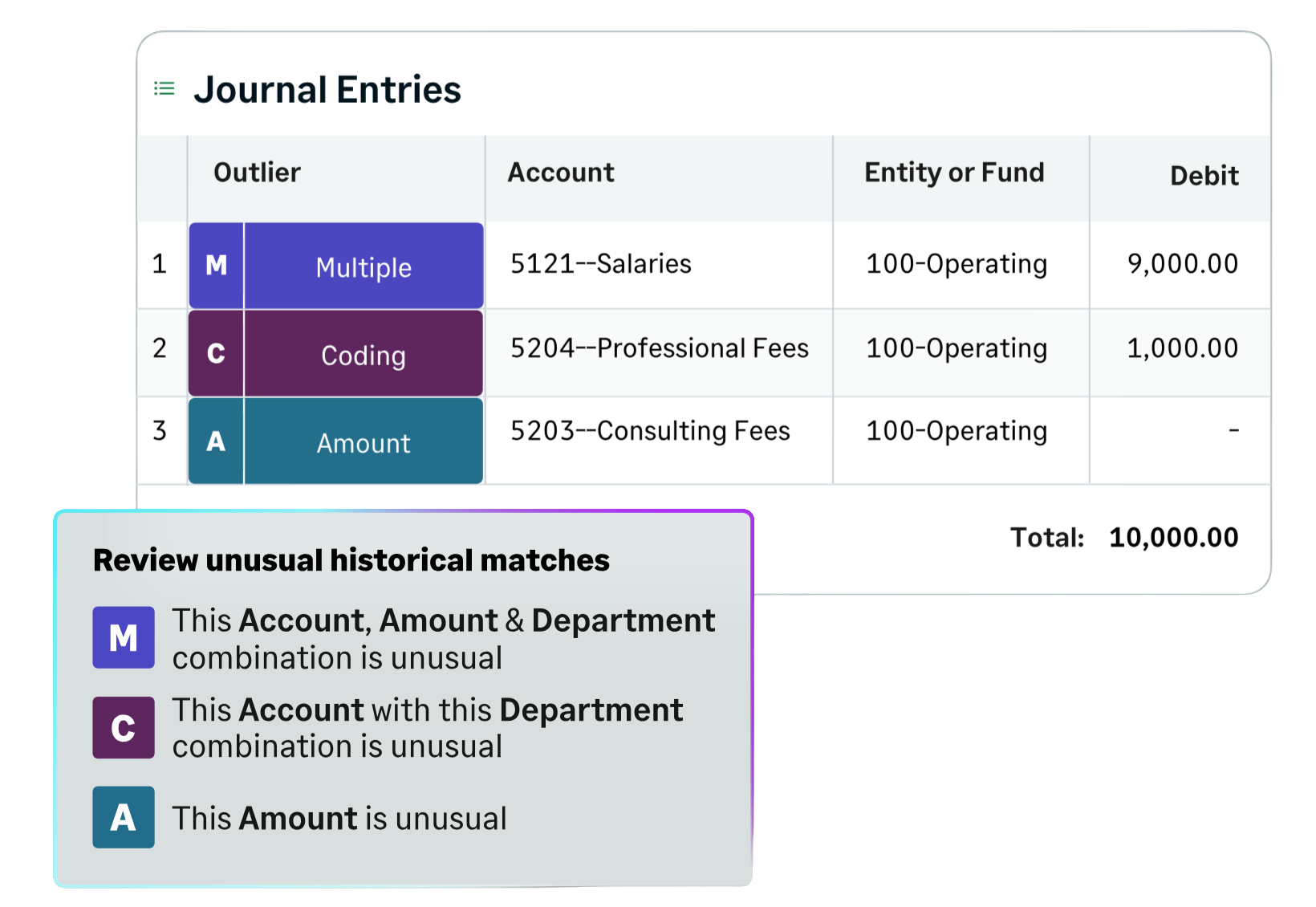
Every entry checked before it posts
Once the agent is turned on, it compares each submitted journal entry with your past activity. Entries that look normal move on as usual, and entries that stand out are flagged so someone can take a closer look.
For each journal entry, the agent will:
- Check the entry in the background after it’s submitted for approval
- Compare its accounts, dimensions, and amounts with your historical patterns
- Flag any lines that don’t fit and explain the reason
- Send flagged entries back to the submitter first, if Outlier Assistant is on
- Learn from each decision your team makes to improve future reviews
Compatibility & requirements
Getting started with the Financial Assurance Agent
The Financial Assurance Agent is built into Sage Intacct General Ledger, available in all regions, and turned on from your company’s subscription settings. Our Sage Intacct consultants can handle the setup and make sure your journals and approvals are ready.
Here’s what we’ll help you get ready:
- Sage Intacct General Ledger with AI and machine learning services turned on
- Journals set up to use the approval process
- At least 1,000 posted journal entry lines and at least one month of data from the past two years
- An administrator to turn on the agent and Outlier Assistant
- Journal entry permissions for the people who submit and approve entries
After the agent is turned on, Sage Intacct takes about 24 to 48 hours to learn from your data and build your model, depending on how much history you have.

Why partner with Rand Group?
Set up around your controls
We start by reviewing how your team submits, approves, and posts journal entries today. Then we set up approvals and the agent so its reviews support your existing controls instead of adding extra steps.
Trusted by 1,200+ organizations
More than 1,200 organizations rely on Rand Group, and many have worked with us for years. We stay involved after go-live to fine-tune your setup and help you adopt new Sage Intacct AI features.
Hands-on help for your finance team
We support clients across the United States and Canada, from first setup to everyday use. Our Sage training shows submitters and approvers how to read flags and respond to them quickly.
A top 1% Sage partner
Rand Group is proudly ranked among the top 1% of Sage partners in North America and recognized as the top Sage reseller by G2, an independent software review authority. We bring that experience to every Sage Intacct project.
Frequently Asked Questions (FAQs)
What is the Sage Intacct Financial Assurance Agent?
The Financial Assurance Agent is an AI agent built into Sage Intacct that reviews journal entries as they move through approvals. It compares each entry with your past patterns and flags unusual ones, so errors can be fixed before they post. To see how it fits with Sage’s other AI tools, read our complete guide to Sage AI and AI agents in Sage Intacct.
What does the agent look for?
The agent looks for two kinds of unusual activity. Coding outliers are unexpected combinations of accounts and dimensions, such as a department paired with a location it’s rarely used with. Amount outliers are amounts that are unusual for that journal.
Does the agent approve or reject entries on its own?
No. The agent only flags entries for review. Approvers still decide whether to approve, correct, or decline each entry, and entries that aren’t flagged should still be reviewed as part of your normal process.
What happens when an entry is flagged?
The approver sees a flag on the entry and the specific lines, with a short explanation of why it was raised. If Outlier Assistant is turned on, the entry goes back to the submitter first, so they can correct it or confirm it’s right before it moves on.
How does the agent learn what's normal for our business?
The agent builds a model from your own journal entry history. It keeps learning as new entries are added and as your team approves, corrects, or resubmits flagged entries, so it adjusts as your business changes.
Which journals does the agent review?
The agent reviews entries in general ledger journals that use the approval process. You can also choose which of those journals use Outlier Assistant, which sends flagged entries back to the submitter before they reach an approver.
How long does it take to get started?
Once your journals and approvals are ready, turning on the agent only takes a few steps. Sage Intacct then needs about 24 to 48 hours to learn from your data and build your model before it starts flagging entries.
Does the agent replace our internal controls or audits?
No. The agent adds an extra layer of review, but controls such as approval limits and segregation of duties are still up to your organization. No tool is foolproof, so your team’s judgment and your audit process still matter.