Dynamics 365
 Power Platform
 Dynamics
 Cloud & Productivity
Microsoft Dynamics 365 Business Central
Business Central is an ERP developed by Microsoft for small to midsize businesses that can be deployed either in the cloud or on-premise. Increase financial visibility, optimize supply chain, boost sales, improve service, deliver projects on time and under budget and take your business anywhere with a consistent, intuitive experience across multiple devices with Dynamics 365 Business Central.

What does Business Central do?

Comprehensive financial management
Business Central streamlines financial operations, automating tasks like bank reconciliation and month-end closing while supporting multiple currencies and intercompany transactions. It leverages AI to provide accurate cash-flow projections and real-time insights, helping you make more profitable decisions and efficiently manage cash flow.


Integrated sales and service management
Business Central empowers sales teams with lead management and opportunity-tracking capabilities, driving revenue growth. It also ensures smooth transitions from sales to service, managing customer interactions, returns, and service agreements to exceed customer expectations.


Optimized supply chain operations
Business Central improves supply chain efficiency with vendor management, purchasing, order fulfillment, and returns. It uses AI-powered forecasting for inventory replenishment, ensuring optimal stock levels and streamlined operations within storage facilities.
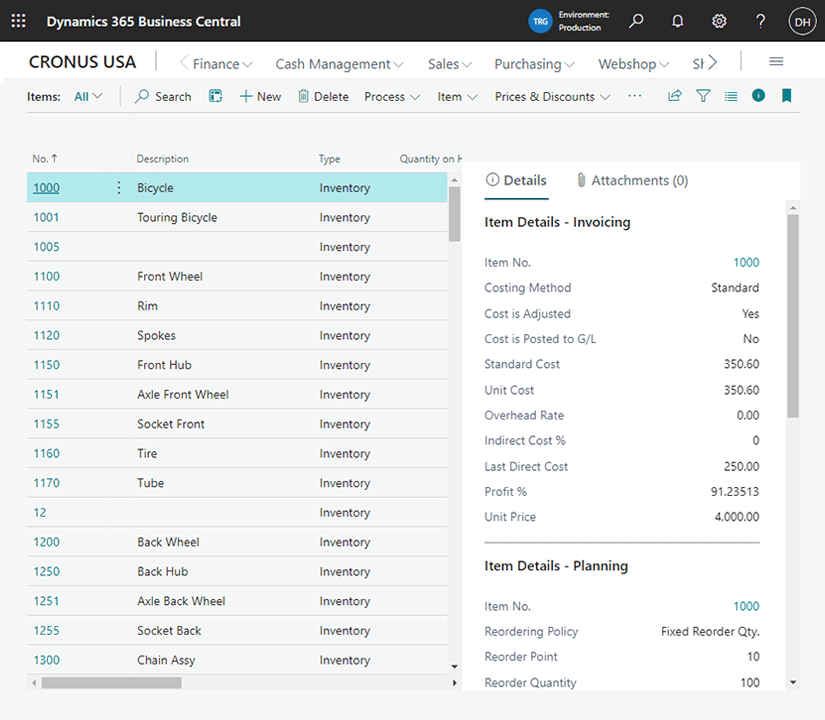

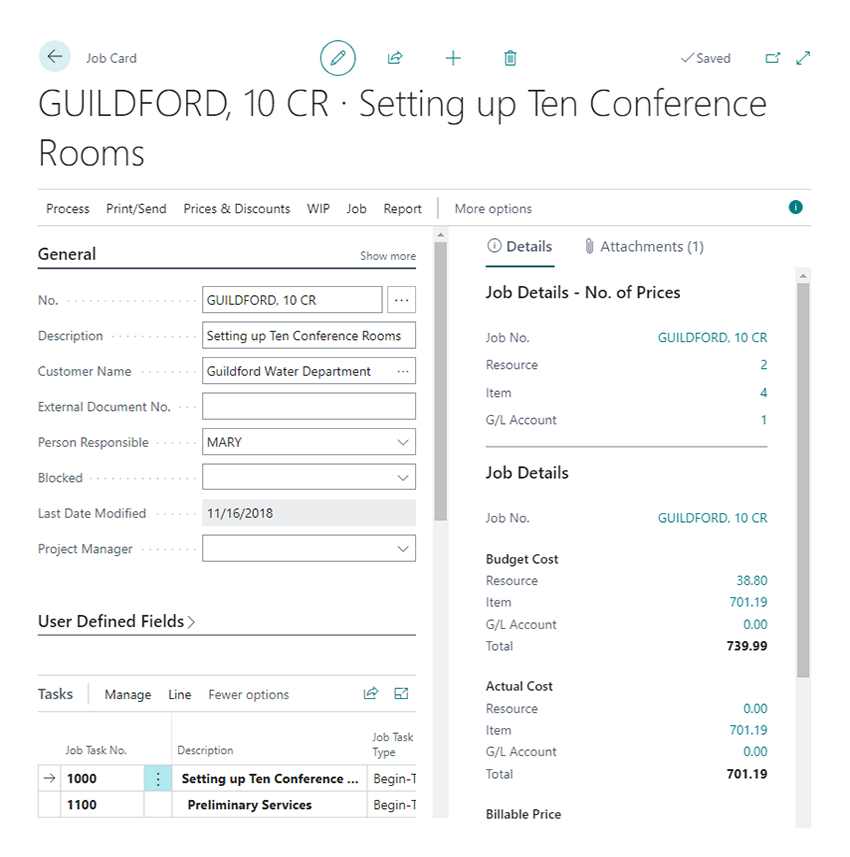
Effective project management
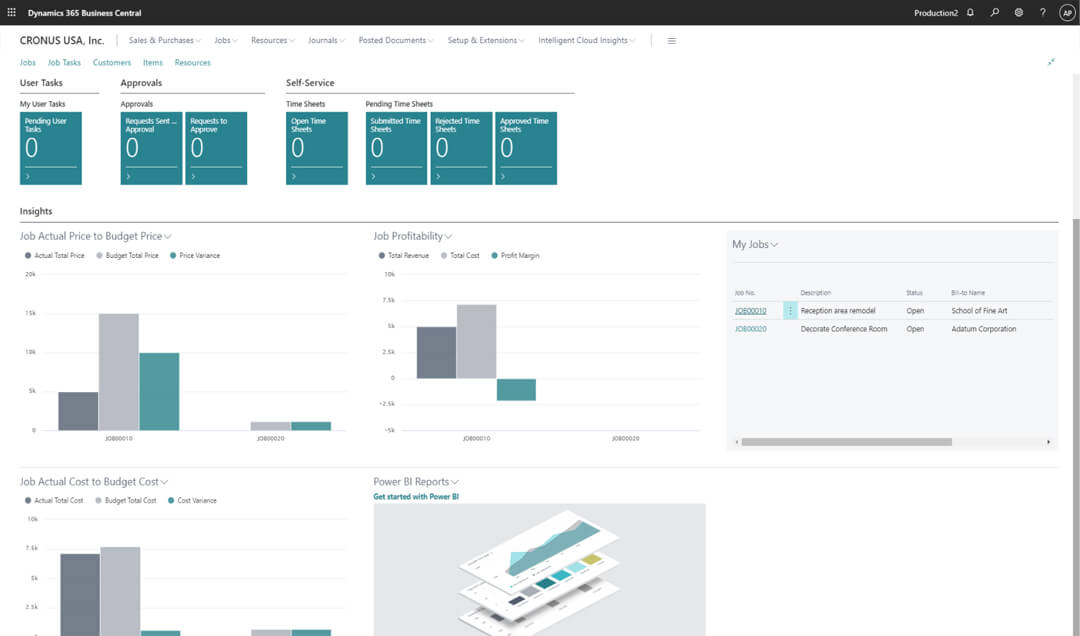
Business Central enables effective project management with tools for timesheets, job costing, and detailed budgeting. It integrates with the general ledger, sales, and purchasing modules, providing real-time insights on project status, profitability, and resource utilization to keep projects on track.

Streamlined manufacturing processes
Business Central empowers proactive manufacturing operations, enhancing throughput, quality, and uptime while reducing costs and meeting customer expectations. With customizable manufacturing capabilities and comprehensive production planning and shop floor control functionalities, the platform ensures flexibility and efficiency in production processes.


Artificial intelligences with Copilot
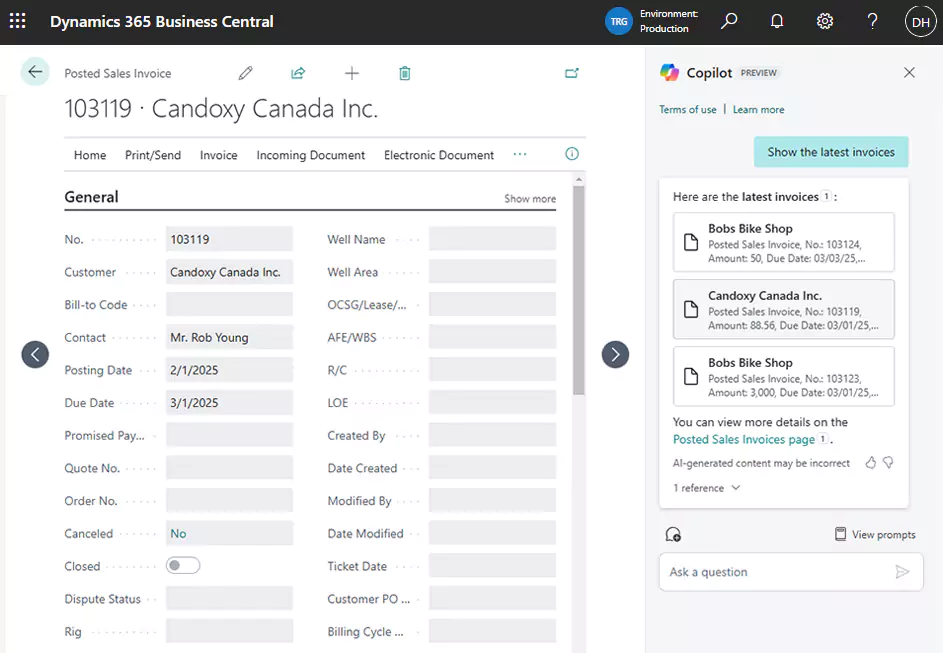
Streamline your operations with AI-powered assistance. Dynamics 365 Copilot in Business Central automates tasks, accelerates workflows, and delivers intelligent insights to enhance productivity. With advanced AI capabilities, it simplifies complex processes, empowering users to innovate and achieve more.
How is Dynamics 365 Business Central licensed and priced?
Pricing is based on the number of users and edition to make it affordable for organizations of all sizes. Business Central is available in two editions: Essentials and Premium.

White Paper
The ultimate guide to Business Central licensing and pricing
Dynamics 365 Business Central is fast to implement, easy to configure, and can support even highly specialized industries. Pricing is based per user to make it affordable and scalable for all sizes of organizations. Download this guide to learn how Business Central is priced, the different editions, types of users, licensing options, and more.
How long does it take to implement Business Central and how much does it cost?
Rand Group offers 3 different implementation options depending on the complexity of your business and your budget. Explore which option is the right fit for your organization.

Rapid Activation
Get up and running on Business Central faster
Rand Group’s Rapid Activation implementation of Business Central delivers an agile solution in weeks, leveraging industry best practices and extensive cloud deployment experience. Our fixed fee package ensures transparency and no surprise costs, providing a faster time to value and better ROI. Ideal for smaller to mid-market clients, this out-of-the-box solution covers core business functions and enables rapid user adoption. Additional functionalities can be added via Power Packs, with customizations and third-party integrations estimated separately.
- Ready-to-go package
- Fixed fee
- Rapid user adoption
- Industry led best practices
- Core business functions
- Low maintenance
Starting at $25,000
Rand Group’s Rapid Activation methodology





Hybrid
Partner with Rand Group for a collaborative Business Central implementation
Rand Group’s hybrid approach to Business Central implementation combines the expertise of our consultants with the hands-on involvement of your internal team. This collaborative method ensures a tailored deployment, with shared responsibilities between Rand Group and your organization. Our consultants will configure the initial legal entity and train your team on system features and future configurations, while your internal team will handle training, testing, and deployment.
- Rand Group configures one legal entity and trains your team for future configurations
- Training on system features and functions for your internal team; your internal team provides training to locations and users.
- Rand Group builds a testing document; your team leads the testing and first-line support
- Rand Group creates the deployment plan; your team leads and executes deployment steps
Rand Group’s Hybrid implementation methodology






Digital Transformation
Business Central implementation tailored to your unique business needs
Rand Group's Digital Transformation implementation of Business Central is ideal for mid-market to large, complex clients seeking a tailored solution with potential third-party integrations and customizations. This traditional consulting engagement spans 3 to 6 months and follows a structured, best-practice methodology with clear deliverables at each phase. Our comprehensive, step-by-step process ensures a successful deployment of Business Central within your organization.
- Audit of existing ERP system and user experience
- Clear list of deliverables to ensure no surprises
- Integration of Business Central with your existing technology stack
- System testing and data migration
- End-user training to ensure system adoption
Rand Group’s implementation methodology


Explore our comprehensive Business Central services
Rand Group is your trusted partner for all things Microsoft Dynamics 365 Business Central. We provide a full range of services, from implementation and integration to training, support, and AI enablement, tailored to help you get the most from your ERP system.

Implementation

Integrations

Custom Development

Data Migration




Unsure if Business Central is right for your organization?
A personalized Business Central demo helps you understand how the system fits your business. Our experts will review your current processes, challenges, and goals, then walk through how Business Central supports your financials, operations, and reporting. You will see how the system works in real scenarios and how it can improve visibility, efficiency, and decision-making across your organization.
Already using Dynamics 365 BC? Our support team can help
Our team of accounting and industry experts, software developers, and data analysts can help you achieve the most out of Business Central. Our support services include:
- User training
- Troubleshooting and issue resolution
- Business process automation
- New feature enablement
- System customizations
- Integrations
- Reporting and analytics
- System documentation and audit assistance

Why partner with Rand Group?
Microsoft Partner of the Year
Rand Group was named the 2025 Microsoft Americas Channel Emerging Partner of the Year, recognizing our delivery excellence across Microsoft business applications, including Dynamics 365 Business Central. This award reflects our proven ability to implement, support, and scale Business Central for growing organizations across North America.
Long-term partnership and support
Rand Group is committed to building long-term relationships with our clients, offering ongoing support and services to help your business grow and adapt with Business Central. Our 90% client retention rate is a testament to our dedication and effectiveness.
Proven implementation methodology
Rand Group follows a proven Business Central implementation methodology with defined phases, scope control, and clear milestones. This approach helps reduce risk, improve adoption, and keep implementations aligned with business requirements.
Trusted industry expertise
Our team includes certified public accountants (CPAs) and industry experts who understand the unique challenges of your business and ensure your implementation aligns with best practices.
Frequently Asked Questions (FAQs)
What is Dynamics 365 Business Central?
Microsoft Dynamics 365 Business Central is a cloud-based ERP system designed for small and mid-sized businesses. It helps companies manage finance, operations, inventory, sales, and projects in one connected platform. Business Central replaces disconnected tools like spreadsheets and legacy accounting systems. It is part of the Microsoft Dynamics 365 ecosystem and integrates with Microsoft 365 and Power Platform.
To learn more, read our blog on What is Business Central?
Is Business Central an ERP or a CRM?
Business Central is primarily an ERP system, not a standalone CRM. It includes core ERP functionality such as financial management, inventory, purchasing, and operations. Business Central also provides basic customer and sales capabilities, but it is commonly integrated with Dynamics 365 Sales for full CRM functionality. This allows businesses to manage both operations and customer relationships together.
To learn more, read our blog on Is Business Central an ERP or CRM? or our blog on Business Central vs Dynamics 365 CRM.
What does Business Central do?
Business Central centralizes core business processes into a single system. It manages accounting, purchasing, inventory, sales orders, invoicing, and reporting. Business Central helps teams automate routine tasks and improve data accuracy across departments. This gives leadership better visibility into financial and operational performance.
To learn more, read our blog on What does Business Central do?
What are the benefits of Business Central?
Business Central improves efficiency by connecting finance and operations in one ERP system. It reduces manual work, improves data accuracy, and supports better decision-making with real-time reporting. The platform is scalable, so it can grow as your business adds users, locations, or complexity. Built-in Microsoft integrations also improve productivity across Teams, Excel, and Outlook.
To learn more, read our blog on What are the benefits of Business Central?
What modules are included in Business Central?
Business Central includes modules for financial management, sales, purchasing, inventory, and project management. Additional functionality supports warehousing, manufacturing, service management, and supply chain processes. Modules can be enabled based on your business needs rather than deployed all at once. This modular approach helps control cost and complexity.
To learn more, read our blog on Business Central modules.
What is the difference between Business Central Essentials and Premium?
Business Central Essentials includes core financials, sales, purchasing, inventory, and project management. Business Central Premium adds advanced capabilities for manufacturing and service management. Companies that require production orders, bills of materials, or service contracts typically need Premium. The right edition depends on operational complexity rather than company size.
To learn more, read our blog on Business Central Essentials vs Premium.
How much does Business Central cost?
Dynamics 365 Business Central is licensed per user, per month. Business Central Essentials costs $80 per user per month, while Business Central Premium costs $110 per user per month. Pricing can vary based on user types, add-ons, integrations, and implementation services. A full licensing review helps determine total cost and the right mix of users.
To learn more, read our Business Central pricing guide or our blog on Business Central licensing.
How is Business Central implemented?
Business Central is implemented through a phased process that includes planning, configuration, data migration, testing, and training. Most organizations deploy Business Central in the cloud, though on-premises options are available in specific scenarios. A structured implementation approach helps reduce risk and improve user adoption. The right deployment model depends on business requirements, compliance needs, and IT strategy.
For more information, read our Business Central implementation guide or our Business Central cloud vs on premises deployment blog.
Can Business Central integrate with other systems?
Business Central integrates with Microsoft tools like Excel, Outlook, Teams, Power BI, and Power Platform. It also supports integrations with third-party applications such as payroll, eCommerce, WMS, and industry-specific systems. Integrations can be built using APIs, connectors, or certified apps from AppSource. This allows Business Central to fit into your existing technology ecosystem.
For more information, read our Business Central integration guide.
What reporting tools are available in Business Central?
Business Central includes built-in financial statements, account schedules, and operational reports. Users can analyze data directly in lists, export to Excel, or connect to Power BI for dashboards and analytics. Reporting supports both day-to-day operational needs and month-end financial reporting. This flexibility helps different users access the insights they need.
For more information, read our Business Central reporting guide.
Does Business Central include AI capabilities?
Yes, Dynamics 365 Business Central includes built-in AI capabilities through Microsoft Copilot and AI agents. Copilot helps users summarize data, explain transactions, and complete tasks using natural language directly inside Business Central. AI agents extend this by supporting more automated, task-oriented scenarios as Microsoft expands AI across Dynamics 365. Together, these tools help improve efficiency while keeping users in control of business processes.
For more information, read our blog on top Copilot features in Business Central or our blog on AI agents in Business Central.
Does Business Central support mobile field service?
Yes. Microsoft Dynamics 365 Business Central supports mobile field service through integrated solutions. Organizations can extend Business Central with ExpandIT Mobile Field Service for a streamlined, ERP-connected field service experience, or integrate with Dynamics 365 Field Service for more advanced enterprise-level service management capabilities. Rand Group helps you evaluate both options to ensure the solution aligns with your operational complexity, growth plans, and service strategy.
What do reviews say about Dynamics 365 Business Central?
Reviews of Microsoft Dynamics 365 Business Central are generally positive across analyst reports and customer review platforms. Organizations often highlight strong financial management capabilities, ease of use, and seamless integration with Microsoft tools like Excel, Teams, and Power BI. Platforms such as Gartner Peer Insights and G2 show high user satisfaction, with many companies reporting improved efficiency, better reporting, and streamlined operations after implementation.
To learn more, read our blog on Microsoft Dynamics 365 Business Central reviews.
Related Insights

Excise Tax in Dynamics 365 Business Central: Setup, calculation, and reporting
Dynamics 365 Business Central can calculate, register, and track excise taxes for eligible items and fixed assets. Learn how the functionality works, what needs to be configured, and what businesses should consider before using it.

Field Service ERP software: How to connect dispatch, parts, job costs, and billing
Field service ERP software connects field operations with inventory, job costing, billing, and financial reporting. Learn how the process works, what needs to connect, and which ERP and field service combinations may fit your business.

Best AI tools for Business Central: Copilot, AI agents, forecasting, and more
AI can help Business Central users automate work, analyze ERP data, forecast demand, and reduce repetitive tasks. Explore six AI tools that can help organizations get more value from Dynamics 365 Business Central.