Dynamics 365
 Power Platform
 Dynamics
 Cloud & Productivity
What is the difference between D365 F&O and Business Central?

Microsoft Dynamics 365 Finance & Operations and Dynamics 365 Business Central are both Microsoft ERP solutions that connect financial and operational processes. The main difference is the level of complexity they are designed to support. Business Central provides a more streamlined ERP for small and mid-sized organizations, while Dynamics 365 Finance & Operations provides greater depth for complex, high-volume, and global operations.
Choosing between the two can depend on company size, business complexity, and growth plans. Financial requirements, transaction volumes, reporting, manufacturing and supply chain processes, implementation resources, and budget can also influence which ERP is the better fit. This guide compares Dynamics 365 F&O vs Business Central across these areas to help you evaluate the options.
At a glance:
Dynamics 365 Business Central is generally best suited to small and mid-sized organizations that need comprehensive ERP functionality with lower cost and complexity, while Dynamics 365 F&O is designed for organizations that require more advanced finance, manufacturing, supply chain, global, and high-volume capabilities.
What is Dynamics 365 Finance & Operations?
Microsoft Dynamics 365 Finance & Operations (D365 F&O) is an enterprise resource planning (ERP) platform designed to manage complex financial and operational processes. Dynamics 365 Finance & Operations is primarily made up of two applications: Dynamics 365 Finance and Dynamics 365 Supply Chain Management. Organizations can use either application individually or combine them to create a connected ERP environment across finance, operations, and supply chain teams.
Dynamics 365 Finance supports core financials, accounts payable and receivable, budgeting, financial reporting, asset management, cash management, financial planning, compliance, and complex multi-entity operations. Dynamics 365 Supply Chain Management extends the ERP environment across procurement, inventory, planning, manufacturing, warehousing, transportation, asset maintenance, and fulfillment.
Dynamics 365 F&O is designed for organizations with complex financial and operational requirements. D365 Finance and Operations provides advanced financial management, supply chain management, manufacturing, and other enterprise capabilities, along with extensive configuration options that allow businesses to adapt the system to their processes. The platform is also highly scalable, supporting growing transaction volumes, business units, locations, and operational requirements. This additional depth generally comes with higher software costs and a more involved implementation than Dynamics 365 Business Central.
To learn more, read our What is Dynamics 365 F&O? blog.


Download the full F&O and BC comparison guide
Dive deeper into the comparison between D365 F&O and Business Central. Download our comprehensive guide today and gain valuable insights into each system’s capabilities, pricing models, and more.
What is Dynamics 365 Business Central?
Microsoft Dynamics 365 Business Central is a comprehensive enterprise resource planning (ERP) solution designed for growing small and mid-sized organizations. D365 Business Central connects financial management, purchasing, sales, inventory, projects, warehouse management, reporting, and other core business processes within one system. This connected approach helps organizations reduce manual work, improve visibility, and manage day-to-day operations from a shared source of data.
Dynamics 365 Business Central is designed to provide strong ERP functionality without the level of complexity required by many enterprise systems. Its user-friendly interface, flexible configuration options, and streamlined implementation approach make it well suited to small and mid-sized organizations that need more than basic accounting software. D365 Business Central can also scale as an organization adds users, entities, locations, and more sophisticated business processes.
Dynamics 365 Business Central integrates closely with Microsoft 365, Power BI, Power Platform, and other Microsoft technologies, helping organizations connect data, reporting, automation, and everyday productivity tools. While D365 Business Central can support substantial operational complexity, Dynamics 365 Finance & Operations provides greater depth for highly complex enterprise finance, global operations, manufacturing, planning, warehouse, and supply chain requirements.
To learn more, read our What is Dynamics 365 Business Central? blog.

Dynamics 365 F&O vs Business Central: At a glance
The main difference between Dynamics 365 F&O and Business Central is the level of complexity each ERP is designed to support. Dynamics 365 Finance & Operations is built for organizations with complex, high-volume financial and operational requirements. It provides more advanced functionality, configuration options, and scalability, but typically requires a larger investment and longer implementation.
Dynamics 365 Business Central is designed for small to mid-sized organizations that need comprehensive ERP functionality with less complexity. It supports core financial and operational processes, is generally easier to use, costs less, and can be implemented more quickly than D365 F&O.
Dynamics 365 F&O vs Business Central
This video compares D365 Finance & Operations and Business Central, outlining key differences in functionality, complexity, cost, and ideal use cases to help organizations choose the right ERP.
Dynamics 365 F&O vs Business Central: Functional comparison
While both Dynamics 365 Finance & Operations and Business Central cover the same core business areas, the depth and complexity of each function differ significantly. The following sections compare how each platform supports key operational workflows, highlighting where D365 Finance & Operations provides advanced, enterprise-grade capabilities and where Business Central offers streamlined functionality designed for faster adoption.
Record to report
Record to report covers core financial operations, including general ledger, reporting, consolidations, and close processes. Both Dynamics 365 Finance & Operations and Business Central support multi-entity and multi-currency accounting, but they differ in depth. D365 F&O is built for complex reporting structures, advanced posting frameworks, and advanced consolidations, while Business Central supports more streamlined financial structures and built-in consolidation capabilities.
Procure to pay
Procure to pay includes purchasing, requisitions, vendor management, and expense handling. Dynamics 365 Finance & Operations provides advanced capabilities such as full requisition management, vendor collaboration, expense management, and sophisticated demand planning. Business Central supports essential purchasing and planning functions, offering a streamlined approach suited to organizations with less complex procurement requirements.
Order to cash
Order to cash spans pricing, sales orders, invoicing, revenue recognition, and collections. D365 Finance & Operations supports complex pricing models, trade agreements, and advanced revenue recognition and collections workflows. Business Central focuses on straightforward sales and billing scenarios, with simpler pricing structures, basic revenue deferrals, and standard credit management.
Project management and accounting
Both Dynamics 365 F&O and Business Central support project-based organizations, but Dynamics 365 Finance provides greater depth for complex project accounting. D365 F&O supports advanced project structures, costing, billing, expenses, and financial controls, while Business Central provides project management and accounting capabilities for organizations with more straightforward project requirements.
Manufacturing, inventory, warehouse, and transportation management
Dynamics 365 F&O and Business Central both support manufacturing, inventory, and warehouse operations, but D365 F&O provides greater depth for complex production and logistics environments. Dynamics 365 Finance & Operations supports discrete and process manufacturing, advanced inventory and warehouse configurations, and native transportation management, while Business Central supports discrete and assembly manufacturing along with more streamlined inventory, planning, and warehouse processes.
Dynamics 365 F&O vs Business Central: AI, Copilot, and agents
Dynamics 365 Finance & Operations and Business Central are both part of the Microsoft ecosystem, giving organizations access to Microsoft’s growing investment in artificial intelligence across Dynamics 365, Microsoft Copilot, Power Platform, and Copilot Studio. Both ERP platforms offer embedded Copilot experiences that help users find information, analyze data, summarize activity, and complete tasks using natural language. Microsoft is also expanding both platforms with AI agents that can automate defined business processes with less manual intervention.
AI in Dynamics 365 Finance & Operations
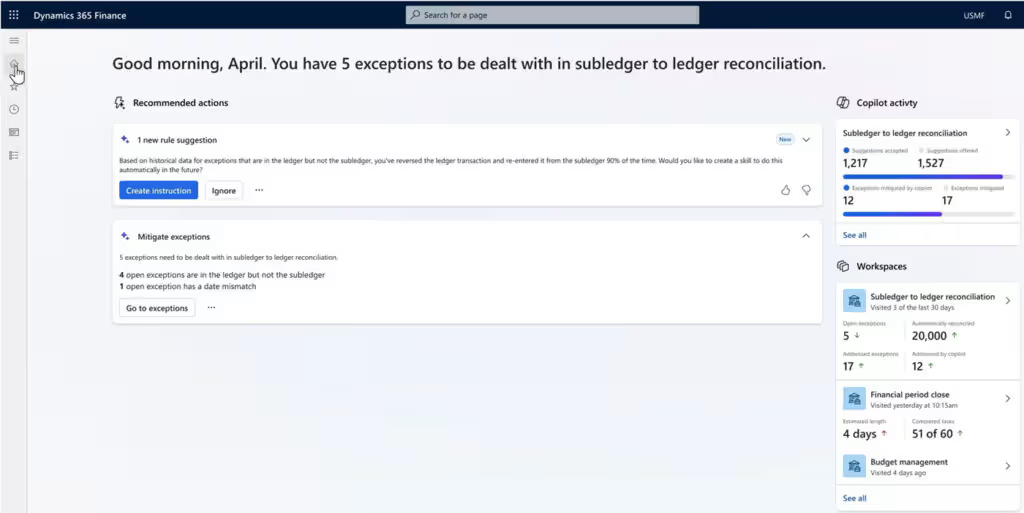
Copilot in Dynamics 365 Finance & Operations applies AI across financial and operational workflows to help users work more efficiently and make informed decisions. Copilot can summarize business data, surface relevant insights and exceptions, assist with communications, analyze trends, and provide natural-language guidance within the ERP. These capabilities help reduce time spent searching for information and completing routine tasks.
Microsoft is also introducing AI agents that can automate and support more complex finance and supply chain processes. Current and emerging D365 F&O agents include:
- Account Reconciliation Agent: Identifies reconciliation exceptions and recommends actions to help finance teams investigate and resolve discrepancies.
- Procurement Agent: Supports supplier communications, monitors purchase order changes, follows up on delayed or unconfirmed orders, and evaluates how supplier changes may affect inventory, production, and customer deliveries.
Organizations can also extend Dynamics 365 Finance & Operations with custom agents using technologies such as Microsoft Copilot Studio and the Dynamics 365 ERP MCP server.
AI in Dynamics 365 Business Central
Dynamics 365 Business Central brings Copilot into everyday finance, sales, purchasing, and operational workflows. Users can interact with Business Central data using natural language, find records, get guidance on how to complete tasks, and create analyses without manually configuring every filter or field. Other Copilot capabilities support tasks such as bank reconciliation, record summarization, sales order creation, and data entry, helping users complete routine work with fewer manual steps.
Business Central also includes purpose-built AI agents for common ERP processes. Current Business Central agents include:
- Sales Order Agent: The Sales Order Agent monitors customer emails, identifies customers and requested items, checks availability, prepares quotes and sales orders, and supports customer communication with human oversight.
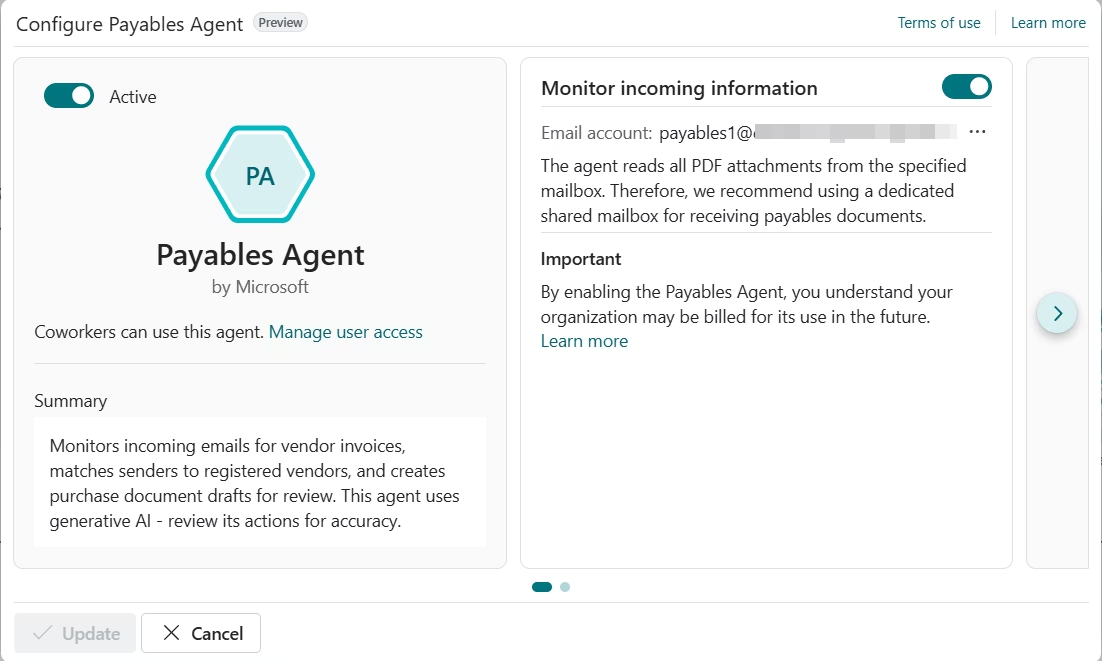
- Payables Agent: Processes incoming vendor invoices, extracts invoice information, identifies vendors, and prepares purchase invoice drafts for review.
Microsoft continues to expand the Business Central agent framework, while organizations can also extend the platform with custom AI and agent experiences through the broader Microsoft cloud.
Dynamics 365 F&O vs Business Central: Pricing and licensing
Business Central has a lower starting software price and a more consolidated licensing model than Dynamics 365 Finance & Operations. D365 F&O separates financial and supply chain capabilities into distinct applications, while Business Central packages most core ERP functionality into one license.
Business Central pricing and licensing
Dynamics 365 Business Central is available in Essentials and Premium editions. Essentials costs $80 per user per month and includes core functionality for finance, sales, purchasing, inventory, projects, supply planning, and warehousing. Premium costs $110 per user per month and adds manufacturing and service management.
To learn more, read our Business Central pricing and licensing guide.
Dynamics 365 Finance & Operations pricing and licensing
Dynamics 365 Finance & Operations licensing centers on two applications: Dynamics 365 Finance and Dynamics 365 Supply Chain Management. Each application is available in a standard and Premium edition. Standard D365 Finance and D365 Supply Chain Management licenses cost $210 per user per month and require at least 20 licenses, while the Premium editions cost $300 per user per month and have a 10-license minimum. Premium editions add capabilities, capacity, and entitlements for organizations with more advanced requirements.
To learn more, read our Dynamics 365 F&O pricing guide.
Implementation differences between D365 F&O and Business Central
Implementation is another major difference between Dynamics 365 F&O and Business Central. Both require planning, configuration, data migration, testing, training, and go-live support. However, D365 F&O implementations typically involve broader business processes, more complex integrations, and more extensive configuration. Rand Group’s implementation guides estimate a typical Business Central implementation at about 2–9 months and $25,000–$250,000, compared with 8–24 months and $250,000–$1 million+ for a Dynamics 365 F&O implementation.
Rand Group also offers Rapid Activation approaches for organizations with requirements that fit a more standardized implementation. Business Central Rapid Activation and D365 F&O Rapid Activation focus on defined scope, standard functionality, limited customization, and a structured deployment process to reduce implementation time and cost.
How to choose between D365 F&O and Business Central
There is no single revenue, employee, or user threshold where an organization automatically graduates from Business Central to D365 F&O. The right platform depends on what the ERP must do today and what it will need to support over the next several years.
The goal is not to choose the ERP with the most features. It is to choose the platform that can support required processes and controls without introducing unnecessary cost and complexity.
Choose Dynamics 365 Business Central if…
Dynamics 365 Business Central may be the better fit if your organization:
- Needs a comprehensive ERP for finance, purchasing, sales, inventory, projects, warehousing, and other core operations.
- Wants strong ERP functionality without the complexity of an enterprise-scale platform.
- Has relatively straightforward multi-company, reporting, manufacturing, and supply chain requirements.
- Uses discrete or assembly manufacturing rather than complex process manufacturing.
- Wants a lower software and implementation cost than D365 F&O.
- Prefers a faster, more standardized implementation with fewer customizations and integrations.
Choose Dynamics 365 F&O if…
Dynamics 365 Finance & Operations may be the better fit if your organization:
- Has complex financial, operational, or global business requirements.
- Manages high transaction volumes, multiple legal entities, or sophisticated reporting and consolidation needs.
- Requires advanced manufacturing, planning, warehouse, transportation, or supply chain management capabilities.
- Needs native support for process manufacturing, including batch-based production.
- Has complex procurement, project accounting, pricing, credit, or collections processes.
- Has the budget, resources, and timeline required for a more complex ERP implementation.
Partnering with Rand Group to choose the right Dynamics 365 ERP
Choosing between Dynamics 365 Business Central and Dynamics 365 Finance & Operations requires more than comparing features. Rand Group helps organizations evaluate their requirements, select the right ERP, and build an implementation plan that supports both current operations and long-term goals.
Rand Group can help you:
- Evaluate Business Central and D365 F&O: Compare each ERP against your financial, operational, reporting, manufacturing, supply chain, and industry requirements.
- Assess business processes: Identify process gaps, inefficiencies, and requirements that should influence ERP selection and design.
- Plan your ERP architecture: Define how ERP, CRM, reporting, integrations, automation, data, and AI should work together.
- Develop a licensing and implementation strategy: Determine the right licenses, implementation approach, project scope, timeline, budget, and internal resource requirements.
- Implement and extend your ERP: Configure Dynamics 365, migrate data, build integrations, develop customizations, and create reporting solutions where needed.
- Support adoption and long-term optimization: Provide training, support, AI readiness, and ongoing improvements as your requirements change.
Rand Group brings more than two decades of business application experience, 3,000+ successful engagements, 1,200+ clients, and a 90% client retention rate. Rand Group was also recognized as the 2025 Microsoft Americas Channel Emerging Partner of the Year, an award selected from more than 2,100 nominations.
What our clients say about us
“Rand Group didn’t just implement a system—they helped us rethink our business processes.”
— Jeff Nelson, Director, Sapphire Gas Solutions
“We have always felt like a top priority when working with Rand Group’s team.”
— Christa Curette, VP of Engineering & Technology, Conquest Completion Services, LLC
“Rand Group has been a really great partner for us. I absolutely recommend them.”
— Julia Petty, Controller, The Museum of Fine Arts, Houston
“Rand Group has been top-notch—professional, responsive, and very proactive. You can tell their internal processes are really sound.”
— Derek Atwood, Subs for Pools

Get help choosing the right Dynamics 365 solution
Choosing between Dynamics 365 Finance & Operations and Business Central depends on your organization’s size, complexity, and growth plans. Rand Group helps organizations evaluate requirements and determine which platform best fits their needs.
Key takeaways
- Dynamics 365 Business Central is designed for small and mid-sized organizations, while Dynamics 365 F&O supports more complex, high-volume, and global operations.
- Both platforms support finance, sales, purchasing, inventory, projects, manufacturing, AI, and other core ERP processes, but D365 F&O provides greater depth for advanced requirements.
- Dynamics 365 F&O is better suited to complex manufacturing and supply chain operations, including native process manufacturing and transportation management.
- Both D365 F&O and Business Central include Microsoft Copilot capabilities and AI agents that help automate financial and operational processes.
- Business Central starts at $80 per user per month, while standard Dynamics 365 Finance and Dynamics 365 Supply Chain Management licenses start at $210 per user per month.
- Business Central implementations typically require less time and investment than D365 F&O implementations, which are generally broader and more complex.
Frequently asked questions
What is the main difference between Dynamics 365 F&O and Business Central?
The main difference is the level of complexity each ERP is designed to support. Business Central provides comprehensive ERP functionality with a more streamlined approach, while Dynamics 365 F&O offers greater depth for complex, high-volume, and global financial and operational requirements.
Is Dynamics 365 Business Central or D365 F&O better for small and mid-sized businesses?
Dynamics 365 Business Central is generally better suited to small and mid-sized organizations because it offers broad ERP functionality with lower costs and less implementation complexity. D365 F&O may still be appropriate when a smaller organization has unusually complex financial, manufacturing, supply chain, or global requirements.
When should a company choose Dynamics 365 F&O instead of Business Central?
Organizations should consider Dynamics 365 F&O when they need advanced financial management, complex multi-entity operations, high transaction volumes, process manufacturing, sophisticated planning, advanced warehouse management, or native transportation management.
Can Dynamics 365 Business Central support manufacturing?
Yes. Business Central Premium supports discrete and assembly manufacturing, including production planning, bills of material, routings, capacity management, and production orders. D365 F&O is better suited to more complex manufacturing requirements, including native process manufacturing.
Which is better for multi-company and global operations: D365 F&O or Business Central?
Both platforms support multiple companies and currencies, but Dynamics 365 F&O provides greater depth for complex global organizations. Business Central can support multi-company operations when legal structures, reporting, consolidations, and global requirements are more straightforward.
Do Dynamics 365 F&O and Business Central both include Copilot and AI agents?
Yes. Both platforms offer Microsoft Copilot capabilities and AI agents that can summarize information, analyze data, assist users, and automate business processes. The specific Copilot features and agents differ based on the financial and operational processes supported by each ERP.
How much do Dynamics 365 F&O and Business Central cost?
Business Central Essentials starts at $80 per user per month and Premium costs $110 per user per month. Standard Dynamics 365 Finance and Dynamics 365 Supply Chain Management licenses start at $210 per user per month, while Premium editions cost $300 per user per month.
How long does it take to implement Business Central compared with D365 F&O?
A typical Business Central implementation takes about 2–9 months, while a D365 F&O implementation typically takes about 8–24 months. Actual timelines depend on scope, integrations, customizations, data migration, and business complexity.
Next steps
Dynamics 365 Business Central and Dynamics 365 Finance & Operations can both provide a strong foundation for connected financial and operational management. The right choice depends on how closely each platform aligns with your processes, complexity, budget, implementation requirements, and long-term plans.
Rand Group can help you compare the two ERP platforms, assess your business requirements, and determine the right approach for implementation, integrations, reporting, AI, and ongoing support. Contact us today to compare Dynamics 365 F&O and Business Central and build the right ERP roadmap for your organization.