Dynamics 365
 Power Platform
 Dynamics
 Cloud & Productivity
Microsoft Dynamics 365 Copilot and AI agents
Microsoft Dynamics 365 brings artificial intelligence directly into ERP, CRM, sales, service, finance, and operations. Copilot helps users search, summarize, analyze, create content, and complete work with natural language, while AI agents can monitor processes and complete defined tasks with human oversight.

Unlocking AI in the Dynamics 365 suite
AI in Dynamics 365 now extends beyond a single Copilot assistant. Microsoft combines embedded Copilot experiences, AI agents, intelligent automation, and predictive capabilities across the Dynamics 365 suite to help users complete work faster and reduce manual effort.
These capabilities work directly with business data and processes. Sales teams can research leads and prepare for meetings, service teams can summarize and manage cases, finance teams can reconcile accounts, and operations teams can use agents to monitor transactions and procurement activity. Many Dynamics 365 applications also connect with Microsoft 365 Copilot and Copilot Studio to extend AI into the broader flow of work.
Rand Group helps organizations implement, configure, and extend AI across Dynamics 365. Our team can help identify high-value use cases, prepare your data and processes, configure Copilot and AI agents, develop custom agents, train users, and provide ongoing support as Microsoft adds new capabilities.

Bring AI into everyday Dynamics 365 workflows
Copilot and AI agents work within Dynamics 365 applications and connected Microsoft tools. Users can summarize records, ask questions, analyze data, draft content, or act on recommendations without moving business data into disconnected AI tools.

Make Dynamics 365 easier to use with natural language
Natural language makes it easier for users to find information and complete tasks. Instead of learning every menu, report, or filter, users can ask questions, search for records, request summaries, and receive contextual guidance within supported Dynamics 365 experiences.

Automate routine work with AI agents
AI agents go beyond answering questions. Depending on the application and agent, they can monitor activity, research information, prepare transactions, identify exceptions, communicate with customers or vendors, and move work forward within defined business rules.

Unlock the power of AI with Dynamics 365
AI capabilities across Dynamics 365 continue to expand. Rand Group can help you evaluate where Copilot and AI agents fit into your business, configure the right capabilities, and build an AI roadmap around practical business outcomes.
AI and Copilot capabilities across the Dynamics 365 suite
Microsoft is embedding Copilot, AI agents, and intelligent automation across Dynamics 365 applications. The capabilities available depend on the product, licensing, region, and release status, and some newer AI features remain in preview.
Business Central

Bank account reconciliation
Copilot improves the speed and accuracy of bank account reconciliation by proposing matches between bank statement transactions and ledger entries. It can also suggest general ledger accounts for unmatched transactions, such as bank fees or interest income. Users review and adjust Copilot’s recommendations before posting, reducing repetitive matching work while keeping finance teams in control of the final reconciliation.


Chat with Copilot and Global Search
The Copilot Assistant and Global Search capabilities help users find records, pages, reports, and answers using natural language. The Copilot Analysis Assistant extends this experience by turning natural-language requests into analysis views with filters, grouping, sorting, and totals. Together, these tools make Business Central easier to navigate and help users analyze financial and operational data without complex searches or reporting skills.


AI-assisted data entry and marketing text
Copilot reduces manual data entry by suggesting field values as users create or update records in Business Central. It can also create AI-powered marketing text based on existing item attributes and user-selected tone and format. Teams can review and refine generated product descriptions before using them, including publishing marketing content to Shopify, helping maintain consistent information while reducing repetitive data entry and content creation.


AI agents for sales, payables, and expenses
Copilot in Business Central now extends beyond user assistance with AI agents that can complete defined business processes. AI agents in Business Central include the Sales Order Agent, Payables Agent, and Expense Agent, which can process customer requests, vendor invoices, and employee expenses. These agents reduce repetitive work while keeping activity transparent and allowing users to review approvals, exceptions, and important decisions.


Finance & Operations

Immersive home
Immersive Home gives Dynamics 365 Finance and Dynamics 365 Supply Chain Management users an AI-first workspace for daily work. It brings together priority tasks, AI agent activity, suggested agents, workspace shortcuts, and relevant information in one place. Users can review work created by agents, move directly into tasks that need attention, and complete common actions without navigating between multiple modules.


Collections coordinator summary
Copilot in Dynamics 365 Finance helps collections teams quickly understand customer accounts by summarizing overdue invoices, payment history, aged balances, and remaining credit. Within the Collections coordinator workspace, users can review this information and generate AI-drafted reminder emails based on Finance data. This reduces time spent reviewing account activity and helps collections staff focus on customers that require follow-up.


Demand plan analysis
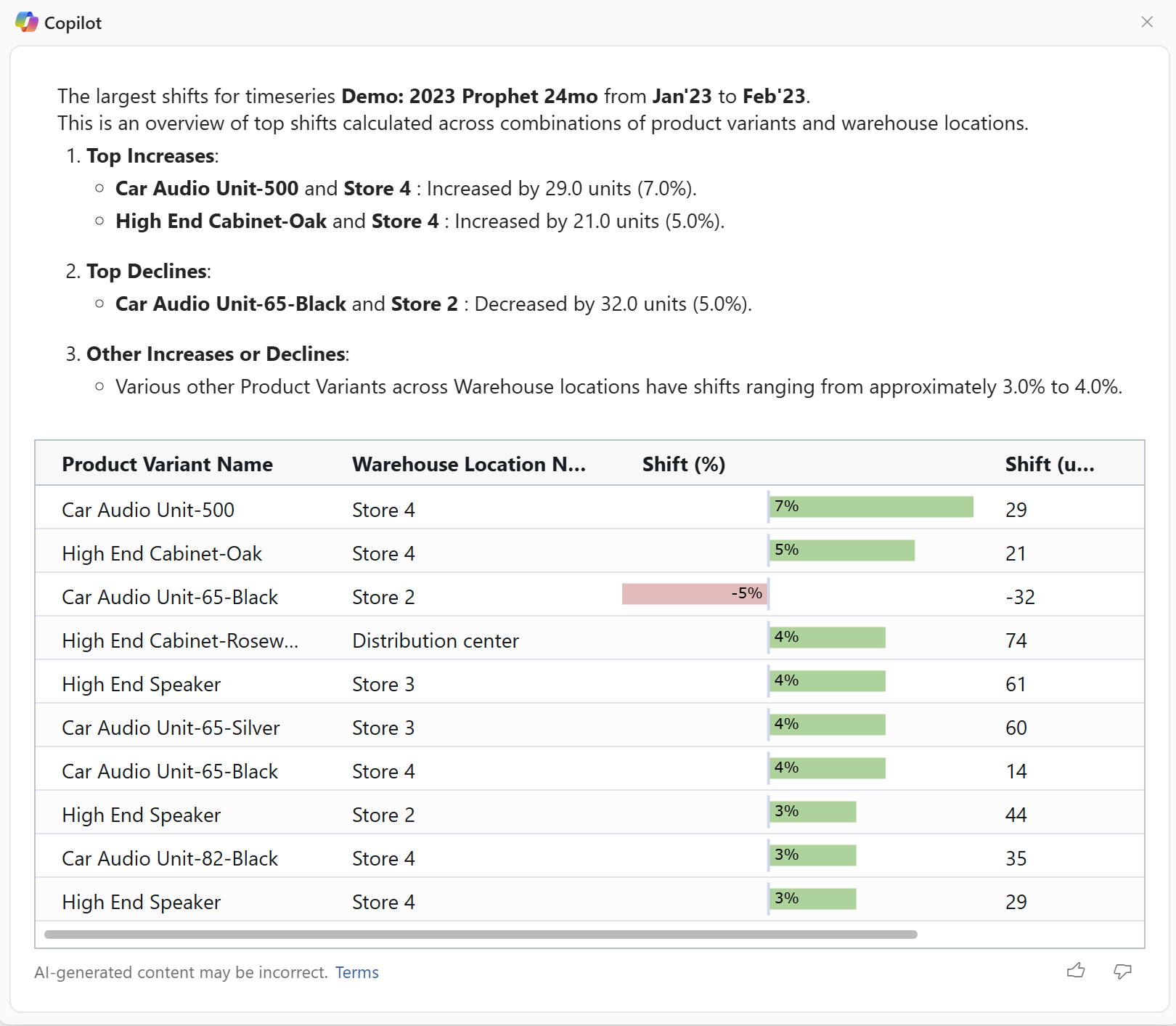
Copilot in Dynamics 365 Supply Chain Management helps demand planners analyze forecasts using natural language. Users can examine shifts, trends, deviations, and anomalies across demand plans and receive plain-language summaries with supporting visualizations. This makes it easier to understand why forecasts changed, identify important patterns, and adjust plans without manually analyzing every dimension of the underlying demand data.

AI agents for finance and procurement
AI agents automate defined finance and procurement processes while keeping users involved in exceptions and approvals. The Account Reconciliation Agent identifies reconciliation differences and recommends actions to help maintain a more continuous financial close. The Supplier Communications capabilities within the Procurement Agent can monitor purchase orders, follow up with vendors, draft communications, and surface changes that require attention, reducing manual work across finance and procurement.

Sales & Customer Insights

Meeting preparation and sales summaries
Copilot in D365 Sales helps sellers prepare for meetings and understand customer records without manually gathering information. Copilot can summarize leads, opportunities, and accounts and highlight recent changes, customer activity, and important opportunity details. Before a meeting, it brings relevant information from the associated opportunity into a structured overview, helping sellers understand the customer, current deal status, and recent activity before the conversation begins.

Smart email assistance
Copilot helps sellers create professional customer emails using CRM context and their own instructions. Sellers can generate new messages, respond to customers, and refine AI-generated drafts before sending them. Copilot can also summarize email conversations and add relevant information to customer records, reducing manual documentation. This helps sales teams respond faster, maintain consistent communication, and spend less time switching between email and Dynamics 365 Sales.

Natural-language sales search and research
AI makes it easier for sellers to find and analyze sales information using natural language. Sellers can ask questions about records and recent changes, while the Sales Research Agent can explore more complex business questions through a conversation with sales data. Copilot can also surface information and recommendations from documents stored in SharePoint. These capabilities help sellers find relevant CRM and business information without relying on complex searches, filters, or manual research across multiple systems.


AI agents for sales and customer journeys
AI agents in Dynamics 365 Sales can research and qualify leads, monitor opportunities, identify risks, and recommend next actions. In Dynamics 365 Customer Insights – Journeys, AI agents can also build customer journeys from natural-language goals and optimize outreach based on engagement patterns. Together, these agents help sales and marketing teams automate repetitive work, prioritize customer engagement, and create more personalized experiences across the customer journey.

Customer Service & Contact Center
Case and conversation summarization
Copilot in D365 Customer Service generates summaries of cases, chats, and transcribed voice conversations so representatives can understand customer issues faster. Case summaries highlight important details and recent activity, while conversation summaries capture the customer’s needs and steps already taken. This reduces time spent reviewing records and transcripts and helps representatives maintain context when cases or conversations move between team members.


AI-assisted answers and customer responses
Copilot helps representatives answer questions and respond to customers without leaving their workspace. Users can ask natural-language questions grounded in approved knowledge and business data, receive proactive prompts based on the active case or conversation, and generate draft customer emails using case context. Representatives can review and refine the suggested answers and messages before using them, helping service teams respond faster while maintaining accurate and consistent communication.

AI agents for case, knowledge, and quality management
Dynamics 365 Customer Service includes AI agents that automate work across the service lifecycle. The Case Management Agent can create, update, resolve, and close cases, while the Customer Knowledge Management Agent helps identify knowledge gaps and maintain articles. The Quality Evaluation Agent can also assess customer interactions against defined criteria, helping teams reduce administrative work, improve knowledge, and review service quality at scale.

Customer intent, self-service, and intelligent routing
Dynamics 365 Contact Center uses AI agents to understand customer needs and connect them with the right service experience. The Customer Intent Agent identifies common intents and recommends actions, while voice agents can support autonomous conversations and ask follow-up questions. Intent-driven routing then directs interactions to the appropriate representative based on customer needs, helping reduce unnecessary transfers and speed up resolution.

Field Service

Create and update work orders
Copilot in Dynamics 365 Field Service helps reduce manual work across the work order lifecycle. Service teams can use Copilot capabilities in Outlook to assist with work order creation and scheduling, while technicians can use natural language by text or speech in the Dynamics 365 Field Service mobile app to update booking status, tasks, products, services, and time. This helps teams keep work orders accurate without relying on repetitive manual entry.

Work order summaries and AI-powered insights
Copilot generates work order summaries that highlight important details such as status, priority, asset information, activities, parts, services, and recommended next actions. Users can also ask natural-language questions about work orders, assets, bookings, and other service data and receive contextual answers. These capabilities help technicians and dispatchers understand service history, current conditions, and next steps without reviewing multiple records or navigating complex screens.

AI-powered scheduling agents
AI agents in Dynamics 365 Field Service extend AI from assistance into more autonomous service operations. The Scheduling Operations Agent helps dispatchers optimize technician schedules based on availability, skills, location, priorities, delays, cancellations, and other changing conditions. Organizations can define scheduling goals and priorities, allowing the agent to recommend or make schedule adjustments while dispatchers focus on exceptions and customer needs.

AI-generated inspection templates
Copilot can turn existing PDFs or images into draft Dynamics 365 Field Service inspection templates. Instead of manually rebuilding a paper checklist or inspection form, service managers can upload the existing document and let Copilot create a starting template that can be reviewed, edited, and published. This helps organizations digitize inspection processes faster while keeping inspections connected to work orders, technicians, customer assets, and service history.

Project Operations
AI-generated project task plans
Copilot in D365 Project Operations helps project managers accelerate project planning by generating an initial work breakdown structure from a project name and description. Copilot suggests project tasks, durations, and effort estimates that managers can review and refine. This gives teams a consistent starting point for building project plans while reducing the time required to manually structure new projects.

Risk identification and mitigation
Copilot helps project managers identify potential risks using project information such as scope, schedule, budget, and actual activity. When risks are identified, Copilot can recommend mitigation steps that managers can review and apply to the project. This helps teams recognize potential problems earlier, document appropriate responses, and spend less time manually evaluating project information for issues that could affect delivery.


Automated project status reports
Copilot can generate project status reports using current project KPIs, work activity, and financial information. Project managers can create internal or external reports that summarize project progress and provide a starting point for stakeholder updates. The AI-generated content can be reviewed and refined before it is shared, reducing the manual effort required to gather project data and prepare recurring status reports.


AI-assisted time, expenses, and approvals
Dynamics 365 Project Operations includes AI agents that reduce administrative work across time, expense, and approval processes. Copilot and the Time Entry Agent can create draft time entries and customer-facing comments, while the Expense Agent can extract receipt data and prepare expense reports. The Approvals Agent can review time, expense, and material entries against company policies and flag transactions that are ready for approval or need additional review.

Proven impact of AI on business performance
%
decrease in costs
%
increase in quality
%
faster decision making
Copilot tailored for your Dynamics 365 environment
Copilot and AI agents are most valuable when they solve real business problems. Rand Group helps organizations configure Dynamics 365 AI around their systems, roles, data, and workflows so users receive relevant assistance within the processes they already follow.
- Tailored Copilot experiences and AI agents: Align AI capabilities with specific business processes, roles, and priorities.
- AI grounded in your business data: Connect AI with approved Dynamics 365 data, knowledge, KPIs, and business context instead of relying on generic responses.
- Embedded assistance: Bring AI into the ERP, CRM, Microsoft 365, and operational tools employees already use.
- Process automation: Reduce repetitive work across finance, sales, service, projects, and operations.
- Natural-language insights: Help users find records, analyze information, and understand business data without complex navigation.
- Secure implementation and governance: Apply permissions, approved data sources, human oversight, and Microsoft security controls to AI workflows.


Intelligent AI agents built to extend Dynamics 365
Microsoft provides prebuilt AI agents across Dynamics 365, while organizations can also build custom agents for their own workflows. Rand Group develops and extends AI agents using Microsoft Copilot Studio, Power Platform, Dynamics 365, Microsoft 365, and other Microsoft AI services to automate work, connect business data, and support processes across applications.
- Custom AI agents: Build agents in Microsoft Copilot Studio around specific roles, workflows, and business requirements.
- Process automation: Automate document processing, follow-ups, approvals, monitoring, and other repetitive activities.
- Business data grounding: Connect agents with approved Dynamics 365, Dataverse, Microsoft 365, and organizational knowledge.
- MCP-enabled connections: Use Model Context Protocol where supported to connect agents with Dynamics 365 data, business logic, and actions.
- Human oversight: Define where agents can act independently and where employees must review or approve actions.
- Agent governance: Control permissions, data access, monitoring, capacity, and security as agent use expands.
Why partner with Rand Group for AI agent services
Business technology expertise
Rand Group has delivered business technology solutions since 2003 and completed more than 3,000 successful engagements. Our experience across ERP, CRM, software engineering, integrations, data, and AI helps us implement Dynamics 365 Copilot within the broader technology environment it depends on.
Long-term client partnership
With a 90% client retention rate, Rand Group builds relationships that extend beyond deployment. We provide ongoing support, optimization, training, and strategic guidance as Microsoft expands Copilot and AI capabilities across Dynamics 365.
Microsoft AI expertise
Rand Group works across Dynamics 365, Microsoft 365, Power Platform, Copilot Studio, Azure, and other Microsoft technologies. We help organizations enable built-in Copilot capabilities, deploy AI agents, connect business data, and extend AI around their specific workflows.
Award-winning Microsoft partner
Rand Group is a Microsoft Solutions Partner and Microsoft Americas Channel Emerging Partner of the Year. Our Microsoft expertise spans Dynamics 365, Power Platform, cloud, data, AI, and application development, giving clients one partner for both Copilot adoption and the technology that supports it.
Frequently Asked Questions (FAQs)
What is Microsoft Dynamics 365 Copilot?
Microsoft Dynamics 365 Copilot refers to AI-powered assistance built into Dynamics 365 applications. Depending on the application, Copilot can summarize records, answer questions, analyze data, draft content, provide recommendations, and help users complete tasks with natural language. Dynamics 365 now also includes AI agents that can carry out defined work with less direct user input.
To learn more, read our blog post on What is Dynamics 365 Copilot?
Is Dynamics 365 Copilot the same as Microsoft Copilot?
No. Microsoft Copilot is a broader family of AI products and experiences. Dynamics 365 includes Copilot capabilities designed around ERP, CRM, sales, service, and operational data. Microsoft 365 Copilot works across applications such as Outlook, Teams, Word, and Excel. These experiences are increasingly connected, allowing users to work with Dynamics 365 information from both Dynamics 365 and Microsoft 365.
To learn more, read our blog on Microsoft Copilot.
What are AI agents and how are they different from Copilot?
AI agents are autonomous software programs that analyze data, monitor conditions, and automatically execute tasks or workflows without requiring direct user input. In Dynamics 365 and other enterprise systems, AI agents can optimize schedules, trigger processes, update records, or respond to events in real time. Copilot, by contrast, is a conversational AI assistant that helps users complete tasks through prompts, summaries, and suggestions inside the application interface.
To learn more, read our blog on AI agents in Dynamics 365, or explore these guides:
What are the features and use cases of Copilot in Dynamics 365?
Common Dynamics 365 Copilot use cases include record summarization, email drafting, meeting preparation, natural-language search, data analysis, project planning, work order summaries, demand analysis, and customer service assistance. AI agents extend these capabilities by automating multi-step processes such as processing orders, qualifying leads, handling cases, following up with suppliers, and identifying accounting exceptions.
For real-world examples, read our blog on practical Copilot use cases in Dynamics 365 Business Central and our blog on AI agent use cases.
What Dynamics 365 applications support Copilot?
AI capabilities are available across much of the Dynamics 365 portfolio, including Dynamics 365 Business Central, Dynamics 365 Finance, Dynamics 365 Supply Chain Management, Dynamics 365 Sales, Dynamics 365 Customer Service, Dynamics 365 Contact Center, Dynamics 365 Field Service, Dynamics 365 Project Operations, and Dynamics 365 Customer Insights. The exact Copilot and agent capabilities vary by product.
To learn more, read about:
What are the benefits of using Copilot in Dynamics 365?
Copilot can reduce repetitive work, make business information easier to find, help users create content, and provide faster access to insights. AI agents can extend these benefits by carrying out defined processes and monitoring work that would otherwise require repeated manual attention. The business value depends on the process, data quality, configuration, and level of user adoption.
Will AI and Copilot replace employees?
No. AI and tools like Dynamics 365 Copilot are designed to assist employees, not replace them. Their primary role is to automate repetitive tasks such as data entry, report generation, record summaries, and process coordination. This allows employees to spend more time on higher-value work like analysis, decision-making, customer engagement, and strategic planning.
In practice, AI typically reshapes roles rather than eliminating them. Teams become more productive because routine administrative work is automated, while employees focus on problem-solving, innovation, and improving business outcomes.
Is Copilot only useful for large enterprises?
No. Dynamics 365 Copilot is useful for organizations of all sizes, including small and mid-sized businesses. Because Copilot is built into cloud-based Dynamics 365 applications, companies can access advanced AI capabilities without large IT teams or complex infrastructure. Businesses often use Copilot to automate tasks such as report generation, data analysis, forecasting, and customer insights, helping teams improve efficiency and make faster decisions regardless of company size.
Is my business data secure when using Copilot in Dynamics 365?
Yes. Dynamics 365 Copilot uses Microsoft’s enterprise-grade security, privacy, and compliance framework to protect business data. Data is encrypted, access is controlled through role-based permissions, and organizations maintain control over how their data is used within Dynamics 365. Copilot operates within the existing security model of the application, helping ensure that sensitive information is only accessible to authorized users while maintaining compliance with industry standards and regulations.
Do users need technical expertise to use Copilot or AI tools?
No. Dynamics 365 Copilot is designed for business users and does not require coding or technical expertise. Users interact with Copilot through natural language prompts, dashboards, and automated workflows directly inside Dynamics 365 applications. This allows employees to generate reports, summarize data, and automate tasks without needing data science or development skills. However, maintaining clean, structured business data helps ensure AI delivers accurate and reliable results.
What is prompt engineering and why does it matter when using Copilot?
Prompt engineering is the practice of writing clear, specific instructions or questions that guide AI tools like Dynamics 365 Copilot to generate accurate and useful results. Well-structured prompts help Copilot understand the context of a request, retrieve the right data, and produce more relevant summaries, reports, or recommendations. Poor or vague prompts can lead to incomplete or less helpful responses, so learning how to structure prompts improves the quality and reliability of AI output.
To learn more, read our blog on the Top ten prompt engineering techniques.
What is Model Context Protocol and how does it relate to Dynamics 365?
Model Context Protocol, or MCP, is a standard that can help AI agents connect with approved data, tools, and actions. Microsoft provides an MCP server for Dynamics 365 Finance and Operations applications that can expose ERP data and business logic to compatible agents. MCP can help organizations build agents that work directly with business processes while maintaining governed access to Dynamics 365.
Does Copilot require additional licensing in Dynamics 365?
No. Dynamics 365 Copilot is built into many Dynamics 365 applications and does not require a separate license. However, availability can depend on the product edition. In some Dynamics 365 CRM applications, Copilot features are only included in higher-tier plans such as Enterprise or Premium editions, while ERP applications typically include Copilot capabilities across their editions.
Contact us to learn more about Copilot availability and licensing options for your Dynamics 365 environment.
How do I get started with AI in Dynamics 365?
To get started with AI in Dynamics 365, organizations should begin by identifying high-impact business processes where automation or insights can improve efficiency. Many Dynamics 365 applications already include built-in AI capabilities like Copilot, which can be enabled and configured within the system. Ensuring clean, structured business data and defining clear use cases, such as automating reporting, forecasting demand, or summarizing customer interactions, helps maximize the value of AI.
To learn more, read our blog on Getting started with AI in Dynamics 365.
Related Insights

AI adoption challenges: How to overcome resistance and build buy-in
Most organizations now use AI, but far fewer have scaled it across the business. This guide explains common AI adoption challenges, how to address stakeholder objections, and how to build confidence and buy-in in stages.

Microsoft Copilot consulting services: Strategy, deployment, governance, and adoption
Buying Copilot licenses is the easy part, and getting lasting value from them is the hard part. This blog walks through what a Copilot consulting partner actually does at each stage, so your organization can move from experimentation to measurable results with control.

Is Microsoft Copilot worth it? Here’s what we’ve learned
Is Microsoft 365 Copilot worth the investment? After extensive hands-on testing with clients and internal teams, Rand Group breaks down where Copilot delivers real value—and where expectations should be tempered. This practical review explores Copilot’s strengths, limitations, and who benefits most.