Dynamics 365
 Power Platform
 Dynamics
 Cloud & Productivity
What is Dynamics 365 Business Central? Your complete guide to Microsoft’s cloud ERP

Microsoft Dynamics 365 Business Central is an ERP system designed for small and mid-sized organizations that need to connect finance, sales, purchasing, inventory, projects, and operations in one platform. It helps replace disconnected accounting tools and spreadsheets with shared data, standardized processes, and stronger financial and operational visibility.
As part of the Microsoft ecosystem, Business Central also connects with Microsoft 365, Power BI, Power Platform, Copilot, AI agents, and other Dynamics 365 applications. This guide covers how Business Central works, its capabilities, pricing, deployment options, licensing, integrations, implementation, and how to determine whether it is the right ERP for your organization.
At a glance:
Dynamics 365 Business Central is a Microsoft ERP for small and mid-sized organizations that combines financial management with inventory, supply chain, projects, warehousing, reporting, and other operational capabilities. Business Central is available in cloud and on-premises deployments, with cloud customers gaining access to Microsoft Copilot and AI agents.
What is Business Central ERP?
Business Central is an enterprise resource planning (ERP) system that connects financial and operational processes within one platform. It gives small and mid-sized organizations a shared system for managing business data instead of relying on separate accounting applications, spreadsheets, and disconnected tools.
Business Central serves as a central system of record across departments. Finance, sales, purchasing, inventory, projects, and operations work from the same underlying data, giving employees consistent information and leadership a clearer view of business performance.
Dynamics 365 Business Central is most commonly deployed in Microsoft’s cloud, where Microsoft manages the underlying infrastructure and platform updates. An on-premises deployment is also available for organizations that require more direct control over their ERP environment.


See Business Central in action
Schedule a personalized demo of Dynamics 365 Business Central to see how it manages finance, operations, inventory, and reporting in one connected system. Our team will walk you through real workflows and answer your questions based on your business requirements.
What are the benefits of Microsoft Dynamics 365 Business Central ERP?
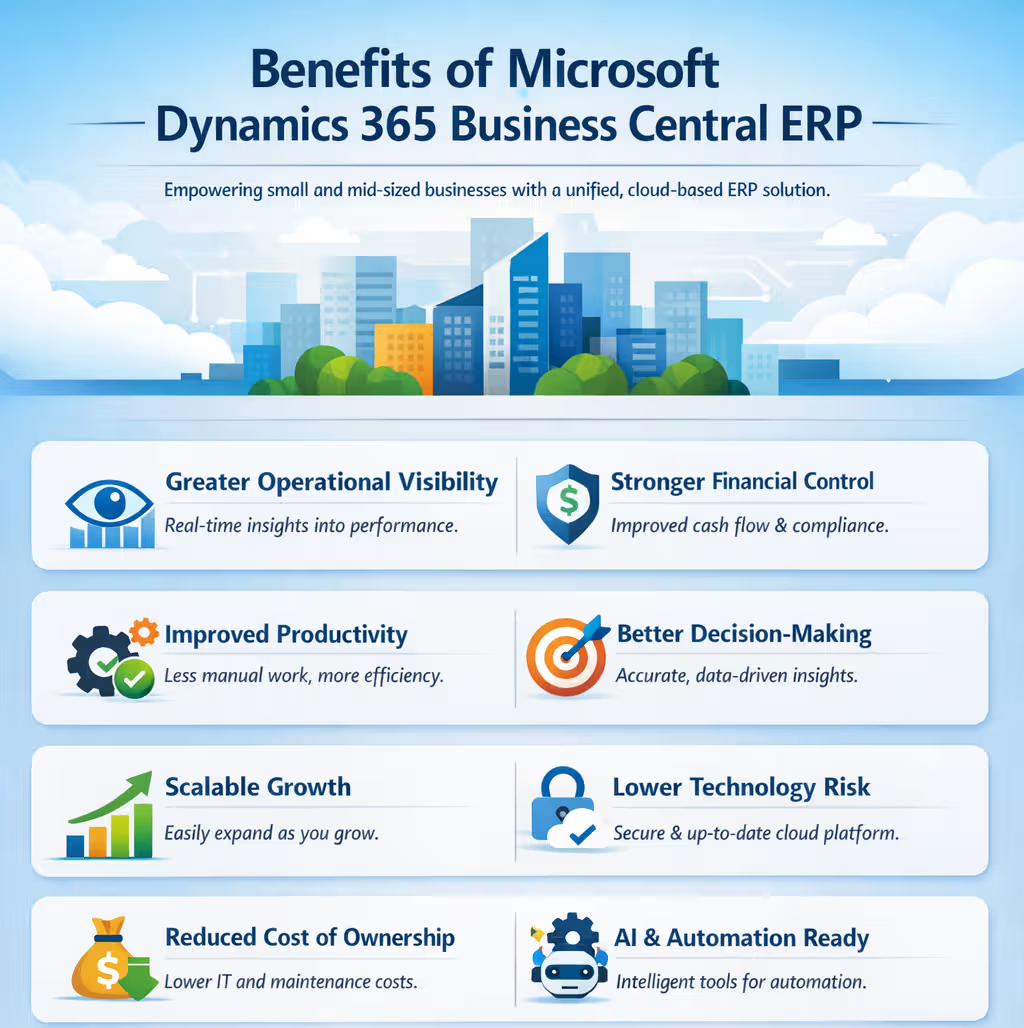
Microsoft Dynamics 365 Business Central ERP helps small and mid-sized businesses centralize operations, improve financial visibility, and scale efficiently. By connecting finance, sales, purchasing, inventory, operations, and reporting in one system, Business Central can reduce manual work, improve data accuracy, strengthen controls, and give teams more timely information for decision-making.
Key benefits of Dynamics 365 Business Central ERP include:
- Greater operational visibility: Gain real-time insight into financial and operational performance across the organization.
- Stronger financial control: Improve cash flow management, audit readiness, and internal controls.
- Improved productivity: Reduce manual data entry, duplicate work, and disconnected processes.
- Better decision-making: Give teams access to accurate, current financial and operational data.
- Scalable growth: Add users, entities, locations, and capabilities as business requirements expand.
- Lower technology burden: Cloud deployments reduce infrastructure maintenance while providing Microsoft-managed updates and security.
- Better collaboration: Connect teams through shared data and integration with familiar Microsoft applications.
- Foundation for automation and AI: Use workflows, Copilot, and AI capabilities to automate work and support more efficient processes.
Business Central ERP capabilities and features
Dynamics 365 Business Central provides connected ERP capabilities across finance, sales, purchasing, inventory, projects, warehousing, and other operations. Its core ERP modules share the same data, helping teams manage processes in one system, while the Premium edition adds manufacturing and service management capabilities.
Financial management
Financial management is a core Dynamics 365 Business Central module for managing accounting, cash flow, assets, budgets, and financial reporting. It connects financial activity across the business, giving finance teams current data while supporting multiple companies, currencies, and reporting dimensions.
- General ledger with dimensions for tracking by department, project, location, or other business segment
- Accounts payable and accounts receivable
- Bank reconciliation, including Copilot-assisted matching
- Budgeting, financial reporting, and cash flow forecasting
- Fixed asset management and depreciation
- Multi-currency and intercompany transactions
- Subscription billing and recurring revenue management

Sales and customer management
Dynamics 365 Business Central connects sales and customer activity with inventory, fulfillment, and financial data to support the full quote-to-cash process. Sales teams can manage customer records, opportunities, pricing, quotes, orders, invoices, and returns while working from current inventory and account information.
- Contact and customer management
- Sales opportunities and basic pipeline tracking
- Quotes, sales orders, and invoicing
- Customer-specific pricing, discounts, and price lists
- Inventory availability and order promising
- Customer credit limits and payment terms
- Returns and credit memos
- Sales reporting and analysis
Business Central includes basic CRM capabilities. Organizations that need deeper lead management, sales automation, forecasting, and seller productivity tools can integrate Business Central with Dynamics 365 CRM.

Project management
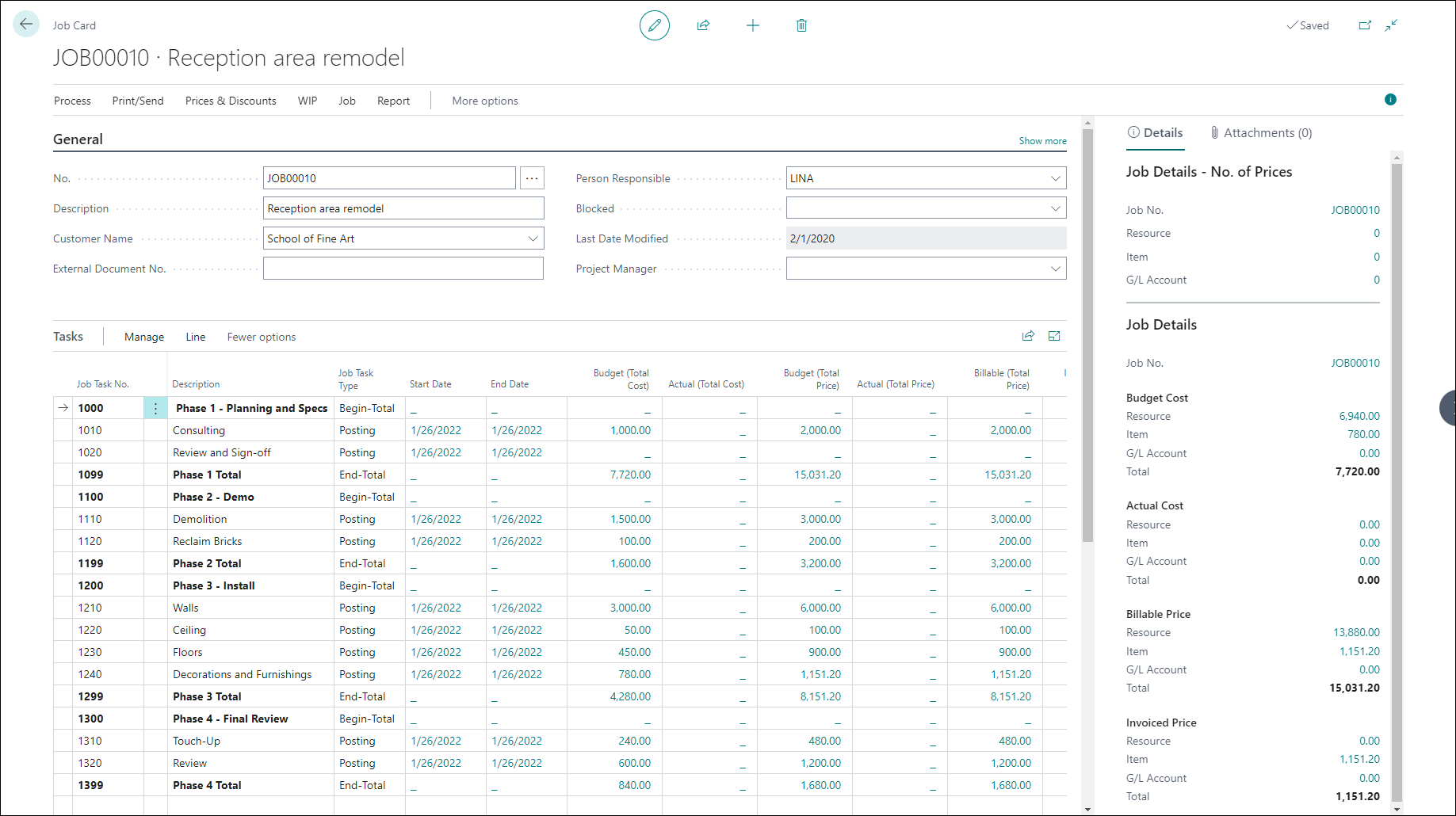
Dynamics 365 Business Central provides project management capabilities for planning work, tracking costs and resources, billing customers, and measuring project profitability. Because project activity is connected to financials, teams can compare budgets with actual costs and keep project margins current as work progresses.
- Project and task setup with budgets and deadlines
- Timesheets and resource planning
- Job costing and work in process (WIP) calculations
- Cost and pricing management
- Time and materials, fixed-price, and milestone billing
- Budget-to-actual and project profitability reporting
- Resource utilization and capacity tracking
Supply chain management
Dynamics 365 Business Central supports supply chain management by connecting purchasing, demand planning, replenishment, and supplier activity. The system uses current inventory, demand, lead times, and planning rules to help teams determine what to buy, how much to order, and when supply is needed.
- Vendor records and purchase orders
- Requisition worksheets and automated purchase suggestions
- Supply planning and material requirements planning (MRP)
- Demand forecasting by item, variant, or location
- Reorder points, safety stock, and lead time settings
- Drop shipments and special orders
- Purchase returns and vendor credit memos
Inventory
Dynamics 365 Business Central provides inventory management capabilities for tracking stock levels, item movements, availability, and costs across multiple locations. Inventory activity connects with purchasing, sales, warehousing, and financials so teams can maintain accurate quantities and understand the financial value of inventory.
- Item setup, units of measure, pricing, and inventory posting groups
- FIFO, LIFO, average, specific, and standard costing methods
- Serial number and lot tracking
- Expiration date and warranty tracking
- Multiple locations, transfers, and in-transit inventory
- Cycle counting and inventory adjustments
- Inventory availability, analysis, and reporting

Warehouse management
The warehouse management module in Dynamics 365 Business Central helps organizations manage receiving, storage, picking, movement, and shipping across one or more locations. It supports both simple warehouse processes and more structured workflows, while keeping inventory quantities and locations current as goods move through the warehouse.
- Warehouse locations and bin management
- Warehouse receipts and shipments
- Inventory picks and put-aways
- Directed pick and put-away
- Internal warehouse movements
- Multiple warehouse locations
- Picking and put-away templates
- Warehouse inventory counts and adjustments

Service management
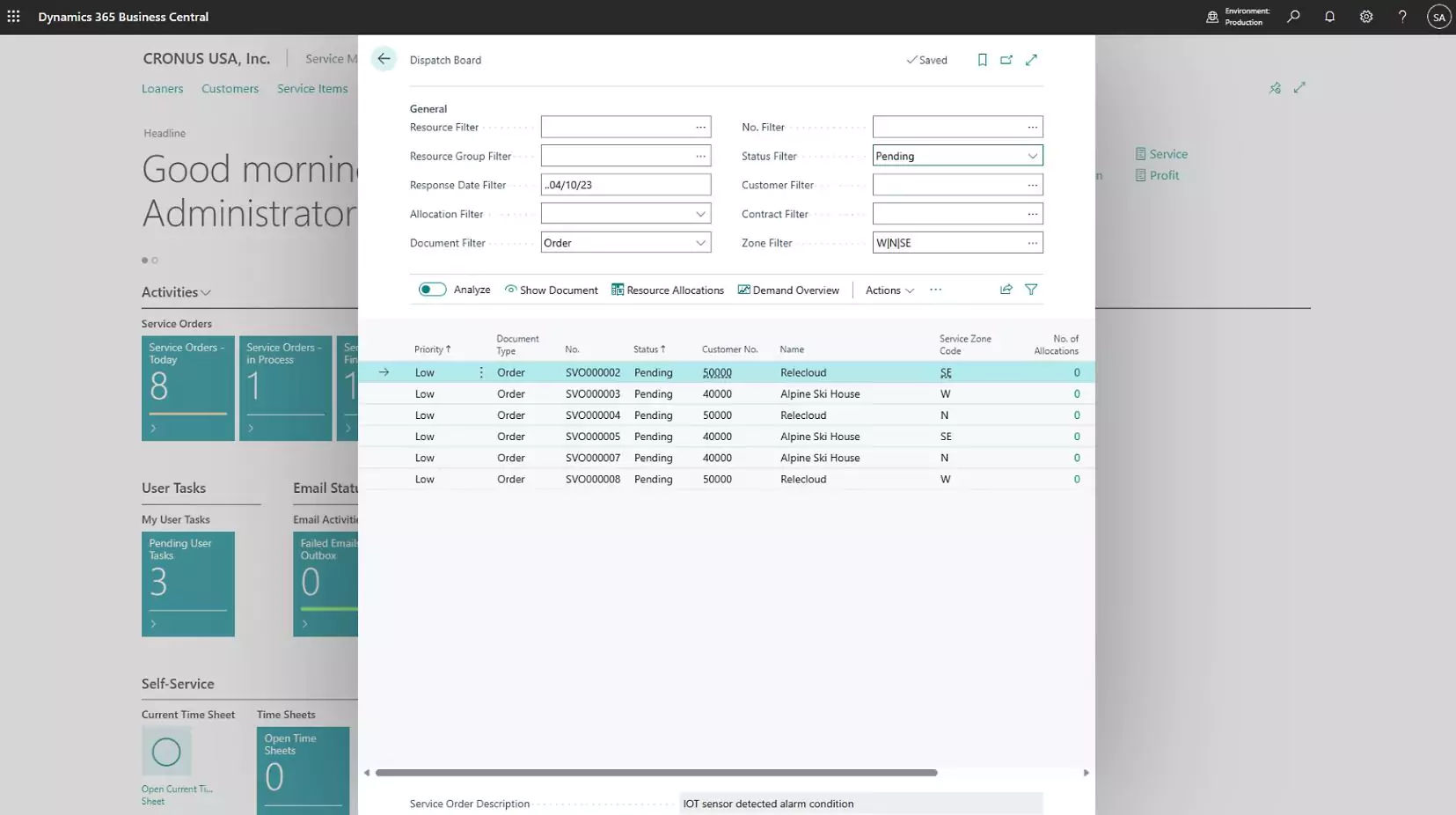
Dynamics 365 Business Central Premium includes service management for organizations that provide maintenance, repair, warranty, or other after-sales services. The module helps teams manage service work from intake through billing while keeping service activity connected with customer, inventory, and financial records.
- Service orders and repair management
- Service item and equipment tracking
- Service contracts and service level agreements
- Technician planning, scheduling, and dispatch
- Warranty management
- Loaner equipment management
- Service pricing and invoicing
Manufacturing
Dynamics 365 Business Central Premium includes manufacturing capabilities for planning, scheduling, producing, and costing manufactured goods. It connects materials, production orders, capacity, inventory, and costs so teams can manage production from demand planning through finished goods.
- Production bills of materials (BOMs) and routings
- Production orders and shop floor execution
- Work centers and machine centers
- Capacity planning and load management
- Material requirements planning (MRP)
- Master production scheduling
- Assemble-to-order and assemble-to-stock processes
- Subcontracting
- Production costing and variance analysis
- Consumption and output tracking

Reporting and analytics
Dynamics 365 Business Central provides reporting and analytics tools for turning financial and operational data into usable insights. Users can review built-in reports, analyze data directly in Business Central, work with Excel and Power BI, and extend reporting with third-party tools when more advanced analysis is needed.
- Built-in financial and operational reports
- Financial statements using accounts, budgets, and dimensions
- List pages and Analysis mode for ad-hoc analysis
- Role-based dashboards and KPI cues
- Excel integration for filtering, modeling, and deeper analysis
- Power BI dashboards for trends, KPIs, and cross-functional reporting
- Drill-down from summaries to underlying transactions
- Custom reports and third-party reporting tools such as Jet Reports

Copilot and AI capabilities in Dynamics 365 Business Central
Dynamics 365 Business Central online includes Microsoft Copilot and AI agents that help users analyze data, reduce manual work, and automate routine processes. Copilot assists users with tasks and insights, while AI agents can monitor activity and prepare work for review with less manual input.
Key AI capabilities in Business Central include:
- Chat with Copilot: Ask questions about Business Central data using natural language.
- Analysis assist: Group, filter, summarize, and analyze data without building complex reports.
- AI-assisted bank reconciliation: Suggest matches between bank transactions and ledger entries.
- Sales Order Agent: Read customer requests and prepare quotes or sales orders for review.
- Payables Agent: Process vendor invoices, match purchasing records, and prepare transactions for approval.
- Expense Agent: Use receipt information to help classify and prepare employee expenses.
Copilot is included with Business Central online, while some AI agent activity uses separately purchased Copilot Credits. AI capabilities are not available with Business Central on-premises.

Business Central deployment options: Cloud vs. on-premises
Dynamics 365 Business Central is available as a Microsoft-hosted cloud service or an on-premises deployment. Both provide the core Business Central ERP platform, but they differ in who manages the infrastructure, updates, scaling, and environment. Business Central online is maintained and updated by Microsoft, while on-premises deployments place more responsibility on the organization or its technology partner.
For many organizations, the biggest difference is access to Microsoft’s cloud innovation. Copilot and AI capabilities are exclusive to Business Central online, while on-premises provides greater control over the underlying infrastructure and update process.
To learn more, read our blog on Business Central cloud vs on-premises.
Microsoft ecosystem, integrations, and extensibility
Dynamics 365 Business Central connects with Microsoft 365, Power Platform, other Dynamics 365 applications, and third-party systems. This allows organizations to connect ERP data with the tools employees already use for productivity, reporting, automation, CRM, and collaboration.
Business Central can also be extended with prebuilt apps, custom extensions, APIs, and integrations without changing the core ERP application. This gives organizations flexibility to add industry or business-specific functionality as requirements change.
- Microsoft 365: Connect Business Central with Outlook, Excel, Teams, Word, and other Microsoft productivity tools.
- Power BI: Build dashboards and analyze Business Central financial and operational data.
- Power Automate: Automate approvals, notifications, and workflows across Business Central and connected systems.
- Power Apps and Dataverse: Build custom applications and connect Business Central data with other Microsoft business applications.
- Dynamics 365 integrations: Connect Business Central with applications such as Dynamics 365 Sales for deeper CRM capabilities.
- Third-party integrations: Connect ecommerce, EDI, banking, payroll, shipping, CRM, and other business systems.
- Apps and custom extensions: Add functionality through Microsoft Marketplace, Rand Group apps, or custom AL development.
- APIs and connectors: Exchange data with external platforms using standard or custom integrations.
How much does Business Central cost?
Dynamics 365 Business Central is licensed on a per-user, subscription basis. Each user must have their own named license, which cannot be shared or used concurrently but can be reassigned when an employee leaves or changes roles.
Microsoft offers monthly, annual, and multi-year subscription terms. Monthly terms provide more flexibility but are typically more expensive, while annual and multi-year agreements can provide more predictable pricing and long-term savings. Users can be added during the subscription term, while reductions generally occur at renewal.
Business Central pricing depends on the type of access required. The U.S. list prices below are based on annual billing:
- Essentials: $80 per user, per month. Includes core ERP capabilities for finance, sales, purchasing, inventory, supply chain planning, projects, and warehouse management.
- Premium: $110 per user, per month. Includes everything in Essentials, plus manufacturing and service management capabilities.
- Team Members: $8 per user, per month. Provides limited access for users who primarily need to read data, approve workflows, update select information, manage quotes, or enter project time.
- Device: $45 per device, per month. Provides limited Business Central access through shared devices used in scenarios such as warehouses, shop floors, or point-of-sale environments.
To learn more, read our Business Central pricing guide or our blog on Business Central licensing.
Business Central Essentials vs Premium
After reviewing pricing, the next step is determining whether Essentials or Premium is the right fit. Both licenses provide core ERP functionality, but Premium adds modules for more complex operational requirements.
Business Central Essentials includes financial management, sales and marketing, purchasing and payables, inventory, supply planning, project management, and warehouse management. It is well suited for organizations focused on finance, distribution, and operations without advanced manufacturing or service requirements.
Business Central Premium includes everything in Essentials, plus Manufacturing and Service Management. It is designed for organizations that manage production orders, bills of materials, capacity planning, service contracts, or equipment repairs.
To learn more, read our blog on Dynamics 365 Business Central Essentials vs Premium.
Who is Business Central for — and who is it not for?
Dynamics 365 Business Central is designed for small and mid-sized organizations that need more than basic accounting software but do not require enterprise-scale ERP complexity. The right fit depends on business processes, transaction volume, entities, locations, integrations, industry requirements, and plans for growth.
Business Central is a strong fit for organizations that:
- Are outgrowing basic accounting tools: Businesses moving beyond spreadsheets, QuickBooks, or other entry-level systems may need a full ERP with stronger financial and operational capabilities.
- Want one connected ERP system: Organizations can manage finance, sales, purchasing, inventory, projects, and operations in one platform.
- Manage operational complexity: Business Central supports distribution, warehousing, manufacturing, service, and project-based processes.
- Operate across multiple entities: Businesses can manage multiple companies, locations, and currencies within Business Central.
- Are moving from legacy Microsoft ERP: Organizations using Dynamics GP, Dynamics NAV, or Dynamics SL can modernize while staying within the Microsoft ecosystem.
- Already use Microsoft technology: Business Central works closely with Microsoft 365, Power BI, Power Platform, and other Dynamics 365 applications.
- Need room to extend the ERP: Apps, integrations, APIs, and custom development can add functionality as business requirements grow.
Business Central is not a strong fit for organizations that:
- Only need basic bookkeeping: Very small businesses with simple accounting needs may be better served by entry-level accounting software.
- Have very large or highly complex operations: Global enterprises with advanced operational requirements, high transaction volumes, or greater process complexity may be better suited to Dynamics 365 Finance & Operations.
- Primarily need advanced CRM: Organizations focused on sales automation, marketing, customer service, or field service may need dedicated Dynamics 365 CRM applications instead of Business Central alone.
- Have highly specialized industry requirements: Complex process manufacturing or other specialized operations may require additional Business Central apps or custom development and should be carefully evaluated before selection.
Business Central vs. other ERP systems
Dynamics 365 Business Central is often compared with accounting software, legacy Microsoft ERP systems, and other mid-market ERP platforms. For small and mid-sized organizations, Business Central stands out for combining broad ERP capabilities with Microsoft 365, Power Platform, analytics, and AI. Larger or more complex enterprises may require Dynamics 365 Finance & Operations instead.
Business Central ERP implementation and training
A Dynamics 365 Business Central implementation aligns the ERP with your business processes, data, reporting, and integration requirements. A typical project includes discovery, solution design, configuration, data migration, testing, deployment, and user adoption. Traditional implementations often take three to six months, while rapid implementation plans can reduce the timeline to as little as six to twelve weeks for organizations with more standardized requirements.
Business Central training is also critical to a successful rollout. Role-based training, hands-on testing, and post-go-live support help users understand new processes and adopt the system more effectively.
To learn more, read our Microsoft Dynamics 365 Business Central implementation guide.
How to get Dynamics 365 Business Central
Dynamics 365 Business Central is available through Microsoft’s partner network. Organizations can purchase licenses through a Microsoft partner, who can also assist with implementation, configuration, data migration, training, and ongoing support.
Business Central can be deployed in Microsoft’s cloud or on-premises. Cloud customers access the system through Microsoft’s hosted environment, while on-premises customers deploy and manage Business Central within their own infrastructure or through a hosting provider.
Getting started with Business Central typically follows these steps:
- Define your business requirements: Identify financial, operational, reporting, and integration needs.
- Select the appropriate license type: Choose between Essentials, Premium, Team Members, and Device licenses based on user roles.
- Choose a Microsoft-certified partner: Work with an experienced partner to scope, plan, and implement the solution.
- Begin implementation and user training: Configure the system, migrate data, test workflows, and prepare users for go-live.
Working with the right partner helps ensure your Business Central deployment aligns with your operational goals and long-term requirements.

Ready to evaluate Business Central?
Rand Group can help you define requirements, choose the right license, plan your implementation, and determine whether Business Central is the right fit for your organization.
Partner with Rand Group for Dynamics 365 Business Central ERP
Rand Group helps organizations evaluate, implement, extend, and support Dynamics 365 Business Central across the full ERP lifecycle. Our team brings together Business Central consultants, software engineers, CPAs, and industry specialists to align the system with financial, operational, reporting, and technology requirements.
Since 2003, Rand Group has completed more than 3,000 successful engagements for more than 1,200 clients, with a 90% client retention rate. Rand Group was also recognized as the 2025 Microsoft Americas Channel Emerging Partner of the Year.
Rand Group’s Dynamics 365 Business Central services include:
- ERP evaluation and selection: Define requirements, compare ERP options, and determine whether Business Central is the right fit.
- Business Central implementation: Configure, migrate, test, and deploy Business Central around your business processes.
- Customization and development: Extend Business Central with custom functionality, apps, and development.
- Business Central integrations: Connect Business Central with Microsoft applications and third-party systems.
- Business Central training: Prepare users with role-based training and practical system guidance.
- Go-live and ongoing support: Support users, resolve issues, and optimize Business Central after deployment.
Contact Rand Group to discuss your Business Central strategy and next steps.
Case study highlight
TCC Multi-Family Interiors came to Rand Group after a previous Business Central implementation left the company unable to use the system effectively. Rand Group reimplemented Dynamics 365 Business Central, migrated data, trained users, integrated industry applications, and developed a custom subcontractor portal. The new system automated invoice workflows that now save employees approximately 16 hours of work each week and created a stronger foundation for growth. To learn more, read the full case study.
What our Business Central clients say about us
“Rand Group’s knowledge base is expansive. Whenever we come up with an idea to be explored, they always have someone on staff that has relevant experience. Anytime we have an issue pop up, Rand Group is always available, dependable, and helpful.”
– Travis Hardwick, President & CEO, TCC Multi-Family Interiors
“Rand Group got our team up and running with Business Central in just weeks. Our time frame and budget were both limited, but they worked with us to meet our needs and exceeded expectations. We’ve found a new long-term partner.”
– Doug Hanson, CPA, Assistant VP, Controller and Treasurer, Redpoint Resolutions
“Rand Group didn’t just implement a system—they helped us rethink our business processes. The team went beyond a ‘canned solution’ and worked closely with us to develop practical, customized solutions.”
– Jeff Nelson, Director, Sapphire Gas Solutions
Key takeaways
- Dynamics 365 Business Central is a Microsoft ERP for small and mid-sized organizations that connects finance, sales, purchasing, inventory, projects, and operations in one system.
- Business Central Essentials includes core ERP capabilities, while Premium adds manufacturing and service management.
- Business Central online provides Microsoft-managed infrastructure, automatic updates, remote access, and access to Copilot and AI agents.
- Business Central integrates with Microsoft 365, Power BI, Power Platform, other Dynamics 365 applications, and third-party systems.
- Business Central is a strong fit for growing organizations that need more than basic accounting software, while larger or highly complex enterprises may require Dynamics 365 Finance & Operations.
- Successful Business Central implementations combine ERP configuration, data migration, integrations, testing, training, and ongoing user support.
Frequently asked questions
What is Dynamics 365 Business Central?
Dynamics 365 Business Central ERP is Microsoft’s cloud-based enterprise resource planning system for small and mid-sized businesses. It centralizes finance, sales, inventory, purchasing, operations, and reporting in one integrated platform. Business Central helps organizations improve visibility, automate processes, and manage core business functions from a single system.
Is Business Central an ERP system?
Yes. Business Central is a full enterprise resource planning (ERP) system. It connects financial management, supply chain, sales, projects, and operational data in one database, eliminating disconnected systems and improving real-time reporting and control.
What is the difference between Business Central and Dynamics NAV?
Dynamics NAV was Microsoft’s previous on-premises ERP solution. Business Central is the modern cloud-based successor to NAV. It offers continuous updates, built-in AI capabilities, improved integration with Microsoft 365 and Power Platform, and greater scalability through Microsoft’s cloud infrastructure.
What is the difference between Business Central Essentials and Premium?
Business Central Essentials includes core ERP functionality such as finance, sales, purchasing, inventory, project management, and basic warehousing. Business Central Premium includes all Essentials features plus Manufacturing and Service Management. Organizations that require production planning or structured service operations typically choose Premium.
How much does Business Central cost per user?
Business Central pricing starts at $80 per user per month for the Essentials license and $110 per user per month for the Premium license. Team Member licenses cost $8 per user per month for light access, and Device licenses cost $45 per device per month for shared workstations.
Is Business Central cloud-based?
Yes. Dynamics 365 Business Central is primarily a cloud-based ERP system hosted on Microsoft Azure. The cloud deployment includes automatic updates, built-in security, remote browser access, and reduced infrastructure management compared to traditional on-premises systems.
However, Business Central can also be deployed on-premises for organizations that require full control over their servers and infrastructure. Most small and mid-sized businesses choose the cloud version for scalability, lower IT overhead, and continuous feature updates from Microsoft.
Can Business Central integrate with Microsoft 365?
Yes. Business Central integrates natively with Microsoft 365 applications such as Outlook, Excel, and Teams. It also connects with Power BI, Power Apps, and Power Automate through the Microsoft Power Platform, allowing organizations to analyze data, automate workflows, and collaborate without moving data between systems.
How long does it take to implement Business Central?
Implementation timelines vary based on business complexity and customization needs. A traditional Business Central implementation typically takes three to six months. A rapid activation approach can reduce deployment time to six to twelve weeks for organizations with simpler requirements.
Who should use Business Central?
Business Central is designed for small and mid-sized organizations that need an integrated ERP system to manage finance, inventory, sales, purchasing, and operations. It is well suited for companies outgrowing entry-level accounting software or legacy ERP systems that require modernization.
How do I get started with Business Central?
To get started with Business Central, define your business requirements, select the appropriate license type, and engage a Microsoft-certified partner. Your partner will help scope the project, configure the system, migrate data, train users, and support a successful go-live.
Next steps
Dynamics 365 Business Central can provide a connected ERP foundation for organizations that have outgrown basic accounting tools or need better visibility across finance and operations. The right approach depends on your processes, complexity, licensing needs, integrations, deployment preferences, and growth plans.
Rand Group can help you evaluate Business Central, select the right licenses, plan your implementation, migrate data, integrate systems, train users, and support the platform after go-live. Contact us to discuss your Business Central requirements and next steps.