Best ERP systems for small businesses

Growing small businesses often reach a point where accounting software, spreadsheets, and disconnected systems can no longer support their financial and operational needs. An enterprise resource planning (ERP) system connects core business processes, improves visibility across departments, and creates a stronger foundation for continued growth.
There is no single best ERP for every small business. The right choice depends on your company size, industry, operational complexity, growth plans, deployment preferences, and budget. This guide compares the best ERP systems for small businesses and explains where each platform fits, what to consider, and how to narrow your options.
At a glance
The best ERP for a small business depends on what the organization needs to manage and how those requirements are expected to grow. Dynamics 365 Business Central is a strong option for growing businesses in the Microsoft ecosystem, Oracle NetSuite fits high-growth and multi-entity organizations, Sage Intacct serves finance-led businesses with advanced accounting needs, and Sage 100 supports manufacturers and distributors that need strong operational functionality. Other options worth considering include Acumatica, QuickBooks Enterprise, Odoo, SAP Business One, Workday, and Epicor.
What is ERP for a small business?
ERP for a small business is software that connects financial and operational processes within one system. Depending on the platform, an ERP can manage accounting, purchasing, inventory, sales, projects, manufacturing, warehouse operations, reporting, customer information, and other core business functions.
ERP goes beyond basic accounting software. Accounting systems primarily record and report financial transactions. ERP connects those financial records with the business activities that create them, giving employees a shared source of data across finance and operations.
When does a small business need an ERP system?
A small business typically needs ERP when its existing systems begin creating more work instead of simplifying it. Company size and revenue matter, but operational complexity is often a better indicator of ERP readiness.
Common signs that it may be time to evaluate ERP include:
- Financial and operational data lives in different systems.
- Reporting requires significant spreadsheet consolidation.
- Inventory or order volumes are becoming difficult to manage.
- Multiple entities or locations need consolidated reporting.
- Manual approvals and data entry are slowing processes.
- The business needs stronger financial controls or auditability.
- Existing accounting software cannot support manufacturing, distribution, projects, or other operational requirements.
- Employees repeatedly enter the same information into different systems.
- Integrations between existing applications are becoming difficult to maintain.
- Growth is increasing transaction volume and process complexity.
A small professional services company with straightforward accounting may be able to use accounting software for years. A manufacturer, distributor, project-based company, or multi-entity organization of a similar size may need ERP much sooner.
How we evaluated the best ERP systems for small businesses
Successful ERP selection is driven by business requirements and future growth, not the length of a feature list. Rand Group has worked with ERP and business management technology since 2003, giving our consultants decades of experience helping organizations evaluate, implement, migrate, integrate, and support business systems.
For this guide, we considered the factors that most often determine whether an ERP remains a good fit as a small business grows:
- Financial management
- Operational functionality
- Scalability
- Industry fit
- Deployment options
- Reporting and analytics
- AI and automation
- Integrations and extensibility
- Implementation requirements
- Licensing and total cost considerations
- Partner and support ecosystem
Best ERP systems for small businesses
The best ERP systems for small businesses range from finance-focused platforms to broader solutions that connect accounting with inventory, sales, projects, manufacturing, and other operations. The right fit depends on where your business is most complex and how you expect those requirements to change as you grow.
The framework below highlights common ERP selection scenarios we see with small and midsize businesses. Use it to narrow your initial options before comparing each platform in greater detail.

Top 10 ERP software selection checklist
This checklist is designed to guide you through the ten essential steps for selecting ERP software, ensuring that you choose the solution that best fits the needs of your business.
Microsoft Dynamics 365 Business Central
Microsoft Dynamics 365 Business Central is a comprehensive ERP designed for growing small and midsize businesses that want to connect financials, operations, sales, supply chain, projects, and other business processes within one platform.
One of its biggest advantages is its connection to the Microsoft ecosystem. Business Central works with applications many companies already use, including Outlook, Excel, Teams, Power BI, Power Apps, and Power Automate. This familiar environment can simplify adoption while making it easier to automate processes and share data across applications.
For small businesses, D365 Business Central delivers enterprise-grade capabilities at a manageable price point without overwhelming complexity. Its modular structure allows businesses to start with core financial management and expand into areas such as inventory, project management, warehousing, manufacturing, or service management as requirements grow. Real-time dashboards, built-in business intelligence, and AI-driven forecasting also help leaders monitor performance and make faster, data-informed decisions.
Business Central can be deployed online or on-premises. However, Microsoft is investing most heavily in the online version, particularly for AI. Business Central online now includes Copilot capabilities and AI agents that can assist with tasks such as data analysis, sales order processing, and accounts payable. The Sales Order Agent can help process customer requests from email, while the Payables Agent can process vendor invoices with human oversight.
Its customization and extensibility are also significant strengths. Businesses can extend Business Central through Power Platform, Microsoft Marketplace applications, integrations, and partner-developed extensions without rebuilding the core system.
Best for: Growing small and midsize businesses that use Microsoft technology and need connected financial and operational functionality.
Key strengths:
- Broad financial and operational ERP capabilities
- Native integration with Microsoft 365
- Power BI, Power Apps, and Power Automate integration
- Copilot and AI agent capabilities in Business Central online
- Strong reporting and analytics options
- Large application and implementation partner ecosystem
Considerations:
- Specialized industries may require third-party applications or configuration.
- Extensive customization can increase implementation cost and complexity.
Business Central is often a strong fit for SMBs that have outgrown accounting software but do not need a large enterprise ERP. Microsoft currently lists Business Central Essentials at $80 per user per month, while Premium adds manufacturing and service management functionality at a higher license level.

Oracle NetSuite
Oracle NetSuite is a cloud-native ERP platform designed to connect financial management, purchasing, inventory, order management, CRM, projects, ecommerce, and other business processes within one system.
For small businesses anticipating rapid growth, NetSuite provides a strong foundation for scaling without changing ERP platforms as requirements become more complex. Its modular architecture allows organizations to start with core functionality and add capabilities as the business expands.
NetSuite is particularly strong for organizations managing multiple entities, locations, currencies, or countries. NetSuite OneWorld supports multiple subsidiaries within one account, including multi-currency transactions, financial consolidation, intercompany activity, tax requirements, and subsidiary-level reporting.
NetSuite also provides industry-specific configurations and an extensive ecosystem of modules and integrations. Businesses can expand into areas such as planning and budgeting, revenue management, warehouse management, professional services automation, ecommerce, and human capital management.
Best for: Fast-growing businesses with multi-entity, multi-location, or international requirements.
Key strengths:
- Cloud-native architecture
- Strong multi-entity and global functionality
- Financial consolidation and multi-currency support
- Broad financial and operational capabilities
- Industry-specific configurations
- Real-time reporting and dashboards
Considerations:
- Pricing is not publicly listed and varies based on users, modules, and requirements.
- Smaller organizations with simple operations may not need the full breadth of the platform.
NetSuite is often a strong choice when a business expects its organizational structure to become more complex. Companies planning acquisitions, adding subsidiaries, entering new markets, or expanding internationally can continue scaling within the same ERP environment rather than replacing the system again.

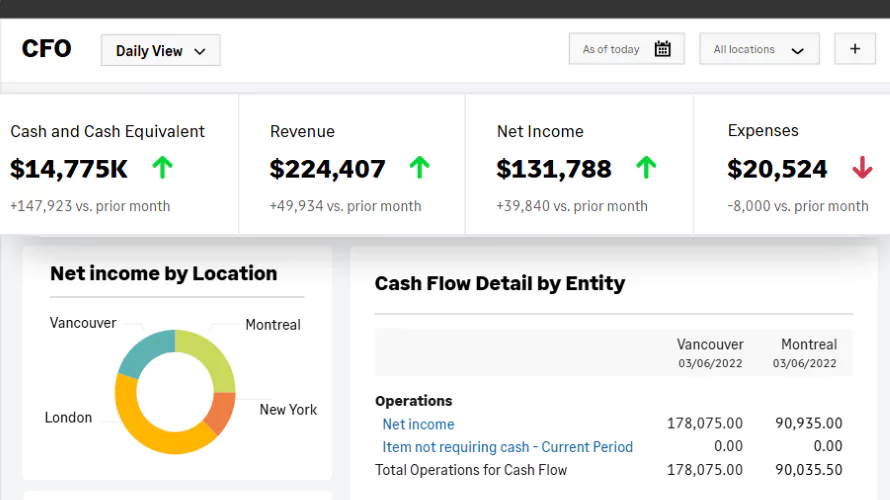
Sage Intacct
Sage Intacct is a cloud-native financial management system designed for small and midsize organizations that need sophisticated accounting, reporting, automation, and financial controls without the operational breadth of a traditional full-suite ERP.
Its finance-first approach makes Sage Intacct particularly well suited for professional services, nonprofit, healthcare, financial services, hospitality, senior care, skilled nursing, software, and other organizations where financial management is the primary driver of ERP selection.
A major differentiator is Sage Intacct’s dimensional reporting. Organizations can analyze financial performance by entity, location, department, project, program, customer, or other dimensions without creating an overly complex chart of accounts. Sage Intacct also remains the AICPA’s preferred provider of financial applications.
Sage Intacct now includes AI-driven capabilities and AI agents such as the Close Agent, Financial Assurance Agent, and AP Automation Agent. These tools can help manage close activities, identify unusual journal entries, automate invoice processing, and reduce repetitive financial work.
Best for: Finance-led organizations with complex accounting, multi-entity management, reporting, and financial control requirements.
Key strengths:
- Advanced financial management
- Multi-entity consolidation
- Dimensional reporting
- Real-time dashboards and financial visibility
- Strong audit trails and financial controls
- Expanding AI and financial automation
- Open API and broad integration ecosystem
Considerations:
- Manufacturing, warehouse, and deep supply chain processes often require connected applications.
- Businesses seeking one system for extensive operational ERP functionality may prefer a broader suite.
- Pricing is quote-based and depends on users, entities, modules, and requirements.
Sage Intacct is often a strong fit when financial complexity is the main problem the business needs to solve. It provides deeper accounting and reporting capabilities while allowing organizations to connect specialized operational systems around the financial core.
Sage 100
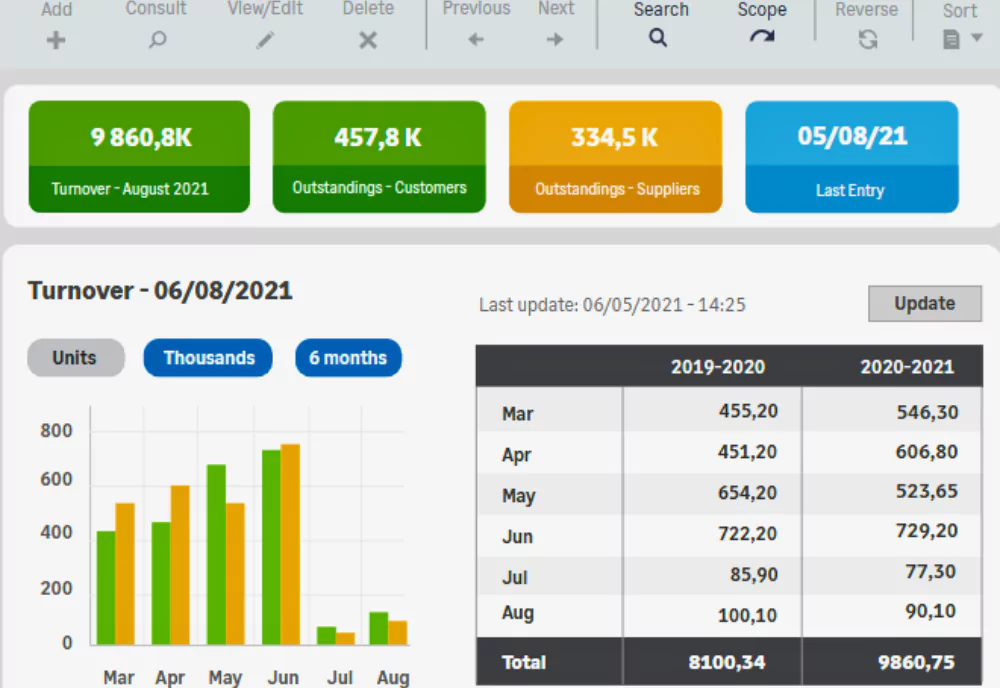
Sage 100 is a proven business management and ERP system for small and midsize businesses, particularly manufacturers and distributors that require strong financial management, inventory control, purchasing, sales order processing, and manufacturing functionality.
Unlike cloud-native ERP platforms, Sage 100 gives businesses greater flexibility over how the environment is deployed and managed. This can appeal to organizations that want more control over infrastructure, data, customizations, or existing integrations.
Sage 100 provides mature manufacturing and distribution capabilities, including inventory management, lot and serial tracking, purchasing, sales orders, shipping, warehouse processes, forecasting, replenishment, and production functionality.
Sage is also continuing to modernize the product. Sage 100 now includes the Sage AI Help Agent, which provides in-product assistance and lets users search topics and ask questions while working in the system.
Best for: Manufacturers and distributors that want established operational functionality, customization, and deployment flexibility.
Key strengths:
- Strong inventory and distribution functionality
- Manufacturing capabilities
- Financial management and controls
- Flexible customization
- Established Sage partner ecosystem
- Support for specialized manufacturing and distribution workflows
Considerations:
- It is not built on the same multi-tenant SaaS architecture as newer cloud ERP platforms.
- Global and highly complex multi-entity organizations may eventually require another platform.
- Companies pursuing a cloud-first strategy should compare Sage 100 carefully with SaaS alternatives.
Sage 100 remains a practical option when manufacturing, distribution, inventory, and operational control are more important than moving to a native SaaS architecture. Businesses with specialized workflows can also benefit from its mature customization and add-on ecosystem.
Acumatica
Acumatica is a cloud ERP platform that provides functionality across financial management, CRM, inventory, distribution, manufacturing, projects, construction, field service, and retail. Its industry editions make it most relevant for businesses with operational requirements that extend beyond accounting.
One of Acumatica’s main differentiators is its licensing model. It does not charge an additional software license for every user. Instead, pricing is based on the applications selected, expected transaction volume, resource requirements, and deployment. This can benefit businesses with large user populations, but it also makes costs less straightforward to predict than a simple per-user model.
Acumatica also offers open APIs and customization options. However, companies should evaluate how much configuration or customization will be required and whether there is sufficient partner and third-party expertise available for their industry.
Best for: Growing organizations with large user populations or operational requirements in manufacturing, distribution, construction, retail, or services.
Key strengths:
- No per-user software licensing
- Industry-specific editions
- Broad financial and operational functionality
- Open APIs and extensibility
- Cloud-based access
Considerations:
- Usage and resource-based pricing can make future costs harder to estimate as transaction volumes grow.
- Its partner and third-party application ecosystem is smaller than those of some more established ERP platforms.
- Businesses with specialized requirements may still need significant configuration or customization.
Acumatica is worth considering when broad ERP access is a major priority and per-user licensing would become expensive. However, businesses should model future resource usage carefully rather than assuming unlimited users will automatically result in a lower total cost.

QuickBooks Enterprise
QuickBooks Enterprise is the most advanced product in the QuickBooks Desktop line and can serve as a next step for small businesses that have outgrown QuickBooks Pro, Premier, or basic accounting software. However, QuickBooks Enterprise is not a full-featured ERP system. It extends accounting functionality without providing the same financial and operational depth as other platforms.
QuickBooks Enterprise adds functionality such as advanced inventory, pricing, job costing, payroll, role-based permissions, and more than 200 customizable reports. Industry editions are available for areas such as contracting, manufacturing and wholesale, nonprofit, professional services, and retail. These capabilities can allow a relatively simple business to stay within the familiar QuickBooks environment longer.
The limitations become more significant as the business grows. QuickBooks Enterprise remains a desktop application. Cloud hosting provides remote access, but it adds another layer to the environment rather than providing the same native cloud architecture as a modern SaaS ERP.
QuickBooks Enterprise also has less depth in areas such as multi-entity management, manufacturing, supply chain management, advanced workflow automation, and connected business processes. Businesses that compensate by adding spreadsheets and third-party applications can eventually recreate the same disconnected environment they were trying to solve.
Best for: Smaller businesses that have outgrown basic QuickBooks products but still have relatively straightforward financial and operational requirements.
Key strengths:
- Familiar QuickBooks interface
- Strong core accounting functionality
- Advanced inventory and job costing options
- Lower implementation complexity than a full ERP
- Broad reporting for a small-business accounting platform
Considerations:
- Limited cloud architecture: QuickBooks Enterprise is desktop-based, even when accessed through cloud hosting.
- Limited AI and automation: It does not provide the same embedded AI, agents, forecasting, and workflow automation available in many modern cloud ERP systems.
- Scalability challenges: Growing transaction volume, entities, locations, currencies, and operational complexity can expose limitations in reporting, controls, and process management.
- Integration gaps: Additional applications may be required as needs expand, increasing integration, maintenance, and data-management complexity.
- Limited ERP depth: Manufacturing, supply chain, consolidation, and other advanced processes are less robust than in a full ERP platform.
QuickBooks Enterprise is often best viewed as a transitional solution rather than a long-term ERP strategy. It can extend the life of a QuickBooks environment, but businesses expecting rapid growth or increasing complexity should consider whether moving directly to a full ERP would avoid another migration later.

Odoo
Odoo is a modular business management platform with applications for accounting, CRM, sales, inventory, manufacturing, purchasing, ecommerce, projects, HR, and other business functions. Its broad application library allows smaller companies to start with a limited set of tools and add functionality over time.
Odoo’s open-source foundation provides significant flexibility, but that flexibility can also create complexity. Businesses that rely heavily on custom modules or unique configurations need to account for implementation, testing, upgrades, and ongoing maintenance rather than evaluating Odoo based only on its relatively low software price.
The platform can cover a wide range of business processes, but organizations with sophisticated accounting, financial controls, reporting, or governance requirements should evaluate those areas carefully before assuming the breadth of the application suite equals the depth of a more established ERP.
Best for: Cost-conscious, technically capable small businesses that want modular functionality and are comfortable managing more configuration.
Key strengths:
- Broad suite of business applications
- Relatively low software entry cost
- Modular implementation approach
- Cloud and on-premises options
- Open-source extensibility
Considerations:
- Heavy customization can increase upgrade and maintenance complexity.
- Implementation quality and long-term support can depend heavily on the partner and configuration approach.
- Custom development can reduce some of the cost advantages of the core software.
- Organizations with complex financial, governance, or enterprise requirements may need a more mature ERP platform.
Odoo can make sense for a smaller business that values flexibility and low initial software costs. It is less compelling when extensive customization is needed to reproduce functionality that another ERP already provides as standard.
SAP Business One
SAP Business One is an established ERP designed for small and midsize organizations. It combines accounting, purchasing, inventory, sales, CRM, reporting, and manufacturing functionality in one system.
Its strongest use cases tend to be manufacturing and distribution businesses that already value the SAP ecosystem. The platform can support significant operational requirements, but it follows a more traditional ERP model than many newer cloud-first systems.
SAP Business One can be deployed on-premises or through cloud hosting. This provides deployment flexibility, although companies looking for a modern SaaS experience should evaluate how the proposed environment will actually be hosted, updated, and maintained.
Best for: Small manufacturers and distributors that have a specific reason to use the SAP ecosystem.
Key strengths:
- Financial and inventory management
- Manufacturing and MRP functionality
- Purchasing and sales management
- Established SAP ecosystem
- Cloud-hosted and on-premises deployment options
Considerations:
- The user experience can feel more traditional than newer SaaS ERP platforms.
- Implementation, customization, and upgrades can depend heavily on specialized SAP partners.
- Customization can increase long-term maintenance and upgrade requirements.
- Total cost can be difficult to justify for smaller businesses with relatively straightforward needs.
SAP Business One is most relevant when its manufacturing functionality or connection to the broader SAP environment provides a specific advantage. For a general small-business ERP search, newer cloud platforms may offer a simpler path to implementation and ongoing management.
Workday
Workday is best known for financial management and human capital management in larger organizations. Workday GO extends packaged finance, HR, payroll, and planning capabilities to the small and midsize market, but its target customer is still considerably larger than many businesses searching for a small-business ERP.
Workday positions its Workday GO finance and HR offerings for companies with approximately 500 to 3,500 employees. As a result, it is more accurately viewed as an option for larger SMBs and midsize organizations than for a typical small business.
Its primary strength is connecting finance and workforce management. That also defines its limitations in this comparison. Workday does not provide the same depth in inventory, manufacturing, warehouse management, and distribution as ERP systems designed around product-based operations.
Best for: Larger SMBs and midsize service organizations where finance, HR, payroll, and workforce planning are the primary requirements.
Key strengths:
- Connected finance and HR
- Payroll and workforce management
- Financial planning and analytics
- Cloud architecture
- Embedded AI and automation
Considerations:
- Its target market starts above the size of many small businesses evaluating ERP.
- Software and implementation requirements may be difficult to justify for smaller organizations.
- Manufacturing, inventory, warehouse, and distribution functionality is limited compared with operational ERP platforms.
- It is a narrower fit when the primary ERP requirement extends beyond finance and workforce management.
Workday can be a strong platform for the right midsize organization, but it would not typically be one of the first systems a smaller business should evaluate. It becomes more relevant as employee count and HR complexity increase.
Epicor
Epicor Kinetic is a manufacturing-focused ERP that combines financial management with production, planning, scheduling, supply chain management, quality, costing, and shop-floor processes.
Its depth can be valuable for manufacturers with sophisticated production requirements. However, the same depth can make Epicor more system than a smaller manufacturer needs if its processes can be handled by a broader SMB ERP with standard manufacturing functionality.
Epicor supports discrete, make-to-order, and other manufacturing environments and includes capabilities such as MRP, forecasting, capacity planning, production scheduling, and multi-site management. These capabilities can also increase the importance of detailed requirements gathering, implementation expertise, and user training.
Best for: Manufacturers whose production complexity requires deeper manufacturing functionality than a general-purpose SMB ERP provides.
Key strengths:
- Deep manufacturing functionality
- MRP and production planning
- Advanced scheduling
- Supply chain and shop-floor capabilities
- Multi-site manufacturing support
Considerations:
- The platform can be more complex than necessary for small businesses with straightforward manufacturing requirements.
- Implementation can require significant manufacturing process expertise and internal resources.
- Specialized functionality can increase implementation scope and cost.
- Companies outside manufacturing have little reason to choose it over a broader ERP platform.
Epicor is most relevant when advanced manufacturing requirements justify a specialized platform. Smaller manufacturers should first determine whether they actually need that level of depth or whether a more broadly focused SMB ERP can support their operations with less complexity.
Best ERP software for small business comparison chart
Small businesses have many ERP options, but not every platform needs to be compared side by side. The chart below focuses on six systems that represent some of the most common paths growing SMBs evaluate, from broad cloud ERP and finance-led platforms to manufacturing-focused systems and transitional accounting software.
For growing small and midsize businesses moving toward a modern cloud platform, Dynamics 365 Business Central, Oracle NetSuite, and Sage Intacct often warrant the closest consideration. Business Central offers broad ERP functionality with deep Microsoft integration, NetSuite provides strong scalability for multi-entity and global organizations, and Sage Intacct delivers advanced financial management and reporting. The best fit depends on the business processes, complexity, and growth requirements the system needs to support.
How much does ERP cost for a small business?
ERP software costs vary based on the platform, number of users, modules, entities, and pricing model. Some ERP systems charge a monthly fee per user, while others use custom pricing based on modules, transactions, or system resources.
Implementation costs for small businesses commonly range from approximately $25,000 to $100,000+. The final cost depends heavily on project scope, and complex manufacturing, multi-entity, highly integrated, or heavily customized implementations can exceed this range.
Key factors that affect ERP cost include:
- Number of users and modules
- Software licenses or subscriptions
- Implementation scope
- Data migration and cleanup
- Integrations
- Customization or development
- Third-party applications
- Reporting requirements
- Testing
- Training and change management
- Internal employee time
- Ongoing support and optimization
Comparing ERP systems based only on monthly license price can be misleading. A lower-cost platform that requires extensive customization, integrations, or third-party applications may ultimately cost more than a higher-priced ERP that supports more of your requirements natively.
How to choose the best ERP for your small business
Choosing the best ERP for a small business starts with understanding your requirements before comparing software. The strongest ERP selections account for current processes, future growth, implementation needs, and long-term cost—not just the number of features available.
- Define your business requirements. Document the processes the ERP needs to support, current pain points, reporting needs, integrations, and must-have functionality. This gives you a consistent set of requirements for comparing systems.
- Consider your future growth. Think beyond what the business needs today. Account for potential increases in users, transactions, locations, entities, product lines, acquisitions, and geographic reach.
- Evaluate industry and operational fit. Focus on the processes that are most important to your business, such as manufacturing, distribution, projects, subscription billing, multi-entity accounting, or nonprofit reporting. These requirements can quickly narrow the list of viable ERP systems.
- Compare total cost and implementation requirements. Consider software, implementation, data migration, integrations, customization, training, support, and internal resources. A lower license price does not always mean a lower total cost.
- Evaluate the ERP and implementation partner separately. A strong ERP still requires the right team to implement it. Compare partner experience, industry knowledge, methodology, data migration capabilities, integrations, training, support, and references.
A structured ERP selection process makes it easier to eliminate poor-fit systems early and focus your evaluation on the platforms that can support both your current requirements and future growth.
Common mistakes small businesses make when choosing ERP
Small businesses can choose a capable ERP and still struggle if the selection process overlooks cost, growth, data, implementation, or user adoption. Common ERP selection mistakes include:
- Selecting ERP primarily on price: A lower license price does not always mean a lower total cost.
- Choosing for today’s needs instead of future growth: The ERP should support expected changes in users, transactions, locations, entities, and business complexity.
- Comparing features without documenting business processes: A long feature list does not guarantee the system will support your most important workflows.
- Underestimating data migration: Poor or inconsistent legacy data can create problems that carry into the new ERP.
- Over-customizing the system: Rebuilding every legacy process can increase implementation cost and make future updates harder.
- Ignoring implementation partner fit: ERP success depends heavily on the experience and capabilities of the team implementing the software.
- Underestimating training and internal resources: Employees need time for decisions, testing, data preparation, training, and adoption.

Need help selecting the best ERP for your small business?
Selecting the right ERP is less about finding the longest feature list and more about aligning technology with your business strategy. Rand Group’s software selection engagement helps define your requirements, compare leading platforms, and evaluate functionality, cost, scalability, and implementation fit.
Why work with a multi-platform ERP partner?
A multi-platform ERP partner can evaluate your business requirements before assuming one specific product is the answer. This is especially valuable for small and midsize businesses because ERP systems can differ significantly in functionality, scalability, deployment, integrations, and total cost.
Rand Group works across Microsoft Dynamics 365, Oracle NetSuite, and Sage. Since 2003, we have completed more than 3,000 successful engagements for more than 1,200 clients across North America, and our 90% client retention rate reflects our focus on long-term partnerships.
Our ERP experience covers the full technology lifecycle:
- ERP evaluation and selection
- Business process and requirements analysis
- ERP implementation
- Data migration
- System integrations
- Software development and customization
- Reporting and analytics
- Training and user adoption
- Ongoing ERP support
- Optimization and strategic planning
This multi-platform perspective helps us identify where one ERP naturally fits your requirements and where another may require additional modules, integrations, or customization. It also gives you a clearer view of both the initial implementation and the long-term impact of the ERP decision.
What our clients say
“Rand Group got our team up and running with Business Central in just weeks. Our time frame and budget were both limited, but they worked with us to meet our needs and exceeded expectations. We’ve found a new long-term partner.”
— Doug Hanson, CPA, Redpoint Resolutions
“We’ve grown significantly since moving to NetSuite, and the system has scaled with us every step of the way.”
— Joseph Lo, Mann Eye Institute
“Our experience working with Rand Group has always been so positive that I knew they were the right team to guide our move to Sage Intacct. They already understood our company structure, which made the implementation very easy, and they have always been responsive to our needs.”
– Lisa Morris, Accounting Director, Spine Team Texas
“The business was growing to the point where we really needed a comprehensive accounting system where all the different modules would talk to each other. Sage today is an integral part of our business.”
– Martha Kinzel, Controller, Trim-Tex Drywall Solutions
Real-world examples from growing businesses
Feature comparisons explain what an ERP can do. Real implementations show how different platforms perform when businesses apply them to actual financial and operational challenges.
The following Rand Group clients selected different systems based on their requirements.
Dynamics 365 Business Central: Redpoint Resolutions
Redpoint Resolutions needed to replace FinancialForce quickly and within a limited budget. The fast-growing company wanted stronger financial functionality without taking on a long, highly customized ERP implementation.
Using Rand Group’s Rapid Activation methodology, Redpoint implemented Dynamics 365 Business Central in just six weeks, two weeks faster than anticipated. The implementation included financial management, accounts payable and receivable, fixed assets, cash management, and targeted user training.
Key results included:
- Business Central implemented in six weeks
- Project completed two weeks faster than anticipated
- Core financial processes moved to a more scalable ERP
- Targeted training supported rapid adoption
- Foundation established for adding functionality over time
To learn more, read the full Redpoint Resolutions case study.
Oracle NetSuite: Mann Eye Institute
Mann Eye Institute operates across 17 locations and needed a financial platform that could keep pace with continued growth. Its previous Dynamics GP environment was slowing reporting and requiring significant manual effort from a lean accounting team.
After implementing NetSuite, AP reports that previously took up to 20 minutes could run in under 10 seconds. Invoice approvals moved from multi-day cycles to same-day processing, and the system supported 40% to 50% revenue growth without adding accounting headcount.
Key results included:
- AP reporting reduced from up to 20 minutes to under 10 seconds
- Invoice processing accelerated to same-day approvals
- Better reporting across locations and departments
- 40% to 50% revenue growth supported without additional accounting staff
- Reduced burden on the internal IT team
To learn more, read the full Mann Eye Institute case study.
Sage Intacct: Spine Team Texas
Spine Team Texas needed a financial platform that could support continued growth across its clinics, surgery centers, and investment companies. Its aging Sage 500 environment required repetitive company-by-company work for intercompany transactions, vendor management, reconciliations, and reporting.
After moving to Sage Intacct, Spine Team Texas gained more efficient multi-company accounting and flexible reporting by company, location, and department. The organization has since added at least four clinics and one surgery center without increasing finance staff.
Key results included:
- Added five locations without increasing finance staff
- Saved approximately one hour each day on bank reconciliation
- Reduced six revenue journal entries to one multi-company entry
- Improved reporting across clinics, departments, surgery centers, and investment companies
- Expanded financial visibility for managers without adding manual reporting
To learn more, read the full Spine Team Texas case study.
Sage 100: Trim-Tex Drywall Solutions
Trim-Tex Drywall Solutions had used Sage 100 for more than 25 years, but rapid growth exposed process and reporting gaps. Departments operated in silos, reporting was disconnected, and the company needed better visibility across production, inventory, and finance.
Rand Group helped Trim-Tex expand its use of Sage 100 and connected Sage applications to improve reporting, production management, inventory, and collaboration. The changes helped save hundreds of thousands of dollars in accounting fees and supported 5x company growth.
Key results included:
- Reduced employee man-hours
- Hundreds of thousands of dollars saved in accounting fees
- Improved inventory management
- Better reporting across departments
- Technology foundation that supported 5x company growth
To learn more, read the full Trim-Tex Drywall Solutions case study.
Key takeaways
- The best ERP for a small business depends on its industry, operational complexity, growth plans, technology environment, and budget.
- Dynamics 365 Business Central is a strong fit for growing businesses that want connected finance and operations within the Microsoft ecosystem.
- Oracle NetSuite is well suited to high-growth organizations with multi-entity, multi-location, or international requirements.
- Sage Intacct is a strong choice for finance-led organizations that need advanced accounting, reporting, and multi-entity management.
- Sage 100 remains a practical option for manufacturers and distributors that need strong operational functionality and deployment flexibility.
- QuickBooks Enterprise can extend the life of a small-business accounting system, but growing complexity may eventually require a full ERP platform.
- Small businesses should compare scalability, total cost, implementation requirements, and partner fit instead of selecting ERP based on features or license price alone.
Frequently asked questions about ERP for small businesses
What is the best ERP system for a small business?
The best ERP system for a small business depends on its industry, operational complexity, technology environment, growth plans, and budget.
- Dynamics 365 Business Central is a strong fit for growing businesses that use Microsoft and need connected finance and operations.
- Oracle NetSuite is well suited to high-growth, multi-entity, and multi-location organizations.
- Sage Intacct is a strong choice for finance-led organizations with advanced accounting and reporting needs.
- Sage 100 is well suited to manufacturers and distributors that value operational functionality and deployment flexibility.
- QuickBooks Enterprise can work for smaller businesses that have outgrown basic accounting software but are not ready for a full ERP.
The right ERP should support both your current requirements and the complexity you expect as the business grows.
How much does an ERP system cost for a small business?
ERP costs for small businesses include software licensing and implementation services. Software pricing varies by platform, users, modules, entities, and pricing model, while implementation costs commonly range from approximately $25,000 to $100,000+.
Data migration, integrations, customization, training, reporting, and business complexity can increase the total cost.
How long does it take to implement an ERP system for a small business?
ERP implementation timelines depend on scope, but most small businesses take between 2 to 6 months.
- Simpler implementations → 6–12 weeks
- More complex systems → 3–6+ months
Projects move faster when requirements are clearly defined and internal teams are actively involved.
What is the difference between cloud ERP and on-premise ERP?
Cloud ERP is hosted by the vendor and accessed via the internet, while on-premise ERP is hosted on your own servers.
- Cloud ERP (NetSuite, Business Central, Sage Intacct):
- Lower IT overhead
- Automatic updates
- Easier remote access
- On-premise ERP (Sage 100, Business Central):
- Greater control over data and infrastructure
- More customization flexibility
- Preferred in certain regulated or operational environments
Most SMBs are moving toward cloud ERP, but on-premise solutions still make sense for specific industries and requirements.
When should a small business upgrade from QuickBooks to an ERP?
Most businesses outgrow QuickBooks when operational complexity increases—not just revenue.
Common signs include:
- Managing inventory across multiple locations
- Needing real-time reporting across departments
- Using multiple disconnected systems or spreadsheets
- Requiring multi-entity or multi-currency support
If your team is spending more time managing data than using it, it’s usually time to consider ERP.
What ERP is best for small companies in manufacturing or distribution?
Manufacturing and distribution businesses typically need ERP systems with strong inventory, supply chain, and production capabilities.
- Sage 100 → strong on-premise option with manufacturing and inventory control
- Business Central → flexible cloud ERP with growing manufacturing capabilities
- NetSuite→ strong for growing manufacturing companies that need to scale
The right choice depends on whether you prioritize cloud access, customization, or operational depth.
What are the biggest mistakes small businesses make when choosing ERP?
The most common ERP selection mistakes are not technical—they’re strategic.
- Choosing based on price instead of scalability
- Focusing on features instead of business processes
- Underestimating implementation time and resources
- Over-customizing too early
- Not involving key stakeholders across departments
Avoiding these mistakes is often more important than the specific ERP you choose.
Do small businesses really need an ERP system?
Not every small business needs ERP—but most growing businesses eventually do.
ERP becomes valuable when:
- You need a single source of truth across departments
- Manual processes are slowing down operations
- Reporting and decision-making are delayed
- You’re planning to scale or expand
ERP is less about size and more about operational complexity.
Next steps
Choosing the best ERP for your small business starts with understanding your current processes, future growth, and the requirements a new system needs to support. Comparing functionality, scalability, implementation needs, total cost, and partner expertise can help you narrow the options and avoid selecting a system you may quickly outgrow.
Rand Group helps organizations evaluate, implement, migrate, integrate, and support ERP solutions across Microsoft Dynamics 365, Oracle NetSuite, and Sage. Contact us today to discuss your ERP requirements and determine which solution is the right fit for your business.