
Intelligent Time Agent
Build accurate timesheets automatically for billing, payroll, and compliance
The Intelligent Time Agent is AI time tracking built into Sage Intacct. It rebuilds the workday from calendars, email, and computer activity, then suggests timesheet entries with the right client, project, or task. Approved time flows straight into payroll, billing, and project accounting, while every entry stays in the employee’s hands until they submit it.
Business challenge
Time that isn’t recorded can’t be billed
Many employees fill in timesheets at the end of the week, trying to remember every meeting, email, and task. Short activities get forgotten, entries get rounded, and timesheets arrive late. Those gaps lead to lost revenue, payroll corrections, and time that is hard to report against projects and grants.

Billable hours that slip through the cracks
Quick calls, short emails, and small tasks rarely make it onto a timesheet, even though they took real time.

Timesheets that take too long to complete
Rebuilding a week of work from memory pulls professionals away from the client work they were hired to do.

Payroll and grant reporting at risk
Missing hours and incorrect allocations create overtime errors, payroll rework, and gaps in the records funders and auditors expect.
Features
Let your timesheets build themselves
The Intelligent Time Agent works natively inside Sage Intacct, so there is no separate system to manage or reconcile. It keeps track of work as it happens, turning timesheets into a quick review instead of a memory exercise.
Capture time from the tools your team already uses
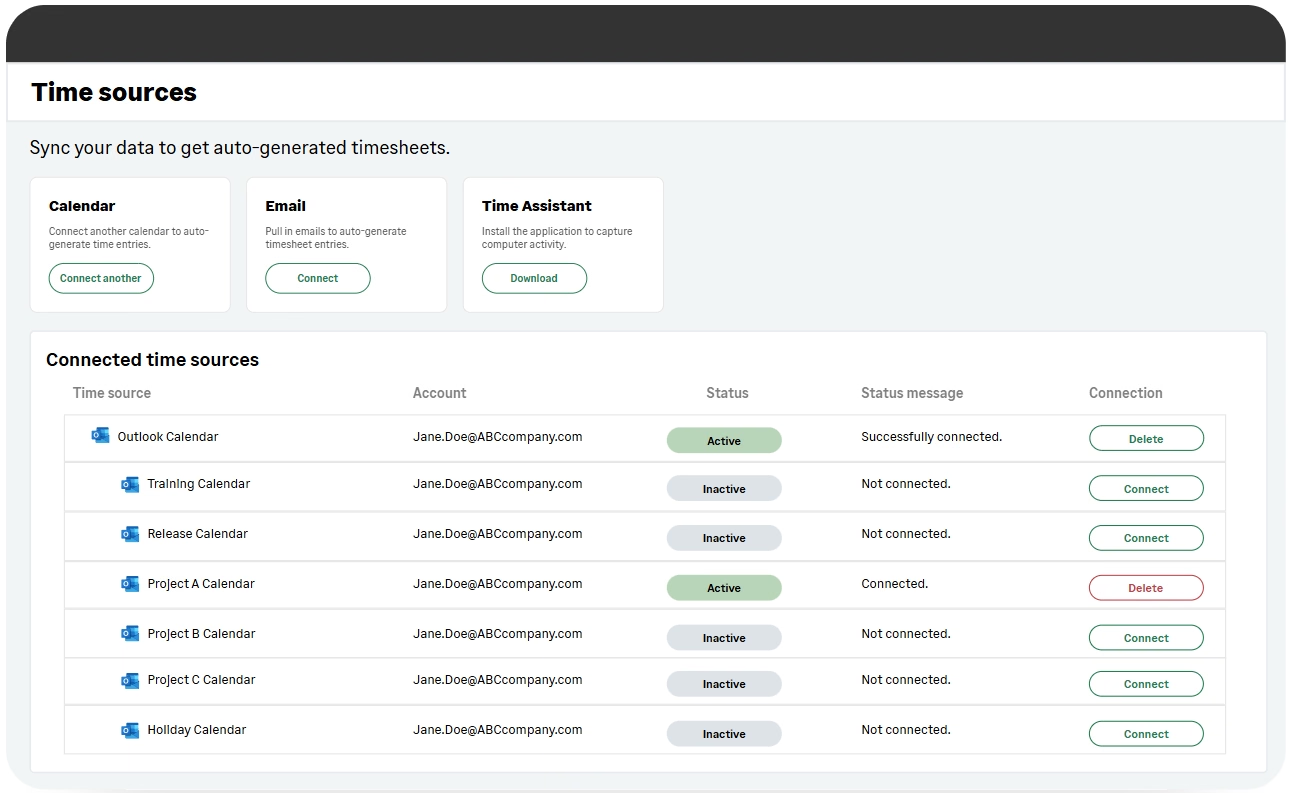
The agent connects to the places where work actually happens and keeps a record of each activity. Your team doesn’t need to start timers or change how they work, and entries stay accurate even when timesheets are submitted days later.
The agent can capture:
- Meetings from Microsoft Outlook and Google calendars
- Sent email from Microsoft Outlook, including the time spent writing it
- Active applications and documents on Windows and Mac computers
- Activity from up to three calendars and three email accounts per user
- Forgotten time outside scheduled hours, flagged so billable work gets invoiced
- Clock-in and clock-out times from the web or mobile app
Submit accurate time for billing, payroll, and grants
The agent suggests entries, but employees decide what goes on their timesheet. Once submitted, time flows directly into payroll, billing, and the general ledger, with checks that catch errors before they cause problems.
With the Intelligent Time Agent, your team can:
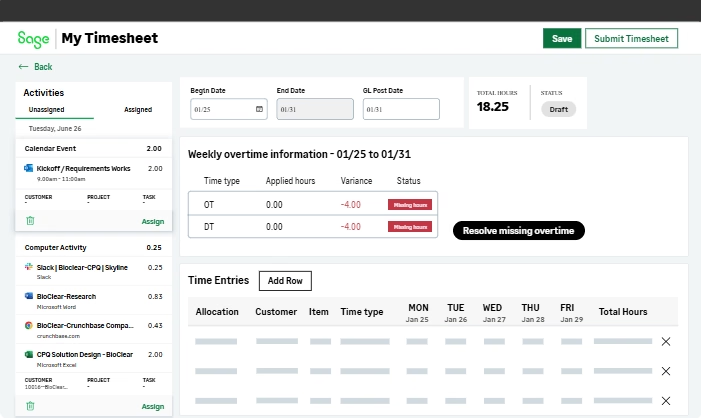
- Get suggested entries with the related client, project, or task
- Split time across projects, grants, programs, and departments with transaction templates
- Track overtime in real time, using rules you can set by location
- Catch errors and missing hours before timesheets reach payroll
- Approve or decline timesheets on the go with the mobile app
- Keep an audit trail for grant reporting and board requirements

Turn every working hour into accurate time records
We'll help you connect the right time sources, set up your projects, grants, and overtime rules, and roll Sage Intelligent Time out to your team. Let's talk about how it could fit your billing, payroll, and reporting process.
How it works
From workday activity to submitted timesheet
The agent fits into the way your team already works, turning everyday activity into time entries that are ready to review.
Connect your time sources
Each user links their calendar and email and installs the Time Assistant on their computer.
Work as usual
The agent records meetings, sent emails, and active applications in the background, without screenshots or keystroke tracking.
Review suggested entries
Captured activities appear as cards, each suggested with the related client, project, or task.
Adjust and submit
Users edit, add, or remove entries as needed, and built-in checks flag errors or missing hours before they submit.
Approve and bill
Managers approve timesheets on the web or mobile app, and the time flows straight into payroll, billing, and project accounting.
Compatibility & requirements
Getting started with the Intelligent Time Agent
The Intelligent Time Agent is built into Sage Intacct, available in all supported regions in English, and turned on through your Time configuration. Our Sage Intacct consultants can handle the setup and help your employees connect their time sources.
Here’s what we’ll help you get ready:
- Sage Intacct with time tracking set up for your projects and tasks
- Sage Intelligent Time turned on in your Time configuration
- Microsoft Outlook or Google calendars, and Microsoft Outlook email, for each user
- The Time Assistant installed on each user’s Windows or Mac computer
- Overtime rules and transaction templates for how time should be allocated
- Data retention policies for time and project data, set by your administrator
Gmail and server-based email aren’t currently supported as email sources, and time sources need to be connected from a computer rather than the mobile app.

Why partner with Rand Group?
Built around how your team bills
We start with how your organization tracks, bills, pays, and allocates time today. Then we set up projects, grants, overtime rules, and time sources so the agent’s suggestions line up with the way your team records its work.
A relationship that lasts
More than 1,200 organizations work with Rand Group, and many have relied on us for years. We stay involved after rollout to answer questions, fine-tune settings, and help you adopt new Sage Intacct features as they arrive.
Rollout support for every user
We support clients across the United States and Canada, helping each employee connect their calendar, email, and Time Assistant. Our Sage training also shows managers how to review and approve timesheets quickly.
Top-ranked Sage partner
Rand Group is proudly ranked among the top 1% of Sage partners in North America and recognized as the top Sage reseller by G2, an independent software review authority. Our team brings that experience to every Sage Intacct rollout, from setup to ongoing support.
Frequently Asked Questions (FAQs)
What is the Sage Intelligent Time Agent?
The Intelligent Time Agent is AI time tracking built into Sage Intacct. It builds timesheets from calendars, email, and computer activity, then suggests entries with the related client, project, or task. Approved time flows directly into payroll, billing, and project accounting. To see how it fits with Sage’s other AI tools, read our complete guide to Sage AI and AI agents in Sage Intacct.
What information does the agent capture?
From calendars, it captures meeting names, dates, and times. From sent email, it captures the subject, sender, recipients, and timestamps. On your computer, the Time Assistant records which applications are active, the window or tab name, and timestamps.
Does the agent read my emails or track my keystrokes?
No. The contents of your emails aren’t recorded, and the agent doesn’t take screenshots, track keystrokes, or collect location data. Only you can see your activity, you can turn any time source off at any time, and the agent is GDPR and CCPA compliant.
Does the agent submit timesheets on its own?
No. The agent only suggests entries. Each user reviews their timesheet, makes any changes, and submits it, and managers can then approve or decline it as usual.
Which calendar and email services does it work with?
The agent works with Microsoft Outlook and Google calendars, with up to three calendars per user. For email, it supports Microsoft Outlook, with up to three accounts per user. Gmail and server-based email aren’t currently supported.
Can we use the agent on mobile?
Yes. The Sage Intelligent Time and Expense app for iOS and Android lets users clock in and out, enter time, manage expense reports, and approve or decline timesheets. Time sources need to be connected from a computer.
Does the agent help with payroll and overtime?
Yes. The agent tracks overtime in real time using rules you can set by location, and it flags errors and missing hours before timesheets reach payroll. Because it runs inside Sage Intacct, approved time flows to payroll without manual re-entry.
Can we allocate time to grants and programs?
Yes. Transaction templates split time across programs, grants, projects, and departments automatically. You can track time by grant, project, or funding source, with an audit trail for compliance and board reporting.