
AP Automation Agent
Reduce manual invoice entry and keep accounts payable moving
Sage Intacct AP Automation Agent uses AI to capture supplier invoice details and match vendor records. It automatically assigns GL accounts and dimensions to prepare draft bills, reducing manual data entry. The agent also detects potential duplicates and supports purchase order and three-way matching. These capabilities help accounting teams identify discrepancies earlier, reduce processing delays, and maintain control over accounts payable.
Business challenge
Manual invoice processing slows down accounts payable
Every supplier invoice must be entered accurately, checked against supporting records, and approved before payment. As invoice volumes grow, manual entry and email follow-up take more time, causing backlogs and delaying approvals.
Invoice processing takes time away from other priorities
Entering vendor details, amounts, dates, and line items adds hours of repetitive work to the accounting workload and increases the risk of mistakes.

Billing discrepancies require investigation
Duplicate submissions and charges that do not match purchase orders require additional checks to confirm what the business actually owes.

Unclear ownership delays payments
When approval responsibilities are unclear, invoices can sit unattended, making it harder to pay suppliers on time and maintain reliable cash flow forecasts.
Features
Give accounts payable a faster starting point
Sage Intacct AP Automation Agent captures invoice details and creates draft bills, reducing manual entry so accountants can check accuracy and address inconsistencies.
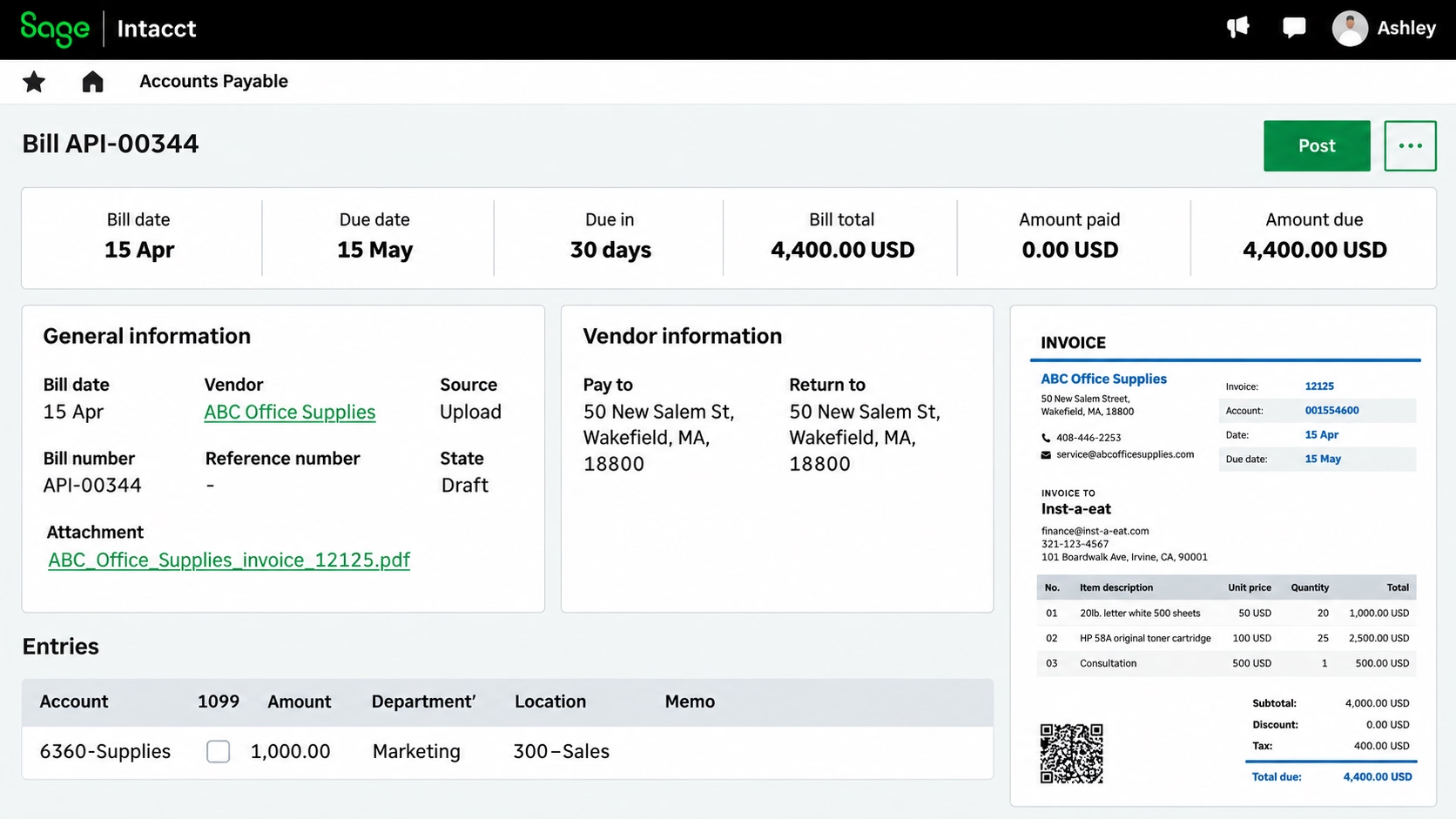
Capture invoice details and automate accounting codes
Sage Intacct AP Automation Agent reduces manual data entry by extracting information from supplier invoices and preparing draft bills. AI-assisted vendor matching and automatic accounting codes help teams process invoices while keeping the information available for verification.
The process includes:
-
Extracting vendor information, amounts, dates, and line items from uploaded or emailed invoices.
-
Matching supplier details to existing vendor records.
-
Automatically applying general ledger (GL) account and dimension coding.
-
Preparing draft bills for accountants to verify and correct before approval.
Identify discrepancies and strengthen invoice controls
Sage Intacct AP Automation Agent helps accounting teams detect potential duplicates and compare invoices with purchasing records. These capabilities make it easier to investigate differences before payment while maintaining established approval procedures.
This includes:
-
Flagging potential duplicate invoices for investigation.
-
Matching invoices to purchase orders when Purchasing is configured.
-
Supporting three-way matching to compare invoices, purchase orders, and receipts.
-
Identifying differences in prices, quantities, and totals that require attention.
-
Processing bills through configured approval workflows, with access to supporting records and approval history.
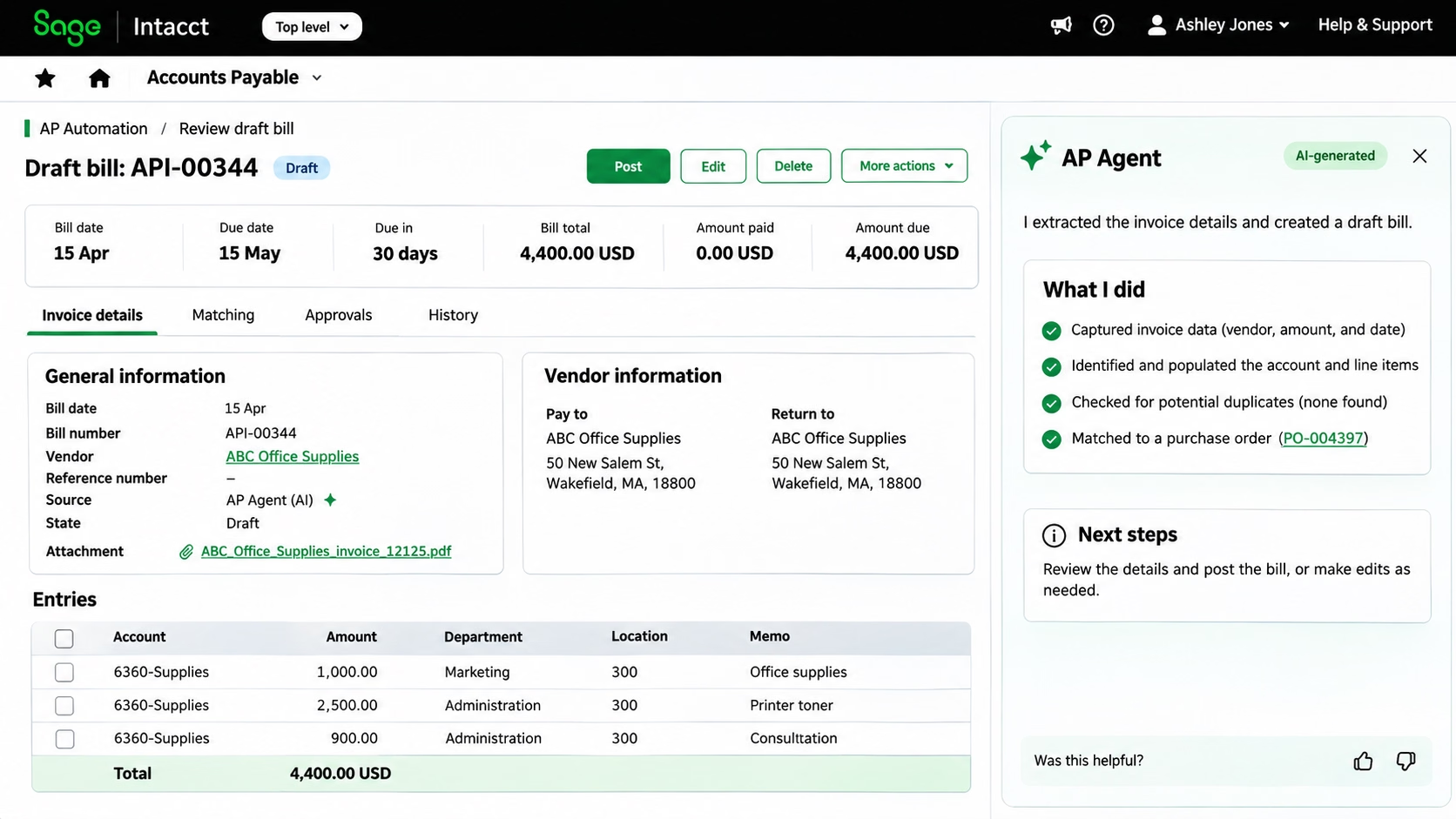

Make invoice processing faster and easier to manage
Reduce manual entry while maintaining essential checks and approvals. Rand Group can assess the current accounts payable process and help configure Sage Intacct AP Automation Agent to support it.
How it works
How Sage Intacct AP Automation Agent supports the invoice-to-payment process
Explore five steps that combine automated capture, accuracy checks, and configured approvals to reduce repetitive work and keep supplier bills moving.
Submit the invoice
Upload or email a supplier invoice for processing through Sage Intacct AP Automation.
Capture details and prepare a draft
The agent extracts invoice information, matches vendor details, and automatically applies GL account and dimension coding to prepare a draft bill for verification.
Verify the information
Accountants check the draft and investigate potential duplicates or discrepancies. When three-way matching is configured, Sage Intacct compares invoice details with purchase orders and receipts to identify differences that need attention.
Complete the approval process
Submit the bill through the configured workflow so authorized users can provide the required sign-offs.
Schedule payment and follow up
Manage approved bills through Sage Intacct Accounts Payable and the applicable payment services.
Compatibility & requirements
Prepare Sage Intacct for AP Automation Agent
Sage Intacct AP Automation Agent operates within AP Automation. Rand Group can help confirm availability and identify the subscriptions, access rights, and configuration needed to support the intended workflow.
Before rollout, confirm the following are in place:
- An active Sage Intacct subscription with the appropriate AP Automation access and regional availability.
- Accurate vendor records and an established process for submitting supplier invoices by upload or email.
- User access rights to verify draft bills and complete the relevant accounts payable activities.
- Configured approval rules and the required Purchasing functionality if purchase order matching is needed.
- Appropriate payment services and authorization controls for paying approved bills.

Why partner with Rand Group?
Start with the right priorities
We assess invoice volumes, recurring discrepancies, and approval delays to identify where automation could save time and reduce manual work.
Configure workflows around internal controls
Our consultants help align Sage Intacct settings with established procedures and test the workflow using realistic business scenarios.
Get local expertise and ongoing support
With offices across the United States and Canada, our consultants provide support backed by Sage Intacct knowledge and an understanding of accounting processes.
Sage Intacct expertise grounded in accounting processes
We combine Sage Intacct expertise with an understanding of how accounting teams receive, verify, approve, and pay supplier invoices. We help connect the agent’s capabilities with practical improvements to daily AP work.
Frequently Asked Questions (FAQs)
What is Sage Intacct AP Automation Agent?
Sage Intacct AP Automation Agent uses AI to automate routine accounts payable tasks, including invoice capture, vendor matching, GL account and dimension coding, and draft bill preparation. It also supports duplicate detection, purchase order matching, and three-way matching, while accountants remain responsible for verifying information and completing required approvals.
How does AP Automation Agent fit into Sage Intacct AP Automation?
The agent captures invoice details and prepares draft bills. Sage Intacct’s configured workflows then guide those bills through approval and payment, with reporting and controls to track each stage.
How are invoices submitted?
Supplier invoices can be uploaded or emailed for processing. The agent extracts the details and prepares a draft bill for verification.
Do accountants still need to check draft bills?
Yes. Accountants verify captured information, correct errors, investigate discrepancies, and follow the organization’s approval requirements before bills proceed to payment.
Can this Agent match invoices to purchase orders and receipts?
Yes. Sage Intacct AP Automation supports purchase order and three-way matching when the required purchasing functionality and records are available. Three-way matching compares supplier invoices with purchase orders and receipts, checking prices, quantities, and totals. The system flags discrepancies for investigation before payment.
Does the agent automatically pay supplier invoices?
The agent’s invoice-processing capabilities do not replace payment authorization. Approved bills are paid through the configured Sage Intacct AP process and applicable payment services.
How can Rand Group help implement AP Automation Agent?
Rand Group can assess the current AP process, confirm requirements, configure relevant capabilities, and test the workflow. We also provide training and ongoing support to help accountants use the agent and handle exceptions consistently.