Sage 100 year-end processing best practices for distribution modules

Closing the fiscal year in Sage 100 doesn’t have to be complicated. With the right approach, your team can complete year-end processing efficiently while keeping your distribution modules fully aligned with the General Ledger (GL). Sage 100 is designed to streamline workflows, maintain accurate financials, and give organizations full visibility into operations—so year-end becomes an opportunity to start the new year with confidence.
Year-end processing in Sage 100 is a structured way to ensure your data is clean, reconciled, and ready for reporting. By preparing modules, reconciling balances, and archiving historical data, you reduce errors, accelerate your close, and strengthen internal controls. This guide provides actionable best practices for each module, highlights key reports, and shares tips to avoid common pitfalls—helping your team close the year smoothly, confidently, and with complete visibility into your financials.
Why year-end processing matters in Sage 100
Year-end processing is critical housekeeping for your financial data. Without proper procedures, organizations risk discrepancies, audit issues, and delays in starting the new year. Processing the distribution modules correctly ensures:
- Locking prior periods to prevent accidental back-posting
- Clearing and archiving outdated orders to improve system performance
- Updating period and year markers for accurate reporting
- Aligning sub-ledgers with the GL to reduce reconciliation issues
Each module in Sage 100 plays a specific role: Purchase Order governs vendor orders and invoices, Sales Order manages customer orders and deposits, and Inventory tracks quantities, costs, and valuation. Coordinating year-end processing across all modules ensures that the flow of data is accurate, and the GL reflects the true state of your business operations.
Beyond financial accuracy, proper module processing improves operational efficiency. Clearing old or completed orders from the modules prevents system slowdowns and reduces the time spent searching for relevant transactions. Accurate module reconciliation also makes audits faster, with fewer questions from auditors and less manual intervention from your finance team.
In short, year-end processing is not just an accounting exercise—it’s a strategic step in keeping your Sage 100 environment clean, efficient, and reliable.
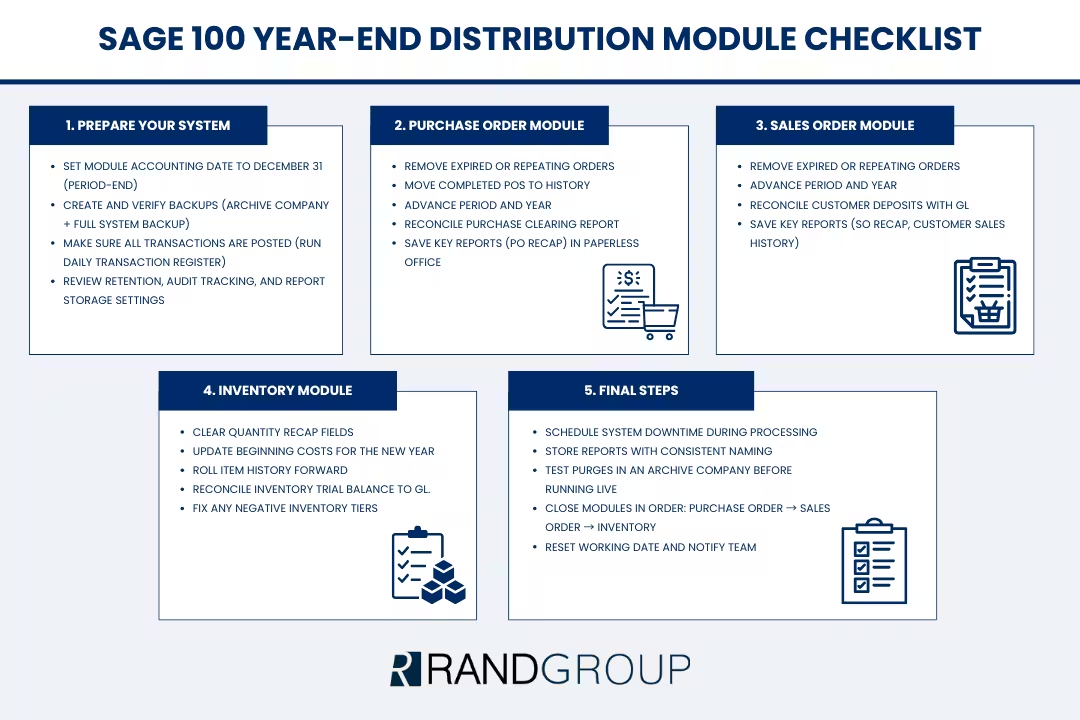
Preparing Sage 100 for year-end processing
Proper preparation is the foundation of a smooth year-end close in Sage 100. By taking a few deliberate steps—setting module dates, creating reliable backups, and reviewing system configurations—you can prevent common errors and save significant time during the close. Preparation ensures that each of the distribution modules operates accurately, all transactions are fully posted, and your financial data stays aligned with the General Ledger.
Investing time upfront in preparation makes year-end processing predictable and efficient. Rather than reacting to errors or discrepancies, your team can work confidently, knowing the distribution modules are ready for module-specific processing. This proactive approach reduces manual adjustments, keeps reports accurate, and helps finance and operations teams complete the year-end close with minimal disruption.
Set the module accounting date
Before starting year-end routines, set the accounting date in each module to the period-end being closed, typically December 31. Many Sage 100 processes reference this date for cleanup, purges, and roll-forward operations. If you process year-end early in January, leave the date at 12/31 until all routines are complete, then reset to the current working date.
Create and validate a backup
Backups are your safety net. Without a verified backup, mistakes or unexpected issues could require hours of manual correction. Best practices include:
- Creating an archive company copy (Library Master → Company Maintenance) to test routines safely
- Performing a full file-level backup of MAS90 directories and SQL databases for Sage 100 Premium
- Validating the backup by opening the archive company and checking trial balances, inventory totals, and summary reports
A well-tested backup not only provides security but also enables your team to practice processing in a safe environment. This practice can help identify potential issues before impacting live data.
Confirm all transactions are fully posted
Unposted transactions are the leading cause of discrepancies between the modules and the GL. To prevent this:
- Run the Daily Transaction Register (DTR) in each module
- Verify that the “file is empty” message appears, indicating all transactions have posted successfully
- Investigate any partially posted transactions before continuing
Ignoring unposted transactions can cause reconciliation headaches, forcing your team to manually trace and adjust mismatches between modules and the GL.
Review key setup and retention options
The final step before processing modules is reviewing retention, audit tracking, and report storage settings:
- Retention: Determine how many years of history to keep and how long completed orders remain in the system
- Audit tracking: Decide which changes to track and at what level
- Paperless Office: Confirm reports are stored in the correct repository with proper naming conventions and company codes
A thoughtful review now ensures that your modules’ historical data is preserved for audits while keeping the system efficient and manageable.
Purchase Order module year-end considerations
The Purchase Order module is a key component of the distribution modules and an essential starting point for year-end processing. Because it feeds both the Inventory and Accounts Payable modules, ensuring the Purchase Order data is accurate prevents discrepancies from cascading downstream. Taking the time to reconcile and clean up the Purchase Order module before closing sets the stage for a smooth, efficient year-end close across all distribution modules.
Proper preparation in the Purchase Order module ensures that vendor orders, receipts, and invoices are fully accounted for, aligning with the General Ledger and reducing manual adjustments. By addressing issues early, your team can complete the year-end close confidently, knowing the distribution modules reflect accurate, reliable data that supports reporting and operational planning.
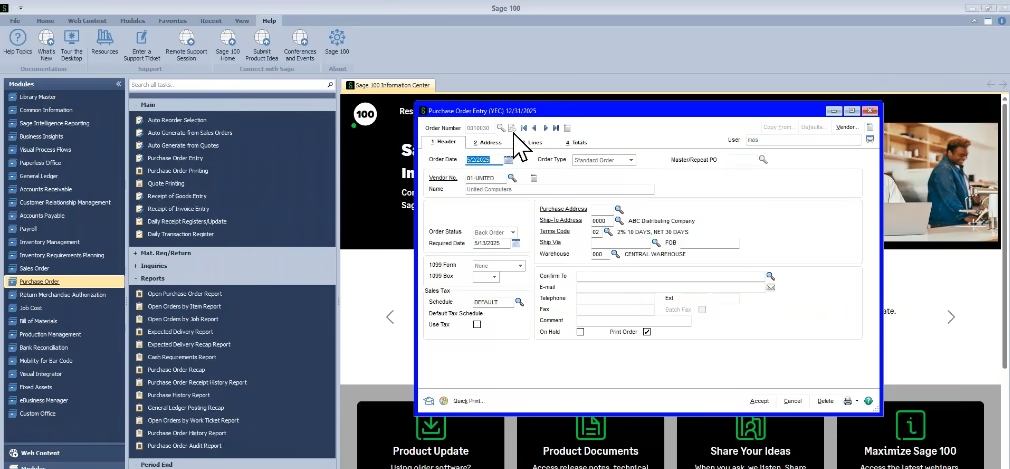
Featured Webinar:
Year-end processing: Distribution modules
Get your distribution operations year-end ready with Rand Group’s Sage 100 specialists. This on-demand webinar covers closing Inventory, Sales, and Purchase Order modules, reconciling data, running reports, and optimizing processes for accurate results and stronger insights into 2025.

What year-end processing does in the Purchase Order module
- Removes expired master and repeating orders
- Moves completed POs to history based on retention settings
- Advances the module period and year
- Optionally purges PO recap reports
Reconciling the Purchase Clearing Report
The Purchase Clearing Report highlights items received but not invoiced, or invoiced but not received, and helps reconcile the module totals to the GL clearing accounts. Common reconciliation issues include:
- Pending postings in the DTR
- AP invoices entered outside the PO module
- Manual journal entries affecting clearing accounts
Reports to archive for the Purchase Order module
- PO Recap Report: Provides a snapshot of open and completed orders
- Archiving in Paperless Office ensures audit readiness and trend analysis
Closing the Purchase Order module carefully ensures that both downstream Inventory and Accounts Payable modules reflect accurate transactions, reducing reconciliation issues and audit questions.
Sales Order module year-end considerations
The Sales Order module is an important part of the distribution modules and typically closes more quickly than Purchase Order, but careful attention to deposits is essential to maintain accurate General Ledger balances. Reviewing deposits and ensuring they are properly applied helps prevent discrepancies and keeps your financial data aligned across all distribution modules.
Taking a structured approach to the Sales Order module ensures that customer orders, payments, and open deposits are fully reconciled before year-end. This preparation not only reduces manual adjustments but also gives your team confidence that the distribution modules are synchronized and ready for reporting, audit, and operational planning.

Year-end processing in the Sales Order module
- Removes expired master and repeating orders
- Advances the module period and year
- Optionally purges recap reports
Reconciling customer deposits
Deposits recorded in the module should align with GL deposit accounts. Best practices include:
- Exporting deposit data by payment type (Check, ACH, etc.)
- Summarizing totals and comparing to GL balances
- Investigating discrepancies, such as invoices without applied deposits or unlinked cash receipts
Reports to archive for the Sales Order module
- Sales Order Recap
- Customer Sales History
Properly closing the Sales Order module ensures that customer balances, deposits, and revenue recognition are accurate, preventing surprises during audits or financial reporting.

Unlock the full potential of Sage 100
Ready to unlock the full potential of Sage 100 for your organization? Rand Group can help you implement, configure, and optimize your system—so your team can close the year faster, maintain accurate financials, and operate more efficiently.
Inventory module year-end considerations
The Inventory module is a central part of the distribution modules and often requires the most careful attention during year-end processing. Because inventory directly impacts the balance sheet, cost of goods sold, and operational planning, accurate reconciliation is critical to ensure financial statements reflect the true state of your business.
By thoroughly reviewing and reconciling the Inventory module before closing, your team can verify item quantities, valuations, and costs, while ensuring all transactions are properly aligned with the General Ledger. Taking this proactive approach helps prevent downstream errors, reduces manual adjustments, and ensures the distribution modules provide reliable, audit-ready data for management and operational decision-making.

Year-end processing in the Inventory module
- Clears quantity recap fields (received, sold, adjusted, issued)
- Updates beginning average costs for the new year
- Rolls item history forward
- Adjusts default transaction inquiry ranges based on configuration
Reconciling inventory
- Run the Inventory Trial Balance (ITB) as of December 31
- Reconcile totals to GL accounts by product line and warehouse
- Use Stock Status and Inventory Valuation reports to verify quantities and cost basis
Addressing negative inventory tiers
- Run the Negative Tier Adjustment Register to correct over-distributed items
- Review remaining negative tiers and adjust quantities using physical counts or manual corrections
- Apply any standard cost or valuation updates before year-end to ensure accurate GL posting
Accurate Inventory module processing ensures the organization has the right quantities on hand, correct valuation, and financial statements that reflect reality.
Best practices for a smooth Sage 100 year-end close
- Schedule system downtime during processing to prevent file locks and errors
- Store period-end reports in Paperless Office with consistent naming conventions
- Test purge utilities in an archive company before running live
- Review audit tracking and retention annually to balance compliance with performance
- Close modules in order: Purchase Order → Sales Order → Inventory
These steps not only improve accuracy but also reduce stress on your team by making the process predictable and repeatable year after year.
A practical Sage 100 year-end playbook
- Set the module accounting date to the period-end
- Create and validate backups
- Confirm all transactions are posted
- Reconcile Purchase Order, Sales Order deposits, and Inventory balances
- Archive key reports in Paperless Office
- Run year-end processing in the correct order
- Reset the working date and communicate system readiness
Following this structured playbook allows your team to close the modules confidently, with minimal risk of errors and complete visibility for auditors and management.
Next steps
Year-end processing in Sage 100’s distribution modules is a crucial step for maintaining clean financials, accurate reporting, and operational efficiency. Organizations that follow best practices benefit from faster closes, fewer reconciliation errors, and a system that supports growth rather than creating headaches.
If your team is looking to streamline year-end, reduce reconciliation issues, or ensure your distribution modules are optimized for long-term efficiency, Rand Group can help. Our Sage 100 consultants provide expert guidance, workflow reviews, and tailored implementation strategies designed to maximize the value of your system.
Take the next step toward a smoother, more reliable year-end close. Contact Rand Group today to discuss your Sage 100 environment and learn how our experts can help your team close the year faster, with cleaner data, fewer surprises, and a more efficient, connected system.



Subscribe to our Insights