
Sage Intacct reporting tools: Standard reports, dashboards, and custom views

Growing businesses often struggle to manage complex financial operations, particularly when multiple entities are involved. Manual spreadsheets and outdated systems slow decision-making and hide critical insights. Sage Intacct addresses this with powerful, user-friendly reporting tools—from standard reports to customizable dashboards and the Interactive Custom Report Writer. Together, these tools enable teams to monitor cash flow and track critical metrics. As a result, they can make timely decisions to support growth and improve operational efficiency. This guide is designed for finance professionals, business leaders, and managers who want to enhance financial visibility. Moreover, it helps teams make smarter decisions through Sage Intacct’s advanced reporting tools.
What makes Sage Intacct reporting tools different
Sage Intacct’s reporting capabilities are built directly into the system, ensuring accurate, up-to-date financial and operational data. Users can access real-time reports through role-based dashboards, so stakeholders see the critical metrics they need. This eliminates unnecessary information and helps teams make faster, informed decisions. Key benefits include:
- Immediate access to both financial and operational data
- Multi-dimensional reporting across departments, projects, and entities
- Role-based dashboards for secure, user-specific views
- Integrated dashboards and reporting for consistent insights
- AI-assisted analysis to flag trends and spot exceptions
Finance teams track revenue, expenses, and cash flow. Meanwhile, executives monitor overall financial health, and managers combine data to make faster, smarter decisions—all while reducing reliance on spreadsheets and boosting cross-team collaboration.


Make Sage Intacct reporting work for your business
Rand Group helps organizations align standard reports, dashboards, custom views, and AI insights with real business needs. We’ll help you define requirements, configure reporting, and identify quick wins.
Accounting dimensions: The foundation of better reporting
Dimensions add context and granularity to reports, enhancing financial analysis. In Sage Intacct, dimensions are tags used to categorize transactions, allowing for flexible data analysis without the need for complex account codes. Think of dimensions like hashtags for financial data. In other words, they make it easy to slice and dice by location, department, or customer without bloating your chart of accounts. Transactions can be tagged by project, customer, vendor, item, or custom fields. This reduces chart-of-accounts complexity and enables self-service reporting. As a result, teams can create custom reports without IT support and gain quick insights for smarter decision-making. With dimensions, teams can:
- Slice A/R aging by customer or region
- Review A/P aging by vendor or department
- Analyze expenses by project, department, or location
- Track project-level margins and profitability across multiple tags
- Segment revenue by customer, product, or region
Sage Intacct standard, out-of-the-box reports
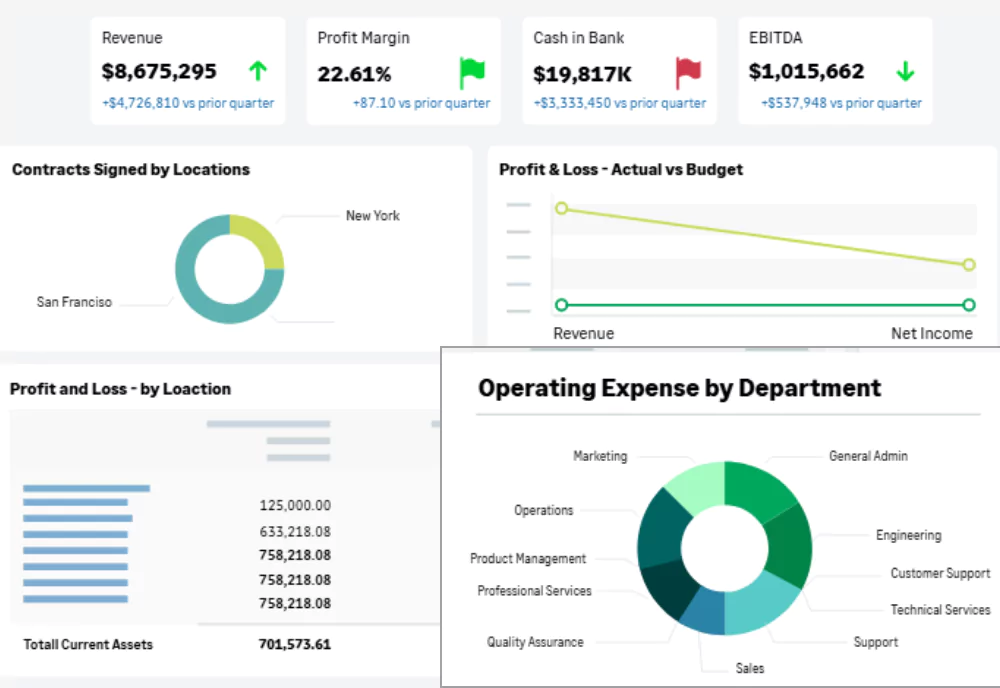
Sage Intacct provides over 150 built-in financial reports, including balance sheets, income statements, A/R and A/P aging, and budget vs. actual comparisons. These reports deliver clear insights for each reporting period, maintaining an audit trail for compliance. They also reduce manual consolidation and help teams quickly access critical financial data for faster, more accurate decision-making. While standard reports are prebuilt, they are also highly configurable. Users can tailor reports using filters, date ranges, and dimensions without creating reports from scratch. This flexibility allows teams to answer common financial questions quickly while preserving consistency and accuracy. Examples of standard reports:
- Generate monthly income statements filtered by department or entity
- Produce consolidated balance sheets across multiple entities
- Review budget vs. actual reports by department, project, or cost center
- Analyze A/R aging by customer to improve collections
- Monitor cash flow statements to understand liquidity and forecast short-term needs

Dashboards: Real-time insights by role
Sage Intacct dashboards offer interactive, real-time views of financial and operational data. They are fully customizable and role-based, allowing teams to spot trends and track key metrics. This helps users make data-driven decisions quickly. By tailoring dashboards to industry and role-specific needs, organizations gain real-time visibility. Dashboards also reduce reliance on spreadsheets. Global dashboards let teams compare performance across locations, entities, and currencies. Drill-down features link metrics directly to reports and custom views, helping users focus on the data that matters most. Role-based examples:
- CFO and executives: Monitor cash flow, revenue trends, balance sheets, and key metrics across entities
- Controllers: Track close status, accounts receivable, budget variances, and audit exceptions
- Department managers: Monitor spend vs. budget, financial KPIs, and headcount metrics
- Project managers: Track project costs, margins, and milestones

Sage Intacct dashboards by industry
Sage Intacct dashboards can be tailored to industry-specific needs, providing finance and operational teams with the insights that matter most. By focusing on metrics relevant to your sector, these dashboards enable faster, data-driven decisions and reduce reliance on spreadsheets. They improve operational efficiency and support smarter, real-time decision-making. Global dashboards also allow organizations to compare performance across locations, entities, and currencies. Moreover, drill-down features link metrics directly to reports and custom views, helping teams focus on actionable data. Industry-specific examples:
- Professional services: Track project profitability, billable hours, unbilled revenue, and client engagement metrics
- Healthcare: Monitor revenue cycle performance, departmental costs, patient billing, and compliance metrics
- Construction and real estate: Monitor project budgets, subcontractor costs, milestone completions, and cash flow
- Nonprofit organizations: Analyze program expenses, grants, and donor contributions
- Family offices: Monitor investment performance, cash flow, and multi-entity reporting

Custom views: Operational and transactional reporting
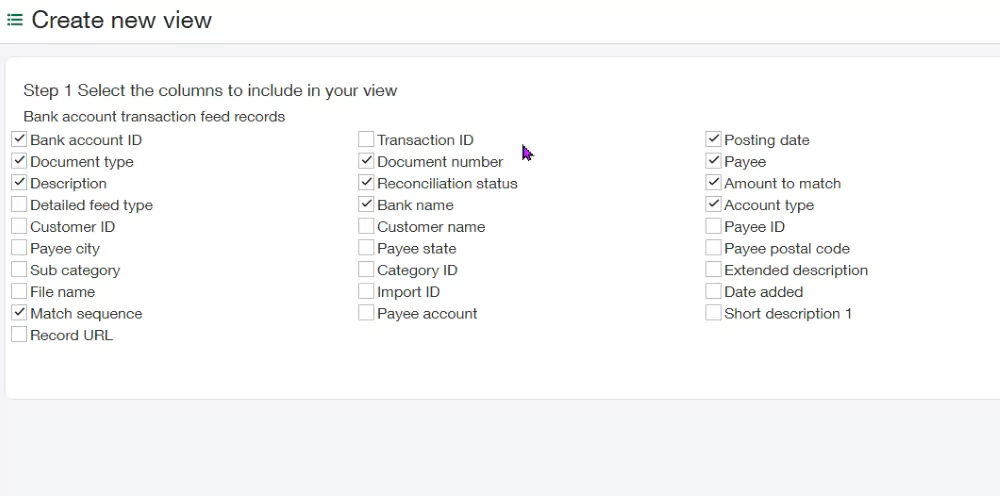
Custom views in Sage Intacct provide transaction-level insight into operational and financial data. They give teams the flexibility to analyze the information they need. These views complement standard reports and dashboards while supporting self-service reporting. As a result, teams can make faster decisions without relying on spreadsheets or IT support. Custom views also integrate seamlessly with dashboards and standard reports. They reduce reliance on spreadsheets and provide real-time insights, helping teams act quickly and focus on what matters most. Examples of custom views in action:
- Finance: Reviewing open A/R by customer
- Project managers: Tracking detailed project costs and margins
- Operations: Investigating anomalies using dashboards
- Procurement: Monitoring vendor spend by category
- Sales: Tracking unbilled revenue by project or client
Advanced Sage Intacct reporting tools: Interactive Custom Report Writer
The Interactive Custom Report Writer in Sage Intacct allows teams to create flexible, user-defined reports tailored to their business needs. Users can include calculated columns, pivot tables, conditional logic, and math functions. This enables advanced analytics while maintaining a full audit trail for compliance and strategic decision-making. By integrating with standard reports, dashboards, and custom views, it reduces reliance on spreadsheets and external tools. Teams gain real-time, actionable insights that support faster decision-making and strategic operational improvements. Use cases:
- Generate custom revenue reports by customer, product, or region
- Conduct vendor spend analysis with invoice-level drill-down
- Produce audit-ready financial reports without exporting data
- Analyze project profitability across multiple dimensions
- Track detailed expense allocations for cost control

AI-powered insights
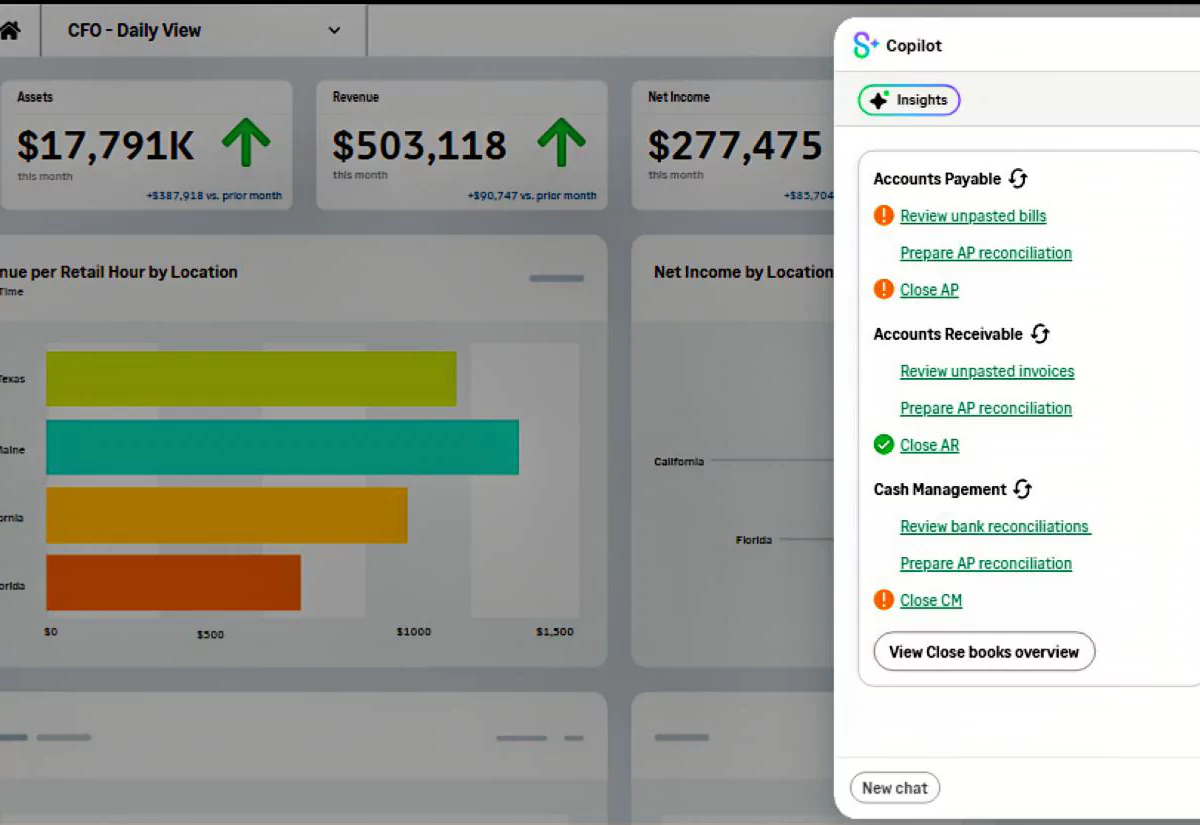
AI in Sage Intacct, powered by Sage Copilot, automatically flags trends, highlights anomalies, and surfaces critical metrics across financial and operational data. This reduces manual analysis and allows teams to focus on high-impact decisions. By working directly within dashboards, reports, and custom views, Sage Copilot delivers predictive insights that help teams anticipate challenges, act on opportunities faster, and make more informed decisions. This provides real-time insights, improves operational efficiency, and enhances financial visibility. Use cases:
- Flag unusual transactions or trends for faster investigation
- Highlight key metrics and anomalies within dashboards and reports
- Identify potential revenue or cost risks before they escalate
- Detect workflow bottlenecks and operational inefficiencies
- Support predictive insights to anticipate challenges and opportunities
Best practices for maximizing Sage Intacct reporting tools
Following best practices ensures organizations get the most from Sage Intacct. Combining smart design, automation, and real-time insights allows teams to cut manual work and boost collaboration. This also enables faster, smarter decisions while improving accuracy and efficiency. Key best practices:
- Use clear names and consistent formatting for reports and dashboards
- Review and update reports regularly to reflect changing business needs
- Combine dimensions, dashboards, and AI insights for real-time reporting
- Leverage the advanced capabilities of the Interactive Custom Report Writer
- Automate repetitive tasks to free finance teams for strategic decision-making
Real-world results from Sage Intacct reporting
Organizations using Sage Intacct dashboards and reporting tools often see measurable efficiency gains across finance operations. For example, Club Greenwood, a luxury athletic club in Denver, used real-time dashboards and reporting to streamline workflows and improve visibility across key processes. These improvements reveal how centralized reporting and real-time visibility can reduce manual effort while supporting faster, more accurate decision-making. As a result:
- Accounts payable processing was reduced by 30%
- Bank reconciliation time was cut by 50%
- Month-end close was accelerated by up to 30%
Scaling reporting across multiple entities, currencies, and locations
Sage Intacct supports multi-entity, multi-currency, and global reporting, making it easy to consolidate financial data across an organization. Real-time reports and automated intercompany eliminations allow leaders to monitor performance across locations and subsidiaries. Ultimately, this ensures consistent decision-making, reduces manual work, and improves operational efficiency at every level. Use cases:
- Generate consolidated balance sheets with automatic intercompany eliminations
- View global dashboards by entity, location, or currency
- Compare subsidiaries to identify growth opportunities
- Monitor cross-entity cash flow to optimize working capital
- Analyze intercompany transactions for faster reconciliation
How Sage Intacct reporting tools work together
Conclusion
Sage Intacct reporting tools—standard reports, dashboards, custom views, interactive custom reports, and AI-assisted insights—enable organizations to move from spreadsheets to real-time, data-driven intelligence. With dimensions, dashboards, AI insights, and best practices, teams can reduce manual work, improve collaboration, and make smarter, faster decisions. Sage Intacct provides the flexibility and insights needed to scale confidently and grow your business. See Sage Intacct reporting in action. Contact us today to unlock real-time insights, streamline operations, and drive growth with powerful dashboards and custom reports tailored to your business.



Subscribe to our Insights
