
Close Agent
Keep month-end moving with a clearer view of the work ahead
Spend less time chasing updates and more time completing the close. Sage Intacct Close Agent helps finance teams track close progress, identify unfinished work, and go directly to tasks that need attention. Working within Sage Intacct Close Automation, it guides users through close activities and works alongside tools for assigning tasks and investigating discrepancies.
Business challenge
Limited visibility into unfinished tasks can delay the financial close
Closing the books requires coordination across people, applications, and entities. When updates are scattered and responsibilities are unclear, accountants spend valuable time identifying unfinished tasks instead of completing them.

Too much time spent tracking progress
Checking separate screens, spreadsheets, and messages makes it harder to get a clear, up-to-date view of close progress.

Unclear ownership and timing
Without clear task assignments and deadlines, unfinished work can hold up the next steps and delay the financial close.

Discrepancies discovered late
Subledger differences and unexplained variances can require additional investigation just as reporting deadlines approach.
Features
Bring close progress and next steps into focus
Close Agent provides guidance within Sage Intacct’s broader Close Automation offering. Together, the available tools help accountants see which tasks remain, coordinate recurring activities, and investigate discrepancies.
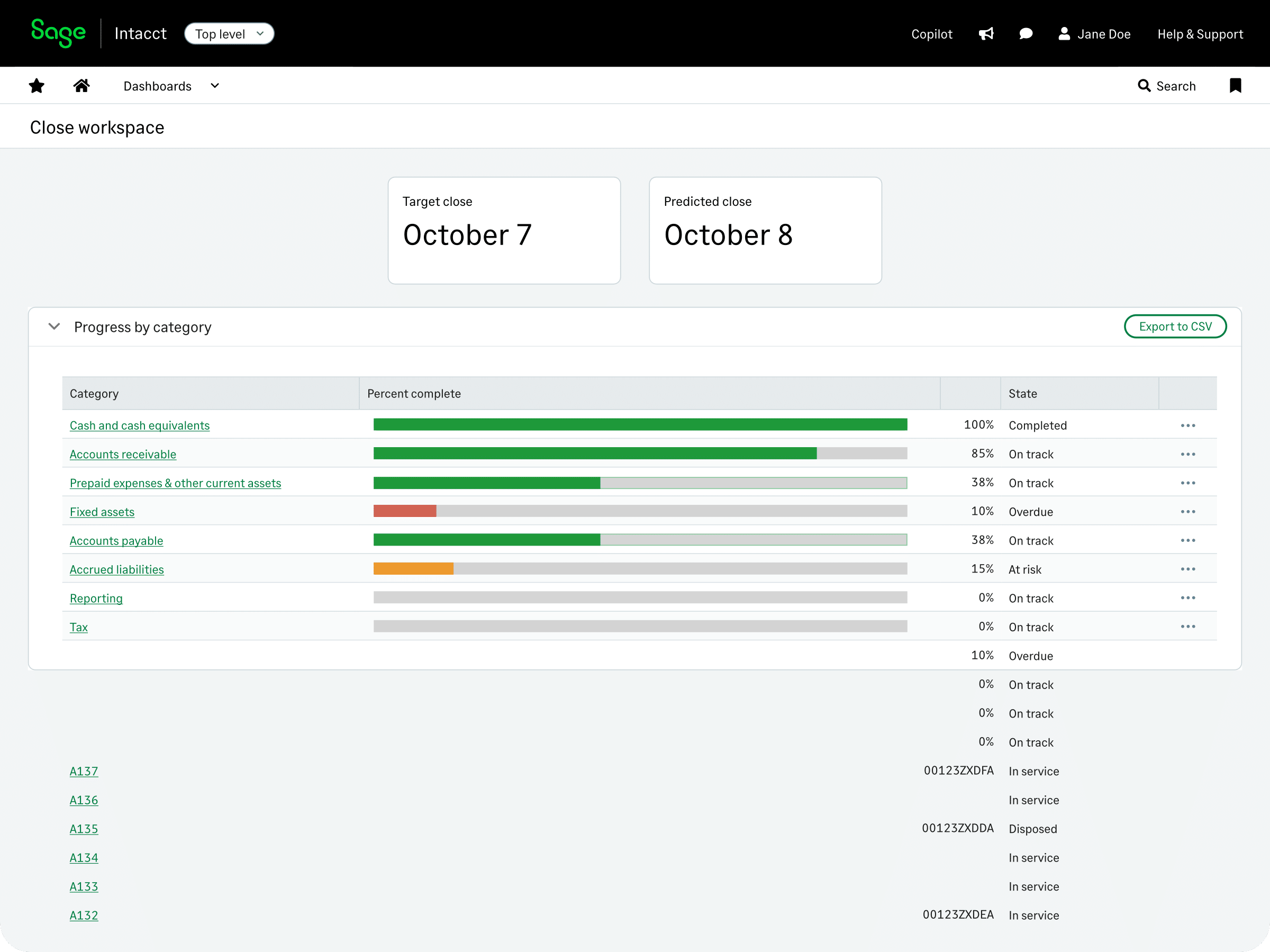
See what needs attention and go directly to the task
Close Assistant, the guided experience described in Sage’s help, displays the close status of key accounting applications in the Copilot panel. Select a reporting period to see available tasks and follow links to the related pages.
Accountants can:
- Check close status for Accounts Payable, Accounts Receivable, Cash Management, and General Ledger.
- Identify unposted invoices and journal entries that need attention.
- Navigate to bank reconciliation, A/P and A/R reconciliation, or variance analysis activities.
- Open the appropriate application closing page when the required work is complete.
Coordinate close tasks and investigate discrepancies
Use the wider Close Automation tools to organize responsibilities and investigate discrepancies.
With the relevant tools enabled, teams can:
- Standardize recurring work with Close Workspace templates, assigned owners, dependencies, and target dates.
- Compare A/P and A/R balances with the general ledger using Subledger Reconciliation Assistant, then use supporting reports and guidance to investigate any differences.
- Investigate budget and prior-period variances through Variance Analysis, using account drilldowns and AI-generated descriptions to support analysis.
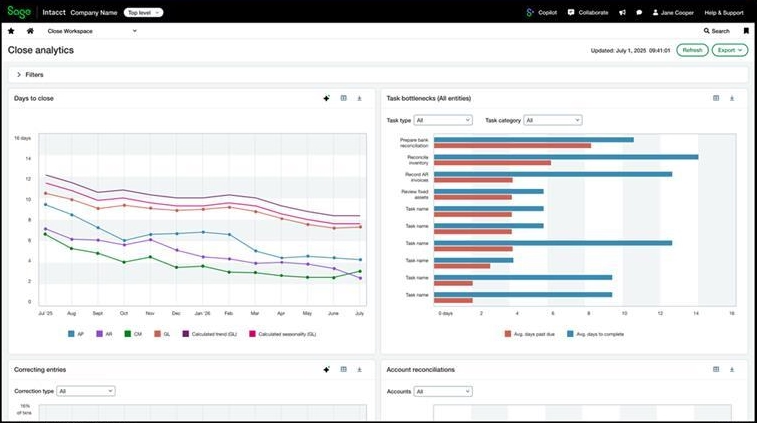

Make the next financial close smoother and more coordinated
Give your team a clearer view of progress, defined task ownership, and direct links to month-end activities. Rand Group can review your Sage Intacct setup and help identify where Close Agent and the wider Close Automation tools can reduce time spent coordinating the close.
How it works
Five practical steps to keep the financial close on time
Use Close Assistant to see what needs attention next, then work through the relevant accounting pages and supporting tools.
Choose the reporting period
Open Sage Copilot, run Close Assistant, and select the period being closed.
Check application status
See which applications are closed and where incomplete activities remain. In a multi-entity organization, the panel indicates when an application has not been closed across all entities.
Open outstanding work
Follow links to the relevant invoices, journal entries, reconciliation activities, or closing pages.
Investigate differences
When these tools are configured, use Subledger Reconciliation Assistant to investigate reconciliation differences and Variance Analysis to review budget and prior-period variances.
Complete activities and confirm progress
Finish the required work, use the relevant closing pages, and refresh the status. Track assigned responsibilities through Close Workspace when enabled.
Compatibility & requirements
What is needed to use Sage Intacct Close Agent
To use Close Assistant, you need a Close Automation subscription and the appropriate setup.
Before rollout, confirm the following requirements are in place:
- Subscription to Sage Intacct Close Automation, with Close Assistant enabled and Close Workspace configured if shared checklists are needed.
- Business-user access with Close Assistant: Run permission and the authorizations required for related accounting activities.
- Enhanced lists enabled for the Close Assistant features that require them.
- Relevant subscriptions and permissions for General Ledger, Accounts Payable, Accounts Receivable, and other applications involved in the close.
- Appropriate entity access, reporting periods, and configuration for reconciliation and variance analysis, including entity groups with a shared base currency where required.

Why partner with Rand Group?
Accounting processes come first
We examine recurring close challenges, handoffs, and manual follow-up before recommending configuration changes. The goal is a process that makes daily accounting work easier to manage.
A partner beyond implementation
Our support continues after features are enabled. We help refine templates, permissions, and workflows as close requirements change, so your setup continues to support the way your team works.
Local teams across North America
With offices across the United States and Canada, our consultants offer local support backed by Sage Intacct expertise. Whether the close process changes or questions arise about Close Agent, your team can connect with someone familiar with your setup and accounting workflows.
Sage Intacct expertise you can trust
We combine Sage Intacct knowledge with an understanding of accounting processes to configure Close Automation around real business needs. We help align applications, entity structures, and user access so accountants can navigate close activities with greater clarity and confidence.
Frequently Asked Questions (FAQs)
What is Sage Intacct Close Agent?
Sage Intacct Close Agent is an AI-powered assistant that tracks month-end tasks, flags potential issues, and guides finance teams through close activities. It’s part of the broader Sage Intacct Close Automation offering.
Which accounting applications does the guided panel cover?
The Close Assistant panel covers Accounts Payable, Accounts Receivable, Cash Management, and General Ledger. The activities shown depend on subscriptions and enabled applications.
How does it relate to Close Automation?
Close Automation is the broader offering. Alongside the guided assistant, it includes Close Workspace for coordination, Subledger Reconciliation Assistant for ledger comparisons, and Variance Analysis for investigating financial differences.
Does Close Agent post entries or make changes automatically?
Sage states that Close Agent does not post entries or make changes without approval. Accountants remain responsible for evaluating information, resolving discrepancies, and approving accounting actions.
Can it support a multi-entity close?
Yes. The guided panel provides an overview of application close status across entities, while Close Workspace supports entity-level task assignments and dependencies. Users can see only the entities and information they have permission to access.
Can it help investigate reconciliation differences and budget variances?
Yes, through the related Close Automation tools. Subledger Reconciliation Assistant compares A/P and A/R with General Ledger, while Variance Analysis helps teams investigate budget and prior-period variances.