Sage 100 vs Sage 300: Understanding the differences between these Sage ERPs

For many growing businesses, choosing an ERP system determines how well they can scale operations, manage financial reporting, and support long-term growth. An ERP platform affects everything from accounting and reporting to inventory, operations, and long-term scalability. However, comparing ERP options can be challenging, especially when evaluating solutions within the same ecosystem.
Two commonly compared platforms are Sage 100 and Sage 300, both powerful ERP solutions designed to help organizations manage finances and operations. When evaluating Sage 100 vs Sage 300, the key difference comes down to scale and complexity. Sage 100 is designed for small-to-mid-sized businesses that need strong accounting and operational tools. Meanwhile, Sage 300 is built for mid-market organizations with multiple entities, international operations, or more complex financial structures. In this guide, we’ll break down the key differences, features, and ideal use cases to help you determine which ERP is the right fit for your business.
What is Sage 100?
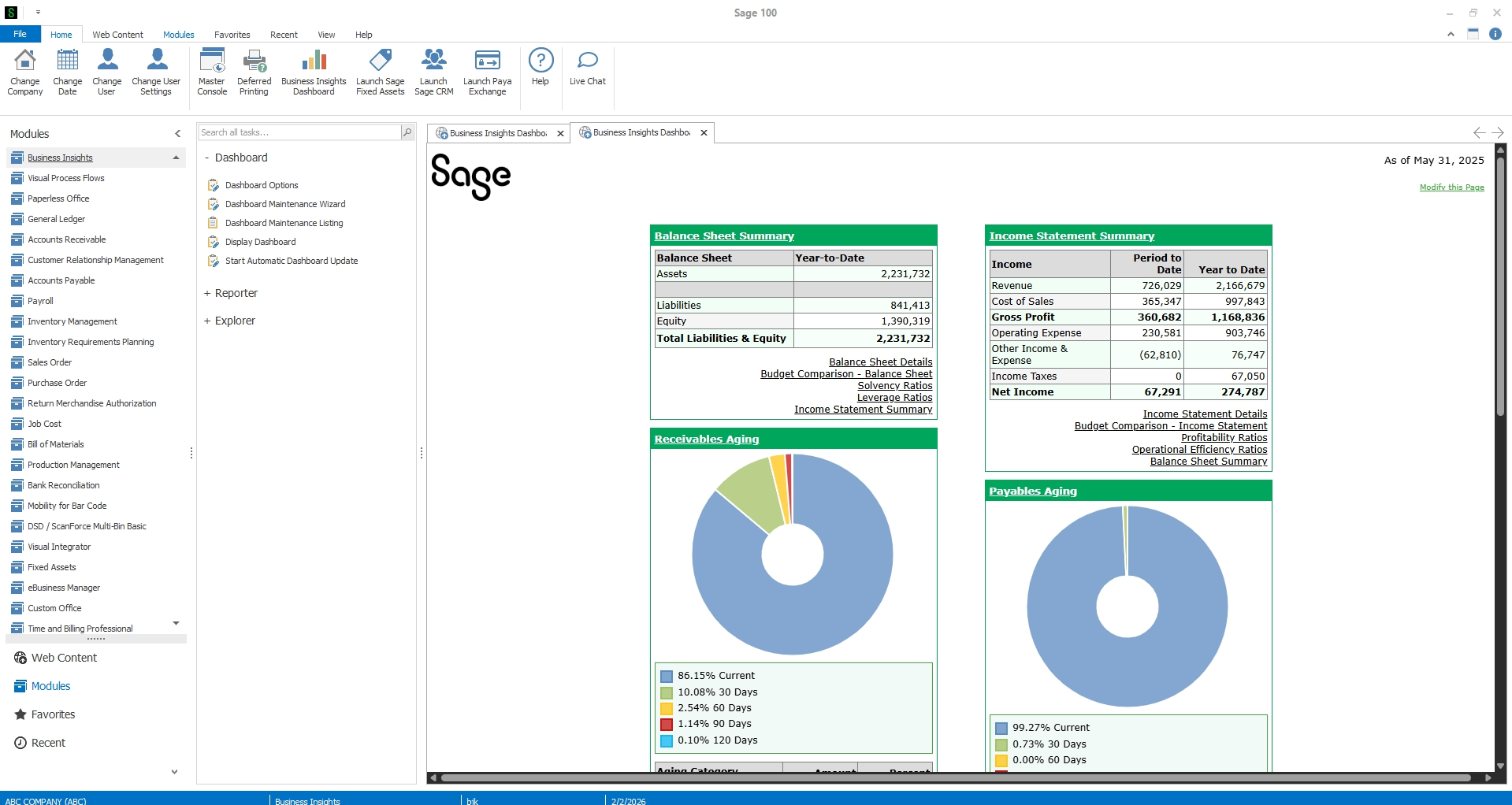
Sage 100 is an enterprise resource planning (ERP) system designed primarily for small to mid-sized businesses that need integrated financial management and operational visibility. It combines accounting, inventory management, and operational modules into a single system that helps organizations streamline workflows and improve decision-making.
Unlike basic accounting software, Sage 100 provides a full ERP foundation without the complexity and cost often associated with enterprise systems.
Sage 100 core capabilities
Sage 100 offers a wide range of features designed to support operational efficiency and financial control:
- Financial management
- Inventory and order management
- Manufacturing management
- Payroll and HR capabilities
- Reporting and business intelligence tools
These features allow organizations to manage multiple operational processes in one centralized system, improving accuracy and reducing manual work.
The system offers flexible deployment options, including on-premise, hosted cloud, and hybrid environments, allowing companies to adopt cloud technology at their own pace. Sage 100 is known for its strong customization capabilities, with a wide ecosystem of add-ons, integrations, and configurable workflows that allow businesses to tailor the system to their operations. Overall, Sage 100 delivers powerful ERP functionality without unnecessary complexity, making it a strong choice for growing SMBs.
What is Sage 300?
While Sage 100 focuses on growing SMBs, Sage 300 is designed for mid-market organizations with more complex operational requirements.
Sage 300 delivers enterprise-grade financial management and operational capabilities, particularly for organizations that operate across multiple companies, regions, or currencies.
Core focus areas
Sage 300 is especially strong in environments that require:
- Multi-entity financial management
- Multi-currency transactions
- Multi-language operations
- Global financial consolidation
These capabilities make Sage 300 particularly appealing for organizations operating internationally or managing multiple business units.
Sage 300 is typically used by mid-market organizations with multiple subsidiaries, international operations, or multi-currency requirements, particularly those needing consolidated financial reporting. Because of its advanced capabilities, Sage 300 often requires more complex implementation and configuration but provides the flexibility larger organizations need to manage sophisticated financial structures.


Explore all Sage ERP options
Not sure which Sage ERP solution is right for your business? Our Ultimate Sage ERP Comparison Guide breaks down Sage Intacct, Sage 100, Sage 50, Sage 300, and Sage 500 to help you compare functionality, scalability, deployment options, and ideal use cases so you can confidently choose the right system for your organization.
Sage 100 vs Sage 300: Key differences at a glance
When comparing Sage 100 vs Sage 300, the differences primarily relate to scale, complexity, and international functionality.
One key difference in the Sage 100 vs Sage 300 comparison is cost and complexity. Sage 100 generally has a lower total cost of ownership, making it an attractive option for SMBs seeking ERP functionality without enterprise-level pricing.
Sage 100 vs Sage 300: Feature comparison
Although Sage 100 and Sage 300 share many core ERP capabilities, their strengths differ depending on operational needs.
Financial management
Both systems offer strong financial management functionality, including:
- General ledger
- Accounts payable
- Accounts receivable
- Financial reporting
However, Sage 300 has stronger capabilities for consolidated financial reporting, particularly for organizations managing multiple subsidiaries or entities. Sage 100, meanwhile, excels at streamlining financial workflows for SMBs that want robust accounting without unnecessary complexity.
Inventory and operations
Inventory and operational management are areas where Sage 100 performs particularly well, especially for product-based businesses. The platform includes tools for:
- Inventory control
- Sales order processing
- Warehouse management
- Manufacturing management
These features make Sage 100 especially attractive for manufacturers and distributors, which represent a large portion of our user base. The system is designed to help businesses track inventory in real time, streamline order fulfillment, and manage production processes more efficiently.
Sage 300 also offers inventory and distribution management modules, including Inventory Control, Purchase Orders, and Order Entry, which support purchasing, sales processing, and inventory tracking. However, Sage 300 is often used more heavily for financial management and multi-entity environments, while Sage 100 tends to be favored by organizations that need strong operational functionality alongside accounting.
Multi-currency and international support
This is one of the clearest distinctions when comparing Sage 100 vs Sage 300.
Sage 300 offers native multi-currency and multi-language functionality, allowing organizations to manage global operations and cross-border financial transactions more easily.
Sage 100 can support multi-company environments, but its international capabilities are more limited and typically require additional configuration or integrations.
Customization and integrations
Both platforms offer extensive integration capabilities with:
- CRM systems
- E-commerce platforms
- Reporting tools
- Industry-specific applications
However, Sage 100 is widely known for its strong ecosystem of add-ons and customizations, making it easy to tailor the system to industry-specific workflows.
Implementation and usability
Another key difference in the Sage 100 vs Sage 300 comparison is usability.
Sage 100 generally offers:
- Faster implementation timelines
- Simpler configuration
- Easier day-to-day management
Sage 300 provides deeper enterprise functionality, but this often requires more complex setup and system administration.
Key benefits of Sage 100 vs Sage 300
Both Sage 100 and Sage 300 offer strong ERP capabilities but are designed for different levels of operational complexity.
Sage 100 is often the preferred choice for growing SMBs because it delivers powerful financial and operational management without enterprise-level complexity. It offers strong inventory, manufacturing, and distribution capabilities. Plus, it is highly customizable through add-ons and integrations. And it offers a lower total cost of ownership with faster implementation timelines.
Sage 300, on the other hand, is built for organizations with more complex financial environments. It excels in multi-entity financial management, multi-currency transactions, and consolidated reporting. It is well suited for larger or international organizations.
Understanding these strengths helps businesses determine which ERP best aligns with their operational needs and growth plans.
Who Should Choose Sage 100 vs Sage 300?
For many organizations evaluating Sage 100 vs Sage 300, Sage 100 is the ideal solution for growing small and mid-sized businesses that need stronger accounting, inventory, and operational capabilities without enterprise-level complexity. It works particularly well for companies that have outgrown entry-level systems like QuickBooks, operate primarily within the United States or Canada, and require tools for inventory management, distribution, or manufacturing.
Sage 300, on the other hand, is often a better fit for organizations with more complex operational structures. It suits businesses with international operations, multi-currency transactions, multiple subsidiaries, or advanced intercompany reporting needs. Ultimately, the right choice between Sage 100 vs Sage 300 depends on the scale and complexity of your business operations.
Sage 100 vs Sage 300 FAQ
Is Sage 100 or Sage 300 better?
Neither system is universally better. Sage 100 is typically better for small to mid-sized businesses, while Sage 300 is designed for larger organizations with international operations or complex financial structures.
What is the main difference between Sage 100 and Sage 300?
The biggest difference is operational complexity. Sage 100 is optimized for SMBs, while Sage 300 supports global organizations with multi-currency and multi-entity requirements.
Which system is newer: Sage 100 or Sage 300?
Sage 300 originated earlier as ACCPAC and has been used by global organizations for decades. Sage 100 is newer and evolved later from the MAS 90 platform and was designed primarily for small and mid-sized businesses. Both systems have been updated and enhanced over time, and Sage continues to support and develop both ERP platforms today.
Can Sage 100 handle multiple companies?
Yes. Sage 100 can manage multiple companies within the same system, though Sage 300 offers more advanced intercompany capabilities.
Is Sage 100 cloud-based?
Sage 100 can be deployed in hosted cloud environments, on-premise systems, or hybrid deployments depending on the organization’s infrastructure preferences.

Still deciding between Sage 100 vs Sage 300?
Connect with our ERP experts for guidance on the right solution for your business and learn how the right Sage platform can support your long-term growth.
Maximize your Sage 100 investment with Rand Group
Selecting the right ERP is only the first step. Successful implementation and long-term optimization require the right technology partner.
Our Sage team has decades of experience helping organizations successfully implement and manage Sage ERP solutions.
We provide:
- Sage ERP consulting and selection guidance
- Sage 100 implementation services
- Data migration and system integration
- Custom development and add-ons
- Ongoing support and system optimization
As a certified Sage partner, Rand Group helps businesses implement ERP solutions that align with their operational goals and long-term growth strategies.
Final thoughts: Sage 100 vs Sage 300
When comparing Sage 100 vs Sage 300, both platforms offer powerful ERP capabilities, but they serve different types of organizations. Sage 100 is ideal for small to mid-sized businesses that need strong accounting, inventory management, and operational visibility without enterprise-level complexity. Sage 300, meanwhile, is better suited for mid-market organizations with international operations and complex financial structures.
For many growing companies, Sage 100 delivers the right balance of power, flexibility, and affordability. If you’re evaluating ERP solutions and want help determining whether Sage 100 or Sage 300 is the right fit for your organization, we can help. Contact our Sage experts today to schedule a consultation and learn how Sage 100 can support your business growth.