Guide to Sage 100 integrations

For small and mid-sized businesses, Sage 100 often serves as a central system for managing inventory, sales orders, purchasing, invoicing, and financial reporting. But Sage 100 rarely operates alone. Ecommerce platforms, CRM systems, warehouse applications, payment tools, tax solutions, and other business applications may all play a role in day-to-day operations.
Sage 100 integrations connect these systems so information can move between them without relying on duplicate entry or disconnected manual processes. Depending on the integration, orders can flow from an ecommerce platform into Sage 100, inventory updates can move back to an online storefront, customer information can be shared with a CRM, or warehouse activity can update ERP records.
This guide explores how Sage 100 integrations work, the tools and platforms commonly used to build them, popular systems to connect with Sage 100, and important considerations for creating a reliable integration strategy.
Key takeaways
- Sage 100 can connect with a wide range of business systems, including ecommerce, CRM, warehouse, inventory, payment, tax, document management, and reporting applications.
- Integration methods vary by business need. Options include Sage API/Web Services, Visual Integrator, third-party connectors and platforms, and custom development.
- IN-SYNCH and CIMcloud are common Sage 100 integration solutions used by Rand Group to support ecommerce, customer-facing, and other connected workflows.
- Successful integrations start with the business process. Organizations should define what data needs to move, which system owns it, how frequently it should update, and whether an established connector can meet the requirements.
- The right integration strategy can reduce duplicate entry and improve connected workflows while allowing Sage 100 and specialized applications to perform their intended roles.
What is a Sage 100 integration?
A Sage 100 integration connects Sage 100 with another business application so data or processes can move between the systems. Depending on the business requirements and technology involved, an integration may exchange information in real time, at scheduled intervals, or through batch imports and exports.
Common Sage 100 integration scenarios include:
- Sending ecommerce orders into Sage 100 for processing
- Synchronizing customers between Sage 100 and a CRM
- Updating an ecommerce platform with inventory availability
- Connecting warehouse or 3PL activity with inventory and order records
- Sharing payment information with financial workflows
- Sending transaction data to a sales tax application
- Consolidating Sage 100 data with information from other systems for reporting and analytics
The goal is not simply to add functionality to Sage 100. A well-designed integration creates a connected workflow in which each application performs its intended role while the necessary information moves between systems accurately and efficiently.
Benefits of integrating Sage 100 with other business systems
Integrating Sage 100 with other applications can help organizations reduce manual work and create more consistent processes across departments and systems.
Key benefits can include:
- Reduce duplicate data entry: Automatically transfer information between Sage 100 and other applications rather than recreating the same records manually.
- Improve data accuracy: Reduce errors involving customers, SKUs, quantities, addresses, pricing, and other information that may otherwise be entered in multiple systems.
- Streamline workflows: Connect processes that span ecommerce, accounting, inventory, sales, warehouse, fulfillment, and other functions.
- Improve visibility: Make relevant ERP information available to employees and applications outside Sage 100.
- Support growth: Automate higher transaction volumes without requiring a proportional increase in manual data entry.
- Create a more connected technology environment: Allow specialized applications to work alongside Sage 100 without creating unnecessary information silos.

Need help with Sage 100 integrations?
Connect Sage 100 with the applications your business relies on. Rand Group can help you assess integration requirements, evaluate the right approach, and implement connected workflows around your business processes.
How Sage 100 integrations are built
There is no single way to integrate Sage 100 with another application. The right approach depends on the systems involved, the amount and type of data being exchanged, how frequently information needs to move, the required business rules, and whether an established connector already exists.
Common approaches include Sage integration tools, third-party connectors and integration platforms, and custom development.
Sage 100 integration approaches at a glance
Sage API/Web Services
Sage API/Web Services can allow external applications to read or update Sage 100 information programmatically. APIs can support integrations with ecommerce platforms, CRM systems, customer portals, mobile applications, and other software.
Depending on the integration, API-based connections can exchange information such as:
- Customers
- Sales orders
- Inventory
- Products
- Pricing
- Financial and transaction data
API-based integrations can be valuable when an organization requires automated, bi-directional data exchange or needs to connect Sage 100 with a specialized application. They generally require technical development, appropriate security and authentication, and careful consideration of data mapping and business rules.
Visual Integrator
Visual Integrator provides import and export capabilities for moving information between Sage 100 and other data sources. It is particularly useful for scheduled or batch-based integrations where real-time synchronization is not required.
Organizations can use Visual Integrator to automate recurring data exchanges involving:
- Customer records
- Inventory information
- Sales orders
- Invoices
- Other Sage 100 data
For example, a business might schedule nightly inventory or customer updates between Sage 100 and another system rather than manually importing the same information each day.
Visual Integrator also supports capabilities such as:
- Field mapping to align data between systems
- Validation to help maintain data accuracy
- Conditional logic to control how imported information is processed
- Scheduled processing for recurring imports and exports
These capabilities can help organizations create repeatable data exchange processes while reducing manual entry and improving consistency.
Third-party connectors and integration platforms
Not every Sage 100 integration needs to be developed from scratch. Third-party connectors and integration platforms can provide established connections between Sage 100 and ecommerce, CRM, warehouse, fulfillment, and other business systems.
Rand Group’s Sage 100 team commonly works with IN-SYNCH and CIMcloud when helping clients connect Sage 100 with other applications.
IN-SYNCH is a Sage 100 integration platform used to synchronize data between Sage 100 and external systems such as ecommerce platforms, marketplaces, shipping tools, CRM systems, and other third-party applications. Depending on the integration, it can automate the exchange of:
- Sales orders
- Customer information
- Inventory
- Pricing
- Shipping information
- Other business data
CIMcloud is an ecommerce, customer portal, and customer interaction platform with built-in Sage 100 integration. It is often used when organizations want customer-facing self-service, online ordering, account access, and related digital commerce capabilities connected to Sage 100. It can support workflows such as:
- B2B ecommerce
- Customer self-service
- Online sales order entry
- Product and pricing management
- Inventory availability
- Customer and order synchronization
The right connector depends on several factors, including the systems being connected, required data flows, transaction volume, synchronization frequency, business rules, and customization requirements. An experienced Sage 100 partner can help evaluate these requirements and determine the right integration approach.
Custom development
When native tools or established connectors do not meet an organization’s requirements, a custom Sage 100 integration may be appropriate.
Custom development can address unique workflows, specialized applications, complex business rules, or multi-system environments that cannot be supported adequately through an off-the-shelf connector.
A custom integration may also combine several technologies. For example, an integration could use APIs for one workflow, scheduled data exchange for another, and custom logic to validate or transform information before it enters Sage 100.
Custom integrations require careful planning because the technical connection is only one part of the project. Organizations also need to determine which application owns each type of data, how exceptions are handled, what happens when synchronization fails, and how the integration will be maintained as the connected applications change.
Other Sage 100 connectivity and customization tools
Sage 100 also provides tools such as Custom Office that can help organizations customize Sage 100 and connect ERP information with Microsoft Office applications and internal workflows.
Custom Office can support user-defined fields, document attachments, scripts, and connections with applications such as Word, Excel, and Outlook. These capabilities can be useful for improving internal processes, but they generally serve a different purpose than deeper API-based or multi-system integrations.
What systems can integrate with Sage 100?
Organizations can connect Sage 100 with many different types of business applications. The most valuable integrations are typically those that eliminate manual handoffs between systems that participate in the same business process.
Ecommerce integrations
Ecommerce is one of the most common reasons businesses integrate Sage 100 with another system. Connecting Sage 100 with an ecommerce platform can automate the movement of information between online storefronts and back-office operations.
Common integration points include:
- Sales orders and order updates
- Customer information
- Products and SKUs
- Inventory availability
- Pricing
- Taxes and payments
- Shipping and tracking information
Sage 100 can be integrated with platforms such as Shopify and BigCommerce, as well as other ecommerce environments, using third-party connectors, middleware, or custom development.
Rand Group commonly works with solutions such as IN-SYNCH and CIMcloud for Sage 100 ecommerce and digital commerce integrations. IN-SYNCH can support connections between Sage 100 and external ecommerce platforms, while CIMcloud combines Sage 100 connectivity with B2B ecommerce and customer self-service capabilities.
For organizations using Shopify, read our guide to Sage 100 Shopify integration for a closer look at integration options and considerations.
CRM integrations
Connecting Sage 100 with a customer relationship management system can reduce duplicate entry between sales and accounting while giving teams access to relevant information across both environments.
Depending on the systems and requirements, a CRM integration may synchronize:
- Customers and contacts
- Quotes and sales orders
- Products and pricing
- Invoices
- Account information
- Other relevant sales and transaction data
Organizations may integrate Sage 100 with Sage CRM or third-party CRM platforms such as Salesforce and HubSpot.

Warehouse, inventory, and fulfillment integrations
Warehouse, inventory planning, shipping, and fulfillment systems often need access to information stored in Sage 100. Connecting these systems can reduce manual handoffs between order processing, inventory management, warehouse operations, and fulfillment.
For example, ScanForce WMS and Mobile Sales can connect warehouse and field activity with Sage 100, helping synchronize inventory transactions, sales orders, barcode-driven processes, and fulfillment activity.
Netstock connects Sage 100 inventory information with demand forecasting and replenishment planning, allowing organizations to use ERP data for inventory planning while keeping Sage 100 at the center of operational and financial processes.
Organizations may also need to connect Sage 100 with other warehouse management systems, 3PL providers, shipping applications, or specialized inventory platforms.
Common integration points can include:
- Inventory quantities
- Sales and purchase orders
- Receipts
- Shipments
- Transfers
- Tracking information
- Demand and replenishment data

Payment and tax integrations
Tax and payment applications can also connect directly with Sage 100 transaction workflows.
Avalara can integrate tax calculation and compliance processes with Sage 100 transactions, reducing the need to maintain tax calculations separately.
Paya can connect payment processing with Sage 100, allowing payment and transaction information to become part of ERP workflows and reducing manual payment entry and reconciliation.
The specific data flow depends on the application and configuration, but these integrations can help connect specialized financial services with the transactions maintained in Sage 100.
Document management and workflow integrations
Document management and workflow systems can connect supporting documentation and approval processes with Sage 100 transactions.
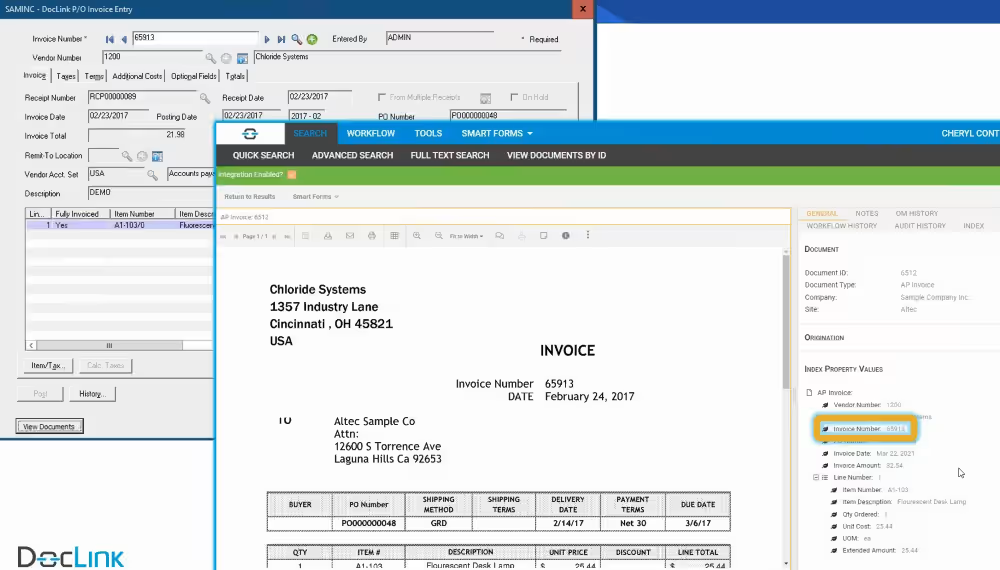
For example, DocLink can connect invoices, purchase orders, and other documents with Sage 100 processes. Organizations may also integrate Sage 100 with AP automation, EDI, document management, and workflow platforms when those systems are part of a broader business process.
These integrations can help reduce manual document handling, connect approvals with ERP transactions, and maintain supporting information alongside financial and operational processes.
Reporting and analytics integrations
Organizations may also need to combine Sage 100 information with data from CRM, ecommerce, operations, or other business systems for analysis and reporting.
Reporting and analytics integrations can extract and consolidate financial and operational data so decision-makers can analyze information across multiple systems rather than relying on isolated reports.
Solutions such as Sage Data & Analytics can support this type of connected reporting environment. Depending on an organization’s technology stack, Sage 100 data may also feed other reporting, business intelligence, or data platforms.

Sage 100 integration examples
Looking at the complete business process can help illustrate how Sage 100 integrations connect applications and reduce manual work.
Ecommerce order-to-fulfillment
An ecommerce order and customer information can flow into Sage 100 for processing, while inventory, fulfillment, and tracking information can move back to the online storefront. This reduces manual order entry and helps keep customer-facing information aligned with back-office activity.
CRM-to-ERP sales process
A sales team may manage prospects and opportunities in a CRM, then pass relevant customer or transaction information into Sage 100 at the appropriate point in the sales process. Sage 100 data can also be made available to sales or service teams, reducing the need to maintain the same records in both systems.
Multi-system or cross-company integration
Organizations with multiple companies or specialized applications may need to synchronize data across separate systems. Rand Group has worked with a Sage 100 client using IN-SYNCH to exchange information across company systems and eliminate duplicate entry, demonstrating why integration planning should begin with the required business processes and data flows.
How to choose the right Sage 100 integration approach
Choosing an integration approach should begin with business requirements rather than technology.
Before selecting a connector or development method, consider:
- Which systems need to connect? Identify every application involved in the workflow, not just Sage 100 and the primary external application.
- What data needs to move? Define specific records and fields such as customers, orders, inventory, pricing, payments, or shipments.
- Which direction should information flow? Some information may move into Sage 100, some may move out, and some may require bi-directional synchronization.
- Which system owns the data? Establish the source of record for customers, products, pricing, inventory, financial transactions, and other information.
- How quickly does information need to update? Determine whether the process requires near-real-time exchange, frequent scheduled updates, or nightly batch processing.
- Can an established connector meet the requirement? A proven connector may reduce development effort, but custom development can be appropriate for specialized workflows.
Best practices for Sage 100 integrations
Whether you use an established connector or develop a custom integration, several practices can improve reliability and maintainability:
- Standardize data: Establish consistent customer, product, item, and other key data across connected applications.
- Define system ownership: Determine which application serves as the source of record for each type of information.
- Map fields and workflows carefully: Document exactly which records and fields move between systems and what triggers the exchange.
- Implement validation and error handling: Establish rules for invalid, incomplete, duplicate, or conflicting information.
- Protect sensitive data: Use appropriate authentication, access controls, and security practices for financial, customer, and employee information.
- Test complete workflows: Test normal transactions as well as exceptions, failures, duplicates, and unusual business scenarios.
- Document the integration: Maintain documentation covering mappings, business rules, dependencies, schedules, and troubleshooting procedures.
- Plan for change: Review integrations when Sage 100, connected applications, or business processes are upgraded or modified.

Choose the right partner for your Sage 100 integration
The right integration partner should understand both the technical connection and the business processes it supports. Look for experience with Sage 100, integration development, third-party platforms, and connected workflows. Our Sage 100 consultants can evaluate your requirements and recommend the right integration approach.
Why partner with Rand Group for Sage 100 integrations?
A successful Sage 100 integration requires more than connecting two applications. Data moving into or out of Sage 100 can affect customers, inventory, sales orders, purchasing, fulfillment, payments, accounting, reporting, and other downstream processes.
Rand Group’s Sage 100 consultants and developers can help organizations:
- Assess existing systems, workflows, and integration requirements
- Define which data should move between systems and where it should originate
- Evaluate native integration tools, APIs, custom development, and third-party platforms such as IN-SYNCH and CIMcloud
- Configure data mapping, validation rules, synchronization schedules, and exception handling
- Develop and test custom Sage 100 integrations when standard options do not meet business requirements
- Optimize and support integrations as systems and business processes evolve
Rand Group has more than 35 years of experience providing Sage 100 development services, including third-party integrations, custom applications, reporting, analytics, and workflow enhancements. Rather than treating an integration as an isolated technical project, our team considers how each connection fits into the broader financial and operational environment.
Frequently asked questions about Sage 100 integrations
What can Sage 100 integrate with?
Sage 100 can integrate with ecommerce platforms, CRM systems, warehouse and inventory applications, payment processors, tax solutions, reporting tools, document management systems, and other business applications. The available integration method depends on the external system and the data that needs to be exchanged.
Does Sage 100 have an API?
Sage 100 offers API and Web Services capabilities that can be used to connect external applications with Sage 100 data and processes. The appropriate technology and implementation approach depends on the Sage 100 environment and integration requirements.
Can Sage 100 integrate with Shopify?
Yes. Sage 100 can be connected with Shopify using third-party connectors or custom integration approaches. Depending on the solution, orders, customers, inventory, pricing, shipping, and other information can be exchanged between the systems.
Can Sage 100 integrate with a CRM?
Yes. Sage 100 can be integrated with Sage CRM and third-party CRM platforms such as Salesforce and HubSpot. CRM integrations can synchronize customer, sales, order, invoice, and other relevant information depending on the business requirements.
What is the best way to integrate Sage 100 with another application?
The best approach depends on the applications involved, required data flows, transaction volume, synchronization frequency, business rules, and available connectors. Options may include Sage API/Web Services, Visual Integrator, third-party platforms such as IN-SYNCH or CIMcloud, or custom development.
Do Sage 100 integrations update data in real time?
It depends on the integration. Some connections can exchange information in real time or near real time, while others use scheduled or batch processing. The appropriate frequency should be based on the business process and technical capabilities of the connected systems.
Build a connected Sage 100 environment
Sage 100 integrations can connect your ERP with ecommerce, CRM, warehouse, inventory, payment, tax, reporting, and other applications to reduce duplicate entry and create more efficient workflows. The right approach depends on your systems, data flows, business rules, and whether native tools, third-party platforms, or custom development best fit your requirements.
Rand Group can help you evaluate, design, implement, and optimize Sage 100 integrations around your broader technology environment. Contact our Sage 100 team to discuss your integration requirements.