Sage 100 vs. Acumatica: Which ERP system is right for your business?

Choosing the right enterprise resource planning (ERP) system is an important decision for businesses looking to improve financial management, streamline operations, and support growth. For small and midsized manufacturers and distributors, Sage 100 and Acumatica offer comprehensive ERP capabilities but differ in cost, deployment, licensing, and functionality.
Whether you’re moving beyond entry-level accounting software or currently using Sage 100 and considering a change, understanding these differences is essential. Sage 100 provides established accounting, manufacturing, and distribution functionality at a typically lower cost, while Acumatica offers a broader, cloud-oriented platform with integrated business applications. This Sage 100 vs. Acumatica comparison explores both systems, when it makes sense to enhance an existing ERP environment, and other solutions worth considering.
At a glance: Sage 100 vs. Acumatica
Sage 100 and Acumatica both offer financial management, manufacturing, and distribution capabilities, but they serve different business needs and budgets. Sage 100 is generally the more affordable option for small and midsized manufacturers and distributors that need dependable ERP functionality without unnecessary complexity. Acumatica offers a cloud-oriented platform with broader integrated applications that may benefit businesses with more complex requirements. For existing Sage 100 users, upgrading, adding modules, or implementing third-party solutions may be more cost-effective than replacing their ERP system. Businesses with requirements beyond either platform should also consider alternatives such as Sage Intacct, NetSuite, and Microsoft Dynamics 365 Business Central.
What is Sage 100?
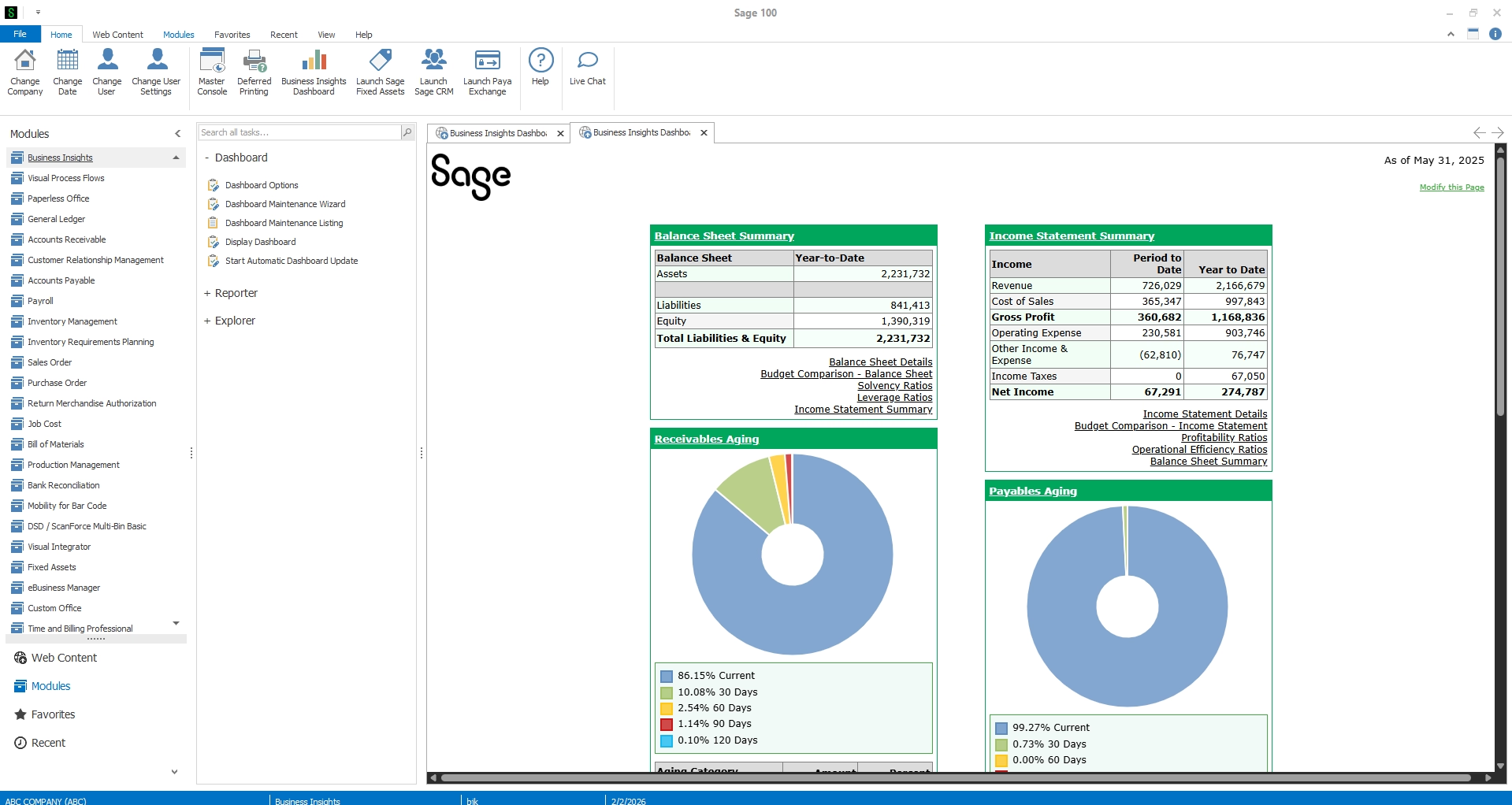
Sage 100 is a comprehensive ERP system designed for small and midsized businesses that need more than basic accounting software. With established financial management, inventory, manufacturing, and distribution capabilities, Sage 100 helps organizations connect financial and operational processes, improve efficiency, and maintain control over their business.
Unlike cloud-only applications, Sage 100 supports both on-premises and hosted deployment options, allowing organizations to choose an environment that aligns with their infrastructure, security, and accessibility requirements.
Key Sage 100 capabilities include:
- Financial management: General ledger, accounts payable, accounts receivable, bank reconciliation, and financial reporting.
- Inventory management: Multi-warehouse inventory tracking, lot and serial number tracking, purchasing, and inventory replenishment.
- Manufacturing and production: Bill of Materials, Production Management, and Inventory Requirements Planning to support manufacturing operations.
- Sales and distribution: Sales order processing, purchasing, order fulfillment, and connected inventory workflows.
- Payroll management: Integrated payroll capabilities to help manage employee compensation, payroll taxes, and reporting.
- Reporting and customization: Customizable reports, Sage Intelligence, and third-party integrations that extend ERP functionality.
Sage 100 is particularly valuable for manufacturers, distributors, and inventory-intensive businesses that need detailed operational control without unnecessary ERP complexity.
What is Acumatica?
Acumatica is a cloud-oriented ERP platform designed to connect financial management with broader business operations. Its browser-based interface allows employees to access authorized business information across locations and devices, while its integrated applications support accounting, inventory, manufacturing, distribution, and project-based operations.
Acumatica offers industry-specific editions for organizations with specialized operational requirements, including manufacturers, distributors, construction companies, and service-based businesses. It also uses a resource- and usage-based licensing approach rather than traditional per-user seat licensing.
Key Acumatica capabilities include:
- Financial management: General ledger, accounts payable, accounts receivable, cash management, and financial reporting.
- Manufacturing management: Production orders, material requirements planning, scheduling, and shop floor functionality.
- Distribution and inventory: Warehouse management, purchasing, inventory tracking, and order fulfillment.
- Project accounting: Project budgets, job costing, billing, and financial tracking.
- CRM functionality: Customer records, sales opportunities, and connected customer management processes.
- Reporting and analytics: Embedded dashboards, reporting tools, and business analytics.
Acumatica may be attractive to organizations seeking a modern, browser-based ERP experience with integrated applications across multiple departments. However, its broader functionality and implementation requirements should be evaluated against the organization’s actual operational needs.


Find the right ERP solution for your business
Choosing an ERP system requires careful evaluation of your business needs, functionality, and long-term goals. Download our Top 10 ERP Software Selection Checklist to explore the essential steps for comparing solutions and making an informed investment.
Sage 100 vs. Acumatica comparison chart
Although both systems offer comprehensive ERP functionality, their differences become clearer when comparing deployment, operational capabilities, licensing, and customization.
Functionality varies by edition, licensed modules, deployment configuration, and third-party integrations.
Key differences between Sage 100 and Acumatica
While Sage 100 and Acumatica both provide the core functionality businesses expect from ERP software, their approaches to managing operations, deploying technology, and supporting growth differ. Understanding these distinctions can help determine which platform aligns best with your organization’s priorities.
Cloud architecture and deployment
One of the most significant differences between Sage 100 and Acumatica is how the systems are deployed and accessed.
- Sage 100: Originally designed for on-premises deployment, Sage 100 gives businesses control over their ERP infrastructure and configuration. Organizations can also host Sage 100 in a cloud environment to support remote access while retaining familiar workflows and functionality.
- Acumatica: Built around a web-based architecture, Acumatica provides browser-based access and supports cloud deployments, including public and private cloud environments, as well as on-premises deployment options.
Acumatica’s browser-based architecture may offer advantages for organizations prioritizing distributed teams and cloud-oriented workflows. However, businesses do not necessarily need a cloud-native ERP system to benefit from remote accessibility. Hosted Sage 100 environments can provide remote access while allowing organizations to preserve existing processes and integrations.
For companies that prefer greater control over their infrastructure or have specialized operational requirements, Sage 100’s deployment flexibility can be a meaningful advantage.
Sage hosting – Securing Sage 100 in the cloud
Discover how hosting Sage 100 in the cloud can enhance security, improve remote accessibility, reduce downtime, and simplify IT management. Watch this on-demand webinar with Rand Group and Cloud at Work to explore the benefits of Sage hosting and how to modernize your ERP environment without replacing your existing system.

Financial management and accounting
Strong financial management is essential for any ERP system. Both Sage 100 and Acumatica provide accounting capabilities designed to help organizations manage transactions, maintain financial controls, and improve reporting.
Sage 100 financial capabilities include:
- General ledger, accounts payable, and accounts receivable.
- Bank reconciliation and cash management.
- Financial statements and customizable reporting.
- Multi-company accounting.
- Integrated payroll functionality.
- Audit trails and transaction controls.
Acumatica provides comparable core accounting functionality alongside integrated financial automation, multi-company management, intercompany transactions, and consolidation capabilities.
Acumatica’s integrated financial management capabilities may benefit organizations with complex multi-entity structures or extensive intercompany activity. Sage 100 remains a strong choice for businesses prioritizing dependable accounting processes, detailed financial reporting, and integration with manufacturing and distribution operations.
Manufacturing and distribution capabilities
Manufacturing and distribution functionality is one of the most important considerations when comparing Sage 100 vs. Acumatica. Both systems provide capabilities to manage inventory, purchasing, production, and order fulfillment, but their approaches differ.
Sage 100 offers established manufacturing and distribution functionality, including:
- Inventory management: Track stock across warehouses, monitor quantities, and manage lot and serial numbers.
- Bill of Materials: Define product components and support assembly processes.
- Production Management: Manage production activities, material consumption, and manufacturing costs.
- Inventory Requirements Planning: Evaluate demand and supply requirements to support replenishment decisions.
- Purchasing and sales orders: Connect purchasing, inventory, and order processing workflows.
- Warehouse extensions: Add barcode scanning, bin management, and other specialized capabilities through supported solutions.
Acumatica also offers manufacturing and distribution functionality, including MRP, production scheduling, shop floor management, and integrated supply chain processes. These capabilities may benefit manufacturers with complex production requirements.
Sage 100 provides comprehensive manufacturing and distribution functionality for small and midsized businesses, combining financial management, inventory control, and production capabilities to support efficient operations.
Real-world results with Sage 100
Rand Group helped Stucchi USA reduce time spent locating inventory by 50% through Sage 100 enhancements, including multi-bin management and barcode scanning. Read the case study to see how these improvements streamlined operations.
Reporting and business intelligence
Both Sage 100 and Acumatica provide financial and operational reporting, but their approaches differ.
- Sage 100: Offers customizable reporting through Crystal Reports, Sage Intelligence, and third-party integrations.
- Acumatica: Provides embedded dashboards, reporting, and analytics across connected business processes.
While Acumatica emphasizes integrated, browser-based analytics, Sage 100 offers flexible reporting options that can be tailored to specific business requirements.
Customization, integrations, and scalability
As businesses grow, ERP requirements often become more specialized. Both Sage 100 and Acumatica support customization and integrations, although they use different technologies and approaches.
Sage 100 offers:
- An established ecosystem of third-party applications.
- Customization tools to support specialized business processes.
- Integrations with CRM, eCommerce, warehouse management, and other applications.
- Additional modules that extend functionality as requirements evolve.
- Deployment options that accommodate different infrastructure preferences.
Acumatica offers:
- API-based integrations with external applications.
- Customizable workflows and business processes.
- Connected financial and operational applications.
- Industry-specific functionality and extensions.
- A web-based platform designed to support distributed operations.
Acumatica’s architecture can simplify certain integrations and connected workflows, while Sage 100’s established customization ecosystem remains valuable for businesses with specialized manufacturing and distribution requirements.
For organizations with well-established processes, additional Sage 100 modules, integrations, and reporting enhancements may provide a practical, cost-effective way to support growth without replacing their ERP system.
Sage 100 vs. Acumatica pricing: What should businesses expect?
ERP pricing involves more than software licensing. Implementation, customization, infrastructure, integrations, and ongoing support all influence the total investment.
Sage 100 and Acumatica use different licensing approaches, making it important to compare their total cost of ownership rather than subscription costs alone.
Sage 100 pricing and licensing
Sage 100 commonly uses concurrent-user subscription licensing, with costs influenced by the number of users, software edition, and additional modules.
Factors affecting Sage 100 costs include:
- Core accounting software and user licensing.
- Manufacturing, inventory, and other optional modules.
- Implementation, configuration, and data conversion.
- Hosting or on-premises infrastructure.
- Integrations, customization, and ongoing support.
Sage 100 is typically less expensive than Acumatica, making it an attractive option for small and midsized businesses that need strong accounting, manufacturing, and distribution capabilities without the cost of a more extensive ERP implementation. Its modular approach also allows organizations to invest in functionality that aligns with their needs. Actual costs depend on licensing, implementation scope, and required modules. Learn more in our Sage 100 pricing guide.
Acumatica pricing and licensing
Acumatica uses a resource- and usage-based pricing model rather than traditional per-user seat licensing. This can benefit organizations with many employees who need access to ERP information, particularly when individual usage levels vary.
However, pricing depends on several factors:
- Applications and industry editions selected.
- Expected transaction volume and resource consumption.
- Deployment requirements.
- Implementation and configuration complexity.
- Integrations, customizations, and ongoing support.
Acumatica’s licensing model can be advantageous for organizations with many users but relatively low transaction volumes. However, businesses should evaluate how resource consumption, implementation requirements, and ongoing costs affect the total investment, particularly when compared with a typically lower-cost solution such as Sage 100.
Comparing total cost of ownership
When evaluating Sage 100 vs. Acumatica pricing, consider the total investment over three to five years, including software, implementation, training, infrastructure, and ongoing support.
The lowest licensing cost does not always translate into the lowest total cost of ownership. A solution that aligns closely with existing business processes and requires less customization may provide greater long-term value.
For many small and midsized manufacturers and distributors, Sage 100 can deliver the functionality they need at a lower overall cost. Acumatica’s additional capabilities may justify a larger investment for organizations with more complex requirements, but businesses should determine whether those capabilities provide enough value to offset the difference.
Sage 100 vs. Acumatica: Pros and cons
Both ERP platforms offer advantages and limitations. Understanding these tradeoffs can help businesses prioritize the capabilities that matter most.
Sage 100 pros and cons
Advantages:
- Typically lower software and implementation costs than Acumatica for small and midsized businesses.
- Proven accounting, manufacturing, and distribution functionality.
- Flexible on-premises and hosted deployment options.
- Established customization and third-party integration ecosystem.
- Integrated payroll capabilities.
- Modular functionality that can support a phased investment.
- Familiar workflows for organizations already using Sage products.
Potential limitations:
- Traditional application architecture rather than a cloud-native interface.
- Remote accessibility may require hosting or additional solutions.
- Some advanced capabilities require additional modules or integrations.
- Complex multi-entity operations may require additional configuration or specialized tools.
Acumatica pros and cons
Advantages:
- Modern, browser-based ERP architecture.
- Integrated financial and operational applications.
- Manufacturing, distribution, construction, and other industry editions.
- Resource-based licensing without traditional per-user seat charges.
- Embedded dashboards and mobile-friendly workflows.
- Integrated payroll management available.
Potential limitations:
- Implementation can involve significant configuration and training.
- Resource-based pricing requires careful evaluation of expected usage.
- Specialized functionality may require additional applications or customization.
- A broad ERP implementation can introduce complexity for businesses with relatively straightforward requirements.
Ultimately, the right choice depends on which advantages deliver meaningful value for your business and which limitations could affect day-to-day operations.
Which ERP is right for your business: Sage 100 or Acumatica?
Choosing between Sage 100 and Acumatica requires evaluating your industry’s requirements, operational complexity, technology preferences, and budget. While both systems can support growing businesses, certain scenarios may make one platform a better fit.
Choose Sage 100 if you…
- Operate in manufacturing or distribution: You need strong inventory management, production, purchasing, and order processing capabilities.
- Prefer deployment flexibility: You want the option to maintain an on-premises environment or use cloud hosting.
- Need integrated accounting and payroll: Your organization values established financial management and payroll capabilities.
- Have specialized operational processes: You need customization options and access to an established ecosystem of industry-specific solutions.
- Prioritize cost-effective ERP functionality: You need comprehensive accounting, inventory, manufacturing, and distribution capabilities without the cost of a more extensive ERP platform.
For many small and midsized manufacturers and distributors, Sage 100 provides a strong balance of functionality, flexibility, and long-term value.
Consider Acumatica if you…
- Prioritize browser-based accessibility: Your organization wants a modern web interface for employees working across multiple locations.
- Require broad operational integration: You need connected financial, manufacturing, distribution, CRM, or project management processes.
- Have complex project or manufacturing requirements: Your business could benefit from specialized industry editions and integrated workflows.
- Have many users but relatively low transaction volumes: Acumatica’s resource-based licensing model may offer cost advantages depending on your organization’s usage patterns.
- Prefer a cloud-oriented technology strategy: You want an ERP platform designed around web-based workflows and connected applications.
Acumatica can be a strong option for organizations with these priorities, but its broader functionality and implementation requirements should be weighed against the potential value.
For businesses evaluating their first comprehensive ERP system, Sage 100 may provide the best balance of functionality and affordability, particularly in manufacturing and distribution. Acumatica may be worth the additional investment when its broader capabilities address specific operational requirements. The decision should be based on what your business needs today and how those requirements are expected to evolve.
Should existing Sage 100 users upgrade, enhance, or move to Acumatica or another ERP?
If your business already uses Sage 100, moving to Acumatica isn’t necessarily the best next step. While Acumatica offers additional capabilities, many organizations can address changing business requirements by upgrading Sage 100, implementing new modules, or integrating third-party applications.
Before committing to an ERP replacement, evaluate whether your current system can continue to meet your business requirements.
When enhancing Sage 100 makes sense
For businesses with established processes and a Sage 100 environment that continues to meet requirements, optimization may provide a more cost-effective path forward.
Consider enhancing Sage 100 when:
- Your system needs an upgrade: Moving to a newer Sage 100 version can provide access to updated functionality, performance improvements, and supported technology.
- You need additional functionality: Modules such as Production Management and Inventory Requirements Planning can extend manufacturing and inventory capabilities.
- Manual processes are slowing operations: Third-party solutions for barcode scanning, warehouse management, automation, and reporting can address specific operational challenges.
- Remote accessibility is a priority: Cloud hosting can provide remote access without requiring a complete ERP replacement.
- Your existing customizations remain valuable: Retaining established workflows and integrations may reduce disruption, implementation costs, and employee retraining.
When moving to another ERP may be appropriate
An ERP migration may make sense when your business has requirements that Sage 100 cannot reasonably support, even with upgrades, additional modules, or integrations.
For example, organizations may need more extensive multi-entity management, advanced project accounting, broader integrated applications, or different technology capabilities. In these situations, Acumatica may be an option, but it should be evaluated alongside other ERP platforms.
Before replacing Sage 100, assess the cost and capabilities of your existing system against the benefits, implementation effort, and ongoing expenses of a new ERP solution. An objective evaluation can help determine whether optimization or migration will deliver greater long-term value.
Other ERP options worth considering
Sage 100 and Acumatica aren’t the only ERP solutions available to growing businesses. If your organization requires more advanced financial management, broader operational functionality, or a cloud-based ERP platform, several other solutions may be worth evaluating.
Sage Intacct
Sage Intacct is a cloud-based financial management solution designed for organizations with complex accounting, reporting, and multi-entity requirements. Its dimensional reporting, financial automation, and consolidation capabilities make it particularly valuable for businesses prioritizing financial visibility and control.
Oracle NetSuite
Oracle NetSuite is a cloud ERP platform that connects financial management with inventory, order management, CRM, and other business processes. It can be a strong option for growing organizations that need integrated operations, multi-entity management, and scalability across locations or business units.
Microsoft Dynamics 365 Business Central
Microsoft Dynamics 365 Business Central is a cloud ERP solution that combines financial management, inventory, purchasing, sales, and operational capabilities. It may appeal to small and midsized businesses seeking integrated ERP functionality, particularly those already using Microsoft applications.
The right ERP platform depends on your organization’s industry, operational complexity, budget, and long-term goals. Businesses should compare their requirements across multiple solutions rather than assuming that moving beyond Sage 100 automatically means adopting Acumatica.

Find the right ERP strategy for your business
Not sure whether to enhance your existing ERP system or invest in a new solution? Rand Group’s experienced consultants can help you evaluate your requirements, compare ERP platforms, and determine the most cost-effective path forward.
Partnering with Rand Group for ERP selection and optimization
Choosing the right ERP system requires more than comparing features and pricing. Whether you’re implementing your first ERP solution, optimizing Sage 100, or considering a move to a new platform, Rand Group helps businesses make informed technology decisions based on their operational requirements and long-term goals.
As a technology partner with expertise across Sage, Microsoft Dynamics 365, and Oracle NetSuite, Rand Group helps organizations evaluate, implement, and optimize ERP solutions that align with their business needs.
Why businesses partner with Rand Group:
- Multi-platform ERP expertise: Our consultants work with Sage 100, Sage Intacct, Microsoft Dynamics 365, and Oracle NetSuite, helping businesses evaluate solutions based on their requirements rather than a single platform.
- Manufacturing and distribution experience: We understand inventory management, production planning, purchasing, warehouse operations, and the financial processes that support them.
- ERP assessments and optimization: We help existing Sage 100 customers identify opportunities to improve performance through upgrades, additional modules, integrations, and process improvements before considering a replacement.
- Implementation and ongoing support: From software selection and implementation to customization, training, and long-term optimization, our team helps organizations maximize the value of their ERP investments.
Whether Sage 100 continues to meet your requirements or your business needs a different ERP platform, Rand Group can help you evaluate your options and develop a practical path forward.
Key takeaways: Sage 100 vs. Acumatica
- Both Sage 100 and Acumatica offer comprehensive ERP functionality. Each supports financial management, manufacturing, inventory, and distribution, although capabilities and deployment approaches differ.
- Sage 100 is typically the more affordable option. For many small and midsized manufacturers and distributors, Sage 100 provides the functionality needed at a lower overall cost.
- Acumatica offers broader integrated capabilities. Its browser-based architecture, industry-specific applications, and resource-based licensing may benefit businesses with more complex requirements or many users with relatively low transaction volumes.
- Existing Sage 100 users should evaluate optimization before migration. Upgrades, additional modules, third-party applications, and hosting may address changing business requirements without the cost and disruption of replacing ERP software.
- Other ERP platforms may be worth considering. Sage Intacct, NetSuite, and Microsoft Dynamics 365 Business Central offer alternatives for organizations with different financial, operational, and technology requirements.
- Business requirements and total cost of ownership should guide ERP decisions. The best solution is the one that meets your needs, supports growth, and delivers measurable value within your budget.
Sage 100 vs. Acumatica FAQs
What is the main difference between Sage 100 and Acumatica?
The main difference between Sage 100 and Acumatica is their architecture and approach to ERP management. Sage 100 is an established ERP solution with on-premises and hosted deployment options, strong accounting functionality, and manufacturing and distribution capabilities. Acumatica is a cloud-oriented ERP platform offering browser-based access, integrated operational applications, and resource-based licensing.
Is Acumatica better than Sage 100 for manufacturing?
Acumatica is not necessarily better than Sage 100 for manufacturing. Both systems provide production, inventory, and planning capabilities. Acumatica offers integrated manufacturing functionality, including MRP and production scheduling, while Sage 100 provides established Bill of Materials, Production Management, and inventory planning capabilities. The best choice depends on production complexity, integration requirements, and budget.
Is Sage 100 a cloud-based ERP system?
Sage 100 is traditionally an on-premises ERP system, but it can be hosted in a cloud environment to support remote accessibility. Unlike cloud-native ERP applications, Sage 100 retains its established application architecture. This gives businesses flexibility to choose a deployment model that aligns with their infrastructure, security, and operational requirements.
Is Acumatica more expensive than Sage 100?
Acumatica may require a larger implementation investment than Sage 100 for businesses with relatively straightforward requirements, but costs vary significantly. Sage 100 typically uses concurrent-user licensing, while Acumatica uses resource-based pricing. The most accurate comparison considers software licensing, implementation, integrations, hosting, training, and ongoing support over the system’s expected lifecycle.
Can Sage 100 support multiple companies and locations?
Yes. Sage 100 supports multiple companies and inventory locations, making it suitable for businesses managing several entities, warehouses, or operational sites. However, advanced financial consolidation and intercompany requirements may require additional configuration or integrated solutions. Businesses should evaluate these needs when selecting their ERP system.
Can Sage 100 support a growing business?
Yes. Sage 100 can support growing businesses through its financial management, manufacturing, inventory, and distribution capabilities. Organizations can extend functionality with additional modules, third-party integrations, customized reporting, and hosted deployment options. Its scalability depends on transaction volumes, operational complexity, and the specific requirements of the business.
Choosing the right ERP for your business
When comparing Sage 100 vs. Acumatica, the right choice depends on your business requirements, budget, and long-term goals. Sage 100 is often the more cost-effective solution for small and midsized manufacturers and distributors, while Acumatica may justify a larger investment for organizations that need its broader integrated capabilities. Existing Sage 100 users should also consider whether upgrades, additional modules, or integrations can address their needs before committing to a new ERP system.
ERP selection doesn’t have to be limited to these two platforms. Sage Intacct, Oracle NetSuite, and Microsoft Dynamics 365 Business Central may also be worth considering depending on your organization’s requirements. With expertise across multiple ERP solutions, Rand Group can help you evaluate your options, optimize existing technology, and select a system that supports your business. Contact us to discuss your ERP strategy.