Ultimate guide to Sage 100 reporting and analytics

Sage 100 offers a comprehensive suite of reporting and analytics tools. From standard financial statements and operational sales reports to interactive dashboards and custom reports, these tools empower finance teams, operations leaders, and executives to monitor performance, identify trends, and make informed decisions.
Over the years, Sage 100 has expanded beyond basic reporting. Users can now leverage built-in report utilities, Excel-based reporting, web analytics, automated workflows, and cloud dashboards. Each tool serves a unique purpose, and understanding how to use them effectively is key to streamlining operations and improving decision-making. This guide breaks down each reporting option, explains its features and best use cases, and shows how organizations combine tools to meet their financial, operational, and management reporting needs.
At a glance
Sage 100 provides a range of reporting and analytics tools for financial, operational, and executive reporting. Organizations can use Crystal Reports for highly formatted reports, Sage Intelligence for Excel-based reporting, Business Insights Explorer for ad hoc analysis, Sage Enterprise Intelligence for web-based dashboards, and Sage Data & Analytics for consolidating Sage 100 and other data sources. Sage Alerts & Workflow adds automation by delivering reports and notifications when defined conditions are met. The right combination depends on your reporting requirements, data sources, users, and desired level of automation.
How Sage 100 reporting works
Sage 100 provides a structured reporting architecture built for flexibility and scalability. Reports can be generated through:
- Crystal Reports: For highly formatted financial statements and operational reports
- Sage Intelligence Reporting: Excel-based reporting and analytics
- Sage Enterprise Intelligence: Web-based dashboards for executives
- Sage Data & Analytics: Cloud-based dashboards and analytics
- Business Insights Explorer: Interactive operational reporting
Reports pull data from modules like General Ledger, Accounts Receivable, Accounts Payable, Inventory, and Sales Orders, with dashboards consolidating this information into operational and financial views. Organizations can run reports in real time, analyze historical trends, or schedule recurring reports. Sage Alerts & Workflow adds automation, sending reports and notifications when thresholds are met, so the right insights reach the right people at the right time.
Crystal Reports for Sage 100
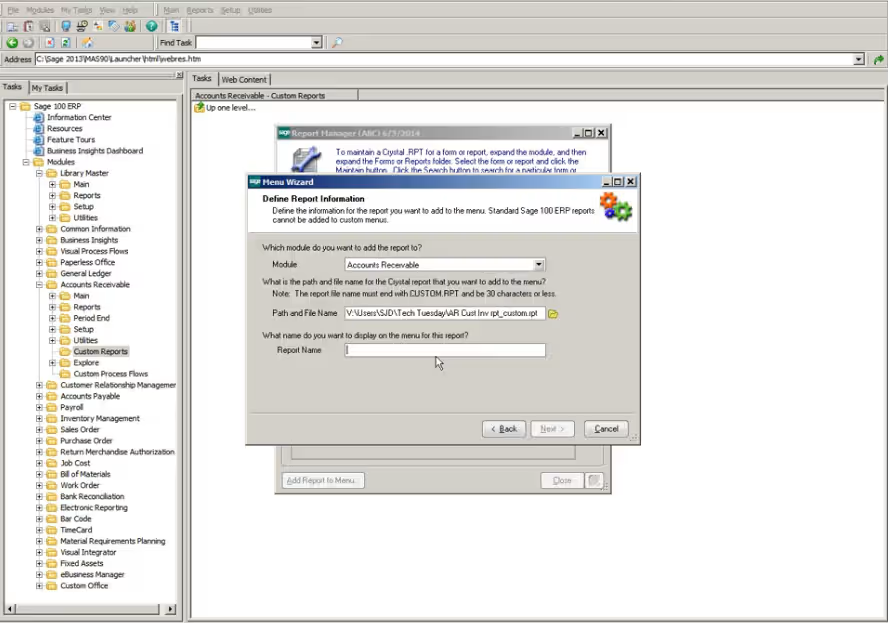
The primary formatted report utility used with Sage 100 is Crystal Reports. It allows users to create reports from scratch, edit reports, and generate structured financial reports and operational reports with precise layouts. Crystal Reports is ideal for organizations that require detailed, highly formatted output. Users can leverage it to harness their business data, create custom reports, and add calculated fields to summarize total sales, cash flow, or inventory management data. Reports can be exported to Excel, PDF, or CSV, providing flexible distribution. Key features:
- Custom report design: Build new reports or modify existing reports to meet unique requirements
- Data grouping and calculations: Group data and add calculated fields to focus on relevant reports
- Multi-source data access: Pull data from multiple modules for multiple companies
- Flexible export options: Export to Excel, PDF, CSV, or other formats
- Integration with Sage 100 modules: Works with General Ledger, Accounts Payable, Accounts Receivable, Inventory, and Sales Orders

See Sage 100 reporting tools in action
Discover how Sage 100 reporting and analytics can transform your financial, operational, and executive insights. Request a personalized demo and see dashboards, automated reports, and actionable analytics in real time. Take control of your data, streamline workflows, and make faster, smarter business decisions—all tailored to your organization’s needs.
Business intelligence and analytics
Sage 100 offers several intelligence reporting tools that go beyond static reports to interactive analysis, dashboards, and trend tracking. Teams can analyze business data in real-time, across multiple data sources, and use pre-built reports or custom reports for actionable insight.
Sage Intelligence
An Excel-based intelligence reporting tool, Sage Intelligence is designed to leverage users’ existing Excel skills while pulling live data from Sage 100. It provides a secure environment to run and store reports, allowing users to create reports, edit reports, and customize existing reports. The tool includes several modules tailored for different reporting requirements. Key features:
- Deep Excel integration: Easily create and design reports using familiar Excel functions
- Multiple reporting modules: Report Viewer, Report Manager, Report Designer, and Connector for multiple sources
- Custom and standard reports: Use pre-built reports or new reports for finance, operations, and executive teams
- Automated distribution: Send reports automatically at scheduled intervals
- Consolidation capabilities: Combine data across multiple companies and modules for a complete view

Sage Enterprise Intelligence (SEI)
SEI is a web-based analytics reporting and dashboard tool for executives and managers. It provides role-based KPIs, interactive drill-downs, and cross-module consolidation. Key features:
- Web access: Access dashboards from any browser
- Role-based metrics: Display relevant reports depending on user roles
- Drill-down analysis: Explore calculated fields and underlying transaction details
- Cross-module data views: Consolidate business data from multiple sources

Business Insights Explorer
Business Insights Explorer provides interactive ad hoc reporting, allowing users to filter, sort, and drill down on live Sage 100 data. Learn more about using these capabilities in our guide to dashboard reporting in Sage 100.
Key features:
- Interactive reporting: Easily create operational reports on the fly
- Filtering and sorting: Focus on relevant reports and critical parameters
- Drill down capabilities: Examine detail behind summary financial reports
- Exports: Deliver reports in Excel, PDF, or CSV

Sage Data & Analytics
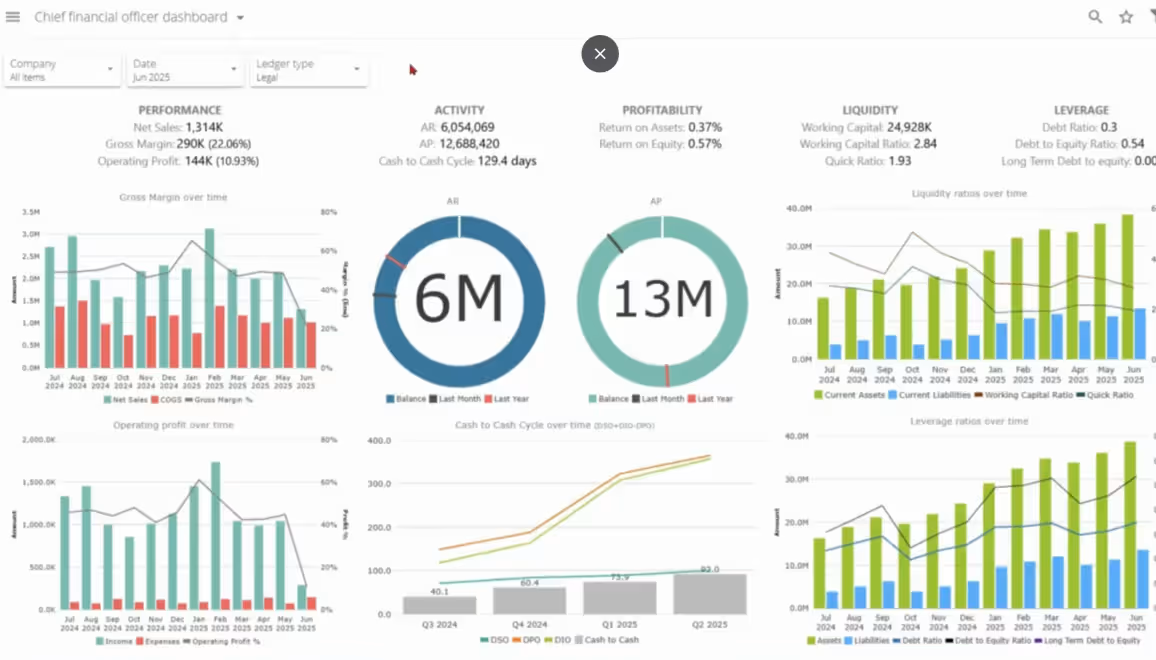
Sage Data & Analytics, powered by Zap, is the data-foundation tier of the Sage 100 reporting toolbox. Where the tools above report from Sage 100, SD&A builds a governed data hub beneath it: a ready-made warehouse that loads automatically from Sage 100 and the systems around it, and serves every downstream tool from one set of numbers. Key features:
- A managed data hub, not another report writer: pre-built Sage 100 models deploy in days and maintain themselves
- Every consumption path from one source: live Excel workbooks, web dashboards, and Power BI, all reading the same governed data
- Data consolidation: combine Sage 100 with CRM, spreadsheets, legacy databases, and other applications
- Multi-company and multi-site: one consistent view across entities with role-based security
- Automated reporting: schedule refreshes and distribute reports without manual effort
Sage Data & Analytics for Sage 100
Take your Sage 100 reporting to the next level. Watch our on-demand webinar to explore how Sage Data & Analytics consolidates data, automates report generation, and provides clear, actionable insights to help your team make faster, smarter decisions.

Sage Alerts & Workflow: Reporting automation
Sage Alerts & Workflow automates alerts, workflows, and report distribution, monitoring Sage 100 data and triggering notifications when specific thresholds are met. Key features:
- Automated alerts: Notify users about overdue invoices, low inventory, or operational exceptions
- Workflow automation: Route tasks and approvals automatically
- Module integration: Works with financial, inventory, and sales orders
- Customizable rules: Define triggers based on parameters, thresholds, or date range
- Delivery options: Send reports via email, pop-up, or dashboard notifications
Reporting challenges and best practices
Even with powerful tools, Sage 100 reporting can face challenges that impact accuracy, efficiency, and confidence in data. Performance issues, multi-module inconsistencies, and heavy reliance on Excel exports can slow reporting and create multiple versions of the same information.
Best practices include:
- Standardize reporting structures: Use consistent naming conventions, charts of accounts, and module setups.
- Schedule reports efficiently: Leverage tools like SAW or Sage Intelligence to automate report generation and distribution.
- Enforce governance: Define report ownership, access controls, and version management to ensure accuracy and auditability.
- Leverage automation and dashboards: Combine pre-built reports, custom reports, and AI-driven dashboards for proactive insights and faster decision-making.
- Monitor performance: Keep dashboards and large reports optimized to prevent slowdowns and ensure timely access to data.
Comparing Sage 100 reporting tools
How to choose the right Sage 100 reporting tool
Selecting a Sage 100 reporting solution depends on reporting requirements, user roles, and business needs. Finance teams often rely on Sage Intelligence Reporting or Crystal Reports for detailed financial reports like balance sheets and income statements. Many executives prefer SEI dashboards or Sage Data & Analytics for strategic insight. On the other hand, operational managers may lean on Business Insights Explorer for quick sales reports or inventory management reports.
Sage 100 reporting by industry
Sage 100 reporting can be tailored to industry-specific needs, giving finance, operations, and executive teams the most relevant reports and insights. Custom dashboards and reports streamline decision-making, improve operational efficiency, and link directly to financial reports, sales reports, and custom reports.
Industry-specific examples:
- Manufacturing: Forecast demand and provide insights into operational trends. Organizations can monitor production efficiency and on-time shipments to improve plant-level performance.
- Distribution: Provide insights into operational trends across warehouse stock, shipping performance, and cash flow. KPIs such as warehouse turnover and order accuracy help managers optimize fulfillment and inventory processes.
- Retail: Insights into trends support demand planning and performance monitoring. Sales per SKU and inventory turnover rate are key KPIs that help identify top-selling items and optimize stock levels.
Future of Sage 100 reporting tools
Sage 100 reporting continues to evolve, focusing on user-driven enhancements, deeper cloud integration, and improved compliance. Updates have introduced expanded invoice fields, enhanced audit tracking, and better performance for Crystal Reports, making reporting faster and more precise. Looking ahead, Sage 100 aims to support continued compliance and integration with add-ons and third-party tools. Their goal is to enable users to achieve more insightful, customizable, and efficient data analysis.
Key takeaways
- Sage 100 supports multiple reporting tools designed for different financial, operational, analytical, and management reporting needs.
- Crystal Reports is well suited for detailed, highly formatted reports, while Sage Intelligence provides flexible Excel-based reporting.
- Business Insights Explorer supports quick, ad hoc analysis of Sage 100 operational data, while Sage Enterprise Intelligence provides web-based dashboards and KPIs.
- Sage Data & Analytics creates a governed data hub that can combine Sage 100 with CRM, spreadsheets, databases, and other business systems.
- Sage Alerts & Workflow helps automate report distribution, alerts, approvals, and exception-based notifications.
- Choosing the right reporting approach depends on your data sources, reporting complexity, user preferences, and need for dashboards, automation, or cross-system analysis.
Frequently asked questions (FAQs)
What reporting tools are available in Sage 100?
Sage 100 reporting options include Crystal Reports, Sage Intelligence, Sage Enterprise Intelligence (SEI), Business Insights Explorer, Sage Data & Analytics, and Sage Alerts & Workflow. Each serves different needs, ranging from formatted financial reports and Excel-based analysis to dashboards, cross-system analytics, and automated alerts.
What is the best reporting tool for Sage 100?
The right Sage 100 reporting tool depends on your requirements. Crystal Reports is useful for highly formatted reports, Sage Intelligence supports Excel-based financial reporting, Business Insights Explorer provides ad hoc operational analysis, and SEI offers web-based dashboards. Sage Data & Analytics is designed for organizations that need to consolidate Sage 100 with other data sources or provide governed data to Excel, web dashboards, and Power BI.
Can Sage 100 create custom reports?
Yes. Sage 100 users can create and customize reports using tools such as Crystal Reports and Sage Intelligence. Depending on the tool, organizations can modify layouts, calculations, data fields, filters, and reporting structures to meet specific financial and operational requirements.
Can Sage 100 reporting integrate with Excel?
Yes. Sage Intelligence is designed around Excel-based reporting and allows users to analyze Sage 100 data using familiar Excel functionality. Sage Data & Analytics can also provide governed Sage 100 and cross-system data for reporting in Excel.
Can Sage 100 data be used in Power BI?
Yes. Sage Data & Analytics can consolidate Sage 100 and other business data into a governed data hub that can serve Power BI as a downstream reporting and visualization tool.
Can Sage 100 automate reports and alerts?
Yes. Sage Alerts & Workflow can monitor Sage 100 data and automatically distribute reports or trigger notifications based on defined conditions, thresholds, and dates. Sage Intelligence and Sage Data & Analytics also support reporting automation capabilities.
Can Sage 100 consolidate reporting across multiple companies?
Yes. Several Sage 100 reporting tools support multi-company reporting. Sage Intelligence can consolidate information across companies and modules, while Sage Data & Analytics can provide a consistent data environment across multiple companies, sites, and other business systems.
How do I choose the right Sage 100 reporting and analytics solution?
Start by identifying who needs the reports, which data sources need to be included, how reports will be consumed, and how much automation or customization is required. Organizations may also use multiple Sage 100 reporting tools together to support different financial, operational, and executive reporting requirements.
Conclusion
The right Sage 100 reporting approach depends on your data, reporting requirements, and the people who need access to insights. While some organizations need detailed financial reports or Excel-based analysis, others may benefit from dashboards, automated alerts, or reporting that combines Sage 100 with other business systems.
Rand Group can help you evaluate your current reporting environment and determine which tools best support your financial and operational needs. Contact us to explore Sage 100 reporting and analytics solutions or request a personalized demo.