QuickBooks to Sage 100 migration: Cost, timeline, and what to expect

QuickBooks is a practical accounting solution for many small businesses, but as organizations grow, their financial and operational needs often become more complex. Increasing demands for inventory management, manufacturing, purchasing, and reporting may lead businesses to compare QuickBooks vs Sage 100 as they evaluate more comprehensive ERP capabilities.
However, transitioning to a new ERP system requires careful planning. In this guide, Rand Group’s Sage experts explain the costs, timelines, data migration considerations, and implementation steps involved in a QuickBooks to Sage 100 migration to help your business prepare for a successful transition.
At a glance: QuickBooks to Sage 100 migration
Migrating from QuickBooks to Sage 100 can provide growing businesses with more comprehensive financial management, inventory, distribution, and manufacturing capabilities. A typical Sage 100 implementation takes approximately two to three months, although timelines and costs vary based on software requirements, data conversion, integrations, and project complexity. Careful planning, data preparation, thorough testing, and an experienced implementation partner can help minimize disruption and support a successful transition.
Why migrate from QuickBooks to Sage 100?
QuickBooks can continue to meet the accounting needs of many small businesses, but growth often introduces operational requirements that extend beyond basic financial management. As transaction volumes increase and business processes become more complex, organizations may find themselves relying on spreadsheets, manual workarounds, or disconnected applications to manage essential activities.
Sage 100 offers an integrated ERP environment designed to support financial management alongside inventory, purchasing, sales order processing, manufacturing, and payroll operations.

Is Sage 100 the right fit for your business?
Not sure if Sage 100 is the right next step beyond QuickBooks? Rand Group’s Sage experts can help evaluate your accounting and operational requirements, explore Sage 100’s capabilities, and determine whether it’s the right solution to support your business goals.
Signs your business may have outgrown QuickBooks
Common indicators that it may be time to consider a more comprehensive ERP solution include:
- Increasing inventory complexity: Managing multiple warehouses, inventory costing, stock movements, or replenishment requires more sophisticated processes.
- Growing manufacturing requirements: Production planning, bills of materials, and manufacturing workflows have become difficult to manage with existing tools.
- Disconnected business processes: Accounting, purchasing, sales, and inventory teams rely on separate applications or manual data transfers.
- Limited reporting flexibility: Financial and operational reporting requires extensive spreadsheet manipulation or manual consolidation.
- Too many workarounds: Employees spend significant time maintaining spreadsheets, reconciling systems, or performing repetitive tasks.
- Changing operational requirements: Business growth has introduced more complex workflows, integrations, or reporting needs.
While QuickBooks Enterprise offers more advanced inventory and operational capabilities than QuickBooks Online, organizations may still reach a point where they require a more integrated ERP platform.
What Sage 100 offers growing businesses
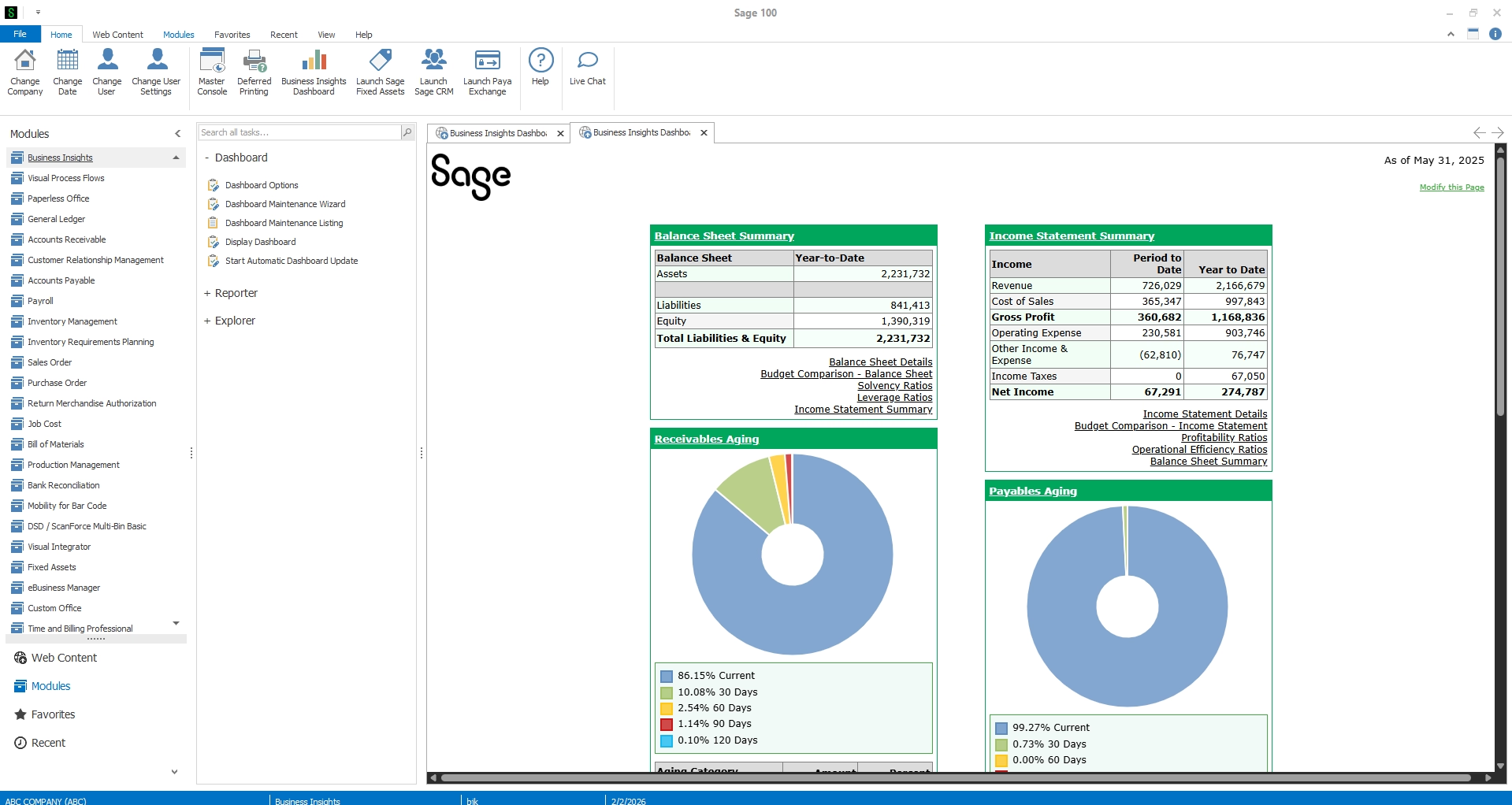
Sage 100’s capabilities combine core accounting functionality with more advanced tools for managing financial and operational processes. Depending on the modules implemented, businesses can benefit from:
- Comprehensive financial management: Manage general ledger, accounts payable, accounts receivable, and financial reporting.
- Integrated payroll management: Process employee payroll and manage related reporting with Sage 100’s Payroll module, providing an alternative for businesses currently using QuickBooks Payroll.
- Advanced inventory management: Improve control over inventory transactions, costing, stock levels, and warehouse operations.
- Integrated purchasing and sales orders: Streamline order processing, purchasing, and inventory workflows.
- Manufacturing capabilities: Manage bills of materials, production activities, and manufacturing processes.
- Flexible reporting: Connect financial and operational data to improve visibility and support decision-making.
- Deployment flexibility: Choose between on-premises and hosted environments based on business and IT requirements.
For growing businesses with complex inventory, distribution, or manufacturing needs, Sage 100 can provide a more comprehensive ERP solution than their existing QuickBooks environment.
How much does Sage 100 cost?
The cost of Sage 100 depends on your organization’s size, required functionality, number of users, and implementation complexity. As a starting point, Sage 100 core accounting software typically ranges from $7,500 to $15,000 annually, before additional modules, Sage 100 Advanced edition requirements, and implementation services.
For businesses migrating from QuickBooks, the total investment also depends on the scope of the transition. A straightforward implementation involving core accounting and limited data conversion will generally cost less than a project requiring advanced inventory management, manufacturing capabilities, multiple integrations, or extensive customization.
When budgeting for your migration, it is important to distinguish between Sage 100 software pricing and the professional services required for implementation, data conversion, training, and ongoing support. A detailed requirements assessment can help establish a more accurate estimate based on your business needs.
Factors that influence Sage 100 migration costs
How to budget for your migration
When budgeting for a QuickBooks to Sage 100 migration, consider the total cost of ownership, not just the initial software investment. Key expenses to account for include:
- Implementation services: System configuration, data conversion, integrations, and customization.
- Employee training: Preparing users to work efficiently in the new system.
- Infrastructure and hosting: Server requirements, hosting fees, and related IT expenses.
- Internal resources: Employee time dedicated to data preparation, testing, and project participation.
- Ongoing support: System maintenance, troubleshooting, and future enhancements.
A detailed requirements assessment can help identify the functionality your business needs, clarify migration complexity, and establish a realistic budget while minimizing unexpected costs.

Understand the cost of your Sage 100 migration
Every QuickBooks environment is different. Rand Group’s Sage specialists can help assess your business requirements, identify migration considerations, and develop an implementation plan aligned with your needs and budget.
How long does it take to migrate from QuickBooks to Sage 100?
A typical Sage 100 implementation takes approximately two to three months, based on Rand Group’s general implementation experience. However, the actual timeline for migrating from QuickBooks to Sage 100 depends on the scope and complexity of the project.
Organizations implementing core financial functionality with relatively straightforward data requirements may have a shorter implementation than businesses introducing inventory management, manufacturing processes, multiple integrations, or extensive customization.
Typical Sage 100 implementation phases
A successful QuickBooks to Sage 100 migration follows a structured implementation methodology designed to minimize disruption, maintain data accuracy, and prepare employees for the new system. Rand Group’s Sage experts guide businesses through the following key phases:
1. Project planning
The implementation begins with establishing project requirements, defining responsibilities, and developing a realistic timeline. Key activities include:
- Reviewing existing QuickBooks processes and business requirements
- Identifying the Sage 100 modules needed
- Defining project scope, milestones, and responsibilities
- Establishing a migration and implementation schedule
2. Installation and module setup
Once planning is complete, Sage 100 is installed and configured to support the organization’s financial and operational processes. Activities may include:
- Installing Sage 100 in the selected environment
- Setting up general ledger, accounts payable, and accounts receivable
- Configuring inventory, purchasing, sales orders, payroll, and other required modules
- Establishing user permissions and business-specific settings
3. Data migration to a test environment
QuickBooks data is prepared and imported into a Sage 100 test environment before the final transition. This allows businesses to review converted information and identify issues before go-live.
Key activities include:
- Preparing QuickBooks data using Sage 100 import templates
- Importing customer, vendor, financial, and inventory records
- Reviewing imported records for accuracy and completeness
- Identifying and correcting data conversion issues
4. Employee training and testing
With the test environment configured, employees receive training and gain experience using Sage 100. This phase helps users become familiar with new processes and identify questions before the system goes live.
Activities may include:
- Providing role-specific training
- Reviewing accounting and operational workflows
- Testing transactions and reporting
- Addressing questions and configuration issues
5. Pilot meeting and go-live preparation
Before go-live, Rand Group conducts a pilot meeting to review the system, address final questions, and confirm readiness for the transition.
This phase includes:
- Reviewing key workflows and implementation requirements
- Addressing outstanding questions and concerns
- Confirming user readiness
- Establishing the final cutover plan
6. Go-live and current data migration
Once the organization is ready for the transition, Sage 100 is populated with current business data from QuickBooks as part of the final cutover. Final data conversion and reconciliation help ensure the system is ready for daily operations.
Key activities include:
- Completing the final import of current data
- Reconciling financial balances and validating records
- Transitioning daily transactions from QuickBooks to Sage 100
- Providing go-live assistance and resolving initial issues
Following a structured implementation process helps businesses identify potential challenges early, prepare employees for new workflows, and support a smoother transition to Sage 100.
What about downtime during migration?
Some business activities may need to be temporarily paused during the final cutover to maintain data integrity. A coordinated migration plan that includes final data conversion, reconciliation, and testing can help minimize disruption and support a smoother transition to Sage 100.
What can extend the migration timeline?
Several factors can affect how long a QuickBooks to Sage 100 migration takes, including:
- The volume and quality of existing QuickBooks data.
- The number of Sage 100 modules being implemented.
- Complex inventory structures or manufacturing requirements.
- Third-party integrations and customizations.
- The amount of historical information being converted.
- Employee availability for testing, training, and project decisions.
Establishing clear requirements and preparing data early in the process can help reduce unexpected delays and keep the project moving toward its planned go-live date.
What data can be migrated from QuickBooks to Sage 100?
QuickBooks data can be converted for use in Sage 100, but differences in data structures require careful mapping and validation. Depending on your QuickBooks environment and migration scope, common types of data transferred include:
- Chart of accounts: General ledger accounts mapped to Sage 100.
- Financial balances: Opening balances and selected general ledger data.
- Customer and vendor records: Contact details, payment terms, and other master data.
- Accounts receivable and payable: Outstanding invoices, bills, credits, and open balances.
- Inventory information: Item records, quantities, warehouse details, and costing information.
- Historical general ledger data: Selected GL transactions or balances needed for financial reporting and comparative analysis.
What can be transferred depends on your QuickBooks version, available data exports, and Sage 100 configuration. A data migration assessment helps determine which records to convert and how to maintain accuracy.
Should you migrate all your QuickBooks history?
Not every business needs to transfer its complete QuickBooks transaction history into Sage 100. In fact, Rand Group’s Sage experts generally recommend migrating historical data for the general ledger (GL), but not bringing over historical transactions from other modules. This approach can simplify data conversion, reduce implementation complexity, and help businesses start with cleaner records in Sage 100.
When planning your data migration, consider:
- General ledger history: Determine which historical GL transactions or balances are needed for financial reporting and comparative analysis.
- Other modules: Rather than importing complete transaction histories for accounts payable, accounts receivable, inventory, and other modules, prioritize the current records and outstanding transactions needed for ongoing operations.
- Historical data access: Retain older QuickBooks records for reference, audits, and reporting based on your organization’s data retention requirements.
- Data accuracy: Reconcile financial balances, review master records, and validate inventory information before importing data into Sage 100.
Rand Group’s Sage experts can help determine which records should be migrated and which can remain accessible in QuickBooks, supporting a more efficient transition while maintaining access to important historical information.
How to prepare for a successful QuickBooks to Sage 100 migration
Moving from QuickBooks to Sage 100 introduces new workflows, data requirements, and operational considerations. Careful preparation can help businesses avoid common migration challenges, minimize disruption, and support a smoother transition.
Before beginning your migration, focus on these key steps:
- Define your business requirements: Identify current QuickBooks limitations and determine which financial, inventory, distribution, and manufacturing capabilities your business needs in Sage 100.
- Prepare your data for import: Review customer, vendor, financial, and inventory records for duplicates, outdated information, and discrepancies. Rand Group provides Sage 100 import templates to help organize data for conversion, and our Sage experts can assist with reviewing and preparing records before migration.
- Establish a historical data strategy: Determine which transactions and records need to be migrated and which can remain accessible in QuickBooks for reference.
- Evaluate integrations and workflows: Identify third-party applications that may need to be replaced or integrated, and assess how existing processes will function in Sage 100.
- Assign internal project responsibilities: Involve key stakeholders from accounting, operations, and IT in requirements gathering, decision-making, and testing.
- Prioritize testing and training: Validate financial balances, inventory data, and operational workflows while providing employees with role-specific training.
- Develop a cutover plan: Establish when QuickBooks transactions will stop, how final balances will be reconciled, and when employees will begin using Sage 100.
- Set realistic expectations: Establish a budget and timeline that account for project complexity, internal resources, and potential implementation challenges.
Real-world migration consideration: Customer ship-to addresses
During a recent QuickBooks to Sage 100 migration, Rand Group’s Sage experts identified a data conversion limitation involving customer ship-to addresses. These addresses could not be transferred automatically using the available migration process and had to be entered manually in Sage 100. This highlights the importance of reviewing detailed customer records before migration, identifying information that may require manual entry, and accounting for these tasks in the implementation timeline.
Working with an experienced Sage 100 implementation partner can help reduce migration risks and prepare your business for a successful go-live. Rand Group’s Sage experts provide guidance throughout the process, including data preparation, import templates, system configuration, training, and ongoing support.
Is Sage 100 the right next step for your business?
While Sage 100 can be a strong replacement for QuickBooks, the right ERP solution depends on your operational requirements, financial processes, and long-term goals.
Sage 100 may be a good fit for businesses that need:
- Advanced inventory management: Greater control over inventory, purchasing, and warehouse operations.
- Manufacturing and distribution capabilities: Integrated tools for production management, bills of materials, and order processing.
- Comprehensive financial management: Connected accounting and operational processes with flexible reporting.
- Integrated payroll capabilities: Manage payroll processing and related reporting through Sage 100’s Payroll module rather than relying on a separate payroll system.
- Deployment flexibility: On-premises or hosted options that align with IT requirements.
However, organizations prioritizing cloud-native financial management, multi-entity accounting, financial automation, or complex consolidation may also want to evaluate Sage Intacct.
An experienced ERP partner can help assess your requirements, compare solutions, and determine which platform best supports your business today and as it grows.
Why partner with Rand Group for your QuickBooks to Sage 100 migration?
As a Sage Diamond Tier partner, Rand Group combines extensive Sage expertise with financial and operational knowledge to help businesses plan and execute successful ERP migrations. Our approach focuses on minimizing disruption, aligning Sage 100 with your business requirements, and supporting long-term success.
- Experienced Sage specialists: Our consultants help evaluate requirements, select the right Sage 100 modules, and configure the system around your business needs.
- Financial and operational expertise: We understand the accounting, inventory, distribution, manufacturing, and reporting processes that drive your operations.
- Structured migration methodology: Our approach covers planning, data conversion, configuration, testing, training, and go-live support to help reduce migration risks.
- Long-term partnership: Our team provides ongoing Sage 100 support, troubleshooting, enhancements, and optimization as your business evolves.
Key takeaways: Planning your QuickBooks to Sage 100 migration
- Evaluate your business requirements: Sage 100 offers comprehensive inventory, distribution, manufacturing, and accounting capabilities for growing businesses.
- Understand migration costs: Consider software licensing, implementation, data conversion, integrations, training, and ongoing support.
- Set a realistic timeline: A typical Sage 100 implementation takes approximately two to three months, depending on project complexity.
- Prioritize data preparation: Use import templates, validate records, and establish a historical data strategy that prioritizes GL history and essential current transactions.
- Choose an experienced partner: Working with Sage 100 specialists can help streamline implementation, reduce disruption, and support long-term success.
Frequently asked questions about QuickBooks to Sage 100 migration
How much does it cost to migrate from QuickBooks to Sage 100?
The cost of a QuickBooks to Sage 100 migration depends on software licensing, the number of users, required modules, implementation services, data conversion, integrations, and training. More complex projects involving manufacturing, inventory, or extensive customization generally require a greater investment. A requirements assessment can help establish a project-specific estimate.
How long does a QuickBooks to Sage 100 migration take?
A typical Sage 100 implementation takes approximately two to three months, although the timeline varies based on project scope. Data complexity, required modules, integrations, customization, and employee availability can affect implementation duration. More complex migrations may take longer.
Can you transfer data directly from QuickBooks to Sage 100?
QuickBooks data can be migrated to Sage 100, but the process typically requires exporting, cleaning, mapping, importing, and validating records. Because the systems use different data structures, a direct one-click transfer should not be assumed. The conversion approach depends on the QuickBooks product, data requirements, and Sage 100 configuration.
Can you keep your historical QuickBooks transactions when migrating to Sage 100?
Historical QuickBooks information may be converted to Sage 100, depending on the data and migration requirements. However, transferring every historical transaction is not always necessary or practical. Some businesses migrate essential balances, open transactions, and master records while retaining access to QuickBooks for historical reporting and reference.
Will my business experience downtime during a QuickBooks to Sage 100 migration?
Some operational interruption may be necessary during the final migration and cutover process. The amount of downtime depends on transaction volumes, integrations, data conversion requirements, and implementation planning. Testing, reconciliation, backups, and a coordinated cutover schedule can help minimize disruption.
Is Sage 100 better than QuickBooks for inventory and manufacturing?
Sage 100 provides more comprehensive ERP functionality for many inventory-intensive distribution and manufacturing businesses, including integrated purchasing, sales order processing, inventory management, Bill of Materials, and Production Management. However, QuickBooks Enterprise also offers inventory and manufacturing-related capabilities. The best solution depends on the complexity of your business requirements.
Do I need an implementation partner to migrate from QuickBooks to Sage 100?
Working with an experienced Sage 100 implementation partner can help reduce migration risks, particularly for businesses with complex accounting processes, inventory requirements, integrations, or historical data. A partner can assist with requirements assessment, system configuration, data conversion, testing, training, and post-implementation support.
Can I migrate from QuickBooks Online or QuickBooks Enterprise to Sage 100?
Yes, businesses using either QuickBooks Online or QuickBooks Enterprise can plan a migration to Sage 100. However, the available data, export methods, and conversion requirements differ between the products. An assessment of your existing QuickBooks environment helps determine which records can be migrated and the most appropriate conversion approach.
Plan your QuickBooks to Sage 100 migration with confidence
Migrating from QuickBooks to Sage 100 can help your business streamline financial and operational processes, improve inventory management, and establish a stronger foundation for growth. However, a successful transition requires careful planning, accurate data conversion, and an implementation strategy aligned with your business requirements.
Whether you’re exploring Sage 100 as a potential replacement or preparing to make the move, Rand Group’s Sage experts can guide you through the process. From evaluating your requirements and estimating migration costs to implementation and ongoing support, our team can help you plan a successful transition. Connect with our Sage 100 team to discuss your migration goals and determine the right next steps for your business.