Export standard or Crystal Reports from Sage 100 to Excel

Exporting standard or Crystal Reports from Sage 100 to Excel allows you to easily manipulate, sort, and analyze your data for deeper insights, rather than working with static printouts—simply set your report parameters, choose “Export” as the printer, select the Excel format, and your report will open directly in Excel for further analysis.
Analyzing data from Sage 100 is most effective when you can leverage the tools and flexibility of Excel. Instead of working with static printouts of standard or Crystal reports, you can export your Sage 100 data directly to Excel, making it easier to sort, filter, and manipulate information for deeper insights.
How to export standard or Crystal reports from Sage 100 to Excel
As an example, let’s look at exporting the General Ledger Detail Report from Sage 100. Start by setting the Report Setting to “Standard.” (See Image 1 below.)
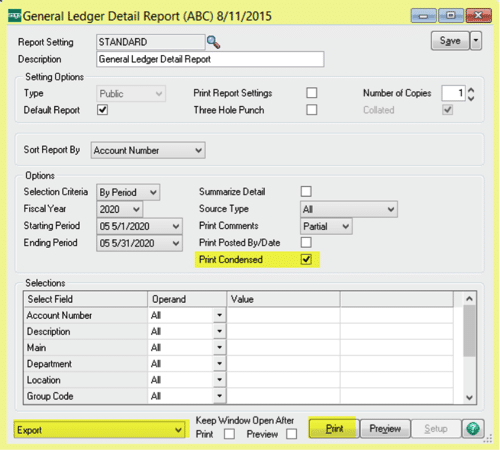
- Set the parameters for your report as needed.
- Check the box next to “Print Condensed.”
- In the bottom left, change the printer to “Export.” You can also select “Data Only Export,” but note that this will exclude report headers in the exported Excel file.
- Click “Print.” This opens the Export window.

- Under “Select Format,” choose the appropriate Excel version from the drop-down menu.
- For “Select Destination,” choose “Application” so the report opens directly in Excel. Click “OK.”
- The “Excel Format Options” window will appear.

- From the “Column width based on objects in the:” drop-down, select “Details.”
- Click “OK.”
- Your report will open in Excel, ready for analysis.
Next steps
Rand Group specializes in helping organizations optimize their use of Sage 100 and other ERP solutions. Whether you’re looking to unlock the full potential of Sage 100, integrate robust reporting and analytics, or migrate to a modern cloud ERP such as Microsoft Dynamics 365 or Business Central, our expert team is here to guide you every step of the way.
To discuss your current challenges or future plans for ERP and reporting, contact Rand Group to speak with one of our dedicated consultants. Discover how we can help you streamline your reporting processes and empower your business with data-driven insights.