Sage Intacct 2026 Release 4: What’s new and what matters

Sage Intacct 2026 Release 4 (R4), launched on November 6, 2026, introduces updates to financial management, security, reporting, and automation. From improvements in accounts payable to expanded payment options and new AI capabilities, it brings changes that can affect how finance teams manage their daily work.
Some enhancements require attention from administrators, particularly those involving email security and user access. Others offer opportunities to simplify accounting tasks, improve financial visibility, and strengthen existing processes.
We’ll explore the key Sage Intacct 2026 R4 updates, explain how they work, and highlight what finance teams should consider before adopting them.
At a glance
Sage Intacct 2026 Release 4 introduces updates across financial management, security, reporting, and automation. Here are the key changes:
- Security and administration: Email sender allow-list enforcement, easier license tracking, and optional passkey authentication.
- Accounts payable and purchasing: Improvements to AP Automation, document processing, and purchasing transactions.
- Employee expenses: New options for reimbursing employees through Accounts Payable or external payroll providers.
- AI and reporting: General availability of the Finance Intelligence Agent and early access to Connected Reporting for Excel.
- Customer payments and billing: Expanded payment capabilities through Fortis and new options for usage-based billing.
- Transaction approvals: Early access to custom approval workflows for Accounts Receivable and Order Entry.
Feature availability depends on your region, subscription, permissions, and system configuration. Some enhancements are available only through Sage’s Early Adopter programs.
Security and administration updates in Sage Intacct 2026 R4
Release 4 includes enhancements to email security, user access, and license management. These updates give administrators additional tools to manage system settings, strengthen security, and monitor user licenses.
Email sender allow list enforcement
Sage Intacct now enforces the Allowed sender email addresses list. Only addresses included on this list can be used as sender or reply-to addresses for emails generated through the system.
This requirement helps prevent email spoofing by restricting which addresses can be used for business communications. It applies to invoices, statements, payment reminders, purchase orders, sales orders, and email templates.
Enforcement began the week of November 9, 2026. Sage automatically populated the list with addresses used during the previous three months, but administrators should verify that all required addresses are included.
To check and update your approved email addresses in Sage Intacct, follow these simple instructions:

Step 1:
Navigate to Company > Setup > Company > Security.

Step 2:
Locate the Allowed sender email addresses section.

Step 3:
Verify that all email addresses used for business communications are included.

Step 4:
Add any missing addresses and remove those that are no longer in use.
Emails using unapproved sender or reply-to addresses will be blocked. Administrators can investigate delivery failures through Company > Admin > Email delivery logs.
Organizations that send invoices, statements, or other financial documents directly from Sage Intacct should check this setting to avoid interruptions to customer and vendor communications.
Easier license usage tracking
The new License usage page gives administrators a clearer view of how many users are assigned to each license type.
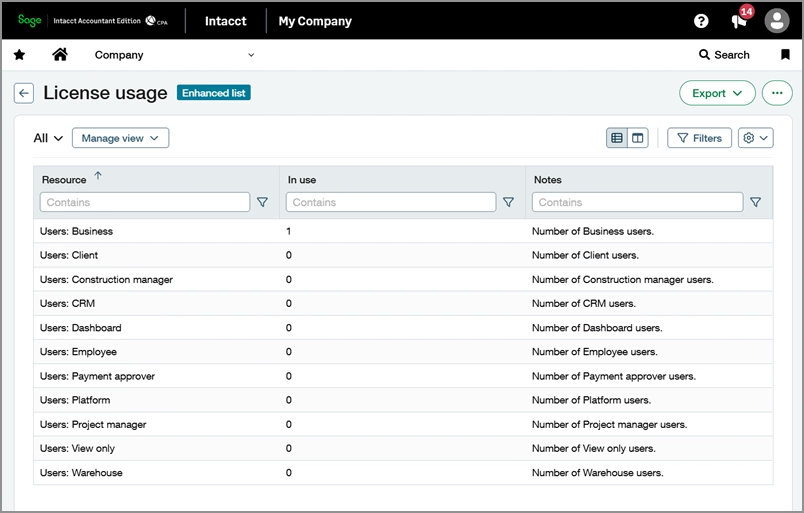
Previously, checking license usage required filtering user records and counting users by category. The new page displays these totals in one location, making it easier to compare usage against licensed limits.
Administrators can access this information under Company > Setup > Configuration > License usage.
This feature is particularly useful when adding employees, conducting user access checks, or monitoring subscriptions to avoid unexpected licensing costs.
Passkey authentication for secure sign-in
Sage Intacct 2026 R4 introduces optional passkey authentication, allowing eligible users to sign in without entering a traditional password.
Passkeys use secure credentials stored on trusted devices. Depending on the device, users can authenticate through fingerprint recognition, facial recognition, or another secure unlock method.
This approach offers stronger protection against phishing and credential theft while simplifying the sign-in process.
Administrators must enable passkey authentication before users can register compatible devices. Existing password and multi-factor authentication methods remain available as backup options.
Passkeys are not available to users who sign in through single sign-on (SSO). Organizations already using SSO can continue with their current authentication process.
Accounts payable and expense management enhancements
Sage Intacct 2026 R4 includes updates to AP Automation, purchasing, and employee expense reimbursements. These changes address common challenges such as repetitive data entry, transaction consistency, and reimbursement processing.
Improvements to AP Automation and Purchasing
Finance teams using AP Automation with Purchasing will benefit from three key enhancements in Sage Intacct 2026 R4.
Multi-entity transaction processing
In multi-entity environments, system managers can now configure transactions received through entity-specific email addresses to be created at the top level while maintaining the appropriate entity information.
This supports centralized transaction processing without losing the details needed to assign transactions to the correct entity.
Improved memo field predictions
Sage Intacct can now populate purchasing transaction memo fields using descriptions extracted from uploaded documents.
This reduces manual entry and helps preserve relevant details from the original document. The enhancement applies to uploaded files; documents submitted through email continue to use the existing processing behavior.
Document number inheritance
Automated purchasing transactions can now retain the source document number when the transaction definition is configured to inherit it.
This helps maintain consistency between related purchasing records and makes transactions easier to trace.
Automatic splitting of multi-page documents — Early Adopter
Sage Intacct AP Automation can now identify and separate multiple transactions from a single uploaded document, simplifying invoice processing.
For example, if a PDF contains several vendor invoices, the system can identify and create separate transactions while retaining access to the original file.
This can reduce the time accounts payable teams spend manually separating documents before processing them.
The feature is currently available through Sage’s Early Adopter program. It applies to uploaded documents rather than files received through email.
New employee expense reimbursement options
Sage Intacct now allows organizations to reimburse employee expenses through Accounts Payable or an external payroll provider.
Businesses using the appropriate Time and Expenses functionality can select the approach that best fits their existing payment processes.
Reimbursement through Accounts Payable
When an employee expense report is approved, Sage Intacct automatically generates a corresponding AP bill. The organization can then reimburse the employee through its standard Accounts Payable process.
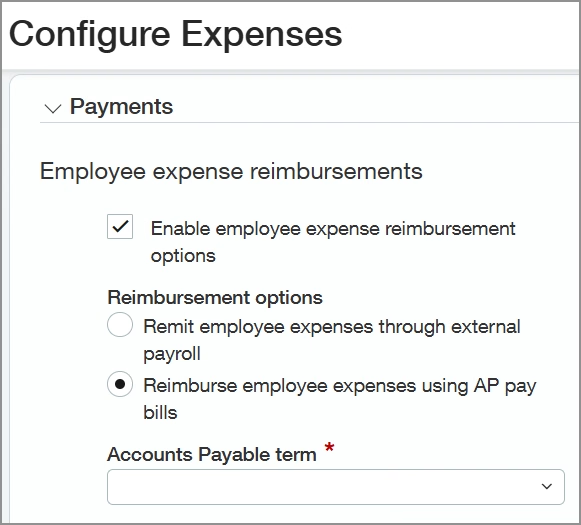
This option allows finance teams to manage employee reimbursements alongside other payments.
Reimbursement through external payroll
Approved employee expense reports can also be prepared for reimbursement through an external payroll provider.
This approach allows organizations to manage employee payments through payroll while tracking the related expenses in Sage Intacct.
Important: Once the first AP bill is created, the selected reimbursement method cannot be changed.
Organizations should evaluate both options and confirm their configuration before processing reimbursements.
AI, reporting, and approval improvements
Release 4 expands the tools available for accessing financial information, creating reports, and managing transaction approvals. The updates include both generally available features and capabilities offered through early-access programs.
Finance Intelligence Agent is now generally available
The Sage Intacct Finance Intelligence Agent is now generally available in supported regions, giving finance teams a new way to access and analyze financial information.
Through Sage Copilot, users can ask questions about their financial data in natural language rather than searching through multiple reports.
For example, a finance professional could ask:
“Which five vendors have the highest overdue balances, and how much is outstanding for each?”
The Finance Intelligence Agent can retrieve and summarize the relevant information, helping users answer financial questions without manually gathering data from different screens.
Users can also examine supporting details to better understand the information behind the response.
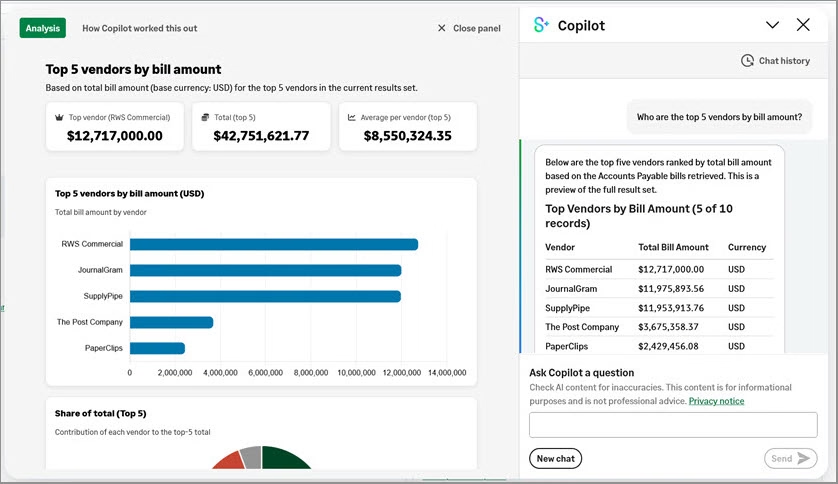
This functionality can be useful for accountants, controllers, and finance leaders who regularly investigate transactions, analyze financial performance, or respond to management questions.
The agent respects existing Sage Intacct data permissions. Administrators must enable the functionality and assign the appropriate access before users can begin using it.
To learn more about these capabilities, explore our guide to Sage Copilot and AI agents in Sage Intacct.
Connected Reporting for Excel — Early Adopter
Connected Reporting for Excel allows finance teams to create and refresh Excel reports using financial data linked directly to Sage Intacct.
Instead of exporting new data whenever information changes, users can refresh their connected reports to retrieve updated figures.
The feature also supports guided report creation and natural-language prompts, giving users more flexibility when working with financial information in Excel.
Existing Sage Intacct security permissions apply to the connected data, helping organizations maintain appropriate access controls.
Connected Reporting for Excel is currently an Early Adopter feature, available in Canada, the United Kingdom, and the United States.
This functionality may be particularly valuable for teams that rely on Excel for management reporting, budgeting, or financial analysis.
Custom approvals for Accounts Receivable and Order Entry — Early Adopter
Sage Intacct is expanding custom approval capabilities to Accounts Receivable invoices and Order Entry transactions.
Organizations can define approval rules based on transaction details and business requirements, then route transactions to designated approvers.
For example, a company could require additional approval for invoices exceeding a specified amount before they proceed.
The new Custom approvals application supports configurable rules, approval routing, and access to approval history.
These features can help businesses establish more consistent controls over receivables and sales transactions.
Customer payments and billing updates
Sage Intacct 2026 R4 introduces additional options for collecting customer payments and managing billing arrangements based on usage or changing quantities.
Customer Payments powered by Fortis
Customer Payments powered by Fortis is now generally available to Sage Intacct customers in the United States.
This integrated solution allows customers to pay invoices through secure payment links, reducing the need to process payments outside Sage Intacct.
The functionality supports:
- Secure payment links on invoices.
- Partial customer payments.
- Credit card and ACH payments.
- Customer refunds.
- Saved payment methods and scheduled payments.
These features allow accounts receivable teams to manage payment activity within Sage Intacct while giving customers more flexibility.
Companies using separate payment processing systems may want to evaluate whether Fortis fits their collection workflows.
The service requires the appropriate subscription and configuration.
Variable-quantity and tiered billing
Sage Intacct now supports additional billing options for organizations that charge customers based on usage or changing quantities.
Through billing groups, team members can record billable activity using quantity entries. Sage Intacct then uses those quantities when generating invoices.
For example, an organization that bills customers based on hours worked, transactions processed, or units consumed can calculate charges using the recorded quantities.
The enhancement also supports Order Entry price lists and tiered pricing methods, including volume, step, and absolute pricing.
This gives organizations more flexibility to manage usage-based billing without relying on separate calculations.

Need help with Sage Intacct 2026 Release 4?
Rand Group can help you understand the latest updates, assess their impact on your current environment, and adopt the features that support your business needs.
Year-end preparation and additional enhancements
Release 4 also includes information and updates related to year-end reporting, financial processes, and technical integrations.
Preparing for 2026 1099 reporting
Organizations in the United States should review their Sage Intacct 1099 settings before preparing tax-year 2026 filings.
Sage’s Release 4 documentation outlines changes to reporting thresholds and form fields, including updates affecting Forms 1099-MISC and 1099-NEC.
Finance teams should confirm that vendor information, transaction classifications, and reporting amounts reflect the applicable requirements.
Before processing 1099s, organizations should:
- Review the 2026 tax-year form changes.
- Verify vendor records and 1099 classifications.
- Check transactions assigned to affected forms and boxes.
- Run 1099 reports to confirm the amounts.
- Determine whether to file electronically or print and mail forms.
Sage Intacct also supports electronic filing through its TaxBandits integration.
An important consideration: Sage Intacct does not automatically move existing information when IRS form or box requirements change. Employees may need to update affected transactions before filing.
For more guidance on 1099 preparation, join our upcoming Sage Intacct year-end and 1099s: Prepare for a smooth close webinar on December 15, 2026. Our Sage Intacct experts will cover key year-end tasks, 1099 reporting requirements, and practical tips to help you prepare for a smooth close.
Other enhancements in Sage Intacct 2026 R4
Release 4 includes additional updates to general ledger reconciliations, customer refunds, bank file processing, and construction-related retainage.
Sage has also redesigned its Developer Portal and updated REST API resources for companies using custom integrations.
These enhancements may be important for businesses using specialized Sage Intacct modules or connected applications. Reviewing the full release notes can help administrators identify changes relevant to their environment.
Watch the Sage Intacct 2026 R4 overview
Want a closer look at the latest updates? In this video, we walk through the key changes in Release 4, including security enhancements, AP Automation, reporting, and new financial management capabilities.
How to prepare for Sage Intacct 2026 R4
Sage Intacct updates are delivered automatically through the cloud platform, but some features require additional configuration, permissions, or subscriptions.
Finance teams and administrators should focus on the changes that affect their existing processes before enabling new functionality.
Here are five steps to prioritize:
- Check email security settings. Verify that the allowed sender email list includes all addresses used for business communications.
- Review permissions and licensing. Use the new License usage page to check user counts and confirm access requirements for new functionality.
- Evaluate accounting workflows. Determine whether changes to AP Automation, expense reimbursements, customer payments, or billing could improve existing processes. Pay particular attention to settings that cannot be reversed.
- Verify year-end reporting requirements. Check 1099 configurations and confirm that reporting information reflects the applicable tax-year changes.
- Consider Early Adopter opportunities. Evaluate whether features such as Connected Reporting for Excel, custom approvals, or automated document splitting address current business needs.
Reviewing these areas will help organizations prioritize relevant changes and determine where additional configuration or training may be needed.
Key takeaways
- Security changes require attention. Administrators should verify approved email sender addresses and become familiar with the new license usage tools.
- Accounts payable and expense processing offer new options. Enhancements support purchasing automation, document handling, and employee reimbursements.
- Financial analysis is becoming more accessible. The Finance Intelligence Agent allows eligible users to retrieve information through natural-language questions.
- Reporting and approval capabilities are expanding. Connected Reporting for Excel and custom transaction approvals are available through Early Adopter programs.
- Payments and billing offer greater flexibility. Fortis supports integrated customer payments, while billing groups can accommodate variable quantities and tiered pricing.
- Preparation depends on your environment. Organizations should check feature availability, permissions, and configuration requirements before making changes.
Frequently asked questions (FAQs)
When was Sage Intacct 2026 Release 4 released?
Sage Intacct 2026 Release 4 was released on November 6, 2026. It includes updates across security, financial management, automation, reporting, and customer payments.
What are the most important Sage Intacct 2026 R4 changes?
Key updates include email sender allow-list enforcement, improved license tracking, AP Automation enhancements, new expense reimbursement options, the Finance Intelligence Agent, passkey authentication, and expanded payment functionality.
The most relevant changes depend on your organization’s existing workflows and subscriptions.
Is the Sage Intacct Finance Intelligence Agent generally available?
Yes. The Finance Intelligence Agent is generally available in supported regions, including the United States, Canada, the United Kingdom, Australia, Singapore, and South Africa.
Access depends on the applicable subscription, administrator configuration, and user permissions.
Can Sage Intacct users sign in without a password?
Yes. Sage Intacct 2026 R4 introduces optional passkey authentication for eligible users.
Passkeys use trusted devices and secure authentication methods, but the feature is not available to users who sign in through SSO.
Can organizations change their employee expense reimbursement method later?
The reimbursement method cannot be changed after an AP bill has been created using the new process.
Organizations should confirm their preferred method and test the configuration before processing reimbursements.
Are all Sage Intacct 2026 R4 features available to every customer?
No. Some enhancements are generally available, while others require Early Adopter access or are limited to specific regions.
Subscriptions, permissions, and system configuration may also affect availability.
Prepare your organization for Sage Intacct 2026 R4
Sage Intacct 2026 R4 introduces updates that may affect how your organization manages security, accounting processes, reporting, and customer payments.
Start by identifying the changes most relevant to your business, confirming their availability, and determining whether any configuration adjustments or team training are needed.
As a technology consulting and implementation partner specializing in Sage Intacct, we can help you assess your existing configuration and permissions, evaluate new reimbursement and payment workflows, and train your team on relevant R4 capabilities.
Reach out to Rand Group to discuss how these updates apply to your business and how our experts can help you get more value from Sage Intacct.