Sage Intacct accounts receivable automation: Billing, collections, payments, and cash flow

For many finance teams, accounts receivable is still more manual than it needs to be. Repetitive invoicing, inconsistent collections follow-up, disconnected payment processes, and manual reconciliation can consume valuable accounting resources and slow the invoice-to-cash cycle.
Sage Intacct accounts receivable automation helps organizations streamline core AR processes within the same cloud financial management platform used to manage their broader accounting operations. This can reduce administrative work, improve financial visibility, and give finance teams greater control over receivables and cash flow.
At Rand Group, our Sage consultants help organizations evaluate the entire invoice-to-cash process, not just individual software features. By aligning Sage Intacct with an organization’s workflows, financial requirements, and technology environment, businesses can build a more efficient and scalable approach to accounts receivable.
At a glance
- Sage Intacct Accounts Receivable helps automate and streamline invoicing, recurring billing, receivables management, payment recording, and AR reporting.
- Connected financial data keeps accounts receivable aligned with the general ledger, reducing manual entry and reconciliation.
- Real-time AR visibility helps finance teams monitor aging, outstanding balances, DSO, and cash flow.
- Process-first automation helps organizations prioritize high-impact opportunities instead of simply recreating manual workflows.
- Rand Group's Sage Intacct expertise helps organizations configure, integrate, and optimize AR processes around their financial and operational requirements.
What is Sage Intacct?
Sage Intacct is a cloud-based financial management platform that helps organizations automate accounting processes and gain real-time visibility into financial performance. Its core financial capabilities include general ledger, accounts payable, accounts receivable, cash management, multi-entity accounting, and financial reporting.
Sage Intacct accounts receivable is part of this connected financial environment, helping organizations manage customer accounts, invoicing, recurring billing, payments, collections, and AR reporting while keeping receivables connected to the general ledger.
This integrated approach reduces manual accounting work while giving finance teams greater visibility into outstanding receivables and their impact on cash flow.

Streamline your financial processes with Sage Intacct
Discover how Sage Intacct can help your organization automate financial processes, improve visibility, and build a more scalable accounting environment. Talk to a Sage Intacct expert to explore the right capabilities for your business.
What is Sage Intacct accounts receivable automation?
Sage Intacct accounts receivable automation refers to using Sage Intacct’s built-in Accounts Receivable capabilities to automate and streamline core AR processes, including customer invoicing, recurring billing, payment management, collections, and financial reporting.
Rather than managing receivables through disconnected spreadsheets and manual processes, finance teams can maintain AR activity within the same financial system as the general ledger and other core accounting functions.
This connected approach can help organizations:
- Reduce repetitive data entry
- Standardize invoicing processes
- Automate recurring transactions
- Improve visibility into outstanding balances
- Manage collections more consistently
- Record customer payments efficiently
- Keep AR and general ledger information aligned
- Monitor receivables and cash flow with current financial data
The objective is not to automate every customer interaction. Instead, Sage Intacct helps remove unnecessary manual work from routine AR processes while giving accounting teams better information for managing exceptions.

Automate invoicing and recurring billing
Efficient accounts receivable starts with timely, accurate invoicing. Every unnecessary delay between completing a sale or service and issuing an invoice can extend the time it takes to ultimately collect the cash.
Sage Intacct Accounts Receivable helps organizations standardize and streamline invoice processing. Depending on the organization’s business processes and configuration, finance teams can use Sage Intacct to:
- Create customer invoices
- Generate recurring invoices for repeat transactions
- Maintain customer and billing information
- Use configurable invoice formats
- Deliver invoices electronically
- Track invoice status within the financial system
- Connect billing activity with the general ledger
Recurring invoices can be particularly valuable for organizations that repeatedly bill customers for predictable products, services, fees, or other charges. Rather than manually recreating the same invoice each billing cycle, accounting teams can establish repeatable processes that reduce administrative effort and improve consistency.
Connect billing with other business systems
For many organizations, the information required to create an invoice originates outside accounting. Customer information may reside in a CRM, while transaction details may originate in an operational or industry-specific system.
Integrating those systems with Sage Intacct can reduce duplicate data entry and create a more connected path from the underlying business transaction to accounts receivable.
Rand Group considers these upstream processes when designing Sage Intacct solutions. Before automating invoicing, our consultants work with organizations to understand questions such as:
- What event should trigger an invoice?
- Where does the billing information originate?
- What approvals are required?
- Which data should flow into Sage Intacct?
- How should exceptions be managed?
- How should the resulting transaction affect the general ledger?
Automating an inefficient process simply makes the inefficient process run faster. A process-first approach helps ensure that Sage Intacct supports both accounting efficiency and appropriate financial controls.
Streamline collections and manage outstanding receivables
Generating an invoice is only the beginning of the AR cycle. Finance teams also need a reliable way to identify outstanding balances and determine where collection efforts should be focused.
Without centralized AR information, collections can become highly manual. Employees may export aging reports to spreadsheets, maintain separate notes about customer conversations, and spend time determining which invoices require attention.
Sage Intacct provides finance teams with centralized information about customer accounts and outstanding receivables. This helps accounting teams:
- Review customer balances
- Monitor outstanding invoices
- Analyze receivables by aging period
- Identify overdue balances
- Review customer account activity
- Prioritize accounts requiring attention
- Maintain better visibility into collection performance
The benefit is greater control over collections without relying as heavily on disconnected spreadsheets and manually assembled information.

Focus collection efforts where they matter
Automation does not eliminate the need for human involvement in collections. Customers may dispute charges, request clarification, experience temporary payment problems, or require individualized follow-up.
Instead, better AR processes allow employees to spend less time gathering information and more time resolving the issues preventing payment.
For example, an accounting employee should not need to manually combine information from multiple spreadsheets just to determine which invoices are overdue. Centralized AR data makes it easier to identify those balances and concentrate collection efforts on the customers and invoices requiring action.
That consistency can contribute to a shorter collection cycle and better control over days sales outstanding (DSO).
Simplify customer payment processing
Once a customer pays, accounting needs to accurately record that payment against the appropriate receivable.
Sage Intacct allows organizations to record customer payments within Accounts Receivable and apply those payments to outstanding transactions. Because AR is part of the broader Sage Intacct financial environment, payment activity remains connected to customer balances and financial records.
A more streamlined payment process can help finance teams:
- Record customer receipts
- Apply payments against outstanding invoices
- Maintain current customer balances
- Reduce manual reconciliation
- Improve the accuracy of AR aging
- Keep financial reporting current
Organizations processing a high volume of customer receipts can further automate the process with Rand Group’s Lockbox Processing for Sage Intacct. Developed specifically for Sage Intacct, the application can import bank lockbox files, match customer and invoice information, and apply cash receipts in Sage Intacct. This reduces manual data entry, accelerates payment processing, and helps improve accuracy.
Organizations that require additional electronic payment methods or specialized payment processing can also integrate Sage Intacct with complementary payment solutions. These integrations can extend the payment experience while keeping Sage Intacct at the center of the financial process.
The distinction is important: Sage Intacct Accounts Receivable provides the core accounting foundation for managing receivables and customer payments, while additional payment capabilities may depend on the organization’s configuration and connected solutions.
Keep accounts receivable and the general ledger connected
One of the key advantages of managing accounts receivable within Sage Intacct is that AR does not operate as an isolated system.
Invoices, payments, customer balances, and related accounting activity are connected with the broader financial environment. This helps reduce the reconciliation challenges that can occur when receivables are tracked separately from the general ledger.
A connected AR and general ledger environment can help organizations:
- Reduce duplicate financial data entry
- Maintain more consistent accounting records
- Improve period-end reconciliation
- Keep customer balances and financial reporting aligned
- Reduce reliance on spreadsheet-based adjustments
- Give finance leaders more current information
This connection becomes increasingly valuable as an organization grows. Higher transaction volumes, additional entities, and more complex billing processes can make manual reconciliation difficult to scale.
At Rand Group, we frequently see organizations focus initially on the efficiency of individual transactions. However, the larger value often comes from improving how financial information flows across the organization. A faster invoice process has limited value if accounting still needs to manually reconcile that activity elsewhere at month-end.
Improve AR reporting and cash flow visibility
Accounts receivable is not only an operational accounting function. It is also an important source of information about working capital and cash flow.
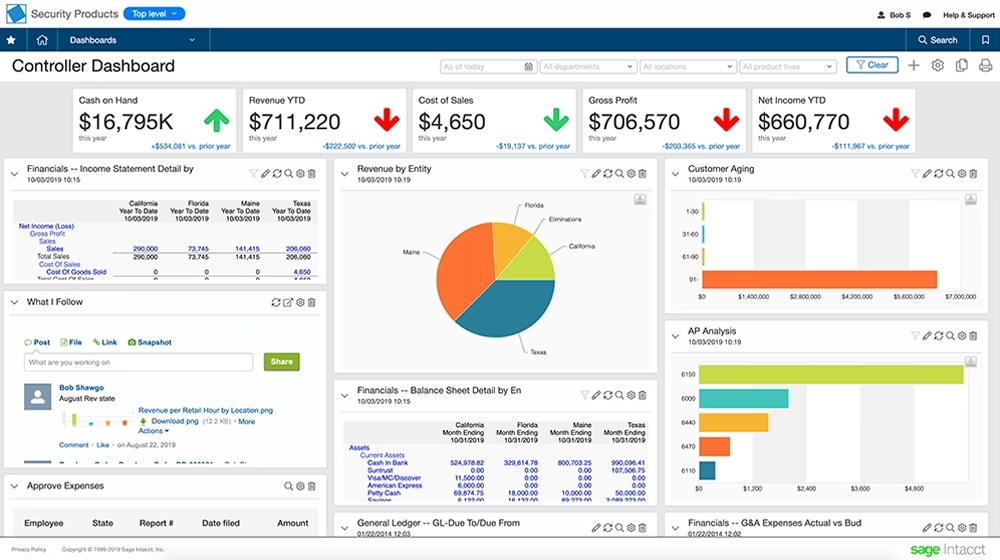
Sage Intacct provides reporting and dashboard capabilities that allow finance teams to analyze receivables without relying exclusively on manually maintained spreadsheets.
Depending on reporting requirements, organizations can use AR information to monitor:
- Total accounts receivable
- Current and overdue balances
- AR aging
- Customer balances
- Invoice activity
- Collection trends
- Days sales outstanding
- Customer payment patterns
Current AR information helps finance leaders answer important questions. Are receivables growing faster than sales? Which balances are moving into older aging categories? Are particular customers consistently paying late? Is DSO trending in the right direction?
These questions matter because recorded revenue does not necessarily translate into available cash.
An organization can generate strong sales while experiencing cash flow pressure if customers pay slowly. Improving the AR process helps finance teams maintain better visibility into how efficiently revenue is converted into cash.
The relationship can be summarized simply:
Invoice accurately and promptly → monitor outstanding balances → collect consistently → record payments efficiently → maintain accurate AR data → improve cash flow visibility
The value of Sage Intacct accounts receivable automation therefore extends beyond administrative efficiency. Better AR processes provide finance leaders with more reliable information for managing working capital and making financial decisions.

AI and emerging automation in Sage Intacct accounts receivable
Sage continues to expand AI and intelligent automation across Sage Intacct, creating new opportunities to reduce manual work in accounts receivable.
One emerging capability is Cash Intelligence: Payment Reminders, currently available through Sage’s Early Adopter program. It helps AR teams identify customers with open or overdue invoices and send one-click or bulk payment reminder emails, supporting more consistent collections follow-up.
Sage is also introducing broader AI capabilities, including the Finance Intelligence Agent, which helps users analyze financial data using natural language, and the Sage Intacct AI Gateway, which provides a secure way to connect Intacct data with external AI applications.
Together, these developments show how Sage Intacct is evolving beyond traditional automation toward more intelligent financial workflows. Organizations should evaluate availability and fit as these capabilities continue to develop.
Sage Intacct accounts receivable in action: Association of Arkansas Counties
Rand Group’s work with the Association of Arkansas Counties (AAC) demonstrates the impact of modernizing accounts receivable as part of a broader Sage Intacct implementation. AAC’s legacy Sage 100 environment relied on manual processes for complex receivables, installment payments, and data entry that were becoming difficult to scale.
Rand Group worked with AAC to migrate to Sage Intacct while identifying opportunities to improve existing workflows. The new environment helped AAC:
- Move accounts receivable and payable to digital, paperless processes
- Streamline installment billing
- Automate data imports and reduce manual entry
- Establish a more scalable financial platform
AAC’s experience demonstrates Rand Group’s process-focused approach to Sage Intacct accounts receivable automation: understand the existing workflow, identify opportunities for improvement, and configure Sage Intacct to support a more efficient financial process.
What accounts receivable processes should you automate first?
Organizations do not need to automate every AR process at once. Start with the areas creating the most manual effort, delays, or financial risk. Consider where repetitive data entry occurs, how overdue receivables are managed, how much effort payment processing requires, and whether finance leaders have timely visibility into AR performance.
Common priorities for Sage Intacct accounts receivable automation include:
- Standardize invoicing to reduce manual steps and billing delays.
- Automate recurring transactions to eliminate repetitive billing tasks.
- Centralize receivables management to improve visibility into customer balances and overdue invoices.
- Streamline payment recording to reduce manual processing and reconciliation.
- Connect business systems to eliminate duplicate data entry.
- Improve AR reporting to monitor aging, DSO, and receivables performance.
The right priorities depend on your transaction volumes, existing processes, business systems, and financial objectives.

Optimize your AR processes with Rand Group
Turn your accounts receivable data into greater efficiency and financial visibility. Trust Rand Group’s Sage Intacct experts to help you optimize and automate AR processes and reporting around your organization’s needs.
Partnering with Rand Group for Sage Intacct accounts receivable automation
Software functionality is only one component of successful accounts receivable automation.
Every organization has different customers, billing models, approval requirements, accounting structures, reporting needs, and surrounding business systems. Those differences influence how Sage Intacct should be configured and where automation will provide the greatest value.
Rand Group brings hands-on Sage ERP, Sage Intacct, accounting process, and integration experience to these engagements. Our consultants can help organizations:
- Assess existing invoice-to-cash processes
- Identify manual bottlenecks and opportunities for automation
- Design Sage Intacct AR workflows around business requirements
- Configure invoicing and recurring transactions
- Migrate customer and financial data
- Integrate Sage Intacct with CRM and operational systems
- Develop AR reports and dashboards
- Train accounting and finance teams
- Optimize Sage Intacct as business requirements evolve
For organizations evaluating Sage Intacct accounts receivable automation, the objective should not be to automate as many tasks as possible. The goal is to remove unnecessary manual work while maintaining appropriate controls and giving finance teams better information for managing receivables.
Frequently asked questions about Sage Intacct accounts receivable automation
Is Accounts Receivable built into Sage Intacct?
Yes. Sage Intacct Accounts Receivable is part of Sage Intacct’s core financial management capabilities. It allows organizations to manage customer accounts, invoices, recurring transactions, payments, receivables, and AR reporting within the same cloud financial management environment as the general ledger and other accounting functions.
What is Sage Intacct accounts receivable automation?
Sage Intacct accounts receivable automation refers to using Sage Intacct’s Accounts Receivable capabilities to reduce manual work across processes such as invoicing, recurring billing, receivables management, payment recording, and reporting. Because AR is connected with Sage Intacct’s broader financial environment, organizations can also reduce duplicate data entry and improve financial visibility.
What accounts receivable processes can Sage Intacct automate?
Sage Intacct can help automate and streamline invoice creation, recurring invoices, customer and transaction management, financial data flow, and AR reporting. It can also integrate with other business applications to reduce manual data entry when customer or billing information originates outside Sage Intacct.
Does Sage Intacct support recurring invoices?
Yes. Sage Intacct supports recurring transactions that can help organizations streamline predictable billing activity. Rather than manually recreating the same invoices each billing cycle, accounting teams can establish recurring processes that improve consistency and reduce administrative effort.
How does Sage Intacct help with collections?
Sage Intacct provides centralized visibility into customer balances, outstanding invoices, and AR aging, helping finance teams identify overdue receivables and prioritize collection efforts. This reduces reliance on manually assembled spreadsheets and gives employees more reliable financial information when following up with customers.
Can Sage Intacct record and apply customer payments?
Yes. Customer payments can be recorded and applied against outstanding receivables in Sage Intacct, helping organizations maintain current customer balances and accurate AR information. Organizations requiring additional electronic payment functionality may also connect Sage Intacct with compatible payment solutions.
How does Sage Intacct accounts receivable connect to the general ledger?
Sage Intacct Accounts Receivable operates within the broader Sage Intacct financial management environment, allowing AR transactions to remain connected with the general ledger. This can reduce duplicate data entry, simplify reconciliation, and give finance teams more consistent financial information.
How can Sage Intacct accounts receivable automation improve cash flow?
Sage Intacct accounts receivable automation can improve cash flow management by helping organizations invoice more efficiently, maintain better visibility into overdue receivables, record payments accurately, and monitor AR performance. More current receivables information also helps finance leaders identify collection issues and working-capital risks sooner.
Does Sage Intacct Accounts Receivable require a separate AR automation application?
No separate application is required to use Sage Intacct’s core Accounts Receivable capabilities. Sage Intacct includes functionality for managing invoices, customer receivables, payments, recurring transactions, and AR reporting. Organizations can choose to extend these capabilities with additional Sage or third-party solutions when their requirements call for specialized functionality.
How can Rand Group help improve accounts receivable in Sage Intacct?
Rand Group can assess existing AR processes, identify opportunities for automation, configure Sage Intacct, migrate financial data, integrate surrounding business systems, develop reports and dashboards, train users, and optimize workflows. Our consultants focus on aligning Sage Intacct with each organization’s accounting requirements and broader financial processes.
Build a more efficient path from invoice to cash
Sage Intacct accounts receivable automation helps organizations streamline invoicing, manage outstanding balances, record payments accurately, and gain better visibility into receivables, all within a connected financial management environment.
Rand Group combines Sage Intacct expertise with practical implementation, integration, and financial process experience to help organizations build more efficient and scalable AR processes. Contact our team today to learn how Sage Intacct can help streamline accounts receivable and improve financial visibility.