Sage Intacct integration guide: Connecting your ERP ecosystem

Sage Intacct accounting software is a cloud-native platform designed for modern financial management. Organizations rely on it as the central system for managing financial data, reporting, and core business processes. However, many companies depend on multiple systems to run daily operations. For example, sales departments use CRM platforms, operations rely on inventory management systems, and finance teams manage accounts payable, accounts receivable, billing, payroll, and payment processing across several applications.
Integrations help connect these systems so financial data flows automatically between applications. By integrating operational systems with accounting software, organizations can reduce manual data entry, improve accuracy, and gain real-time insight into financial performance. Because Sage Intacct is built with an open API architecture and supported by a large ecosystem of partner applications, businesses can easily connect the systems they already use into a unified financial management platform. In this guide, we explain how Sage Intacct integrations work, the systems organizations commonly connect, and the architectures used to integrate financial systems. You’ll also gain a clearer understanding of common integration approaches and the benefits of connecting Sage Intacct with other business applications.
- What are Sage Intacct integrations and how do they work?
- Common types of Sage Intacct integrations for finance departments
- Sage Intacct integrations overview
- Sage Intacct integration architectures
- How to choose the right Sage Intacct integrations
- How Sage Intacct integrations manage financial data
- Business processes improved by integrations
- Benefits of Sage Intacct integrations
- How to implement a Sage Intacct integration
- How Rand Group can help with Sage Intacct integrations
- Frequently asked questions (FAQs)
What are Sage Intacct integrations and how do they work?
A Sage Intacct integration connects the financial platform with another business system so financial data and transactions move automatically between applications. Instead of entering the same information across multiple systems, integrations allow data to flow directly into Sage Intacct accounting software. This reduces manual work and helps keep financial records consistent across departments.
Finance departments commonly use integrations to automate tasks such as:
- Syncing customer relationship management (CRM) data with financial records
- Importing payroll journal entries into the accounting system
- Posting vendor invoices from AP automation platforms
- Recording payment processing activity for accounts receivable
- Capturing sales invoice data from eCommerce platforms
In many organizations, Sage Intacct becomes the central financial system where operational data is consolidated and turned into financial insight.

Common Sage Intacct integration categories include:
- Accounts payable automation (AP automation)
- Customer relationship management (CRM)
- Payroll and HR systems
- Inventory management software
- Payment processing services
- Project management platforms
- Reporting and analytics applications
Common types of Sage Intacct integrations for finance departments
Organizations use Sage Intacct integrations to connect a wide range of operational systems used across sales, operations, and finance. Each integration category supports specific finance workflows and business processes, allowing financial data from these systems to flow automatically into Sage Intacct.
AP automation
AP automation solutions connect accounts payable workflows directly with Sage Intacct. Instead of manually entering supplier invoices, these applications capture invoice data, route approvals, and automatically create invoice transactions within the accounting system.
Typical AP automation capabilities include:
- Automated invoice capture and processing
- Vendor onboarding portals for suppliers
- Approval workflows based on company policies
- Three-way matching between purchase orders, invoices, and receipts
- Automatic posting to accounts payable
Solutions such as Stampli automate invoice processing, payment approvals, and vendor management. When integrated with Sage Intacct, these systems reduce manual data entry and provide clearer visibility into accounts payable activity and business spend.
Organizations often adopt AP automation to:
- Strengthen financial controls
- Reduce fraud risk
- Improve compliance with tax and regulatory requirements
- Reduce time and cost associated with payables processing
For example, Rand Group helped Central Management modernize its financial operations by implementing Sage Intacct and integrating Stampli for accounts payable automation. This integration eliminated paper-based approvals and reduced administrative workload while improving financial visibility and reporting.
Document management
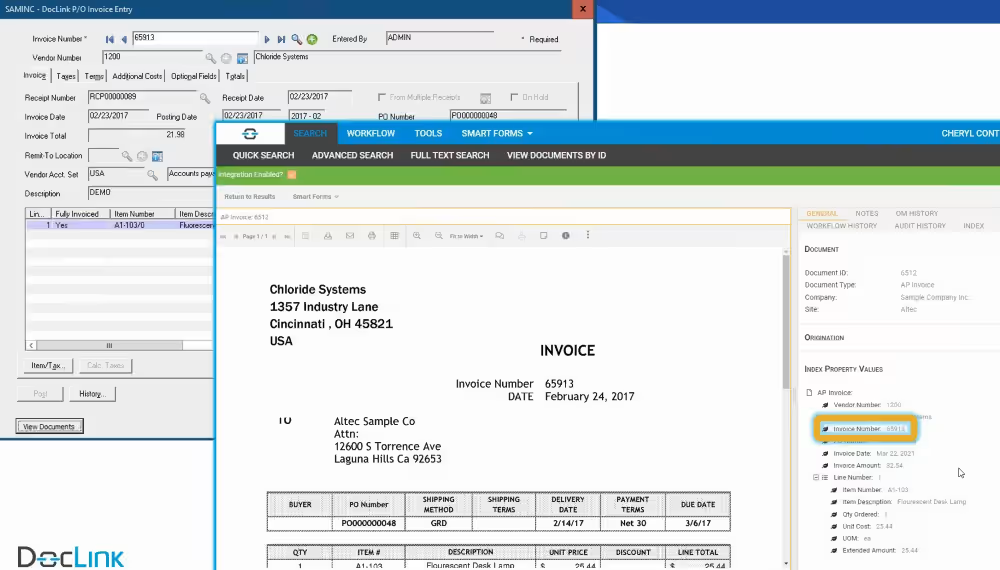
Document management systems help organizations organize and manage financial documents associated with transactions in the accounting system. Solutions such as DocLink integrate with Sage Intacct to store invoices, contracts, purchase orders, and other supporting documents alongside financial records.
With a document management integration, organizations can:
- Attach documents directly to financial transactions
- Provide quick access to supporting documents during audits
- Reduce manual document searches across multiple systems
- Improve visibility into financial documentation and approvals
Integrating document management with Sage Intacct helps finance departments maintain organized records while improving the efficiency of document retrieval and review.
CRM
CRM integrations connect customer relationship management systems with Sage Intacct financial records. When opportunities are closed in a CRM system, the integration can automatically create financial records such as sales invoices, update accounts receivable, or create a new contact record in Sage Intacct.
Common capabilities include:
- Synchronizing customers and contacts
- Automatically generating sales invoices
- Updating accounts receivable status
- Improving visibility into billing and revenue performance
Integrations with CRM platforms such as Microsoft Dynamics 365 Sales also streamline invoicing, revenue recognition, and quote-to-cash workflows. This ensures that sales activity is reflected quickly in financial reporting. For example, many organizations integrate their CRM application with Sage Intacct to automate quote-to-cash workflows. When a deal closes, the integration can automatically create customer records, generate a sales invoice, and update accounts receivable in Sage Intacct. This reduces manual data entry and helps ensure financial data reflects sales activity in real time.
For finance leaders, this alignment between CRM and accounting software provides clearer visibility into revenue pipelines and customer activity.

Payroll and HR
Payroll integrations automatically transfer payroll data into Sage Intacct, making them a critical component of financial operations. Organizations integrate payroll systems with Sage Intacct accounting software to simplify payroll accounting and improve reporting accuracy. Without integrations, finance teams often post payroll journal entries manually after each payroll run. By integrating payroll with Sage Intacct, they can automate these accounting processes, reducing reconciliation work and minimizing manual data entry.
For example, Sage Intacct Payroll powered by ADP allows payroll data to flow directly into the accounting platform. This integration automates payroll journal entries and ensures payroll expenses are recorded accurately for financial reporting.
Typical payroll integrations support:
- Automatically post payroll journal entries
- Allocate payroll costs by department, class, or project
- Improve visibility into payroll expenses across the organization
- Simplify payroll reconciliation during the month-end close


Sage Intacct Payroll
Discover how Sage Intacct Payroll data flows directly into Sage Intacct—without exports, re-entry, or post-pay reconciliation. Learn how connecting payroll and finance improves accuracy, visibility, and financial control, and see how payroll integration can simplify processes.
Expense management
Expense management software helps organizations track employee expenses and reimbursements. When integrated with Sage Intacct, approved expenses can be automatically recorded in the general ledger.
Typical capabilities include:
- Automated expense processing and posting
- Policy enforcement for corporate spending
- Faster employee reimbursements
- Real-time expense reporting
Expense management platforms such as Ramp allow organizations to track corporate card activity and employee reimbursements in real time. These integrations help maintain accurate financial records while improving visibility into company spending.

Payment processing
Payment processing integrations allow businesses to connect payment platforms with Sage Intacct so transactions update financial records automatically. When payments are processed through credit cards, ACH transfers, or digital payment services, Paya and other solutions update accounts receivable status and records the transaction in Sage Intacct.
Typical capabilities include:
- Automatic posting of customer payments
- Real-time updates to payment status
- Improved cash flow visibility
- Automated payment reconciliation
Sage Intacct can also integrate with major banks to automate bank feeds and reconciliation processes, helping finance departments reconcile accounts faster.

Sales tax automation
Managing sales and use tax manually can become increasingly complex as organizations expand into new regions or sell across multiple jurisdictions. Companies integrate sales tax automation solutions such as Avalara with Sage Intacct to simplify tax calculation and compliance. Avalara integrates with Sage Intacct accounting software to automatically calculate tax rates during the invoicing process and track tax obligations across different locations.
With an Avalara integration, organizations can:
- Automatically calculate sales tax across multiple jurisdictions
- Manage exemption certificates for customers
- Track tax obligations as the business expands into new regions
- Simplify tax reporting and filing processes
Automating tax calculations helps reduce manual work for finance departments and improves the accuracy of tax reporting.
eCommerce
eCommerce integrations connect online sales platforms with Sage Intacct so sales transactions and billing data are recorded automatically. Integrations with solutions including Shopify, Magento, and WooCommerce help ensure that sales invoices, refunds, taxes, and payment records are accurately reflected in financial reports.
Common capabilities of eCommerce integrations include:
- Automatically creating sales invoices from online orders
- Synchronizing customer records and order data with Sage Intacct
- Recording refunds, discounts, and adjustments in financial records
- Updating payment status and accounts receivable balances
- Capturing tax and shipping charges for accurate reporting
- Consolidating eCommerce sales data for financial analysis
Inventory management
Sage Intacct includes native inventory management capabilities that allow organizations to track inventory quantities, manage valuation, and record inventory transactions within the financial system. However, organizations with more complex supply chain operations often extend these capabilities by integrating specialized inventory management systems. These platforms provide additional operational tools for inventory planning, forecasting, and multi-location inventory optimization while ensuring financial data remains synchronized with Sage Intacct.
Common capabilities of inventory management integrations include:
- Advanced inventory planning and demand forecasting
- Synchronizing operational inventory data with Sage Intacct financial records
- Supporting barcode scanning and warehouse workflows
- Managing complex multi-location or multi-warehouse inventory operations
- Improving supply chain visibility and operational inventory control

Warehouse management
Warehouse management systems extend Sage Intacct’s inventory capabilities by providing tools for barcode scanning, warehouse operations, and real-time inventory tracking. Solutions such as ScanForce integrate with Sage Intacct to connect warehouse operations with financial and inventory records.
With a warehouse management integration, organizations can:
- Track inventory using barcode scanning
- Automate warehouse receiving and shipping processes
- Improve inventory accuracy across locations
- Synchronize warehouse activity with Sage Intacct inventory records
These integrations help ensure that operational inventory activity aligns with financial reporting, improving both inventory visibility and accounting accuracy.
Sage Intacct integrations overview
Sage Intacct integrates with many operational and financial systems. The table below highlights common Sage Intacct integrations and the business processes they help automate.

Ready to connect your systems with Sage Intacct?
Disconnected systems often create manual work, reporting delays, and inconsistent financial data. Rand Group’s experts can perform a detailed integration assessment to identify gaps between Sage Intacct and your other business systems, reduce manual reconciliation work, and design a more reliable flow of financial data across your technology stack.
Sage Intacct integration architectures
Organizations can connect Sage Intacct to other business systems in several different ways depending on their technical environment, reporting needs, and integration complexity. While some integrations rely on simple connectors between two applications, others use integration platforms that manage data flows across multiple systems.
Understanding these architectural approaches helps finance and IT leaders design an integration strategy that supports both operational efficiency and long-term scalability.
Direct API integrations / Custom integrations
Some integrations connect external applications directly to Sage Intacct using its open APIs and web services. In this architecture, the external system communicates directly with Sage Intacct to exchange financial data such as journal entries, invoices, customer records, or transaction updates.
Direct API integrations are typically used when organizations need to connect proprietary software, industry-specific platforms, or internal systems that do not have pre-built connectors available.
These integrations are commonly used when:
- Connecting two systems with well-defined workflows
- Synchronizing specific financial transactions such as invoices or journal entries
- Integrating proprietary or industry-specific operational systems
- Automating specialized business processes that require custom logic
Sage Intacct provides secure web services and open APIs that allow developers to build custom integrations between the accounting platform and external systems. These APIs enable automation for billing, reporting, transaction management, and other financial processes while ensuring that financial data remains synchronized across systems.
Importantly, the same business rules, permissions, and security controls that apply in the Sage Intacct user interface also apply to API interactions. This helps maintain strong data governance, accurate financial records, and full auditability when transactions originate from integrated systems.
Because custom API integrations require development work, they are typically implemented by internal development teams, integration specialists, or certified Sage Intacct partners.
Pre-built connectors and marketplace integrations
Many organizations implement integrations using pre-built connectors rather than building custom integrations from scratch. These connectors are typically available through the Sage Intacct Marketplace and allow common business applications to integrate directly with Sage Intacct with minimal development effort.
The Sage Intacct Marketplace serves as the primary hub for discovering certified third-party applications that integrate with the platform. It includes solutions from more than 350 software vendors across a wide range of operational and financial functions.
Marketplace integrations often support common workflows such as:
- CRM and quote-to-cash automation
- Accounts payable automation
- Payroll and HR synchronization
- Sales tax automation
- Payment processing
- eCommerce order synchronization
Examples of well-known integration partners include Salesforce, ADP, Shopify, and Avalara, along with hundreds of additional specialized applications built for specific industries and finance workflows.
Applications listed in the Sage Intacct Marketplace go through a review process by Sage that evaluates factors such as:
- Security standards
- API compatibility
- System performance and reliability
- Proven success for Sage Intacct customers
Because these integrations are pre-built and maintained by software vendors, organizations can often deploy them more quickly and with less technical complexity than custom integrations.
Integration platform (iPaaS) solutions
Larger organizations or companies with complex technology environments often use integration platforms—sometimes called integration platform as a service (iPaaS)—to manage data flows across multiple systems.
In this architecture, an integration platform acts as a centralized layer that connects applications such as CRM systems, ERP platforms, payroll software, data warehouses, and financial systems like Sage Intacct.
iPaaS platforms help organizations:
- Manage complex multi-system integrations
- Transform and standardize data between applications
- Monitor integration performance and error handling
- Orchestrate workflows across multiple business systems
- Scale integrations as additional systems are added
Examples of iPaaS platforms include Zapier, Workato, Celigo, MuleSoft, and Boomi. These platforms use APIs behind the scenes to automate workflows and synchronize data between systems without requiring organizations to build and maintain custom integrations for every application.
By centralizing integration logic within a dedicated platform, organizations can simplify long-term maintenance, improve visibility into data flows, and reduce the risk of integration failures.
Hybrid integration environments
In practice, many organizations use a hybrid approach that combines several integration architectures. For example, a company might use marketplace connectors for common systems such as payroll or expense management, while relying on direct API integrations for proprietary applications and an iPaaS platform to orchestrate data flows across the broader technology environment.
This hybrid approach allows organizations to balance speed, flexibility, and scalability as their technology ecosystem evolves. By combining multiple integration methods, companies can connect operational systems efficiently while maintaining strong financial data governance within Sage Intacct.
How to choose the right Sage Intacct integrations
Not every organization needs the same integration architecture. The most effective Sage Intacct integrations depend on your operational systems, reporting requirements, and finance workflows. When evaluating integration options, finance leaders should consider several key factors:
- Business process impact: Start by identifying processes that involve significant manual work or data reconciliation. Common priorities include accounts payable automation, CRM integration, payroll integration, and payment processing.
- Pre-built connectors vs. custom integrations: Many organizations start with certified applications from the Sage Intacct Marketplace, which offer pre-built integrations that can be implemented quickly. Custom integrations may be required when connecting proprietary systems or specialized industry platforms.
- Security and compliance: Financial integrations must meet security standards and maintain accurate audit trails. Marketplace solutions typically undergo review for API compatibility, system reliability, and security controls.
- Data flow and reporting requirements: Ensure integrations support the financial data your organization needs for reporting. For example, integrations should map operational data to Sage Intacct dimensions such as department, project, customer, or location.
- Scalability: Choose integrations that can scale with the organization as transaction volumes grow or new systems are added.
By carefully evaluating these factors, finance teams can build an integration strategy that supports automation, accurate financial reporting, and long-term growth.
How Sage Intacct integrations manage financial data
Sage Intacct uses dimensional accounting, which allows organizations to tag transactions with attributes such as department, project, location, or customer. When systems integrate effectively, finance leaders gain a single, real-time view of financial health across the organization. Operational transactions from sales, payroll, purchasing, and billing systems flow directly into Sage Intacct, providing better visibility into financial performance and operational activity.
This visibility helps organizations:
- Generate more detailed financial reports
- Monitor business activity in real time
- Analyze performance across departments and projects
Many integrations also maintain audit trails that record the source system for each transaction.
Business processes improved by integrations
Sage Intacct integrations can significantly improve several critical business processes.
- Accounts payable workflows become faster when invoices are captured automatically and routed through approval workflows.
- Procurement systems can connect purchase orders with financial transactions, improving supplier management and spending controls.
- Payroll integrations automate payroll reconciliation tasks, reducing manual accounting work.
- Billing systems that integrate with Sage Intacct support accurate revenue recognition by transferring billing events and contract data into the accounting platform.
These integrations allow organizations to simplify operations while improving financial accuracy.
Benefits of Sage Intacct integrations
For CFOs and finance leaders, integrations help position Sage Intacct as a centralized financial hub. When operational systems connect directly with accounting software, leadership gains better visibility into cash flow, transactions, billing activity, and financial performance across the company. One of the most important benefits of Sage Intacct integrations is improved financial reporting speed. Real-time updates allow finance departments to close the books faster at month end, because transactions from operational systems are already recorded in the accounting platform.
Organizations also benefit from:
- Reduced manual data entry
- Improved financial accuracy
- Better visibility into cash flow and transactions
- Faster financial reporting and analysis
In many companies, workflow automation can save finance departments hundreds of hours per month by eliminating repetitive tasks such as invoice entry and reconciliation.
How to implement a Sage Intacct integration
The integration process typically begins in Sage Intacct by configuring web services that allow external applications to connect with the platform. Organizations must create a web services user in Sage Intacct so the integration can authenticate securely. Once the connection is established, systems can begin exchanging data such as journal entries, invoices, and financial transactions.
A successful integration project typically involves collaboration between finance teams, IT staff, and implementation partners. Because integrations often require careful data mapping, security configuration, and testing, many organizations choose to work with a certified Sage Intacct partner to ensure the integration is implemented securely and aligned with their financial processes.
How Rand Group can help with Sage Intacct integrations
Implementing integrations successfully requires both technical expertise and a strong understanding of finance workflows. Rand Group helps organizations design and implement Sage Intacct integration strategies that align technology with business goals.
Our consultants work with finance leaders to:
- Implement solutions from the Sage Intacct Marketplace
- Build custom integrations using Sage Intacct APIs
- Connect Sage Intacct with CRM, payroll, and operational systems
- Improve financial reporting and system performance
By helping companies simplify financial processes and automate workflows, Rand Group enables organizations to transform Sage Intacct into a fully connected financial management platform. When implemented thoughtfully, Sage Intacct integrations allow organizations to build a connected financial platform that supports faster reporting, better financial insight, and scalable growth.
Frequently asked questions (FAQs)
What types of systems can integrate with Sage Intacct?
Sage Intacct integrates with many business systems including CRM platforms, payroll software, AP automation tools, inventory management systems, payment processors, and eCommerce platforms.
Does Sage Intacct have an API for integrations?
Yes. Sage Intacct provides an open API that allows developers to build custom integrations. These APIs support tasks such as creating transactions, retrieving financial data, and synchronizing records.
How long does it take to implement a Sage Intacct integration?
Implementation time varies based on complexity. Simple pre-built connectors may take a few days to configure. More complex integrations involving multiple systems or custom workflows may take several weeks.
What is the Sage Intacct Marketplace?
The Sage Intacct Marketplace is a directory of certified third-party applications that integrate with Sage Intacct. These apps extend the platform’s capabilities and are reviewed by Sage for compatibility and security.
Do businesses need a developer to integrate Sage Intacct?
Not always. Many organizations use pre-built connectors from the Sage Intacct Marketplace. Custom integrations or advanced workflows may require developers or integration specialists like Rand Group.
Next steps
If your organization is evaluating Sage Intacct integrations or planning a Sage Intacct implementation, working with an experienced partner can help ensure your financial systems are configured for long-term success. Rand Group helps companies implement and optimize Sage Intacct accounting software, connect critical business systems, and design integration architectures that support scalable financial operations. Contact us to learn how we can help you implement Sage Intacct and build a connected financial system for your organization.