Sage Intacct 2026 release 2: Top updates and new features

Sage Intacct 2026 release 2, also referred to as Sage Intacct 2026 R2, introduces new features that help finance teams work faster, improve visibility, and reduce manual effort. This release includes updates across AI, automation, AP, cash management, fixed assets, purchasing, projects, inventory, billing, and industry solutions.
Our Sage Intacct experts work closely with organizations to review new releases, identify the updates that matter most, and align new capabilities with real accounting and finance workflows. This helps teams prioritize the features that can improve efficiency, strengthen controls, and support better decision-making.
Because some features require permissions, configuration, or Early Adopter access, our team recommends reviewing each update against your current workflows before enabling new capabilities.
In this article, we explore the top new features in Sage Intacct 2026 release 2, including the Finance Intelligence Agent, Sage Intacct AI Gateway, AP automation enhancements, Fixed Assets Management updates, and other key improvements.
Finance Intelligence Agent (phased early adopter)
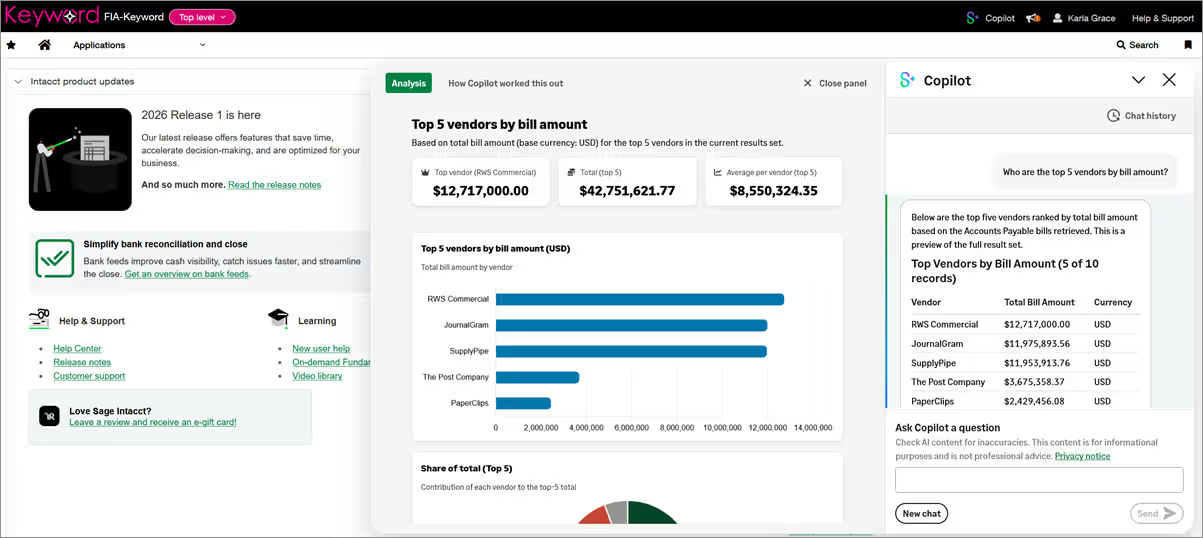
The Finance Intelligence agent is a key Sage Intacct 2026 release 2 update and a centerpiece of Sage’s agentic AI strategy. As part of Sage’s growing network of AI agents, it is designed to help finance teams move beyond basic reporting and interact with financial data in a more natural way. Powered by Sage Copilot, the Finance Intelligence agent lets users ask questions in plain language, retrieve data across Sage Intacct, identify trends, and review the reasoning behind each answer.
Sage is expanding access to the Finance Intelligence agent through a phased Early Adopter rollout in 2026. When a company is enabled, the Sage Intacct administrator can review the feature and decide whether to turn it on for users. Rand Group brings deep ERP, accounting, and AI agent expertise to help organizations understand how tools like the Finance Intelligence agent fit into Sage Intacct, including user adoption, data governance, reporting strategy, and secure use of AI in finance processes.
Key capabilities and benefits include:
- Ask questions about Sage Intacct financial data using natural language
- Retrieve and aggregate data across Sage Intacct without manual report building
- Identify trends and patterns that may support better financial decisions
- Review transparent reasoning behind each answer to help build trust
- Drill into the details behind financial results and calculations
- Support faster analysis for finance leaders, controllers, and accounting teams
- Maintain control through administrator-led enablement and user permissions
- Provide feedback through the Early Adopter program to help shape future releases
Sage Intacct AI gateway
The Sage Intacct AI Gateway is a major Sage Intacct 2026 release 2 feature that gives organizations a secure way to connect Sage Intacct financial data with external AI tools and custom AI workflows. It provides access through Sage Intacct REST APIs and the Sage Intacct MCP Server, which uses the Model Context Protocol to help AI applications interact with business data in a standard, governed way. This means compatible AI clients can explore metadata, query financial records, and generate insights using natural language while keeping access controlled.
Unlike Sage Copilot, which is the embedded AI experience inside Sage Intacct, the AI Gateway is built for external AI development. It gives developers, IT teams, and finance leaders a foundation for building AI-powered data assistants, integration tools, reporting workflows, and custom agents outside the core application. Rand Group recommends starting with read-only use cases, such as schema exploration, reporting support, vendor analysis, data mapping, and integration planning, before expanding into more advanced AI workflows. This approach helps teams prove value while protecting financial data, maintaining user permissions, and reducing risk.
Key capabilities and benefits include:
- Connect Sage Intacct data to external AI tools through REST APIs or the MCP Server
- Use natural language prompts to explore objects, fields, and financial data
- Support read-only access through MCP for safer AI-powered discovery and reporting
- Access core financial areas such as AP, AR, cash management, general ledger, purchasing, and order entry
- Enforce existing Sage Intacct user roles and permissions
- Maintain auditability and control over how AI applications access data
- Build custom AI workflows for reporting, integrations, data mapping, and validation
- Support developer copilots that can recommend queries, fields, filters, and integration patterns
- Connect Sage Intacct with broader business systems and AI clients
- Give organizations a flexible path to adopt AI at their own pace while maintaining finance-grade governance

Make the most of Sage Intacct 2026 R2 with Rand Group
Identify which Sage Intacct 2026 release 2 updates are most relevant to your workflows, controls, and reporting needs. Rand Group can help you evaluate new capabilities, adjust configurations, and create a practical adoption plan that supports measurable business value.
AP automation enhancements
The Sage Intacct 2026 release 2 AP automation enhancements help accounts payable teams process vendor bills with more speed and accuracy. Intelligent 3-way matching uses AI to compare purchase orders, receivers, and vendor invoices at the line level, helping users find price and quantity differences before bills are posted.
These updates also make AP Automation easier to use in daily work. Based on Rand Group’s experience helping finance teams improve AP, purchasing, and approval workflows in Sage Intacct, these enhancements can help reduce manual effort while keeping stronger controls over invoice review and posting.
- Faster exception handling: AI flags price and quantity differences so users can review discrepancies faster. This helps AP teams focus on the items that need attention instead of manually checking every line.
- More accurate invoice matching: Vendor invoice lines can be matched directly to the related purchase order and receiver lines. This improves accuracy compared to header-level matching alone.
- Reduced manual review: Match tolerance thresholds help limit unnecessary review of small differences. This allows teams to spend more time on true exceptions and less time on routine invoice checks.
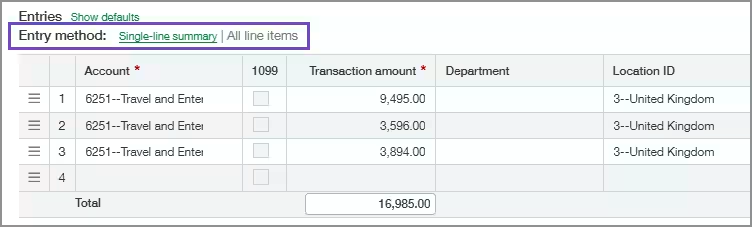
- More flexible bill review: Users can switch between a single-line summary and detailed line item entry when reviewing draft bills. This helps teams choose the format that best fits each vendor invoice.
- Simpler bill uploads: Bills can now be uploaded directly from the Automated transactions list. This creates a more connected AP and Purchasing workflow and reduces the need to move between screens.
- Improved automation over time: User choices during bill review help Sage Intacct improve future automation accuracy. This supports more consistent AP processing as the system learns from real transaction patterns.
Fixed Assets Management enhancements
The Sage Intacct 2026 release 2 Fixed Assets Management enhancements give finance teams more control over depreciation, asset changes, corrections, and capitalization. These updates can help reduce manual work, improve audit trails, and make fixed asset accounting easier to review during month-end close. We recommend reviewing your current fixed asset workflows before enabling new options, especially depreciation summarization and correction treatment settings, so your team understands how each update affects future postings.
- Summarize depreciation postings: Depreciation postings can now be grouped into one summarized journal entry when assets share the same accounting attributes. This helps reduce General Ledger volume, improve posting performance, and make depreciation easier to reconcile.
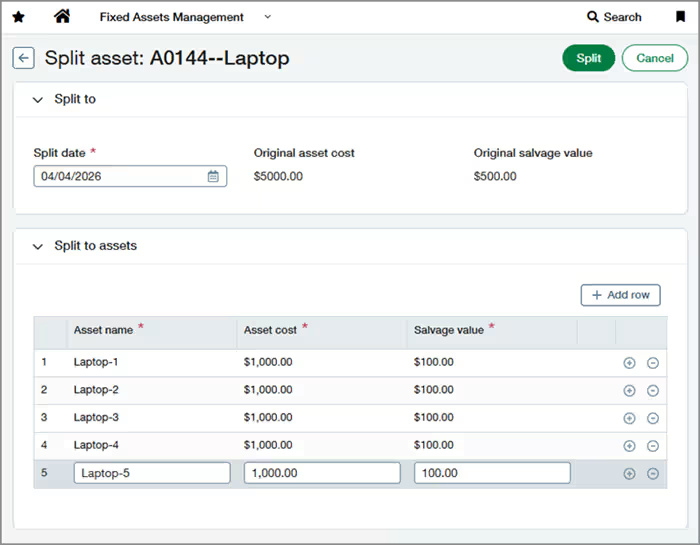
- Split an asset into multiple assets: Users can split one asset into up to 20 separate assets while preserving depreciation accuracy and history. This is useful when assets need to be tracked, transferred, or disposed of separately without manual workarounds.
- Reverse depreciation postings: Teams can now reverse posted depreciation directly in Fixed Assets Management. This creates an offsetting journal entry while preserving the original posting, which supports clearer audit trails and easier correction of depreciation errors.
- Revert partial disposals: Users can undo the most recent partial disposal from the asset record. Sage Intacct restores the depreciation schedule and related amounts, helping teams correct disposal mistakes without manual General Ledger adjustments.
- Enhancements to CIP asset capitalization: Construction in progress assets now have more flexible capitalization options. Users can enter a capitalization date and revert a capitalization when changes are needed, which supports cleaner month-end close and better asset lifecycle control.
- Other updates to Fixed Assets Management: Disposal details now appear on a dedicated Disposals tab, making asset disposal activity easier to find and review. The Fixed Assets Management section on AP and Purchasing transaction lines also moved below Dimensions, creating a cleaner layout for users entering or reviewing asset-related transactions.
Industry updates and solutions
In Sage Intacct 2026 release 2, industry-focused enhancements give SaaS, construction, field operations, real estate, and payroll teams more targeted tools for their daily work. These updates support better reporting, cleaner billing, stronger project visibility, and more connected workflows. With experience supporting organizations in construction, real estate, field services, and software, we can help you evaluate which industry updates apply to your processes and how to prepare your team for adoption.
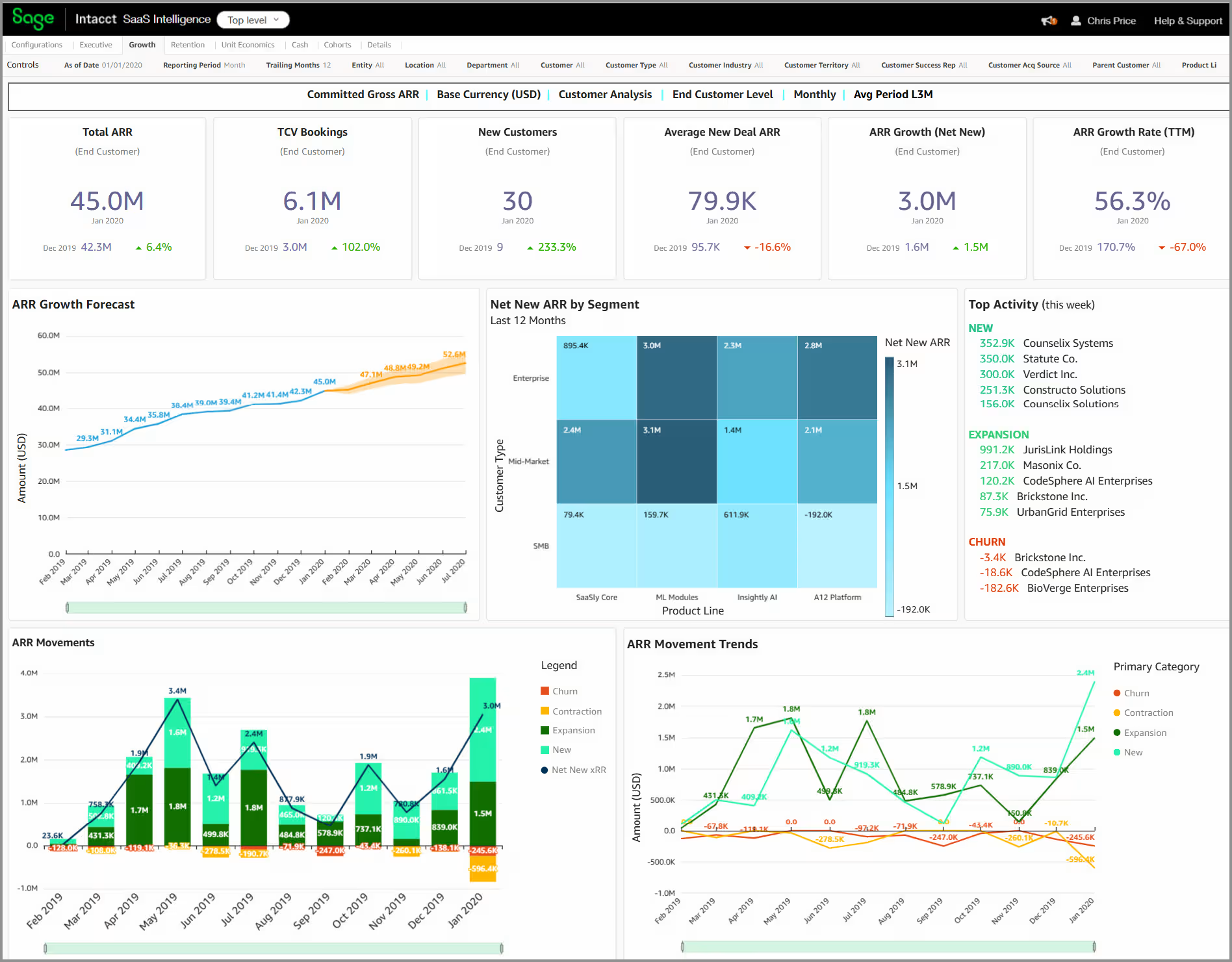
- SaaS Intelligence advanced analytics—Early Adopter: SaaS Intelligence now offers more flexible dashboards, expanded SaaS metrics, richer visuals, and predictive analytics. This helps SaaS finance teams track revenue, churn, ARR, and customer trends with more clarity.
- Flexibly release retainage from a Construction project contract: Construction teams can now release retainage across all invoice lines on a project contract using a percentage. This makes retainage release easier for companies that release retainage in bulk at key project milestones.
- Enhancements in work in progress (WIP) management: WIP management now supports using primary forecast estimates to calculate project manager forecasts in WIP schedules. This helps construction finance teams improve forecast accuracy and reduce duplicate project handling.
- Enhancements in Sage Field Operations: Sage Field Operations now lets users pull quote items directly into work orders and send platform emails from their own email address. These updates help field teams reduce re-entry, improve work order accuracy, and increase customer response rates.
- Enhancements in Sage Intacct Real Estate: Sage Intacct Real Estate includes improvements to tenant ledgers, lease activation, and CPI rent increase processing. These updates help property teams improve reconciliation, support accurate revenue recognition, and manage rent adjustments with less manual effort.
- Payroll and HR enhancements with Sage Human Capital Management: Sage Human Capital Management connects HR, payroll, time tracking, scheduling, recruiting, performance, learning, and embedded AI in one platform. This helps reduce duplicate data entry and gives HR, payroll, and finance teams a more complete view of workforce activity.
Cash management and collections enhancements
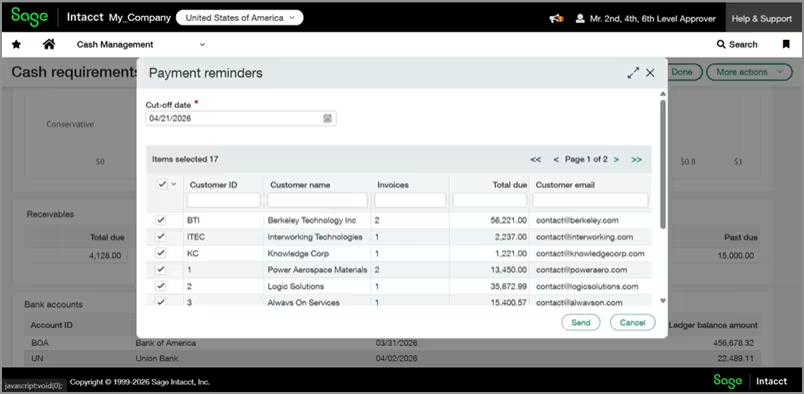
Sage Intacct 2026 release 2 adds new cash management tools that help finance teams act faster on cash flow insights. The new one-touch customer payment reminders feature lets users view customers with open invoices from the Cash requirements page and send reminder emails in bulk. This can help reduce manual follow-up, accelerate collections, and improve visibility into short-term cash needs. During Early Adopter use, Sage recommends continuing to rely on primary financial reports for final business decisions while Cash requirements is fine-tuned.
- One-touch customer payment reminders: Users can now send payment reminder emails from the Cash requirements page with a single click. This helps AR teams follow up on outstanding invoices faster and improve cash flow without manually drafting each email.
- Bulk reminders for open invoices: The Payment reminders dialog shows customers with invoices due on or before the selected cut-off date. Teams can review the list, remove customers as needed, and send reminders in bulk.
- Predefined email content: Sage Intacct creates the reminder email content for users. This reduces administrative work and helps teams keep customer follow-up consistent.
- Bank transaction visibility by entity restriction: User entity restrictions now apply to bank and credit card transactions. This helps organizations protect sensitive cash data by limiting users to the transactions they are allowed to see.
- Safeguards for transaction creation rules: Creation rules now help prevent the same GL account from being used on both sides of a transaction. This reduces duplicate journal entry risk and supports cleaner reconciliation.
- Improved manual transaction accuracy: Manually created reconciliation transactions no longer default to the current date. Users must enter the actual transaction date, which helps reduce errors during bank reconciliation.
Purchasing approvals and controls
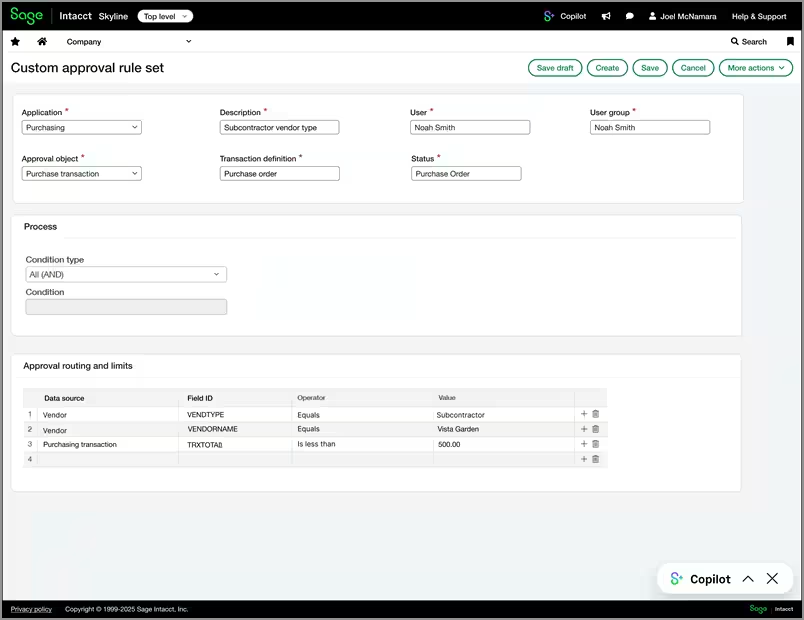
Custom Purchasing approvals in Sage Intacct 2026 release 2 help organizations reduce manual approval routing while improving control over purchasing activity. Administrators can build rule-based approval workflows using vendor details, payment priority, currency, and transaction amounts, so purchase transactions are automatically sent to the right approvers. Since this feature is in Early Adopter, companies should review current approval policies before enabling it to make sure rules align with purchasing controls and compliance needs.
- Reduce manual approval routing: Transactions are automatically sent to the right approvers based on defined rules. This helps users spend less time managing approvals.
- Strengthen purchasing controls: Rules can use vendor details, payment method, currency, and transaction totals. This helps higher-risk purchases get the right review.
- Improve approval accuracy: AND/OR logic supports more precise routing. This helps match each transaction to the correct user or group.
- Support consistent processes: Custom rules work within the existing Purchasing approval experience. Users get more control without learning a new process.
- Increase audit readiness: Approval decisions are recorded in the transaction and approval history. This gives teams clearer visibility into who approved each purchase.
- Improve compliance support: Automated rules help reduce skipped steps and inconsistent routing. This makes it easier to enforce purchasing policies.
Projects and grants financial summary enhancements
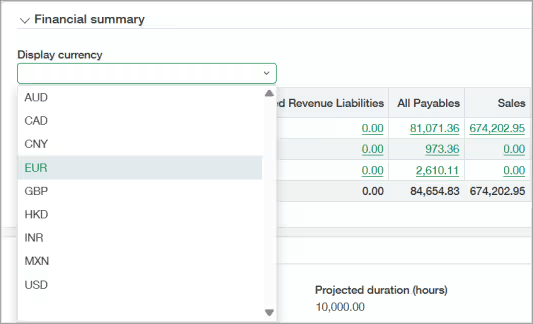
The Project and Grant financial summary enhancements in Sage Intacct 2026 release 2 help teams review project financials in the currency that makes the most sense for their work. Users can switch the Financial summary view from the base currency to another currency, and Sage Intacct updates the values right away using the Intacct Daily Rate.
These updates also improve financial review and variance analysis. With the right permissions, users can drill down from the project Financial summary to supporting General Ledger detail, helping project managers and finance teams investigate issues faster while keeping access controlled.
- Review multiple currencies: Users can switch the Financial summary to another display currency. This helps teams review project results across markets.
- See instant updates: Values update as soon as a new currency is selected. This reduces the need for separate currency reports.
- Improve project visibility: Project managers can view financial position in the most useful currency. This makes project performance easier to understand.
- Drill into GL detail: Authorized users can open supporting General Ledger data from the Financial summary. This helps teams investigate variances faster.
- Protect financial data: GL drill-down requires explicit report permission. Users only see data allowed by their access rights.
- Streamline review workflows: Teams can move from summary data to supporting detail more easily. This supports faster financial review.
Inventory and supplies enhancements
Sage Intacct 2026 release 2 adds inventory and supplies enhancements that help teams improve accuracy, reduce rework, and manage item costs with more control. These updates support cleaner fulfillment, more reliable inventory costing, and stronger tracking for warehouse transfers.
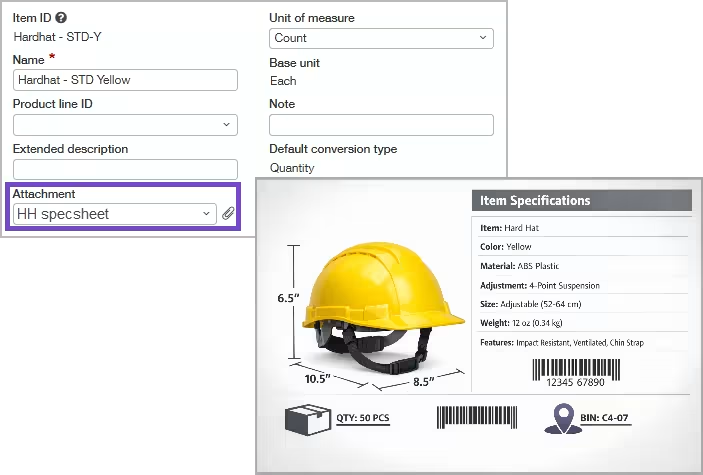
- Centralized inventory item attachments: Teams can now store item images, specification sheets, MSDS files, installation guides, and other documents on the item record. This helps users identify items correctly during order entry, receiving, picking, and shipping.
- More control of transaction cost precision: Sage Intacct now gives users more control over how many decimal places are used for item unit costs, up to 10 decimal places. This helps reduce rounding differences and supports more accurate inventory costing.
- Track inventory transfers more securely: Companies using Inventory Transfer In/Out transaction definitions need to move to Warehouse Transfer In/Out transaction definitions. This provides more complete inventory movement tracking and helps strengthen control over transfers between warehouses.
Order Entry and billing enhancements
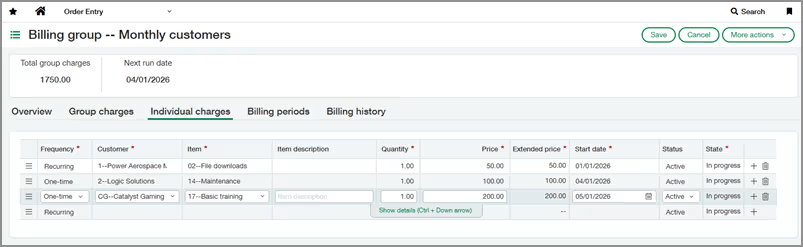
The Sage Intacct 2026 release 2 Order Entry and billing enhancements help teams manage customer billing with more flexibility, accuracy, and control. Billing groups now support customer-specific charges and a centralized invoice runs list, while Order Entry email settings now use approved sender and reply-to addresses to improve consistency and reduce errors.
- Greater billing flexibility: Billing groups can now include customer-specific charges. This helps teams manage exceptions without separate manual invoices.
- Reduced manual billing work: Individual charges can be managed from multiple places. This reduces offline tracking and one-off processes.
- Clearer invoice run visibility: The new Invoice Runs list shows billing activity across billing groups. Teams can drill into details for review and reconciliation.
- Improved billing accuracy: Individual charges apply only to the related customer’s invoices. This helps reduce billing errors.
- More consistent customer emails: Order Entry emails now use approved sender and reply-to addresses. This keeps customer communication standardized.
- Stronger email security: Admin-controlled allow lists help prevent unauthorized sender addresses. This supports internal email policies.
Other updates and enhancements
Sage Intacct 2026 release 2 also includes several smaller updates that can improve close tasks, administration, integrations, time approvals, and expense management.
- Link to custom views from tasks in Close Workspace: Custom task templates can now include a link to a public custom view. This helps close users go directly to the filtered data they need.
- REST API updates: The latest REST API release adds the Try it feature, updated endpoints, new endpoints, and expanded workflow support. These updates help developers test, integrate, and extend Sage Intacct more efficiently.
- Introducing the Roles permissions report: Administrators can now view standard and custom permissions for a role in one report. This makes role validation easier and supports access reviews.
- Sage Intacct import service: new imports now available: The import service now supports more data imports through a guided workflow. This helps teams map, validate, correct, and load data with less manual effort.
- Define application configuration values with configuration objects—General Availability: Configuration objects are now generally available for platform applications. This helps teams manage key-value pairs, reduce maintenance work, and lower the risk of misconfiguration.
- Assign delegates to approve timesheets using Sage Intelligent Time: Approvers can now assign delegates to approve or decline timesheets while they are out of office. This keeps payroll workflows moving without manual reassignment.
- Enhancements in Sage Expense Management: Sage Expense Management now includes automatic approvals, project-level billable defaults, Express ACH, grouped expense submission, mobile push notifications, and budget improvements. These updates help reduce approval delays, improve budget visibility, and speed up employee reimbursements.
Partner with Rand Group for your Sage Intacct 2026 release 2 review
The Sage Intacct 2026 R2 includes meaningful updates across AI, AP automation, cash management, fixed assets, purchasing, reporting, and industry solutions. For many organizations, the challenge is not just knowing what changed, but knowing which updates matter most to their processes, controls, and goals.
As a Sage Diamond partner with more than 20 years of business technology experience and a 90% client retention rate, Rand Group helps organizations get more value from Sage Intacct. Our Sage Intacct experience spans implementation, reporting, integrations, automation, AP workflows, multi-entity accounting, and process improvement, helping clients use more of the system and reduce reliance on manual work.
- Feature review and prioritization: We can help you review the Sage Intacct 2026 release 2 updates and determine which features apply to your organization. This helps your team focus on changes that can improve efficiency, visibility, and control.
- Process alignment: We help connect new features to your current finance, accounting, purchasing, and reporting workflows. This ensures updates are evaluated based on real business needs, not just feature availability.
- System optimization: We help clients use Sage Intacct more fully by improving configuration, automation, reporting, and integrations. This can reduce manual work and improve user adoption.
- Controls and governance: We can help assess how new features affect permissions, approvals, audit trails, and data access. This is especially important for AI, automation, purchasing approvals, and cash management updates.
- Ongoing support: We provide guidance beyond implementation, helping teams continue to improve how they use Sage Intacct over time. This helps organizations keep pace with new releases and changing business needs.
Case study: Improving Sage Intacct efficiency for a multi-entity organization
A growing senior living company partnered with Rand Group to modernize financial operations with Sage Intacct. The organization needed stronger multi-entity reporting, more efficient AP processes, better consolidated visibility, and faster decision-making. Rand Group helped implement Sage Intacct, integrate AP automation, simplify intercompany workflows, and create custom reports for clearer financial insight.
The results show how the right Sage Intacct strategy can create measurable value. The company increased the number of entities managed by 50% without adding accounting staff and improved intercompany transaction efficiency by 97%, reducing a 32-step process to a single transaction.
The VP of Accounting shared, “We consider Rand Group an extension of our team—the partnership helps us be more efficient and make faster, more informed decisions.”
To learn more, read the full case study.
Frequently asked questions
What is Sage Intacct 2026 release 2?
Sage Intacct 2026 release 2 is a product update that adds new features across AI, automation, cash management, fixed assets, purchasing, projects, inventory, billing, and industry solutions.
When is Sage Intacct 2026 release 2 available?
Sage Intacct 2026 release 2 was released on May 8, 2026. Many updates are available in all regions, while some depend on your region, subscription, permissions, and feature configuration. Certain features, such as the Finance Intelligence Agent and custom Purchasing approvals, are being rolled out through Early Adopter programs. Sage Intacct 2026 release 3 is scheduled for August 7, 2026.
What are the biggest Sage Intacct 2026 release 2 updates?
The biggest updates include the Finance Intelligence Agent, Sage Intacct AI Gateway, intelligent 3-way matching for AP Automation, Fixed Assets Management enhancements, custom Purchasing approvals, and new cash management tools.
What is the Finance Intelligence Agent in Sage Intacct?
The Finance Intelligence Agent is a Sage AI-powered tool that helps users ask questions about financial data in natural language. It can retrieve data, identify trends, and explain the reasoning behind answers.
What is the Sage Intacct AI Gateway?
The Sage Intacct AI Gateway is a secure connection layer that lets organizations connect Sage Intacct data to external AI tools and custom AI workflows. It supports access through Sage Intacct REST APIs and the Sage Intacct MCP Server.
Are all Sage Intacct 2026 release 2 updates available to every customer?
No. Some updates are generally available, some require specific subscriptions or permissions, and some are part of Early Adopter programs. Companies should review availability by feature before planning adoption.
What does Early Adopter mean in Sage Intacct?
Early Adopter means Sage is giving selected customers access to a feature before broader release. These customers can test the feature and provide feedback before it becomes more widely available.
Should my organization turn on every new Sage Intacct 2026 release 2 feature?
No. Your organization should evaluate each update based on your workflows, controls, reporting needs, and user readiness. Some features may be useful right away, while others may require planning or configuration.
How should companies prepare for Sage Intacct 2026 release 2?
Companies should review the release notes, identify relevant updates, confirm feature availability, assess permissions, and test changes before broader rollout. It is also helpful to prioritize updates that reduce manual work or improve visibility.
How can Rand Group help with Sage Intacct 2026 release 2?
Rand Group can help review the Sage Intacct 2026 release 2 updates, identify the features most relevant to your organization, and plan adoption. As a Sage Diamond partner, Rand Group helps clients optimize Sage Intacct through implementation, reporting, automation, integrations, and ongoing support.
Next steps
Sage Intacct 2026 release 2 brings practical updates that can help finance teams improve automation, reporting, approvals, cash visibility, and day-to-day productivity. However, not every feature will apply to every organization, and some updates may require planning, permissions, configuration, or Early Adopter access.
Rand Group can help you review the release, determine which updates are most relevant to your organization, and create a plan for adoption. Contact us to connect with a Sage Intacct expert and get help preparing for Sage Intacct 2026 release 2.