Sage Data & Analytics vs Sage Intelligence: Which is right for your business

Business intelligence (BI) tools transform raw data from multiple sources into meaningful insights. They enable teams to monitor key performance indicators (KPIs), improve operational efficiency, and make data-driven decisions. Sage offers two powerful business intelligence solutions: Sage Data & Analytics (SD&A) and Sage Intelligence. Both improve reporting and decision-making; however, each serves distinct purposes depending on business size, reporting needs, and data strategy. In this guide, we explain the key differences, compare capabilities, and help you choose the right business intelligence solution for Sage 100.
At a glance
Sage Data & Analytics and Sage Intelligence both help organizations get more value from Sage 100 data, but they serve different reporting needs. Sage Intelligence is best suited for finance and accounting teams that want familiar, Excel-based reporting directly from Sage 100. Sage Data & Analytics provides a broader business intelligence and data management platform for organizations that need to combine Sage 100 with CRM, databases, spreadsheets, and other systems for more advanced reporting and analysis. The right choice depends on your data sources, reporting complexity, number of users, and long-term analytics strategy.
Sage Data & Analytics (SD&A): Enhanced insights for strategic growth
Sage Data & Analytics, powered by Zap, is a modern business intelligence and data management solution that helps organizations get more value from their Sage 100 data. It creates a governed data hub that brings Sage 100 information together with data from CRM, spreadsheets, databases, and other business systems. By automatically loading and maintaining this data, Sage Data & Analytics provides a consistent foundation for reporting and analysis across Excel, the web, and Power BI. It provides quick and easy access to information and supports multi-site location operations. Unlike traditional reporting tools, it reduces the need for IT/technical expertise.
Organizations using Sage Data & Analytics gain instant insights that go beyond simple dashboards. For example, project managers can track important operational benchmarks, monitor KPIs, and drill down into operational and financial information. Furthermore, the platform enables advanced analytics, predictive forecasting, and graphical business intelligence tools, such as cash flow analysis and live sales dashboards. Together, these features help companies optimize revenues and stay competitive.
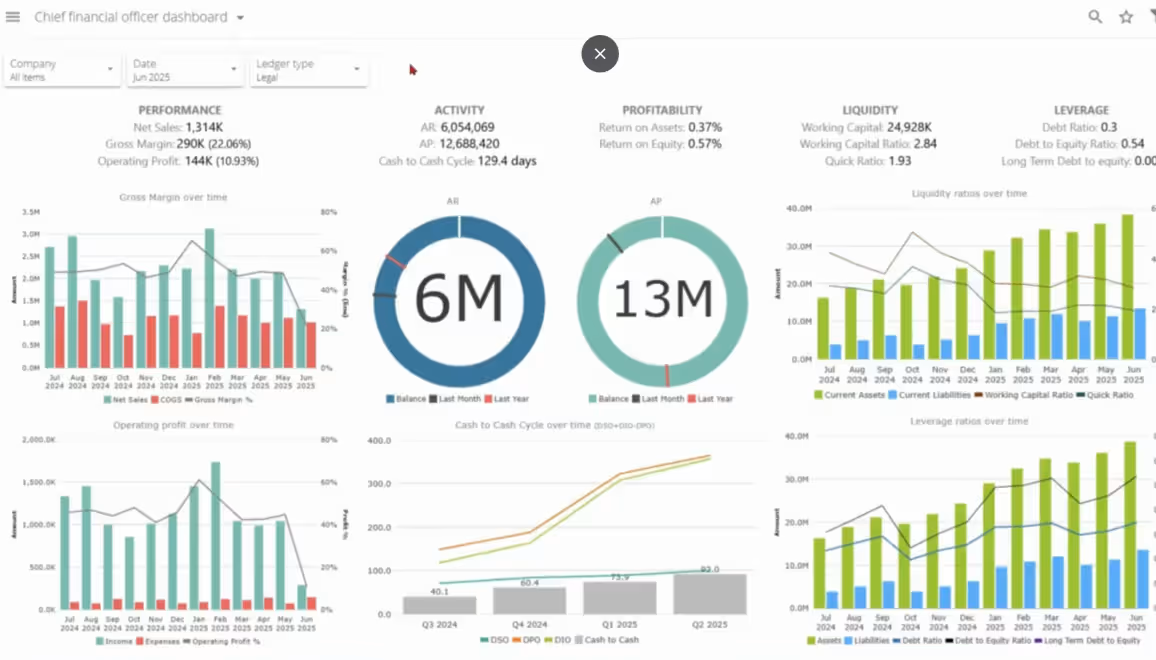
Dashboards and data models
Sage Data & Analytics provides industry-specific dashboards and fully customizable data models. As a result, business users can analyze company finances, cash flow, and purchasing metrics quickly. Additionally, its data visualization capabilities, including intuitive dashboards and meaningful graphs, make complex information easier to interpret:
- Consolidates financial and operational data across multiple sources
- Delivers current insights with advanced analytics and data visualization
- Scales across multi-site operations and supports fully customizable data models
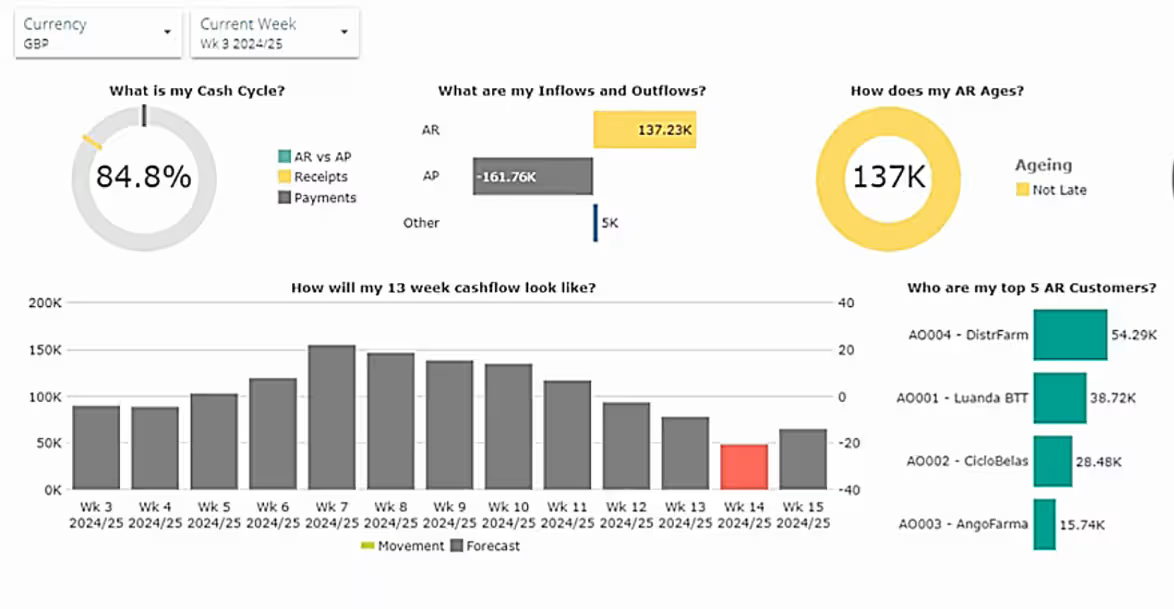
Integration and accessibility
Sage Data & Analytics excels at Sage 100 integration by connecting to multiple legacy systems, CRMs, and external databases. It is accessible via web pages, mobile apps, and cloud services, giving teams data access from anywhere. In addition, APIs allow analytical tools and custom integrations, providing flexibility for companies with multi-site operations or single-location setups.
Security, implementation, and scalability
Role-based dashboards ensure secure access for different departments. Implementation requires some technical knowledge; however, training ensures business users can leverage data management and analytics tools effectively. Sage Data & Analytics scales to handle multiple sources, large datasets, and complex reports.
Sage Data & Analytics for Sage 100
Are you ready to transform your Sage 100 reporting? Watch our on-demand webinar to see how Sage Data & Analytics automates reporting, integrates multiple data sources, and delivers actionable insights to simplify decision-making.

Sage Intelligence: Simplified reporting for everyday business
Sage Intelligence is a powerful reporting tool designed for finance, accounting, and operations teams who need to generate financial reports quickly. It comes bundled with Sage 100; however, advanced functionality requires further cost. Unlike Sage Data & Analytics, it focuses on Excel-based reporting, which allows teams to create reports using familiar tools. It also automates routine financial reports and helps explore operational data through intuitive dashboards.
While Sage Data & Analytics emphasizes strategic insights, Sage Intelligence simplifies day-to-day reporting. It is ideal for a few users or departments that rely heavily on Excel and ERP systems. As a result, teams can access data without extensive technical expertise. Users can drill down into details, monitor key performance indicators, and improve operational efficiency with graphical business intelligence tools and data representation.
Accessibility is primarily desktop- and Excel-based, with scheduled reporting. Since integration beyond Sage ERP systems is limited, it is best suited for single-location businesses or small teams. Setup is quick, requiring Excel proficiency rather than BI expertise, and scalability is moderate:
- Streamlines reporting with Excel-based templates
- Automates financial reports and operational data tracking
- Ideal for business users seeking quick and easy access to company finances

Comparing Sage Data & Analytics vs Sage Intelligence
For companies using Sage 100 ERP, both Sage Intelligence and Sage Data & Analytics (SD&A) can be valuable, as they address different but complementary needs. Sage Intelligence is ideal for Excel-based financial reporting directly from Sage 100. This setup makes it easy for finance and accounting teams to generate, customize, and distribute reports quickly.
In contrast, Sage Data & Analytics serves as a more comprehensive, multi-source platform. It offers advanced dashboards, operational and financial insights, and data consolidation across systems. Functioning like a modern data warehouse and BI tool, SD&A enables deeper, integrated analytics. These capabilities reach well beyond any single tool, including live, refreshable reporting inside Excel itself through the Zap Live add-in, providing a more strategic view of business performance without asking teams to leave the tools they know.
In Rand Group’s experience working with Sage 100 organizations, the decision often comes down to the scope of the reporting environment. Organizations primarily looking to improve financial reporting within Sage 100 may not need a broader analytics platform. When reporting requires data from Sage 100 alongside CRM, spreadsheets, databases, or other business systems, Sage Data & Analytics becomes a stronger consideration.
How to choose between Sage Data & Analytics and Sage Intelligence
Choosing between Sage Data & Analytics and Sage Intelligence starts with understanding how your organization uses Sage 100 data today and what you need from your reporting environment. Rather than comparing features alone, consider the scope and complexity of your reporting requirements.
Ask these questions when evaluating your options:
- Do you primarily need financial reporting from Sage 100? If your team mainly needs to create, customize, and distribute financial reports using Sage 100 data, Sage Intelligence may provide the functionality you need.
- Do you need to combine data from multiple systems? If reporting requires information from Sage 100 alongside CRM, databases, spreadsheets, or other business applications, Sage Data & Analytics provides a broader data management and analytics platform.
- How do users prefer to access and analyze information? Sage Intelligence is centered around familiar Excel-based reporting, while Sage Data & Analytics supports Excel as well as dashboards, web-based reporting, Power BI, and other visualization options.
- How many teams and locations need access to reporting? Organizations with multiple departments, locations, or data sources may benefit from the broader data models and reporting capabilities available with Sage Data & Analytics.
- How will your reporting requirements evolve? Consider whether your organization will need to incorporate additional data sources, support more users, or perform more advanced analysis as the business grows.
Choose Sage Intelligence when your reporting needs are primarily centered on Sage 100 financial data and your team prefers an Excel-based reporting environment.
Consider Sage Data & Analytics when you need to bring together Sage 100 and other business data, support reporting across multiple teams or locations, or build a more scalable foundation for business intelligence and analytics.
Scenarios by industry
Reporting requirements can vary by industry, particularly when organizations need to connect financial information with operational data. Here are a few examples of how Sage Data & Analytics and Sage Intelligence can support different reporting needs:
- Manufacturing: Manufacturers can use Sage Data & Analytics to bring together financial and operational data to analyze purchasing, inventory, production, cash flow, and performance across multiple locations. Sage Intelligence can support finance teams with Excel-based financial reporting, budgeting, and month-end reporting from Sage 100.
- Distribution: Distributors can use Sage Data & Analytics to analyze inventory, purchasing, sales, and other operational information across systems or locations. Sage Intelligence provides a more focused option for financial reporting and analysis directly from Sage 100.
- Retail: Retail organizations can use Sage Data & Analytics to combine sales, customer, inventory, and financial data for broader performance analysis and dashboards. Sage Intelligence can support routine financial reporting for teams that primarily work with Sage 100 data in Excel.
These scenarios illustrate why the right solution depends less on industry alone and more on the data your organization needs to analyze, where that information resides, and how users need to access it.
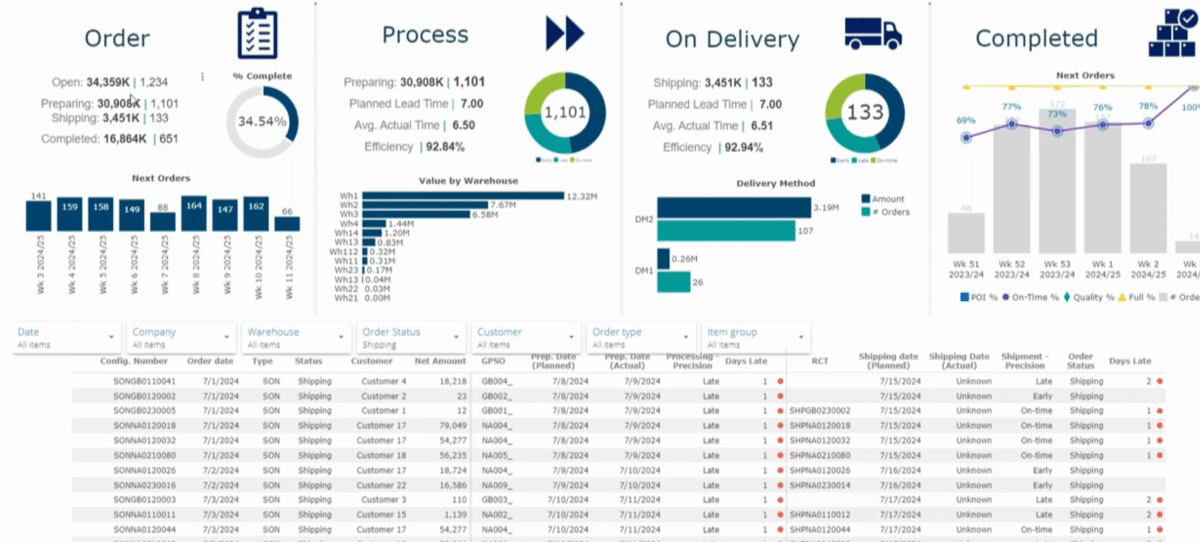

See Sage Data & Analytics and Sage Intelligence in action
Ready to unlock your data’s potential? Whether you need better insights with Sage Data & Analytics or streamlined reporting with Sage Intelligence, our team can assess your needs, recommend the best fit, and support a smooth deployment from start to finish.
Key takeaways
- Sage Intelligence is best for Excel-based reporting: It gives finance and accounting teams a familiar way to create, customize, and distribute reports using Sage 100 data.
- Sage Data & Analytics supports broader business intelligence needs: It combines Sage 100 data with information from CRM, databases, spreadsheets, and other systems for consolidated reporting and analysis.
- The solutions serve different levels of reporting complexity: Sage Intelligence focuses on day-to-day financial and operational reporting, while Sage Data & Analytics supports multi-source analysis, dashboards, advanced analytics, and customizable data models.
- Business complexity can help determine the right fit: Organizations with multiple locations, departments, or data sources may benefit from Sage Data & Analytics, while teams primarily focused on Sage 100 and Excel reporting may find Sage Intelligence better suited to their needs.
- Your long-term data strategy should guide the decision: Consider where your data resides, who needs access to reporting, how information is analyzed today, and how your analytics requirements may evolve.
Frequently asked questions (FAQs)
What is the difference between Sage Data & Analytics and Sage Intelligence?
Sage Data & Analytics (SD&A) is a cloud-based BI and data management platform. It consolidates data from multiple sources, including Sage 100, other Sage ERP, CRM, and external databases. This makes it ideal for strategic, multi-department, and multi-site reporting. Sage Intelligence, in contrast, focuses on Excel-based financial and operational reporting within Sage ERP systems. It is best for day-to-day reporting and teams who rely heavily on Excel.
Which Sage ERP systems work with these tools?
Sage Intelligence is available for Sage 100. Sage Data & Analytics is available for Sage 100, Sage 300, and Sage X3, and can also consolidate data from non-Sage systems and databases, making it the fit for organizations with more complex data needs. For Sage Intacct, the same platform as SD&A is available under its own name, Zap Data Hub.
Do I need advanced technical or Excel skills to use these tools?
No. Sage Intelligence is designed for finance and operations teams and works directly in Excel, so users with basic to intermediate Excel skills can generate reports and dashboards quickly. SD&A requires some technical setup but provides powerful dashboards and predictive analytics. Training ensures business users can make the most of the platform without deep IT knowledge.
Can these tools handle multi-company or multi-site reporting?
Yes. SD&A excels at multi-site, multi-company, and multi-currency reporting. Its cloud-based architecture and customizable data models allow organizations to consolidate information from multiple locations. Sage Intelligence is best suited for single-site or smaller teams, but can still manage multiple entities within Sage ERP with optional modules.
How do I get Sage Data & Analytics or Sage Intelligence?
Both tools are available through authorized Sage partners. A partner will assess your reporting needs, review your ERP setup, and recommend the right solution and modules. They can also manage setup, configuration, and training, ensuring the solution delivers value quickly. Contact a Sage partner to discuss deployment options.
How does Sage Data & Analytics and Sage Intelligence compare to Power BI?
Power BI is a versatile, cloud-based analytics platform that connects to many data sources. It excels at creating highly customizable dashboards and interactive visualizations. However, it often requires more setup and technical expertise than SD&A or Sage Intelligence. For teams focused on Sage 100 reporting, Sage solutions provide faster deployment, prebuilt reports, and tighter integration with ERP workflows, making them easier for finance and operations teams to use immediately.
Which solution is right for my business?
It depends on your business size, reporting requirements, and data strategy. Choose Sage Intelligence if your team needs quick, Excel-based reporting for finance and operations. Choose SD&A if you want a cloud-based, multi-source platform with advanced dashboards, predictive analytics, and enterprise-level insights.
Conclusion: Aligning the solution to your needs
Choosing the right business intelligence solution starts with understanding your organization’s reporting requirements, data sources, users, and long-term analytics strategy. The right approach should support how your teams work today while providing flexibility as your reporting needs evolve.
Rand Group’s Sage 100 experts can help you evaluate your reporting environment and determine which solution best aligns with your business needs. Contact us to schedule a demo and explore the right approach for getting more value from your Sage 100 data.