Sage Intacct AI for skilled nursing: Copilot, AI Gateway, and practical use cases

Skilled nursing finance teams must manage high transaction volumes, complex entity structures, changing labor costs, reimbursement timing, and facility-level reporting. Sage Intacct AI can reduce the time spent entering data, preparing reports, finding exceptions, and investigating financial changes across the organization.
Sage Intacct includes embedded automation, Sage Copilot, specialized AI agents, and AI Gateway capabilities. This guide explains how these tools work, where they can support skilled nursing finance, and how to prepare your data, systems, controls, and employees for responsible AI adoption.
At a glance
Sage Intacct AI helps skilled nursing organizations automate finance tasks, analyze facility performance, detect unusual activity, and access approved financial information through natural-language questions. Embedded automation supports routine work, Sage Copilot and AI agents guide finance processes, and AI Gateway connects Sage Intacct with external AI tools and custom applications.
Table of contents
- What is Sage Intacct?
- Why does AI matter for skilled nursing finance?
- What AI tools are available in Sage Intacct?
- Sage Intacct AI capabilities for skilled nursing finance
- Sage Intacct AI use cases for skilled nursing
- How to prepare your skilled nursing organization for AI
- Partner with Rand Group for Sage Intacct AI
- Key takeaways
- Frequently asked questions
What is Sage Intacct?
Sage Intacct is a cloud financial management platform that helps skilled nursing organizations manage accounting across facilities, departments, and legal entities. It supports core processes such as general ledger, accounts payable, accounts receivable, cash management, purchasing, budgeting, reporting, and multi-entity consolidation.
Skilled nursing providers can use dimensions to organize financial data by facility, department, payer, vendor, service line, and other reporting categories. Finance teams can review consolidated results and then drill into the locations, accounts, and transactions driving performance.
Sage Intacct can also connect with payroll, electronic medical record, banking, budgeting, and other healthcare systems. These connections help organizations bring financial and operational data together for measures such as labor costs, occupancy, payer mix, and cost per patient day.
For a broader overview of the platform, read our guide to Sage Intacct for skilled nursing.

Why does AI matter for skilled nursing finance?
Skilled nursing finance teams manage large volumes of invoices, payroll transactions, journal entries, bank activity, patient-day statistics, and intercompany data across multiple facilities. AI in Sage Intacct can reduce manual work, surface exceptions, and help finance leaders understand what changed, why it changed, and where attention is needed.
Sage’s 2025 CFO research highlights the potential impact of AI and automation, with reported benefits of up to:
0 %
reduction in monthly close time
0 %
reduction in invoice processing time
0 x
ROI in as little as six months
For skilled nursing organizations, the value of AI goes beyond faster data entry. Sage Intacct AI can help finance teams monitor activity across facilities, investigate changes sooner, and spend less time preparing information for review.
Benefits can include:
- Faster invoice processing for food, medical supply, staffing, maintenance, and other vendors
- Better visibility into close progress across facilities and legal entities
- Earlier detection of unusual journal entries, duplicate invoices, and coding errors
- Faster analysis of labor, overtime, and agency staffing costs
- Clearer explanations of changes in cost per patient day
- Improved cash planning around payroll and reimbursement cycles
- Easier access to approved financial answers for facility leaders
- Faster preparation of facility and management summaries
AI should not replace the judgment of controllers, accountants, facility administrators, or operational leaders. It should reduce the time they spend locating and preparing information so they can focus on reviewing results and deciding what action to take.
What AI tools are available in Sage Intacct?
Sage Intacct offers several connected AI tools rather than one individual feature. The easiest way to understand Sage Intacct AI is to group its tools into three categories:
- Embedded AI and automation within standard finance processes
- Sage Copilot and specialized AI agents for analysis and guided workflows
- Sage Intacct AI Gateway for external and custom AI applications
Skilled nursing organizations can begin with built-in automation and add more advanced tools as their data, processes, and AI strategy develop.
Embedded AI and automation
Embedded AI works within standard Sage Intacct transactions and workflows. It supports repeatable tasks such as capturing invoice data, suggesting account and dimension coding, matching bills with purchase orders and receipts, detecting possible duplicates, and identifying unusual financial activity.
For example, Sage Intacct AP Automation can read an incoming facility invoice, prepare a coded draft, and route it for approval. The system learns from corrections over time, while finance employees remain responsible for reviewing and approving the transaction.
This is often a practical starting point for skilled nursing organizations because it applies AI to existing processes with clear inputs, outputs, and approval requirements.

Sage Copilot and AI agents
Sage Copilot is a generative AI assistant embedded within Sage Intacct. It gives finance teams a simple way to interact with financial data, review activity, and receive guidance within existing workflows.
Sage Copilot can help users:
- Ask questions about financial data in natural language
- Find reports, records, and transactions
- Track month-end close activities
- Identify reconciliation differences
- Review trends and budget variances
- Receive summaries and recommended next steps
- Get help completing Sage Intacct tasks
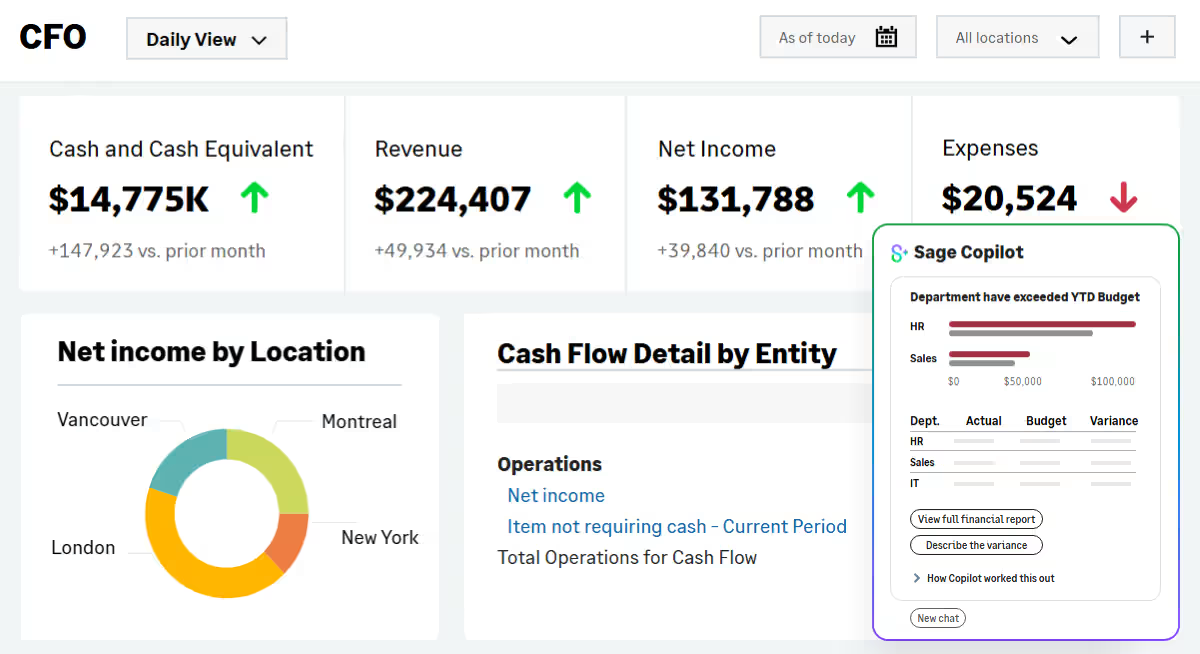
Sage Intacct also includes specialized AI agents that support specific finance processes. These agents may work behind the scenes, appear within Sage Intacct workflows, or provide results through Sage Copilot.
Sage Intacct AI agents include:
- Finance Intelligence Agent: Answers financial questions, analyzes performance, and explains the results behind reports and transactions.
- Close Agent: Tracks close activities, identifies delays, and guides finance teams through remaining tasks.
- AP Automation Agent: Captures invoices, suggests coding, matches purchase orders, and flags possible duplicates.
- Financial Assurance Agent: Reviews journal entries for errors, duplicate activity, and transactions that differ from normal patterns.
- Time Agent: Suggests timesheet entries using information from meetings, emails, and other work activity.
The Finance Intelligence, Close, AP Automation, and Financial Assurance agents are the most directly relevant to most skilled nursing finance teams.
For more information, read our complete guide to Sage Copilot and our article on AI agents in Sage Intacct.

Sage Intacct AI Gateway
Sage Intacct AI Gateway allows organizations to connect Sage Intacct financial data with approved external AI tools and custom applications. It extends AI beyond the standard Sage Intacct interface while keeping access aligned with existing roles and permissions.
For example, an organization could connect Sage Intacct with a compatible AI tool such as Claude. Authorized users could then ask natural-language questions about financial data within the application they prefer.
A skilled nursing organization could also build a custom assistant and connect it to Sage Intacct. The assistant could combine approved financial, payroll, census, or other operational data to support facility reporting and analysis.
For more information, read our guide to Sage Intacct AI Gateway.

How the Sage Intacct AI tools work together
Embedded automation, Sage Copilot, AI agents, and AI Gateway address different needs. They can be used separately or combined within the same skilled nursing finance process.
For example, embedded AI could capture an agency staffing invoice. The Financial Assurance Agent could flag an unusual labor entry, while Sage Copilot helps the controller investigate the variance. A custom AI Gateway application could then summarize labor, occupancy, and cost-per-patient-day trends for regional leadership.

Explore the evolution of AI in finance
Finance-trained AI is changing how CFOs approach the month-end close, from reconciliations and variance review to continuous monitoring and guided analysis. Download the white paper to learn how Sage Copilot can reduce manual work, improve accuracy, and give finance leaders better visibility across financial operations.
Sage Intacct AI capabilities for skilled nursing finance
Sage Intacct AI capabilities can help skilled nursing finance teams reduce manual work, monitor financial activity, and access facility-level insights faster. When financial and operational data is structured consistently, these tools can support accounting processes across multiple facilities, departments, vendors, and legal entities.
- Natural-language financial analysis: Sage Copilot and the Finance Intelligence Agent allow users to ask questions about financial data in plain language. Finance leaders can review facility expenses, cash balances, budget performance, and other results without creating a new report for every question.
- Trend and variance monitoring: Certain Sage Intacct AI capabilities can monitor financial activity for changing trends and unexpected variances. This can help skilled nursing organizations identify shifts in labor, agency staffing, dietary supplies, maintenance, and other facility costs earlier.
- Multi-facility close and reconciliation: The Close Agent tracks close activities across accounts payable, accounts receivable, cash management, and the general ledger. Automated reconciliation also compares ledgers and highlights discrepancies so controllers can see which facilities, entities, or accounts still require attention.
- AI-powered invoice processing: The AP Automation Agent captures invoice data, identifies vendors, suggests account and dimension coding, and matches bills with purchase orders and receipts. This can reduce manual entry for high-volume expenses while keeping facility and finance approvals in place.
- Duplicate and anomaly detection: Sage Intacct AI can flag duplicate invoices, unusual journal entries, unexpected coding, and transactions that differ from normal patterns. Finance teams can focus their review on exceptions that may indicate an error, control issue, or missing information.
- Explainable insights and guided actions: AI-generated answers can direct users to the accounts, reports, and transactions behind a result. Sage Intacct AI can also recommend next steps and notify users when an invoice, reconciliation, close task, or variance requires action.
- Custom financial assistants: Sage Intacct AI Gateway allows organizations to build approved AI assistants around specific roles and information needs. A skilled nursing organization could create tailored experiences for finance executives, regional leaders, or facility administrators using authorized Sage Intacct data.
- Cross-system AI workflows: AI Gateway can connect Sage Intacct with approved payroll, EMR, workforce, budgeting, and other business systems. This creates a foundation for custom AI workflows and broader analysis that combine financial data with labor, census, patient-day, payer, and operational information.
Sage Intacct AI use cases for skilled nursing
The best Sage Intacct AI use cases begin with a clear finance problem. Skilled nursing organizations should focus on processes that involve high transaction volumes, repeated analysis, or information spread across facilities and systems.
Each use case also depends on accurate data and consistent financial dimensions. Labor, census, patient-day, payer, and other operational data may need to be integrated with Sage Intacct before AI can analyze the full picture.
Automate invoice processing across facilities
Skilled nursing organizations process invoices for food, medical supplies, agency staffing, utilities, maintenance, and other facility expenses. AP employees must capture the bill, select the correct entity, apply facility and department dimensions, match supporting documents, and route the transaction for approval.
Sage Intacct AP Automation can prepare a coded bill and compare it with related purchase orders and receipts. Finance employees can then focus on exceptions such as:
- Prices or quantities that do not match supporting documents
- Possible duplicate invoices
- Unrecognized vendors
- Expenses assigned to the wrong facility or department
- Bills that exceed approval limits
This approach can increase invoice processing capacity while keeping review and approval requirements in place.
Accelerate the close across facilities and entities
A skilled nursing close may involve dozens of facilities, property companies, and related entities. One incomplete reconciliation or late journal entry can delay consolidated financial reporting for the entire organization.
Sage Intacct AI can provide a current view of close progress and help controllers identify where work has stalled. Finance teams can use these insights to:
- Find incomplete or delayed close tasks
- Identify facilities that need support
- Detect recurring bottlenecks
- Prioritize issues that affect consolidated reporting
- Reduce manual status meetings and follow-up emails
- Compare close performance between periods
AI improves coordination and visibility, while the accounting team remains responsible for completing and approving close activities.
Analyze labor, overtime, and agency staffing costs
Labor is one of the largest and most variable expenses for skilled nursing providers. Finance and operational leaders need to understand regular wages, overtime, agency staffing, benefits, and other workforce costs by facility and department.
When payroll and agency expenses are integrated with Sage Intacct and classified consistently, users can ask questions such as:
- Which facilities exceeded their overtime budgets?
- Where did agency staffing costs increase?
- Which locations had rising labor costs while occupancy declined?
- How does nursing labor compare across facilities?
- Which transactions caused this labor variance?
- Which facility had the largest increase in labor cost per patient day?
Reliable analysis depends on payroll expenses being assigned to the correct facility, department, and labor category.
Explain changes in cost per patient day
Cost per patient day connects facility expenses with the volume of care provided. A change may result from higher labor costs, lower census, increased agency use, vendor price changes, or a shift in fixed-cost allocation.
When patient-day statistics are available with Sage Intacct financial data, AI can help users investigate questions such as:
- Why did cost per patient day increase at this facility?
- How did agency labor affect cost per patient day?
- Which facilities have declining occupancy and rising fixed costs?
- How do dietary costs per patient day compare across locations?
- Which accounts are driving the change?
- Which facilities improved margin despite lower census?
Patient-day and census data may need to be imported or integrated from an EMR, clinical system, or other operational source.
Identify unusual transactions earlier
Traditional financial reviews often focus on the largest transactions. Smaller repeated errors, unexpected coding, or unusual patterns may receive less attention.
Sage Intacct AI can help accounting teams identify exceptions such as:
- Duplicate vendor invoices
- Unusual journal entries
- Transactions posted to unexpected accounts or departments
- Entries outside normal accounting periods
- Significant changes in vendor activity
- Manual adjustments that differ from historical patterns
AI does not determine whether a transaction is incorrect. It helps accountants identify where to begin their review.
Improve cash planning around payroll and reimbursements
Skilled nursing organizations must meet payroll and vendor obligations while managing reimbursement schedules from Medicare, Medicaid, managed care organizations, and private-pay residents. A delayed payment can affect cash needs across several facilities or entities.
Sage Intacct AI can help finance leaders compare expected cash with upcoming requirements. Common questions include:
- Which facilities have near-term funding needs?
- Will expected receipts cover the next payroll?
- How would a delayed reimbursement affect cash?
- Which vendor payments are due first?
- Where may an intercompany cash transfer be required?
- How would a capital purchase affect the short-term cash position?
Finance leaders should confirm expected receipts, payment dates, and other assumptions before changing payment priorities or moving funds.
Give facility leaders faster access to financial answers
Facility administrators need current financial information, but they may not need full access to the accounting system. They often rely on finance employees to run reports and explain changes.
Sage Copilot or a custom AI Gateway application can give approved users a simpler way to ask facility-specific questions, such as:
- How is my facility performing against budget?
- Which expenses increased this month?
- What is our current labor cost per patient day?
- How does agency labor compare with last month?
- Which invoices still require approval?
- What caused the change in operating margin?
Access should follow Sage Intacct roles and permissions. Users should also be able to review the reports and transactions behind each answer.
Build a skilled nursing performance assistant
Sage Intacct AI Gateway can support a custom assistant that brings financial and operational measures into one management experience. The assistant could prepare a draft monthly summary for executives, regional leaders, or facility administrators.
A skilled nursing performance assistant could organize and explain:
- Revenue and operating margin by facility
- Actual results compared with budget
- Occupancy and patient days
- Labor, overtime, and agency staffing costs
- Cost per patient day
- Payer mix
- Cash and accounts receivable trends
- Major vendor variances
- Unusual transactions
- Incomplete close activities
The assistant could identify meaningful changes and prepare a first draft for review. Finance and operational leaders would confirm the data, add business context, and approve the final report.
This is a custom AI Gateway use case rather than an out-of-the-box Sage Intacct feature. It would require approved access to Sage Intacct and any other systems used in the analysis.
How to prepare your skilled nursing organization for AI
Preparing for Sage Intacct AI starts with a clear business problem, reliable data, and defined controls. A focused approach helps skilled nursing organizations test value, protect sensitive information, and expand AI only after the process works as intended.
- Choose one focused use case: Start with a process that involves repeated manual work or analysis, such as invoice matching, close tracking, labor reporting, budget variance review, or monthly management summaries. A narrow use case is easier to test and improve.
- Build a consistent data foundation: Standardize how facilities classify accounts, departments, vendors, payers, labor types, and patient-day statistics. AI cannot produce reliable comparisons when locations use different definitions or coding practices.
- Connect the required systems: Identify where the financial and operational data needed for the use case is stored. Payroll, EMR, workforce, banking, and other systems may need to connect with Sage Intacct to support complete analysis.
- Define access and protect sensitive data: Give each user and AI application access only to the information required for its purpose. Skilled nursing organizations should also confirm Sage Intacct BAA eligibility, Advanced Audit Trail requirements, and the security and contractual terms of any third-party AI platform.
- Keep people in the approval process: Define which tasks AI can support and which decisions require human review. Employees should approve invoices, investigate flagged transactions, validate financial explanations, and authorize actions involving cash or sensitive information.
- Test with a controlled pilot: Begin with a limited group of users, facilities, or transactions. Review accuracy, permissions, approval workflows, user understanding, time saved, and the corrections required before expanding the solution.
- Measure the results: Track outcomes such as invoice processing time, close duration, reporting hours, recoding rates, exceptions identified, and AI suggestions accepted. These measures show whether AI is reducing work or only moving it to another part of the process.

Find the right starting point for Sage Intacct AI
An AI assessment can help your skilled nursing organization identify practical opportunities across finance, reporting, automation, and connected systems. Rand Group will review your current environment and outline where AI can reduce manual work, improve visibility, and deliver measurable value.
Partner with Rand Group for Sage Intacct AI
Working with an experienced Sage Intacct partner can help turn an AI idea into a practical finance solution. The right partner can align Sage Intacct AI with your accounting processes, data structure, integrations, security requirements, and approval controls so the technology supports measurable business goals.
Rand Group combines Sage Intacct, accounting, integration, automation, and AI expertise with experience in skilled nursing and healthcare. We bring more than 35 years of Sage experience and hold Sage Diamond Tier Partner status, the highest level in Sage’s global partner program. Rand Group has also completed more than 3,000 engagements for more than 1,200 clients across North America and maintains a 90% client retention rate.
Our team understands multi-entity structures, facility-level reporting, cost-per-patient-day analysis, payroll and census integrations, AP automation, and the financial controls required across growing care organizations.
Rand Group can help your organization with:
- AI strategy and roadmap: Identify high-value Sage Intacct AI use cases and create a phased plan based on your systems, priorities, and level of readiness.
- Sage Copilot and AI agents: Evaluate, configure, and improve embedded AI capabilities for close management, financial analysis, accounts payable, and transaction review.
- Financial data and reporting: Standardize dimensions, reporting structures, and operational measures so AI can produce reliable facility-level insights.
- System integrations: Connect Sage Intacct with EMR, payroll, banking, workforce, budgeting, and other approved systems.
- Finance automation and controls: Improve AP processing, purchasing, approvals, reconciliations, and other workflows while maintaining human oversight.
- AI Gateway and custom applications: Evaluate Sage Intacct AI Gateway and develop custom assistants, integrations, and AI workflows around your business needs.
- Security and governance: Define permissions, validation steps, approval requirements, and data protection practices for AI users and applications.
- Training and optimization: Prepare users, measure results, and expand successful AI use cases as your organization’s needs evolve.
What our clients say about Rand Group
“Rand Group had experience with other groups in our industry, and the positive feedback we heard helped us feel confident in our choice. They helped us build the industry-specific reports we needed, but they did not just do it for us. They explained the system, gave us the tools to understand it, and helped us become self-sufficient. It has been a great partnership.”
– Taylor Peak, Accounting Manager, Plantation Management Company
“Our experience working with Rand Group has always been so positive. They already understood our company structure, and they have always been responsive to our needs.”
– Lisa Morris, Accounting Director, Spine Team Texas
Key takeaways
- Sage Intacct AI includes embedded automation, Sage Copilot, specialized AI agents, and Sage Intacct AI Gateway.
- Skilled nursing organizations can use Sage Intacct AI to automate invoices, accelerate the close, detect exceptions, and improve financial analysis.
- Sage Copilot allows finance teams to ask natural-language questions about approved Sage Intacct data.
- Sage Intacct AI Gateway supports custom assistants and workflows that combine financial, payroll, census, and other operational data.
- Reliable AI results depend on consistent financial dimensions, connected systems, controlled access, and accurate data.
- Skilled nursing organizations should begin with a focused use case, keep people in the approval process, and measure results before expanding AI.
Frequently asked questions
What is Sage Intacct AI for skilled nursing?
Sage Intacct AI is a set of embedded automation, AI agents, Sage Copilot, and AI Gateway capabilities that help skilled nursing organizations automate finance work, analyze results, and access financial insights faster.
How can Sage Intacct AI help skilled nursing finance teams?
Sage Intacct AI can help finance teams process invoices, track the close, identify unusual transactions, explain variances, analyze labor costs, and prepare facility-level financial summaries.
What is the difference between Sage Copilot, AI agents, and Sage Intacct AI Gateway?
Sage Copilot is the user-facing AI assistant, AI agents support specific finance processes, and AI Gateway connects Sage Intacct with external AI tools and custom applications.
Can Sage Intacct AI automate accounts payable for skilled nursing facilities?
Yes. Sage Intacct AP Automation can capture invoice data, suggest coding, match bills with purchase orders and receipts, detect possible duplicates, and route transactions for approval.
Can Sage Intacct AI analyze labor costs and cost per patient day?
Yes, when payroll, census, and patient-day data are connected and classified consistently. Finance teams can then compare labor, overtime, agency staffing, occupancy, and cost-per-patient-day trends across facilities.
Can Sage Intacct AI connect with payroll, EMR, and census systems?
Yes. Sage Intacct can integrate with payroll, EMR, workforce, banking, budgeting, and other approved systems to bring financial and operational data together.
What can skilled nursing organizations build with Sage Intacct AI Gateway?
Skilled nursing organizations can use AI Gateway to build custom assistants, reporting tools, and workflows that combine authorized Sage Intacct data with payroll, census, labor, and other operational information.
Is Sage Intacct AI secure for skilled nursing financial data?
Sage Intacct AI uses roles and permissions to control access, but organizations must also review third-party AI tools, integrations, data storage, and healthcare compliance requirements before sharing sensitive information.
Does Sage Intacct AI replace accountants or facility leaders?
No. Sage Intacct AI supports data entry, analysis, monitoring, and reporting, while accountants, controllers, and operational leaders remain responsible for review, approval, and business decisions.
How should a skilled nursing organization get started with Sage Intacct AI?
Start with one focused use case, confirm that the required data is accurate, define permissions and approvals, test the process with a limited group, and measure the results before expanding.
Put Sage Intacct AI to work in skilled nursing finance
Sage Intacct AI can help skilled nursing organizations reduce manual work, improve financial visibility, and give finance leaders more time to review results. The best approach begins with a focused use case, reliable data, connected systems, controlled access, and clear human approval requirements.
Rand Group can help you evaluate Sage Intacct AI, prepare your financial and operational data, configure automation, connect business systems, and build a phased roadmap for Sage Copilot, AI agents, and AI Gateway. Contact us today to identify practical AI opportunities for your skilled nursing organization.