Sage Intacct consolidation: How the Domestic Consolidation module works

Managing financial reporting across multiple entities can be challenging, especially when transactions occur between companies within the same organization. Finance teams must combine financial results, eliminate intercompany activity, and ensure consolidated statements accurately reflect the business as a whole. As transaction volumes grow, this process can become time-consuming and difficult to manage manually.
Sage Intacct provides multi-entity reporting capabilities and dedicated consolidation modules to simplify this work. Its Domestic Consolidation module automates inter-entity eliminations, supports accurate financial reporting, and helps organizations close their books faster. This guide explains how Sage Intacct consolidation works, the difference between manual and automated consolidation, and how to determine which approach is right for your business.
At a glance
Sage Intacct Domestic Consolidation is an add-on module that automates financial consolidation for wholly owned entities with a flat ownership structure and a single base currency. It uses configurable consolidation books to eliminate intercompany transactions, generate consolidated financial statements, and maintain audit-ready records. Organizations can also consolidate manually using Sage Intacct’s core multi-entity tools, but the module reduces repetitive work and improves reporting consistency. Businesses with multiple base currencies or complex ownership structures may need Global or Advanced Ownership Consolidation instead.
What is Sage Intacct?
Sage Intacct is a cloud-based financial management and enterprise resource planning (ERP) system designed for growing organizations with complex accounting and reporting needs. It brings core financial functions, including general ledger, accounts payable, accounts receivable, cash management, and financial reporting, into one platform. Beyond everyday accounting, Sage Intacct provides workflow automation, real-time dashboards, and dimensional reporting. This allows finance teams to analyze financial performance by location, department, project, or other business areas without creating an overly complex chart of accounts.
One of Sage Intacct’s key strengths is its multi-entity accounting capabilities. Organizations can manage multiple legal entities within a shared financial system while maintaining separate books and financial records for each. The platform supports inter-entity transactions, standardized accounting processes, and reporting at the individual entity, group, or organization-wide level. This provides the financial visibility and structure needed to manage complex multi-entity operations and support consolidated financial reporting.
To learn more, read our blog on What is Sage Intacct?.

What is Sage Intacct Domestic Consolidation?
Sage Intacct Domestic Consolidation is an add-on module that automates financial consolidation for wholly owned entities that share a single base currency. It is designed for organizations with a flat ownership structure that need to report their financial results as one business. The module automates inter-entity eliminations, creates consolidated financial statements, and provides a clear audit trail. This helps finance teams reduce manual work, improve accuracy, and streamline the financial close.
Financial consolidation involves more than simply combining financial statements. While combined reporting adds together the balances of individual entities, consolidation also removes transactions that occur between them. These adjustments, known as inter-entity eliminations, prevent internal sales, management fees, loans, and other intercompany activity from being counted in the organization’s consolidated financial results.
For example, consider a company that owns several inns in Canada, each operating as a separate legal entity using Canadian dollars. If one entity charges another for shared services, the revenue and expense appear in their individual financial records. However, because the transaction occurred within the same organization, it must be eliminated from the consolidated financial statements. Sage Intacct Domestic Consolidation automates these adjustments, giving the company an accurate view of its overall financial performance.

Simplify domestic consolidations in Sage Intacct
See how Sage Intacct Domestic Consolidation works in practice. In this on-demand webinar, our Sage Intacct expert demonstrates how to set up consolidation books, automate inter-entity eliminations, and generate consolidated financial statements. You’ll also learn how the module compares to standard multi-entity reporting and when it makes sense to upgrade.
How does Sage Intacct Domestic Consolidation work?
Sage Intacct Domestic Consolidation uses predefined rules to automate the consolidation process. Finance teams create consolidation books that define which entities to include, which accounts to eliminate, and what financial data to report. When a consolidation is run, Sage Intacct applies these rules to the selected reporting period, generates the necessary elimination entries, and produces consolidated financial results. The process can be repeated each month without rebuilding the consolidation from scratch.
Key features and capabilities
Sage Intacct Domestic Consolidation provides tools to manage inter-entity transactions, prepare consolidated financial statements, and maintain a clear record of consolidation activity. Its core capabilities include:
- Automated inter-entity eliminations: Automatically eliminate transactions recorded in configured accounts, including intercompany revenue, expenses, loans, and due-to/due-from balances.
- Separate consolidation books: Create multiple consolidation books for different groups of entities or reporting needs while preserving each entity’s individual financial records.
- Period-based consolidations: Run consolidations for specific reporting periods, track their completion status, and maintain consistent elimination rules across periods.
- Audit trails and journal drill-down: Review system-generated elimination entries and drill into consolidation journals to trace financial results back to supporting transactions.
- Flexible financial reporting: Include selected journals and reporting dimensions, such as departments, locations, and projects, to maintain detailed financial visibility.
- Reconsolidation and adjustments: Rerun previous consolidations when transactions change or new entries are posted, helping keep consolidated reports accurate and up to date.
Together, these capabilities help finance teams reduce manual journal entries, shorten the month-end close, and produce more consistent financial reports. They also make it easier to explain consolidated balances to management, auditors, and other stakeholders.
How the consolidation process works
Once the module is enabled, finance teams configure their consolidation settings and use them for each reporting period. The process generally follows five steps:
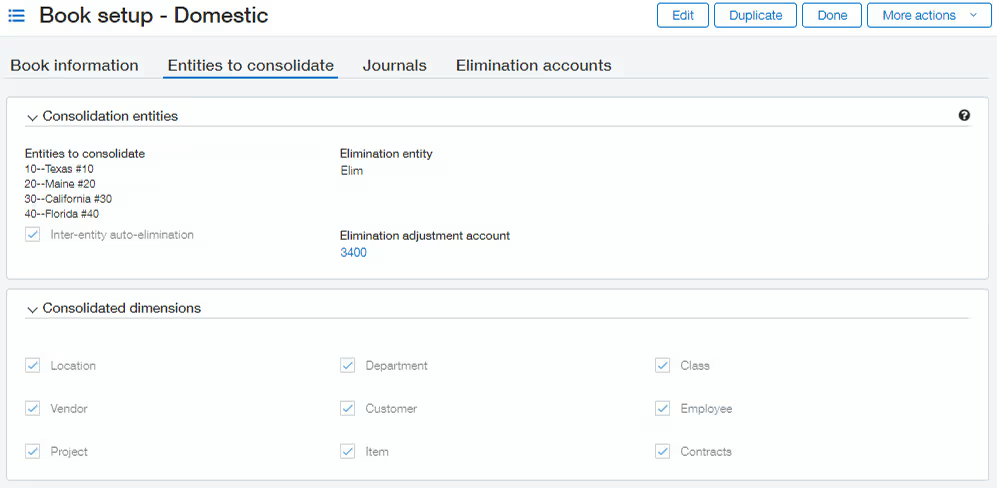
- Create a consolidation book. Set up a dedicated book and select the legal entities to include in the consolidated financial statements.
- Configure elimination rules. Identify an elimination entity and specify which general ledger accounts contain inter-entity transactions that need to be eliminated.
- Select journals and dimensions. Choose the additional journals and financial dimensions to include, such as department, location, or project.
- Run the consolidation. Select the reporting period and start the consolidation. Sage Intacct processes the included financial activity and automatically generates the configured elimination entries.
- Review consolidated results. Access the consolidated income statement and balance sheet, review elimination journals, and drill into transactions to verify the results.
Once configured, the same consolidation book can be used for future periods. If changes are made to previously reported transactions, finance teams can reconsolidate the affected periods to update their financial results.
Manual vs. Sage Intacct Domestic Consolidation
You can consolidate financial statements in Sage Intacct without purchasing the Domestic Consolidation module. The platform’s core multi-entity capabilities allow organizations to combine financial results across entities. However, the elimination entries needed for true financial consolidation must be handled manually. Domestic Consolidation automates this work and provides a more structured process for financial reporting.
Without the module, finance teams can use top-level financial reports, location groups, and report groups to combine results from selected entities. Inter-entity due-to and due-from account mapping helps record balances between entities and keep their books balanced. Accountants must then prepare and post elimination journal entries to remove internal revenue, expenses, and balances from consolidated results.
Manual consolidation can work well for organizations with limited inter-entity activity. However, as transaction volumes increase and reporting needs become more complex, several challenges can arise:
- Time-consuming manual work: Accountants must calculate, prepare, and post elimination entries during each reporting period.
- Higher risk of errors: Manual processes increase the chance of missed transactions, incorrect adjustments, or inconsistent eliminations.
- Longer financial close: Consolidated financial statements may be delayed while teams prepare and review elimination entries.
- Limited audit traceability: Auditors must review supporting journal entries and documentation to understand how consolidated balances were calculated.
- Dependence on individual employees: Knowledge of which accounts to eliminate may rest with one accountant, making the process harder to maintain or transfer.
The main difference between manual consolidation and Sage Intacct Domestic Consolidation is the level of automation, consistency, and control over the process.
The right approach depends on how much inter-entity activity your organization manages and the level of reporting control it needs. For businesses with frequent eliminations or complex reporting requirements, the time saved and improved audit visibility may justify the additional module.

Is your Sage Intacct consolidation process holding you back?
Not sure whether manual consolidation or the Domestic Consolidation module is right for your business? Rand Group’s Sage Intacct experts can evaluate your current processes, identify opportunities for automation, and help you determine the best approach for your financial reporting needs.
When should you use Sage Intacct Domestic Consolidation?
Sage Intacct Domestic Consolidation is designed for multi-entity organizations with a flat ownership structure, 100% ownership of each entity, and a single base currency. All entities must use the same base currency, whether that is U.S. dollars, Canadian dollars, or another supported currency. The module is particularly valuable for organizations that need to eliminate inter-entity transactions and produce accurate, audit-ready consolidated financial statements.
Meeting these requirements does not automatically mean your organization needs the module. The decision depends on the volume of inter-entity activity, the complexity of your reporting, and how much time your team spends on consolidation. The following signs indicate that Domestic Consolidation may be a worthwhile investment:
- Frequent inter-entity transactions: Your entities regularly exchange funds, charge management fees, or provide shared services to one another. Automating eliminations reduces the work required to account for these transactions during each close.
- Multiple consolidation groups: Your organization needs separate consolidated financial statements for different groups of entities, such as regions or business divisions. Dedicated consolidation books make it easier to manage each reporting group with consistent rules.
- Growing month-end close demands: Your finance team spends significant time preparing elimination entries before consolidated reports are ready. Automation can reduce this workload and help deliver financial statements sooner.
- Frequent financial adjustments: Late invoices, corrected transactions, or additional journal entries require updates to previously consolidated periods. Reconsolidation allows finance teams to incorporate these changes without rebuilding the process manually.
- Stricter audit and reporting requirements: Auditors, lenders, or other stakeholders require detailed support for consolidated financial results. Formalized elimination entries and journal drill-down provide a clearer record of how the numbers were calculated.
When should you move beyond Domestic Consolidation?
As your organization grows, Sage Intacct Domestic Consolidation may no longer meet your financial reporting needs. The two main reasons to upgrade are multiple base currencies and more complex ownership structures. For example, acquiring a subsidiary that uses a different base currency may require currency translation, while adding partially owned entities requires accounting for ownership percentages and non-controlling interests.
Sage Intacct offers three consolidation subscriptions: Domestic, Global, and Advanced Ownership Consolidation. Each builds on the capabilities of the previous subscription, allowing organizations to support more complex financial structures as their needs change. The table below compares their requirements and capabilities.
The distinction between base currencies and transaction currencies is important. An organization can process transactions in multiple currencies without necessarily needing Global Consolidation. The upgrade becomes necessary when the entities being consolidated use different base currencies. Similarly, Advanced Ownership Consolidation may be required for complex ownership structures even if every entity uses the same base currency.
Partner with Rand Group for Sage Intacct consolidation
Successful Sage Intacct consolidation requires more than enabling the right module. Your entity structure, elimination rules, and financial reporting must be configured to support your accounting processes and business requirements. Rand Group helps organizations evaluate their consolidation needs, implement the right solution, and optimize financial workflows to reduce manual effort, strengthen reporting accuracy, and support a faster close.
As a Sage Diamond-tier partner, Rand Group brings more than two decades of Sage experience and over 3,000 successful implementations. Our team of Sage-certified consultants, CPAs, and industry experts combines accounting knowledge with technical expertise to help organizations manage complex financial operations. With a 90% client retention rate, we are committed to building long-term partnerships through ongoing support, optimization, and strategic guidance.
Our Sage Intacct services include:
- Consolidation advisory and planning: Evaluate your entity structure, reporting requirements, and intercompany processes to determine the right consolidation approach.
- Implementation and configuration: Configure Sage Intacct, consolidation books, elimination accounts, and workflows to support your financial processes.
- Financial reporting and analytics: Develop consolidated financial statements, dashboards, and dimensional reports for greater visibility across entities.
- Integrations and automation: Connect Sage Intacct with other business systems and automate accounting workflows to reduce manual work.
- Training and ongoing support: Help your finance team manage consolidations, resolve issues, and improve financial processes as your organization grows.
Case study: Streamlining financial consolidations across 32 entities
A growing senior living organization struggled with manual financial consolidation across 32 entities, relying on spreadsheets to combine financial data and prepare organization-wide reports. Rand Group implemented Sage Intacct, configured automated consolidations, and developed financial reports that provide visibility by region and facility. The team also automated intercompany transactions, reducing a 32-step process to a single transaction. The organization now benefits from faster consolidated reporting, less manual work, and improved financial visibility.
To learn more, read the full case study.
What our clients say about us
“Rand Group had experience with other groups in our industry, and the positive feedback we heard helped us feel confident in our choice. They helped us build the industry-specific reports we needed, but they did not just do it for us. They explained the system, gave us the tools to understand it, and helped us become self-sufficient. It has been a great partnership.”
– Taylor Peak, Accounting Manager, Plantation Management Company
“Our experience working with Rand Group has always been so positive that I knew they were the right team to guide our move to Sage Intacct. They already understood our company structure, which made the implementation very easy, and they have always been responsive to our needs.”
– Lisa Morris, Accounting Director, Spine Team Texas
Key takeaways
- Sage Intacct Domestic Consolidation automates financial consolidation for wholly owned entities with a flat ownership structure and a single base currency.
- Financial consolidation goes beyond combined reporting by eliminating inter-entity transactions to prevent double counting.
- Automated consolidation reduces manual journal entries, shortens the financial close, and improves reporting accuracy.
- Consolidation books support period-based reporting, automated eliminations, audit trails, and transaction-level drill-down.
- Manual consolidation is possible using Sage Intacct's core multi-entity capabilities, but requires accountants to prepare and post elimination entries.
- Global and Advanced Ownership Consolidation support more complex requirements, including multiple base currencies, tiered ownership, and partially owned entities.
Sage Intacct Domestic Consolidation FAQs
Is Sage Intacct Domestic Consolidation included in the standard subscription?
No, Sage Intacct Domestic Consolidation is an additional paid subscription. Core multi-entity reporting is available without the module, but automated eliminations and dedicated consolidation books require a consolidation subscription. Pricing depends on your Sage Intacct licensing agreement.
Can you consolidate financial statements in Sage Intacct without the Domestic Consolidation module?
Yes, Sage Intacct allows organizations to combine financial results using core multi-entity reporting tools. However, accountants must manually prepare and post inter-entity elimination entries to produce consolidated financial statements.
Does Sage Intacct Domestic Consolidation automatically eliminate all intercompany transactions?
No, Sage Intacct Domestic Consolidation automatically eliminates intercompany transactions based on the accounts and rules configured in the consolidation book. Transactions outside those settings may require additional configuration or manual adjustments.
Can Sage Intacct Domestic Consolidation handle transactions in multiple currencies?
Yes, Sage Intacct Domestic Consolidation can support transactions in multiple currencies as long as every entity being consolidated uses the same base currency. If entities have different base currencies, Global Consolidation is required.
Does Sage Intacct Domestic Consolidation only work for U.S. companies?
No, Sage Intacct Domestic Consolidation is not limited to companies operating in the United States. Organizations in Canada and other supported regions can use the module, provided their entities share one base currency and meet the ownership requirements.
Can you consolidate different groups of entities separately in Sage Intacct?
Yes, Sage Intacct allows organizations to create multiple consolidation books for different groups of entities. Each book can include selected entities and reporting configurations, allowing finance teams to produce separate consolidated financial statements.
Can you rerun a consolidation after posting additional transactions?
Yes, Sage Intacct allows finance teams to reconsolidate previous reporting periods after posting new transactions or correcting existing entries. Reconsolidation updates the financial results and may affect subsequent periods that have already been consolidated.
When should you upgrade from Sage Intacct Domestic Consolidation to Global or Advanced Ownership Consolidation?
You should upgrade when your organization’s currency or ownership requirements exceed the capabilities of Domestic Consolidation. Global Consolidation supports entities with different base currencies, while Advanced Ownership Consolidation supports tiered ownership structures, partially owned subsidiaries, and non-controlling interests.
Simplify your Sage Intacct consolidation process
The right consolidation approach depends on your organization’s entity structure, intercompany activity, and financial reporting needs. While manual consolidation may work for simpler organizations, automated consolidation can help growing businesses reduce errors, shorten the financial close, and improve visibility into financial performance. Evaluating your current processes is the first step toward determining whether Sage Intacct Domestic Consolidation is the right investment.
Rand Group can help you assess your consolidation requirements, select the right Sage Intacct solution, and configure your system to support accurate, efficient financial reporting. From implementation and automation to training and ongoing support, our experts can help you get more value from Sage Intacct. Contact us to discuss your consolidation needs and explore how we can simplify your financial processes.