Sage Intacct demo: Explore features by industry and function

A Sage Intacct demo is a walkthrough of the platform that shows how it manages financial processes, reporting, and operational workflows in real-world scenarios. These demos help organizations understand how Sage Intacct supports core accounting functions, automates manual tasks, and provides visibility into financial performance.
This page brings together Sage Intacct demo videos organized by industry use cases and core financial capabilities. It is designed to help you explore the platform and see how it works across different functions and real-world scenarios.
- What is Sage Intacct?
- Sage Intacct functionality demos
- Sage Intacct industry demos
- Partner with Rand Group for a personalized Sage Intacct demo
- Sage Intacct demo FAQs
What is Sage Intacct?
Sage Intacct is a cloud-based financial management and enterprise resource planning (ERP) solution designed for growing organizations. It helps businesses manage core accounting processes such as general ledger, accounts payable and receivable, revenue recognition, and expense management in one centralized system. Because Sage Intacct is built on a multi-tenant cloud architecture, users can access real-time financial data from anywhere, improving visibility, collaboration, and operational efficiency.
Sage Intacct also supports advanced needs like multi-entity consolidations, dimensional reporting, and automated workflows. This allows organizations to streamline financial operations while gaining deeper insight into performance across departments, locations, or business units. Sage Intacct reviews consistently highlight its strong reporting capabilities, ease of use, and ability to automate complex financial processes. These features help finance teams reduce manual work, improve accuracy, and make faster, data-driven decisions as the business grows.
A Sage Intacct demo helps bring these capabilities to life by showing how the system works in real scenarios. By watching a demo, organizations can see key features in action, understand how workflows are automated, and evaluate how Sage Intacct fits their financial and operational needs.

Schedule a personalized Sage Intacct demo
See how Sage Intacct can support your financial management, reporting, and operational needs. Our experts will walk through key features and show how the system fits your business.
Sage Intacct functionality demos
These Sage Intacct demos are organized by core functional areas to help you understand how the platform supports financial management, reporting, and operational processes. Each section highlights key capabilities and shows how organizations use Sage Intacct to automate workflows, improve accuracy, and gain real-time visibility.
Sage Intacct financial management demos
These Sage Intacct demos highlight how the platform automates core financial processes and improves accuracy across accounting workflows. Each video shows how finance teams can reduce manual work, gain real-time visibility, and close books faster.
AP bill automation
This Sage Intacct demo shows how AP bill automation uses artificial intelligence (AI) and machine learning (ML) to streamline the accounts payable process. The system can automatically create vendor bills, extract key data, and reduce manual entry, while continuously improving through a feedback loop that increases accuracy over time. This helps finance teams process invoices faster, reduce errors, and focus on higher-value work.
Bank reconciliation
This video demonstrates how Sage Intacct automates bank reconciliation to reduce manual work and improve accuracy. The system uses tools like Match and Create Rules to automatically match transactions and streamline reconciliation, helping finance teams close books faster and with fewer errors.
The walkthrough also highlights newer capabilities like the Bank Transaction Assistant, which makes it easier to import, review, and categorize transactions while building more precise matching rules over time. Key benefits include:
- Faster reconciliation with automated matching rules
- Automatic creation of inter-entity journals
- Simplified transaction imports and review processes
These features help organizations move away from manual reconciliation and gain better control over cash and financial data.
This video also covers Sage Intacct Bank Feeds, which connects your bank and credit card accounts directly to the system. Transactions are automatically imported throughout the day, keeping financial data up to date in near real time. This reduces manual uploads and gives teams better visibility into cash flow during the month.
Dynamic allocations
Dynamic allocations in Sage Intacct automate how costs, revenue, and other financial data are distributed across departments, projects, and business units. This Sage Intacct demo shows how predefined rules replace manual calculations, ensuring consistent and accurate allocations. As a result, organizations can reduce manual effort while gaining clearer visibility into how financial data is spread across the business.
Multi-entity consolidation
This Sage Intacct demo shows how multi-entity consolidation helps organizations manage multiple companies, locations, or subsidiaries in one system. The platform can consolidate hundreds of entities in minutes by automating key processes like currency conversions, inter-entity transactions, and financial reporting. This reduces manual work and improves accuracy across complex financial structures.
The video also highlights how Sage Intacct simplifies global operations by handling decentralized payables, multiple currencies, and local tax requirements. By automating consolidation activities, finance teams can close the books 25–70% faster and gain real-time visibility across the entire organization.
Amortization of prepaid expenses
This walkthrough shows how Sage Intacct automates the amortization of prepaid expenses to improve accuracy and save time. Instead of manually creating recurring journal entries, the system automatically generates amortization schedules directly from the original vendor bill or invoice. This ensures expenses are recognized correctly over time without additional manual steps.
The video highlights how this functionality reduces errors, streamlines accounting workflows, and keeps financial records aligned with source transactions. By automating prepaid expense management, finance teams can simplify month-end processes and maintain more accurate financial reporting.
Spend management
This Sage Intacct demo shows how spend management helps organizations control costs and stay within budget. The system automatically monitors transactions across the general ledger, accounts payable, and purchasing modules to provide real-time visibility into spending. This allows finance teams to track expenses as they happen instead of after the fact.
The video also highlights how configurable checks and controls can be set up to enforce budget limits and prevent overspending. By adding these controls directly into financial workflows, organizations can improve accountability, reduce risk, and maintain stronger financial discipline.
Sage Intacct reporting and dashboards demos
These Sage Intacct demos highlight the platform’s reporting and dashboard capabilities and how they support real-time visibility across the business. Each video showcases different features that help organizations explore data, analyze performance, and present insights more effectively.
Financial reporting intro
This Sage Intacct demo provides an overview of how financial reporting works within the system. It shows how organizations can create reports using financial, dimensional, and statistical data to produce clear financial statements and operational insights. This allows finance teams to analyze performance in real time and make more informed decisions.
The video walks through how to build and customize reports, including adjusting rows, adding columns, setting permissions, and formatting outputs. It also demonstrates how to create common reports, such as revenue reports, giving users a practical understanding of how Sage Intacct supports flexible and accurate financial reporting.
Advanced financial reporting
This video builds on the basics by showing how Sage Intacct supports more complex and detailed reporting. It highlights how organizations can analyze data across multiple dimensions, compare performance, and uncover trends using real-time financial and operational data. This allows finance teams to move beyond standard reports and gain deeper insight into business performance.
Dimensional accounting
This Sage Intacct demo shows how dimensional accounting enables more flexible and dynamic reporting without adding complexity. Instead of relying on rigid account structures, users can tag transactions with dimensions like department, location, or project, making it easier to filter and analyze data across the business.
The video highlights how this approach reduces maintenance and allows organizations to adapt as they grow. Teams can add new departments or locations without restructuring the chart of accounts, while still gaining detailed insights through dynamic reports and dashboards.
Report writer
This Sage Intacct demo shows how the built-in report writer allows organizations to create and customize reports without relying on external tools like Excel. Users can easily slice and analyze data to present meaningful insights across finance, sales, and other departments, all within the system.
The video highlights how this flexibility improves visibility for key stakeholders, including executives and investors. By centralizing reporting in Sage Intacct, teams can access real-time data, reduce manual work, and deliver more accurate and timely insights.
Dashboards
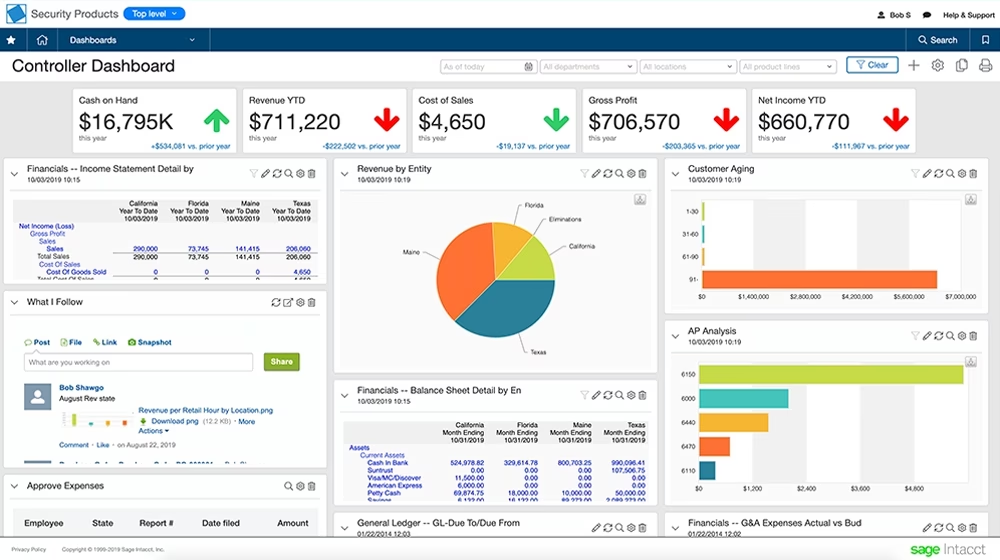
Dashboards in Sage Intacct provide a centralized view of key financial and operational data, allowing users to see insights without switching between reports or menus. This video shows how to build, clone, and customize dashboards so each user can access the information most relevant to their role.
Key capabilities include:
- Real-time visibility with up-to-the-minute data
- Role-based views tailored to different users
- Multiple dashboard types, including operational and analytical views
Inventory and supply chain management demos
Managing consumable inventory across locations can be difficult without real-time visibility and control. This Sage Intacct demo shows how the supplies inventory feature helps organizations track quantities, costs, and locations while streamlining purchasing and inventory workflows.
The video also highlights how supplies inventory integrates with purchasing and inventory control modules to simplify requisitions, approvals, and purchase orders. With centralized data and real-time insights, organizations can reduce manual tracking, prevent stockouts, and improve day-to-day operational efficiency.
Budgeting and planning
These Sage Intacct demos highlight how organizations can improve budgeting, forecasting, and financial planning processes. Each video showcases features that help reduce manual work, increase accuracy, and provide better control over financial planning activities.
Budgeting and planning
Budgeting and planning in spreadsheets can quickly become time-consuming and error-prone. This Sage Intacct demo shows how the platform replaces manual Excel processes with a more structured and reliable approach to budgeting, forecasting, and financial planning.
The video highlights how organizations can eliminate common challenges like version control issues, data silos, and formula errors. By centralizing budgeting and planning in Sage Intacct, teams can save time, improve accuracy, and focus more on analysis instead of manual data entry.
Budget imports
Moving budget data into a new system can be a challenge, especially when transitioning from spreadsheets. This Sage Intacct demo shows how budget imports simplify the process by allowing organizations to quickly upload and manage budget data within the platform. The video walks through how teams can streamline data entry, reduce manual work, and maintain consistency when building and updating budgets.
Sage Intacct industry demos
These Sage Intacct demos are organized by industry to show how the platform supports specific business needs and operational challenges. Each section highlights how organizations in different industries use Sage Intacct to manage financial complexity, improve visibility, and streamline processes in real-world scenarios.
Sage Intacct for construction
Managing construction projects requires constant visibility into costs, timelines, and profitability. This Sage Intacct for construction demo explores how the platform brings financial and project data together, giving teams a clearer view of performance across every job.
The video highlights how construction firms can track job costs in real time, identify issues earlier, and make faster decisions to stay on budget. By connecting project management with financial reporting, Sage Intacct helps reduce risk and improve overall project outcomes.
Sage Intacct for healthcare
These Sage Intacct demos focus on how healthcare organizations manage financial complexity, improve visibility, and maintain control across multiple locations. This includes organizations such as multi-entity healthcare systems, oncology practices, specialty clinics, skilled nursing facilities, and provider networks that require strong financial oversight and reporting. Each video highlights key capabilities that support better decision-making, operational efficiency, and compliance in healthcare finance.
Sage Intacct for Healthcare
Healthcare organizations face growing complexity as they expand across clinics, providers, and service lines. This Sage Intacct demo explores how the platform helps finance teams improve visibility, strengthen controls, and manage financial performance in a changing healthcare environment.
In this webinar, you will see how Sage Intacct supports healthcare finance with:
- Real-time visibility across clinics, providers, and service lines
- Simplified multi-entity reporting across locations
- Stronger purchasing controls and reduced manual reporting
The video also highlights tools like EMRConnect and clinical eProcurement, which help connect clinical and financial data while improving efficiency and reducing month-end close effort.
Clinical eProcurement
Procurement in healthcare often involves complex supply chains, strict controls, and high-volume purchasing. This Sage Intacct demo explores how clinical eProcurement helps organizations streamline purchasing while maintaining visibility into supply spend and compliance requirements.
The video highlights how healthcare teams can better manage clinical supplies, control costs, and standardize purchasing processes. By centralizing procurement within Sage Intacct, organizations can improve oversight, reduce inefficiencies, and ensure more consistent purchasing across locations.
Sage Intacct for real estate
Real estate organizations often manage multiple properties, entities, and data sources, making financial visibility difficult. This Sage Intacct for real estate demo explores how the platform simplifies real estate accounting by combining lease management and financials in one system, helping teams reduce manual reporting and improve data consistency.
In this video, you’ll learn:
- How REIT structures create challenges across multiple properties and systems
- Common issues caused by disconnected data and spreadsheet-based reporting
- How a unified platform improves visibility, consistency, and operational efficiency
Sage Intacct for nonprofit and grant tracking
Nonprofits and public sector organizations must carefully manage funding while meeting strict reporting and compliance requirements. This Sage Intacct demo shows how grant tracking centralizes funding data, automates allocations, and provides real-time visibility into expenses and program performance.
In this video, you’ll learn:
- How to track and manage grants in a centralized system
- How dashboards provide real-time visibility into funding and spending
- How built-in reporting supports compliance, including SEFA reporting
Partner with Rand Group for a personalized Sage Intacct demo
Watching Sage Intacct demos is a great way to understand how the platform works, but every organization has unique processes, data, and reporting requirements. A personalized demo allows you to go beyond general examples and see how Sage Intacct would function with your workflows, business structure, and real-world scenarios. This helps you evaluate how the system fits your needs and where it can deliver the most value.
As a Sage Intacct partner, Rand Group works with organizations across industries to evaluate, implement, and optimize financial systems. Our team brings deep experience in financial management, reporting, and system integration, allowing us to guide you through the platform and align it with your business goals. We focus on practical outcomes, helping you understand how Sage Intacct can support your operations today and scale with your growth.
Rand Group provides:
- Personalized Sage Intacct demos tailored to your business processes and requirements
- Sage Intacct implementation services, including system design, configuration, and data migration
- Integration support to connect Sage Intacct with your existing systems
- Ongoing support and managed services to maintain and improve system performance
- Optimization and advisory services to enhance reporting, automation, and financial workflows
Sage Intacct demo FAQs
Where can I see demos of other Sage Intacct features?
You can view additional Sage Intacct demos on the Rand Group YouTube channel, which includes videos across financial management, reporting, and industry-specific use cases. These demos provide a broad overview of features and capabilities.
Can I see a Sage Intacct demo tailored to my industry or business?
Yes. A personalized Sage Intacct demo is tailored to your industry, business processes, and requirements. It focuses on how the system would work for your specific workflows and goals.
What is the difference between these demo videos and a personalized Sage Intacct demo?
These videos provide general overviews of Sage Intacct features and use cases. A personalized demo is customized to your organization and shows how the system fits your specific financial and operational needs.
What does a Sage Intacct demo show?
A Sage Intacct demo shows how the system manages financial processes such as accounts payable, reporting, budgeting, and multi-entity consolidation. It highlights key features, workflows, and real-world use cases.
Is Sage Intacct a good fit for growing businesses?
Yes. Sage Intacct is designed for growing organizations that need stronger financial controls, real-time visibility, and scalable reporting. It supports multi-entity structures, automation, and advanced analytics.
How do I request a Sage Intacct demo?
You can request a Sage Intacct demo by scheduling a personalized walkthrough with a Sage Intacct partner, such as Rand Group. This allows you to see how the platform fits your specific business needs.
Next steps
Exploring Sage Intacct demos is a great way to understand the platform, but seeing it applied to your business makes the biggest impact. A personalized demo allows you to evaluate how Sage Intacct fits your processes, reporting needs, and growth plans.
Our team can walk through your specific requirements and show how Sage Intacct supports your financial operations, industry needs, and long-term goals. Contact us today to schedule your personalized Sage Intacct demo.