Sage Intacct implementation best practices

Implementing a new financial management system is a major investment, one that can transform how your organization operates, reports, and scales. Sage Intacct is a powerful, cloud-based financial platform, but like any ERP solution, its value depends on how effectively it is implemented.
Organizations that approach implementation with a clear strategy and proven Sage Intacct implementation best practices are better positioned to drive adoption, realize value sooner, and fully leverage the system’s capabilities. In this blog, we’ll walk through the best practices used by successful finance teams, from early planning and data preparation to testing, training, and long-term optimization. Drawing on our experience as a Sage Intacct partner, this guide is designed to help you navigate the process with confidence and build a strong foundation for success.
Why Sage Intacct implementation best practices matter
A successful Sage Intacct implementation is about more than deploying new software, it’s about building a financial system that aligns with your organization’s processes, priorities, and future direction. Best practices provide the structure needed to make informed decisions throughout the implementation, ensuring critical elements like system design, testing, and user readiness are addressed intentionally rather than reactively. By following a disciplined, best-practice-driven approach, organizations can minimize risk, improve consistency, and create a system that delivers reliable insights and supports growth over time.
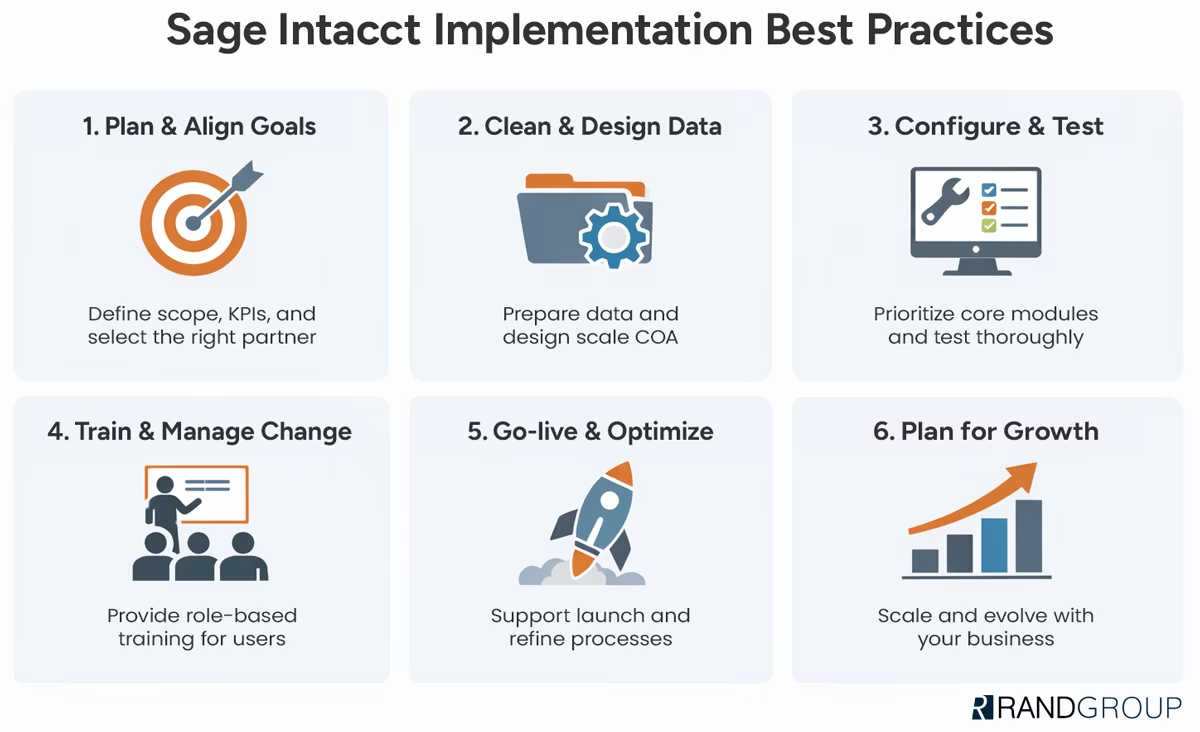
Pre-implementation planning: Set the foundation for success
Sage Intacct implementation best practices begin long before the system is configured. A strong planning phase establishes clear expectations, aligns stakeholders around shared goals, and creates the structure needed to manage scope and timelines effectively. By investing time upfront to define success, identify priorities, and prepare the organization for change, teams can reduce risk, avoid misalignment, and set the stage for a smoother implementation and stronger long-term outcomes.
Define success early
One of the most common causes of implementation challenges is a lack of clarity around what success looks like. Before configuration begins, work with your team to clearly define:
- Business goals and desired outcomes
- Project scope, including what is in and out of scope
- Success metrics and key performance indicators (KPIs)
Documenting these elements early helps prevent scope creep, keeps the project focused, and provides a clear way to measure success after go-live.
Choose the right Sage Intacct implementation partner
Your implementation partner plays a critical role in project success. Working with an experienced, certified Sage Intacct partner ensures you receive guidance rooted in best practices, not trial and error.
It’s equally important to confirm alignment between what was discussed during the sales process and what the consulting team will deliver. Early alignment on expectations, timelines, and responsibilities helps avoid surprises later in the project.

Top 7 ERP implementation partner selection criteria
Choosing the right ERP implementation partner can make all the difference. A trusted partner brings strategic guidance, proven expertise, and a focus on long-term success, while the wrong choice can lead to delays, rework, and missed opportunities. Explore our comprehensive guide to learn the seven key strategies and criteria to consider when selecting the right ERP implementation partner for your organization.
Build stakeholder and team buy-in
Technology changes are also team changes. Successful Sage Intacct implementations prioritize change management from the start by involving key stakeholders and end users early.
Engaging the people who will use the system every day helps:
- Surface real-world requirements
- Build excitement and ownership
- Increase adoption at go-live
Even the best-designed system won’t deliver value if users aren’t fully bought in.
Data preparation and design best practices
Data preparation is one of the most overlooked, but most impactful, Sage Intacct implementation best practices. The quality of your data and the way your system is designed directly influence reporting accuracy, user confidence, and long-term system usability. Taking the time to clean, structure, and thoughtfully design your data before migration helps prevent downstream issues and ensures Sage Intacct is built on a solid, scalable foundation.
Clean and prepare your data
Migrating poor-quality data into a new system can create reporting issues and delays long after go-live. Before migration, take time to:
- Clean up inactive vendors, customers, and accounts
- Correct inconsistencies and duplicates
- Decide how much historical data to migrate
Thoughtful data preparation leads to cleaner reporting, smoother reconciliations, and greater confidence in the system from day one.
Design a scalable chart of accounts
Sage Intacct’s dimensional architecture allows organizations to simplify their general ledger while gaining more powerful reporting. Best practices include:
- Using meaningful account groupings
- Avoiding unnecessary account proliferation
- Designing with future growth in mind
A well-designed chart of accounts should support today’s needs while remaining flexible enough to scale.
Customize dimensions for your business
Dimensions are one of Sage Intacct’s greatest strengths. Renaming dimensions, such as changing “Project” to “Grant”, helps align the system with your organization’s terminology and processes.
Using dimensions for reporting instead of adding accounts allows you to:
- Improve reporting flexibility
- Reduce maintenance
- Support more advanced analysis
Configuration and build: Focus on what matters first
A phased approach is a core Sage Intacct implementation best practice that helps organizations reduce risk and build momentum early in the project. By focusing first on essential financial processes and configuring the system with purpose, teams can establish a stable foundation, simplify adoption, and create a clear path for future enhancements without overwhelming users or introducing unnecessary complexity.
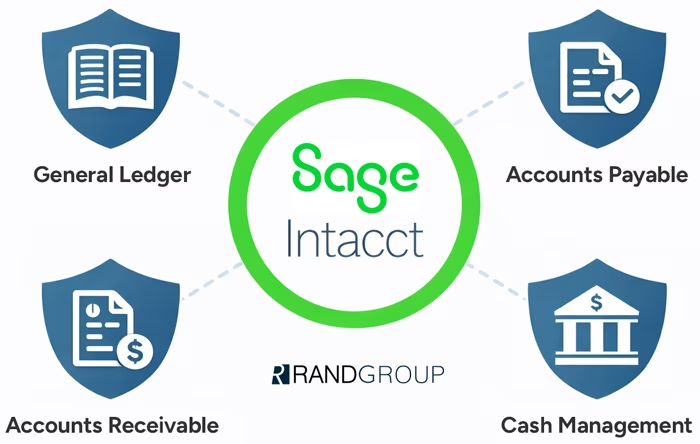
Prioritize core financial modules
Rather than implementing every available module at once, most organizations benefit from focusing Phase 1 on core financials:
- General Ledger
- Accounts Payable
- Accounts Receivable
- Cash Management
This approach allows teams to stabilize essential processes first and build a roadmap for future phases.
Configure with purpose
Configuration decisions should always be tied back to business processes. Best practices include:
- Customizing data entry screens for efficiency
- Setting IDs carefully, knowing they cannot be changed later
- Leveraging Smart Rules and Smart Events to automate controls and workflows
Thoughtful configuration reduces manual effort and improves data accuracy.
Always use a test environment
All configuration and experimentation should be done in a test environment, not production. This allows teams to validate setups, explore options, and reduce go-live risk without disrupting live operations.
Testing, testing, and more testing
If there’s one Sage Intacct implementation best practice that cannot be overstated, it’s testing. Thorough testing ensures the system supports real-world processes, validates configurations, and prepares users for day-to-day operations before go-live. By identifying issues early and giving teams hands-on experience in a safe environment, testing reduces risk, builds confidence, and helps ensure a smoother transition to Sage Intacct.
Test your real-world processes
Successful implementations focus on testing actual workflows, not just basic system functionality. Your team should practice completing their daily tasks exactly as they will at go-live. This ensures users are confident, prepared, and productive on day one.
User acceptance testing (UAT)
User Acceptance Testing is where issues are identified before they become costly problems. Involving end users early helps validate:
- Reports and dashboards
- Approval workflows
- Integrations and data flows
Catching issues before go-live protects confidence and momentum.
Training and change management for adoption
Technology alone doesn’t drive success, people do. Even the most well-designed Sage Intacct implementation will fall short if users aren’t confident, informed, and engaged. Effective training and proactive change management help teams understand not just how to use the system, but why new processes matter, ensuring adoption, consistency, and long-term value from your investment.
Role-based training
Training should be tailored to each user’s responsibilities. Role-based training helps users understand how Sage Intacct supports their specific tasks, rather than overwhelming them with unnecessary features. Reinforcing new processes and efficiencies helps teams fully embrace the system.
Encourage ongoing learning
Sage Intacct is a SaaS solution that evolves through quarterly updates. Ongoing learning is a key part of long-term success. Best practices include:
- Reviewing quarterly release notes
- Attending partner webinars
- Leveraging Sage Intacct Help resources
Continuous education ensures you’re always getting the most from your investment.
Go-live and post-implementation optimization
Sage Intacct implementation best practices don’t stop at go-live—they extend well beyond it. The period immediately following go-live is critical for reinforcing adoption, addressing early challenges, and ensuring the system is delivering expected results. Ongoing optimization allows organizations to refine processes, enhance reporting, and continue improving efficiency as their needs evolve.
Support during go-live
Having both internal and partner resources available during go-live helps resolve issues quickly and maintain user confidence. Prompt support ensures a smoother transition and minimizes disruption.
Optimize after go-live
Post-go-live optimization turns a successful implementation into a strategic advantage. Once the system is live, take time to:
- Review performance against KPIs
- Fine-tune workflows and reports
- Identify additional automation opportunities
Learn from other Sage Intacct users
Connecting with peers in your industry can provide valuable insights. User groups, meetups, and professional networks offer opportunities to share ideas and learn how others are using Sage Intacct to solve similar challenges.
Plan for growth and long-term success
A successful implementation isn’t just about meeting today’s needs, it’s about preparing for tomorrow. Designing with scalability in mind allows your system to grow alongside your organization. Revisit future phases and “pipe dreams” regularly, and work with your partner to evolve the system as your business changes.
How Rand Group helps ensure a successful Sage Intacct implementation
We help organizations succeed by combining implementation best practices with a proven methodology and deep industry experience.
Our Sage experts provide:
Ongoing partnership beyond go-live – Our relationship doesn’t end at go-live. We support ongoing optimization, new modules, integrations, and future growth. This ensures you get the most from Sage Intacct long term.
A proven, structured implementation methodology – Our phased, milestone-driven approach emphasizes clarity, accountability, and transparency. Each phase is designed to reduce risk, maintain momentum, and deliver value quickly.
Strategic guidance from day one – We begin with a thorough discovery and business process review to ensure alignment on goals, scope, and success metrics. This upfront strategy ensures the system is designed to support real business needs.
Configuration aligned to your business – Our team configures Sage Intacct using best practices tailored to your organization, including scalable charts of accounts, thoughtfully designed dimensions, and automation that improves efficiency without adding complexity.
Testing, training, and change management support – We guide clients through hands-on testing, UAT, and role-based training to ensure teams are confident and prepared at go-live. Our change management approach focuses on adoption, not just deployment.

Start your Sage Intacct journey with confidence
A systems and process review with our experts is the first step toward a successful Sage Intacct implementation. We will assess your current environment, align technology with your business goals, and help you build a clear, actionable path forward.
Sage Intacct implementation best practices: Frequently asked questions
How long does a Sage Intacct implementation typically take?
Implementation timelines vary based on scope, modules, integrations, and data complexity. For organizations focusing on core financials, a Sage Intacct implementation typically takes three to six months. More complex implementations or phased rollouts may take longer. Following Sage Intacct implementation best practices, such as clear scope definition and phased deployment, helps keep timelines on track.
What are the most common challenges during a Sage Intacct implementation?
Common challenges include poor data quality, unclear requirements, insufficient testing, and limited user training. Many issues arise when organizations underestimate change management or attempt to implement too much at once. Working with an experienced partner and prioritizing planning, testing, and adoption helps avoid these pitfalls.
Should we implement all Sage Intacct modules at once?
Not usually. One of the most important Sage Intacct implementation best practices is phased deployment. Most organizations benefit from implementing core financial modules first. Core financials include General Ledger, Accounts Payable, Accounts Receivable, and Cash Management. You can add additional modules once the foundation is stable.
How much historical data should we migrate into Sage Intacct?
There is no one-size-fits-all answer. Many organizations choose to migrate one to two years of detailed historical data and retain older data in a legacy system or data warehouse for reference. The right approach depends on reporting needs, audit requirements, and data quality.
Why should we work with a Sage Intacct implementation partner?
An experienced Sage Intacct partner provides strategic guidance, technical expertise, and proven implementation methodologies. Partners help reduce risk, avoid costly mistakes, and ensure the system is configured to support your business.
Turning Sage Intacct into a strategic advantage
Successful ERP projects don’t happen by accident. By following proven Sage Intacct implementation best practices, from planning and data preparation to testing, training, and optimization, organizations can reduce risk and maximize ROI.
With the right strategy and an experienced partner, Sage Intacct becomes more than a financial system, it becomes a platform for smarter decision-making and scalable growth. Rand Group is proud to partner with organizations at every stage of their Sage Intacct journey to help turn implementation success into long-term value. Contact our team today to start your ERP implementation journey.