Tip of the Month
Sage Intacct Tip of the Month: Save time with report groups
Finance teams often run the same collection of reports every month, quarter, or year. Whether you are preparing financial statements for executives, departmental reports for managers, or a package for the board, opening and generating each report individually adds repetitive work to an already busy reporting cycle.
Sage Intacct report groups provide a more efficient approach. By bundling related reports together, users can generate an entire reporting package with a single action, helping save time, improve consistency, and simplify recurring reporting processes.
Tip summary: Streamline recurring reporting with report groups
A report group bundles multiple reports into a single reporting package that can be generated at once. Users can select the reports they need, arrange them in the desired order, and reuse the group for recurring reporting processes.
Report groups can help finance teams:
- Reduce repetitive report generation
- Standardize reporting packages
- Maintain a consistent report order
- Simplify month-end and quarter-end reporting
- Ensure stakeholders receive the same reports each reporting period
In short, if you regularly run the same group of reports, creating a report group can turn several individual tasks into one repeatable process.
Tip insights: When should you use a report group?
Consider creating a report group whenever multiple reports are routinely generated together for the same process or audience.
For example, a month-end financial package might include:
- Income Statement
- Balance Sheet
- Cash Flow Statement
- AR Aging
- AP Aging
A board reporting package could combine financial statements, budget versus actual reports, and KPI or statistical reports, while a department manager package could include a department P&L, budget variance analysis, and headcount reporting.
Report groups can also support multi-entity organizations that routinely generate entity-level financial statements, consolidated reports, and intercompany analysis.
Tip steps: How to create a report group in Sage Intacct
Step 1: Identify the reports
Start by determining which reports are consistently generated together. Think about recurring month-end, quarterly, annual, management, or board reporting packages where users currently run several reports individually.
Step 2: Create the report group
Navigate to:
Reports → Report Groups → Add
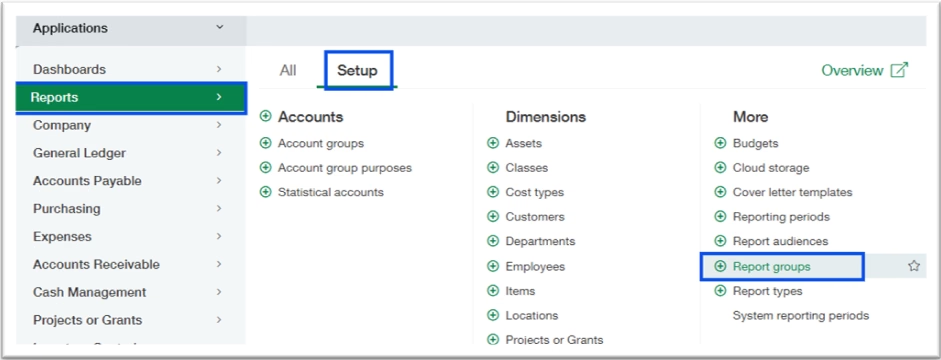
Enter a Report Group Name and Description that clearly identify the purpose or intended audience of the reporting package.
Using a consistent naming convention can make it easier for users to quickly identify the correct group.

Step 3: Add and organize your reports
Select the reports you want to include in the group and arrange them in the desired output order.
Consider how stakeholders typically review the information. For example, you may want to begin an executive reporting package with high-level financial statements before moving into more detailed operational or supporting reports.

Step 4: Test the report group
Run the report group to verify that each report generates correctly and appears in the appropriate sequence.
Review the package from the intended recipient’s perspective to ensure it contains the right information and follows a logical order.
Step 5: Incorporate the group into your reporting process
Once validated, use the report group as part of your recurring reporting process. Instead of opening and running each report separately, users can generate the established package whenever it is needed.
Tip best practices
- Create separate report groups for different audiences, such as executives, department managers, and board members.
- Keep each group focused on reports that are commonly used together.
- Use clear naming conventions so users can easily identify the appropriate reporting package.
- Arrange reports in an order that makes the package easy for stakeholders to review.
- Periodically review report groups to remove obsolete reports and incorporate new reporting requirements.
Why this tip matters
Report groups are a simple way to eliminate repetitive work from recurring reporting processes. By organizing commonly used reports into reusable packages, finance teams can save time, improve consistency, and make month-end, management, and board reporting more efficient.
If your team is spending too much time manually assembling reporting packages, Rand Group’s Sage Intacct experts can help you optimize your reporting processes and identify additional opportunities to get more from your system. Contact our team for Sage Intacct support. And be sure to return next month for another Sage Intacct Tip of the Month.