Tip of the Month
Sage Intacct Tip of the Month: Simplify expense allocations with fixed amounts and percentages
Allocating shared expenses across departments, locations, or projects is a common accounting task. However, when one part of an expense needs to be assigned a specific dollar amount before the remaining balance is distributed, calculating and entering those amounts manually can add unnecessary work and increase the risk of errors.
Sage Intacct Transaction Allocations provide a more efficient approach. By combining fixed amounts with percentage-based distributions, finance teams can automate more complex expense allocations, improve consistency, and reduce repetitive calculations during transaction entry.
Tip summary: Allocate fixed amounts first, then split the remaining balance
Sage Intacct Transaction Allocations allow users to distribute expenses across multiple dimensions based on predefined allocation rules. While percentage-based allocations are commonly used, the Fixed Amount allocation method provides additional flexibility.
With this method, users can assign specific dollar amounts to designated dimensions first, then distribute the remaining balance according to defined percentages.
For example, suppose your organization has a $10,000 shared marketing expense that needs to be allocated across corporate marketing and three regional departments. Your allocation could be configured as follows:
Sage Intacct applies the $2,000 fixed allocation first, leaving $8,000 to distribute across the three regions based on their assigned percentages.
Instead of manually calculating and entering four separate amounts, users can apply the allocation definition to handle the distribution consistently.
This approach is particularly useful when one department, location, project, or other dimension needs to absorb a predetermined amount before the remaining expense is shared.
Tip steps: How to use fixed amounts and percentages in Sage Intacct Transaction Allocations
Step 1: Identify the expense and allocation requirements
Start by identifying a recurring expense that requires a combination of fixed and percentage-based allocations.
Determine which department, location, project, or other dimension should receive the fixed amount and how the remaining balance should be distributed.
Step 2: Open Transaction Allocations
In Sage Intacct, navigate to the Transaction Allocations setup area, typically under:
Company → Setup → Transaction Allocations
Open an existing allocation definition or select Add to create a new one.
Note: Navigation may vary depending on your Sage Intacct configuration and permissions.
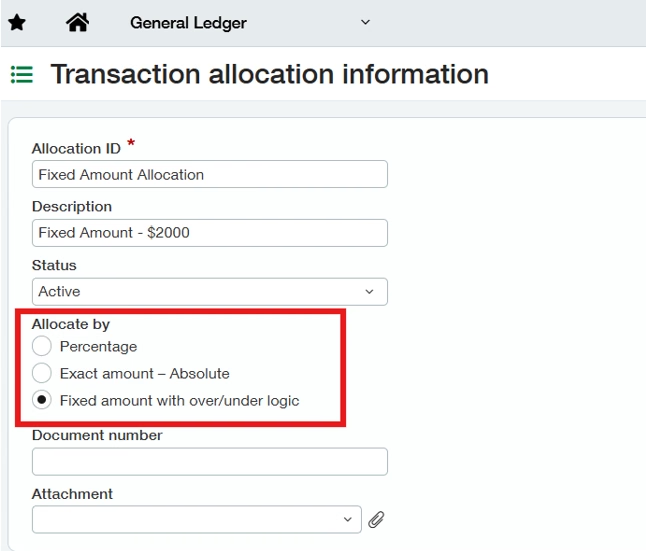
Step 3: Configure the fixed amount allocation
Set up the allocation definition using the Fixed Amount method.
Identify the dimension that should receive the predetermined amount and enter the appropriate dollar value.
For the marketing expense example, Corporate Marketing would receive a fixed allocation of $2,000.
Step 4: Define the percentage-based distribution
Next, configure the remaining allocation lines using the appropriate percentages.
For the example above, the remaining balance would be distributed as follows:
- East Region: 50%
- West Region: 30%
- Central Region: 20%
Ensure the percentages total 100% of the remaining balance so the expense is fully distributed.
Step 5: Save and test the allocation
Save the allocation definition and test it using a representative transaction.
Review the resulting distribution to confirm that Sage Intacct applies the fixed amount first and calculates the percentage allocations using the remaining balance.
Step 6: Apply the allocation to future transactions
Once the allocation has been validated, use it when entering applicable transactions.
Rather than manually calculating each department’s or location’s share, users can apply the predefined allocation to distribute the expense according to the established rules.

Tip insights: When should you use this allocation method?
Combining fixed amounts and percentages can be particularly valuable for organizations managing shared expenses with multiple cost centers or dimensions.
Common use cases include:
- Shared administrative expenses: Assign a fixed corporate portion before distributing the remaining expense across departments.
- Marketing costs: Allocate a predetermined amount to corporate marketing before splitting the balance among regional teams.
- Facility expenses: Assign a fixed amount to one location before distributing remaining costs across other locations.
- Project expenses: Allocate a specific cost to one project and distribute the remaining expense across participating projects.
This approach can be especially useful when the same allocation logic is applied repeatedly throughout the month or during recurring accounting processes.
Why this tip matters
Sage Intacct Transaction Allocations can simplify more than basic percentage-based expense distributions. By applying fixed amounts first and allocating the remaining balance automatically, finance teams can reduce manual calculations, improve consistency, and streamline recurring accounting processes.
If your organization is spending too much time manually distributing shared expenses, Rand Group’s Sage Intacct experts can help you evaluate your allocation processes and identify opportunities to improve efficiency through automation. Contact our team to get more value from your Sage Intacct investment and be sure to return next month for another Sage Intacct Tip of the Month.