Tip of the Month
Sage Intacct Tip of the Month: Make reporting easier with dimension groups and structures
As organizations grow, their reporting needs often become more complex. New departments, locations, programs, projects, customers, and other dimension values can make it difficult to analyze related information without repeatedly selecting individual values or exporting data to Excel for additional grouping.
Sage Intacct dimension groups and dimension structures provide a more scalable approach. They allow you to organize related dimension values into meaningful reporting categories and reuse those groupings across reports. In this month’s Sage Intacct Tip of the Month, we’ll show you how these tools can simplify reporting and create greater consistency as your organization grows.
Tip summary: Organize reporting with dimension groups and structures
A dimension group is a named set of members within a dimension, such as selected locations, a particular type of customer, or a group of programs. Dimension groups can be used to filter financial reports, General Ledger reports, dashboards, and graphs.
A dimension structure is built from one or more dimension groups and is designed specifically for financial statement reporting. Structures allow you to place a dimension on the rows or columns of a financial report and reuse the same grouping across multiple reports.
Together, dimension groups and structures can help you:
- Simplify reporting by grouping related dimension values
- Analyze information at different levels of detail
- Reduce repetitive report configuration
- Create consistent reporting across users and reports
- Build a reporting framework that can scale as new dimension values are added
Instead of rebuilding the same groupings every time you run a report, you can define them once and reuse them throughout Sage Intacct.
Dimension group vs. dimension structure: Which should you use?
Consider using dimension groups when you regularly need to report on several dimension values together.
For example, imagine a nonprofit tracks the following Program dimension values:
- Youth Services
- Adult Services
- Senior Services
- Community Outreach
The organization may need to report on each program individually while also viewing all four as a broader Community Programs category. A dimension group can organize those programs together, while a dimension structure can incorporate that grouping into financial statement layouts.
This gives users the flexibility to analyze individual dimension values or broader categories without manually recreating the grouping for each report.
Tip steps: How to create dimension groups and structures in Sage Intacct
Step 1: Identify the dimension
Start by determining which dimension you want to organize, such as Program, Location, Department, Customer, or another dimension used by your organization.
Think about which values users frequently select together when running reports. These are often good candidates for a Dimension Group.
Step 2: Determine your reporting hierarchy
Before creating the group, decide how you want the dimension values to roll up for reporting.
For example, a Community Programs grouping might include Youth Services, Adult Services, Senior Services, and Community Outreach.
Focus on how your organization needs to analyze the information rather than simply how the dimension values are currently listed. Planning the hierarchy first can make your reporting structure easier to maintain as the organization grows.
Step 3: Create the dimension group
Navigate to:
Reports → Setup → Dimension Groups → [Dimension] → + Add
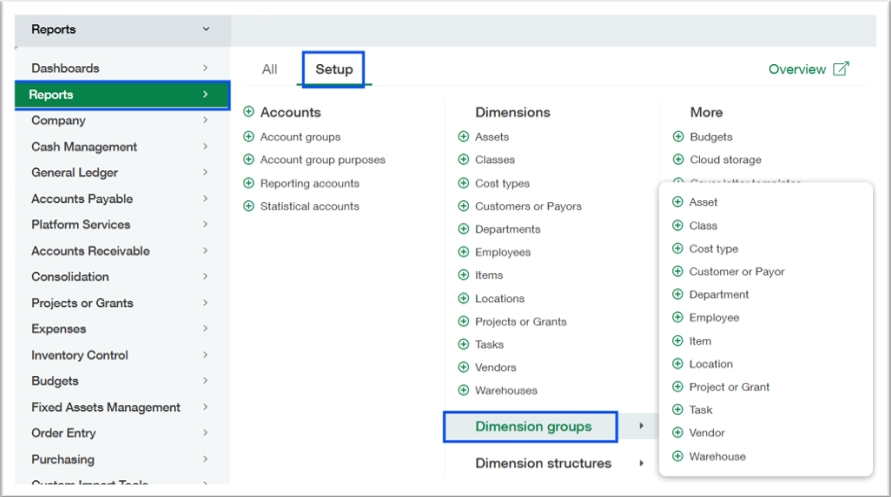
Enter a Group ID and Group Name. Keep in mind that the Group ID cannot be changed after the group is created, while the Group Name can be updated later.
Next, choose how members will be assigned:
- Specific members: Manually select the individual dimension values that belong in the group. This works well for smaller or relatively fixed groups but requires updates when membership changes.

- All members: Use filter criteria, such as an ID range or field value, to determine which members belong in the group. New dimension values that meet the criteria can then be included automatically, making this approach particularly useful for scalable reporting.

Step 4: Create the dimension structure
If the grouping will be used in financial statement reporting, create a Dimension Structure. When adding a Dimension Group, Sage Intacct provides an option to create the corresponding structure automatically.
You can also manage structures under:
General Ledger → All → Financial report structures → Dimension structures
A Dimension Structure can contain one or more Dimension Groups and allows the associated dimension to appear on the rows or columns of a financial report.

Step 5: Use groups and structures in your reports
Once configured, use the Dimension Group as a filter when running reports for that dimension. For financial statements, apply the Dimension Structure when building the report.
Structures can provide headings, individual member or substructure rows, and totals, allowing users to analyze financial information at the appropriate level of detail. Dimension Structures can also be used across columns while still allowing reports to expand by other dimensions, providing additional flexibility for more complex reporting requirements.

Tip insights: Best practices for dimension groups and structures
- Use All members with filter-based criteria when possible to reduce ongoing maintenance as new dimension values are added.
- Think about reporting requirements whenever you create a new dimension value and determine where it belongs in your existing hierarchy.
- Reuse Dimension Structures across reports to maintain consistent financial statement organization.
- Establish clear naming conventions so users can easily identify the appropriate groups and structures.
- Periodically review groups, filters, and hierarchies to ensure they continue to reflect current business processes and reporting requirements.
Why this tip matters
Dimension Groups and Structures turn individual dimension values into a reusable reporting framework. By defining how information should be grouped once, organizations can reduce repetitive report setup, create more consistent financial reporting, and analyze Sage Intacct data at the level that makes the most sense for the business.
If your reporting has become difficult to manage as your dimensions have grown, our Sage Intacct experts can help you design reporting structures that align with your financial and operational needs. Contact our team for help optimizing Sage Intacct. And be sure to return next month for another Sage Intacct Tip of the Month.