How to improve inventory accuracy in Sage 100: 10 best practices for better inventory control

Inventory discrepancies can quietly drain profits through stockouts, excess inventory, delayed shipments, purchasing mistakes, and inaccurate financial reporting. When your inventory records don’t match what’s on the shelf, every department, from the warehouse to finance, feels the impact.
The good news is that improving Sage 100 inventory accuracy doesn’t require replacing your ERP. Sage 100 includes powerful inventory management capabilities that, when paired with disciplined processes and the right technology enhancements, can significantly improve inventory visibility, warehouse efficiency, and operational performance.
In this guide, we’ll share 10 proven best practices for improving inventory accuracy in Sage 100, from cycle counting and inventory reconciliation to barcode scanning and warehouse optimization. These strategies can help reduce inventory discrepancies, improve efficiency, and support better business decisions.
At a glance
Accurate inventory is critical for controlling costs, improving warehouse efficiency, and delivering exceptional customer service. This blog explores 10 best practices for improving inventory accuracy in Sage 100, including cycle counting, transaction management, barcode scanning, inventory reconciliation, and demand planning.
What is Sage 100?
Sage 100 is an enterprise resource planning (ERP) solution designed for small and midsized businesses that need greater control over financial management, inventory, distribution, manufacturing, and operations. It is especially popular among wholesale distributors, manufacturers, industrial suppliers, and light assembly organizations that require powerful functionality without the complexity of a large enterprise ERP.
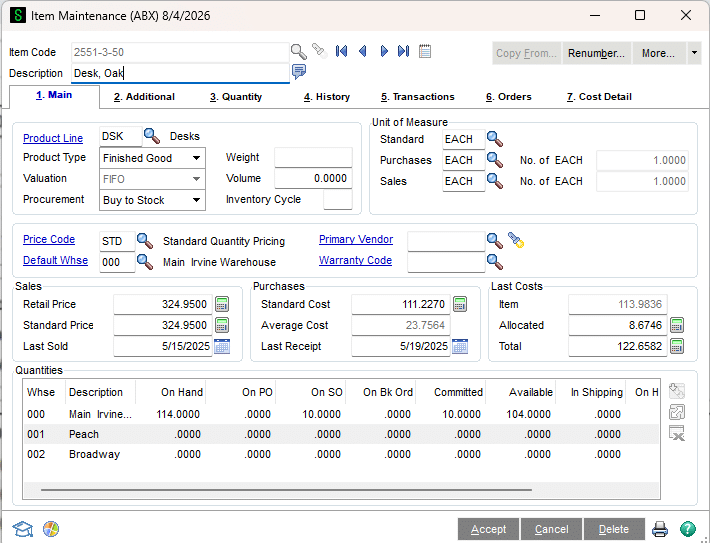
The Sage 100 Inventory Management module provides organizations with the tools needed to accurately track inventory across warehouses while supporting purchasing, sales, production, and financial reporting.
Key Sage 100 inventory management capabilities include:
- Inventory tracking across multiple warehouses
- Multi-bin inventory management
- Lot and serial number tracking
- Physical inventory and cycle counting
- Purchase Order and Sales Order integration
- Bills of Material and Production Management
- Inventory valuation and reporting
- Multi-location inventory visibility
When paired with well-defined warehouse procedures and ongoing optimization, these capabilities help organizations reduce inventory discrepancies, improve customer service, and make better purchasing decisions.

Is Sage 100 the right ERP for your business?
Choosing the right ERP is a critical decision. If you’re evaluating Sage 100 for your distribution, manufacturing, or wholesale business, our Sage experts can help you determine whether it’s the right fit for your inventory management and operational goals. Connect with a member of our team to discuss your requirements, see Sage 100 in action, and explore how it can support your business growth.
Why inventory accuracy matters
Inventory accuracy affects nearly every area of the business. When inventory records don’t match what’s physically on the shelf, the consequences extend far beyond the warehouse.
Poor inventory accuracy can lead to:
- Stockouts that delay customer shipments
- Excess inventory that ties up working capital
- Incorrect purchasing decisions
- Production delays
- Increased warehouse labor
- Inaccurate financial statements
- More time spent resolving inventory discrepancies
- Difficult month-end and year-end reconciliations
On the other hand, organizations with accurate inventory data can purchase more confidently, improve order fulfillment, reduce carrying costs, and provide finance teams with reliable inventory valuations. Accurate inventory also creates a stronger foundation for forecasting, planning, and business growth.
10 ways to improve inventory accuracy in Sage 100
Improving inventory accuracy isn’t about a single feature or process. It requires a combination of consistent inventory management practices, disciplined transaction processing, and the effective use of Sage 100’s built-in capabilities. The following best practices can help reduce inventory discrepancies, improve warehouse efficiency, and maintain reliable inventory records.
1. Conduct regular physical counts and cycle counts
Annual physical inventories can identify discrepancies, but waiting an entire year often allows errors to accumulate unchecked. Instead, use Sage 100’s Physical Count functionality to conduct regular cycle counts throughout the year. Counting smaller groups of inventory on a scheduled basis allows warehouse teams to identify issues earlier without shutting down operations.
Many organizations count:
- High-value inventory monthly
- Fast-moving inventory quarterly
- Slow-moving inventory annually
More frequent counting helps improve inventory accuracy while minimizing operational disruption.

2. Record inventory transactions daily
One of the most common causes of inaccurate inventory is delayed transaction entry. Receiving inventory without immediately recording receipts, or shipping products before posting transactions, creates timing differences between physical inventory and system records.
To keep Sage 100 inventory accurate, record:
- Purchase receipts
- Sales shipments
- Inventory transfers
- Inventory adjustments
- Customer returns
- Vendor returns
Entering transactions as inventory moves helps ensure the ERP always reflects current inventory levels.
3. Follow the correct transaction sequence
Accurate inventory depends on following the proper transaction flow.
For example, organizations should always process:
Purchase Order → Receipt of Goods → Vendor Invoice → Shipment
Posting transactions out of sequence can create negative inventory tiers, costing issues, and valuation errors that become increasingly difficult to resolve over time.
Establish standardized procedures and user training to ensure inventory transactions are processed consistently across departments.
4. Reconcile inventory with the General Ledger
Inventory accuracy isn’t just a warehouse responsibility; it directly affects financial reporting. Perform regular reconciliations between Sage 100 Inventory Management and the General Ledger to identify discrepancies before month-end close.
Regular reconciliation helps organizations:
- Catch posting issues early
- Validate inventory valuation
- Improve audit readiness
- Reduce month-end adjustments
Weekly or monthly reconciliation is far easier than trying to resolve months of accumulated differences.
5. Correct out-of-balance inventory promptly
Small inventory issues rarely stay small.
Negative inventory tiers, zero quantity cost issues, and out-of-balance quantities can affect inventory valuation, purchasing decisions, and financial reporting if left unresolved.
Organizations should routinely review inventory utilities and investigate:
- Negative quantity situations
- Cost layer inconsistencies
- Open quantity discrepancies
- Inventory adjustment trends
Resolving issues promptly helps maintain long-term inventory accuracy while preventing larger downstream problems.
6. Improve warehouse accuracy with barcode scanning
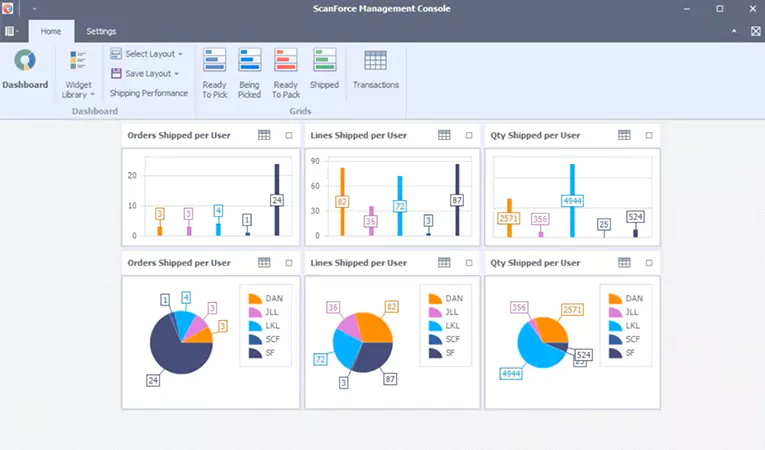
Manual data entry remains one of the largest sources of inventory errors. Integrating Sage 100 with warehouse barcode scanning solutions such as ScanForce helps automate inventory transactions while reducing keystroke errors.
Barcode scanning can improve:
- Receiving
- Directed picking
- Bin transfers
- Physical counts
- Shipping verification
- Warehouse productivity
Warehouse personnel spend less time entering data and more time completing value-added work, while inventory accuracy improves significantly.
7. Organize inventory with multi-bin management
Knowing that inventory exists somewhere in the warehouse isn’t enough. Sage 100’s multi-bin inventory capabilities allow organizations to identify exactly where inventory is stored, making picking, replenishment, and cycle counting much more efficient.
Benefits include:
- Reduced picking errors
- Faster warehouse operations
- Better inventory visibility
- More efficient replenishment
- Improved employee productivity
As organizations grow, organized warehouse locations become increasingly important for maintaining accurate inventory records.

8. Optimize reorder points with Netstock Predictor IA
Inventory accuracy isn’t just about knowing what’s on the shelf; it also means purchasing the right quantities at the right time. Regularly reviewing reorder points, lead times, demand trends, and seasonal fluctuations helps reduce both stockouts and excess inventory.
For organizations looking to improve inventory planning, Rand Group offers Netstock Predictor IA, a demand and supply planning solution that integrates with Sage 100. By analyzing inventory data and providing actionable forecasting insights, Netstock helps optimize reorder points, improve purchasing decisions, and better balance inventory investment with customer demand.
9. Review inventory reports regularly
Sage 100 includes a variety of inventory reports that help identify issues before they affect customers or financial reporting.
Organizations should routinely review reports such as:
- Inventory Valuation
- Stock Status
- Item Transaction History
- Sales History
- Inventory Movement reports
Regular reporting allows managers to identify unusual trends, investigate discrepancies, and make proactive inventory decisions instead of reacting after problems occur.

10. Continuously improve inventory processes
Technology alone doesn’t create accurate inventory. The most successful organizations regularly evaluate warehouse workflows, train employees, document procedures, and identify opportunities for continuous improvement.
Periodic reviews often uncover opportunities to:
- Reduce manual processes
- Improve warehouse layouts
- Automate repetitive tasks
- Enhance reporting
- Introduce barcode scanning
- Optimize inventory workflows
Working with an experienced Sage 100 consulting partner can help organizations identify these opportunities and implement improvements that continue delivering value year after year.

Ready to optimize your Sage 100 inventory management?
Whether you want to improve inventory accuracy, streamline warehouse operations, implement barcode scanning, or optimize inventory planning, Rand Group’s Sage experts can help. Talk to a Sage 100 consultant to learn how we can help you maximize your Sage 100 investment.
Why Partner with Rand Group for Sage 100 inventory management?
For more than 35 years, Rand Group has helped manufacturers and distributors maximize the value of their Sage 100 investment. Our consultants combine deep product expertise with real-world operational experience to help organizations:
- Implement Sage 100
- Improve inventory accuracy and warehouse processes
- Adopt barcode scanning and other Sage 100 add-on solutions
- Optimize inventory reporting and reconciliations
- Develop custom integrations and enhancements
- Provide ongoing Sage 100 support and consulting
Sage 100 inventory accuracy FAQs
How do you improve inventory accuracy in Sage 100?
The best ways to improve inventory accuracy in Sage 100 include conducting regular cycle counts, recording inventory transactions daily, following the correct transaction sequence, reconciling inventory with the General Ledger, correcting inventory discrepancies promptly, and using barcode scanning to reduce manual entry errors.
What inventory management features are included in Sage 100?
Sage 100 Inventory Management includes multi-warehouse inventory tracking, multi-bin management, lot and serial number tracking, physical inventory and cycle counting, inventory valuation, Purchase Order and Sales Order integration, Bills of Material, and reporting tools that help organizations maintain accurate inventory records.
Does Sage 100 support cycle counting?
Yes. Sage 100 includes Physical Count functionality that supports regular inventory counts and cycle counting. Many organizations use cycle counting to verify smaller groups of inventory throughout the year, improving inventory accuracy without disrupting warehouse operations.
Can Sage 100 track inventory by warehouse and bin location?
Yes. Sage 100 supports inventory tracking across multiple warehouses, and organizations can enhance inventory visibility with multi-bin management. This allows warehouse teams to identify exactly where inventory is stored, improving picking efficiency and reducing inventory errors.
Does Sage 100 support barcode scanning?
Yes. Sage 100 integrates with barcode scanning solutions such as ScanForce, allowing organizations to automate receiving, picking, transfers, shipping, and physical inventory counts while reducing manual data entry and improving inventory accuracy.
How often should inventory be reconciled in Sage 100?
Most organizations should reconcile inventory with the General Ledger monthly as part of the financial close process. Businesses with high transaction volumes may benefit from weekly reconciliations to identify discrepancies earlier and maintain more accurate financial reporting.
What causes negative inventory in Sage 100?
Negative inventory typically occurs when inventory is shipped before receipts are posted, transactions are processed out of sequence, or inventory adjustments are delayed. Following standardized transaction procedures and entering transactions promptly helps prevent negative inventory situations.
Can Sage 100 help reduce inventory carrying costs?
Yes. By improving inventory visibility, supporting accurate reorder points, and providing better inventory reporting, Sage 100 helps organizations make more informed purchasing decisions that reduce excess inventory and lower carrying costs.
Is Sage 100 a good ERP for distributors and manufacturers?
Yes. Sage 100 is widely used by wholesale distributors, manufacturers, and light assembly organizations because it combines strong financial management with inventory management, warehouse functionality, production capabilities, and distribution-focused workflows that support business growth.
When should you work with a Sage 100 consultant to improve inventory management?
Organizations should consider working with a Sage 100 consultant when experiencing recurring inventory discrepancies, warehouse inefficiencies, inaccurate reporting, challenges with inventory planning, or when implementing barcode scanning, warehouse automation, or other inventory optimization initiatives. An experienced partner can identify process improvements and recommend solutions that maximize the value of your Sage 100 investment.
Optimize your Sage 100 investment with Rand Group
Accurate inventory is the foundation of efficient warehouse operations, informed purchasing decisions, and reliable financial reporting. While Sage 100 provides the tools needed to maintain accurate inventory records, organizations achieve the greatest results when those capabilities are supported by disciplined processes, automation, and continuous optimization.
Whether you’re looking to improve inventory accuracy, streamline warehouse operations, implement barcode scanning, or optimize your overall Sage 100 environment, Rand Group’s Sage consultants can help. Contact our team to learn how we can help you maximize the value of your Sage 100 investment and build an inventory management strategy that supports your organization’s long-term growth.