Sage 100 Inventory Management: A complete overview of features and benefits

Inventory can be one of a company’s largest assets, but without accurate visibility, it can quickly become one of its biggest operational challenges. When inventory levels are inaccurate or spread across disconnected systems, businesses often experience stockouts, excess inventory, delayed shipments, higher carrying costs, and purchasing decisions based on outdated information. These issues don’t just affect warehouse operations, they impact customer satisfaction, cash flow, and profitability.
For distributors, manufacturers, retailers, and other inventory-intensive businesses, effective inventory management requires more than knowing what’s on the shelf. It requires a connected system that tracks inventory quantities, costs, availability, and movement while keeping purchasing, manufacturing, sales, and accounting aligned.
Sage 100 Inventory Management provides that foundation. As a core module within Sage 100 ERP, it helps organizations gain greater visibility and control over inventory by connecting inventory operations with financial management and other critical business processes. The result is more accurate inventory, better purchasing decisions, improved operational efficiency, and a stronger foundation for growth.
What is Sage 100 Inventory Management?
Sage 100 Inventory Management is a core module within Sage 100 ERP that helps organizations track inventory quantities, costs, availability, and movement. It serves as the operational hub for inventory control, helping businesses manage products from purchasing and receiving through production, sales, fulfillment, and financial reporting.
Rather than operating as a standalone inventory system, Sage 100 Inventory Management connects with other Sage 100 modules such as Sales Order, Purchase Order, Production Management, and General Ledger.
This integration helps ensure that purchasing, sales, warehouse, manufacturing, and accounting teams are working from consistent information. As transactions are processed and posted, inventory data is updated across the system, reducing duplicate entry and improving visibility into inventory activity.
The true value of Sage 100 Inventory Management comes from the tools it provides to improve inventory accuracy, streamline purchasing, increase warehouse efficiency, and support more informed business decisions.

Who should use Sage 100 Inventory Management?
Sage 100 Inventory Management is well suited for organizations that buy, store, manufacture, distribute, or sell physical products.
- Manufacturers use Sage 100 to track raw materials, work-in-process, and finished goods while supporting production planning and inventory availability.
- Wholesale distributors use Sage 100 to manage inventory across multiple warehouses, improve purchasing decisions, and fulfill customer orders more efficiently.
- Retailers use Sage 100 to maintain appropriate stock levels, reduce excess inventory, and minimize stockouts.
- Field service organizations can track parts carried in service vehicles or remote locations, improving availability and accountability.
Because of its flexibility, Sage 100 Inventory Management supports organizations across a wide range of inventory-intensive industries.
In our experience, organizations gain the greatest value when inventory management is fully integrated with purchasing, sales, production, and financial processes rather than managed through disconnected spreadsheets or standalone applications.
Real-world example: Organizations with growing inventory operations often benefit from an ERP that can evolve with their business. For example, we’ve worked with Stucchi USA for more than 20 years to continuously optimize its Sage 100 environment. As the company expanded across the U.S., Canada, and Mexico, Sage 100 grew with it to support inventory management, warehouse operations, pricing, light assembly, and finance without requiring a complete ERP replacement.

Explore what Sage 100 can do for your business
Sage 100 offers a wide range of modules designed to help manufacturers, distributors, and other growing businesses streamline operations. Whether you’re interested in Inventory Management, Manufacturing, Job Costing, or other Sage 100 capabilities, our consultants can help you determine which solutions best fit your business. Connect with a Sage 100 expert to learn more and start building an ERP strategy that supports your goals.
Sage 100 Inventory Management key features
Sage 100 includes a wide range of inventory management capabilities designed to help businesses improve accuracy, reduce costs, and manage inventory more strategically.
Multi-warehouse inventory management
Many growing businesses manage inventory across multiple warehouses, distribution centers, retail locations, or service vehicles. Sage 100 allows users to track inventory quantities and availability by warehouse, transfer inventory between locations, and maintain accurate inventory balances across the organization.
This visibility helps businesses fulfill orders faster, reduce unnecessary transfers, and make better decisions about where inventory should be stored.
Inventory valuation and costing
Inventory valuation plays an important role in financial reporting and profitability analysis. Sage 100 supports several valuation methods, including:
- Standard Cost
- Average Cost
- FIFO
- LIFO
- LIFO
- Lot
- Serial
This flexibility allows organizations to select the method that best aligns with their accounting practices and business requirements. Accurate inventory valuation also helps finance teams understand inventory investment, monitor margins, and produce more reliable financial reports.

Lot and serial number tracking
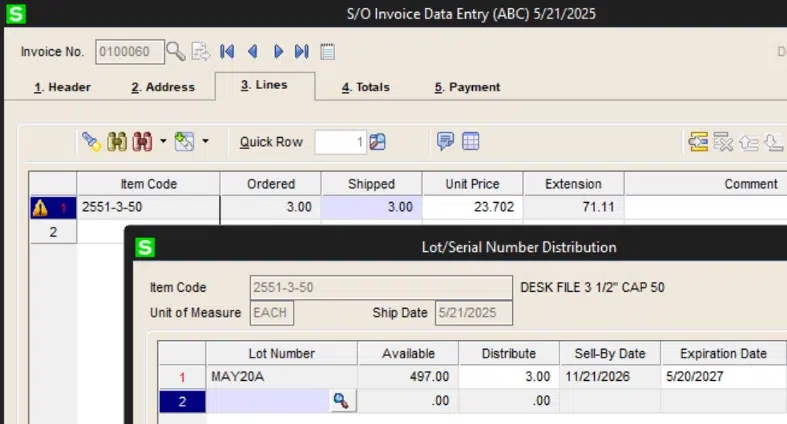
For organizations that need product traceability, Sage 100 supports lot and serial number tracking. This allows businesses to track items from receipt through shipment and maintain visibility into where specific products came from and where they were sent.
Lot and serial tracking is especially valuable for companies that manage warranties, product recalls, expiration dates, or industry compliance requirements. These capabilities are commonly used by manufacturers, distributors, food and beverage companies, and medical supply organizations.
Inventory replenishment and purchasing
Sage 100 Inventory Management helps purchasing teams make better replenishment decisions by supporting reorder points, minimum and maximum quantities, lead times, and purchasing recommendations.
These tools help businesses reduce stockouts while avoiding overstocking. For companies with more advanced planning needs, Inventory Requirements Planning (IRP) can further support demand forecasting and purchasing recommendations.
By improving replenishment planning, organizations can optimize inventory investment, reduce carrying costs, and maintain better product availability for customers.
Kitting and inventory assembly
Sage 100 supports preassembled kits, allowing businesses to group multiple component items together for sale or fulfillment. During sales order entry, kit components can be expanded so users can review or modify individual elements as needed.
For companies that assemble products, bundle components, or sell configurable items, kitting and Bill of Materials functionality can help improve accuracy and simplify order processing.
Inventory inquiries and reporting
Effective inventory management depends on accurate information. Sage 100 provides inquiry screens and reports that help users monitor inventory availability, quantities on hand, committed inventory, quantities on order, transaction history, and inventory valuation.
Common reports include:
- Inventory Valuation Report
- Stock Status Report
- Reorder Report
- Inventory Turnover Analysis
- Slow Moving Inventory Report
- Overstock Report
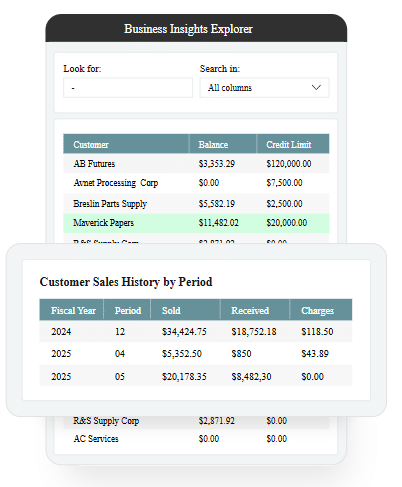
Business Insights Explorer adds interactive reporting capabilities, allowing users to filter data, drill into transactions, create custom views, and export information to Excel for additional analysis.
These tools help purchasing managers, warehouse teams, and finance leaders identify trends, manage inventory investment, and make decisions based on current information.
Inventory controls and auditing
Inventory accuracy requires strong controls. Sage 100 Inventory Management includes audit trails, item history, inventory adjustment records, transaction history, and user security controls to help organizations improve accountability.
These controls can help reduce shrinkage, investigate discrepancies, and support compliance requirements. For finance teams, they also provide greater confidence that inventory balances and valuation reports reflect actual business activity.
How Sage 100 Inventory Management works with other modules
One of Sage 100’s biggest advantages is that Inventory Management is fully integrated with the rest of the ERP system. Instead of managing inventory in isolation, information flows across purchasing, sales, manufacturing, and accounting to improve visibility and reduce manual data entry.
Key integrations include:
- Sales Order: Automatically updates inventory availability as customer orders are entered, shipped, and invoiced, helping prevent overselling and improve order fulfillment.
- Purchase Order: Updates inventory quantities as goods are received while providing purchasing teams with visibility into incoming stock.
- Production Management: Tracks raw material consumption and finished goods production, helping manufacturers maintain accurate inventory throughout the production process.
- General Ledger: Posts inventory transactions to the General Ledger to support accurate inventory valuation and financial reporting.
- Accounts Payable and Accounts Receivable: Keeps purchasing, receiving, invoicing, and inventory records synchronized across the business.
Extend Sage 100 Inventory Management with warehouse automation
While Sage 100 provides strong inventory control capabilities, many organizations extend the system with integrated warehouse automation solutions.
Solutions such as ScanForce can add functionality such as:
- Mobile barcode scanning
- Receiving automation
- Directed picking
- Shipping verification
- Warehouse mobility
- Advanced multi-bin management
ScanForce is one of many third-party applications that integrate seamlessly with Sage 100. Many of our Sage 100 clients extend their ERP with warehouse management and barcode scanning solutions to improve warehouse efficiency, reduce manual data entry, increase picking accuracy, accelerate receiving, and maintain more accurate inventory records.
Benefits of Sage 100 Inventory Management
When properly implemented and optimized, Sage 100 Inventory Management can help organizations:
- Improve inventory accuracy
- Reduce stockouts
- Prevent overstocking
- Lower inventory carrying costs
- Improve warehouse productivity
- Increase order fulfillment rates
- Make better purchasing decisions
- Improve customer service
- Strengthen financial reporting
- Support business growth
While every organization realizes value differently, many of our clients see the greatest improvements after standardizing inventory processes and integrating inventory management with purchasing, manufacturing, and accounting. Greater visibility often leads to fewer stockouts, more accurate purchasing decisions, and stronger financial reporting.
To fully realize these benefits, it’s important to look beyond the software itself. An experienced Sage partner can help tailor Sage 100 Inventory Management to your business processes, integrate complementary solutions when appropriate, and ensure you’re getting the most value from your ERP investment.

Thinking about implementing or optimizing Sage 100?
Whether you’re deploying Sage 100 for the first time or expanding your existing Sage 100 environment, partnering with an experienced ERP consultant can make all the difference. Download our free Top 7 ERP Implementation Partner Selection Criteria guide to learn the seven factors every organization should consider before selecting an implementation partner.
Maximize the value of Sage 100 Inventory Management with Rand Group
Successfully managing inventory requires more than turning on software features. It requires the right configuration, accurate data, defined processes, meaningful reporting, and users who understand how to manage inventory within the system.
Rand Group helps organizations evaluate, implement, optimize, and support Sage 100 Inventory Management. With over 35 years of Sage experience, our consultants offer deep knowledge in manufacturing, distribution, and inventory-intensive industries, helping clients align Sage 100 with real-world operational needs.
Our Sage 100 services include:
- Sage 100 implementation and consulting
- Process optimization
- Sage and third-party integrations
- Sage ERP customization
- User training
- Ongoing Sage 100 support
Whether you are implementing Sage 100 for the first time or improving an existing environment, we can help you get more value from Sage 100 inventory Management.
Frequently asked questions about Sage 100 Inventory Management
What is Sage 100 Inventory Management?
Sage 100 Inventory Management is a Sage 100 module that helps organizations track inventory quantities, costs, availability, movement, valuation, and transaction history while integrating inventory with purchasing, sales, manufacturing, and accounting.
What industries use Sage 100 Inventory Management?
Sage 100 Inventory Management is commonly used by manufacturers, distributors, retailers, field service organizations, and other businesses that manage physical inventory across warehouses, production environments, or service locations.
Does Sage 100 support multiple warehouses?
Yes, Sage 100 supports multi-warehouse inventory management, allowing organizations to track quantities, availability, transfers, and inventory balances across multiple warehouse locations.
Can Sage 100 track lot and serial numbers?
Yes, Sage 100 supports lot and serial number tracking to help organizations improve traceability, manage warranties, support recalls, track expiration dates, and meet industry requirements.
Can Sage 100 help reduce inventory carrying costs?
Yes, Sage 100 can help reduce inventory carrying costs by improving inventory visibility, replenishment planning, purchasing accuracy, and stock level management.
Can Sage 100 support manufacturing inventory?
Yes, Sage 100 integrates with Bill of Materials, Work Order, and Production Management to help manufacturers manage raw materials, work-in-process, and finished goods.
Can Rand Group help optimize Sage 100 Inventory Management?
Yes, Rand Group provides Sage 100 consulting, implementation, reporting, warehouse automation integrations, user training, and ongoing support to help organizations optimize inventory management.
Final thoughts
Sage 100 Inventory Management helps organizations improve inventory visibility, strengthen purchasing decisions, streamline warehouse operations, and maintain more accurate financial records. For distributors, manufacturers, retailers, and other inventory-intensive businesses, it provides the tools needed to manage inventory with greater confidence.
By implementing Sage 100 as part of a connected ERP strategy, organizations can reduce manual work, improve accuracy, and support more efficient operations. Contact our team today for help evaluating, implementing, or optimizing Sage 100 Inventory Management. We can ensure your inventory processes are better aligned with your business goals.