Sage 100 add-ons: Top solutions to extend your ERP

Sage 100 provides small and midsized businesses with a strong foundation for managing accounting, inventory, purchasing, sales, and other core operations. But as your business evolves, you may need capabilities beyond the functionality included in your existing ERP environment.
Sage 100 add-ons can help fill those gaps. From warehouse management and accounts payable automation to sales tax compliance, reporting, and customer relationship management, add-on solutions allow businesses to expand Sage 100 around their specific requirements.
The key is choosing the right solution for the problem you are trying to solve. This guide explores popular Sage 100 add-ons, the business needs they address, and what to consider before expanding your ERP environment.
At a glance: Sage 100 add-ons
Sage 100 can be extended with a broad range of Sage and third-party add-ons that provide additional functionality. Businesses can use add-ons to automate manual processes, improve inventory and warehouse management, strengthen reporting, simplify tax compliance, manage customer relationships, and address other specialized requirements.
The right solution depends on your existing Sage 100 environment, business processes, industry, users, and long-term goals. Before adding new software, it is important to determine whether your requirement is best addressed through existing Sage 100 functionality, an add-on, an integration, or customization.
What are Sage 100 add-ons?
Sage 100 add-ons are additional applications, modules, and extensions that expand the capabilities of Sage 100. They allow organizations to address specialized business requirements without necessarily replacing their core ERP system.
For example, a distributor that needs barcode scanning and more advanced warehouse processes can add warehouse management capabilities. A finance team struggling with manual invoice processing can introduce AP automation. A company operating across multiple tax jurisdictions can add automated sales tax capabilities.
This flexibility allows businesses to build on their Sage 100 investment as their processes and requirements evolve.
Sage 100 add-ons vs. integrations
Sage 100 add-ons and integrations often overlap, but they are not exactly the same.
An add-on extends Sage 100 with additional functionality, such as warehouse management, AP automation, tax compliance, or advanced reporting. An integration connects Sage 100 with another application so information can move between systems.
Some solutions do both. For example, an application may add specialized functionality while also exchanging information directly with Sage 100.
This guide focuses on the capabilities you can add to Sage 100. For a deeper look at APIs, Visual Integrator, Custom Office, data synchronization, and connecting Sage 100 with other applications, read our Guide to Sage 100 integrations.
Why use Sage 100 add-ons?
Business requirements rarely stay the same. Transaction volumes increase, warehouse operations become more complex, reporting requirements expand, and processes that once worked in spreadsheets can become difficult to manage.
Instead of replacing Sage 100, businesses may be able to address specific requirements by extending the system with additional functionality.
Sage 100 add-ons can help organizations:
- Automate manual processes: Reduce repetitive data entry and administrative work.
- Improve inventory operations: Add capabilities for scanning, warehouse management, forecasting, and replenishment.
- Strengthen financial processes: Automate accounts payable, asset management, payments, and other finance workflows.
- Improve reporting and visibility: Give decision-makers better access to financial and operational information.
- Support compliance: Simplify processes such as sales tax calculation and documentation.
- Improve customer management: Connect sales, customer service, and account information.
- Adapt Sage 100 to changing requirements: Add targeted functionality without automatically moving to a different ERP platform.
The goal should not be to add more software for the sake of adding functionality. Instead, each add-on should address a defined business need and fit into your broader Sage 100 environment.

Find the right add-ons for your Sage 100 environment
Extend Sage 100 with solutions designed to address your specific business needs. Explore the add-ons Rand Group recommends for improving automation, reporting, warehouse management, financial processes, and more.
Top Sage 100 add-ons to extend your ERP
There is no single combination of Sage 100 add-ons that is right for every organization. The most valuable solutions depend on where your business is experiencing process gaps, inefficiencies, or new requirements.
Sage 100 can be extended with many additional enhancements and solutions beyond those covered here. The following are a few of the top examples for addressing common financial and operational needs.
Here are several areas where Sage 100 users can extend their ERP.
Improve warehouse management and inventory accuracy
Businesses managing significant inventory volumes may need capabilities beyond standard inventory processes. Warehouse management add-ons can introduce barcode scanning, mobile workflows, picking, receiving, and other tools that make it easier to manage inventory movement.
ScanForce provides warehouse management and mobile capabilities for Sage 100. Businesses can use the solution to support barcode scanning, inventory transactions, receiving, fulfillment, and other warehouse processes.
A warehouse management add-on may be worth considering if your business:
- Relies heavily on manual warehouse data entry
- Has difficulty maintaining accurate inventory quantities or locations
- Needs barcode scanning
- Wants to streamline picking, receiving, and fulfillment
- Needs employees to perform Sage 100 inventory processes from the warehouse floor
For manufacturers and distributors, these capabilities can help connect physical inventory processes more closely with the information maintained in Sage 100.

Automate accounts payable
Manual invoice entry, routing, approvals, and payment processes can consume significant finance team resources.
Sage AP Automation extends Sage 100 with tools for digitizing and automating accounts payable processes. Businesses can streamline invoice processing and approval workflows while reducing repetitive data entry.
AP automation may be valuable when:
- Invoices are manually entered into the ERP
- Approvals rely on email or paper
- Finance teams spend significant time tracking invoice status
- Increasing invoice volumes are creating additional administrative work
- Organizations want greater visibility into AP workflows
Automating these processes can allow finance teams to spend less time managing routine transactions and more time focused on higher-value financial activities.

Simplify sales tax compliance
Managing sales tax can become increasingly complex as businesses sell across states and tax jurisdictions.
Sage SalesTax, powered by Avalara, adds automated sales tax capabilities to Sage 100, helping businesses calculate applicable taxes and manage tax requirements across transactions.
Businesses may consider sales tax automation when they:
- Sell into multiple tax jurisdictions
- Have growing transaction volumes
- Spend significant time maintaining tax rates
- Want to reduce manual tax calculations
- Face increasingly complex sales tax requirements
Automating sales tax processes can reduce the administrative burden associated with determining and applying the appropriate rates.

Automate alerts and business workflows
Not every important business event happens while someone is actively looking at a Sage 100 screen. Organizations may need a way to identify exceptions and take action when specific conditions occur.
Sage Alerts & Workflow can monitor business conditions and initiate notifications and workflows based on predefined rules. For example, businesses can create processes around overdue invoices, credit limits, inventory conditions, and other events that require attention.
Businesses can use alerts and workflow automation to:
- Identify exceptions earlier
- Automatically notify the appropriate employees
- Reduce reliance on employees manually checking reports
- Standardize recurring processes
- Escalate important conditions that require action
This can be particularly valuable for organizations managing a growing number of transactions, customers, products, or operational processes.

Improve reporting and business intelligence
As businesses grow, reporting requirements often extend beyond standard financial statements. Leaders may want to combine financial, inventory, sales, and operational information to understand performance.
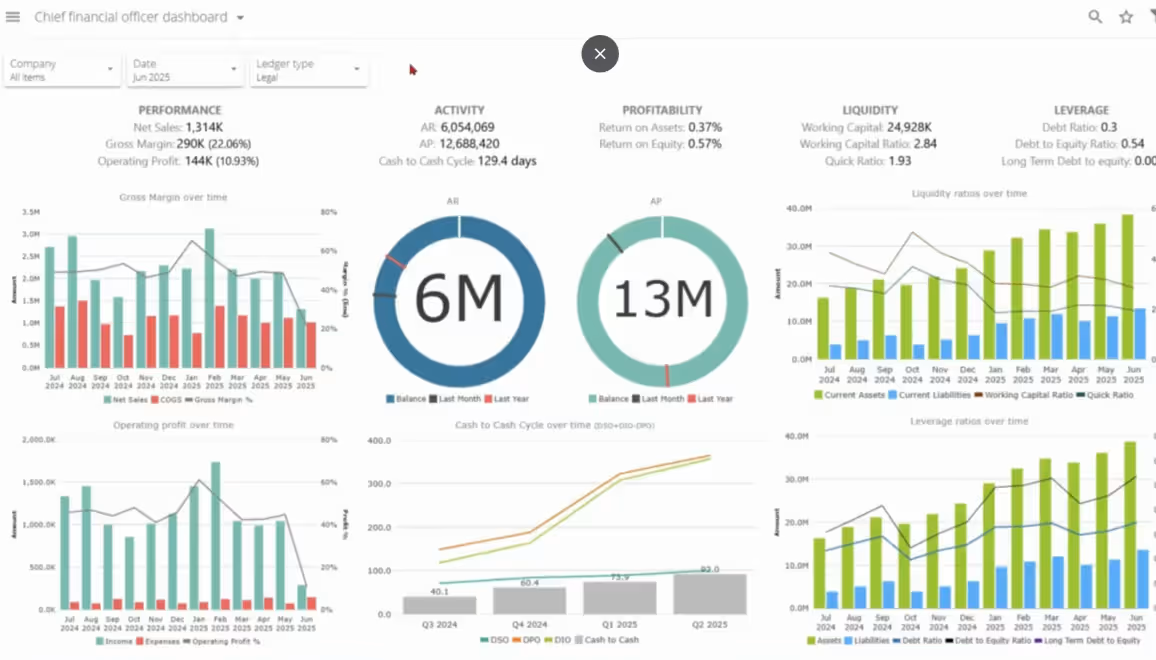
Sage Data & Analytics, powered by Zap, provides additional business intelligence capabilities for Sage 100. Organizations can centralize data, build dashboards, analyze KPIs, and support more sophisticated financial and operational reporting.
It can be useful for organizations that:
- Spend significant time assembling reports manually
- Rely heavily on spreadsheets for analysis
- Need information from multiple business systems
- Want dashboards for financial or operational KPIs
- Need more flexible reporting for different departments or decision-makers
Rather than replacing familiar reporting workflows, the right analytics solution can help finance and operations teams make better use of the data already generated by Sage 100.
Strengthen fixed asset management
Businesses with substantial investments in equipment, machinery, vehicles, buildings, or other fixed assets may require more specialized asset management capabilities.
Sage Fixed Assets provides tools for managing assets throughout their lifecycle, including acquisition, depreciation, tracking, transfers, and disposal.
Organizations can use Sage Fixed Assets to:
- Maintain centralized asset records
- Calculate depreciation using applicable methods
- Track asset locations and custodians
- Support physical inventories
- Manage construction-in-progress processes
- Strengthen tax and audit readiness
Sage Fixed Assets is a separate solution from the fixed asset functionality available within Sage 100 and can be used when an organization needs more comprehensive asset management capabilities.

Improve customer and sales management
Accounting and operational information only tells part of the customer story. Sales and service teams may need tools specifically designed to manage customer relationships, communications, opportunities, and activities.
Sage CRM is a separate customer relationship management solution that integrates with Sage 100, extending the broader ERP environment with sales, marketing, and customer service capabilities. It can help businesses centralize customer information and give customer-facing teams greater visibility into accounts and activities.
Current Sage 100 subscription bundles include the Sage CRM server and one named user. Organizations that want to expand their use of Sage CRM should evaluate their implementation requirements, including the processes and teams that will use the solution and the number of additional named users needed.
Businesses may consider CRM functionality when they need to:
- Track sales opportunities and activities
- Centralize customer communications
- Improve visibility across sales and customer service teams
- Reduce disconnected customer information
- Better coordinate customer-facing and back-office processes

How to choose the right Sage 100 add-ons
With numerous Sage and third-party solutions available, selecting an add-on should start with the business requirement rather than the product.
Before implementing a new solution, consider:
- What problem are you trying to solve? Identify the specific manual process, bottleneck, reporting gap, or operational requirement.
- Can Sage 100 already address it? Configuration changes or existing functionality may solve the problem without additional software.
- How will employees use the solution? Consider which teams, roles, and workflows will be affected.
- What information does the add-on need? Determine how the solution will interact with Sage 100 and other business applications.
- Does it fit your industry requirements? Manufacturers, distributors, professional services firms, and other businesses may have very different needs.
- Will it scale? Consider future users, transaction volumes, locations, entities, and operational requirements.
- What will implementation require? Configuration, data migration, testing, training, and process changes should be considered alongside software functionality.
- How will the solution be supported? Understand who will maintain the application and help troubleshoot issues over time.
In some situations, an add-on is the right answer. In others, the requirement may be better addressed through existing Sage 100 functionality, an integration, or targeted customization. Evaluating the process first helps avoid unnecessary complexity.
Sage 100 add-ons in action: Stucchi USA
Stucchi USA, a manufacturer and distributor of hydraulic quick couplers, has worked with Rand Group to continually adapt its Sage 100 environment as the company has grown. As new operational requirements emerged, Stucchi expanded its Sage 100 capabilities to support areas including:
- Warehouse management: Warehouse scanning and multi-bin inventory management
- Production: Production Management for kitting and light assembly
- Pricing: Customer- and product-specific pricing capabilities
- Reporting: Expanded access to business data and reporting
- Third-party solutions: Evaluation of additional tools as operational needs evolved
These improvements helped Stucchi reduce time spent locating inventory by 50%. Stucchi’s experience demonstrates how Sage 100 can evolve alongside a business. Rather than adding functionality for its own sake, organizations can identify specific process gaps and introduce the right capabilities as their requirements change.

Put your Sage 100 add-ons to work
Choosing the right solution is only the beginning. Partner with Rand Group’s Sage 100 experts to configure, implement, and integrate add-on solutions into your existing environment while supporting your business processes and users.
Partner with Rand Group to extend Sage 100
Determining that you need additional functionality is often easier than determining which solution should provide it.
Rand Group helps businesses evaluate, implement, customize, and optimize Sage 100 environments. Our Sage 100 consultants work with organizations to understand their existing processes, identify gaps, and determine the most appropriate approach for addressing them.
Depending on your requirements, Rand Group can help with:
- Reviewing existing Sage 100 functionality and configuration
- Identifying opportunities for automation and process improvement
- Evaluating Sage and third-party add-ons
- Implementing and configuring selected solutions
- Connecting add-ons with Sage 100 and other business applications
- Developing targeted customizations when packaged functionality does not meet the requirement
- Training users on new processes and capabilities
- Providing ongoing Sage 100 support and optimization
This process-first approach is important because adding another application is not always the answer. An experienced Sage 100 consultant can help determine whether your requirement calls for an add-on, an integration, configuration changes, customization, or a combination of approaches.
Key takeaways
- Sage 100 add-ons extend your ERP with specialized capabilities for areas such as warehouse management, AP automation, tax compliance, reporting, CRM, and asset management.
- Add-ons and integrations can overlap, but they serve different purposes. Add-ons focus on extending functionality, while integrations focus on connecting systems and exchanging information.
- The right add-on starts with a defined business requirement. Businesses should identify the process gap before selecting software.
- New software is not always necessary. Existing Sage 100 functionality, configuration, integrations, or targeted customization may sometimes provide a better solution.
- Sage 100 can evolve alongside a business. A thoughtful combination of core functionality and additional capabilities can help organizations continue getting value from their ERP as requirements change.
- An experienced Sage 100 partner can help evaluate the complete environment and determine which approach best addresses your requirements.
Frequently asked questions about Sage 100 add-ons
What are Sage 100 add-ons?
Sage 100 add-ons are Sage and third-party solutions that extend Sage 100 with additional functionality. They can address specialized requirements such as warehouse management, AP automation, sales tax compliance, reporting, CRM, fixed asset management, and workflow automation.
What are the best Sage 100 add-ons?
The best Sage 100 add-ons depend on your business requirements. Popular options include ScanForce for warehouse management, Sage AP Automation for accounts payable, Avalara for sales tax, Sage Alerts & Workflow for process automation, Sage Data & Analytics for reporting, Sage Fixed Assets for asset management, and Sage CRM for customer relationship management.
What types of add-ons are available for Sage 100?
Sage 100 can be extended with solutions for warehouse management, inventory planning, accounts payable, fixed assets, reporting and analytics, CRM, sales tax, document management, payments, ecommerce, workflow automation, and other specialized business requirements.
What is the difference between a Sage 100 add-on and an integration?
A Sage 100 add-on provides additional functionality, while an integration connects Sage 100 with another application to exchange information. Some solutions function as both because they provide additional capabilities while also connecting directly with Sage 100 data and workflows.
Can Sage 100 integrate with third-party software?
Yes. Sage 100 can connect with a variety of third-party applications. The appropriate integration method depends on the application, data requirements, Sage 100 environment, and business process. Businesses can use tools and approaches such as APIs, Visual Integrator, Custom Office, and product-specific connectors.
Can Sage 100 add-ons automate manual processes?
Yes. Depending on the solution, Sage 100 add-ons can automate processes such as invoice processing and approvals, barcode scanning, tax calculations, business alerts, reporting, document workflows, and other repetitive tasks.
How do I know which Sage 100 add-ons my business needs?
Start by identifying processes that are manual, inefficient, difficult to scale, or unsupported by your current Sage 100 environment. Then determine whether existing functionality, an add-on, an integration, or customization is the most appropriate solution. A Sage 100 partner can help evaluate the requirement and available options.
Do Sage 100 add-ons require customization?
Not always. Many Sage 100 add-ons provide configurable functionality that can be implemented without significant customization. More specialized business requirements may require additional configuration, integration work, or targeted custom development.
Can Sage 100 add-ons extend the life of my ERP?
They can in situations where Sage 100 continues to meet your core ERP requirements but you need additional capabilities in specific areas. Add-ons, integrations, and targeted enhancements can help address new requirements without automatically requiring an ERP replacement. However, businesses should periodically evaluate whether Sage 100 continues to support their broader operational and technology strategy.
Extend the value of your Sage 100 investment
As your business requirements change, it does not automatically mean you have outgrown Sage 100. The right add-ons can address specific process gaps, introduce automation, and give teams additional capabilities while building on the ERP environment they already use.
If you are looking to automate a manual process, improve operational visibility, or add new functionality to Sage 100, contact Rand Group to evaluate your requirements and determine which Sage 100 add-ons and enhancements are the right fit for your business.