How to reclassify posted transactions in Sage Intacct

In most finance teams, small transactional errors are inevitable. A bill gets coded to the wrong expense account, a dimension is missed, or an invoice is assigned to the wrong department. Traditionally, correcting these issues required voiding transactions and re-entering them—an approach that introduces inefficiency, disrupts audit trails, and can create confusion in financial reporting.
Sage Intacct addresses this challenge with its reclassification feature. This capability allows accounting teams to make controlled updates to posted transactions, specifically bills and invoices without compromising the integrity of financial data.
For organizations focused on maintaining accurate reporting while minimizing operational friction, understanding how and when to use reclassification is critical. This article outlines how the feature works, its constraints, and how to apply it effectively in real-world scenarios.
What reclassification means in Sage Intacct
Reclassification in Sage Intacct allows users to update certain attributes of posted transactions, including those that are partially or fully paid. Rather than reversing and recreating entries, users can make targeted corrections while preserving the original transaction structure.
This functionality is particularly valuable for:
- Correcting general ledger (GL) account assignments
- Updating dimensions such as department, location, or project
- Adding or modifying supporting details like memos or attachments
- Aligning transactions with updated reporting requirements
At its core, reclassification is designed to improve accuracy without sacrificing control. Every change is logged, and the system maintains a complete audit trail, ensuring transparency for both internal stakeholders and external auditors.
However, this flexibility is intentionally limited. Sage Intacct enforces strict rules around what can and cannot be modified, which helps maintain compliance with accounting standards.
Key controls and limitations to understand
Before using the reclassification feature, it’s important to understand the boundaries that govern it. These controls are not limitations in a negative sense, they are safeguards that ensure financial integrity.
- Transactions must be in an open period: Reclassification is only allowed for transactions within open accounting periods. This prevents retroactive changes to closed financials.
- Amounts cannot be changed: Users cannot modify transaction totals, line amounts, or payment amounts. This ensures that financial statements remain consistent.
- Customer or vendor relationships must remain valid: While there is some flexibility, the vendor (for bills) or customer (for invoices) must either remain the same or align with predefined hierarchical relationships.
- Posting and payment dates are locked: Key dates tied to financial reporting cannot be altered through reclassification.
- Full audit trail is maintained: Every change is recorded, including who made the change and when. This supports compliance and traceability.
- Certain transaction types are excluded: For example, bills created through quick payments or manual payments are not eligible for reclassification.
These controls strike a balance between flexibility and governance, allowing finance teams to correct errors efficiently without introducing risk.
System configuration and permissions
Before users can begin reclassifying transactions, the feature must be enabled at both the system and user levels. This is a critical step that is often overlooked during initial implementation.
First, reclassification must be activated within both Accounts Payable (AP) and Accounts Receivable (AR):
- In AP, enable reclassification for bills and adjustments
- In AR, enable reclassification for invoices and adjustments
Once enabled at the module level, permissions must be assigned to users or roles. Within the permissions settings for AP and AR, administrators can grant access to reclassify bills or invoices by selecting the appropriate options.
This dual-layer configuration ensures that only authorized users can make changes to posted transactions. It also allows organizations to tailor access based on roles, such as limiting reclassification to senior accounting staff.
A thoughtful approach to permissions is essential. While the feature is powerful, it should be controlled to prevent misuse or unintended changes.
How to reclassify transactions in Sage Intacct
Once reclassification is enabled and permissions are assigned, the process itself is straightforward. However, following a consistent approach helps ensure accuracy and avoids validation errors.
At a high level, reclassification involves locating a posted transaction, entering reclass mode, making controlled updates, and reposting the transaction with a full audit trail.
Step-by-step process
- Navigate to the correct module: Go to Accounts Payable (for bills) or Accounts Receivable (for invoices), then access the list view for the relevant transaction type.
- Select a posted transaction: Choose a bill or invoice that has already been posted. This can include transactions that are fully or partially paid, as long as they are in an open period.
- Enter reclassify mode: Open the transaction and select the Reclassify option. This enables editing while preserving the original transaction structure.
- Update allowable fields: Make necessary corrections such as changing GL accounts, updating dimensions like department or location, editing memos or descriptions, adjusting terms or due dates, and adding or removing attachments.
- Validate system constraints: Confirm that the transaction remains in an open period, that the vendor or customer relationship is still valid, and that restricted fields such as amounts or key dates have not been altered.
- Post the reclassified transaction: Once updates are complete, click Post to save the changes. The system records the update and maintains a full audit trail.
- Repeat if additional changes are needed: If further updates are required, the transaction can be reclassified again, provided it still meets eligibility requirements.
Following this process allows finance teams to make precise corrections without interrupting workflows or compromising reporting integrity. Over time, establishing a standard approach to reclassification can reduce errors and improve consistency across the organization.

Reclassifying accounts payable transactions
Reclassifying a bill in Sage Intacct is a straightforward process, but it requires attention to detail. The goal is to correct specific elements of the transaction without altering its financial impact.
To begin, navigate to the Accounts Payable module and access the bills list. From there, select a bill that has already been posted—this can include bills that are paid or partially paid.
Once inside the bill, users will see a Reclassify option. This opens the transaction in a mode that allows controlled edits.
Within this interface, users can:
- Update reference numbers or descriptions
- Modify payment terms and due dates
- Add or remove attachments
- Adjust GL accounts at the line level
- Update dimensions such as department, location, or project
- Edit memo fields to improve clarity
After making the necessary updates, the transaction can be reposted. Sage Intacct then records the changes while preserving the original transaction history.
It’s worth noting that this process can be repeated. If additional corrections are needed later—such as adding a missing attachment or updating a dimension, the transaction can be reclassified again, provided it still meets the eligibility criteria.
This iterative flexibility is particularly useful in fast-paced environments where information may not be complete at the time of initial entry.
This is especially valuable when paired with broader AP process improvements, such as those discussed in improving vendor communication with Sage Intacct payment notifications, where better visibility and consistency reduce downstream corrections.
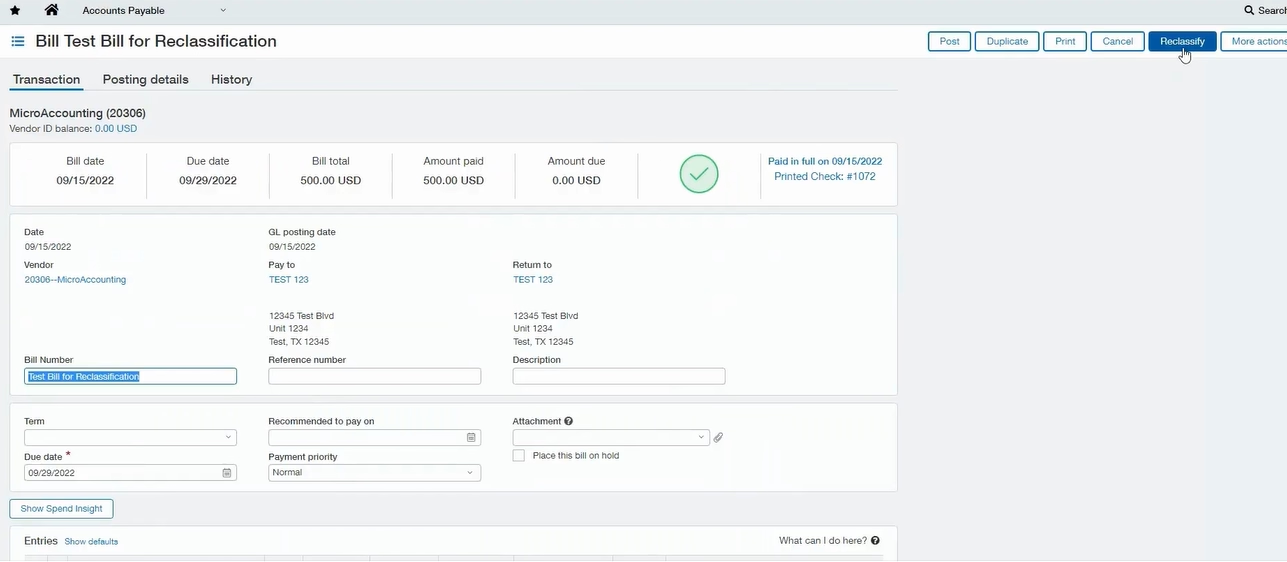
Watch how reclassification works in Sage Intacct
Want to see the reclassification feature in action? Watch the short walkthrough below to see how to update posted bills and invoices, understand system limitations, and apply corrections without reversing transactions. If you have questions about how this fits into your Sage Intacct environment or want help getting started, Rand Group is here to help.

Reclassifying accounts receivable transactions
The process for reclassifying invoices in Accounts Receivable closely mirrors the approach used for bills, with a few key differences.
Users begin by navigating to the AR module and selecting an invoice from the list view. After opening the transaction, the Reclassify option enables editing.
Within an invoice, users can:
- Add or update reference numbers and descriptions
- Modify terms and due dates
- Adjust GL accounts associated with revenue
- Update dimensions such as department, location, or channel
- Edit memo fields for additional context
However, there are some distinctions to keep in mind:
- System-generated invoice numbers cannot be changed
- Customer relationships must remain consistent with system rules
- Certain dimension combinations may trigger validation errors
For example, if a user attempts to assign a dimension that conflicts with the customer setup—such as an incompatible department or channel—the system will prevent the update and provide an error message.
These validations are important. They ensure that reclassification aligns with the organization’s data structure and reporting logic.
Once all updates are complete and validated, the transaction can be reposted, and the changes are immediately reflected in reporting.


Ready to simplify transaction corrections in Sage Intacct?
Reclassification is a powerful feature, but its effectiveness depends on how your system is configured and how your processes are structured. Rand Group helps organizations optimize Sage Intacct, improve data accuracy, and reduce rework across finance workflows. If you’re looking to strengthen your processes, we’re here to help.
Practical use cases for reclassification
While the mechanics of reclassification are important, its real value comes from how it is applied in day-to-day operations. Several common scenarios illustrate where this feature delivers measurable benefits.
Consider a situation where an expense is mistakenly coded to “meals and entertainment” instead of “travel.” Without reclassification, correcting this error would require reversing the original entry and creating a new one. With reclassification, the GL account can be updated directly, saving time and reducing complexity.
Similarly, a transaction may be posted without the correct department or location. As reporting requirements evolve, finance teams often need to refine how data is categorized. Reclassification allows these updates without disrupting the original transaction.
Other examples include:
- Adding missing documentation after a transaction is posted
- Updating payment terms to reflect revised agreements
- Correcting dimension assignments for more accurate reporting
- Ensuring compliance with tax or regulatory classifications
In each of these cases, reclassification provides a controlled way to improve data quality without introducing unnecessary administrative overhead.
For example, organizations looking to reduce recurring errors at the source often combine reclassification with automation strategies such as those outlined in our guide on automating recurring journal entries in Sage Intacct, helping standardize entries and minimize manual corrections.
Governance and audit considerations
One of the most common questions about reclassification is how it aligns with audit and compliance requirements. The ability to modify posted transactions can raise concerns if not properly controlled.
Sage Intacct addresses this through a robust audit framework. Every reclassification action is logged, including:
- The original values
- The updated values
- The user who made the change
- The timestamp of the update
This level of transparency ensures that auditors can trace changes and understand the rationale behind them.
From a governance perspective, organizations should establish clear policies around when and how reclassification is used. This may include:
- Defining which roles are authorized to perform reclassification
- Establishing thresholds for when corrections require additional review
- Documenting standard procedures for common correction scenarios
By combining system controls with internal policies, organizations can confidently use reclassification while maintaining compliance.
Best practices for using reclassification effectively
To get the most value from the reclassification feature, finance teams should approach it as part of a broader data quality strategy.
Start by ensuring that users understand both the capabilities and limitations of the feature. Training should emphasize when reclassification is appropriate and when a full reversal may still be required.
It’s also important to monitor usage. Regular reviews of reclassification activity can help identify patterns, such as recurring errors in coding or dimension selection. These insights can then inform process improvements or additional training.
Another key practice is maintaining alignment between system configuration and business structure. As organizations grow or reorganize, dimension structures and validation rules may need to be updated. Ensuring that these elements are properly configured will reduce errors and make reclassification more effective.
Many teams also leverage tools like enhanced list views and reporting, as highlighted in our Sage Intacct tip on driving efficiency with enhanced views, to quickly identify and correct misclassified transactions.
Finally, treat reclassification as a tool for continuous improvement. Rather than simply correcting errors, use it as an opportunity to refine processes and improve data accuracy over time.
A partner for Sage Intacct success
Sage Intacct’s reclassification feature is a strong example of how modern cloud accounting platforms are designed to balance flexibility with control. However, realizing the full value of features like this depends on how well your system is configured and how consistently your team applies it.
Rand Group works with finance and accounting teams to ensure Sage Intacct is not only implemented correctly but aligned with how your organization operates. This includes structuring dimensions for accurate reporting, configuring permissions to support governance, and establishing processes that reduce the need for rework in the first place.
Beyond initial setup, many organizations benefit from ongoing optimization. As reporting needs evolve or business structures change, features like reclassification become even more important. Having a clear strategy for when and how to use them can improve data quality, streamline workflows, and support more reliable financial insights.
Whether you are implementing Sage Intacct or refining your current environment, Rand Group provides practical guidance to help your team use the platform effectively. The goal is not just to enable features, but to ensure they support accurate reporting, efficient processes, and long-term scalability.
Frequently asked questions about reclassifying transactions in Sage Intacct
Can you edit a posted transaction in Sage Intacct?
Yes, Sage Intacct allows you to update certain elements of posted transactions using the reclassification feature, including bills in Accounts Payable and invoices in Accounts Receivable, even if they are partially or fully paid; however, these edits are limited to fields such as GL accounts, dimensions, and descriptive details, while key financial elements like transaction amounts, posting dates, and payment information cannot be changed, and all updates are captured in a complete audit trail to ensure transparency and compliance.
What changes can you make during reclassification in Sage Intacct?
Reclassification enables finance teams to correct non-financial aspects of a transaction without reversing it, including updating GL account assignments, modifying dimensions like department or location, editing memos or reference numbers, adjusting payment terms or due dates, and adding or removing attachments, all of which help improve reporting accuracy while preserving the original financial impact of the transaction.
What are the limitations of reclassifying transactions in Sage Intacct?
Sage Intacct enforces strict controls on reclassification to protect financial integrity, meaning users cannot change transaction amounts, payment amounts, posting dates, or payment dates, and the transaction must remain in an open accounting period, while vendor and customer relationships must stay valid within system-defined hierarchies and certain transactions, such as those created through quick or manual payments, may not be eligible for reclassification at all.
Can you reclassify paid or partially paid invoices and bills?
Yes, Sage Intacct allows reclassification of both paid and partially paid transactions as long as they are within an open period and meet system requirements, which makes it possible to correct coding or classification errors without voiding and recreating transactions, helping finance teams maintain efficiency while ensuring accurate financial reporting.
When should you use reclassification instead of reversing a transaction?
Reclassification is best used for correcting minor, non-financial errors such as incorrect GL accounts, missing or inaccurate dimensions, or incomplete descriptive details, whereas reversing and re-entering a transaction is more appropriate when changes impact financial values, vendors or customers, or other core transaction elements, making it important to understand the distinction to maintain both efficiency and compliance in your accounting processes.
Next steps
Sage Intacct’s reclassification feature provides a practical way to maintain accurate financial data without introducing unnecessary complexity. By allowing controlled updates to posted transactions, it helps finance teams correct errors efficiently while preserving audit integrity.
For organizations using or evaluating Sage Intacct, the key is not just enabling the feature but implementing it thoughtfully. This includes configuring permissions, aligning processes, and training users to apply it appropriately.
Rand Group works with finance teams to design and optimize Sage Intacct environments that balance flexibility with control. Whether you are implementing Intacct for the first time or looking to improve your current processes, our team can help you assess your configuration, establish governance practices, and ensure your system supports accurate, reliable reporting.
If you would like to explore how reclassification and other Intacct capabilities can streamline your financial operations, contact Rand Group for a consultation.