Sage Intacct vs Sage 50: 11 reasons to move to the cloud

As your business grows and Sage 50 begins to show its limitations, migrating to Sage Intacct offers advanced scalability, real-time cloud access, and powerful automation—transforming financial management for modern, expanding organizations.
As your business grows and evolves, your needs change—especially when it comes to accounting software. Perhaps you’ve expanded locations, manual processes are slowing down operations, or you lack timely cash flow insights. Many small to mid-sized businesses start with Sage 50, a respected entry-level accounting platform. However, as organizations scale, financial management requirements become more complex, and Sage 50’s limitations become apparent.
If you’re finding Sage 50 is no longer meeting your needs, it may be time to consider moving to Sage Intacct. As a cloud-based financial management solution endorsed by the AICPA, Sage Intacct offers scalability and robust features. Below, we compare Sage Intacct vs Sage 50 and highlight 11 compelling reasons why migrating to Sage Intacct could transform your business operations.
1. Enhanced scalability
Sage 50 is well-suited for small and medium-sized businesses, but its capabilities may not keep up as your business grows. Sage Intacct, as a native cloud solution, is designed for advanced scalability, handling increased transaction volumes and more complex accounting requirements without compromising performance. As a SaaS solution, Sage Intacct also receives real-time updates, giving users access to the latest features—unlike legacy platforms like Sage 50 that offer limited upgrades.
2. Superior cloud accounting capabilities
Sage Intacct is a true cloud-native system that allows access to your financial data anytime, anywhere, from any device with internet access. In contrast, Sage 50 is primarily a desktop solution with limited cloud functionality. This level of accessibility is crucial for organizations with remote teams or real-time data access needs.
3. Advanced customization and integration
Sage Intacct excels with its robust customization and integration capabilities. It enables seamless integration with other business-critical solutions—such as CRM, HRMS, and AP/AR automation—reducing manual data entry and errors. Unlike Sage 50, Sage Intacct’s customization ensures the software adapts to your business processes, not the other way around.
4. Comprehensive real-time advanced financial reporting
Many Sage 50 users rely on spreadsheets, manually compiling financial statements. Sage Intacct, on the other hand, offers real-time insights with customizable dashboards and reports. This empowers stakeholders with timely, data-driven decision-making—something not possible with Sage 50.
5. Dimensional chart of accounts
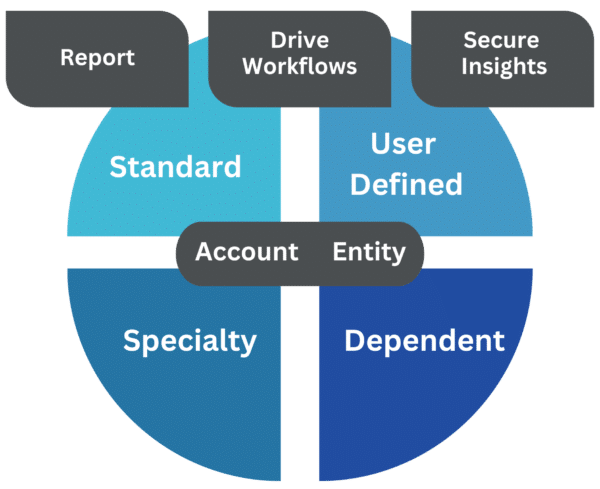
One of the transformative features of Sage Intacct is its dimensional chart of accounts. This allows transactions to be tagged with attributes such as location, department, or project, enabling dynamic reporting and deeper financial insights without a bloated general ledger.
6. Multi-entity management
If your business manages multiple entities, Sage Intacct provides comprehensive tools for inter-entity transactions, consolidations, and reporting. In contrast, Sage 50 makes multi-entity accounting cumbersome and time-consuming.
7. Automated complex financial processes
Sage Intacct automates complex financial processes, reducing errors and labor. It streamlines operations such as revenue recognition, project accounting, inventory management, AP, and AR. In Sage 50, these processes are more manual and labor-intensive, making Sage Intacct a more efficient choice for growing organizations.
8. Compliance and financial management governance
Sage Intacct helps organizations comply with accounting standards like GAAP and IFRS, offering built-in compliance frameworks and audit trails. Achieving compliance is more challenging in Sage 50 due to risks such as data corruption.
9. Improved expense management
With features such as project-based billing and expense management, Sage Intacct provides detailed expense control and insight. This is especially valuable for construction and service-based businesses that need to manage project costs.
10. Robust security features
Sage Intacct delivers advanced security, including data encryption, redundant backups, and strict access controls. These are essential for protecting sensitive financial data and go beyond what desktop-based systems like Sage 50 provide.
11. Enhanced collaboration
The cloud-based nature of Sage Intacct supports better collaboration across departments. The built-in Collaborate feature enables teams to communicate and resolve accounting issues efficiently, leaving notes on tasks and sharing real-time data—improving effectiveness regardless of location.
Next steps
Migrating from Sage 50 to Sage Intacct is a strategic path toward more efficient, scalable, and insightful financial management. With superior cloud capabilities, customization, and automation, Sage Intacct is built for modern, growing organizations. Gartner’s Critical Capabilities Report even awarded Sage Intacct the highest rating, recognizing its industry-leading performance.
One common concern when considering Sage Intacct vs Sage 50 is what to do with your legacy data. Fortunately, the Sage Intacct migration process is designed to simplify this transition, allowing you to focus on optimizing Sage Intacct for your workflows.
How Rand Group can help with your Sage 50 to Sage Intacct migration
- We help your team evaluate data cleansing requirements and lead the data mapping process to ensure a high-quality migration.
- We translate Sage 50 general ledger account balances into your new Sage Intacct chart of accounts.
- We provide automated data migration tools to speed up deployment and minimize disruption.
- We offer a library of standard financial reports and role-based dashboards in Sage Intacct for faster time to value.
Ready to learn more about moving from Sage 50 to Sage Intacct? Contact Rand Group today to discover how we can guide your business through every step of the migration process and help you realize the full benefits of modern cloud accounting.