Sage Intacct migration guide: Planning and executing a successful ERP transition

At Rand Group, we regularly work with organizations that reach the limits of their existing ERP and start asking: What’s next?
The warning signs are familiar, month-end close stretches longer, reporting depends on spreadsheets, multi-entity consolidations grow cumbersome, and leadership lacks real-time visibility into performance. When your system can no longer support your growth strategy, it’s time to evaluate a more scalable solution.
This Sage Intacct migration guide is built for CFOs, controllers, finance leaders, and IT teams considering a move to modern cloud financial management software. Whether upgrading from another Sage solution or transitioning from a legacy or entry-level ERP, a well-planned Sage Intacct migration can enhance automation, reporting, and long-term scalability. In this blog, we outline what Sage Intacct is, why organizations migrate, and how to approach the migration process for a successful outcome.
What is Sage Intacct?
Before diving into the migration strategy, it’s important to understand what sets Sage Intacct apart. Sage Intacct is a cloud-native financial management and accounting solution built for mid-market and growth-focused organizations. Unlike traditional on-premise ERP systems, Sage Intacct is designed for flexibility, automation, and real-time visibility.
Sage Intacct delivers a comprehensive, cloud-based financial management platform designed to support growing and multi-entity organizations. Built with dimensional reporting at its foundation, the system provides deeper financial visibility without adding unnecessary complexity to the chart of accounts. Sage Intacct offers advanced capabilities such as revenue management, purchasing and order management, project accounting, real-time dashboards, and open API integrations. It transforms financial reporting with a powerful core financial suite.
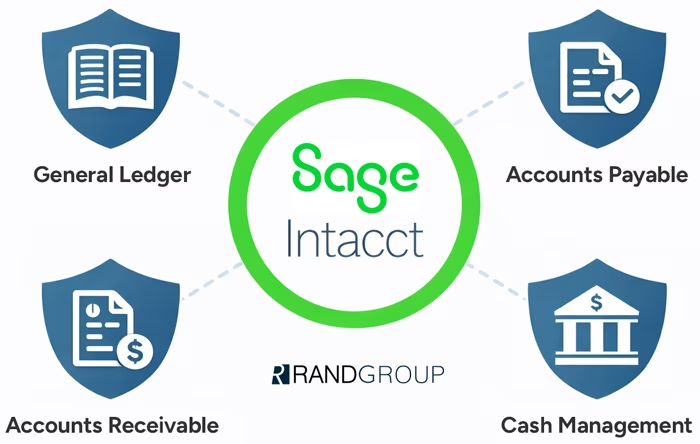
Sage Intacct’s core financials include:
- General Ledger with dimensional reporting for flexible, real-time insights
- Accounts Payable to automate invoice processing and approvals
- Accounts Receivable to streamline billing and collections
- Cash Management for improved visibility into cash flow and bank reconciliations
One of its most powerful differentiators is its dimensional architecture. Instead of relying solely on a complex chart of accounts, Sage Intacct uses dimensions (such as location, department, project, or customer) to enable deeper reporting without increasing GL complexity.
Business value
Organizations that make the move to Sage Intacct often experience:
- Faster month-end close cycles
- Improved financial governance and audit readiness
- Greater transparency across entities
- Real-time insights for executive decision-making
- Support for remote and distributed finance teams
Why move to Sage Intacct?
A Sage Intacct migration is more than a technical upgrade, it’s a strategic investment in the future of your finance function. As organizations grow and operational complexity increases, legacy systems often struggle to provide real-time visibility, scalable reporting, and efficient processes. Sage Intacct addresses these challenges as a fully cloud-native solution, eliminating the burden of server maintenance and manual updates while enabling secure, anywhere access for distributed teams.
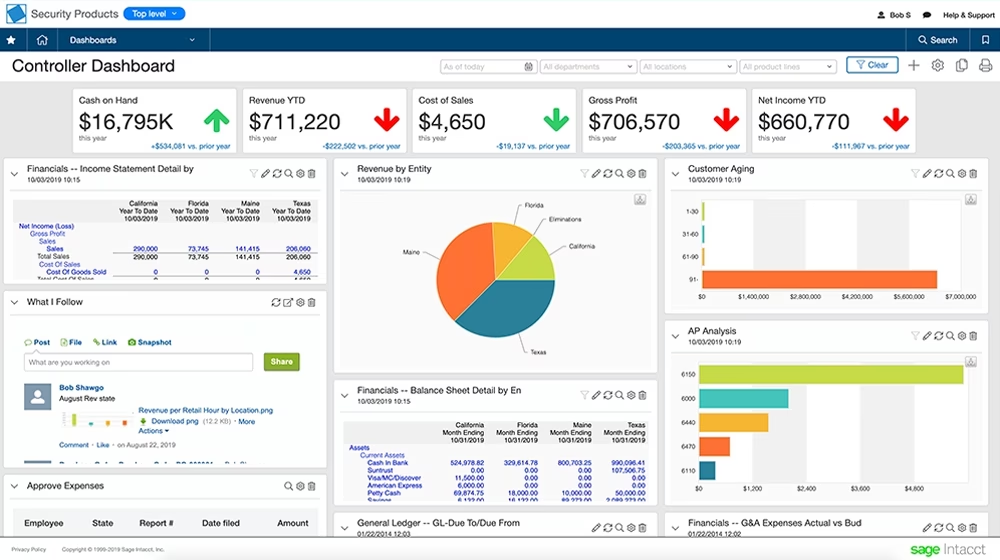
Beyond cloud accessibility, Sage Intacct drives meaningful operational improvements through financial automation, including invoice processing, bank reconciliations, multi-entity consolidations, and revenue recognition workflows. It replaces spreadsheet-heavy reporting with real-time dashboards, drill-down capabilities, and multi-dimensional financial insights. These insights empower leadership to make timely, data-driven decisions. Designed to scale alongside your business, Sage Intacct supports multi-entity growth, intercompany transactions, global reporting structures, and the rapid onboarding of new business units. This provides a modern foundation for sustainable expansion.
Upgrading from existing Sage systems to Sage Intacct
Many organizations already in the Sage ecosystem consider upgrading to Sage Intacct as part of their modernization strategy. Older Sage products such as Sage 50, Sage 100, Sage 300, and Sage 500 were built primarily for on-premise environments. While they remain functional, limitations may include:
- Restricted reporting flexibility
- Limited automation capabilities
- Manual consolidations
- Integration constraints
- Infrastructure maintenance costs

Sage migrations by product
Sage 50 to Sage Intacct
Sage 50 users often reach a growth threshold where basic accounting functionality is no longer sufficient. Migrating to Sage Intacct provides:
- Cloud accessibility
- Advanced reporting
- Stronger internal controls
- Scalable financial management
This transition supports organizations moving from small business accounting to mid-market financial operations.
Sage 100 to Sage Intacct / Sage 300 to Sage Intacct
Sage 100 and Sage 300 both offer cloud-hosted deployment options, providing greater accessibility than traditional on-premise environments. However, they were not originally built as cloud-native platforms. As organizations grow, many begin to feel the limitations of systems that rely heavily on customizations, third-party add-ons, or legacy architecture.
Common migration drivers include:
- Increasing infrastructure and maintenance complexity
- Heavy customization requirements to meet evolving needs
- Limited real-time reporting and dashboard capabilities
- Expanding multi-entity and consolidation demands
Migrating to Sage Intacct provides a fully cloud-native financial management solution designed for scalability, automation, and dimensional reporting. The result is a more modern, robust platform that enhances visibility, reduces complexity, and supports long-term growth.

Sage 100 vs Sage Intacct
If you’re evaluating your options, take a closer look at how Sage 100 compares to Sage Intacct. Download our comprehensive comparison guide to explore each system’s capabilities, understand the differences in cloud architecture, and determine whether moving to Sage Intacct aligns with your long-term growth strategy.
Sage 500 to Sage Intacct
Sage 500 customers often face aging technology concerns, increased maintenance demands, and limited modernization options. Transitioning to Sage Intacct allows organizations to remain within the Sage ecosystem while adopting a future-ready, cloud-native financial management platform.
For manufacturers currently leveraging Sage 500’s operational and manufacturing functionality, those capabilities can be addressed through Sage Operations (formerly SDMO) alongside Sage Intacct. Together, Sage Intacct and Sage Operations provide an integrated solution that supports both robust financial management and manufacturing execution, delivering the cloud flexibility and scalability today’s organizations require.
Benefits of staying in the Sage ecosystem
Remaining within the Sage family offers several advantages, particularly for organizations looking to modernize without completely overhauling their financial technology strategy. Teams can build on existing knowledge while transitioning to a more advanced platform, minimizing disruption and preserving institutional familiarity.
Key benefits include:
- Familiar terminology and workflows
- Trusted vendor continuity
- A clear modernization and upgrade path
- Access to experienced, Sage-certified implementation partners
Additionally, staying within the Sage ecosystem often simplifies data migration and integration planning, since there is greater alignment between legacy Sage systems and Sage Intacct. For many businesses, upgrading within Sage reduces change management friction while enabling a more strategic, scalable, and future-ready technology foundation.
Moving from an entry-level or legacy ERP to Sage Intacct
Organizations not currently using Sage are also strong candidates for a Sage Intacct migration. This includes businesses outgrowing entry-level accounting software like QuickBooks as well as those running legacy ERP systems such as Microsoft Dynamics GP that no longer align with their growth or cloud strategy. When leadership demands faster insights and stronger governance, legacy systems often fall short.
Why organizations switch from legacy ERP
- Aging on-premise infrastructure
- Limited cloud functionality
- Extensive Excel reliance
- Slow and manual close processes
- Limited visibility across departments
Migration challenges & how to overcome them
A successful Sage Intacct migration requires more than technical configuration, it demands careful planning, stakeholder alignment, and a clear understanding of current processes. Organizations that approach ERP migration strategically are far more likely to stay on schedule, control costs, and achieve long-term value.
Common challenges include:
- Data extraction and cleanup. Legacy systems often contain duplicate records, inconsistent naming conventions, and outdated vendors or customers. Cleansing and validating data before migration prevents carrying issues into the new system.
- Mapping the chart of accounts to Sage Intacct’s dimensional structure. Moving from a segmented, account-heavy structure to dimensional reporting requires thoughtful design to ensure flexibility without unnecessary complexity.
- Managing change across departments. Finance, operations, and executive teams must adapt to new workflows, reporting tools, and approval processes. Early communication and role-based training are critical.
- Aligning third-party integrations. CRM systems, payroll providers, expense management tools, and other applications must be evaluated and properly integrated to avoid disruption.
When executed properly, a Sage Intacct migration delivers measurable improvements across the finance function and broader organization. Rather than simply replacing software, the goal is to create a stronger foundation for financial visibility and growth.
Organizations can expect:
- Cleaner, more reliable financial data
- Streamlined close processes
- Enhanced audit readiness
- Improved operational agility
- Stronger executive reporting
Your step-by-step guide to a successful Sage Intacct migration
A successful Sage Intacct implementation follows a defined methodology grounded in proven ERP migration best practices. By combining structured planning, disciplined execution, and stakeholder alignment, organizations can reduce risk and accelerate time to value.
1. Pre-migration planning
Clear goals drive a more focused migration. Before touching data, organizations should:
- Define business objectives
- Identify key stakeholders
- Assess current processes
- Establish timeline and budget
2. Data preparation & cleansing
Data migration is often the most underestimated step. Strong data governance early in the process prevents issues post-go live. This phase includes:
- Extracting historical data
- Cleaning inactive or duplicate records
- Mapping chart of accounts
- Validating balances
- Deciding what historical data to migrate versus archive
3. Implementation & configuration
This stage transforms business requirements into system functionality. During this phase, teams configure:
- Core financial modules
- Dimensions and reporting structures
- Approval workflows
- User roles and permissions
- Integrations with CRM, payroll, and other systems
4. Testing & training
Proper training significantly increases adoption and ROI. User acceptance testing (UAT) ensures accuracy and usability. Activities include:
- Close testing
- Reconciliation validation
- Role-based user training
- Pilot runs
5. Go-live & Post-go-live support
Migration is not the finish line, continuous improvement ensures long-term value. A carefully planned cutover minimizes disruption. After go-live:
- Support teams monitor transactions
- Initial close cycles are reviewed
- Optimization opportunities are identified
Real results in action: Club Greenwood’s migration success
When Club Greenwood set out to modernize its financial systems, the organization partnered with Rand Group to transition from Sage 100 to cloud-native Sage Intacct, a move driven by the need to streamline manual processes, improve reporting, and support future growth. Under our guidance, five years of historical data were migrated smoothly, and the system was configured to match the club’s operational needs while enabling stronger financial insights.
As a result of the migration, Club Greenwood realized measurable operational improvements that significantly boosted efficiency and reduced manual workload. Accounts payable processing time was reduced by 30%, bank reconciliation time was cut by 50%, and the organization accelerated its month-end close cycle by approximately 20–30% thanks to automation and improved workflows.
These gains freed finance staff from repetitive tasks and allowed them to focus on strategic priorities, while customizable reporting and real-time visibility empowered leadership with timely, actionable insights. Club Greenwood’s experience demonstrates how a structured migration with the right ERP partner can deliver tangible results, transforming financial operations into a strategic enabler rather than a constraint.
0 %
Faster bank reconciliation
0 %
Faster accounts payable processing
0 %
Faster month-end close

Ready to explore your migration?
If you’re evaluating a Sage Intacct migration, our team can help you assess readiness, define a roadmap, and execute with confidence. Connect with one of our Sage ERP experts for a personalized migration assessment.
Frequently asked questions about Sage Intacct migration
How long does a Sage Intacct migration take?
Most mid-market Sage Intacct implementations range from 3 to 6 months, depending on complexity, number of entities, integrations, and data history.
What data should I migrate versus archive?
Many organizations migrate open transactions and summary historical balances while archiving older transactional detail. The right strategy depends on reporting needs and compliance requirements.
Do I need a Sage Intacct implementation partner?
While technically possible to self-implement, working with an experienced Sage Intacct partner reduces risk, accelerates deployment, and ensures best-practice configuration.
What are common migration pitfalls?
Common challenges include underestimating data cleanup, overcomplicating dimensions, insufficient testing, and inadequate user training.
Can Sage Intacct integrate with other systems?
Yes. Sage Intacct integrates with CRM systems, payroll providers, expense management tools, and industry-specific applications through APIs and marketplace solutions.
How much does a Sage Intacct migration cost?
The cost of a Sage Intacct migration varies based on several factors, including the number of entities, modules implemented, data complexity, required integrations, and overall business process redesign. Costs typically include software licensing, implementation services, data migration, training, and ongoing support. Organizations with multi-entity structures or complex reporting requirements may require a more comprehensive implementation approach. Working with an experienced Sage Intacct partner helps ensure accurate scoping, realistic budgeting, and a strong return on investment.
Migrate to Sage Intacct with Rand Group
Our Sage team brings deep expertise in ERP migration, implementation strategy, and finance transformation. With decades of experience supporting organizations across sizes and industries, we understand both the technical and operational aspects of ERP transitions.
Our Sage Intacct migration services include:
- Business process assessment – Our team evaluates your current workflows and financial processes to identify inefficiencies and design optimized processes within Sage Intacct.
- Data mapping and conversion – We cleanse, map, and migrate your financial data to ensure accuracy, integrity, and alignment with Sage Intacct’s structure.
- Dimensional design and configuration – We architect a scalable dimensional framework that simplifies your chart of accounts while enabling flexible, real-time reporting.
- Integration strategy – We design and implement integrations between Sage Intacct and your critical systems, including CRM, payroll, expense management, and industry-specific applications.
- Testing and validation support – We guide user acceptance testing, reconciliations, and parallel close activities to confirm system accuracy before go-live.
- Role-based training – We deliver customized training sessions tailored to finance teams, department leaders, and executives to drive user adoption and confidence.
- Post-go-live optimization – After launch, we provide ongoing support and system enhancements to help you maximize the long-term value of your Sage Intacct investment.
Next steps
A Sage Intacct migration is more than a system upgrade, it’s an opportunity to modernize finance, improve reporting, and support sustainable growth. With a structured approach and the right partner, organizations can reduce risk and accelerate value.
Whether upgrading within Sage or transitioning from a legacy ERP, a well-planned migration ensures your financial system becomes a strategic asset, not a limitation. Contact our Sage experts today to start your migration journey.