NetSuite
What is NetSuite QuickStart?

Managing finances is one of the biggest challenges for early-stage technology startups. Founders need to track expenses, monitor cash flow, manage customer payments, and understand their financial position, often without a dedicated finance team. While basic accounting tools can handle initial requirements, growing businesses need greater automation, visibility, and scalability without the cost and complexity of implementing a comprehensive ERP system.
To address these challenges, Oracle NetSuite introduced NetSuite QuickStart, a free, AI-powered financial management platform designed specifically for early-stage technology startups. QuickStart combines essential accounting capabilities, AI-powered automation, and startup-specific financial metrics in one solution, with a pathway to the broader NetSuite ERP platform as businesses grow. This guide explores what NetSuite QuickStart is, its key features, pricing, eligibility requirements, and how it compares to traditional NetSuite ERP.
NetSuite QuickStart at a glance
NetSuite QuickStart is a free, AI-first financial management platform designed for early-stage, high-growth technology startups in the United States. Introduced by Oracle NetSuite in October 2026, the platform combines core accounting, banking, invoicing, subscription management, AI-powered automation, and financial reporting in one solution. QuickStart is intended for startups with a single legal entity and small teams of up to five users, offering essential financial capabilities without software subscription fees, subject to usage limits. As businesses grow, QuickStart provides a pathway to the broader NetSuite ERP platform for more advanced financial and operational requirements.
What is NetSuite QuickStart?
NetSuite QuickStart is a cloud-based financial management platform that helps early-stage technology startups establish and manage their financial operations without the complexity of a traditional ERP implementation. Developed by Oracle NetSuite, QuickStart provides essential accounting functionality alongside embedded artificial intelligence (AI) to automate routine financial processes and help founders make more informed decisions.
Unlike traditional financial management systems that require extensive configuration and implementation services, QuickStart emphasizes self-service onboarding and AI-assisted setup. Businesses can connect financial accounts, establish accounting processes, and begin managing transactions through a streamlined interface.
The platform is designed around three primary objectives:
- Simplify financial management: Bring accounting, banking, invoicing, payments, and reporting together in one connected platform.
- Reduce manual work with AI: Automate repetitive financial tasks, including bill capture, transaction categorization, and reconciliation.
- Support long-term growth: Establish a financial foundation that can transition into the broader NetSuite ERP platform as business requirements become more complex.
QuickStart is not simply a free version of the complete NetSuite ERP platform. Instead, it is a streamlined financial management solution built around the needs of early-stage startups, with a focus on accessibility, automation, and scalability.

Key features and capabilities of NetSuite QuickStart
NetSuite QuickStart combines core financial management functionality with AI-powered automation and startup-specific reporting tools. These capabilities help small teams manage essential financial processes while maintaining visibility into business performance.
Core accounting and financial management
QuickStart provides foundational accounting capabilities to help startups maintain accurate financial records and manage day-to-day transactions.
Key capabilities include:
- General ledger: Record and organize financial transactions, maintain account balances, and support financial reporting.
- Accounts payable: Maintain vendor records, process bills, track expenses, and coordinate outgoing payments.
- Accounts receivable: Create customer invoices, record payments, and monitor outstanding balances.
- Banking and reconciliation: Connect supported bank and credit card accounts, categorize transactions, and reconcile financial activity.
- Financial reporting: Generate essential financial statements, including balance sheets, income statements, and cash flow reports.
- Tax tracking: Maintain transaction and tax information to support financial recordkeeping and reporting.
By consolidating these processes, QuickStart helps startups reduce reliance on disconnected spreadsheets and manual accounting workflows.
AI-powered automation with Ask Oracle
One of the defining characteristics of NetSuite QuickStart is its AI-first approach to financial management. Rather than treating AI as an optional add-on, Oracle has incorporated intelligent automation directly into everyday accounting workflows.
QuickStart uses embedded AI capabilities and the Ask Oracle assistant to help users manage financial information, automate repetitive tasks, and identify activities that require attention.
Examples of AI-powered functionality include:
- Automated bill capture: Extract relevant information from financial documents to reduce manual data entry.
- Transaction categorization: Use AI recommendations to classify expenses and financial transactions.
- Bank reconciliation: Match bank transactions with corresponding financial records and identify exceptions.
- Conversational financial insights: Ask questions about expenses, cash flow, and financial performance using natural language.
- Workflow assistance: Identify outstanding financial activities and support appropriate next steps, with user approval when required.
For example, a startup founder could ask why operating expenses increased during the previous month. Rather than manually reviewing multiple reports, the founder could use AI-assisted analysis to investigate spending patterns and identify contributing transactions.
These capabilities can help startups spend less time on routine accounting administration and more time managing operations and planning for growth.
Startup-specific financial metrics and reporting
Technology startups often need financial insights that extend beyond traditional accounting statements. Metrics such as monthly recurring revenue, burn rate, and cash runway are especially important when evaluating growth, managing expenses, and planning future investments.
NetSuite QuickStart provides visibility into key startup performance indicators, including:
- Monthly recurring revenue (MRR): Monitor predictable monthly revenue generated through recurring subscriptions.
- Burn rate: Understand how quickly the business is spending available cash.
- Cash runway: Estimate how long existing cash reserves can support operations based on current spending.
- Cash flow: Track incoming and outgoing funds to support liquidity management.
- Revenue and expense trends: Analyze changes in financial performance and identify emerging patterns.
For example, a software-as-a-service (SaaS) startup preparing for its next funding round may need to demonstrate recurring revenue growth while monitoring operating expenses. QuickStart brings these financial metrics together to help founders better understand their financial position and make informed decisions.
External AI integrations through Model Context Protocol (MCP)
NetSuite QuickStart also supports integrations with external AI tools through the Model Context Protocol (MCP), which allows AI assistants to securely interact with connected business systems and data, subject to configured permissions.
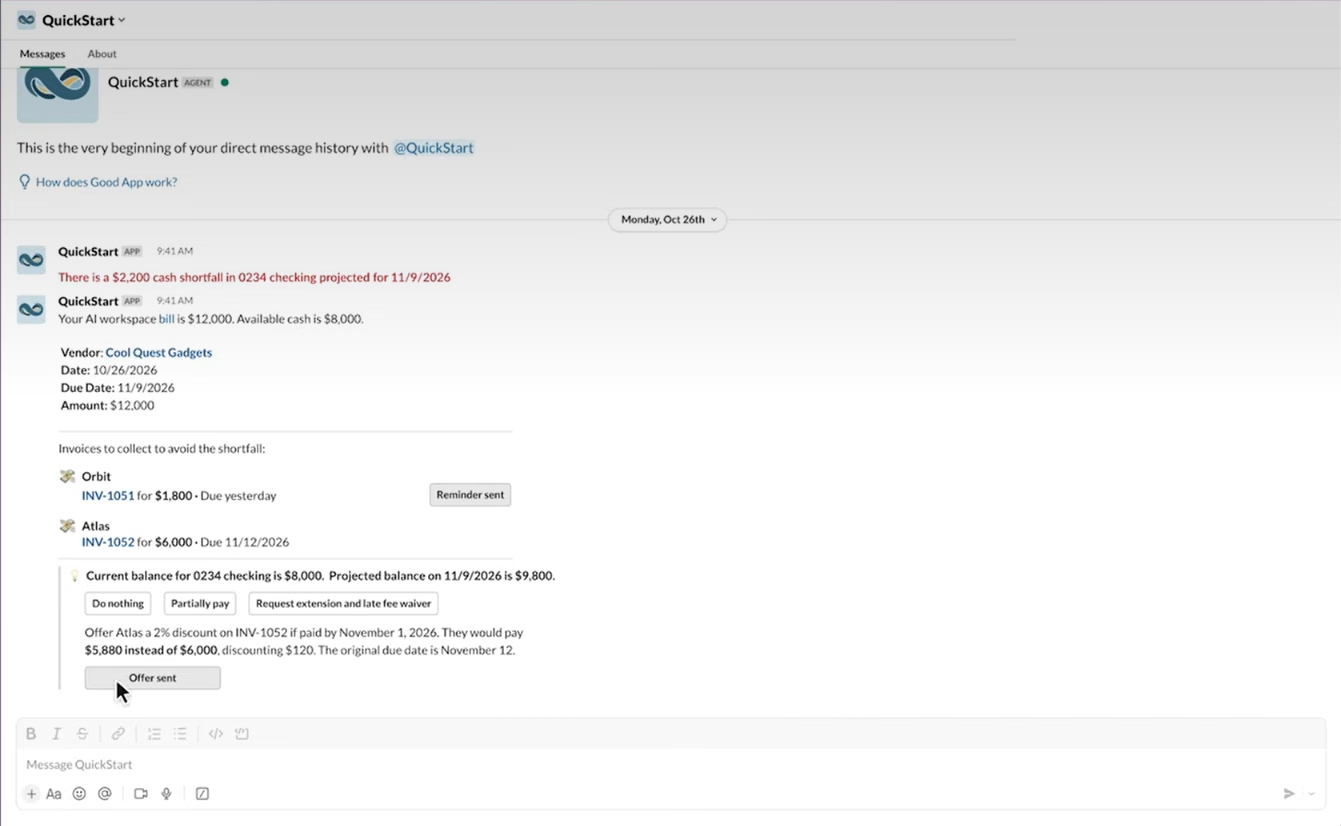
Through supported MCP connections, users can access QuickStart financial information and initiate certain financial workflows from familiar AI environments, including ChatGPT and Claude. QuickStart also supports workflows involving communication tools such as Slack.
Potential use cases include:
- Asking an AI assistant for a summary of current cash balances or financial activity.
- Reviewing unpaid invoices and outstanding customer payments.
- Investigating changes in expenses or recurring revenue.
- Requesting supported financial updates or actions through a conversational interface.
- Receiving notifications about financial activities requiring attention.
For example, a founder could ask an AI assistant to summarize the company’s current cash runway or identify overdue customer invoices without manually navigating through multiple reports.
Supported capabilities depend on the connected tools, permissions, and configuration. Financial actions may also require review or approval before completion.
Subscription billing and business operations
In addition to traditional accounting, QuickStart includes capabilities designed to support technology startups that sell subscription-based services, digital products, or physical goods.
These include:
- Subscription management: Create and manage recurring and usage-based customer subscriptions.
- Billing automation: Support recurring invoices and subscription payment schedules.
- Customer and vendor management: Maintain records for customers, suppliers, and business transactions.
- Purchasing: Create purchase orders, track goods receipts, and manage vendor bills.
- Basic inventory management: Track products, inventory movements, and fulfillment activities.
- Payment processing: Manage customer payments through supported payment integrations, although third-party processing fees may apply.
These capabilities help startups manage financial and operational activities within a connected system rather than relying on separate applications for every process.
Is NetSuite QuickStart really free?
Yes, NetSuite QuickStart is available for free to eligible early-stage technology startups in the United States. Oracle offers the platform without a software subscription fee, allowing qualifying businesses to access core financial management capabilities without the upfront licensing investment typically associated with ERP software. However, third-party service fees, such as payment processing charges, may still apply.
However, QuickStart has eligibility requirements and usage limits that businesses should understand before adopting the platform.
Who qualifies for free NetSuite QuickStart?
QuickStart is designed primarily for early-stage technology startups with relatively straightforward financial management requirements.
The ideal business typically:
- Operates in the United States.
- Is an early-stage, high-growth technology startup.
- Has a small team of five or fewer users.
- Operates as a single legal entity.
- Needs its first comprehensive financial management system.
- Does not yet require advanced multi-entity accounting or international financial management.
Organizations with larger teams, multiple subsidiaries, international operations, or more sophisticated financial controls may be better suited to the broader NetSuite ERP platform.
NetSuite QuickStart free tier limits
Although QuickStart is free, Oracle establishes usage limits to keep the offering aligned with the needs of early-stage businesses.
Business records can include invoices, vendor bills, sales orders, journal entries, subscriptions, customer records, and inventory items. Document limits apply to new files, such as invoices and other supporting documents, added to the platform.
Monthly usage allowances reset each month, and unused capacity does not carry forward. If a business exceeds an applicable usage limit, Oracle will notify the account administrator and may restrict, suspend, or block access to certain services until the allowance resets or usage is reduced. Startups should monitor their usage regularly to avoid potential disruptions to financial operations.
As transaction volumes, team sizes, and financial requirements increase, startups should evaluate whether QuickStart continues to meet their needs or whether transitioning to a more comprehensive NetSuite solution would provide greater value.
How does NetSuite QuickStart work?
Unlike traditional ERP implementations that often involve extensive planning, configuration, data migration, and testing, QuickStart is designed for streamlined, self-service onboarding.
Oracle indicates that eligible businesses can begin using core financial capabilities within minutes, although the time required to establish complete accounting processes depends on the organization’s data and requirements.
The general onboarding process includes five steps:
- Create a QuickStart account: Follow Oracle’s QuickStart account setup instructions to register your business, provide contact information, verify your work email address, and begin onboarding.
- Complete initial setup: Follow the onboarding process and provide information about your business, financial structure, and operating requirements.
- Establish accounting settings: Use AI-assisted setup recommendations to configure foundational financial information and import relevant business data.
- Connect financial accounts: Link supported bank and credit card accounts and establish essential transaction workflows.
- Begin managing finances: Create invoices, process bills, review financial statements, and use AI-powered capabilities to monitor business performance.
The simplified onboarding process helps reduce the time and resources required to establish a financial management system. However, businesses should still verify opening balances, account configurations, and financial data accuracy before relying on the system for important financial decisions.
What are the benefits of NetSuite QuickStart for startups?
For early-stage technology companies, NetSuite QuickStart provides an accessible way to establish structured financial processes without the cost and complexity of a comprehensive ERP implementation.
Key benefits include:
- Lower financial barriers: Access essential financial management tools without software subscription fees, subject to eligibility and usage limits.
- Reduced administrative work: Spend less time on repetitive accounting tasks through AI-powered automation.
- Greater financial visibility: Gain a clearer understanding of cash flow, expenses, revenue, and startup-specific KPIs.
- More informed decisions: Use financial insights to guide spending, investment, and growth strategies.
- Simplified operations: Manage essential financial activities within a connected platform.
- A foundation for growth: Establish financial processes that can support a future transition to full NetSuite ERP.
Together, these benefits help startups manage their finances more efficiently while building a foundation for future growth.
NetSuite QuickStart vs. NetSuite ERP: What’s the difference?
NetSuite QuickStart and Oracle NetSuite ERP are designed to support different stages of business growth. QuickStart provides free, AI-powered financial management for eligible early-stage technology startups, while full NetSuite ERP offers more comprehensive capabilities for organizations with complex financial and operational requirements.
The right choice depends on your organization’s size, financial complexity, operational needs, and growth plans.
When is NetSuite QuickStart the right choice?
NetSuite QuickStart is best suited for early-stage U.S. technology startups with small teams, a single legal entity, and straightforward financial management needs.
It may be a good fit for businesses that:
- Need essential accounting, invoicing, banking, and financial reporting.
- Want to automate routine financial tasks using AI.
- Need visibility into startup metrics such as MRR, burn rate, and runway.
- Have limited budgets and want to avoid upfront software subscription costs.
- Expect to grow but do not yet require advanced ERP functionality.
When should a business consider full NetSuite ERP?
Full NetSuite ERP may be a better fit for organizations that have outgrown basic financial management tools or require more sophisticated functionality.
Businesses should consider full NetSuite ERP when they need:
- Multi-entity accounting: Manage subsidiaries, intercompany transactions, and consolidated financial reporting.
- International operations: Support multiple currencies, global accounting requirements, and international subsidiaries through NetSuite OneWorld.
- Advanced financial controls: Establish more sophisticated approval workflows, accounting policies, and reporting processes.
- Complex inventory management: Manage multiple warehouses, purchasing, fulfillment, and supply chain operations.
- Greater customization: Configure specialized workflows and integrate additional business applications.
- Comprehensive reporting: Analyze financial and operational performance across departments, entities, and business units.
Ultimately, the decision should be based on whether QuickStart continues to meet your business requirements or whether more advanced NetSuite capabilities would provide greater value.
What happens when your business outgrows NetSuite QuickStart?
NetSuite QuickStart is designed to provide a pathway to the broader NetSuite ERP platform as businesses grow. Oracle indicates that financial data, transaction history, and existing workflows can carry forward during the transition, helping organizations avoid starting from scratch.
However, moving to full NetSuite ERP still requires careful planning to ensure the new environment supports the organization’s evolving requirements. Additional functionality, integrations, and business processes may need to be configured, tested, and optimized.
Before transitioning from QuickStart to full NetSuite ERP, businesses should:
- Assess new requirements: Identify financial, operational, and reporting needs that QuickStart can no longer support.
- Review existing data: Validate financial records, account structures, and transaction history before expanding the system.
- Plan additional functionality: Determine which NetSuite modules, workflows, and configurations are needed.
- Evaluate integrations: Identify business applications that need to connect with NetSuite.
- Prepare for testing and training: Validate new processes and ensure employees are ready to use expanded capabilities.
- Develop a transition plan: Establish a realistic timeline, responsibilities, and milestones to minimize disruption.
Working with an experienced NetSuite implementation partner can help organizations navigate these steps, reduce implementation risks, and establish a scalable financial management environment.

Not sure which NetSuite solution is right for your business?
Choosing the right financial management solution starts with understanding your current needs and future growth plans. Whether you’re considering NetSuite QuickStart or need the advanced capabilities of full NetSuite ERP, Rand Group can help you evaluate your requirements, compare your options, and determine the best fit for your business.
Partnering with Rand Group to find the right NetSuite solution
As an experienced Oracle NetSuite Alliance Partner, Rand Group helps organizations evaluate, implement, and optimize NetSuite solutions that support their financial and operational requirements.
With more than 20 years of experience in business technology consulting, Rand Group combines technical NetSuite expertise with an understanding of accounting, business processes, and operational challenges. Our consultants work with organizations to identify requirements, streamline workflows, and implement solutions that support both immediate priorities and future growth.
Rand Group’s NetSuite services include:
- ERP assessment and selection: Evaluate business requirements and determine whether NetSuite is the right solution.
- NetSuite implementation: Configure and deploy NetSuite using structured implementation methodologies optimized for project scope, speed, and cost.
- Data migration and integrations: Prepare financial data and connect NetSuite with other business applications.
- Process optimization: Identify opportunities to improve accounting, reporting, and operational workflows.
- Ongoing support: Help organizations enhance their NetSuite environment as business requirements evolve.
Key takeaways
- NetSuite QuickStart is a free, AI-first financial management platform designed for eligible early-stage technology startups in the United States.
- The platform combines essential financial capabilities, including accounting, banking, invoicing, subscription management, reporting, and startup-specific KPIs.
- Embedded AI and MCP integrations help automate routine financial processes and enable conversational access to financial information through supported AI tools.
- QuickStart has eligibility requirements and usage limits, making it best suited for small, single-entity startups with relatively straightforward financial needs.
- As businesses grow, full NetSuite ERP provides more comprehensive capabilities for managing multi-entity accounting, complex operations, integrations, and advanced reporting.
Frequently asked questions about NetSuite QuickStart
What is NetSuite QuickStart?
NetSuite QuickStart is a free, AI-powered financial management platform developed by Oracle NetSuite for early-stage technology startups in the United States. It combines core accounting, banking, invoicing, subscription management, reporting, and AI automation in one solution. QuickStart is designed to help startups establish financial processes and provides a pathway to the broader NetSuite ERP platform as their needs grow.
Is NetSuite QuickStart free?
Yes. NetSuite QuickStart is free for eligible early-stage U.S. technology startups, subject to usage limits. The platform supports up to five users, 2,500 new business records, 800 emails, and 175 new documents per month. Additional limits apply to document storage, connected bank accounts, and concurrent integration requests.
Who is eligible for NetSuite QuickStart?
NetSuite QuickStart is designed for early-stage, high-growth technology startups in the United States. It is best suited for businesses operating as a single legal entity with five or fewer users and relatively straightforward financial management requirements. Organizations with multiple subsidiaries, international operations, or more advanced financial needs may benefit from full NetSuite ERP.
What features are included in NetSuite QuickStart?
NetSuite QuickStart includes general ledger accounting, accounts payable and receivable, banking, invoicing, financial reporting, subscription management, and basic inventory capabilities. It also offers AI-powered automation, startup-specific metrics such as MRR and cash runway, and integrations with supported business applications and AI tools.
How is NetSuite QuickStart different from NetSuite ERP?
NetSuite QuickStart is a free, streamlined financial management solution designed for early-stage technology startups. Full NetSuite ERP is a paid, more comprehensive platform that supports advanced financial management, multi-entity accounting, global operations, complex inventory management, and extensive customization. QuickStart is intended to provide a financial foundation that can transition into the broader NetSuite platform as business requirements expand.
Does NetSuite QuickStart use artificial intelligence?
Yes. NetSuite QuickStart includes embedded AI capabilities and the Ask Oracle assistant to help automate financial tasks, categorize transactions, reconcile payments, and analyze financial information. Users can also ask natural-language questions about financial performance and access insights that support business decisions.
Can NetSuite QuickStart connect to ChatGPT or Claude?
Yes. NetSuite QuickStart supports connections with ChatGPT and Claude through the Model Context Protocol (MCP). These integrations allow users to interact with supported financial data and workflows through conversational AI interfaces. Available functionality depends on the integration, user permissions, and configured approval requirements.
Can a business upgrade from NetSuite QuickStart to NetSuite ERP?
Yes. NetSuite QuickStart is designed to provide a pathway to the broader NetSuite ERP platform as businesses grow. Oracle indicates that financial data, history, and workflows can carry forward during the transition. However, organizations may still need implementation planning, additional configuration, integrations, and training to support more complex financial and operational requirements.
Build a stronger financial foundation with NetSuite
NetSuite QuickStart provides early-stage technology startups with an accessible way to establish financial processes, automate routine accounting tasks, and gain visibility into important business metrics. By combining essential financial management functionality with AI-powered automation, QuickStart helps founders focus on growing their businesses while maintaining greater control over financial operations.
As organizations expand, their financial management requirements often extend beyond basic accounting and reporting. Whether you’re evaluating NetSuite QuickStart or considering a more comprehensive ERP solution, Rand Group can help you assess your requirements and determine the right approach for your business. Contact Rand Group to connect with our NetSuite experts and build a financial management strategy that supports your next stage of growth.