NetSuite
NetSuite AI: Discover the powerful AI capabilities embedded in NetSuite

Artificial intelligence is becoming a larger part of how businesses work in NetSuite. Oracle is embedding generative AI, predictive analytics, machine learning, conversational assistants, and intelligent automation across finance, planning, reporting, customer management, inventory, supply chain, and other business processes.
These capabilities can help employees spend less time searching for information, entering data, reviewing transactions, and building analysis manually. This guide explores the major AI capabilities available across NetSuite, including NetSuite Next, Ask Oracle, AI agents, generative AI, predictive intelligence, the NetSuite AI Connector Service, and tools for building custom AI solutions.
At a glance
NetSuite AI combines generative AI, machine learning, predictive analytics, conversational AI, and agentic capabilities across its unified cloud business management suite. Organizations can use NetSuite AI to automate routine work, analyze connected business data, predict outcomes, identify exceptions, generate insights, and securely connect compatible external AI tools through Model Context Protocol (MCP).
Table of contents
- What is NetSuite AI?
- NetSuite Next and the new AI-powered experience
- AI agents and agentic workflows in NetSuite
- Generative AI and productivity capabilities in NetSuite
- AI-powered planning, analytics, and predictive intelligence in NetSuite
- NetSuite AI Connector Service and MCP
- Extending NetSuite with custom AI
- How to prioritize NetSuite AI opportunities
- Partnering with Rand Group for NetSuite AI
- Key takeaways
- Frequently asked questions
What is NetSuite AI?
NetSuite AI is the collection of artificial intelligence capabilities built into and connected with the NetSuite business management suite. It includes generative AI, machine learning, predictive analytics, conversational assistants, and agentic capabilities that help users automate work, analyze business data, generate insights, predict outcomes, and complete supported tasks.
Because NetSuite connects financials, customers, inventory, projects, supply chain, commerce, reporting, and other business processes, its AI capabilities can work with connected business context. Instead of analyzing information in isolation, AI can use relationships across NetSuite data to explain performance, identify unusual activity, forecast potential outcomes, and recommend next steps.
NetSuite AI also works within the business environment organizations already use. Existing roles, permissions, workflows, and controls help govern how users access AI-driven information and actions, while NetSuite’s industry-specific functionality can provide additional context for different business processes.
NetSuite AI capabilities at a glance:
NetSuite Next and the new AI-powered experience
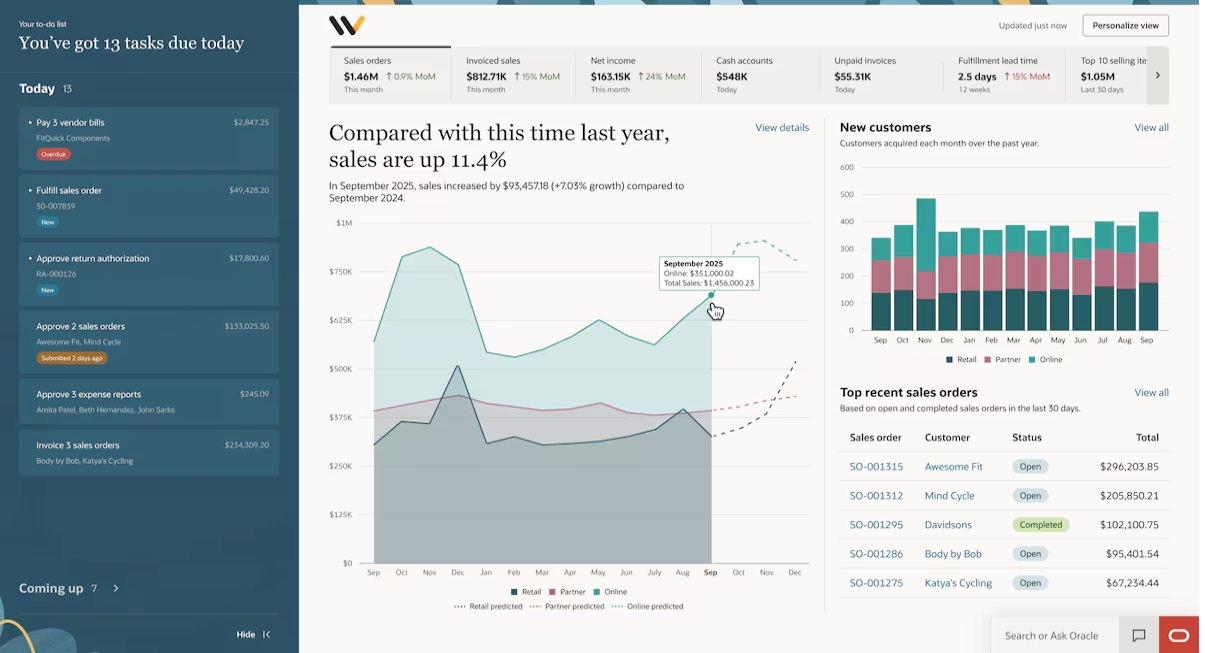
NetSuite Next brings AI more deeply into the overall NetSuite experience. Instead of requiring users to move between reports, searches, records, and separate AI tools, it combines conversational AI, contextual insights, visual analysis, and intelligent workflows within the ERP.
NetSuite Next
NetSuite Next is the next generation of the existing NetSuite platform, not a separate ERP system. Customers can move to the new experience without migrating their data or reimplementing NetSuite. Existing roles, permissions, workflows, data, and customizations remain in place, while the user experience adds deeper AI capabilities and Oracle’s Redwood Design System.
The larger change is how users work with the ERP. NetSuite Next is designed to let people ask questions in natural language, receive contextual insights, analyze business data, and use intelligent workflows to support more complex business processes. Oracle also emphasizes explainable and auditable AI, with insights and actions governed by the same roles, permissions, and policies already used in NetSuite.
To learn more, read our blog on NetSuite Next.
Ask Oracle
Ask Oracle is NetSuite’s conversational AI assistant and a central part of NetSuite Next. It allows users to search, analyze, navigate, and take supported actions in NetSuite using natural-language requests instead of starting with menus, saved searches, or reports.
Users can ask Ask Oracle to:
- Answer business questions: Ask about financial, customer, operational, and other NetSuite data in everyday language.
- Analyze NetSuite data: Investigate performance, trends, and other business questions without manually assembling the analysis.
- Create reports and visualizations: Generate reports, narratives, charts, and other ways to explore the results.
- Find information faster: Navigate to relevant records and pages without needing to know where they are located in NetSuite.
- Complete supported tasks: Move from a question or insight into actions within the user’s normal workflow.
- Explain its answers: View supporting sources and explanations to better understand and validate AI-generated responses.
Ask Oracle respects existing NetSuite roles, permissions, reporting structures, and business configurations. It is also available as a companion to the current NetSuite experience for supported U.S. and Canadian customers, allowing organizations to begin using conversational AI before switching to NetSuite Next.

AI Canvas
AI Canvas extends Ask Oracle from a conversation into a visual workspace for deeper analysis. Users can move an Ask Oracle discussion into a canvas and organize the results with charts, tables, KPI scorecards, narratives, and other visual elements.
This makes AI Canvas useful when a business question requires more than a single answer. Teams can explore an issue, compare information, organize findings, build an ad hoc dashboard, and continue working with the analysis in one place.
AI agents and agentic workflows in NetSuite
AI agents in NetSuite go beyond answering questions or generating content. They can analyze business context, work toward a defined goal, coordinate steps, and recommend or complete supported actions within a workflow. This makes agentic AI useful for more complex ERP processes that require ongoing analysis and action rather than a single AI response.
NetSuite is applying AI agents and assistants across planning, reconciliation, profitability management, product configuration, and support. Human oversight remains part of these processes through permissions, approvals, recommendations, and review controls, helping organizations increase automation while maintaining governance.
To learn more, read our blog AI agents in NetSuite.
AI agents and assistants in NetSuite EPM
NetSuite Enterprise Performance Management (EPM) uses AI across planning, account reconciliation, and profitability management. These capabilities help finance teams automate repetitive work, analyze financial data, and better understand the factors driving forecasts, reconciliations, and cost allocations.
Key AI capabilities include:
- Planning and forecasting: NetSuite Planning and Budgeting uses AI for multivariate forecasting, prediction explanations, trend analysis, and planning insights.
- Account reconciliation: NetSuite Account Reconciliation uses AI-assisted setup and machine learning to improve transaction matching and reduce manual reconciliation work.
- Profitability and cost management: Model Build Assistant helps create allocation models and rules, while Allocation Trace Assistant explains how costs move through allocation models in natural language.
Together, these capabilities reduce manual setup and analysis while helping finance teams better understand forecasts, transaction matches, and cost allocations.

NetSuite Expert
NetSuite Expert is an AI agent within SuiteAnswers that helps users find answers to NetSuite questions. Instead of searching support articles individually, users can ask how-to and product questions in natural language and receive a focused response based on NetSuite support content.
NetSuite Expert uses retrieval-augmented generation (RAG) to search SuiteAnswers and NetSuite Help resources. Responses include links to relevant source material, allowing users to review the documentation behind the answer and continue researching when needed.
Other NetSuite AI agents and assistants
NetSuite also applies conversational and agentic AI to more specialized business processes:
- NetSuite CPQ AI Assistant: Helps sellers and buyers configure complex products and services using natural language. It can gather requirements, recommend configuration options, and explain why those options were selected. The capability requires the NetSuite CPQ Configurator SuiteApp.
- Agentic workflows in NetSuite Next: Oracle is expanding agentic workflows within NetSuite Next to support more complex, multi-step business processes. These workflows are designed to analyze context, recommend actions, and automate supported steps while allowing users to retain control over key decisions.

Build your NetSuite AI roadmap
Identify where AI can create the most value in your NetSuite environment and prioritize the right opportunities. Rand Group can help you turn those opportunities into a practical roadmap aligned with your data, processes, and business goals.
Generative AI and productivity capabilities in NetSuite
NetSuite embeds generative AI into everyday ERP workflows to help users process information, create content, understand business data, and reduce manual work. Some capabilities are standard NetSuite features, while others are delivered through specific modules or SuiteApps.
Intelligent Close Manager
NetSuite Intelligent Close Manager is an AI-powered workspace for managing the financial close. It brings close tasks, transaction amounts, exceptions, and progress into a centralized portlet so accounting teams can see what needs attention and take action without relying on separate spreadsheets or static close checklists.
Key capabilities include:
- Centralized close monitoring: View close tasks, transaction amounts, exceptions, and progress in one place.
- AI-prioritized tasks: Focus attention on the activities most relevant to completing the close.
- Automated task identification: NetSuite surfaces qualifying close work based on transaction activity and enabled features.
- AI-generated close insights: Generate summaries of overall close progress, task coverage, and accounts receivable and accounts payable activity.
- Direct issue resolution: Move from close tasks and exceptions to the related work that needs to be completed.
Intelligent Close Manager combines system-generated tasks with user-created close activities, giving finance teams a more proactive way to monitor the close throughout the accounting period.
To learn more, read our blog, AI-powered close management with NetSuite Intelligent Close Manager.

Transaction Matching Assistant and Enriched Bank Data
NetSuite uses generative AI at multiple points in bank reconciliation. Enriched Bank Data extracts entity information from imported bank transactions to help NetSuite distinguish between multiple possible same-amount GL matches. If ambiguity remains, the Transaction Matching Assistant can evaluate the remaining candidates and recommend the most likely match.
The matching process can include:
- Enriched transaction context: Generative AI identifies entity information in imported bank data to improve matching.
- AI-assisted recommendations: The Transaction Matching Assistant evaluates details such as payee or payor name, memo content, and transaction dates.
- Recommendation context: Users can review the suggested match and remaining candidates before making a decision.
- Human approval: AI-assisted recommendations are not submitted automatically; a user reviews and submits the final match.

Item Creation Assistant
NetSuite Item Creation Assistant uses generative AI to turn product documentation into proposed inventory item records. Users upload a PDF containing structured product information, and NetSuite extracts relevant details for review before creating the items.
The process includes:
- Document extraction: Upload product catalogs, price lists, or other structured PDF files.
- Item data creation: AI can extract information such as item names, descriptions, UPC codes, purchase rates, sales rates, currencies, and other supported fields.
- Human review: Users can edit and validate the extracted information before anything is created.
- Inventory item creation: Approved information is converted into NetSuite inventory item records.
This feature supports PDF files and inventory items, with up to 100 extracted items per uploaded file. This makes the assistant particularly useful for organizations that regularly onboard products from supplier catalogs while maintaining human control over item data.
To learn more, read our blog on the NetSuite AI Item Creation Assistant.

Bill Capture
NetSuite Bill Capture applies AI to accounts payable document processing. Users can upload or email vendor bills, and NetSuite extracts key information to prepare a vendor bill for review and creation. Oracle currently uses its Document Understanding Custom Generative Model to process even more complex invoice formats.
Key capabilities include:
- Invoice data extraction: Process supported PDF, JPEG, and PNG vendor bill files.
- NetSuite record matching: Match extracted information with existing vendors, items, and purchase orders.
- Learning from corrections: Bill Capture uses user corrections to improve future suggestions.
- Existing AP controls: Once the vendor bill is created, configured processes such as approval workflows, SuiteApprovals, and 3-Way Match can continue as normal.
Bill Capture reduces repetitive AP entry while keeping users responsible for reviewing scanned information before creating and processing the bill.
To learn more, read our blog, NetSuite Bill Capture vs NetSuite Intelligent Payment Automation.

Narrative Insights
NetSuite Narrative Insights uses generative AI to explain the information in supported reports and records. With one action, users can generate a concise summary that highlights relevant information and may identify trends, anomalies, risks, opportunities, or gaps in the underlying data.
Narrative Insights is available across supported financial, sales, purchasing, inventory, customer, and operational records and reports. For example, it can summarize an Income Statement, Balance Sheet, A/R Aging Summary, sales report, inventory record, invoice, or Customer 360 view.

Customer 360 and Case Summary
NetSuite also brings generative AI into customer management and support workflows. Customer 360 and Case Summary give employees faster ways to understand customer activity without manually reviewing every transaction or interaction.
- Customer 360: Brings together financial information, transaction history, customer interactions, profitability, purchasing trends, and other customer data. Narrative Insights can generate an AI summary of recent customer interactions.
- Case Summary: Summarizes the history of a customer support case, including messages, key actions, notes, escalations, attachments, and customer sentiment. It also creates a timeline of important case activity.
These capabilities give sales and service teams faster context before they engage with a customer or respond to an active support issue.
Text Enhance
NetSuite Text Enhance brings generative writing assistance directly into supported fields throughout NetSuite. It can create new business content, refine existing text, change its length, and translate content into other languages.
Text Enhance also uses information from the NetSuite page the user is working on as context. For example, when generating an inventory item description, it can use information already stored on that item record to produce content relevant to the specific field.

Other generative AI capabilities
NetSuite includes additional generative AI capabilities for financial analysis, compliance, and subscription businesses:
- Intelligent Flux Analysis: Uses AI to draft explanations for account balance changes between reporting periods, helping accountants investigate variance drivers and prepare financial commentary with less manual analysis.
- Audit Summarization: Uses generative AI within the Compliance 360 SuiteApp to summarize audit information and suggest next steps based on audit controls and related data.
- Subscription Metrics Summary: The Subscription Metrics SuiteApp uses Prompt Studio in its Summary portlet to provide AI-generated context around subscription performance and recurring revenue metrics.
AI-powered planning, analytics, and predictive intelligence in NetSuite
NetSuite also applies AI and machine learning to planning, forecasting, analytics, recommendations, and structured reporting. These capabilities use historical and current business data to identify patterns, predict potential outcomes, explain performance, and help users decide where to focus next.
NetSuite Planning and Budgeting with Intelligent Performance Management
NetSuite Planning and Budgeting uses embedded AI and machine learning to help finance teams build forecasts and understand the factors behind changing business performance. Intelligent Performance Management (IPM) continuously analyzes plans, forecasts, and variances to surface trends, anomalies, biases, and hidden correlations.
Key AI capabilities include:
- Multivariate predictions: Analyze multiple business drivers together to produce forecasts and reveal relationships between variables.
- Predictive planning: Use historical data and predictive models to support budgeting and forecasting.
- IPM Insights: Identify trends, anomalies, biases, and correlations that may require further analysis.
- Forecast explanations: Help users understand the factors contributing to predictive results.
- AI-generated narratives: Turn complex planning insights into explanations that are easier to review and share.
- Scenario modeling: Evaluate how changes in assumptions could affect revenue, cash flow, expenses, headcount, and other outcomes.
These capabilities add predictive intelligence to the broader planning process without replacing finance judgment. Teams can use AI-generated forecasts and explanations as another input when testing assumptions and preparing plans.
To learn more, read our blog on NetSuite Planning and Budgeting.

NetSuite Analytics Warehouse
NetSuite Analytics Warehouse is an AI-powered cloud data warehouse and analytics solution that combines NetSuite information with data from CSV files and other business systems. This gives organizations a broader dataset for analyzing performance across finance, operations, customers, inventory, and other areas.
Its AI and machine learning capabilities include:
- Automated insights: Identify drivers, anomalies, correlations, trends, and other patterns in business data.
- Conversational analytics: Oracle Analytics AI Assistant can generate text and visualizations in response to natural-language prompts.
- Predictive models: Self-training models support use cases including customer churn, inventory stockouts, spend classification, and product recommendations.
- Custom predictive analytics: AutoML and Oracle Machine Learning support additional organization-specific models.
- AI-generated summaries: Explain visualizations and findings in natural language.
This makes NetSuite Analytics Warehouse useful when organizations need AI-driven analysis across more data than what exists in a single NetSuite report or transaction.
To learn more, read our blog on the NetSuite Analytics Warehouse.

Payment Date Prediction
NetSuite Payment Date Prediction uses machine learning to forecast when payment for an open invoice is likely to be received. Instead of relying only on contractual due dates, the model analyzes historical customer payment behavior to provide another view of expected cash timing.
When enough historical data is available, NetSuite provides a predicted payment date and Predicted Overdue Days on eligible invoices. Finance and accounts receivable teams can use these estimates to:
- Improve short-term cash flow forecasting.
- Identify invoices that may be paid late.
- Prioritize collection and follow-up activity.
- Compare likely payment behavior with contractual due dates.
NetSuite requires sufficient historical data before it can generate predictions, including at least 12 weeks of payment history and 50 qualifying paid invoices. Predictions are estimates based on past behavior rather than guaranteed payment dates. To learn more, read our blog, NetSuite AI Payment Date Prediction: Improve cash flow forecasting and AR visibility
Exception Management
NetSuite Exception Management uses customer-specific machine learning models to detect activity that falls outside normal transaction patterns. It can identify potential incorrect amounts or accounts, expected transactions that appear to be missing, and suspicious changes to vendor information.
NetSuite also provides context for each exception, including why an item was flagged and similar transactions for comparison. The models learn from historical activity and from how users resolve or dismiss exceptions, helping the system improve its understanding of normal business patterns over time.

Intelligent Item Recommendations
NetSuite Intelligent Item Recommendations uses AI and machine learning to predict products a customer may want to buy. Recommendations can draw from the customer’s own purchase history, the behavior of similar customers, products frequently purchased together, and similarities between item names, descriptions, and categories.
NetSuite supports several recommendation types, including:
- Order or cart recommendations: Suggest items commonly purchased with products already selected.
- Customers who bought this also bought: Recommend products based on similar purchasing behavior.
- Customer purchase history: Personalize suggestions based on previous purchases.
- Buy Again: Identify products customers tend to purchase repeatedly.
- Alternative items: Recommend similar products based on item attributes.
Sales representatives can access recommendations from supported sales orders, estimates, and opportunities, while SuiteCommerce businesses can display relevant recommendations to online shoppers. The machine learning algorithms process transaction data regularly so recommendations can change as more customer and purchasing data becomes available.

Narrative Reporting
NetSuite Narrative Reporting helps finance teams combine financial statements, data, charts, written commentary, and supporting information within structured management and regulatory reports. AI adds another layer by generating explanations and narratives from financial data.
Generative AI can support three important reporting tasks:
- Explain exceptions: Create a narrative when financial data meets a defined condition or variance threshold.
- Explain causes: Identify and describe major contributors behind an exception.
- Compare periods: Generate commentary comparing current results with prior reporting periods.
Narrative Reporting serves a different purpose than Narrative Insights. Narrative Insights generates quick contextual summaries for supported NetSuite reports and records, while Narrative Reporting is designed for creating, reviewing, and publishing structured financial, management, and regulatory reports.

Additional AI-powered insights
NetSuite also applies predictive and AI-assisted analysis to more specialized operational areas:
- Supply Chain Control Tower and Predicted Risks: Supply Chain Control Tower simulates inventory supply and demand, while the related Supply Chain Predicted Risks feature uses predictive models to identify potential timing risks across purchase orders, transfer orders, and sales orders. Users can review predicted days late or early and confidence levels to evaluate potential supply chain disruption.
- Labor Cost Insights: Introduced with the NetSuite Connector for ADP Workforce Now in NetSuite 2026.2, Labor Cost Insights combines payroll-driven labor costs with NetSuite financial data. Focused reports, configurable analytics, and AI-assisted summaries help finance teams understand relationships between labor spending, revenue, margins, and profitability.
NetSuite AI Connector Service and MCP
The NetSuite AI Connector Service lets organizations connect compatible AI tools, including ChatGPT and Claude, directly to NetSuite. It uses the Model Context Protocol (MCP) to give external AI tools a secure, standardized way to access approved NetSuite data and functionality. This bring-your-own-AI approach gives organizations more flexibility to use the AI platform that fits their needs instead of relying only on AI embedded within NetSuite.
Once connected, users can ask questions and work with NetSuite through natural language. The MCP Standard Tools SuiteApp gives compatible AI tools a defined set of actions they can use, including:
- Work with NetSuite records: Create, read, and update supported records.
- Run reports: Access NetSuite reports through a connected AI assistant.
- Run saved searches: Retrieve information from existing NetSuite saved searches.
- Query NetSuite data: Use read-only SuiteQL to analyze approved business data.
- Support business workflows: Use NetSuite information and available tools to answer questions, analyze data, and assist with supported tasks.
Security remains tied to NetSuite’s existing access model. The AI Connector Service uses authentication and NetSuite role-based permissions, so the connected AI tool does not receive unrestricted access to the ERP. Users and AI tools can only access the records, data, and actions allowed by the authorized NetSuite role.
NetSuite also provides prompts, roles, and skills designed to make these connections easier to use. Prebuilt prompts can help users ask common NetSuite business questions, while predefined roles can align AI access with functions such as CFO, controller, accounts receivable, accounts payable, and treasury. Organizations that need more specialized AI workflows can create custom MCP tools, which we cover in the extensibility section below.
See the NetSuite MCP server in action
See how conversational AI can securely work with NetSuite data through the Model Context Protocol. Watch our on-demand webinar for a practical demonstration of connecting AI with NetSuite and using natural-language prompts to access business information.

Extending NetSuite with custom AI
NetSuite includes many built-in AI features, but businesses can also create AI solutions for their own processes. SuiteCloud gives developers tools to add generative AI, manage prompts, connect external AI platforms, and automate document-based work without rebuilding NetSuite from scratch.
- SuiteScript Generative AI API: The SuiteScript 2.1 N/llm module lets developers add generative AI to NetSuite customizations. For example, a custom script could summarize information, classify text, generate content, or analyze data as part of a larger workflow. AI-generated results should still be reviewed before they are used for important transactions or decisions.
- NetSuite Prompt Studio: Prompt Studio helps administrators and developers control the instructions sent to generative AI. They can create and manage reusable prompts, customize supported Text Enhance actions, and avoid placing the same prompt instructions inside multiple scripts. This makes AI responses easier to standardize and maintain.
- SuiteCloud Developer Assistant: SuiteCloud Developer Assistant helps NetSuite developers write and maintain custom code. It works in Visual Studio Code and can assist with tasks such as generating SuiteScript 2.1 code and working with NetSuite custom objects. Developers review suggested changes before they are applied.
- SuiteCloud Agent Skills: SuiteCloud Agent Skills give compatible AI coding assistants more knowledge about how NetSuite development works. They provide guidance for areas such as SuiteScript, SuiteCloud Development Framework, user interfaces, security, documentation, and deployment. Developers still need to review, test, and approve any AI-generated code or configuration.
How to prioritize NetSuite AI opportunities
With so many AI capabilities available across NetSuite, organizations should start by identifying the business processes where AI can create measurable value. The best opportunities are often areas with high manual effort, large data volumes, frequent exceptions, reporting delays, or repetitive analysis.
Common starting points include financial close, account reconciliation, accounts payable, accounts receivable, planning and forecasting, customer analysis, inventory management, reporting, and data access through conversational AI.
Before enabling or extending AI, organizations should evaluate data quality, permissions, process design, integrations, user readiness, and governance requirements. AI is most valuable when it supports well-defined business processes rather than being adopted feature by feature without a broader plan.
A structured roadmap can help organizations move from AI interest to practical execution by connecting use cases with data readiness, security, process design, user adoption, and measurable outcomes.
Partnering with Rand Group for NetSuite AI
Getting value from NetSuite AI takes more than turning on new features. Organizations need to identify the right use cases, prepare their data and processes, establish appropriate controls, and help employees understand how AI should fit into everyday work.
Rand Group combines AI strategy and engineering, NetSuite expertise, ERP consulting, software development, and business process knowledge to help organizations turn AI into practical business improvements. With more than two decades of experience, 3,000+ successful engagements, 1,200+ clients, and a 90%+ client retention rate, our team understands both the technology behind AI and the finance and operational processes it needs to support.
Rand Group can help you:
- Build an AI strategy and roadmap: Identify high-value use cases and prioritize opportunities based on business value, readiness, and feasibility.
- Implement and optimize NetSuite AI: Configure embedded AI capabilities and align them with your data, processes, and workflows.
- Connect NetSuite with external AI: Use the NetSuite AI Connector Service and MCP to securely connect NetSuite with compatible AI platforms.
- Build custom AI solutions: Develop SuiteCloud extensions, custom MCP tools, integrations, and AI-enabled workflows for business-specific needs.
- Strengthen security and controls: Define permissions, testing standards, review processes, and safeguards for responsible AI use.
- Drive user adoption: Train employees, refine AI workflows, measure results, and expand successful use cases over time.
This approach keeps the focus on business outcomes rather than individual AI features. Rand Group helps organizations use NetSuite AI to reduce manual work, improve visibility, support better decisions, and scale more efficient business processes.
What our clients say about us
“Rand Group felt like part of our team, not a group that was there just to get the project done and move on. We wanted to build the environment the right way the first time.”
– Laza Assany, Controller, Henry Resources LLC
“The level of care, thoughtfulness, and in-depth knowledge provided by Rand Group exceeded our expectations. We now have a partner who not only understands NetSuite but also comprehends the intricacies of accounting and finance. Rand Group has become an extension of our internal technical team, providing invaluable support as we continue to grow.”
– Carolina Pereira, VP of Finance Shared Services, Unified Women’s Healthcare
Key takeaways
- NetSuite embeds AI across its unified business management suite, using connected financial, customer, inventory, operational, and other business data to provide more relevant insights and automation.
- NetSuite Next introduces a more AI-driven experience through tools such as Ask Oracle and AI Canvas without requiring customers to reimplement their existing NetSuite environment.
- NetSuite combines generative AI, machine learning, predictive analytics, and agentic workflows across finance, planning, reporting, customer service, inventory, and other business processes.
- Built-in capabilities such as Intelligent Close Manager, Payment Date Prediction, Narrative Insights, and Exception Management help automate work, explain business data, and identify potential issues earlier.
- The NetSuite AI Connector Service uses Model Context Protocol (MCP) to securely connect compatible external AI tools with approved NetSuite data and functionality.
- Organizations can extend NetSuite AI with SuiteCloud development tools, but long-term value depends on strong data, processes, governance, security, and user adoption.
Frequently asked questions
Does NetSuite have built-in AI capabilities?
Yes. NetSuite includes generative AI, machine learning, predictive analytics, conversational AI, and intelligent automation across finance, planning, reporting, customer management, inventory, and other business processes.
What are the main AI features available in NetSuite?
NetSuite AI capabilities include Ask Oracle, AI Canvas, Intelligent Close Manager, Narrative Insights, Text Enhance, Item Creation Assistant, Payment Date Prediction, Exception Management, Intelligent Item Recommendations, and AI features within NetSuite EPM and NetSuite Analytics Warehouse.
What are the benefits of using AI in NetSuite?
NetSuite AI can help businesses reduce manual work, find information faster, analyze business data, identify exceptions, improve forecasting, generate content and insights, and automate supported workflows. Because AI works with connected NetSuite data, users can apply these capabilities within existing business processes and controls.
How does NetSuite manage AI security and permissions?
NetSuite AI uses existing roles, permissions, and access controls to determine what data and actions a user can access. AI capabilities such as Ask Oracle and the NetSuite AI Connector Service operate within those controls, helping prevent users or connected AI tools from accessing information or completing actions beyond their authorized NetSuite permissions.
What is NetSuite Next and how does it use AI?
NetSuite Next is the next generation of the existing NetSuite experience, with conversational AI, contextual insights, visual analysis, and intelligent workflows built more deeply into how users work. Customers can move to NetSuite Next without migrating their data or reimplementing their existing NetSuite environment.
What is Ask Oracle in NetSuite?
Ask Oracle is NetSuite’s conversational AI assistant that lets users ask questions, analyze business data, find records, generate reports and visualizations, and complete supported tasks using natural language. It operates within the user’s existing NetSuite roles and permissions.
How does NetSuite use AI for financial management and accounting?
NetSuite uses AI to support financial close management, account reconciliation, transaction matching, forecasting, planning, variance analysis, accounts receivable predictions, exception detection, and financial reporting. These capabilities can reduce manual work while helping finance teams identify issues and understand business performance faster.
Can NetSuite connect to ChatGPT, Claude, and other external AI tools?
Yes. The NetSuite AI Connector Service uses Model Context Protocol (MCP) to give compatible external AI tools secure, standardized access to approved NetSuite data and functionality, including records, reports, saved searches, and read-only SuiteQL queries.
Can businesses build custom AI solutions in NetSuite?
Yes. Developers can extend NetSuite AI with SuiteScript generative AI APIs, NetSuite Prompt Studio, SuiteCloud Developer Assistant, SuiteCloud Agent Skills, and custom MCP tools to support business-specific workflows and applications.u
How should a business prepare to use AI in NetSuite?
Organizations should start by identifying high-value use cases and evaluating their data quality, workflows, integrations, permissions, security, and governance. Strong processes and user adoption are important because the value of NetSuite AI depends on the quality of the business environment supporting it.
Put NetSuite AI to work across your business
NetSuite AI is expanding beyond individual productivity tools into a broader set of capabilities for analysis, automation, forecasting, decision support, and connected AI experiences. The right approach depends on your business goals, NetSuite environment, data, processes, and the areas where AI can create the most measurable value.
Rand Group can help you evaluate NetSuite AI opportunities, prepare your environment, implement the right capabilities, and build custom solutions when standard functionality is not enough. Contact us to discuss how your organization can use NetSuite AI to improve processes, increase visibility, and support smarter ways of working.