NetSuite
Your ultimate guide to NetSuite reporting

NetSuite reporting gives businesses real-time access to financial and operational insights across the entire organization. From prebuilt reports to custom dashboards, NetSuite offers flexible tools that help teams make smarter, faster decisions. In this guide, we break down how reporting works, the tools available, and best practices for building a reporting strategy that grows with your business.
- What is NetSuite?
- What is reporting in NetSuite?
- How reporting works in NetSuite
- NetSuite reporting tools
- Types of reports in NetSuite
- Standard vs custom reports in NetSuite
- Common reporting challenges and best practices
- Case Study: Improved reporting speed and scalability with NetSuite
- How Rand Group supports NetSuite reporting
- Frequently asked questions (FAQs) about NetSuite reporting
What is NetSuite?
NetSuite is a cloud-based business management software suite that helps organizations streamline operations, increase efficiency, and drive growth. It combines core enterprise resource planning (ERP) and customer relationship management (CRM) capabilities with a range of additional modules, all in one unified platform. Because NetSuite is an all-in-one system, data from different departments (accounting, sales, HR, etc.) is stored centrally. This centralization eliminates data silos and ensures that everyone is working with the same up-to-date information. In practice, that means if your sales team closes a deal, the finance module and reports update immediately.
When all your data lives in one place, it’s much easier to generate reports that are accurate and consistent. NetSuite’s single source of truth provides real-time visibility into the business. Reports can draw from finance, sales, operations, and other functions simultaneously without messy integrations. This unified approach helps companies make better decisions because reports reflect the latest information across the entire organization.

What is reporting in NetSuite?
NetSuite reporting is the process of using NetSuite’s built-in tools to retrieve and analyze business data in real time for informed decision-making. It means leveraging NetSuite’s software to run reports, searches, and dashboards that turn your raw data into useful insights. Because NetSuite’s reporting is embedded in the system, you don’t have to export data to spreadsheets for basic analysis; you can get both high-level summaries and detailed transaction views right within NetSuite.
Reports in NetSuite serve a wide range of business needs. Some provide detailed views with individual transactions. Others deliver summaries that highlight trends and totals. Reports can be financial or operational in focus, and they can serve internal teams or external stakeholders.
Key distinctions include:
- Detail vs. summary reports: Summary reports offer a big-picture view, like total revenue by department. Detail reports let you drill into individual transactions that make up those totals. NetSuite makes it easy to switch between these views, so users can explore both high-level metrics and supporting details.
- Operational vs. financial reports: Operational reports track day-to-day activities like sales, inventory, or production performance. Financial reports focus on accounting data such as income statements, balance sheets, and budget comparisons. NetSuite supports both, giving teams insights across all business functions.
- Internal vs. external reporting: Internal reports support decision-making across departments using dashboards, KPIs, and performance summaries. External reports serve outside audiences and follow strict standards. NetSuite can produce both standardized outputs and flexible internal reports from the same data.
NetSuite’s reporting tools are built to support a wide range of formats, audiences, and use cases. Whether you need a quick operational snapshot or a formal financial report, the system gives you flexible access to the data that drives your business.

Need help with NetSuite reporting?
NetSuite reporting can become complex as your data grows and your business evolves. A focused assessment can uncover where standard tools are working, where performance issues exist, and how to simplify reporting across teams.
How reporting works in NetSuite
NetSuite’s reporting works on a real-time, embedded analytics architecture. This means the reporting engine, SuiteAnalytics, is built into the NetSuite platform and directly uses live transactional data to produce reports, charts, and KPIs. Unlike some systems where you might wait for a data warehouse to update, in NetSuite the reports reflect the current state of the business data whenever you run them. Here’s a high-level look at how NetSuite’s reporting architecture functions:
- Unified data model: All ERP data—financials, inventory, CRM, and more—is stored in a single system. This allows reports to pull across modules without extra integration or reconciliation. It ensures consistency and eliminates data silos.
- SuiteAnalytics engine: NetSuite’s reporting engine pulls real-time data to power reports, dashboards, and saved searches. Users can access both standard reports and build custom ones using built-in tools. Everything runs directly on live data.
- Role-based access and security: Report access is controlled by user roles and permissions. Employees only see data relevant to their role, which helps protect sensitive information like payroll or financials. Admins can configure access at a granular level.
- Report customization and ad hoc analysis: Standard reports can be filtered and personalized, while custom reports can be built using the Report Builder. Users can choose fields, groupings, and layouts to match their needs. Saved searches and Workbooks support flexible, on-demand analysis.
- Output and scheduling: Reports can be viewed in NetSuite or exported to Excel, PDF, or Word. You can schedule reports to run automatically and send to designated recipients. Long reports can run in the background, with alerts when ready.
NetSuite’s reporting works by leveraging the platform’s integrated data and SuiteAnalytics tools to provide real-time, secure, and customizable insights. The architecture is designed to be user-friendly while also allowing more advanced customization when needed.
NetSuite reporting tools
NetSuite offers several built-in tools and features for reporting and analytics, each serving different purposes. Together, these tools make up the SuiteAnalytics toolkit. Below, we introduce the primary NetSuite reporting tools and what they’re used for:
Standard reports
NetSuite comes with a wide array of standard reports out of the box. These prebuilt reports cover common business needs like financial statements, sales, purchasing, inventory, and project performance. They’re accessible from the Reports menu and can be run instantly, with no setup required. Designed for usability, these reports are formatted for easy reading and are ready to print, export, or share. Many reports also support filters by department, subsidiary, or date range to tailor the output to your needs.
What sets standard reports apart is their interactive functionality. Drill-down features allow users to click on summary numbers to see the transactions behind them. Report snapshots give high-level summaries that can be added to dashboards for at-a-glance tracking. You can also perform multidimensional analysis to evaluate results by location, channel, or product line. NetSuite supports multiple reporting standards through its multi-book accounting feature, making it easy to comply with different regulatory requirements.
Key features of standard reports in NetSuite:
- Drill-down functionality: Users can click on summary numbers to instantly access the transactions behind them. This lets users move from a high-level view to granular details without leaving the report.
- Report snapshots: These are high-level summaries with direct links to the full report. You can add them to dashboards for fast access to important metrics.
- Multidimensional analysis: NetSuite allows you to slice data by custom dimensions like department, product, or region. This lets teams measure performance in more specific, actionable ways.
- Multiple reporting standards: With NetSuite’s multi-book accounting, you can report using different standards like GAAP or IFRS. You can also compare reports across books to see the impact of accounting changes.

Report Builder
The NetSuite Report Builder is a no-code tool that lets users customize reports to match their specific business needs. Whether you’re in finance, operations, or sales, you can tailor layouts, filters, and groupings, without relying on IT. The tool allows users to sort and group data by dimensions like department, region, or product line, and even include custom fields. Once created, custom reports can be saved as templates for ongoing use, making it easier to refresh data and track performance consistently over time. This flexibility helps teams turn raw ERP data into insights that reflect how the business actually operates.
Key features of Report Builder:
- Customize report layouts and filters without coding or scripting
- Group results by business-specific dimensions like region or department
- Add custom fields directly into reports to reflect your data model
- Empower non-technical users to create and modify reports independently
- Save custom reports as reusable templates to speed up recurring reporting
- Improve trend visibility with consistent formats across time periods
- Align reports with team-specific needs—finance, sales, operations, and more

Dashboards and KPIs
NetSuite dashboards give users a real-time snapshot of key business metrics in a single, customizable view. Dashboards are role-based and show relevant information like KPIs, reminders, trend graphs, and tasks depending on the user’s job function. A CFO might track cash flow and receivables aging, while a sales leader sees pipeline performance and territory-level sales. Each user can personalize their dashboard with drag-and-drop components and filter settings, making it easy to focus on what matters most.
Dashboards are built to support decision-making at a glance. They update in real time, allowing users to respond quickly to changes in performance. Most dashboard elements are interactive, you can click KPIs or charts to drill into the data behind them. With the ability to mix visualizations, alerts, and saved search outputs, dashboards help reduce manual reporting and improve day-to-day productivity across the organization.
Key elements of NetSuite dashboards:
- Key Performance Indicators (KPIs): Display real-time metrics like sales, margins, or inventory turns in a simple, color-coded format. You can use out-of-the-box KPIs or create custom ones to track what matters to your business.
- Reminders: Show time-sensitive alerts like overdue invoices, expiring contracts, or open support cases. You can configure how far in advance these reminders appear on the dashboard.
- Tasks: Assign and monitor CRM or project tasks directly from the dashboard. Managers can view task progress across teams and give users quick access to their own assignments.
- Trend graphs: Visualize changes over time for key metrics like revenue, expenses, or customer count. Customize chart layouts and colors to make trends easy to understand at a glance.

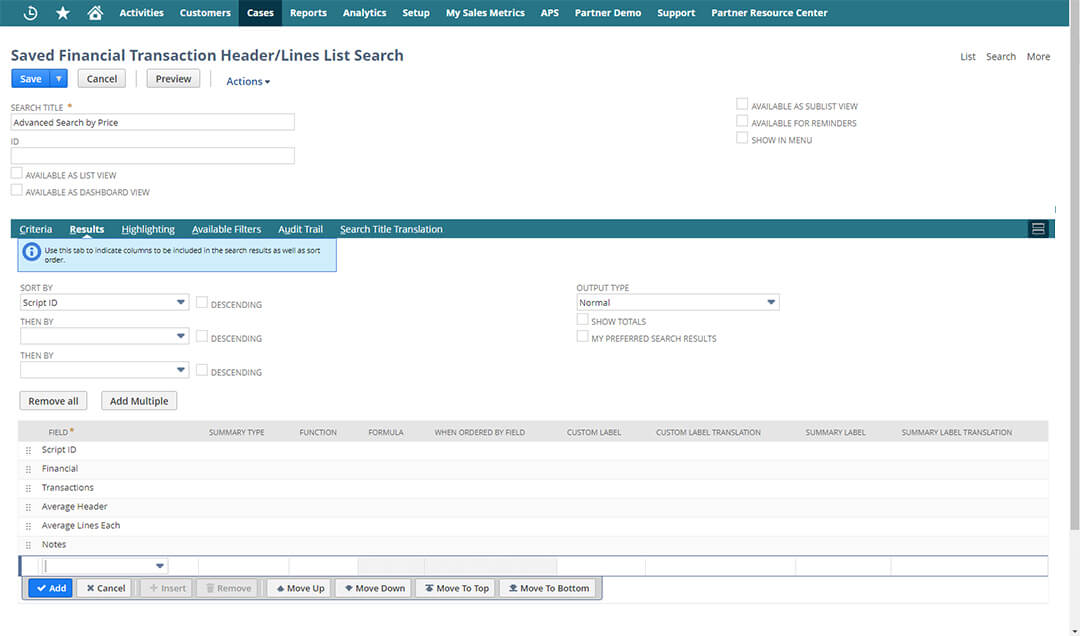
Saved Searches
Saved Searches are one of the most powerful and flexible tools in NetSuite reporting. They let users define custom criteria and filters to generate real-time lists of records—such as transactions, customers, items, or any other data type. These searches can be private or shared, and results can be displayed directly on dashboards, used as shortcuts, or embedded in portlets for fast access to critical metrics. Unlike static reports, saved searches update live and are ideal for tracking ongoing activity or managing daily tasks.
Saved Searches also support proactive workflows through automation. Users can schedule alerts, apply color coding, prioritize next actions, and control who can view the results. They’re commonly used to track overdue invoices, open support cases, sales orders over a certain amount, or inventory thresholds. Because of their flexibility, saved searches are widely used across finance, sales, operations, and support teams—and they often become the go-to reporting tool for power users.
Key capabilities of Saved Searches:
- Email alerts: Trigger automated emails when search results change. Use this for lead follow-ups, inventory backorders, or approvals that need immediate attention.
- Prioritization lists: Build action-oriented reports like “top overdue accounts” or “customers to contact today.” These searches help teams focus on what needs attention first.
- Color highlighting: Add visual cues by flagging key records with color codes. Highlight aging support cases in red or low-stock items in yellow to drive faster response.
- Audience control: Limit who sees each saved search by role, department, or individual. Define default views by job function to improve visibility while maintaining data security.
For deeper tips, explore our blogs on NetSuite Saved Searches: What Are They and How to Use Them, Enhancing NetSuite Saved Searches with conditional statements, and Adding quick filters to Saved Searches.
SuiteAnalytics Workbook
SuiteAnalytics Workbook is NetSuite’s interactive reporting and analysis tool that lets users explore real-time data with pivot tables, charts, and custom datasets, all without writing code. Think of it as built-in business intelligence, similar to Excel or Tableau, but directly connected to your live NetSuite data. Workbooks support advanced analysis that goes beyond standard reports or saved searches, making them ideal for users who want to visualize trends, compare dimensions, or blend data from multiple sources.
Workbooks can be built from scratch or customized using prebuilt templates. Users can save, share, and reuse Workbooks across teams, and even display them on dashboards using portlets. With drag-and-drop functionality, business users can create flexible views of their data while keeping source records safe. Whether you’re analyzing revenue by region or tracking sales by product line, SuiteAnalytics Workbook makes it easier to turn raw data into clear, visual insights.
Key features of SuiteAnalytics Workbook:
- Pivots: Summarize large datasets quickly using drag-and-drop pivot tables. Create filters and sort by top or bottom results to highlight key trends or performance gaps.
- Table views: Display data as itemized lists for easier review and filtering. Table views are useful for users who prefer a straightforward way to analyze data without complex formatting.
- Charts: Build visualizations like bar charts, line graphs, or pie charts to help users interpret patterns over time. Charts use the same filters as pivots, making them easy to build and update.
- Multi-level joins: Combine data from multiple record types in a single dataset. This allows users to analyze connected records, such as sales orders, customer details, and product data, all in one view.

NetSuite Analytics Warehouse
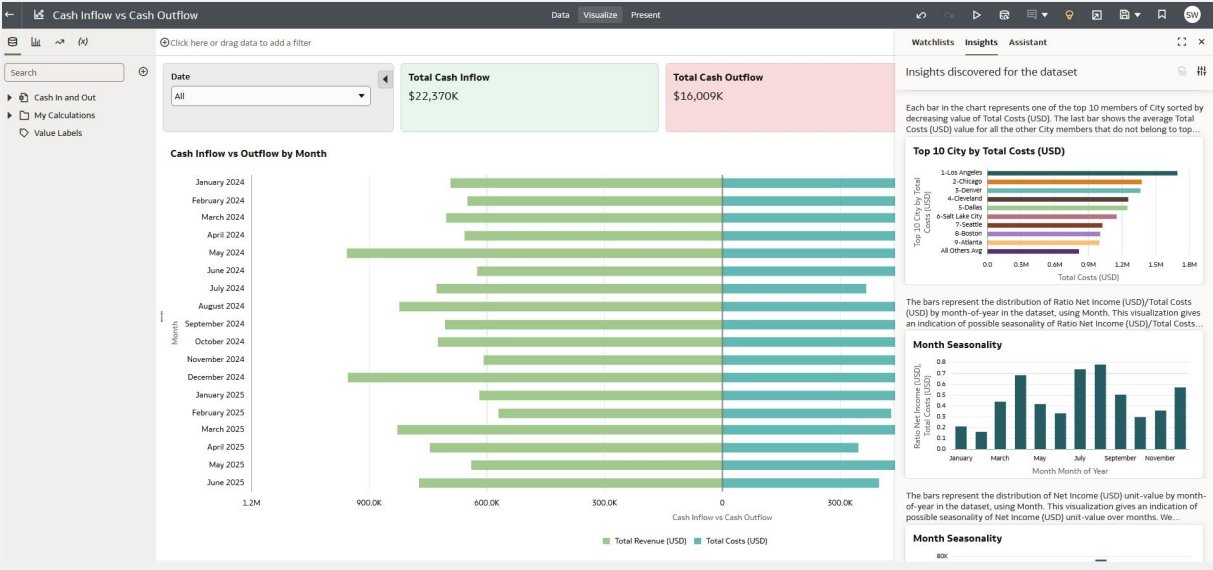
NetSuite Analytics Warehouse (NSAW) is an advanced, AI-powered cloud analytics solution designed specifically for NetSuite customers. It provides a dedicated environment for analyzing NetSuite data along with data from other systems at scale, without impacting day-to-day performance. NSAW is ideal for organizations that need richer insights, historical trend analysis, and predictive capabilities that go beyond the scope of transactional reporting.
Built on Oracle Autonomous Data Warehouse and Oracle Analytics Cloud, NetSuite Analytics Warehouse automatically extracts and transforms your NetSuite data, including custom fields, into an analytics-ready model. It also connects to over 40 third-party sources such as Salesforce and Google Analytics, making it easy to consolidate data across platforms and generate comprehensive dashboards, forecasts, and executive-level reports.
Key capabilities of NetSuite Analytics Warehouse:
- Enterprise-grade analytics and performance: Built on Oracle’s cloud infrastructure, NSAW automatically scales, patches, and tunes itself, delivering fast performance, high security, and minimal maintenance.
- Unified data from multiple sources: Consolidates NetSuite data with external systems to create a single source of truth. This enables deeper analysis and cross-functional insights that standard NetSuite reporting can’t provide.
- AI-powered insights: Embedded AI and machine learning detect anomalies, forecast outcomes, and surface hidden trends, helping leaders act on insights proactively rather than reactively.
- Out-of-the-box dashboards and KPIs: Comes with prebuilt visualizations and subject areas that can be customized by role or department, accelerating time to insight and supporting better decisions.
- Personalized self-service tools: Analysts and business users can build pivot tables, graphs, and reports using intuitive drag-and-drop interfaces. No SQL or scripting required.
- Optimized for scale: NSAW handles large datasets and historical reporting needs without slowing down your core NetSuite environment, making it ideal for growing, multi-entity businesses.
External reporting tools
While NetSuite offers powerful native reporting, some organizations choose to extend reporting capabilities with external tools like Excel, Power BI, Tableau, or custom data warehouses. NetSuite supports this through SuiteAnalytics Connect, which provides ODBC, JDBC, and ADO.NET drivers to access live NetSuite data. This allows users to combine NetSuite data with other systems, perform advanced visualizations, or support enterprise-wide BI strategies. Whether you’re exporting reports to Excel or integrating with a central BI platform, NetSuite ensures your data remains accessible and flexible.
Popular use cases for external tools:
- Data consolidation: Combine NetSuite data with CRM, e-commerce, or legacy systems to create unified reports across platforms.
- Advanced visualizations: Use tools like Power BI or Tableau to build custom dashboards, heat maps, or other visual formats beyond native NetSuite capabilities.
- BI tool integration: Connect NetSuite to your existing enterprise business intelligence environment to standardize reporting across departments.
- Scheduled exports: Automate delivery of NetSuite reports or saved searches to email, Excel, or CSV for offline analysis or distribution.
- API and data syncs: Use REST APIs, SOAP (SuiteTalk), or Connect drivers to feed NetSuite data into external databases or cloud tools for deeper analysis.
Types of reports in NetSuite
NetSuite reporting includes a wide range of built-in and customizable reports that support visibility across your business. Most reports fall into two main categories: financial reports and operational reports. Below, we’ll explore both types and how they support decision-making.
Financial reports
Financial reports in NetSuite help accounting and finance teams track company performance, manage compliance, and prepare for audits or executive review. These reports pull directly from live transactional data and are always up to date, reducing the need for manual exports. NetSuite includes out-of-the-box financial statements, detailed ledgers, and custom layouts that support multi-entity and multi-currency environments. Reports can be run by time period, department, subsidiary, or custom dimensions—making them flexible for both internal and external reporting.
Examples of financial reports in NetSuite:
- Income Statement (Profit & Loss): Tracks revenue, expenses, and net profit across any time period or segment.
- Balance Sheet: Provides a real-time snapshot of assets, liabilities, and equity, with support for consolidated reporting.
- Cash Flow Statement: Displays cash movement across operating, investing, and financing activities to help manage liquidity.
- A/R and A/P Aging: Shows outstanding invoices and bills organized by aging buckets to support collections and payables.
- Budget vs Actual: Compares actual financial performance against planned budgets for better expense control.
- Financial KPIs and Ratios: Includes metrics like gross margin %, current ratio, and return on equity to support analysis and planning.

Operational reports
Operational reports in NetSuite help departments like sales, inventory, procurement, and customer service monitor performance and improve efficiency. These reports are used daily by teams to manage tasks, track activity, and make informed decisions. Because NetSuite reporting pulls from a unified data model, operational metrics can be tied directly to financial outcomes—giving teams real-time visibility across the business without relying on spreadsheets.
Examples of operational reports in NetSuite:
- Sales reports: Track performance by rep, item, customer, or pipeline stage to monitor quotas and manage open opportunities.
- Inventory and warehouse reports: View current stock levels, turnover, backorders, and reorder points to keep inventory flowing smoothly.
- Purchasing and vendor reports: Monitor purchases by vendor, open POs, and delivery performance to manage cost and supplier reliability.
- Project reports: Analyze project profitability, budget vs actuals, and consultant utilization to stay on track and billable.
- Support and service reports: Report on case volume, resolution time, and customer satisfaction to improve service operations.
- Operational KPIs: Measure fulfillment speed, production yield, or web order volume—connecting frontline activity to business performance.

Standard vs custom reports in NetSuite
NetSuite reporting includes over 200 standard reports that support common financial and operational needs out of the box. These built-in reports follow industry best practices and require minimal setup, making them ideal for daily monitoring, period closes, and executive review. Most organizations can rely on standard reports like income statements, balance sheets, sales by customer, and inventory on hand for core reporting tasks. These reports are easy to access, customizable with filters, and maintained by NetSuite during system updates, offering a strong starting point for most business users.
However, many businesses eventually encounter reporting needs that go beyond the defaults. Whether it’s a specific format, custom field, or multi-record data join, standard reports may not provide the full picture. In these cases, NetSuite’s custom reporting tools—like the Report Builder, Saved Searches, and SuiteAnalytics Workbook—can deliver tailored insights that align with unique business processes. Custom reporting ensures teams get the exact data, layout, and metrics they need to make informed decisions.
Common custom reporting options in NetSuite:
- Add custom fields: Include business-specific data like customer segments, project codes, or internal scoring in your reports. Custom fields ensure that your reporting reflects the exact attributes your teams use daily.
- Build calculated columns or KPIs: Create formulas to calculate profit margins, variance percentages, or other performance metrics not available by default. These calculated fields can be used in saved searches, dashboards, or printed reports.
- Join multiple record types: Combine data across modules—such as linking sales orders with customer profiles and support cases—in a single report. This is especially useful when analyzing trends that span CRM and ERP records.
- Create tailored dashboards: Feed dashboards with saved searches and custom KPIs specific to user roles like sales managers, controllers, or project leads. Custom dashboards help users see their key metrics the moment they log in.
- Design cross-entity reports: Generate consolidated reports that group data across subsidiaries, departments, or business units. This helps leadership see rolled-up performance without manual consolidation.
- Automate recurring reports: Schedule custom reports to run and deliver via email in Excel, PDF, or CSV formats. This eliminates the need for manual exports and keeps stakeholders updated with consistent data.
- Work with a NetSuite partner: A partner can help build complex reports, optimize performance, and align reporting with business goals. They bring expertise in NetSuite’s data structure and tools to get results faster and more accurately.
Common reporting challenges and best practices
Even with a strong platform like NetSuite, many businesses face challenges when trying to get consistent, accurate, and actionable reports. Common issues include incomplete data, inconsistent definitions, and over-reliance on spreadsheets. When users aren’t trained or don’t trust the system, they often export data for manual reporting, which leads to errors, delays, and duplicate efforts. Without proper governance, teams may create conflicting reports that don’t align across departments.
Performance issues, reporting silos, and underutilized tools also hold teams back. Reports may run slowly due to large data sets or improper filters. Departments may use their own reporting logic instead of aligning around NetSuite’s shared data model. And without training, users may not realize that a report they’re building manually could be automated inside NetSuite. Overcoming these issues takes a mix of process, training, and smart use of the platform.
Best practices for better NetSuite reporting:
- Ensure data quality and structure: Clean data starts with proper NetSuite setup—required fields, validation rules, and consistent entry practices. Accurate inputs lead to trusted reports and reduce the need for cleanup downstream.
- Use NetSuite tools instead of spreadsheets: Try Saved Searches or dashboards before exporting to Excel. Keeping analysis in NetSuite reduces errors and ensures your reports reflect live data.
- Automate routine reports: Use scheduling features to send reports or saved searches automatically. This saves time and ensures teams get consistent updates without manual effort.
- Standardize KPIs and formulas: Align on definitions for key metrics like gross margin or revenue by region. Use NetSuite’s global KPI setup to ensure consistency across teams.
- Review and optimize regularly: Periodically audit your saved searches and reports. Remove outdated ones, streamline filters, and keep your reporting library clean and fast.
- Work with a NetSuite partner: A NetSuite consulting partner can design custom reports, improve performance, and train your team. They help you follow best practices and unlock the full power of NetSuite reporting.
Case study: Improved reporting speed and scalability with NetSuite
Mann Eye Institute, one of Texas’s largest ophthalmology practices, needed a faster, more scalable financial system to support its growing footprint across 17 locations. With reporting delays and limited visibility by department or location, their legacy system could no longer keep up. Rand Group led the implementation of NetSuite using a rapid deployment approach, focusing on streamlined financial reporting and automation. As a result, Mann Eye transformed its reporting processes—reducing delays, improving accuracy, and enabling real-time insights across the organization.
NetSuite reporting improvements achieved by Mann Eye Institute:
- 95% reduction in AP report generation time, from 20 minutes to under 10 seconds
- Improved reporting accuracy with the ability to report by location, department, and business unit
- 60% reduction in manual data entry for accounts payable through automation
- Same-day invoice approvals, down from multi-day cycles
- Scalable financial reporting supported 40–50% revenue growth with no additional accounting headcount
To learn more, read the full Mann Eye Institute case study.

Get more value from NetSuite reporting
Robust NetSuite reporting requires more than just running reports—it takes the right data structure, governance, and ongoing optimization. Rand Group helps businesses build scalable, accurate reporting solutions that align with long-term goals.
How Rand Group supports NetSuite reporting
Getting the most value from NetSuite reporting requires more than just running default reports—it takes a clear strategy, the right setup, and expert guidance. Rand Group brings deep experience in both NetSuite and financial reporting to help businesses implement a scalable, high-impact reporting framework. From initial assessment to long-term support, our team works with clients to build reporting solutions that are accurate, efficient, and aligned with business goals. Whether you’re building dashboards, refining KPIs, or eliminating manual processes, Rand Group helps you unlock actionable insights from your NetSuite data.
Our NetSuite reporting services include:
- Reporting strategy and assessment: We evaluate your current reporting setup and identify key gaps, inefficiencies, or misaligned KPIs. From there, we design a roadmap to build or optimize reports that align with your business goals.
- Custom report and dashboard development: Our team builds tailored reports, saved searches, and dashboards using NetSuite’s native tools. We can also incorporate advanced features like SuiteScript or the Financial Report Builder for more complex logic.
- Performance optimization and cleanup: If your reports are slow or cluttered, we help streamline them. We optimize saved searches, clean up outdated reports, and improve load times for faster, more reliable reporting.
- Training and user enablement: We provide training sessions and coaching to empower your team to use NetSuite’s reporting tools confidently. This reduces reliance on IT and enables faster, self-service insights across departments.
- Ongoing support and enhancement: As your business evolves, so do your reporting needs. We provide continuous support to manage report updates, troubleshoot issues, and build new insights as requirements change.
Frequently asked questions (FAQs) about NetSuite reporting
What is NetSuite reporting?
NetSuite reporting is the process of analyzing real-time business data using built-in tools like reports, saved searches, dashboards, and workbooks. It helps organizations track financial performance, monitor operations, and make data-driven decisions.
What reporting tools are available in NetSuite?
NetSuite includes standard reports, saved searches, dashboards, KPIs, and SuiteAnalytics Workbook. Each tool supports different reporting needs, from day-to-day operations to financial summaries.
What is a Saved Search in NetSuite?
A saved search is a customizable query that returns a real-time list of results based on user-defined filters and criteria. It’s commonly used for operational reporting, alerts, and exporting data.
What's the difference between a NetSuite report and a Saved Search?
NetSuite reports are structured, often formatted for printing, and best for summaries and financials. Saved searches are more flexible, list-based, and ideal for custom filtering and real-time analysis.
What is NetSuite Analytics Warehouse?
NetSuite Analytics Warehouse is a cloud-based analytics platform built for NetSuite users that centralizes data and delivers advanced reporting, dashboards, and AI-powered insights. It combines Oracle’s Autonomous Data Warehouse and Analytics Cloud to support large-scale analysis, historical trends, and predictive modeling beyond standard NetSuite reports.
Is NetSuite reporting real time?
Yes, NetSuite reporting is real time. Reports, dashboards, and saved searches pull directly from live transactional data.
Why should I work with a partner for NetSuite reporting?
A NetSuite partner helps design accurate, efficient, and scalable reporting. They bring expertise in tools, business logic, and best practices to ensure reports deliver meaningful insights.
Next steps
NetSuite reporting gives your business the visibility needed to make faster, smarter decisions. With the right tools and strategy, you can eliminate manual reporting, reduce delays, and get real-time insights across every department.
Whether you’re just starting with NetSuite or want to improve existing reports, Rand Group can help you design a reporting framework that fits your goals. Contact Rand Group today to get expert guidance and unlock the full value of NetSuite reporting.