Dynamics 365
 Power Platform
 Dynamics
 Cloud & Productivity
Best CRM software for mid-sized businesses

As mid-sized businesses grow, managing sales, marketing, and customer service becomes more complex. Customer information may be spread across different systems, making it harder to track opportunities, manage relationships, and deliver consistent service. The right customer relationship management (CRM) software helps businesses organize customer data, automate processes, and improve visibility across teams.
Finding the best CRM software for your mid-sized business requires understanding how different platforms compare. Microsoft Dynamics 365 Sales, Oracle NetSuite CRM, Sage CRM, Salesforce, and HubSpot offer different approaches to managing customer relationships. This guide compares their features, pricing, integration options, and ideal use cases while exploring additional applications that support specialized business needs.
At a glance
The best CRM software for mid-sized businesses depends on their operations, existing technology, and long-term goals. Dynamics 365 Sales is well suited for Microsoft users who need connected sales processes, NetSuite CRM offers native ERP integration, and Sage CRM supports businesses using Sage 100. Salesforce provides extensive customization and sales automation, while HubSpot offers accessible sales and marketing tools. Specialized Dynamics 365 applications also support customer service, contact centers, field operations, marketing, and project delivery. Businesses should compare functionality, AI capabilities, integrations, administration requirements, and total cost of ownership before selecting a platform.
What is CRM software?
Customer relationship management (CRM) software is a system that helps businesses manage customer information, interactions, and relationships in one place. It provides a central location for tracking contacts, leads, sales opportunities, communication history, and service requests. For mid-sized businesses, CRM software gives sales, marketing, and customer service teams a shared view of customer relationships, helping them stay organized and work together as the business grows.
Modern CRM systems go beyond basic contact management. Depending on the application, businesses can automate sales activities, manage marketing campaigns, resolve customer issues, schedule field services, and track performance through reports and dashboards. Many CRM platforms also include artificial intelligence (AI) tools that help employees reduce manual work, identify opportunities, and make better decisions using customer data.
When does a mid-sized business need a CRM system?
A mid-sized business needs a CRM system when its current tools can no longer support growing customer relationships, sales activities, and service demands. As the business expands, managing information across spreadsheets, emails, and disconnected systems can lead to missed opportunities, slower processes, and limited visibility. Common signs that it’s time to invest in CRM software include:
- Scattered customer information: Customer records, communication histories, and sales activities are spread across multiple systems, making information difficult to find and share.
- Missed sales opportunities: Sales representatives struggle to track leads, manage follow-ups, and move opportunities through the sales pipeline.
- Limited sales visibility: Managers lack accurate forecasts, current pipeline data, and clear insights into sales team performance.
- Disconnected customer service: Support teams cannot easily access previous interactions, open cases, or customer histories to resolve issues efficiently.
- Time-consuming manual processes: Employees spend too much time entering data, updating records, preparing reports, and transferring information between systems.
- Difficulty supporting growth: Existing tools cannot easily accommodate more customers, employees, locations, or increasingly complex business processes.
How we evaluated the best CRM systems for mid-sized businesses
We evaluated five core CRM platforms using the same criteria to understand how well each supports the needs of mid-sized businesses. Rand Group has helped organizations implement and optimize business technology since 2003, with experience across Microsoft, Oracle NetSuite, and Sage. Our comparison considers each platform’s capabilities, integration approach, flexibility, and long-term value, including the differences between available editions and optional applications.
- Sales functionality and reporting: Tools for managing leads, opportunities, pipelines, forecasting, and sales performance.
- Marketing and customer service coverage: Available features for managing campaigns, customer interactions, support cases, and service activities.
- Integration capabilities: Connections with ERP, accounting, email, marketing, and other business applications, including native and third-party integration options.
- Customization and administration: Flexibility to configure workflows, data structures, and business processes, along with the expertise needed to manage the system.
- AI and automation: Available AI assistants, agents, predictive insights, and tools that automate routine work.
- Ease of use and scalability: How easily employees can adopt the software and how well it supports growing teams and changing business requirements.
- Pricing and commercial model: Licensing structure, optional modules, implementation costs, and total cost of ownership.
Best CRM software for mid-sized businesses
The best CRM software for mid-sized businesses provides the tools needed to manage customer relationships, track sales opportunities, and support business growth. However, CRM platforms differ in how they handle marketing, customer service, integrations, automation, and customization. Some are designed to work closely with ERP systems, while others offer broader ecosystems or simpler approaches to customer management.
Five CRM platforms worth evaluating are Microsoft Dynamics 365 Sales, Oracle NetSuite CRM, Sage CRM, Salesforce Sales Cloud, and HubSpot. Each offers core sales and customer management capabilities, but their ideal use cases differ. The following table provides a starting point for identifying which CRM solutions may fit your organization.
10 CRM software selection mistakes that spell failure
Selecting CRM software involves decisions that can affect your sales processes, customer service, and long-term technology costs. Download our white paper to learn 10 common CRM selection mistakes and how to avoid them before making your investment.
Dynamics 365 Sales – best for sales automation and pipeline management
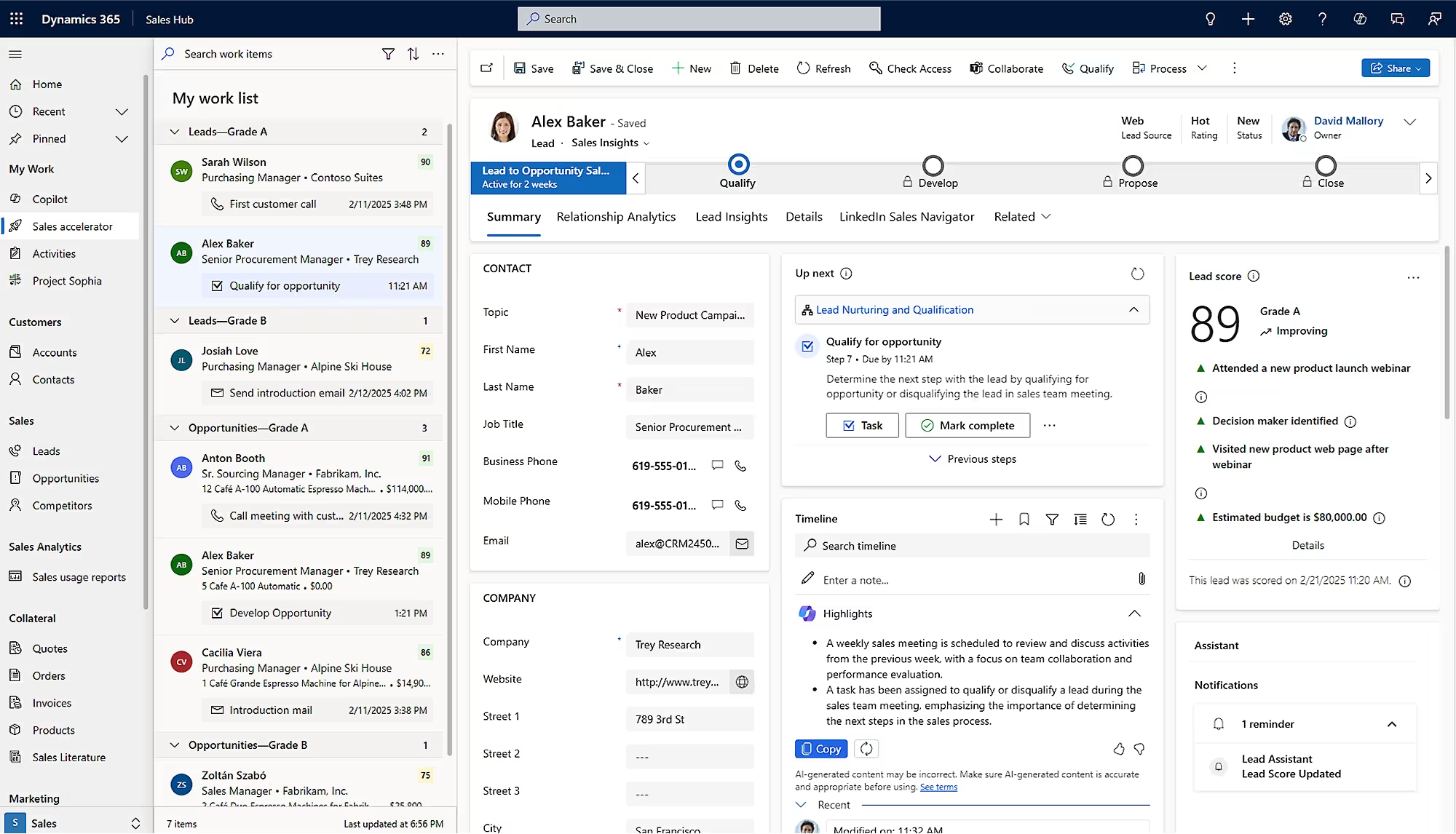
Microsoft Dynamics 365 Sales is a cloud-based CRM application that helps businesses manage leads, track opportunities, and improve sales performance. It gives sales teams a central view of customer records, pipeline activity, and sales forecasts. For mid-sized businesses with growing sales teams or complex sales cycles, Dynamics 365 Sales helps standardize processes, automate routine tasks, and improve visibility into revenue opportunities.
Dynamics 365 Sales works closely with Microsoft 365 applications, including Outlook and Teams, and can integrate with Dynamics 365 Business Central and other ERP systems. The platform also supports customization and automation through Microsoft Power Platform. Businesses can choose between editions with different levels of sales intelligence, forecasting, and AI capabilities, including Copilot and available AI agents.
Key capabilities include:
- Lead and opportunity management: Track prospects, sales activities, customer accounts, and opportunities throughout the sales pipeline.
- Sales forecasting and reporting: Monitor pipeline performance, expected revenue, sales goals, and team activity through dashboards and forecasts.
- AI-powered sales assistance: Use available Copilot features and AI agents to summarize opportunities, prepare for meetings, and support sales activities.
- Workflow automation and customization: Configure sales processes, automate repetitive tasks, and connect customer information with other business applications.
Best fit: Mid-sized businesses using Microsoft 365 or Dynamics 365 that need advanced sales management, automation, and integration with business systems.
Less suitable when: A business needs only basic contact tracking and wants a simple CRM with minimal configuration or administration.
NetSuite CRM – best for businesses using NetSuite ERP
Oracle NetSuite CRM is a cloud-based customer relationship management solution that connects sales, marketing, and customer service within the NetSuite platform. It supports the customer lifecycle from lead generation and opportunity management through sales orders, fulfillment, billing, and support. For mid-sized businesses, this provides a connected view of customer relationships and the transactions associated with them.
NetSuite CRM is particularly valuable for organizations already using NetSuite ERP or seeking an integrated business management platform. Its native ERP connection gives sales teams access to customer orders, inventory, and financial information without relying on a separate CRM database. NetSuite also supports workflow automation, reporting, and customization through SuiteCloud, although more complex configurations may require specialized administration.
Key capabilities include:
- Sales force automation: Manage leads, contacts, opportunities, quotes, sales activities, and revenue forecasts.
- Marketing and customer service: Track campaigns, manage customer communications, and organize support cases.
- Integrated CRM and ERP data: Connect customer information with inventory, orders, fulfillment, billing, and financial records.
- Reporting and customization: Use dashboards, analytics, workflows, and SuiteCloud tools to support business requirements.
Best fit: Mid-sized businesses using NetSuite ERP or planning to adopt NetSuite for connected sales, financial, and operational management.
Less suitable when: An organization wants a standalone sales CRM but does not use or plan to adopt the broader NetSuite platform.

Sage CRM – best for Sage 100 users and growing sales teams
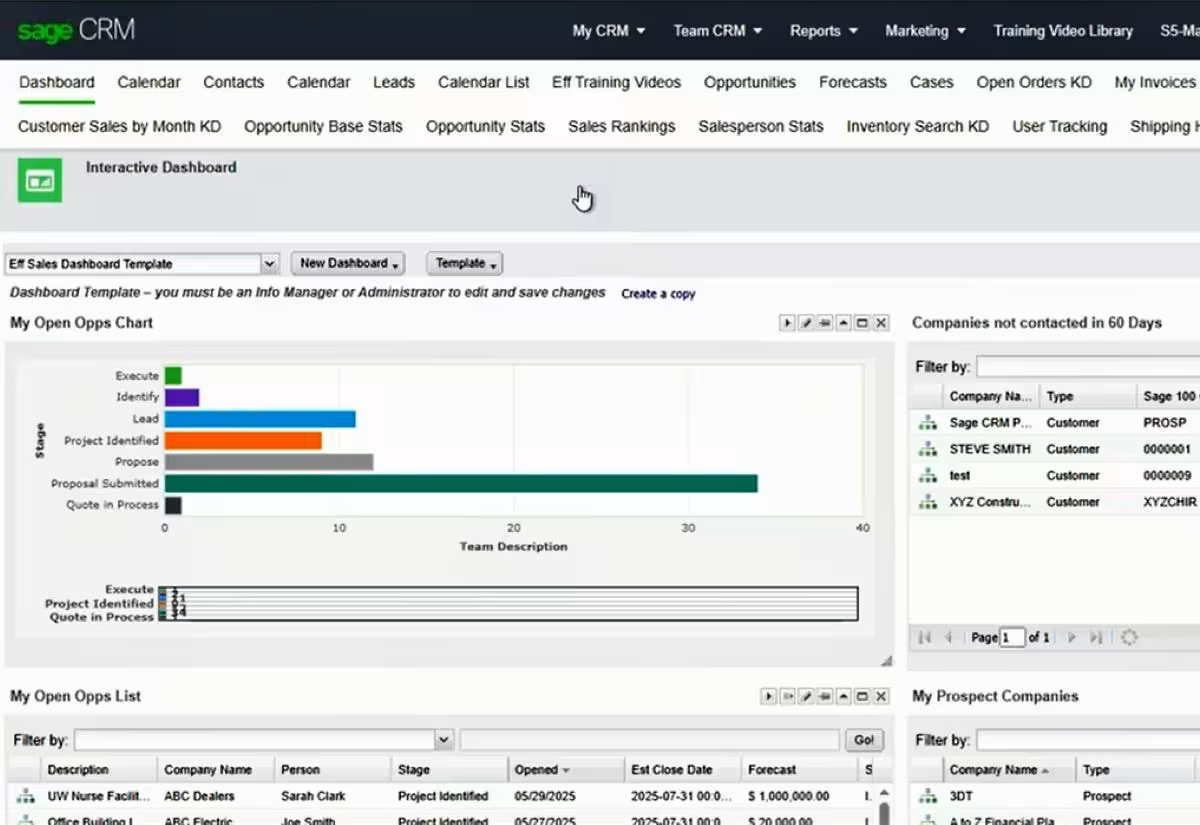
Sage CRM is a customer relationship management system that helps small and mid-sized businesses manage sales, marketing, and customer service. It centralizes customer records, sales opportunities, communication histories, and service cases in one application. Built-in reporting and workflow automation help sales and service teams track activities, manage relationships, and improve daily processes.
Sage CRM is particularly well suited for businesses using Sage 100 that want to connect customer information with accounting and order management. Its Sage 100 integration supports data sharing between sales and financial processes, reducing duplicate entry and improving access to customer information. Sage CRM also offers on-premises and hosted deployment options, along with configurable workflows and reporting tools.
Key capabilities include:
- Lead and opportunity management: Track prospects, sales activities, opportunities, and pipeline progress from one system.
- Sales forecasting and reporting: Monitor expected revenue, sales performance, customer activity, and team results.
- Marketing and customer service: Manage campaigns, customer inquiries, support cases, and communication histories.
- Sage 100 integration and workflows: Connect customer records with accounting and sales order information while automating routine processes.
Best fit: Sage 100 users who want connected CRM and accounting workflows, along with sales, marketing, and customer service capabilities.
Less suitable when: A business requires extensive native AI agents, advanced omnichannel engagement, or a large ecosystem of specialized CRM applications.
Salesforce Sales Cloud – best for complex sales processes and customization
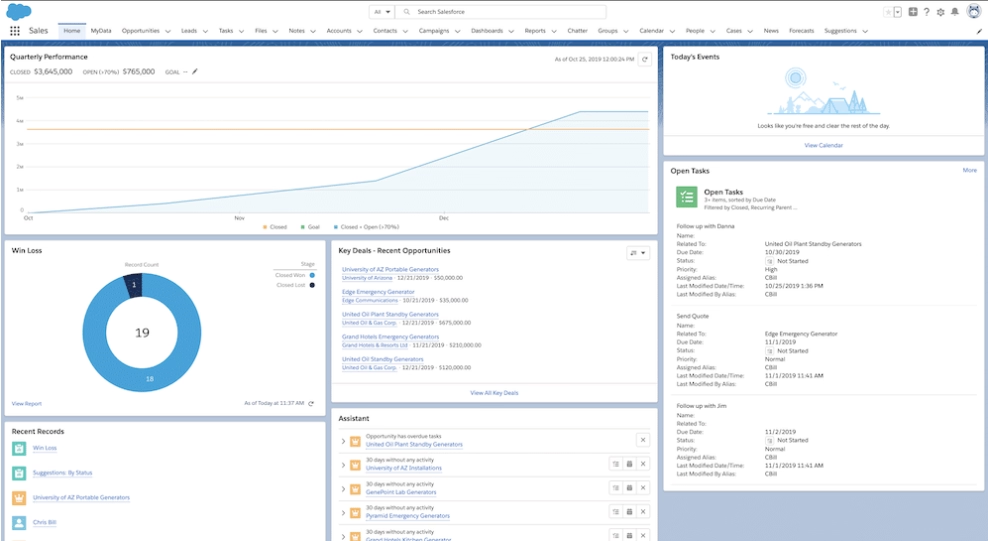
Salesforce Sales Cloud is a cloud-based CRM platform that helps businesses manage leads, opportunities, customer accounts, and sales performance. It supports sales teams with forecasting, pipeline management, automation, and reporting. For mid-sized businesses with complex sales cycles or specialized sales processes, Salesforce offers extensive options for configuring workflows, managing data, and supporting different sales roles.
Salesforce can connect with other business systems through APIs, AppExchange applications, and integration tools such as MuleSoft. Its broader product ecosystem also includes marketing and customer service applications, along with AI capabilities through Agentforce. However, advanced features often require additional licenses, while complex configurations and integrations can increase implementation costs and ongoing administration needs. Businesses should consider these requirements when evaluating Salesforce’s total cost of ownership.
Key capabilities include:
- Lead and opportunity management: Track prospects, manage accounts, monitor pipelines, and support structured sales processes.
- Sales forecasting and analytics: Analyze expected revenue, sales performance, pipeline activity, and opportunities through reports and dashboards.
- AI-powered sales tools: Use available Agentforce capabilities and AI insights to assist with prospecting, sales research, and routine activities.
- Customization and integrations: Configure data structures, automate workflows, and connect applications through Salesforce tools and integrations.
Best fit: Mid-sized businesses with complex sales processes, advanced customization needs, or dedicated resources to manage and expand their CRM.
Less suitable when: An organization needs a straightforward CRM with limited administration, minimal configuration, or predictable costs across multiple advanced features.
HubSpot – best for ease of use and sales and marketing alignment
HubSpot is a cloud-based customer platform that helps businesses manage contacts, sales opportunities, and customer interactions. Its Smart CRM provides shared customer records, while Sales Hub includes tools for pipeline management, sales productivity, and reporting. For mid-sized businesses that want an accessible CRM with a relatively straightforward setup, HubSpot offers a practical starting point that can expand as sales processes become more complex.
HubSpot connects sales, marketing, and customer service through products such as Sales Hub, Marketing Hub, and Service Hub. It also offers integrations through its app marketplace and APIs, allowing businesses to connect CRM data with other applications. However, advanced automation, custom objects, and some Breeze AI capabilities require higher-tier plans or additional products, which can increase costs as business needs grow. Organizations with complex ERP requirements may also need additional integrations and configuration.
Key capabilities include:
- Contact and pipeline management: Organize customer records, track deals, manage sales activities, and monitor opportunities.
- Sales productivity tools: Use email tracking, meeting scheduling, sales sequences, and reporting to support sales teams.
- Connected marketing and service: Extend CRM functionality with marketing campaigns, customer journeys, ticketing, and service tools.
- AI and workflow automation: Use available Breeze AI features and automation tools to summarize information, support outreach, and reduce repetitive work.
Best fit: Growing businesses that prioritize ease of use, employee adoption, and connected sales and marketing processes.
Less suitable when: A business needs deep ERP-centered workflows or extensive custom functionality without relying on additional integrations, higher-tier plans, or specialized configuration.

Specialized Dynamics 365 CRM applications
Beyond core sales CRM software, some businesses need applications that support specific customer-facing processes. Microsoft Dynamics 365 offers specialized solutions for customer service, contact centers, field operations, marketing, and project delivery. These applications extend customer management into other business functions rather than serving as direct alternatives to a general sales CRM.
Dynamics 365 Customer Service – best for customer support and case management
Microsoft Dynamics 365 Customer Service is a CRM application that helps businesses manage customer support requests and resolve issues more efficiently. It brings customer information, service cases, and communication history into one system, giving support agents the information they need to assist customers. For mid-sized businesses with growing service teams, the application helps standardize support processes, improve response times, and maintain consistent service quality.
Dynamics 365 Customer Service supports customer interactions across multiple channels and integrates with other Microsoft applications, including Dynamics 365 Sales. This allows service teams to access relevant customer information without switching between disconnected systems. AI-powered tools also help agents find answers, summarize cases, and respond to customer inquiries, reducing the time spent on routine support tasks.
Key capabilities include:
- Case management: Create, assign, prioritize, and track customer support requests from initial contact through resolution.
- Knowledge management and self-service: Provide agents and customers with access to helpful articles, troubleshooting information, and self-service resources.
- Intelligent routing and automation: Direct cases to the appropriate agents based on skills, availability, and service requirements.
- Copilot and service analytics: Generate case summaries, draft responses, and monitor service performance through dashboards and reports.

Dynamics 365 Contact Center – best for omnichannel customer engagement
Microsoft Dynamics 365 Contact Center is a cloud-based solution that helps businesses manage customer interactions across voice and digital channels. It brings phone calls, chat, messaging, and other customer conversations into a connected service environment. For mid-sized businesses with high contact volumes, the application helps improve routing, support agent productivity, and the consistency of customer experiences.
Dynamics 365 Contact Center focuses on how customers communicate with a business, while Dynamics 365 Customer Service focuses on managing cases and support workflows. The applications can work together, but Contact Center can also integrate with other CRM systems, including Salesforce. Built-in Copilot features, intelligent routing, and AI-powered self-service help businesses manage customer interactions more efficiently.
Key capabilities include:
- Omnichannel engagement: Manage customer conversations across voice, chat, messaging, and other supported channels.
- Intelligent routing: Direct customer interactions to available agents based on skills, workload, and service requirements.
- AI-powered self-service: Help customers resolve common questions through chatbots, virtual agents, and conversational interactive voice response (IVR).
- Copilot and contact center analytics: Summarize conversations, assist agents, and monitor service levels, workloads, and performance.

Dynamics 365 Field Service – best for field service management and scheduling
Microsoft Dynamics 365 Field Service is a CRM application that helps businesses manage on-site service operations, including scheduling, dispatching, maintenance, and repairs. It connects work orders, customer information, technician schedules, and equipment records in one system. For mid-sized businesses that provide field services, the application helps coordinate technicians, reduce scheduling delays, and improve service delivery.
Dynamics 365 Field Service is particularly useful for equipment maintenance providers, manufacturers, utilities, and other service-driven organizations. Technicians can access work orders, service histories, and equipment information through a mobile application, even when working offline. The platform also supports integration with ERP systems and can use IoT data and AI to help businesses move from reactive maintenance toward more proactive service models.
Key capabilities include:
- Work order management: Create, assign, and track service requests, repairs, inspections, and recurring maintenance activities.
- Resource scheduling: Match technicians with jobs based on availability, skills, location, and service priorities.
- Mobile field service tools: Access job details, customer records, equipment histories, and work order updates from the field.
- Predictive maintenance and AI: Use connected equipment data, IoT alerts, and intelligent scheduling tools to identify service needs and reduce downtime.

Dynamics 365 Customer Insights – best for marketing automation and personalized customer engagement
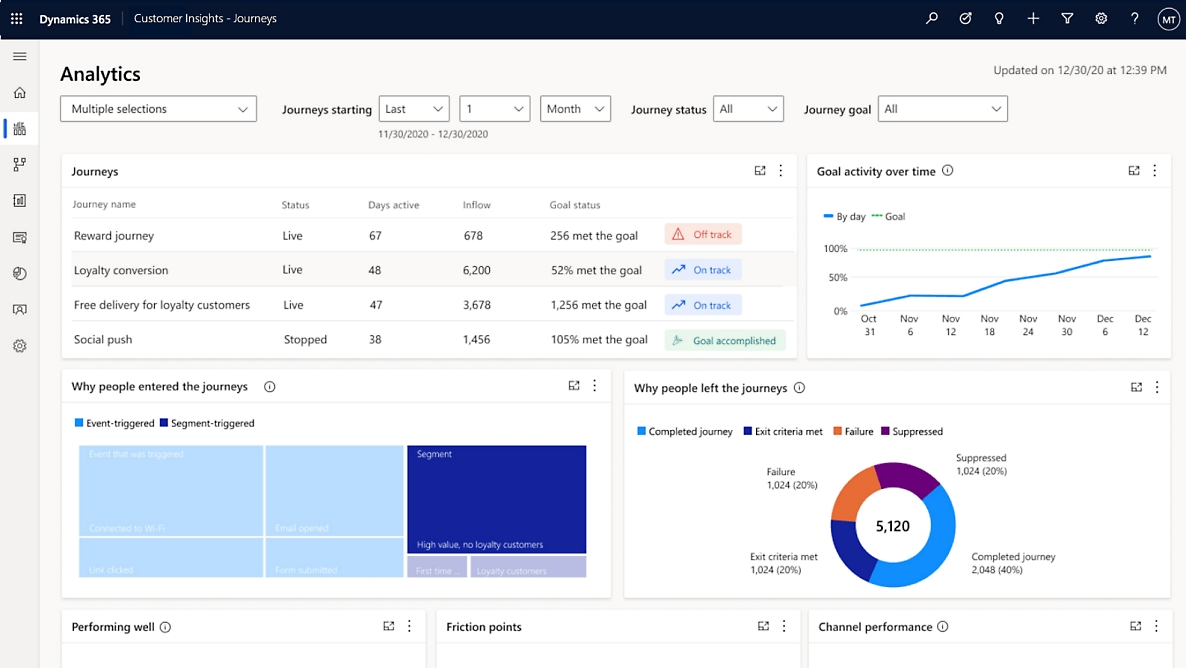
Microsoft Dynamics 365 Customer Insights is a customer data and marketing application that helps businesses understand their customers and deliver personalized experiences. It brings together customer information from multiple sources, allowing marketing teams to build targeted audiences and automate communications. For mid-sized businesses with growing customer databases or complex marketing campaigns, Customer Insights helps improve targeting, engagement, and campaign effectiveness.
Dynamics 365 Customer Insights includes two connected applications: Customer Insights – Data and Customer Insights – Journeys. Customer Insights – Data unifies customer information to create a more complete view of each customer, while Customer Insights – Journeys supports automated, personalized marketing across multiple channels. Together, these capabilities help businesses use customer behavior and preferences to deliver relevant communications throughout the customer lifecycle.
Key capabilities include:
- Unified customer profiles: Combine customer information from multiple data sources to create a more complete view of each customer.
- Advanced segmentation: Build targeted audiences based on demographics, purchase history, customer behavior, and engagement.
- Automated customer journeys: Deliver personalized emails, text messages, and other communications based on customer actions and triggers.
- AI-powered marketing: Use Copilot to assist with content creation, audience segmentation, campaign planning, and customer insights.
Dynamics 365 Project Operations – best for project-based businesses
Microsoft Dynamics 365 Project Operations is a business application that connects project sales, planning, resource management, and financial tracking. It helps organizations manage the complete project lifecycle, from initial opportunities and proposals through project delivery and billing. For mid-sized professional services firms and project-driven businesses, Project Operations provides greater visibility into project progress, resource utilization, and profitability.
Dynamics 365 Project Operations is particularly useful for consulting firms, engineering companies, and organizations that manage multiple client projects. It connects sales and project teams so they can track commitments, allocate resources, and monitor delivery against budgets and timelines. Integration with other Dynamics 365 applications and financial systems helps businesses connect customer relationships with project execution and financial performance.
Key capabilities include:
- Project sales and quoting: Create project estimates, prepare proposals, manage contracts, and track project-related opportunities.
- Project planning and resource management: Build project plans, assign employees, and monitor resource availability and utilization.
- Time and expense tracking: Capture employee hours, project expenses, and other costs to support accurate billing and financial reporting.
- AI-assisted project management: Use available Copilot capabilities to generate project task plans, prepare status reports, and identify potential project risks.

How much does CRM software cost?
CRM software costs include recurring licensing fees and one-time implementation expenses. Microsoft Dynamics 365 Sales licenses range from $65 to $150 per user per month, billed annually, while other Dynamics 365 CRM applications have different pricing. Salesforce offers paid plans starting at $25 per user per month, with more advanced editions costing $100 to $195 or more per user per month. HubSpot offers free CRM tools and paid Sales Hub plans, with standard Starter pricing beginning at $20 per seat per month and higher tiers offering advanced capabilities. Promotional pricing, billing terms, and included features may vary.
NetSuite CRM and Sage CRM use quote-based pricing based on users, modules, and business requirements. Specialized Dynamics 365 applications may also require separate licenses. For example, Dynamics 365 Customer Insights starts at $1,700 per tenant per month, while other applications use per-user pricing. Businesses should confirm which features, AI capabilities, and integrations are included before comparing subscription costs.
Based on our experience implementing CRM systems, one-time implementation costs can range from approximately $15,000 to over $250,000, depending on the scope and complexity of the project. Simpler deployments with standard functionality typically fall at the lower end, while projects involving multiple departments, extensive customization, or complex integrations require a larger investment. These implementation costs are separate from software licensing fees.
Several factors influence the total cost of CRM software:
- Number of users and license types: Costs depend on how many employees need access and the features or editions they require.
- Implementation and configuration: More complex business processes, workflows, and system requirements increase implementation costs.
- Data migration: Moving customer records and sales histories requires data cleanup, mapping, and testing.
- System integrations: Connecting CRM with ERP, accounting, marketing, and other applications may require additional development.
- Customization and advanced features: Custom workflows, AI capabilities, automation, and third-party applications can add to the investment.
- Training and ongoing support: Employee training, system administration, maintenance, and technical support contribute to long-term costs.
Mid-sized businesses should evaluate the total cost of ownership (TCO) rather than software licensing alone. This includes the cost to implement, operate, administer, and maintain the CRM over time. Comparing these expenses helps organizations choose a solution that fits their budget and provides long-term value.
How to choose the best CRM for your mid-sized business
To choose the best CRM for your mid-sized business, evaluate how well each platform supports your goals, existing processes, and future growth. A structured CRM selection process helps you compare solutions using consistent requirements rather than relying on feature lists or vendor demonstrations alone. Follow these five steps to narrow your options:
- Identify your business goals and requirements: Define what you want to improve, such as sales forecasting, lead management, or customer service. Gather input from employees across departments to understand their needs.
- Prioritize essential CRM features: Separate must-have capabilities from optional features and specialized applications. Focus on what your team needs today while considering future requirements.
- Evaluate integration with existing systems: Determine how well each CRM connects with your ERP, accounting, email, marketing, and other applications. Identify whether integrations are native or require additional tools.
- Compare solutions through demonstrations: Request demos using the same business scenarios, such as managing opportunities, generating forecasts, or accessing ERP data. Confirm that the demonstrated features are included in the licenses you are evaluating.
- Consider costs, administration, and scalability: Compare licensing, implementation, customization, and ongoing support costs. Choose a CRM your team can manage effectively as users and business requirements grow.
Common mistakes when choosing CRM software and how to avoid them
Common CRM selection mistakes can lead to higher costs, poor user adoption, and systems that fail to meet business needs. These problems often result from overlooking important requirements during software evaluation and implementation planning. Mid-sized businesses should watch for the following mistakes and take steps to avoid them:
- Choosing based on features alone: A long feature list does not guarantee the software will fit your business. Evaluate how well the CRM supports your daily workflows and specific requirements.
- Overlooking integration requirements: Disconnected systems can lead to duplicate data entry and inconsistent information. Confirm how the CRM will connect with your existing applications before making a decision.
- Underestimating data migration: Incomplete or outdated customer records can cause problems after implementation. Clean, organize, and validate your data before moving it into the new CRM.
- Ignoring employee adoption: A CRM delivers limited value if employees do not use it consistently. Involve end users early and provide training tailored to their roles.
- Focusing only on licensing costs: Subscription fees are only part of the investment. Account for implementation, integrations, customization, training, and ongoing support.
- Over-customizing the CRM: Excessive customization can increase costs, delay implementation, and complicate future updates. Use standard features where possible and customize only when necessary.
Working with an experienced CRM implementation partner can help businesses avoid these mistakes. A partner can identify potential risks, validate requirements, and plan an implementation that supports long-term success.

Need help selecting the best CRM for your mid-sized business?
Choosing the right CRM requires a clear understanding of your business requirements, existing systems, and long-term goals. Rand Group’s software selection services help organizations compare CRM platforms, evaluate functionality and costs, and identify the solution that best supports their needs.
Find the right CRM solution with Rand Group
Choosing the right CRM partner helps businesses select, implement, and optimize software that supports their goals. An experienced partner can help you compare solutions, manage implementation, connect systems, and train employees. Ongoing support also ensures your CRM continues to meet your needs as your business grows.
Rand Group is a multi-platform technology partner with expertise across Microsoft Dynamics 365, Oracle NetSuite, and Sage. Since 2003, we have completed more than 3,000 successful engagements and maintain a 90% client retention rate. Our expertise has earned recognition on the 2026 Best Microsoft Dynamics 365 CRM Partner List and a 2026 NetSuite Alliance Partner Spotlight Award.
Our services support the full CRM lifecycle:
- CRM software evaluation and selection: Assess business requirements, compare solutions, and identify the best fit for your organization.
- CRM implementation: Configure and deploy CRM software to support your business processes, goals, and users.
- Integration: Connect CRM with ERP, accounting, marketing, and other applications to enable accurate data sharing.
- Customization and development: Develop custom workflows, automation, dashboards, and features to meet unique business needs.
- Training and user adoption: Provide role-based training to help employees confidently use the system and improve adoption.
- CRM support: Resolve issues, maintain performance, and optimize your CRM as business requirements change.
Real-world CRM success stories
Rand Group has helped businesses improve sales performance, connect customer information, and streamline service operations through CRM implementations. The following case studies show how tailored implementations, integrations, and automation have helped our clients achieve measurable results.
Sapphire Gas Solutions reduces manual work with Dynamics 365 Sales
Sapphire Gas Solutions struggled with Salesforce, which was difficult to use and disconnected from its financial and project processes. Rand Group migrated the company to Dynamics 365 Sales, configured the CRM around its project-based sales cycle, and integrated it with Dynamics 365 Business Central. The team also developed custom workflows and automated notifications to improve communication between departments. These changes reduced manual data entry by 50%, accelerated sales representative onboarding by 40%, and eliminated more than 200 back-and-forth emails. To learn more, read the full Sapphire Gas Solutions case study.
Patlon Aircraft improves sales reporting with Dynamics 365 Sales
Patlon Aircraft Industries relied on a legacy CRM that made sales reporting and pipeline reviews slow and time-consuming. Rand Group implemented Dynamics 365 Sales, integrated it with Outlook, and developed automated workflows, custom reports, and dashboards to improve access to sales information. With reporting and pipeline data available in one system, Patlon reduced reporting time from several hours to minutes and made sales meetings shorter and more focused. To learn more, read the full Patlon Aircraft case study.
Conquest Completion Services improves field efficiency with Dynamics 365 Field Service
Conquest Completion Services relied on spreadsheets, paper records, and whiteboards to manage field operations, creating delays in scheduling, maintenance, and invoicing. Rand Group implemented Dynamics 365 Field Service and built a custom integration with Dynamics 365 Finance & Operations to automate field ticket processing and invoicing. The team also developed meter-based maintenance tracking and a custom scheduling solution. These improvements helped Conquest achieve an 80% efficiency gain, reduce invoicing time from weeks to days or hours, and save approximately five hours per day on scheduling. To learn more, read the full Conquest Completion Services case study.
What our CRM clients say
“Dynamics 365 Sales is a complete game-changer for us. It’s so much easier to use than our previous CRM, and the integration with Business Central means I always have the most up-to-date data, whether it’s pricing or project margins.”
– Preston McDonald, Sales Director, Sapphire Gas Solutions
“They worked with us every step of the way, walking alongside our team to define and execute the right CRM solution. The immediate buy-in from our staff made it clear that this was an investment well worth making.”
– Patrick Mann, Director of Commercial Sales, Patlon Aircraft Industries Ltd.
“Implementing Dynamics 365 Field Service with Rand Group was a lifesaving, game-changing event. We have had an 80% gain in efficiency and it’s crazy to think of how we used to do things.”
– Christa Curette, VP of Engineering & Technology, Conquest Completion Services, LLC
Key takeaways
- The best CRM software for mid-sized businesses includes Dynamics 365 Sales, NetSuite CRM, Sage CRM, Salesforce Sales Cloud, and HubSpot.
- Dynamics 365 Sales supports connected Microsoft workflows, while NetSuite CRM and Sage CRM offer integration with their respective ERP systems.
- Salesforce offers extensive customization and sales automation, while HubSpot emphasizes ease of use and connected sales and marketing.
- Specialized Dynamics 365 applications extend CRM functionality into customer service, contact centers, field service, marketing, and project operations.
- CRM costs vary by platform, licensing model, and features, with one-time implementation expenses ranging from approximately $15,000 to over $250,000.
- Businesses should compare sales functionality, integrations, customization, AI capabilities, administration needs, and total cost of ownership before selecting a CRM.
Frequently asked questions about CRM software
What is the best CRM software for a mid-sized business?
The best CRM software for a mid-sized business depends on its goals, existing systems, and required features. Dynamics 365 Sales, NetSuite CRM, Sage CRM, Salesforce Sales Cloud, and HubSpot are options to consider. Each offers different strengths in sales automation, ERP integration, customization, and usability.
How do Dynamics 365 Sales, Salesforce, and HubSpot compare?
Dynamics 365 Sales is well suited for businesses using Microsoft applications and needing connected sales processes. Salesforce Sales Cloud offers extensive customization, automation, and integration options for complex sales operations. HubSpot emphasizes ease of use and connected sales and marketing tools, with advanced functionality available through higher-tier plans.
Is NetSuite CRM or Sage CRM better for businesses using ERP software?
NetSuite CRM is a natural fit for businesses using NetSuite ERP, while Sage CRM is particularly well suited for Sage 100 users. Both connect customer management with accounting and operational information. The better choice depends on your existing ERP system, business processes, and integration requirements.
Can one CRM platform manage sales, marketing, and customer service?
Yes, CRM platforms can support sales, marketing, and customer service within a connected system. NetSuite CRM and Sage CRM offer capabilities across these areas, while Dynamics 365, Salesforce, and HubSpot provide additional applications or modules for broader functionality. Available features depend on licensing and configuration.
What AI capabilities are available in CRM software?
Modern CRM platforms offer AI capabilities for sales assistance, customer insights, forecasting, content creation, and workflow automation. Dynamics 365 uses Copilot and AI agents, Salesforce offers Agentforce, and HubSpot provides Breeze AI. NetSuite also offers AI capabilities across its business platform, while Sage CRM focuses more on traditional automation and reporting.
What is the difference between core CRM software and specialized Dynamics 365 applications?
Core CRM software manages customer records, sales opportunities, and relationships, while specialized applications support specific business processes. Dynamics 365 Customer Service, Contact Center, Field Service, Customer Insights, and Project Operations extend functionality into support, communication, field operations, marketing, and project delivery.
How much does CRM software cost for a mid-sized business?
CRM software costs depend on the platform, number of users, licensing model, and required features. Dynamics 365 Sales starts at $65 per user per month, Salesforce paid plans start at $25 per user per month, and HubSpot offers free and paid options. NetSuite CRM and Sage CRM require custom quotes, while one-time implementation costs can range from approximately $15,000 to over $250,000.
How long does it take to implement CRM software for a mid-sized business?
A straightforward CRM implementation can take 6–12 weeks, while more complex deployments may take 3–6 months or longer. Timelines depend on the selected platform, data migration, integrations, customization, and training requirements.
Choose the best CRM software for your business
The best CRM software for your mid-sized business should support your daily operations while providing room to grow. Dynamics 365 Sales, NetSuite CRM, Sage CRM, Salesforce, and HubSpot offer different strengths in sales management, integration, customization, and automation. Understanding these differences can help you choose a platform that fits your requirements, budget, and long-term goals.
Rand Group helps businesses evaluate, implement, and optimize CRM solutions across Microsoft Dynamics 365, Oracle NetSuite, and Sage. Our consultants can help you compare platforms, plan your implementation, and connect CRM with your existing business systems. Contact us to discuss your CRM needs and identify the right solution for your business.