Dynamics 365
 Power Platform
 Dynamics
 Cloud & Productivity
How to add AI to your CRM: Use cases, AI agents, and implementation options

Businesses can add artificial intelligence (AI) to their existing customer relationship management (CRM) software to automate tasks, analyze customer data, and improve sales and service processes. AI can help sales, marketing, and customer service teams reduce manual work, improve customer interactions, and make better decisions using existing CRM data. From qualifying leads to managing service cases, AI creates new opportunities to improve everyday processes.
Businesses can add AI to their existing CRM without replacing their software. Whether you use Microsoft Dynamics 365, Oracle NetSuite, Salesforce, HubSpot, or another platform, there are several ways to introduce AI into your workflows. This guide explains how to add AI to your CRM, explores common use cases and available AI agents, and outlines the steps, costs, and considerations involved in implementation.
At a glance
Businesses can add AI to an existing CRM through three main approaches: enabling native AI features, implementing prebuilt AI agents, or developing custom AI solutions. CRM AI includes predictive AI, generative AI, copilots, and AI agents that support lead management, sales forecasting, marketing, customer service, and retention. Platforms such as Microsoft Dynamics 365, Oracle NetSuite, Salesforce, and HubSpot offer AI capabilities and integration options. A successful implementation requires clear business goals, reliable CRM data, appropriate security controls, and measurable performance targets. Costs and return on investment depend on licensing, customization, usage, and the business value generated.
What is AI in CRM, and how does it work?
Artificial intelligence (AI) in customer relationship management (CRM) uses customer data to automate tasks, generate insights, and support decisions across sales, marketing, and customer service. AI works with information stored in your CRM, including customer records, sales opportunities, communication histories, and service cases. By analyzing this information, AI can identify patterns, provide recommendations, generate content, and complete tasks that would otherwise require manual effort.
AI can be built directly into CRM software or added through external tools and integrations. Many CRM platforms offer native AI features, while businesses can also implement prebuilt AI agents or develop custom solutions. These external tools can connect to CRM data through built-in integrations, APIs, and technologies such as Model Context Protocol (MCP) servers. This flexibility allows organizations to introduce AI into existing workflows without replacing their CRM system.
What types of AI can you add to your CRM?
Businesses can add several types of AI to their CRM, depending on the processes they want to improve. Some AI tools analyze information and predict outcomes, while others generate content, assist employees, or complete tasks automatically. Understanding these differences helps organizations identify which capabilities best support their needs.
The main types of AI used in CRM systems include:
- Predictive AI: Analyzes historical CRM data to identify patterns and forecast outcomes. Businesses can use predictive AI for lead scoring, sales forecasting, customer behavior analysis, and identifying accounts at risk of leaving.
- Generative AI: Creates content and provides natural-language responses using available information. In CRM, generative AI can draft emails, summarize customer interactions, generate service responses, and answer questions about customer records.
- AI assistants and copilots: Help employees complete everyday tasks through conversational interfaces, recommendations, and contextual assistance. Users can ask questions, retrieve customer information, prepare for meetings, and identify next steps without manually searching through records.
- AI agents: Monitor business activity, make decisions within defined boundaries, and carry out tasks using CRM data and connected applications. AI agents can qualify leads, create service cases, manage follow-ups, and coordinate multi-step workflows with varying levels of human oversight.
These capabilities can work independently or together to support more advanced processes. For example, an AI agent might use predictive AI to prioritize a sales lead, generative AI to draft a personalized email, and CRM automation to schedule a follow-up. Combining different AI technologies allows businesses to automate more of their daily work.
What can AI do in CRM? Common use cases
AI can improve CRM processes across the customer lifecycle, from finding new leads to managing long-term customer relationships. Businesses can use AI to automate routine tasks, analyze customer behavior, personalize communications, and improve service delivery. These capabilities support sales, marketing, customer service, and account management teams in different ways.
Sales automation and lead management
AI helps sales teams identify qualified leads, manage opportunities, and focus on activities that move deals forward. By analyzing customer information, engagement history, and sales activity, AI can recommend next steps and automate administrative work. This gives sales representatives more time to build relationships and engage with potential customers.
Common AI use cases for sales include:
- Lead scoring and qualification: Evaluate customer profiles, engagement history, and buying signals to identify and prioritize leads most likely to convert.
- Automated outreach and follow-ups: Draft personalized emails, recommend next steps, and automate follow-up activities based on customer interactions.
- Opportunity analysis and forecasting: Analyze pipeline data, identify deals at risk, and predict sales outcomes to improve forecasting and decision-making.
- Meeting preparation and summaries: Generate customer briefs, summarize sales calls, and capture action items to help representatives prepare for conversations.
- Sales coaching and recommendations: Analyze sales performance, identify areas for improvement, and provide personalized coaching recommendations.
- CRM data entry and updates: Capture relevant information from emails, meetings, and other interactions to reduce manual data entry and keep records current.
Marketing and customer engagement
AI helps marketing teams deliver more relevant content and campaigns based on customer interests, behavior, and engagement history. By analyzing CRM data, AI can identify target audiences, personalize messages, and recommend ways to improve campaign performance. This allows marketers to reach customers with the right information at different stages of their buying journey.
Common AI use cases for marketing include:
- Customer segmentation: Group customers and prospects based on demographics, purchase history, engagement patterns, and other CRM data.
- Personalized content creation: Generate tailored emails, campaign messages, and marketing content based on customer preferences and interests.
- Customer journey creation: Build automated marketing journeys with personalized messages, triggers, and follow-up activities.
- Lead nurturing: Adjust communications and recommend next steps based on prospect activity, engagement levels, and buying signals.
- Campaign performance analysis: Analyze campaign results, identify engagement trends, and recommend improvements to targeting, messaging, and timing.
Customer service and contact center automation
AI helps customer service teams resolve issues faster by reducing manual case management and making customer information easier to access. It can analyze incoming requests, recommend solutions, and assist representatives during conversations. AI-powered self-service tools can also handle routine inquiries, allowing service teams to focus on more complex customer needs.
Common AI use cases for customer service include:
- Automated case intake and routing: Analyze incoming requests, create and classify cases, and route them to the appropriate team based on the issue and priority.
- Case and conversation summaries: Summarize customer interactions, service histories, and open issues so representatives can quickly understand each case.
- Knowledge recommendations: Find relevant support articles, troubleshooting instructions, and suggested responses based on the customer’s issue.
- Conversational AI and self-service: Use AI-powered chatbots and voice agents to answer common questions, provide information, and help customers resolve routine issues.
- Sentiment and quality analysis: Analyze customer conversations to identify frustration, evaluate service quality, and uncover coaching opportunities.
- Case resolution and follow-ups: Recommend next steps, draft resolution messages, and automate follow-up activities to support consistent service.
Account management and customer retention
AI helps account managers maintain stronger customer relationships by identifying changes in account activity and engagement. Instead of manually reviewing customer records, teams can use AI to monitor account health, identify potential risks, and find opportunities for additional sales. These insights help businesses take a more proactive approach to customer retention and growth.
Common AI use cases for account management include:
- Customer 360-degree summaries: Combine sales, service, communication, and transaction data to provide a complete view of each customer relationship.
- Engagement monitoring: Identify customers with declining activity, limited recent communication, or changes in purchasing behavior.
- Customer retention analysis: Analyze account history and customer behavior to identify potential churn risks and recommend retention activities.
- Cross-sell and upsell recommendations: Identify additional products or services that may fit a customer’s needs based on purchase history and account information.
- Proactive account management: Monitor account activity, flag customers who need attention, and recommend timely outreach or follow-up actions.
How can you add AI to your existing CRM?
Businesses can add AI to an existing CRM in three ways: enable built-in AI features, implement prebuilt AI agents, or develop custom AI solutions. Each approach offers different levels of functionality, flexibility, and customization. The right option depends on your existing CRM platform, business processes, and the tasks you want to automate.
Option 1: Enable native CRM AI features and publisher agents
The simplest way to add AI to your CRM is often to use features already provided by your software publisher. Platforms such as Microsoft Dynamics 365 and Oracle NetSuite offer built-in AI assistants, predictive insights, and agents that work with existing customer information. Many of these capabilities can be enabled through configuration or additional licensing without developing custom software.
Native AI is a practical starting point for organizations with standard sales, marketing, or customer service needs. For example, a business using Dynamics 365 Sales can implement Copilot to summarize opportunities or use the Sales Qualification Agent to automate lead research. Because these tools are designed for the existing platform, they can often be deployed with less development than custom solutions.
However, native AI features may have limitations based on the application’s capabilities, licensing, and supported workflows. Businesses should evaluate these requirements to determine whether built-in functionality meets their needs.
Option 2: Implement prebuilt, partner-developed AI agents
Prebuilt AI agents developed by technology partners offer another way to extend CRM functionality. These solutions address specific business processes that may not be fully supported by native AI features. Rather than developing an agent from scratch, organizations can implement an existing solution and configure it to work with their data, business rules, and workflows.
Rand Group develops AI agents and applications that extend leading business platforms. Our AI agents and apps catalog includes solutions developed by Rand Group alongside native agents from software publishers. These agents support sales, customer service, account management, and other CRM processes.
Examples of Rand Group-developed CRM agents include:
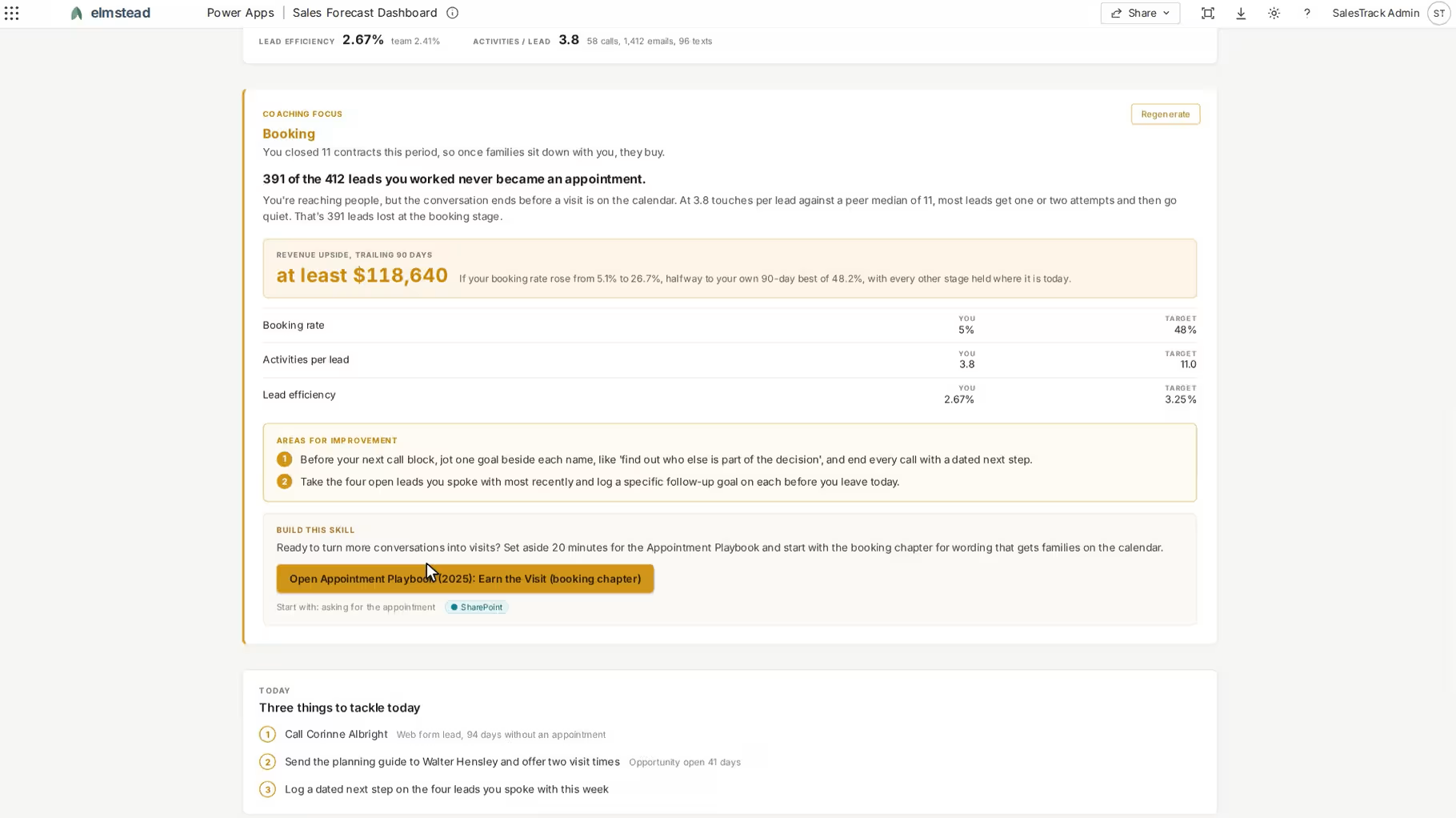
- Sales Coaching Agent: Analyzes sales activity, conversion rates, and performance metrics to identify improvement opportunities. It provides personalized coaching recommendations and actionable insights to support sales performance.
- Sales Planning Agent: Helps sales representatives plan their day by prioritizing opportunities, preparing for meetings, and organizing follow-up activities. It uses Dynamics 365 Sales information to recommend daily priorities and next steps.
- Client Engagement Analyzer Agent: Reviews active customer accounts and recent interactions to identify clients with limited engagement. It helps account managers prioritize outreach and maintain customer relationships.
- Case Intake Agent: Automates customer service case intake by analyzing incoming requests, extracting relevant information, and creating cases in Dynamics 365 Customer Service. It classifies issues and routes cases to the appropriate team.
- Voice Reception & Routing Agent: Automates incoming customer calls with personalized greetings, VIP customer recognition, and intelligent call routing. It helps direct callers to the appropriate team through Dynamics 365 customer service workflows.
Prebuilt AI agents are well suited for organizations that need more functionality than their existing applications provide but want to avoid the complexity of fully custom development.
Implementation may still require configuration, integrations, licensing, and testing to align each agent with existing business processes. Organizations can select the agents that address their needs and expand automation as those needs evolve.
Option 3: Build custom AI agents and CRM integrations
Custom AI development allows businesses to create solutions for processes that native features and prebuilt agents cannot fully support. These solutions can follow unique business rules, use industry-specific information, and connect data across multiple applications. Custom agents are especially useful when a workflow involves several systems or requires specialized decisions and actions.
For example, a manufacturing company could develop an AI service agent that receives a customer request, retrieves warranty information from its ERP, and reviews service history in its CRM. The agent could then prepare a service case with the relevant information for an employee to review. This reduces the need to search multiple systems and manually combine customer information.
Custom AI solutions can be built using technologies such as Microsoft Copilot Studio, Power Automate, Azure AI, and APIs. Model Context Protocol (MCP) servers provide another integration option by giving compatible AI assistants and agents a standardized way to access CRM data, tools, and actions. For example, an AI agent could use an MCP server to retrieve customer records or update an opportunity in a connected CRM, depending on the tools and permissions available.
Custom development provides greater flexibility and control over AI functionality. However, it also requires more planning, technical expertise, and ongoing maintenance. This approach is best suited for organizations with complex requirements or processes that cannot be addressed through existing AI solutions.
Comparing CRM AI implementation options
The following table compares the three main approaches to adding AI to an existing CRM.
Businesses can also combine these approaches to meet different needs. For example, an organization might use native AI for sales summaries, implement a prebuilt agent to monitor customer engagement, and develop a custom solution for a complex service workflow. The goal is to select the most practical and cost-effective approach for each business requirement.
What AI capabilities and agents are available in leading CRM platforms?
Leading CRM platforms offer AI capabilities that help businesses automate tasks, analyze customer information, and improve daily operations. Some features are built directly into CRM software, while others are available through supported add-ons or AI agents. The capabilities available vary by publisher, application, and license.
Microsoft Dynamics 365 AI and Copilot
Microsoft Dynamics 365 provides AI capabilities across its sales, marketing, customer service, contact center, and field service applications. Microsoft Copilot helps employees access information, generate content, and complete tasks, while AI agents can automate more complex workflows. These tools work with business data stored across Dynamics 365 and connected Microsoft applications.
Key AI capabilities across Dynamics 365 CRM applications include:
- Dynamics 365 Sales: Copilot generates lead and opportunity summaries, prepares meeting briefs, and assists with customer communications. The Sales Qualification Agent researches and qualifies leads, while the Sales Opportunity Agent identifies high-value opportunities, potential risks, and recommended next steps.
- Dynamics 365 Customer Service: Copilot summarizes cases, drafts responses, and recommends knowledge articles. The Case Management Agent automates case creation, updates, and follow-ups, while the Customer Knowledge Management Agent helps generate and maintain knowledge articles from service cases.
- Dynamics 365 Customer Insights: AI supports customer segmentation, predictive insights, and personalized marketing content. The Journey Creation Agent, available in preview, helps marketers build customer journeys using natural-language instructions and existing marketing assets.
- Dynamics 365 Contact Center: Conversational AI supports customer interactions across voice and digital channels. The Customer Intent Agent identifies common customer needs, while the Quality Evaluation Agent assesses conversations against defined service standards.
- Dynamics 365 Field Service: Copilot provides work order summaries and service insights. The Scheduling Operations Agent analyzes technician availability, existing bookings, and work priorities to recommend or automate scheduling adjustments in supported configurations.
Microsoft also offers Copilot Studio, Power Automate, and Dataverse to extend AI beyond standard application features. Organizations can use these tools to connect business data, customize workflows, and develop additional agents.

Oracle NetSuite CRM AI capabilities
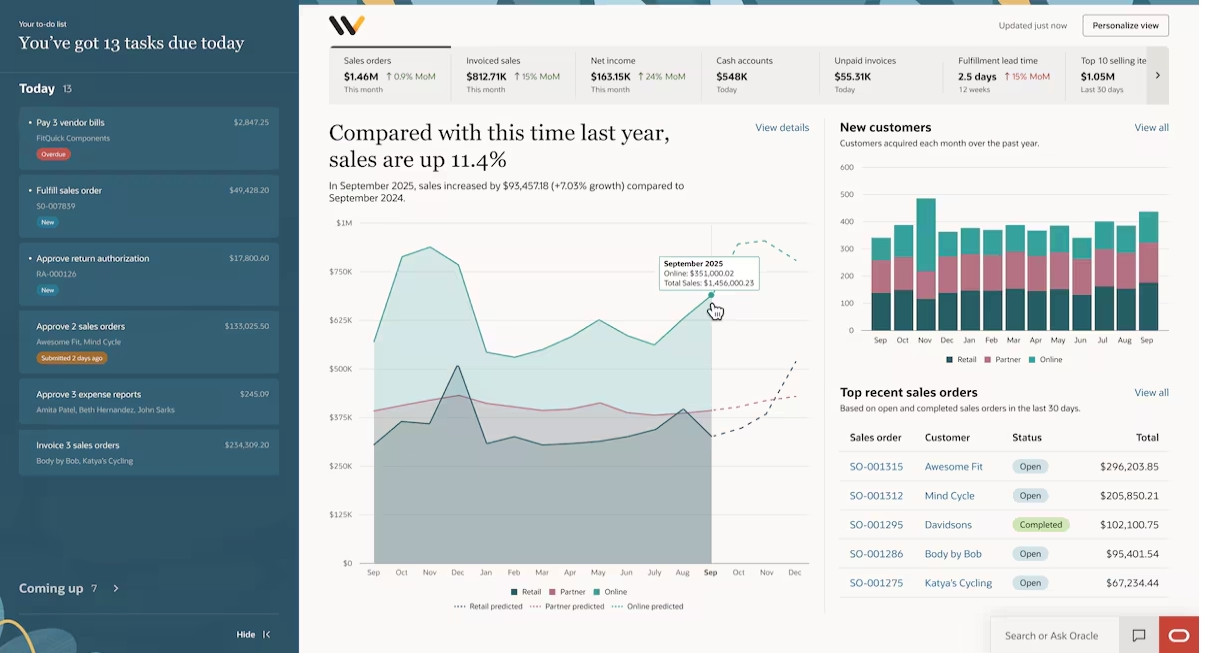
Oracle NetSuite includes AI capabilities that help sales and service teams understand customer activity, manage information, and improve customer interactions. Because NetSuite combines CRM and ERP functionality, users can access customer records, sales opportunities, orders, and financial information within one platform. NetSuite Next expands these capabilities with conversational AI, intelligent workflows, and AI agents embedded throughout the system.
Key NetSuite AI capabilities that support CRM include:
- NetSuite Next and Ask Oracle: NetSuite Next introduces a more AI-driven experience, with Ask Oracle allowing users to search, analyze, and interact with business information using natural language. Sales and service teams can ask questions about customer accounts, review activity, uncover insights, and complete supported tasks without navigating multiple records or reports.
- Customer 360 Narrative Insights: Generates summaries of customer communications, sales activity, and related account information. This helps users understand customer relationships without reviewing individual records.
- Case Summary: Creates AI-generated summaries of customer support cases, including communication history, key actions, timelines, and customer sentiment.
- Text Enhance: Generates, rewrites, and improves text in supported NetSuite fields. Service representatives can use it to prepare responses, while sales teams can refine customer communications.
- AI integrations and extensibility: NetSuite’s SuiteCloud platform, APIs, and AI Connector Service support connections with external AI tools and custom applications. These technologies allow organizations to extend AI into CRM workflows beyond native functionality.
NetSuite Next is rolling out in phases, and eligible customers can also access Ask Oracle within their existing NetSuite experience. These developments give businesses more ways to use AI across customer-facing processes while maintaining their existing data, workflows, and permissions.
For a deeper look at available features, read our guide to AI in NetSuite.
Salesforce Einstein AI and Agentforce
Salesforce provides AI capabilities through Einstein AI and Agentforce across its sales, service, marketing, and field service applications. Einstein AI supports predictive insights, content generation, and employee assistance, while Agentforce enables AI agents to complete tasks using CRM data and connected applications. These capabilities help teams manage customer relationships and automate routine processes within Salesforce.
Key Salesforce AI capabilities include:
- Sales Cloud and Agentforce Sales: Einstein AI supports lead scoring, opportunity insights, sales forecasting, and conversation analysis. Agentforce sales agents can research prospects, qualify leads, prepare account information, and support outreach. The Agentforce Sales Coach provides personalized coaching and feedback to sales representatives.
- Service Cloud and Agentforce Service: AI generates case summaries, recommends knowledge articles, and assists with customer responses. The Agentforce Service Agent can handle routine customer inquiries, perform supported service actions, and escalate complex issues to human representatives.
- Marketing Cloud: Einstein AI supports audience segmentation, personalized marketing, and campaign optimization. The Agentforce Campaign Creation agent helps marketers develop campaign briefs, generate content, and prepare campaigns based on defined goals and customer information.
- Field Service: Agentforce scheduling agents help manage service appointments, coordinate customer communications, and support scheduling changes. AI can also help technicians access service information and work order details.
- Predictive AI and analytics: Einstein analyzes CRM information to identify sales opportunities, forecast outcomes, and recommend next steps. These insights help employees prioritize activities and make decisions based on customer and business data.
Salesforce also provides Agentforce Studio, Salesforce Flow, and Data 360 to extend AI functionality. Businesses can use these tools to build custom agents, connect additional data sources, and automate workflows across applications.
AI feature availability depends on the Salesforce edition, licensing, and configuration. Some Agentforce capabilities require additional subscriptions or usage-based charges.
HubSpot Breeze AI and agents
HubSpot provides AI capabilities through Breeze AI and AI agents across its CRM, sales, marketing, and customer service applications. These tools use customer records, communication history, and other business information to help employees complete tasks and automate workflows. Breeze Assistant provides everyday AI support, while specialized agents can manage more specific activities.
Key HubSpot AI capabilities include:
- Breeze Assistant: Helps employees retrieve CRM information, summarize customer records, draft communications, and prepare for meetings. Users can ask questions about their business data and generate content directly within HubSpot.
- Prospecting Agent: Researches target accounts, identifies buying signals, and helps sales teams find qualified prospects. It also prepares personalized outreach based on available customer information and engagement activity.
- Customer Agent: Uses customer information and knowledge resources to respond to inquiries and help resolve routine service issues. It can support customer conversations across connected channels and escalate requests when human assistance is needed.
- Data Agent: Analyzes CRM records, customer conversations, documents, and external information to answer business questions. It can help teams research accounts, identify missing information, and enrich customer records.
- Marketing AI capabilities: HubSpot supports AI-assisted content creation, customer segmentation, and campaign development. Marketing teams can use these features to prepare personalized messages, create content, and improve customer engagement.
HubSpot also provides Agent Hub and agent builder to manage, configure, and create AI agents. Businesses can extend these capabilities through HubSpot workflows, integrations, and APIs to support additional CRM processes.
AI capabilities vary by HubSpot subscription and feature availability. Some agents require additional permissions, higher subscription tiers, or usage-based HubSpot Credits.
CRM platform AI comparison
The following table compares the native AI capabilities and extension options available across these CRM platforms.
While each platform offers different capabilities, businesses are not limited to the AI features included in their CRM software. Native functionality can be extended through prebuilt agents, integrations, and custom development to support additional business requirements.

Find the right AI solution for your CRM
Not sure whether native AI features, prebuilt agents, or custom AI development are the right fit for your business? Rand Group’s dedicated AI Business Unit can help you evaluate your existing CRM, identify valuable AI opportunities, and develop a practical plan for implementation.
How to implement AI in your CRM: Step-by-step
Implementing AI in your CRM requires a clear plan that connects technology with business goals, data, and existing workflows. A successful CRM AI implementation starts with identifying opportunities, selecting the right solutions, and testing their performance before expanding automation. Follow these five steps to get started.

1. Assess your existing CRM and AI capabilities
Start by reviewing your CRM platform, current licenses, workflows, and integrations. Identify which native AI features are already available and which capabilities require additional licensing or configuration. Evaluate how customer information moves between your CRM and other business applications to determine whether new integrations are needed. This assessment provides a clear picture of your existing technology and opportunities for AI adoption.
2. Identify and prioritize AI use cases
Identify business processes where AI can reduce manual work, improve accuracy, or increase productivity. Good starting points include lead qualification, case summarization, customer engagement monitoring, and CRM data entry. Prioritize opportunities based on business value, implementation complexity, data readiness, and potential risks. Define measurable goals for each use case, such as reducing case handling time or improving lead response rates, so you can evaluate results after implementation.

3. Prepare your CRM data and security controls
Review your CRM data to ensure customer records, sales opportunities, and service information are accurate, complete, and up to date. Poor data quality can lead to unreliable AI recommendations and incorrect automated actions. Establish security controls that define which information AI can access, what actions agents can perform, and when human approval is required. Include data privacy, user permissions, and compliance requirements to protect sensitive customer information.

4. Select and pilot the right AI solution
Choose a native AI feature, prebuilt agent, or custom solution based on your business requirements. Begin with a small pilot using real business scenarios and representative data. Test the accuracy of AI-generated information, how the solution handles exceptions, and whether it follows your business rules. For agents that update records or communicate with customers, verify permissions and approval processes before expanding their use.

5. Measure results and expand adoption
Compare the results of your AI pilot against the goals established before implementation. Track relevant metrics such as time saved, lead conversion rates, case resolution time, customer satisfaction, and error rates. Gather employee feedback to identify improvements and provide training to support adoption. Use these findings to refine the solution, expand successful use cases, and introduce additional AI capabilities as your business needs evolve.
Understanding CRM AI implementation costs and ROI
The cost of adding AI to a CRM depends on the solution, licensing requirements, usage volume, and level of customization. Native AI features may require additional subscriptions or consumption-based fees, while prebuilt agents can involve configuration and integration costs. Custom AI solutions typically require a larger investment in development, testing, infrastructure, and ongoing maintenance. Businesses should consider both upfront and recurring expenses when evaluating the total cost of CRM AI.
To calculate return on investment (ROI), organizations should compare these costs with measurable improvements in productivity, efficiency, and business performance. Benefits may include reduced administrative work, faster customer response times, improved lead conversion rates, and greater employee capacity. Time savings do not always translate into lower labor costs, but they can allow employees to handle more work and focus on higher-value activities.
For example, a customer service team implementing AI-generated case summaries can measure how much time representatives spend reviewing case histories before and after deployment. Comparing these savings with licensing and implementation costs helps determine whether the investment delivers meaningful value. Businesses should also monitor accuracy and service quality to ensure efficiency gains do not come at the expense of customer experience.
For more guidance, read our article on forecasting costs and calculating ROI for Microsoft Copilot and AI initiatives.
Common CRM AI adoption challenges and how to overcome them
Adding AI to your CRM is only part of a successful implementation. Employees must also understand, trust, and consistently use the technology to achieve meaningful results. Common AI adoption challenges include employee resistance, limited training, data quality issues, and uncertainty about business value. Addressing these challenges early helps organizations build confidence and integrate AI into everyday CRM workflows.
Common CRM AI adoption challenges and solutions include:
- Employee resistance and lack of trust: Involve employees in the implementation process, explain how AI supports their roles, and provide opportunities to test the technology before wider adoption.
- Limited AI knowledge and skills: Provide hands-on, role-based training that shows sales, marketing, and service teams how to use AI in their daily work.
- Poor data quality: Address incomplete, duplicate, and outdated CRM records to improve the accuracy of AI-generated insights and recommendations.
- Security and privacy concerns: Establish clear AI governance policies, restrict access to sensitive customer information, and define when human approval is required.
- Unclear business value: Set measurable goals, monitor employee adoption, and share early results to demonstrate how AI improves productivity and customer-facing processes.
- Inconsistent AI performance: Test AI outputs against real business scenarios, gather employee feedback, and refine workflows to improve reliability over time.
Working with an experienced AI partner can help businesses overcome these challenges through structured training, change management, governance, and ongoing support, making it easier to build employee confidence and achieve long-term CRM AI adoption.
Partner with Rand Group to add AI to your CRM
Adding AI to your CRM requires both technical expertise and an understanding of the business processes it supports. Working with an experienced partner helps organizations identify valuable AI opportunities, evaluate existing capabilities, and select solutions that fit their needs. The right approach focuses on improving workflows and delivering measurable results rather than implementing AI without a clear business purpose.
Rand Group combines CRM expertise, business process knowledge, software engineering, and AI development to help organizations get more value from their technology. Since 2003, we have completed more than 3,000 successful engagements and maintain a 90% client retention rate. We have also been recognized in Accounting Today’s 2026 VAR 100 and ERP Global Insights’ 2026 Top 100 VARs. With a dedicated AI Business Unit and expertise across Microsoft, NetSuite, and Sage, we help businesses implement AI solutions that work within their existing technology environments.
Our AI and CRM services include:
- AI strategy & roadmap: Assess your AI readiness, identify high-value CRM use cases, and develop a phased roadmap with clear priorities, measurable goals, and expected ROI.
- AI agent activation & development: Activate and configure existing AI agents or develop custom solutions that automate sales, marketing, customer service, and other CRM workflows.
- AI training & adoption: Provide role-based training, change management, and ongoing guidance to help employees use AI effectively in their daily work.
- AI governance: Establish AI policies, data security controls, permissions, and oversight processes to support secure, responsible AI adoption.
Our experience includes helping organizations improve the systems and processes that support AI adoption. For example, Rand Group helped Patlon Aircraft & Industries implement Dynamics 365 Sales to automate workflows and improve pipeline visibility. Reports that previously took hours can now be generated in minutes, giving the sales team faster access to the information they need.
What our clients say about us
“Rand Group worked with us every step of the way, walking alongside our team to define and execute the right CRM solution. The immediate buy-in from our staff made it clear that this was an investment well worth making.”
— Patrick Mann, Director of Commercial Sales, Patlon Aircraft Industries Ltd.
“One of the biggest reasons we value Rand Group is the stability of the team. We work with the same people year after year, and that continuity matters. Their consistency and responsiveness have made a real difference for our organization. Rand Group has been a really great partner for us. I absolutely recommend them.”
— Julia Petty, Controller, The Museum of Fine Arts, Houston
“Rand Group understood our industry and our challenges from day one. Their expertise and customer-first approach led to a smooth, rapid transition.”
— Kevin O’Donnell, Controller, Praxi OP
“Rand Group has become a resource we can lean on when we are trying to improve or digitize a process. Because of the time spent with our business, the team can go beyond the superficial layers and help us get to solutions that have a material impact on operations.”
— Scott Rolston, President, Stucchi USA
“The level of care, thoughtfulness, and in-depth knowledge provided by Rand Group exceeded our expectations. We now have a partner who not only understands NetSuite but also comprehends the intricacies of accounting and finance. Rand Group has become an extension of our internal technical team, providing invaluable support as we continue to grow.”
— Carolina Pereira, VP of Finance Shared Services, Unified Women’s Healthcare
Whether your organization is exploring AI for the first time or expanding existing capabilities, Rand Group can help you identify opportunities and implement solutions that fit your CRM environment.
Explore Rand Group’s AI solutions or contact our team to discuss your CRM AI goals.
Key takeaways
- Businesses can add AI to an existing CRM without replacing their system through native features, prebuilt agents, or custom solutions.
- CRM AI includes predictive AI, generative AI, copilots, and AI agents that analyze information, assist employees, and automate workflows.
- Common AI use cases in CRM include lead qualification, sales forecasting, personalized marketing, case management, and customer retention.
- Microsoft Dynamics 365, Oracle NetSuite, Salesforce, and HubSpot offer AI capabilities and integration options to support customer-facing processes.
- Successful CRM AI implementation requires clear business goals, accurate data, security controls, pilot testing, and ongoing performance monitoring.
- CRM AI return on investment depends on comparing implementation and ongoing costs with measurable improvements in productivity, sales, and customer service.
Frequently asked questions (FAQs)
Can you add AI to an existing CRM without replacing your software?
Yes, businesses can add AI to an existing CRM without replacing their software. Organizations can enable native AI features, implement prebuilt agents, or connect custom AI solutions through supported APIs and integrations.
What tasks can AI automate in a CRM system?
AI can automate CRM tasks such as lead qualification, data entry, sales follow-ups, customer segmentation, and service case management. AI agents can also monitor customer activity, update records, and complete multi-step workflows with appropriate permissions and oversight.
What is the difference between an AI assistant and an AI agent in CRM?
An AI assistant helps employees complete tasks by answering questions, generating content, and summarizing information. An AI agent can also take action, such as creating service cases, updating customer records, or managing follow-ups, based on defined rules and permissions.
Which CRM platforms support built-in AI features and AI agents?
Microsoft Dynamics 365, Oracle NetSuite, Salesforce, and HubSpot offer native AI capabilities for supported sales, marketing, and customer service workflows. These platforms provide AI assistants, predictive insights, and agents that support different business processes. Available features depend on the platform, license, and release status.
Can you integrate ChatGPT or custom AI agents with your CRM?
Yes, businesses can integrate ChatGPT-based applications and custom AI agents with CRM systems using APIs, connectors, and Model Context Protocol (MCP) servers. These integrations can allow AI to access customer information, generate insights, and perform authorized actions across connected applications.
Do you need a developer to implement AI in your CRM?
No, implementing AI in a CRM does not always require a developer. Many native AI features can be enabled through configuration, while prebuilt agents may require limited setup. Custom AI development typically requires technical expertise to connect systems and support specialized workflows.
How much does it cost to add AI to an existing CRM?
The cost of adding AI to a CRM depends on licensing, usage, integrations, and customization requirements. Native features may involve subscription or consumption fees, while prebuilt and custom agents can require additional implementation, development, and maintenance costs.
How can businesses protect customer data when using AI in CRM?
Businesses can protect CRM customer data by using role-based permissions, secure integrations, and AI governance policies. Organizations should control what information AI can access, define which actions agents can perform, and monitor AI activity to support data privacy and security.
Start adding AI to your CRM with the right approach
Adding AI to your CRM can help your business reduce manual tasks, improve customer engagement, and get more value from existing data. The best place to start is by identifying the processes that need improvement and determining whether native AI features, prebuilt agents, or custom solutions can address those needs. With clear goals and the right technology, businesses can introduce AI gradually and expand automation as they see results.
Rand Group helps organizations turn AI opportunities into practical solutions. Our dedicated AI Business Unit works alongside our Microsoft, NetSuite, and Sage experts to support AI strategy, agent implementation, custom development, training, and governance. Contact us to explore how AI can improve your CRM and develop a plan that aligns with your business goals.