Dynamics 365
 Power Platform
 Dynamics
 Cloud & Productivity
What are AI agents in Dynamics 365 Contact Center?

AI agents in Dynamics 365 Contact Center are changing how organizations manage customer interactions. Instead of relying only on manual processes, teams can use AI to automate conversations, improve response times, and support agents in real time. This guide explains what AI agents are, how they work, and how to use them effectively in your contact center.
- What is Dynamics 365 Contact Center?
- What are AI agents in Dynamics 365 Contact Center?
- How do AI agents work in Dynamics 365 Contact Center?
- AI agents available in Dynamics 365 Contact Center today
- Common use cases for AI agents in Dynamics 365 Contact Center
- AI Agents vs Copilot in Dynamics 365 Contact Center
- Pricing and cost of AI agents in Dynamics 365 Contact Center
- How to get started with AI agents in Dynamics 365 Contact Center
- Frequently asked questions (FAQs)
What is Dynamics 365 Contact Center?
Dynamics 365 Contact Center is a cloud-based, AI-powered contact center solution that helps organizations manage customer interactions across voice and digital channels in one platform. It brings together channels like voice, chat, email, SMS, and social messaging into a single workspace, allowing agents to handle conversations without switching systems. This centralized approach improves consistency, reduces response times, and gives teams full visibility into every customer interaction.
As a Copilot-first solution, Dynamics 365 Contact Center uses built-in AI to improve how service teams work. It includes capabilities like intelligent routing, conversational IVR, real-time transcription, sentiment analysis, and AI agents that support self-service and automation. These features help organizations deliver faster resolutions, more personalized experiences, and better operational efficiency while reducing manual effort and costs.
To learn more, read our complete Dynamics 365 Contact Center guide.
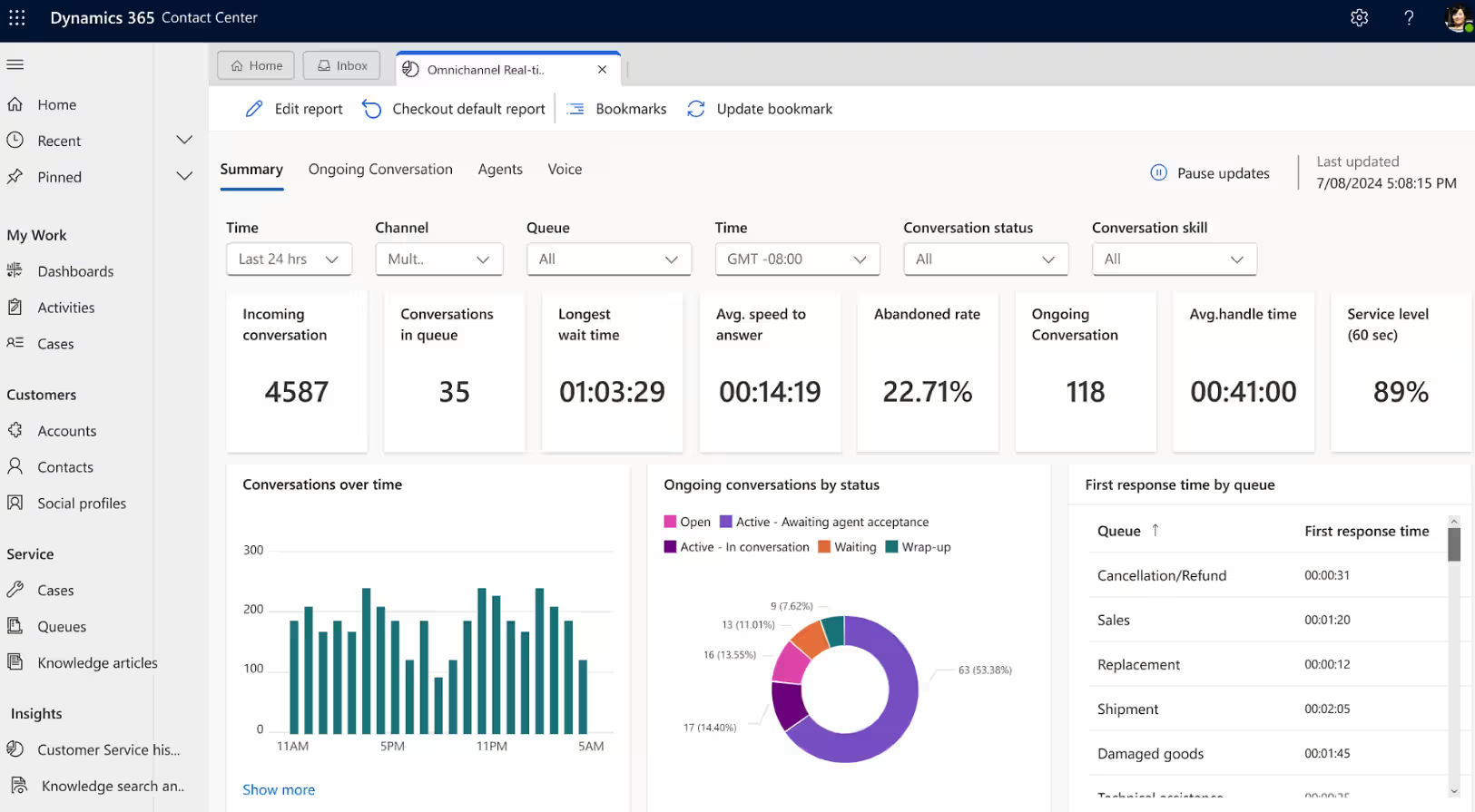
What are AI agents in Dynamics 365 Contact Center?
AI agents in Dynamics 365 Contact Center are intelligent, autonomous software assistants that use artificial intelligence to handle and support customer service tasks. They can understand requests, analyze data, and take action without constant human input. These agents work across channels like voice, chat, and messaging to automate interactions, guide customers through self-service, and assist human agents in real time.
Unlike basic automation, AI agents can learn from data and adapt to different situations. They can answer common questions, route conversations, summarize interactions, and even suggest next steps for agents. By working within the Dynamics 365 Contact Center environment, AI agents help reduce manual work, improve response times, and create more consistent customer experiences at scale.
Benefits of AI agents in Dynamics 365 Contact Center:
- Automate repetitive customer inquiries and reduce agent workload
- Enable 24/7 self-service across voice and digital channels
- Improve response times with instant, AI-driven interactions
- Assist agents with real-time recommendations and conversation summaries
- Increase first-contact resolution with intelligent routing and insights
- Reduce operational costs by handling high-volume interactions efficiently
- Deliver more consistent and personalized customer experiences

Evaluate AI agents for D365 Contact Center
Rand Group helps organizations identify where AI agents can improve customer interactions, reduce manual effort, and align with existing contact center workflows. The result is practical automation that enhances service performance without adding unnecessary complexity or risk.
How do AI agents work in Dynamics 365 Contact Center?
AI agents in Dynamics 365 Contact Center work by continuously analyzing customer interactions, business data, and system signals to decide what action to take next. They operate within existing workflows and channels, using AI to understand intent, apply logic, and either respond directly or assist human agents. This allows them to automate routine tasks, support decision-making, and adapt to different service scenarios in real time.
How AI agents work in practice:
- Data sources: Pull information from CRM data, knowledge bases, past interactions, and connected systems
- Triggers: Activate based on events such as incoming calls, chat messages, form submissions, or workflow conditions
- Decision logic: Use AI models and rules to understand intent, evaluate context, and determine the next best action
- Actions: Respond to customers, route conversations, update records, or trigger workflows automatically
- User interaction: Engage directly with customers through chat, voice, or messaging, or assist agents in their workspace
- Business context: Apply company-specific rules, policies, and data to ensure responses align with business processes
AI agents available in Dynamics 365 Contact Center today
Dynamics 365 Contact Center includes several AI agents that are designed to improve different parts of the customer service experience. These agents work together to automate conversations, capture knowledge, evaluate performance, and support both customers and agents in real time. By combining out-of-the-box AI agents with custom options, organizations can streamline operations, improve service quality, and scale support across channels.
Customer intent agent
The customer intent agent in Dynamics 365 Contact Center uses generative AI to automatically identify why a customer is reaching out. It analyzes past and current conversations to discover common intents, such as billing issues, product questions, or refund requests. These insights are used to build an intent library that helps guide both self-service and agent-assisted interactions.
In real time, the customer intent agent monitors conversations and continuously updates its understanding of customer needs. It suggests follow-up questions, recommends next steps, and surfaces relevant knowledge articles. This helps agents respond faster and more accurately, while also improving self-service experiences by guiding customers to the right answers without human involvement.
Key capabilities of the customer intent agent:
- Automatically discovers and organizes customer intents from historical conversations
- Identifies customer intent in real time during live interactions
- Suggests relevant follow-up questions based on conversation context
- Recommends knowledge articles and solutions to resolve issues faster
- Adapts when customer intent changes during a conversation
- Supports both self-service and agent-assisted service scenarios
- Reduces handling time by guiding agents with next best actions
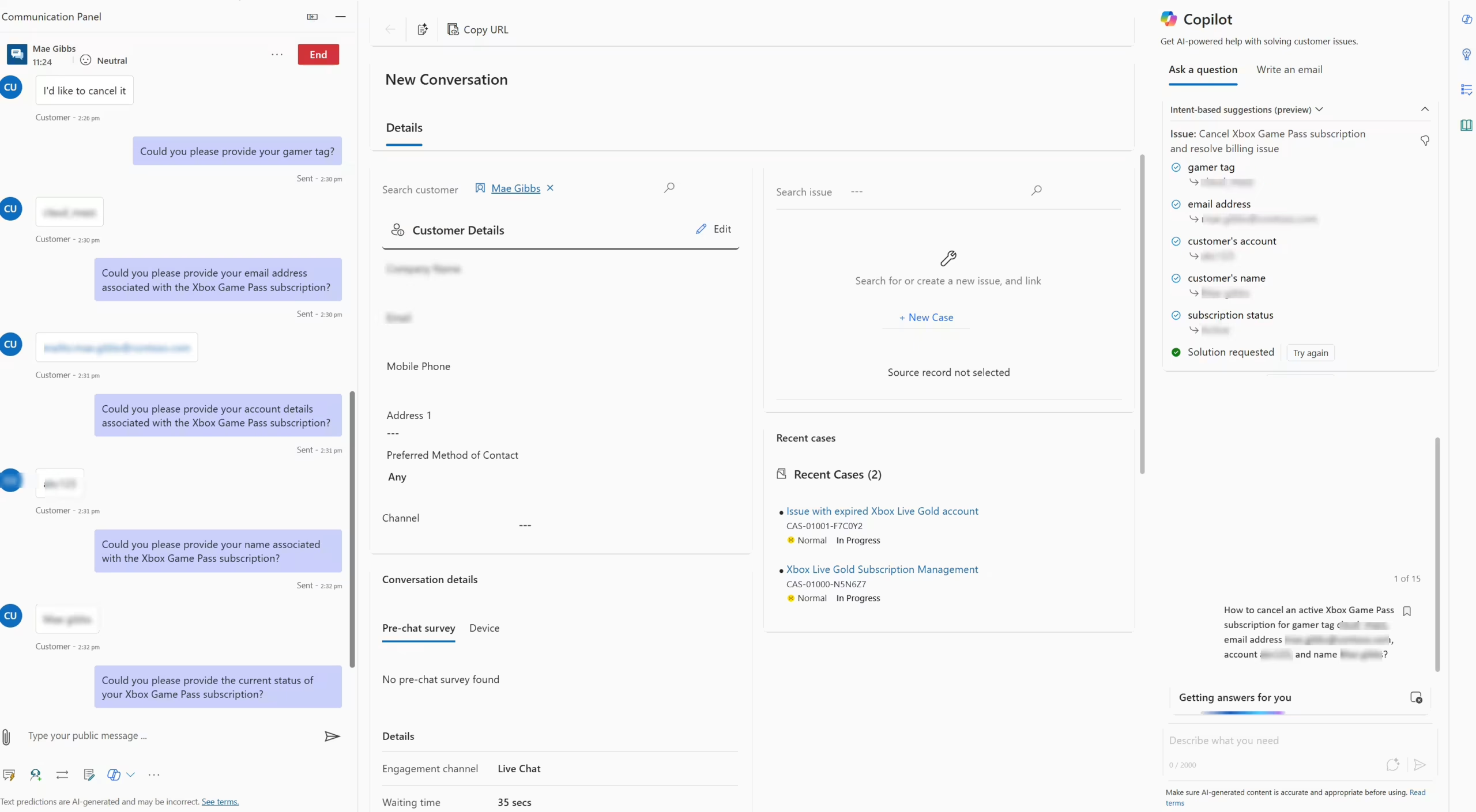
Customer knowledge management agent
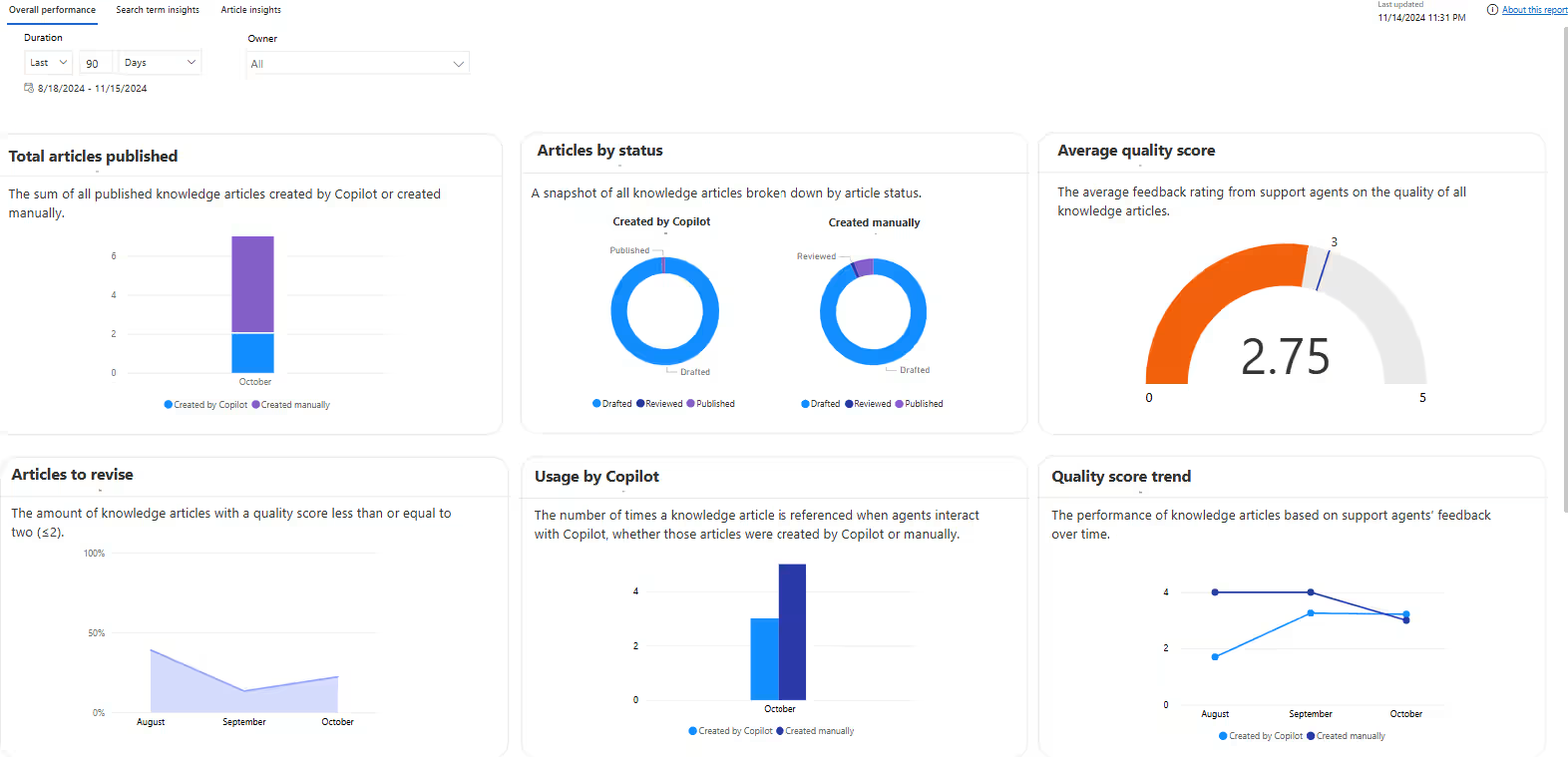
The customer knowledge management agent in Dynamics 365 Contact Center uses AI to automatically capture and create knowledge from real customer interactions. It analyzes resolved cases, conversations, emails, and notes to identify useful information and turn it into structured knowledge articles. This ensures that valuable insights from past interactions are not lost and can be reused to support future customer service.
Over time, the agent continuously improves the knowledge base by filling gaps, updating content, and ensuring accuracy. It compares new cases against existing articles to determine if new knowledge is needed, then drafts content that can be reviewed or published. This helps organizations maintain a high-quality, up-to-date knowledge base that improves both self-service and agent-assisted support while reducing manual content management.
Key capabilities of the customer knowledge management agent:
- Automatically creates knowledge articles from resolved cases and conversations
- Identifies and fills gaps in the existing knowledge base
- Uses historical and real-time data to continuously improve content quality
- Suggests updates or creates new versions of existing knowledge articles
- Supports review and approval workflows for compliance and accuracy
- Provides analytics on knowledge usage and effectiveness
- Improves self-service and agent productivity with better access to answers
Quality evaluation agent
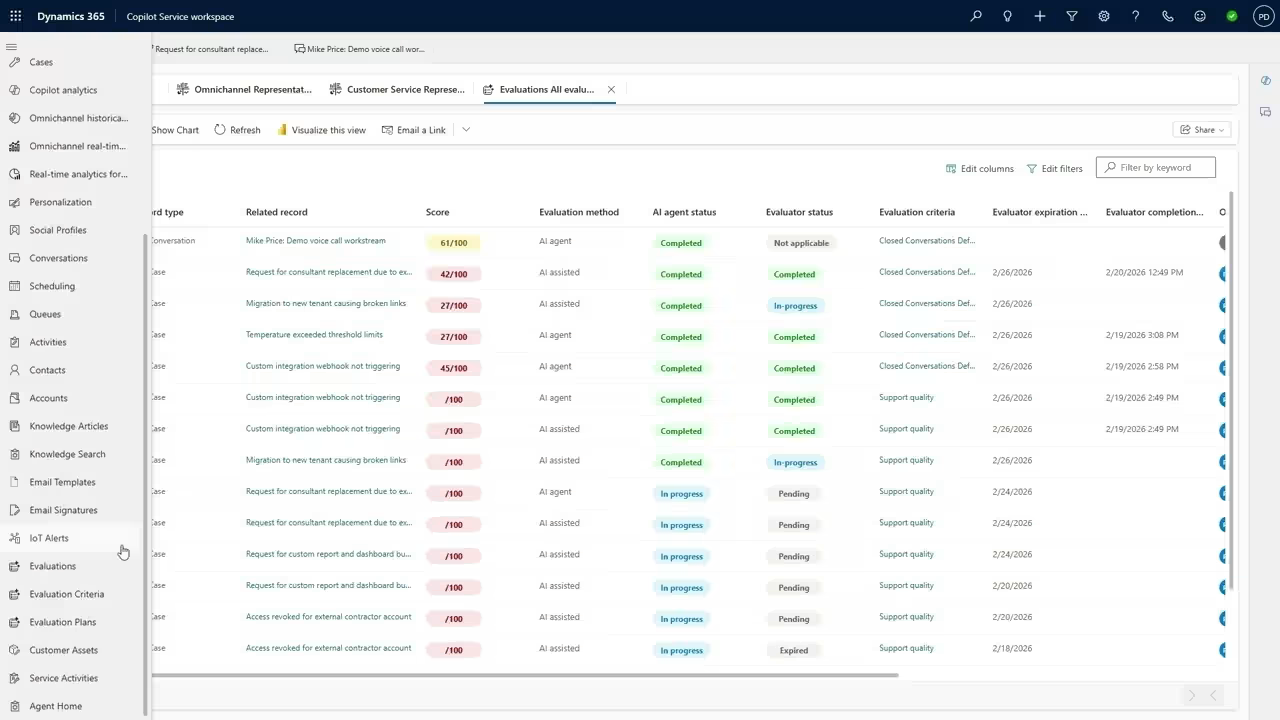
The quality evaluation agent in Dynamics 365 Contact Center uses AI to automatically assess the quality of customer conversations. It evaluates interactions across voice and chat channels based on criteria defined by supervisors, such as compliance, communication quality, and resolution effectiveness. This allows organizations to consistently measure service performance without relying only on manual reviews.
Supervisors can define evaluation frameworks with specific questions, scoring models, and rules that the agent uses to review conversations. Once a conversation is complete, the agent analyzes it, assigns scores, and provides summaries with recommendations. These insights help identify coaching opportunities, improve agent performance, and ensure service standards are met across the contact center.
Key capabilities of the quality evaluation agent:
- Automatically evaluates closed customer conversations using AI
- Applies supervisor-defined criteria, scoring, and quality standards
- Generates summaries with insights and recommended improvements
- Identifies compliance issues and highlights critical failures
- Supports real-time, scheduled, and on-demand evaluations
- Enables consistent and scalable quality monitoring across teams
- Helps improve agent performance through data-driven feedback
Custom AI agents
Beyond Microsoft-delivered agents, organizations can create custom AI agents in Dynamics 365 Contact Center to support their unique service processes. These agents can be designed to handle specific workflows, customer scenarios, or industry requirements that are not covered by out-of-the-box functionality. By extending AI capabilities, teams can automate more complex interactions and align automation with how their contact center actually operates.
Custom AI agents can work across voice and digital channels, using data from Dynamics 365 and connected systems to deliver more relevant responses and actions. This allows organizations to build tailored experiences for both customers and agents, while maintaining control over logic, compliance, and business rules.
Options for building custom AI agents include:
- Copilot Studio: Design conversational or task-based agents for chat, voice, and messaging scenarios
- AI Builder: Apply AI models for intent detection, classification, and data extraction
- Power Automate and Dataverse: Trigger workflows, connect systems, and enforce business logic across interactions
This combination of out-of-the-box and custom AI agents in Dynamics 365 Contact Center allows organizations to scale automation while keeping it aligned with real service operations and governance requirements.
Common use cases for AI agents in Dynamics 365 Contact Center
AI agents in Dynamics 365 Contact Center are used to automate routine interactions, support agents in real time, and improve overall service performance. They can be applied across voice and digital channels to handle high-volume requests, guide conversations, and provide insights that help teams respond more effectively. This makes them valuable for both improving customer experience and reducing operational effort.
Common use cases for AI agents in Dynamics 365 Contact Center:
- Automating common inquiries such as order status, billing questions, and password resets
- Enabling self-service through conversational chatbots and voice IVR
- Routing customer interactions based on intent, priority, or customer data
- Assisting agents with real-time suggestions, summaries, and next best actions
- Generating and maintaining knowledge articles from resolved interactions
- Monitoring and evaluating conversation quality for compliance and coaching
- Personalizing customer interactions using historical data and context
- Scaling support operations during high-volume periods without increasing headcount
AI Agents vs Copilot in Dynamics 365 Contact Center
AI agents and Copilot in Dynamics 365 Contact Center both use AI, but they serve different roles. Copilot is a conversational assistant that helps users complete tasks, while AI agents are designed to take action and automate processes. They often work together, with Copilot supporting agents and AI agents handling tasks in the background to improve efficiency and consistency.
Pricing and cost of AI agents in Dynamics 365 Contact Center
AI agents in Dynamics 365 Contact Center are not included in the base product license and require separate usage-based pricing through Copilot Credits. These credits act as the consumption model for AI capabilities, meaning you only pay for what the AI agents actually use. The pay-as-you-go model is priced at $0.01 per Copilot Credit, making it a flexible and scalable way to adopt AI.
Organizations can choose how they purchase and manage Copilot Credits based on their needs. Options include pay-as-you-go pricing for maximum flexibility, monthly credit packs for predictable usage, or pre-purchase plans for discounted bulk consumption. This range of options allows businesses to start small, scale over time, and align AI costs with actual usage and business value.
The scenarios below show example estimates based on specific usage inputs. For a more accurate estimate based on your own requirements, you can use Microsoft’s Copilot Credit Estimator tool.
Scenario 1: Customer intent agent
The customer intent agent analyzes past cases to identify common customer intents and supports live conversations with real-time suggestions and knowledge retrieval. This scenario represents a mid-sized contact center handling both self-service and agent-assisted interactions.
In this scenario, agent usage includes:
- Intent mining from historical cases (1,000 cases/month): 1,500 Copilot Credits
- Real-time self-service conversations (500 conversations/month, ~7 messages each): 8,010 Copilot Credits
- Real-time assisted-service conversations (250 conversations/month, ~20 messages each): Included in total real-time usage
Total monthly Copilot Credit usage:
1,500 (intent mining) + 17,520 (real-time interactions) = 19,020 Copilot Credits
Estimated monthly cost (pay-as-you-go):
19,020 × $0.01 = $190.20 per month
This example shows how AI-driven intent detection and guidance can scale across conversations while keeping costs predictable. Actual cost will vary based on conversation volume, message count, and how often knowledge retrieval and AI suggestions are triggered.
Scenario 2: Quality evaluation agent
The quality evaluation agent uses AI to review customer conversations and generate performance insights. This scenario reflects a contact center that evaluates conversations through a mix of on-demand reviews, automated triggers, and real-time monitoring.
In this scenario, usage includes:
- Closed conversation on-demand evaluations (1,000 per month): 3,000 Copilot Credits
- Closed conversation trigger-based evaluations (1,000 per month): 3,000 Copilot Credits
- Ongoing conversation real-time evaluations (1,000 per month): 4,000 Copilot Credits
Total monthly Copilot Credit usage:
3,000 + 3,000 + 4,000 = 10,000 Copilot Credits
Estimated monthly cost (pay-as-you-go):
10,000 × $0.01 = $100 per month
This example shows how organizations can scale quality monitoring without manual reviews for every interaction. Actual cost will vary based on evaluation volume and how frequently real-time and automated evaluations are used.
How to get started with AI agents in Dynamics 365 Contact Center
Getting started with AI agents in Dynamics 365 Contact Center requires more than enabling features. Organizations need to identify where AI can improve customer interactions, reduce manual effort, and enhance service performance. This involves evaluating current contact center workflows, conversation volumes, and common service challenges. A structured approach ensures AI agents are implemented in a way that improves efficiency while maintaining control, consistency, and a strong customer experience.
Rand Group takes a practical approach to designing and deploying AI agents in Dynamics 365 Contact Center. This includes configuring Microsoft-provided AI agents, building custom agents where needed, and ensuring they align with your service processes and business rules. Because contact center environments are dynamic, ongoing optimization and governance are critical to maintaining performance and adapting to changing customer needs.
- Identifying high-impact use cases: Analyze conversation data, volumes, and service gaps to determine where AI agents can deliver the most value
- Designing and configuring AI agents: Enable and configure out-of-the-box agents and build custom agents using Copilot Studio and the Power Platform
- Improving self-service and agent workflows: Automate common interactions and enhance agent productivity with real-time assistance
- Extending the platform: Develop custom agents that support unique service processes, integrations, and compliance requirements
- Ongoing optimization and governance: Monitor performance, refine logic, and ensure AI agents align with business rules and service standards
- Long-term support and evolution: Continuously improve AI capabilities as Microsoft releases new features and your service needs evolve
For teams that want hands-on guidance before implementation, Rand Group also offers AI workshops focused on Copilot, AI agents, and real Dynamics 365 Contact Center use cases.
Frequently asked questions (FAQs)
What are AI agents in Dynamics 365 Contact Center?
AI agents in Dynamics 365 Contact Center are intelligent software assistants that use AI to automate customer service tasks. They can analyze conversations, identify intent, and take action across voice and digital channels. These agents help reduce manual work and improve response times.
How are AI agents in Dynamics 365 Contact Center priced?
AI agents are priced using Copilot Credits, which are billed based on usage. Credits are consumed when AI agents perform actions like analyzing conversations or generating responses. Organizations can purchase credits through pay-as-you-go, monthly packs, or pre-purchase plans.
What is the difference between AI agents and Copilot in Dynamics 365 Contact Center?
Copilot assists users by providing suggestions and answers through a conversational interface. AI agents automate tasks and execute actions independently based on triggers and business logic. Copilot supports agents, while AI agents perform work in the background.
Are AI agents available out of the box in Dynamics 365 Contact Center?
Yes. Dynamics 365 Contact Center includes built-in AI agents such as the customer intent agent, customer knowledge management agent, and quality evaluation agent. Organizations can also build custom AI agents using Copilot Studio and the Power Platform.
Do AI agents replace users or support them?
AI agents are designed to support users, not replace them. They handle repetitive tasks, provide recommendations, and automate workflows. This allows human agents to focus on more complex and high-value interactions.
How secure are AI agents in Dynamics 365 Contact Center?
AI agents operate within the security and compliance framework of Microsoft Dynamics 365. They follow role-based access controls, data governance policies, and Microsoft security standards. Organizations can also define rules and permissions to control how AI agents use data.
How do organizations prepare to use AI agents in Dynamics 365 Contact Center?
Organizations should start by identifying high-volume processes and common service challenges. From there, they can evaluate where AI agents can improve efficiency and customer experience. A structured implementation approach ensures AI is aligned with business rules and operational goals. Rand Group also offers AI agent workshops to help teams understand use cases, plan implementation, and get started with confidence.
Can AI agents handle both self-service and agent-assisted scenarios?
Yes. AI agents can engage directly with customers through self-service channels like chat and voice IVR. They can also assist human agents by providing real-time suggestions, summaries, and next best actions during live conversations.
Next steps
AI agents in Dynamics 365 Contact Center provide a practical way to automate service operations, improve customer experiences, and support agents with real-time insights. By starting with the right use cases and aligning AI with your existing workflows, organizations can introduce automation without disrupting service quality or control.
Whether you are exploring AI for the first time or looking to expand your current capabilities, having a structured approach is key. Rand Group can help you identify opportunities, configure AI agents, and build a roadmap that aligns with your service goals. Contact Rand Group today to evaluate how AI agents in Dynamics 365 Contact Center can support your organization.