Dynamics 365
 Power Platform
 Dynamics
 Cloud & Productivity
What AI agents are in Dynamics 365 Customer Service?

Customer service teams are being asked to do more than ever. Customers expect faster responses, accurate answers, and personalized experiences across every channel—while teams are often working with limited time, staffing, and resources. For leadership, this pressure shows up as rising costs and scalability concerns. For agents, it shows up as heavy workloads and repetitive administrative tasks.
AI agents in Microsoft Dynamics 365 Customer Service are designed to help solve these challenges. They do not replace human agents. Instead, they support them by automating routine work, analyzing customer interactions, and delivering the right information at the right time. Whether you are a CEO thinking about long-term growth or a customer service representative handling daily cases, AI agents play a role in creating faster, more consistent service experiences.
What is Dynamics 365 Customer Service?
Microsoft Dynamics 365 Customer Service is a cloud-based platform designed to help organizations deliver consistent, personalized, and efficient customer support across multiple channels. It brings together case management, knowledge management, omnichannel engagement, and AI-driven insights into a single, unified solution.
The platform supports customer interactions across email, chat, voice, and digital messaging while providing agents with a complete view of customer history and context. Built-in analytics and automation tools help teams improve resolution times, maintain service quality, and scale support operations as business needs grow.
When enhanced with AI agents and Copilot, Dynamics 365 Customer Service moves beyond traditional support tools and becomes an intelligent service platform—one that helps teams work smarter, respond faster, and continuously improve the customer experience.
What are AI agents in Dynamics 365 Customer Service?
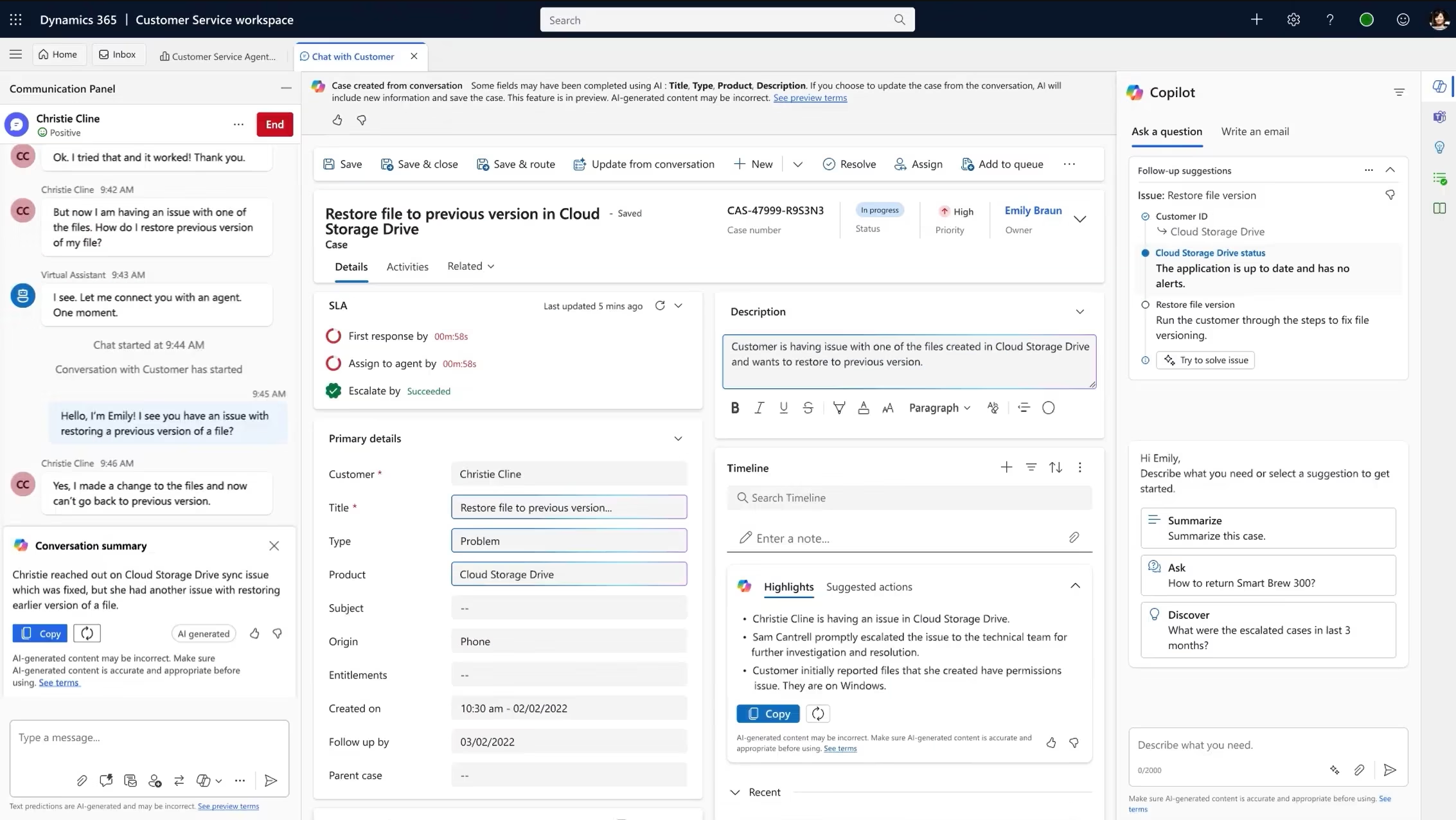
AI agents in Microsoft Dynamics 365 Customer Service are embedded directly into the customer service platform, working behind the scenes to support agents, supervisors, and service operations. Rather than acting as standalone tools, they continuously analyze customer interactions, case data, knowledge articles, and workflows as work happens.
Each AI agent is designed for a specific purpose, such as creating cases, identifying customer intent, surfacing relevant knowledge, or evaluating service quality. Once configured, these agents run automatically, helping teams reduce manual effort and improve consistency without requiring constant user interaction.
Organizations maintain control over how AI agents operate through configuration and governance settings, ensuring they align with business processes and compliance requirements. By handling repetitive tasks and surfacing insights at the right time, AI agents allow human agents to focus on problem-solving, empathy, and delivering better customer experiences.

Ready to explore how AI agents can transform your customer service?
Microsoft AI agents are most impactful when teams understand how to apply them to real business scenarios. Rand Group’s Microsoft AI Agents Workshop: Automate everyday business work is designed to help organizations move from awareness to action.
The AI agents available in Dynamics 365 Customer Service
Microsoft provides several AI agents within Dynamics 365 Customer Service that are designed to work together across the customer service lifecycle. Each agent focuses on a specific area, helping teams streamline operations while maintaining high service quality.
Case management agent
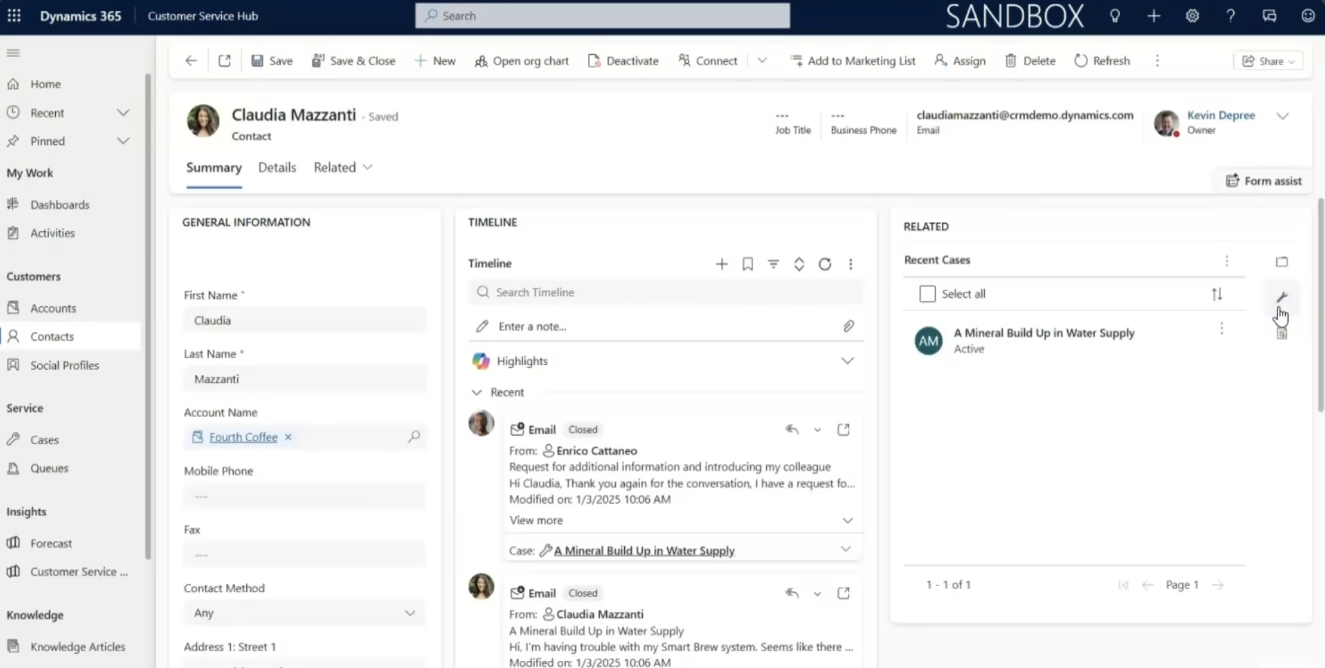
The Case Management Agent helps automatically create and manage cases by analyzing incoming customer interactions such as emails, chats, or digital messages. It identifies relevant details and ensures cases are set up accurately from the start.
Key capabilities:
- Automatically creates cases from incoming customer communications
- Extracts relevant details such as subject, description, and context
- Categorizes cases to improve routing and prioritization
- Reduces manual data entry for customer service teams
Real-world example: A support team receiving hundreds of customer emails per day can rely on the case management agent to automatically create cases with the correct categories and details, allowing agents to focus on resolution instead of data entry.
Customer service representatives benefit from faster case setup, while managers benefit from more consistent case data and improved reporting accuracy.
Customer knowledge management agent
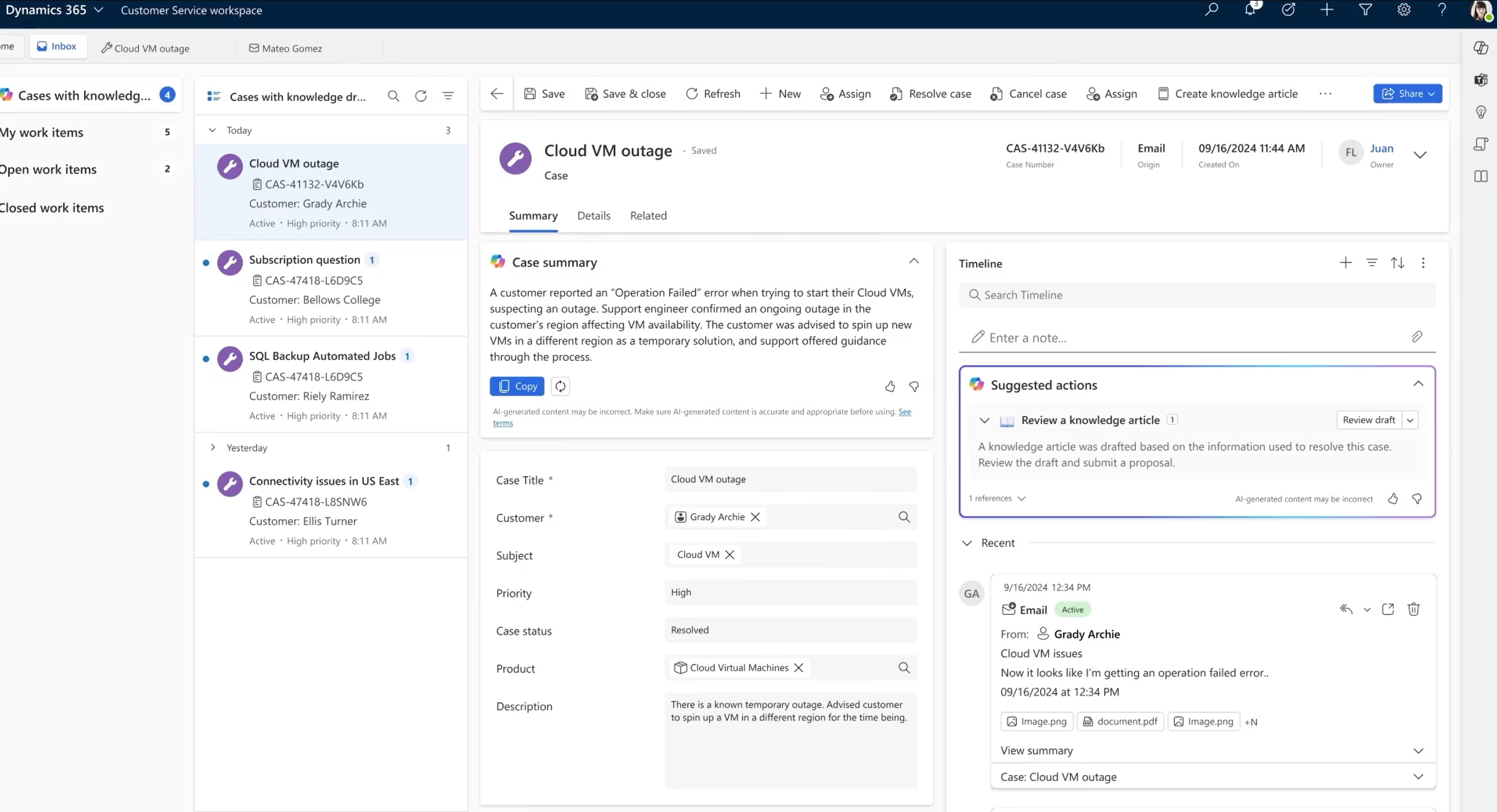
The Customer Knowledge Management Agent helps surface the most relevant knowledge articles during customer interactions. It ensures agents can quickly find accurate, approved information when responding to customer questions.
Key capabilities:
- Analyzes resolved cases to identify topics that lack knowledge articles
- Suggests creating new articles when the same questions arise repeatedly
- Recommends updates when existing articles are outdated or frequently bypassed
- Surfaces the most relevant knowledge articles to agents in real-time during customer conversations
- Tracks article effectiveness and usage patterns to continuously improve your knowledge base
Real-world example: An agent handling a complex product issue can instantly receive suggested knowledge articles without searching manually, resulting in faster and more confident responses.
Customer service agents gain faster access to information, while customers benefit from consistent and accurate answers across channels.
Customer intent agent
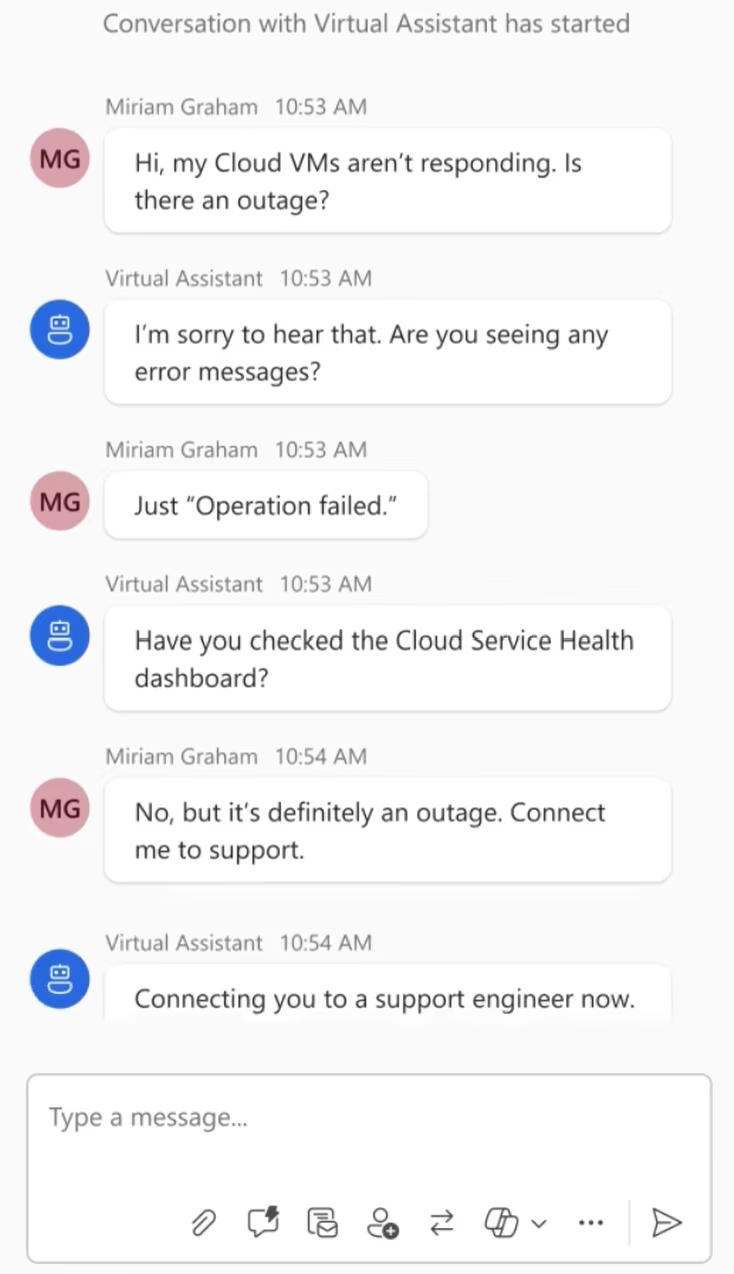
The Customer Intent Agent identifies what a customer is trying to accomplish based on their language, behavior, and interaction history. It helps guide conversations in the right direction from the start.
Key capabilities:
- Uses natural language processing to understand customer intent from their messages
- Identifies the purpose of customer contact (asking a question, reporting an issue, requesting a refund, etc.)
- Suggests relevant responses, articles, or actions based on identified intent
- Helps agents respond faster and more accurately to customer needs
- Learns from successful interactions to improve future suggestions
Real-world example: In a contact center, the customer intent agent can identify whether a customer is asking about billing, support, or account changes and route the interaction accordingly.
Supervisors benefit from improved routing and reduced handle times, while agents benefit from clearer guidance during interactions.
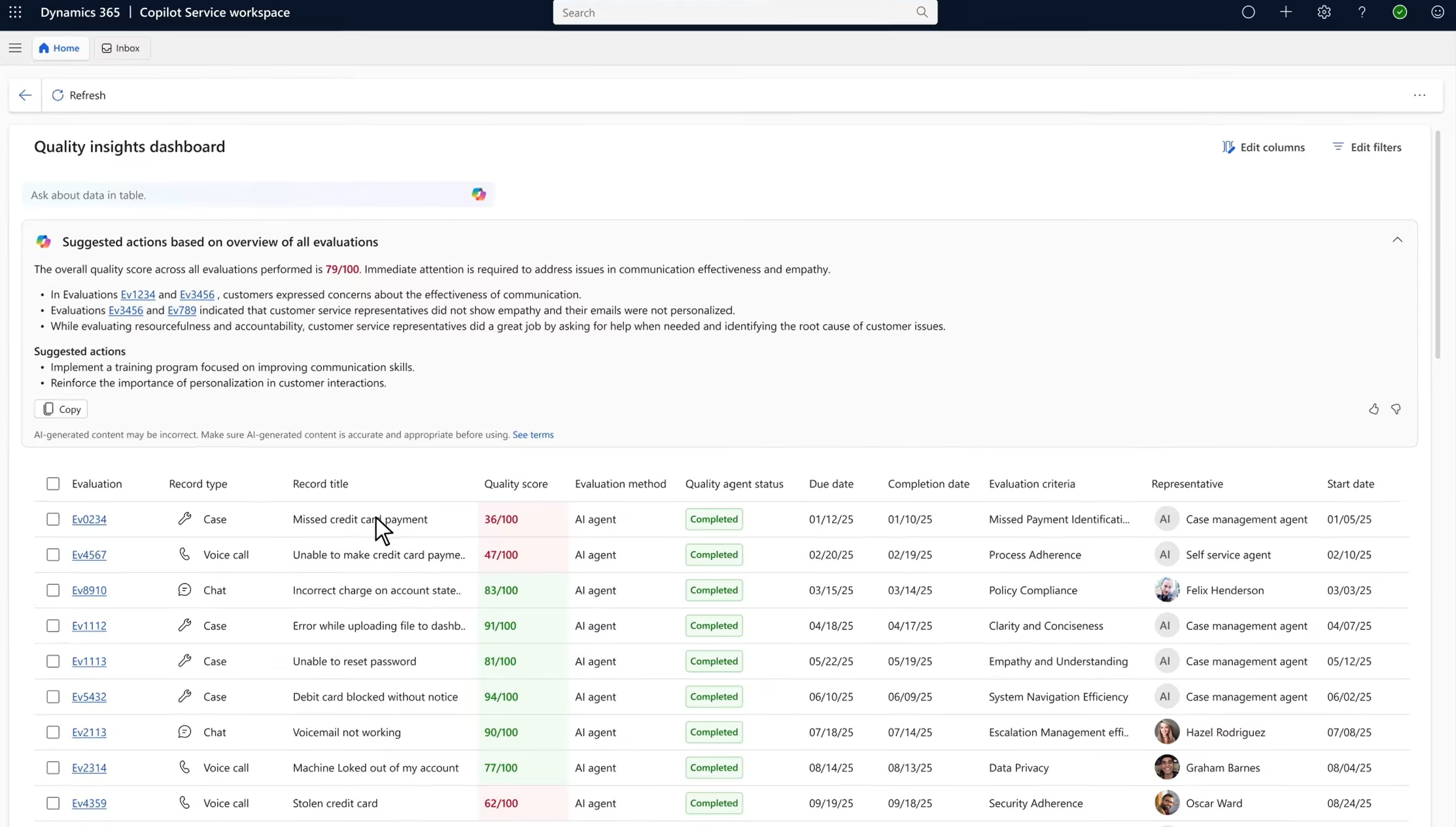
Quality evaluation agent
The Quality Evaluation Agent helps assess customer service interactions by automatically reviewing conversations and identifying trends related to service quality.
Key capabilities:
- Automatically evaluates interactions against quality criteria
- Identifies trends across large volumes of conversations
- Highlights coaching and training opportunities
- Provides consistent, objective quality insights
Real-world example: A customer service manager can use the quality evaluation agent to review trends across thousands of interactions instead of manually sampling a small percentage.
Managers and supervisors benefit from scalable quality monitoring, while agents receive more consistent and objective feedback.
AI agents vs. Copilot in Dynamics 365 Customer Service
AI agents and Copilot are often mentioned together in Dynamics 365 Customer Service, but they serve different purposes. Understanding how they work and how they complement each other helps organizations set realistic expectations and build a stronger AI strategy.
Copilot is designed to assist users in the moment. It helps agents draft responses, summarize cases, and quickly understand customer context during live interactions. AI agents, on the other hand, are purpose-built to automate specific workflows and operate continuously in the background. They handle tasks such as case creation, intent identification, knowledge surfacing, and quality evaluation without needing constant user interaction.
In practice, Copilot supports how work gets done, while AI agents focus on what work gets automated. Together, they create a more intelligent and efficient customer service experience.
Pricing and cost of AI agents in Customer Service
Understanding cost is an important part of adopting AI in Microsoft Dynamics 365 Customer Service. AI agents and advanced Copilot capabilities use a consumption-based pricing model tied to Microsoft Copilot Credits, rather than a fixed per-agent license. This means organizations pay based on how often AI agents are used and the complexity of the actions they perform—not simply by enabling them.
Copilot Credits (tokens) act as the billing unit for AI activity, covering tasks such as interpreting data, generating recommendations, and taking automated actions. Credits are priced at approximately $0.01 per credit, with capacity packs available, such as 25,000 credits for around $200 per month. Actual usage varies depending on interaction volume, agent configuration, and the types of tasks being automated, and unused credits typically expire at the end of the billing period.
This model gives organizations flexibility and control. Teams can manage costs by choosing which AI agents to activate, how frequently they run, and where human approval is required. Because usage patterns differ across organizations, working with a partner like Rand Group helps ensure AI agents are aligned with operational goals while staying within budget expectations.
How AI agents fit into a broader customer service strategy
Here’s an important truth: technology alone doesn’t transform customer service. AI agents are powerful tools, but they deliver the most value when they’re thoughtfully integrated into your broader business strategy.
Successful AI adoption requires attention to three critical areas beyond the technology itself:
- Business processes: AI agents work best when your underlying processes are clear and well-defined. Before implementing AI, take time to document how work flows through your organization, identify bottlenecks, and clarify what “good” looks like. AI agents will amplify your processes—if those processes are inefficient, the AI will efficiently do the wrong things.
- Data quality: AI agents learn from your data and make decisions based on it. If your case data is incomplete, inconsistent, or poorly categorized, the AI agents will struggle to deliver value. Investing in data quality—standardizing fields, enforcing data entry standards, cleaning historical data—pays significant dividends when you deploy AI.
- User adoption and change management: The most sophisticated AI agent is worthless if your team doesn’t trust it or use it. Successful organizations invest heavily in helping their teams understand what AI agents do, why they’re helpful, and how to work effectively alongside them. This means clear communication, hands-on training, addressing concerns openly, and celebrating early wins.
When AI agents are aligned with clear processes, quality data, and enthusiastic adoption, they become force multipliers that help your entire organization deliver better service, operate more efficiently, and scale sustainably.
Frequently asked questions about AI agents in customer service
Are AI agents replacing customer service representatives?
No. AI agents are designed to augment and support human agents, not replace them. They handle repetitive, time-consuming tasks like data entry, case routing, and finding information so your human agents can focus on what they do best—building relationships, handling complex issues, and using judgment in nuanced situations.
How difficult is it to implement customer service AI agents?
Implementation complexity varies depending on your current Dynamics 365 setup, data quality, and organizational readiness. The AI agents themselves are built into Dynamics 365, so there’s no separate software to install. However, successful implementation requires configuration, testing, training, and change management.
Do AI customer service agents work in real time?
Yes. Many AI agents operate in real time, providing suggestions and insights during live customer interactions.
Can AI agents handle complex customer issues?
AI agents assist with complex issues by surfacing information and insights, but human agents remain responsible for final decision-making.
Are customer service AI agents customizable?
Yes, absolutely. While AI agents come with intelligent defaults, they’re designed to be configured and customized for your specific business processes, terminology, quality standards, and workflows.
How do AI agents differ from traditional chatbots?
Traditional chatbots rely on rules or scripted flows, while AI agents leverage advanced LLMs, context tracking, and automation capabilities to handle multi‑step tasks, integrate with business systems, and autonomously complete customer workflows.
What benefits do AI agents provide for customer service teams?
AI agents reduce wait times, streamline self‑service, improve personalization, and handle repetitive inquiries, allowing human agents to focus on complex issues. They also increase operational efficiency and customer satisfaction.
Next Steps
AI agents are quickly becoming a foundational part of modern customer service, helping organizations scale efficiently while still delivering high-quality, human-centered experiences. As customer expectations continue to rise, businesses that thoughtfully adopt AI—balancing technology with people, processes, and change management—will be better positioned to stay competitive and resilient. If you are exploring how AI agents can support your customer service strategy, contact Rand Group to learn how our AI workshops, training, and ongoing support services can help you turn AI potential into real business impact.