Dynamics 365
 Power Platform
 Dynamics
 Cloud & Productivity
Microsoft Dynamics 365 Customer Service pricing and licensing guide

Microsoft Dynamics 365 Customer Service is a powerful CRM solution designed to help organizations manage cases, improve service delivery, and increase customer satisfaction. Understanding Dynamics 365 Customer Service pricing and licensing is essential for budgeting, implementation planning, and long-term cost control.
This guide explains how Dynamics 365 Customer Service is licensed, how it is priced, what additional costs to expect, and how to optimize your total investment.
- What is Dynamics 365 Customer Service?
- How is Dynamics 365 Customer Service licensed?
- How is Dynamics 365 Customer Service priced?
- D365 Customer Service integration and implementation costs
- Dynamics 365 Customer Service total cost of ownership
- How to purchase Dynamics 365 Customer Service
- D365 Customer Service licensing tips and best practices
- Frequently asked questions
What is Dynamics 365 Customer Service?
Microsoft Dynamics 365 Customer Service is a cloud-based customer relationship management (CRM) platform designed to help organizations manage support operations at scale. It centralizes case management, customer interactions, service-level agreements, and performance reporting within a single system.
Built on the Microsoft cloud, Dynamics 365 Customer Service connects with Microsoft 365, Teams, Power BI, and other Dynamics 365 applications to create a unified service environment. The platform supports email, chat, voice, and digital messaging while giving agents a complete view of customer history, contracts, and prior interactions. When enhanced with AI agents and Copilot, it becomes an intelligent service platform that helps teams automate routine tasks and improve resolution speed.
Core Dynamics 365 Customer Service features and capabilities include:
- Case management and SLA enforcement: Manage customer issues from intake through resolution using structured case records. Built-in SLA tracking and entitlements ensure service delivery aligns with contractual obligations and internal policies.
- Unified routing and intelligent work assignment: Automatically route cases, chats, and voice interactions based on skills, priority, and workload capacity. This reduces manual assignment and helps improve first-contact resolution rates.
- Omnichannel engagement: Support customers across email, live chat, voice, and digital messaging within a single interface. Agents see a complete interaction timeline, which reduces repetition and improves response quality.
- Knowledge management and collaboration: Create and surface knowledge articles directly within cases to guide consistent resolution. Integration with Microsoft Teams allows agents to collaborate with subject matter experts without leaving the service record.
- AI agents for service automation: Embedded AI agents in D365 Customer Service analyze conversations, case data, and workflows in real time. They automate repetitive actions, surface recommendations, and support quality monitoring while operating within defined governance controls.
- Copilot AI assistance: Copilot helps agents draft contextual responses, summarize case history, and retrieve relevant knowledge using natural language prompts. It reduces manual effort and improves accuracy in chat, email, and case documentation.
- Service scheduling and coordination: For organizations that deliver scheduled services, cases can connect directly to appointments and resource planning. This ensures continuity between issue tracking and service delivery.
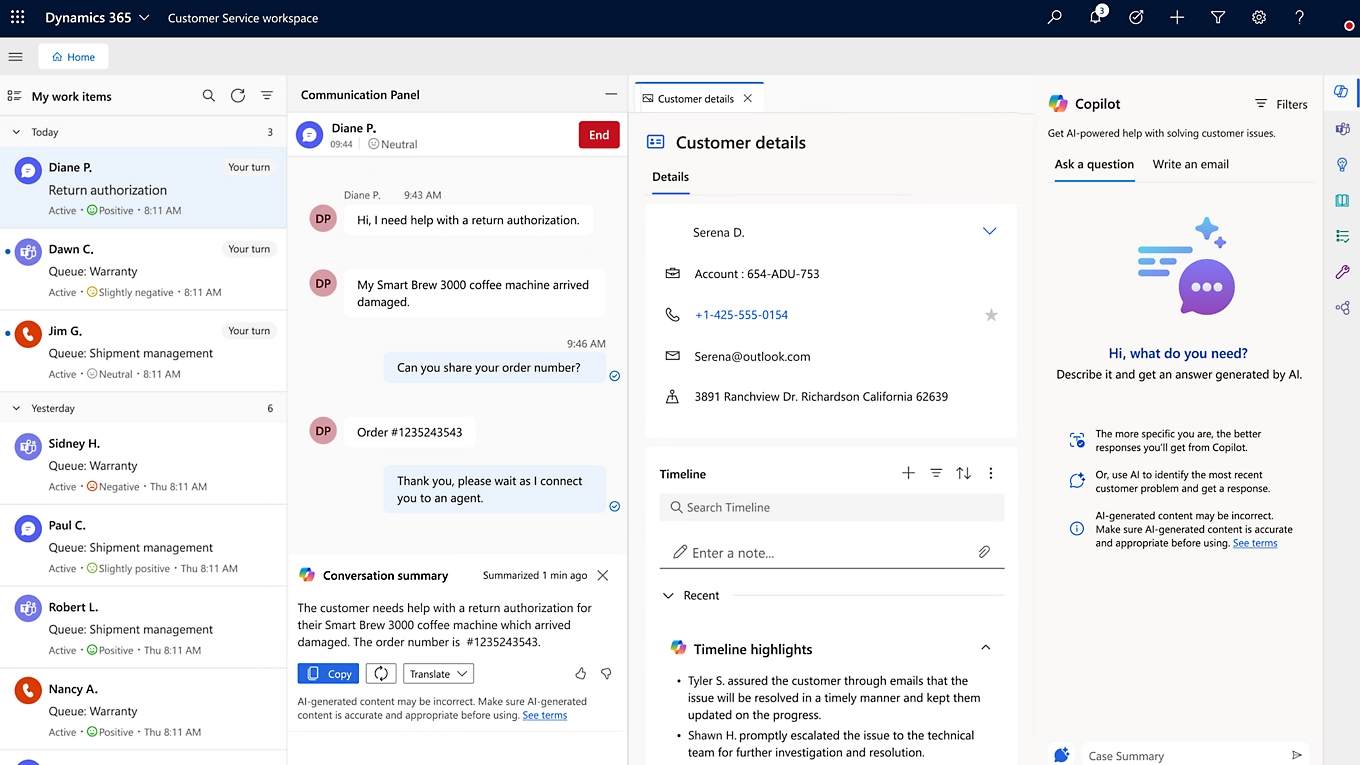

See D365 Customer Service in action
Ready to explore how Dynamics 365 Customer Service can improve your support operations? See the platform in action and discover how it streamlines case management and enhances customer experiences.
How is Dynamics 365 Customer Service licensed?
Dynamics 365 Customer Service uses a per-user, subscription-based licensing model. Each license is assigned to a named user and cannot be shared between multiple individuals. If a licensed user leaves your organization, the license can be reassigned, but concurrent use is not permitted.
Licenses are purchased for a defined subscription term. Organizations can choose the term structure that best aligns with budget planning and staffing flexibility:
- Monthly term: Provides the highest level of flexibility, allowing you to increase or decrease license counts month to month. This option is often used by organizations with variable staffing needs, though monthly subscriptions typically cost more than longer-term commitments.
- Annual term: The most common licensing structure for small and mid-sized organizations. Pricing is locked in for 12 months, and additional users can be added during the term, while reductions typically occur at renewal.
- Multi-year term: Typically structured over three years, this option offers long-term pricing protection and budget predictability. While less flexible than monthly agreements, it can provide stronger overall cost stability.
Dynamics 365 Customer Service is available in three primary license types: Professional, Enterprise, and Premium. Each edition provides a different level of functionality, ranging from core case management to advanced omnichannel engagement and AI-driven automation. Selecting the right edition depends on your service complexity, channel strategy, and long-term growth plans.
How is Dynamics 365 Customer Service priced?
Microsoft Dynamics 365 Customer Service is licensed per user as a cloud-based software-as-a-service (SaaS) subscription. Each named user who needs access to the application requires their own license. Pricing is determined by edition, and organizations choose the version that aligns with their service complexity, channel strategy, and AI requirements.
There are three primary user license types for Dynamics 365 Customer Service: Professional, Enterprise, and Premium.
- Dynamics 365 Customer Service Professional: $50 per user/month (paid yearly). This edition is designed for organizations with less complex service processes. It includes core case management, knowledge management, a self-service customer portal, and foundational reporting to support structured support operations.
- Dynamics 365 Customer Service Enterprise: $105 per user/month (paid yearly). Enterprise expands on Professional by adding advanced capabilities such as unified routing, customer service insights, embedded analytics, and deeper customization. It is intended for organizations with higher service volume, multiple teams, or more complex workflows.
- Dynamics 365 Customer Service Premium: $195 per user/month (paid yearly). Premium includes all Enterprise functionality plus an integrated contact center solution with digital and voice capabilities. It delivers a Copilot-first experience, AI-driven automation, and full capacity entitlements for both Customer Service and Contact Center applications.
Your pricing model should reflect how your service organization operates today and how it plans to scale. Organizations with basic case management needs often start with Professional, while those requiring omnichannel engagement, AI agents, and contact center functionality typically select Enterprise or Premium.
To learn more about the different types of licenses, read our blog on Dynamics 365 Customer Service Professional vs Enterprise.
In addition to Professional, Enterprise, and Premium licenses, Microsoft offers a light-use option called the Dynamics 365 Team Member license. This license is designed for users who need limited access to Customer Service data but do not require full case management or advanced functionality. The Team Member license is priced at $8 per user per month.
The Team Member license is ideal for supervisors, executives, or cross-departmental users who need visibility into cases and reports without performing full service operations.

Download the full pricing and licensing guide
Need a deeper breakdown of licensing scenarios, add-ons, and cost modeling? Download our complete Dynamics 365 Customer Service pricing and licensing guide for detailed comparisons and planning tools.
D365 Customer Service integration and implementation costs
In addition to monthly licensing fees, organizations should plan for a one-time implementation investment. This cost covers solution design, configuration, integrations, data migration, training, and go-live support. A successful Dynamics 365 Customer Service deployment aligns the platform with your service model, governance structure, and reporting requirements.
How much does a Dynamics 365 Customer Service implementation cost? Most Dynamics 365 Customer Service implementations range from $20,000 to over $150,000, depending on complexity. Simpler service environments can often deploy using one of our Dynamics 365 Customer Service Rapid Activation implementation plans, which start around $20,000 and are designed for organizations with straightforward processes and limited customization needs. More complex, enterprise-grade deployments requiring omnichannel, AI agents, or contact center integration fall toward the higher end of the range.
The following factors have the greatest impact on total implementation cost:
- Service process complexity: Organizations with multiple service teams, escalation paths, SLAs, entitlements, or global support models require more configuration and testing.
- Data migration requirements: Importing historical cases, customer records, contracts, and knowledge articles can range from simple imports to complex data transformation projects.
- Customization and automation: Building custom workflows, routing logic, integrations, dashboards, or extensions increases development time and validation effort.
- System integrations: Connecting Dynamics 365 Customer Service to ERP systems, telephony providers, marketing automation platforms, or third-party applications requires APIs, middleware, and configuration.
- Training and adoption planning: Agent training, supervisor enablement, documentation, and change management directly influence user adoption and long-term success.
While lower-cost implementations may appear attractive, they often rely heavily on generic configurations or resources with limited familiarity with compliance requirements and service governance standards. Misalignment in implementation can lead to routing gaps, reporting inconsistencies, or rework after go-live.
Organizations that invest in a structured, well-planned Dynamics 365 Customer Service implementation typically achieve stronger adoption, cleaner reporting, and faster return on investment. In many cases, correcting a poorly executed deployment costs significantly more than implementing the solution correctly from the start.
Dynamics 365 Customer Service total cost of ownership (TCO)
When evaluating Dynamics 365 Customer Service, it is important to understand the total cost of ownership (TCO). TCO includes both the initial implementation investment and the ongoing subscription costs over the life of the system. It provides a clearer picture than license pricing alone.
As a cloud-based CRM platform, Dynamics 365 Customer Service significantly changes how organizations calculate long-term costs compared to traditional on-premises customer service systems. On-premises software often requires large upfront licensing fees, server infrastructure, database management, security investments, IT staffing, and periodic upgrade projects. These costs are typically unpredictable and increase over time as hardware ages and support requirements grow.
Dynamics 365 Customer Service uses a subscription-based pricing model with per-user monthly fees. The subscription includes hosting in Microsoft Azure, infrastructure management, security updates, system maintenance, and ongoing feature enhancements. This eliminates the need for internal server management and reduces the burden on IT teams.
Because updates are delivered automatically through the cloud, organizations avoid expensive upgrade projects that traditionally disrupt operations. New features, including AI agents and Copilot enhancements, are introduced within the subscription framework rather than requiring separate system overhauls.
By consolidating infrastructure, maintenance, and upgrades into a predictable subscription model, Dynamics 365 Customer Service offers a more stable and manageable total cost of ownership. For most organizations, this results in improved budget control, reduced IT overhead, and a lower long-term risk profile compared to legacy customer service platforms.

How to purchase Dynamics 365 Customer Service
Microsoft sells Dynamics 365 Customer Service through its global network of certified partners. These partners are authorized to sell, implement, and support Dynamics 365 solutions for organizations of all sizes. Purchasing through a Microsoft partner provides guidance on licensing selection, subscription terms, implementation planning, and long-term support.
Choosing the right partner is critical to the success of your Dynamics 365 Customer Service deployment. A qualified partner helps align the platform with your case management structure, SLA framework, routing logic, and reporting requirements. They also provide training, integration services, AI configuration support, and ongoing optimization to ensure the system continues to evolve with your service model.
Rand Group is a Microsoft-certified partner with deep experience implementing Dynamics 365 Customer Service across industries. Our team supports organizations with licensing optimization, Rapid Activation deployments, complex enterprise implementations, integrations with ERP and contact center systems, and AI enablement through Copilot and AI agents. We focus on designing scalable service environments that improve resolution speed, reporting accuracy, and operational visibility.
If you are evaluating Dynamics 365 Customer Service or planning an upgrade, working with an experienced partner ensures your investment is structured correctly from day one.
Ready to move forward? Contact Rand Group to get started.

Get Dynamics 365 Customer Service
Modernize your service operations with Dynamics 365 Customer Service. Let our team help you select the right edition, design your solution, and implement with confidence.
D365 Customer Service licensing tips and best practices
Strategic licensing decisions can help control costs and avoid compliance issues. Below are practical recommendations when purchasing Dynamics 365 Customer Service:
- Assess your needs and choose the right edition: Evaluate your service model, case complexity, routing requirements, and AI needs before selecting Professional, Enterprise, or Premium. Choosing the correct edition upfront helps prevent unnecessary upgrades or feature gaps later.
- Leverage the base-and-attach model when applicable: If users require multiple Dynamics 365 applications, Microsoft’s base-and-attach licensing structure may reduce costs. Assign the highest-priced application as the base license and attach additional qualifying applications at a discounted rate where available.
- Use Team Member licenses for light users: Not every user requires a full Customer Service license. The lower-cost Team Member license is appropriate for individuals who need read access or limited updates, provided their responsibilities align with license restrictions.
- Monitor license usage and adjust regularly: Review license assignments and user activity on a recurring basis. Removing unused subscriptions and planning for expected staffing changes helps optimize overall subscription spend.
- Stay informed on licensing updates: Microsoft periodically adjusts pricing, packaging, and promotional offers. Working closely with your partner ensures you stay aware of opportunities that may improve cost efficiency.
- Consult with licensing specialists: Licensing rules can be complex. Partnering with Microsoft-certified experts helps ensure accurate purchases, compliance alignment, and long-term scalability.
Frequently asked questions
How is Dynamics 365 Customer Service licensed?
Dynamics 365 Customer Service is licensed per named user under a subscription model. Each individual who needs access must have their own license, and licenses cannot be shared concurrently. Organizations choose between Professional, Enterprise, or Premium editions and select a monthly, annual, or multi-year term.
How is Dynamics 365 Customer Service priced?
Dynamics 365 Customer Service is priced per user per month based on edition. Professional is $50 per user/month, Enterprise is $105 per user/month, and Premium is $195 per user/month (paid yearly). Pricing varies by edition because each tier includes different levels of functionality and AI capabilities.
What is the difference between D365 Customer Service Professional and Enterprise?
D365 Customer Service Professional includes core case management, knowledge management, and basic service functionality. D365 Customer Service Enterprise adds advanced features such as unified routing, embedded analytics, workflow automation, and deeper customization options for more complex service environments. To learn more, read our blog on D365 Customer Service Professional vs Enterprise.
Is there a minimum number of licenses required?
No. There is no minimum license requirement for Dynamics 365 Customer Service. Organizations can start with a single user license and scale as needed.
Can I mix and match Professional, Enterprise, and Premium licenses?
No. All full users within the same environment must be licensed under the same edition. However, Team Member licenses can be added for users who require limited access.
Can I try Dynamics 365 Customer Service before purchasing?
Yes. Microsoft offers a 30-day free trial of Dynamics 365 Customer Service. This allows organizations to evaluate features, test workflows, and determine which edition best fits their needs before committing to a subscription.
Is there special pricing for nonprofit organizations?
Yes. Microsoft offers discounted pricing for eligible nonprofit organizations. Nonprofits must meet Microsoft’s qualification criteria to access nonprofit licensing rates.
How much does a Dynamics 365 Customer Service implementation cost?
Implementation costs typically range from $20,000 to over $150,000 depending on complexity. Simpler deployments can often use a Rapid Activation plan starting around $20,000, while enterprise implementations with integrations and advanced automation fall at the higher end of the range.
Next steps
Understanding Dynamics 365 Customer Service pricing and licensing is essential to making informed service transformation decisions. Whether you are evaluating editions, estimating implementation costs, or analyzing total cost of ownership, having clarity upfront helps ensure long-term return on investment.
Rand Group is a trusted Microsoft partner dedicated to helping organizations implement and optimize Dynamics 365 Customer Service. Ready to modernize your service operations and improve customer outcomes? Contact Rand Group today to get started.