Dynamics 365
 Power Platform
 Dynamics
 Cloud & Productivity
Geofencing for Dynamics 365 Field Service

Geofencing in Dynamics 365 Field Service enables organizations to automatically track technician location, trigger real-time updates, and improve communication with customers—all without manual intervention.
As service organizations face increasing pressure to provide accurate arrival times and faster resolution, tools like geofencing help bridge the gap between dispatcher expectations and field execution. By creating virtual boundaries around service locations, businesses can automate work order updates, reduce administrative overhead, and deliver a more reliable customer experience.
What is Geofencing in Dynamics 365 Field Service?
What is Geofencing in Dynamics 365 Field Service?
Geofencing is a location-based capability within the Field Service Mobile app that creates a virtual perimeter—also known as a “geo-fence”—around a job site, customer location, or asset.
When a field technician enters or exits this defined area, the system automatically triggers events such as:
- Updating work order status
- Notifying dispatchers
- Logging timestamps for arrival and departure
- Initiating workflows or alerts
In Dynamics 365 Field Service, geofencing compares the real-time GPS location of a technician’s mobile device with the coordinates of a work order. When that boundary is crossed, an event record is created, allowing organizations to track technician movement with precision.
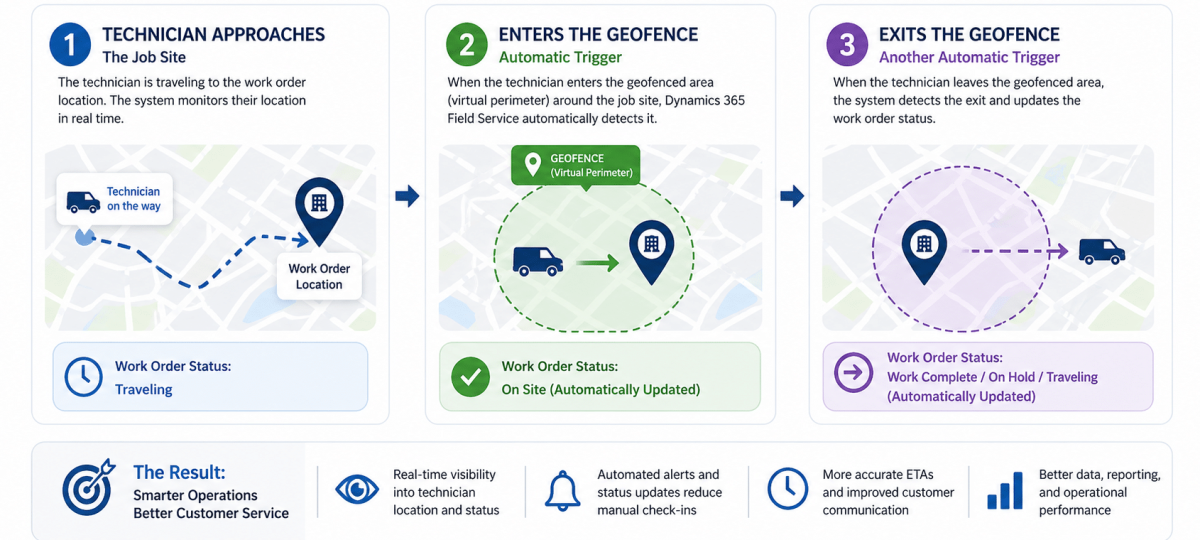
How Geofencing Works in Field Service
Geofencing functionality relies on a combination of:
- GPS data from the Field Service Mobile app
- Work order location coordinates
- Configurable radius settings for each geo-fence
- Event triggers tied to status changes
For example:
- When a technician enters a geo-fenced area → status updates from “Traveling” to “On Site”
- When they exit → status updates to “Work Complete” or “On Hold”
These automated transitions eliminate the need for manual check-ins and reduce the risk of inaccurate reporting.
Seen below is an example of geofence records configured in Dynamics 365 Field Service. Each geofence is tied to a work order or asset and tracks technician movement based on location data from the Field Service Mobile app.

Key benefits of geofencing for field service operations
1. Real-time technician visibility
Dispatchers gain instant insight into where technicians are and whether they’ve arrived on-site. This visibility improves scheduling accuracy and reduces the need for constant communication.
2. Automated work order updates
Instead of relying on technicians to manually update statuses, geofencing ensures that updates happen automatically based on location data—improving data accuracy and consistency.
3. Improved customer communication
With more accurate arrival and departure tracking, organizations can:
- Provide tighter appointment windows
- Send proactive updates
- Reduce missed or delayed appointments
4. Reduced administrative work
Geofencing minimizes manual data entry, allowing technicians to focus on service delivery rather than system updates.
5. Better SLA and KPI tracking
Automatically captured timestamps improve reporting on:
- First-time fix rates
- Response times
- Time on-site vs. travel time
Common use cases for geofencing in Dynamics 365 Field Service
Geofencing is highly flexible and can be applied across industries to improve visibility, automation, and control:
- Field technician arrival verification – Automatically confirm when a technician reaches a job site—especially valuable for compliance-driven industries that require accurate service records.
- Job site security and access control – Trigger alerts when technicians enter or leave restricted or sensitive locations to maintain safety and oversight.
- Break and idle time monitoring – If a technician exits a geo-fenced area mid-job, the system can flag the work order as paused or on hold, improving time tracking accuracy.
- Proactive dispatching and schedule management – If a technician has not entered the geo-fence within the expected timeframe, dispatchers can quickly intervene to reassign work or notify customers of delays.
- Asset-based service tracking – For organizations managing large equipment or multiple service locations, geofencing ensures accurate tracking of work performed at each site.

Want to see how geofencing and automation can transform your field service operations?
Our Dynamics 365 experts can help you configure geofencing, optimize scheduling, and improve technician productivity.
Geofencing and the future of field service
Field service is evolving beyond basic scheduling into a fully connected, data-driven operation. Organizations are increasingly focused on:
- End-to-end work order lifecycle visibility
- Predictive service and IoT integration
- Enhanced customer engagement
Geofencing plays a key role in this shift by providing real-time data that feeds automation, analytics, and decision-making.
When combined with other Dynamics 365 capabilities—such as resource scheduling optimization (RSO) and connected field service—geofencing helps organizations move toward a more proactive and intelligent service model.
Best practices for implementing geofencing
To get the most value from geofencing, consider the following:
- Define appropriate geo-fence radius sizes
Too small can cause missed triggers; too large can reduce accuracy. - Align status triggers with real workflows
Ensure automated updates reflect how your technicians actually work. - Train technicians on mobile usage
Accurate GPS tracking depends on proper app usage and permissions. - Monitor and refine over time
Use reporting insights to adjust configurations and improve performance.
Get started with Dynamics 365 Field Service
Geofencing is just one of many features that make Dynamics 365 Field Service a powerful solution for modern service organizations. From intelligent scheduling to mobile productivity tools, the platform enables teams to deliver faster, more reliable service.
Ready to get started? Rand Group is an award winning Microsoft Solution Provider with a 90% client satisfaction rate offering Dynamics 365 Field Service implementation and support services. Let us partner with you to achieve your business goals and improve your customer service performance by contacting us today.