Best Salesforce alternatives for growing businesses

Salesforce is a leading CRM platform for sales, service, and marketing teams. It offers deep CRM functionality, broad customization, and a large app ecosystem. However, it is not always the right fit for every business.
Many companies compare Salesforce alternatives when they need stronger ERP integration, simpler user adoption, lower long-term complexity, or a CRM that fits better with their existing technology stack. Others want a system that connects sales, service, finance, reporting, and operations without creating more data silos.
The best Salesforce alternative depends on how your business sells, serves customers, manages data, and connects front-office and back-office systems. In this guide, we compare four leading Salesforce alternatives in depth: Microsoft Dynamics 365 CRM, NetSuite CRM, Sage CRM, and HubSpot CRM.
Table of contents
- What is Salesforce?
- Why consider Salesforce alternatives?
- Common Salesforce limitations to consider
- Salesforce alternatives comparison table
- Top Salesforce alternatives
- Other Salesforce alternatives to consider
- Salesforce alternatives by business need
- How to choose the right Salesforce alternative
- How Rand Group helps businesses choose and implement CRM systems
- Frequently asked questions
What is Salesforce?
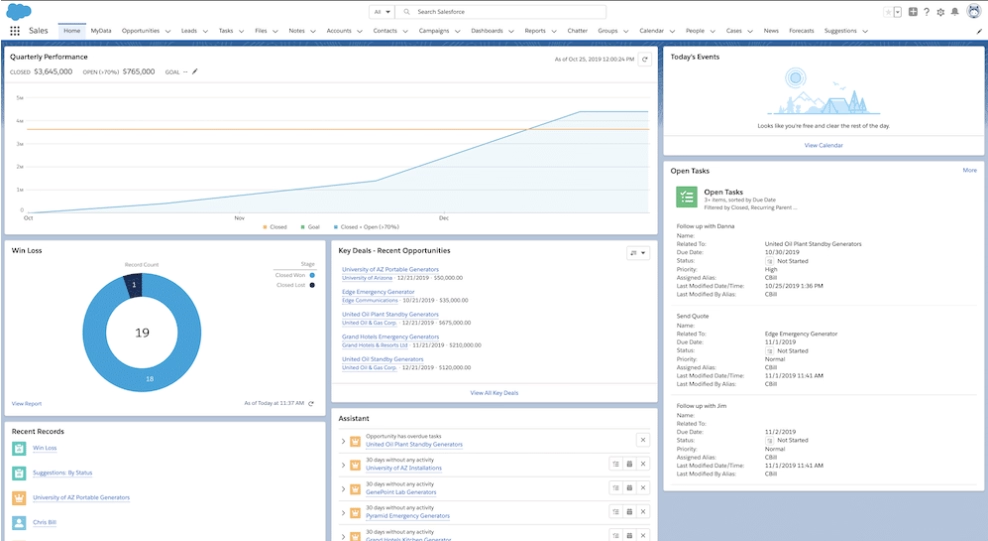
Salesforce is a cloud-based CRM platform that helps businesses manage customer relationships across sales, service, marketing, commerce, and IT. It is commonly used to track leads, manage opportunities, organize customer data, automate sales tasks, and report on pipeline activity.
Salesforce is well known because it offers broad CRM functionality, deep customization, and a large app marketplace. Common Salesforce capabilities include lead and opportunity management, sales automation, workflow tools, dashboards, reports, and third-party integrations.
Salesforce can be a strong fit for companies that need advanced standalone CRM functionality and have the resources to manage setup, customization, integrations, and administration. However, some businesses compare Salesforce alternatives as costs rise, customization adds maintenance, user adoption requires more training, or key data remains in separate ERP, finance, billing, inventory, or reporting systems.
Why consider Salesforce alternatives?
Businesses usually compare Salesforce alternatives for one of two reasons. They may already use Salesforce and feel the system no longer fits either how they work or their budget. Or they may be choosing a new CRM and want to compare Salesforce against other options before making a decision.
A CRM should make it easier to manage customers, not harder. The right CRM should support sales, service, marketing, finance, and operations with clean data, clear workflows, and useful reporting.
Common reasons to consider Salesforce alternatives include:
- You are comparing CRM options before buying: Reviewing Salesforce alternatives helps you choose a CRM that fits your sales process, service model, budget, and long-term technology strategy.
- Your business has outgrown its current CRM setup: Growing teams may need a CRM that supports more users, more data, more locations, or more complex sales and service processes.
- Your teams need more connected customer data: Sales, service, finance, and operations teams need accurate customer data without duplicate entry, manual handoffs, or disconnected records.
- Your CRM needs to work better with other systems: A CRM should connect with ERP, accounting, ecommerce, marketing, service, reporting, inventory, billing, or field service tools.
- Your users need a system that is easier to adopt: A CRM only works when teams trust the data, understand the workflows, and use the system consistently.
- Your company wants to reduce long-term complexity: Some businesses want fewer add-ons, fewer custom workflows, and a more connected platform that is easier to manage.
- Your business needs better reporting and visibility: Leaders need clear insight into pipeline, revenue, customer activity, service history, and team performance.
Choosing the right CRM is important because it shapes how your teams manage customers, share data, automate work, and measure performance. A poor-fit CRM can create extra manual work, low adoption, disconnected reporting, and higher long-term costs. A well-fit CRM can give teams cleaner processes, better customer visibility, and stronger data for decision-making.
At Rand Group, we help businesses evaluate CRM platforms based on how they actually operate, not just on feature lists. Our consultants work across CRM, ERP, reporting, integrations, training, and support, so we understand how CRM decisions affect the full business system. This hands-on experience helps us guide clients toward solutions that fit their current needs, reduce long-term complexity, and scale with future growth.
Common Salesforce limitations to consider
Salesforce is a strong CRM platform, but it may create challenges when a business needs a simpler, more connected, or easier-to-manage system. These limitations are most common when Salesforce becomes one part of a larger application stack that also includes ERP, accounting, ecommerce, service, field operations, billing, and reporting tools.
Before choosing Salesforce or replacing it, companies should look beyond the feature list. The best CRM is not always the system with the most capabilities. It is the system that fits how your teams work, how your data moves, and how your business needs to scale.
Common Salesforce limitations include:
- Cost and licensing complexity: Salesforce costs can increase as teams add advanced features, AI tools, automation, analytics, integrations, higher-tier licenses, or third-party applications.
- Implementation complexity: A Salesforce implementation requires more than software setup because teams also need process design, clean data, role-based screens, testing, training, and reporting.
- User adoption challenges: Salesforce can be difficult to adopt when screens, workflows, required fields, or custom processes feel too complex for daily users.
- Integration and data silos: Salesforce often needs integrations to connect with ERP, accounting, billing, inventory, ecommerce, service, and reporting systems.
- Customization and maintenance: Salesforce is highly configurable, but heavy customization can create more testing, documentation, troubleshooting, and long-term maintenance.
- Administration requirements: Larger Salesforce environments often need dedicated administrators, governance, and ongoing support to manage fields, workflows, apps, reports, permissions, and releases.
- Disconnected business processes: Salesforce is CRM-first, so companies that need sales, finance, inventory, fulfillment, billing, and operations in one connected process may need additional systems and integrations.
- Reporting gaps across systems: Salesforce can provide strong CRM reporting, but cross-system reporting may require extra tools or manual work when customer, financial, operational, and service data live in separate systems.
When we assess CRM fit at Rand Group, we look beyond the CRM screen itself. We review how customer data moves through the business, where users still rely on spreadsheets, which reports require manual work, and which teams depend on the same customer record.
These details often reveal CRM complexity, integration risk, and long-term maintenance needs that may not appear in a basic software demo. Our experience across CRM, ERP, reporting, integrations, and support helps us identify these risks before they become long-term system problems.
Salesforce alternatives comparison table
The best Salesforce alternatives are not all built for the same use case. Some are best for connected sales and service, some are best for ERP integration, and others are best for smaller teams that need a simple CRM.
The table below compares the four Salesforce alternatives covered in depth in this guide: Microsoft Dynamics 365 CRM, NetSuite CRM, Sage CRM, and HubSpot CRM.

Need help choosing a Salesforce alternative?
Rand Group can help you compare CRM platforms, define requirements, and choose a solution that fits your sales, service, reporting, integration, and long-term growth needs. Sign up for a software evaluation and selection engagement to get expert guidance before you commit to a CRM platform.
Top Salesforce alternatives
The best Salesforce alternative depends on your current systems, business size, budget, sales process, service model, and integration needs. This guide focuses on four CRM options that cover the most common buyer needs: Microsoft Dynamics 365 CRM, NetSuite CRM, Sage CRM, and HubSpot CRM.
Salesforce may still be a good fit for organizations that want a CRM-first platform and have the budget, internal resources, and support model to manage it well. However, many growing businesses compare Salesforce alternatives when they need stronger system integration, easier adoption, lower long-term complexity, or a more connected business platform.
Microsoft Dynamics 365 CRM
Microsoft Dynamics 365 CRM is one of the strongest Salesforce alternatives for businesses that use Microsoft 365, Outlook, Teams, Power BI, Power Platform, Azure, or Dynamics 365 ERP. It gives organizations a connected way to manage sales, service, marketing, field service, automation, and analytics within the Microsoft ecosystem.
Dynamics 365 CRM is not just one single application. It is a connected suite of Microsoft customer engagement applications that can be used alone or together based on business needs. This gives companies flexibility to start with sales, service, marketing, or field service and expand over time.
Dynamics 365 CRM also gives businesses flexibility through different product editions. For example, Dynamics 365 Sales and Dynamics 365 Customer Service include Professional and Enterprise options. Professional editions are designed for small and mid-sized businesses that need core CRM functionality with a simpler deployment path, while Enterprise editions support more advanced sales, service, automation, and reporting needs.
For many businesses, Dynamics 365 CRM is a strong alternative to Salesforce because it connects customer data with the tools teams already use every day. It can also connect CRM activity with ERP data, giving sales, service, finance, and operations teams a more complete view of customers, projects, orders, invoices, and performance.
- Dynamics 365 Sales: Dynamics 365 Sales is the closest direct alternative to Salesforce Sales Cloud. It helps sales teams manage leads, opportunities, accounts, pipeline, forecasting, seller activity, and AI-assisted sales insights.
- Dynamics 365 Customer Service: Dynamics 365 Customer Service helps support teams manage cases, knowledge, routing, customer communication, and service performance. It is a strong fit for businesses that need CRM connected to customer support and service operations.
- Dynamics 365 Contact Center: Dynamics 365 Contact Center helps businesses manage customer interactions across digital and voice channels with AI-powered self-service, routing, agent assistance, and service analytics. It is useful for organizations that need a modern contact center connected to customer data and service workflows.
- Dynamics 365 Customer Insights: Dynamics 365 Customer Insights helps businesses unify customer data and create more personalized journeys. It supports segmentation, campaign management, customer profiles, and data-driven engagement.
- Dynamics 365 Field Service: Dynamics 365 Field Service helps businesses manage work orders, scheduling, dispatch, technician activity, customer assets, and service agreements. It is useful for organizations that need to connect customer service with field operations.
For a deeper comparison, read our blog on Dynamics 365 vs Salesforce.
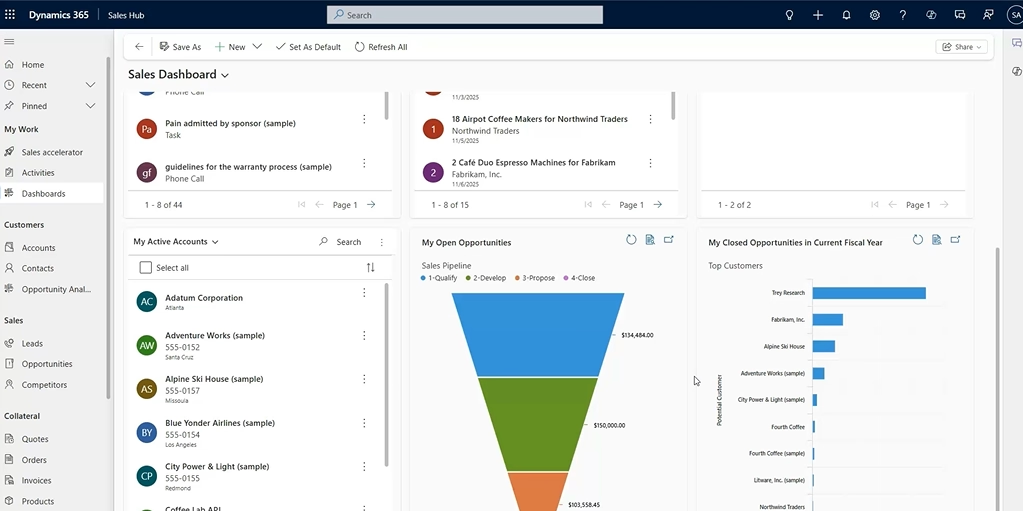
Best for: Businesses that want connected CRM, Microsoft ecosystem alignment, strong ERP integration, AI, reporting, and scalable sales and service processes.
Why it stands out:
- Connected Microsoft ecosystem: Dynamics 365 CRM works well for organizations that already use Microsoft 365, Teams, Outlook, Power BI, Azure, and Power Platform.
- CRM and ERP alignment: Dynamics 365 CRM can connect with Dynamics 365 Business Central and other Dynamics ERP applications, helping teams share customer, order, invoice, and financial data.
- Strong sales capabilities: Dynamics 365 Sales supports leads, opportunities, forecasting, activity tracking, seller workflows, AI insights, and pipeline management.
- Service and field service coverage: Dynamics 365 Customer Service and Field Service extend CRM beyond sales into cases, scheduling, technicians, work orders, and service operations.
- AI and automation: Copilot, agents, Power Automate, and Power Platform help teams reduce manual work and build workflows around real business processes.
- Flexible architecture: Companies can start with one Dynamics 365 application and expand as needs grow.
- Reporting strength: Power BI and Microsoft data tools make Dynamics 365 a strong option for companies that need CRM reporting tied to finance, operations, and service data.
At Rand Group, we helped Sapphire Gas Solutions replace Salesforce with Dynamics 365 Sales after the company experienced CRM limitations tied to complexity, low visibility, adoption challenges, and disconnected systems. Our team implemented Dynamics 365 Sales to match Sapphire’s project-driven sales process and integrated it with Dynamics 365 Business Central, their ERP system.
With Dynamics 365 Sales integrated with Business Central, Sapphire connected sales, operations, and accounting teams with real-time customer, project, pricing, and margin data. The implementation helped Sapphire reduce manual data entry by 50%, speed up sales rep onboarding by 40%, and eliminate more than 200 back-and-forth emails.
Preston McDonald, Sales Director at Sapphire Gas Solutions, said, “Dynamics 365 Sales is a complete game-changer for us. It’s so much easier to use than our previous CRM.”
To learn more, read the full Sapphire Gas Solutions case study.
NetSuite CRM
NetSuite CRM is one of the best Salesforce alternatives for companies that want CRM connected to ERP, finance, inventory, orders, and customer data. It is part of the broader NetSuite cloud ERP platform, which means customer data can connect directly with financials, order management, fulfillment, billing, revenue, and support.
NetSuite CRM helps companies manage interactions with prospects, customers, partners, and suppliers in one place. NetSuite CRM includes sales force automation, customer service management, marketing automation, quotes, commissions, sales forecasts, and partner relationships. It also supports the customer lifecycle from lead to opportunity, order, fulfillment, renewal, upsell, cross-sell, and support.
This is the main difference between NetSuite CRM and Salesforce. Salesforce is a CRM-first platform that usually needs ERP integration. NetSuite CRM is part of a unified business platform where sales, finance, operations, and leadership can work from the same customer record.
For a deeper comparison, read our blog on NetSuite vs Salesforce.
Best for: Companies that want CRM and ERP in one suite, especially businesses with complex quote-to-cash, inventory, order, fulfillment, or billing needs.
Why it stands out:
- Unified CRM and ERP: NetSuite CRM is connected to the same platform that manages finance, orders, inventory, billing, and operations.
- Full customer lifecycle: NetSuite supports lead, opportunity, quote, order, fulfillment, renewal, upsell, cross-sell, and support processes.
- Real-time financial context: Sales teams can gain better visibility into customer financial data, orders, invoices, and account history.
- Fewer data silos: A unified platform can reduce duplicate entry, manual reconciliation, and disconnected reporting.
- Strong fit for growing companies: NetSuite CRM works well for businesses that need customer data tied to revenue, fulfillment, and profitability.
- Industry fit: Manufacturing, distribution, wholesale, ecommerce, subscription, and services businesses often benefit from CRM and ERP working together.
NetSuite CRM may not be the best fit for companies that only need a standalone sales CRM. For simple sales teams, a lighter CRM may be easier to adopt. For growing companies that need customer data tied to financial and operational processes, NetSuite CRM is often a stronger long-term option.
In our experience, NetSuite CRM is most valuable when CRM data needs to support the full customer lifecycle, not just sales activity. It is a strong option for companies that want sales, finance, fulfillment, billing, and customer service teams working from one connected business platform.

Sage CRM
Sage CRM is a practical Salesforce alternative for Sage users, especially businesses already using Sage 100 ERP. It is often a good fit for small to mid-sized organizations that need sales visibility, marketing tools, customer service workflows, and customer data connected to accounting and operations.
Sage CRM helps businesses manage customer relationships across sales, marketing, and service. When connected with Sage 100 ERP, it gives customer-facing teams access to customer records, purchase history, order status, invoices, and operational details in one system.
Sage 100 CRM supports leads, opportunities, sales automation, marketing campaign management, case management, dashboards, mobile apps, and customer self-service. These capabilities help teams improve follow-up, manage customer activity, and gain better visibility without the overhead of an enterprise CRM.
Sage CRM is not designed to replace every enterprise-level Salesforce use case. Its main strength is practical CRM tied to Sage ERP, which can make it a better fit for companies that already use Sage and want a more connected way to manage customer relationships.
Best for: Sage ERP users and mid-sized teams that want sales, marketing, and service visibility connected to accounting and operational data.
Why it stands out:
- Strong Sage ERP fit: Sage CRM is most valuable for companies already using Sage ERP systems.
- Practical sales management: Teams can track leads, opportunities, quotes, follow-ups, and sales history.
- Marketing and service tools: Sage CRM includes marketing management and customer service modules for campaigns, cases, and support visibility.
- ERP-driven customer insight: Sales and service teams can view purchase history, order status, invoices, and customer records when integrated with Sage 100.
- Less enterprise complexity: Sage CRM can provide structure and visibility without the complexity of larger CRM platforms.
- Partner-led value: Sage environments can vary, so partner support is important for configuration, integrations, reporting, and user adoption.
Sage 100 CRM can be especially valuable when teams need stronger follow-up, clearer pipeline visibility, and customer data connected to Sage 100 ERP. For example, we helped Brandon Industries improve sales follow-up and customer retention after the company struggled to track quotes, monitor opportunities, and identify changes in customer buying patterns. Our team helped implement Sage 100 CRM so Brandon Industries could track quotes from creation to close, set follow-up reminders, centralize customer interactions, and report on high-value customer activity.
William Gan of Brandon Industries said, “Sage CRM has been instrumental in helping us track every opportunity and follow up effectively. Our customer retention has improved significantly.”

HubSpot CRM
HubSpot CRM is a common Salesforce alternative for small businesses and marketing-led teams that want a simple CRM with fast adoption. It is built around HubSpot’s customer platform, which includes marketing, sales, customer service, content, commerce, data management, and CRM tools.
HubSpot’s main strength is usability. Teams can manage contacts, deals, tasks, emails, meetings, forms, landing pages, live chat, and basic support workflows without heavy IT involvement. HubSpot also offers a free CRM that unifies customer data on one platform, includes AI tools, and has no expiration date.
HubSpot is a strong option for simple CRM and marketing-led growth. In our experience, it is often a good fit when teams want fast adoption, easy campaign management, and a central place to manage customer engagement. Dynamics 365 CRM or NetSuite CRM is usually a stronger fit when the CRM strategy needs to support deeper operational visibility, ERP-connected data, or more complex business processes. To learn more, read our blog on Dynamics 365 vs. HubSpot.
Best for: Small and growing teams that want a user-friendly CRM with strong marketing tools and quick setup.
Why it stands out:
- Easy adoption: HubSpot is known for a clean interface and fast setup.
- Strong marketing tools: HubSpot works well for inbound marketing, forms, email, content, campaigns, and lead generation.
- Free entry point: HubSpot’s free CRM can be useful for startups, small businesses, and teams moving away from spreadsheets.
- Broad app marketplace: HubSpot connects with many business apps, which helps smaller teams build a flexible cloud software stack.
- AI tools: HubSpot includes AI tools across its platform, including AI agents and features that support marketing, sales, service, and CRM workflows.
- Connected customer platform: HubSpot can bring sales, marketing, service, website content, and customer data into one workspace.

Other Salesforce alternatives to consider
Beyond Microsoft Dynamics 365 CRM, NetSuite CRM, Sage CRM, and HubSpot CRM, a few other Salesforce alternatives may be worth reviewing. These tools are often a better fit for smaller teams, sales-focused teams, or service-led organizations.
- Zoho CRM: Zoho CRM is often considered by small and mid-sized businesses that want an affordable CRM with sales automation, dashboards, reporting, customization, and AI features. Companies with complex ERP integration or governance needs should evaluate long-term fit carefully.
- Pipedrive: Pipedrive is a sales-focused CRM built around pipeline management, activity tracking, deal visibility, and sales reporting. It can be a fit for smaller sales teams that want a simple visual pipeline.
- Freshsales: Freshsales, from Freshworks, is an AI-powered sales CRM for lead capture, deal management, communication, workflow automation, and sales activity tracking. It may be useful for teams that want built-in email, phone, and chat tools.
- Zendesk: Zendesk is best considered for customer service, not full sales CRM replacement. It is strong for ticketing, messaging, help center, automation, and support workflows.
Salesforce alternatives by business need
The right Salesforce alternative depends on the business problem you are solving. Use the list below to narrow your CRM shortlist before reviewing pricing or scheduling demos.
- Best Salesforce alternative for Microsoft-first businesses: Microsoft Dynamics 365 CRM is a strong option for companies already using Microsoft 365, Outlook, Teams, Power BI, Azure, Power Platform, or Dynamics 365 ERP. It is especially useful when sales, service, reporting, and operations need to work together.
- Best Salesforce alternative for ERP-connected CRM: NetSuite CRM and Microsoft Dynamics 365 CRM are strong options for businesses that need customer data connected to finance, inventory, billing, orders, and reporting. NetSuite CRM fits companies that want CRM and ERP in one suite, while Dynamics 365 CRM fits companies that want CRM connected to Microsoft business applications.
- Best Salesforce alternative for Sage users: Sage CRM is often the best fit for businesses already using Sage 100 ERP. It helps teams manage leads, opportunities, marketing, service, and customer activity while connecting CRM data with accounting and operational records.
- Best Salesforce alternative for small businesses: Microsoft Dynamics 365 CRM and HubSpot CRM are both strong options for small and mid-sized businesses. Dynamics 365 CRM is often the better fit when SMBs want Microsoft integration, scalable sales or service tools, and a path to connect CRM with ERP, while HubSpot CRM is a strong fit for teams that want simple setup and marketing-led CRM.
- Best Salesforce alternative for sales-focused teams: Microsoft Dynamics 365 Sales and HubSpot CRM are strong options for teams that need pipeline management, activity tracking, reporting, and automation. Pipedrive may also be worth reviewing for smaller sales teams that want a simple visual pipeline.
- Best Salesforce alternative for customer service teams: Microsoft Dynamics 365 Customer Service is a strong option when service data needs to connect with sales, ERP, reporting, and Microsoft tools. Zendesk may also be worth reviewing for teams that mainly need ticketing, messaging, help center, and support workflows.
How to choose the right Salesforce alternative
Choosing the right Salesforce alternative starts with your business model. A simple sales team may only need contact management, pipeline tracking, and email tools. A more complex organization may need CRM, ERP, service, finance, field service, reporting, and automation to work together.
You should not choose CRM software based only on brand name or entry-level price. The right CRM should support how your business gets leads, wins deals, serves customers, invoices work, tracks orders, and reports on performance.
- Business goals: Define what you need the CRM to improve, such as sales productivity, lead conversion, customer service, marketing engagement, reporting, forecasting, or executive visibility.
- Current technology stack: Review the systems your teams already use and decide whether your CRM needs to connect with productivity tools, ERP, accounting, ecommerce, service, billing, or reporting applications.
- Integration needs: Identify where customer data must flow across the business, including sales, finance, operations, service, inventory, billing, and delivery.
- Process complexity: Match the CRM to your real workflows, such as territories, approvals, CPQ, account hierarchies, service routing, field service, custom reporting, or advanced security.
- Reporting and analytics: Review whether the CRM can support pipeline reporting, customer history, service metrics, forecasting, financial visibility, and cross-system dashboards.
- User adoption: Choose a CRM that fits how your users work, with clear screens, simple workflows, role-based dashboards, training, and leadership support.
- Implementation and support: Consider the full project effort, including planning, configuration, data migration, integrations, testing, training, post-go-live support, and long-term optimization.
How Rand Group helps businesses choose and implement CRM systems
Rand Group is a multi-platform solution provider with more than 20 years of experience helping businesses evaluate, implement, integrate, and support business software. We work across Microsoft Dynamics 365, NetSuite, Sage, reporting, integrations, software engineering, automation, and cloud infrastructure, which gives us a full view of how CRM fits into the broader business technology stack.
Our team has supported thousands of engagements across a wide range of industries and maintains a 90% client retention rate. We help organizations choose CRM systems based on business goals, process requirements, data needs, user adoption, integration strategy, and long-term scalability.
Our CRM services include:
- Software evaluation and selection: We help compare CRM platforms, define requirements, assess fit, and select the right solution for your business model.
- CRM implementation: We manage discovery, design, configuration, data migration, testing, training, and user adoption to support a successful CRM launch.
- Integration: We connect CRM with ERP, accounting, ecommerce, service, reporting, billing, inventory, and other business systems.
- Customization and development: We tailor CRM workflows, fields, dashboards, automation, and extensions to support how your teams work.
- Ongoing CRM support: We provide post-go-live support, troubleshooting, system optimization, reporting help, user training, updates, and long-term guidance.
Frequently asked questions
What is the best Salesforce alternative?
The best Salesforce alternative depends on your business needs. Microsoft Dynamics 365 CRM is often best for Microsoft-first businesses, NetSuite CRM is strong for CRM and ERP in one suite, Sage CRM fits Sage ERP users, and HubSpot CRM works well for small teams that want simple CRM and marketing tools.
Why do companies look for Salesforce alternatives?
Companies look for Salesforce alternatives because of cost, complexity, user adoption challenges, integration needs, reporting gaps, or a desire for a CRM that better fits their technology stack.
Is Microsoft Dynamics 365 CRM a good Salesforce alternative?
Yes. Microsoft Dynamics 365 CRM is a strong Salesforce alternative for businesses that want connected sales, service, marketing, field service, reporting, automation, and Microsoft ecosystem integration.
What is the difference between Dynamics 365 Sales and Dynamics 365 CRM?
Dynamics 365 Sales is a Microsoft CRM application for sales teams. Dynamics 365 CRM is a broader term that can include Dynamics 365 Sales, Customer Service, Customer Insights, Field Service, and Power Platform.
Is NetSuite CRM a Salesforce alternative?
Yes. NetSuite CRM is a Salesforce alternative for businesses that want CRM connected to ERP, financials, orders, billing, inventory, fulfillment, renewals, and customer service.
Is Sage CRM a Salesforce alternative?
Yes. Sage CRM is a Salesforce alternative for businesses that use Sage ERP and want sales, marketing, and service data connected to accounting and operational records.
Is HubSpot CRM a good Salesforce alternative?
HubSpot CRM can be a good Salesforce alternative for small and growing teams that want a simple CRM, fast setup, easy adoption, and strong marketing tools.
Which Salesforce alternative is best for ERP integration?
NetSuite CRM, Microsoft Dynamics 365 CRM, and Sage CRM are strong options for ERP integration. The best fit depends on whether your business uses NetSuite, Microsoft Dynamics 365, Sage, or another ERP system.
Which Salesforce alternative is best for Microsoft users?
Microsoft Dynamics 365 CRM is usually the best Salesforce alternative for Microsoft users. It connects with Microsoft 365, Outlook, Teams, Power BI, Power Platform, Azure, and Dynamics 365 ERP applications.
Which Salesforce alternative is best for small businesses?
Microsoft Dynamics 365 CRM and HubSpot CRM are both strong Salesforce alternatives for small businesses. Dynamics 365 CRM is often a better fit for small businesses that use Microsoft tools, need scalable sales or service processes, or want a path to connect CRM with ERP. HubSpot CRM is a strong fit for small teams that want simple setup, easy adoption, and marketing tools.
What should I compare when reviewing Salesforce alternatives?
Compare Salesforce alternatives based on cost, ease of use, sales features, service needs, ERP integration, reporting, automation, AI capabilities, user adoption, implementation effort, and long-term support.
Does Salesforce include ERP?
No. Salesforce is a CRM-first platform, not a native ERP system. Most businesses need a separate ERP, accounting, finance, inventory, or billing system alongside Salesforce.
Choose a CRM that fits your business model
There is no single best Salesforce alternative for every business. The right CRM should fit how your teams sell, serve customers, share data, manage reporting, and connect with the rest of your technology stack.
Microsoft Dynamics 365 CRM, NetSuite CRM, Sage CRM, and HubSpot CRM each solve different business needs. Contact us to compare Salesforce alternatives, define your CRM requirements, and choose a system that supports your business today and as it grows.