Dynamics 365
 Power Platform
 Dynamics
 Cloud & Productivity
Microsoft Dynamics 365 Customer Service capabilities and features

Customer service has evolved from a reactive support function to a strategic driver of customer retention and revenue protection. B2B organizations are expected to resolve issues quickly, honor contractual commitments, support multiple communication channels, and provide consistent experiences across complex customer relationships.
Many service teams, however, are still operating with disconnected systems, manual routing processes, and limited visibility into performance. This makes it difficult to scale operations, enforce service-level agreements (SLAs), or gain insight into recurring issues that impact customer satisfaction.
Microsoft Dynamics 365 Customer Service addresses these challenges through a connected platform that unifies case management, omnichannel engagement, knowledge management, AI-driven insights, and performance reporting. Dynamics 365 Customer Service is available in Professional and Enterprise editions, designed to support varying levels of service complexity and organizational scale. The following sections explore the core capabilities of Dynamics 365 Customer Service, with a focus on how each feature supports practical service execution and measurable business outcomes.
Case management, SLAs, and entitlements in Dynamics 365 Customer Service
Structured case management is the foundation of a controlled and scalable service operation. Dynamics 365 Customer Service provides a centralized framework for managing customer issues from initial contact through resolution, while enforcing contractual service terms.
Core capabilities include:
- Track customer issues through cases
- Record all interactions related to a case
- Create and track service-level agreements (SLAs)
- Define service terms through entitlements
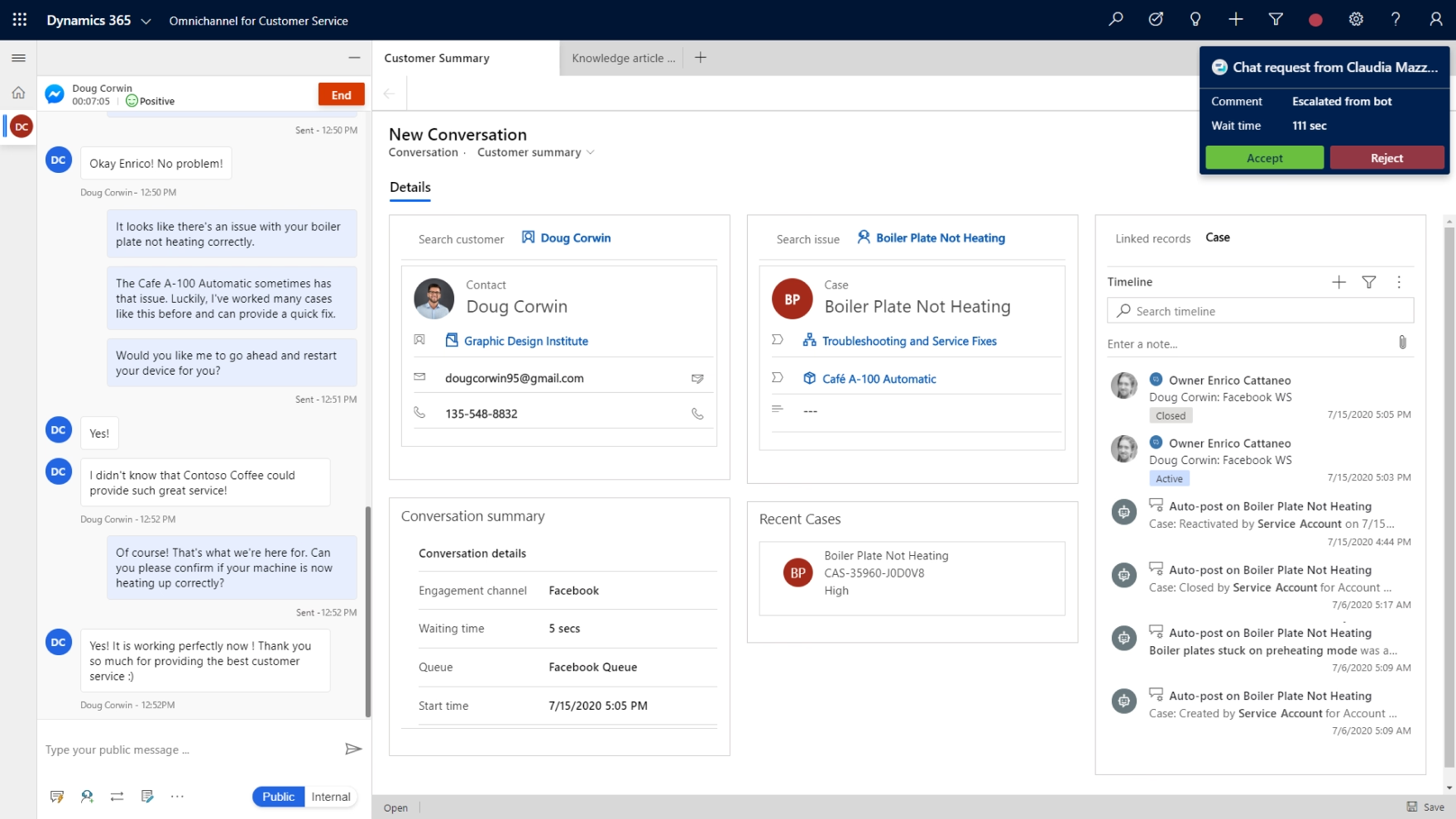
Cases serve as the system of record for service activity. Every email, call, chat, note, and task related to an issue is captured in a unified timeline. This gives agents full context when engaging with customers and reduces the risk of missed details or duplicate effort.
SLAs allow organizations to define response and resolution targets tied to specific case types or customer segments. The system automatically monitors SLA timers and can trigger escalations when thresholds are at risk. This supports compliance and accountability across the service organization.
Entitlements define what level of support a customer is eligible to receive based on contract terms, prepaid hours, or service tiers. By linking entitlements to cases, organizations ensure that service delivery aligns with contractual obligations and internal policies.
Together, these features establish governance within the service process. Leaders gain visibility into SLA compliance and case performance, while agents operate within clearly defined parameters that support consistent service delivery. Dynamics 365 Customer Service improves visibility and consistency in case handling, which can directly impact resolution speed. For examples of how organizations accelerate case closure using the platform, see our blog on how Dynamics 365 Customer Service helps teams close cases faster.

How to choose your Dynamics 365 Customer Service deployment
Dynamics 365 Customer Service is a flexible, per-user solution designed to support organizations of all sizes. Download this guide to compare the Professional and Enterprise editions, understand licensing and pricing, and determine which option best fits your service model.
Unified routing for intelligent work assignment
As service volumes grow, manual case assignment becomes difficult to manage and prone to imbalance. Static queues often result in some agents being overloaded while others are underutilized. Dynamics 365 Customer Service addresses this with unified routing.
Unified routing enables organizations to:
- Automatically route cases, chats, and voice interactions
- Assign work based on agent skills and expertise
- Distribute workloads according to capacity
- Prioritize high-impact or time-sensitive cases
Routing rules evaluate multiple criteria, including case priority, required skills, agent availability, and workload capacity. Work items are then assigned to the most appropriate resource without manual intervention.
This approach improves operational efficiency and supports higher first-contact resolution rates. Customers are more likely to reach an agent with relevant expertise, reducing the need for transfers or escalations.
From a management perspective, unified routing supports scalability. As organizations introduce new channels, expand teams, or modify service models, routing logic can be adjusted without redesigning the entire system. This flexibility allows service operations to evolve alongside business growth.

Omnichannel engagement and conversation management
Customers expect to interact with organizations through their preferred communication channel, whether that is email, chat, or voice. Providing a consistent experience across these channels requires more than simply adding new tools. It requires a unified engagement model.
Dynamics 365 Customer Service enables omnichannel engagement by consolidating conversations within a single interface. Agents can manage interactions across channels while maintaining a complete history of customer communication.
This unified model supports several practical outcomes. First, customers do not need to repeat information when moving between channels. Second, agents can see previous interactions in context, improving the quality and speed of responses.
Voice integration allows organizations to manage phone-based service within the same environment as digital channels. This reduces fragmentation and supports consistent reporting across all interaction types.
For service leaders, omnichannel capabilities provide a consolidated view of channel performance. Metrics such as response times, volume by channel, and resolution rates can be analyzed holistically rather than in isolated systems.
Knowledge base and Microsoft Teams collaboration in Dynamics 365 Customer Service
Consistent service depends on accurate, accessible information. Dynamics 365 Customer Service includes knowledge management and collaboration capabilities that help organizations capture expertise and make it available at the point of need.
Key features include:
- Share information in the knowledge base
- Surface relevant knowledge articles within cases
- Collaborate with experts in Microsoft Teams
The knowledge base allows organizations to create structured articles that document solutions, policies, and troubleshooting steps. These articles can be linked directly to cases and suggested to agents based on context.
By embedding knowledge within the service workflow, organizations reduce reliance on informal communication channels or personal documentation. This improves consistency and shortens resolution times.
Microsoft Teams integration enables agents to collaborate with subject matter experts without leaving the case record. Conversations can be initiated directly from Dynamics 365, maintaining context and traceability.
This combination of knowledge and collaboration supports higher productivity and more consistent service quality. It also reduces dependency on individual expertise by institutionalizing knowledge within the platform.

AI-driven insights and embedded analytics in Dynamics 365 Customer Service
Modern service organizations generate significant operational data. Turning that data into actionable insight is essential for continuous improvement. Dynamics 365 Customer Service includes embedded analytics and AI-driven insights to support this objective.
Organizations can use these capabilities to:
- Identify trends in case volume and resolution time
- Analyze customer sentiment within conversations
- Detect patterns that indicate recurring product or process issues
- Support proactive intervention to improve customer satisfaction
AI-driven insights help surface patterns that may not be immediately visible through manual analysis. For example, an increase in similar cases may point to a product defect or training gap. Sentiment analysis can flag dissatisfied customers for early intervention.
Built-in dashboards and reports provide real-time visibility into key performance indicators, including SLA compliance, case backlog, and agent productivity. Supervisors can monitor queue health and make adjustments as needed.
These analytics capabilities are embedded directly within the application, allowing organizations to move from reactive reporting to proactive service management. Over time, this supports data-informed decisions that enhance both operational efficiency and customer outcomes. For a deeper look at how AI enhances agent performance and service strategy, explore our guide on how to create a world-class support team with Dynamics 365 Customer Service and AI.

Modernize your customer service with Dynamics 365
Dynamics 365 Customer Service delivers the structure, visibility, and intelligence needed to manage complex service operations. From case management and SLAs to omnichannel engagement and AI-driven insights, it enables consistent, measurable performance. Whether you are evaluating the platform or optimizing an existing deployment, Rand Group can help you define a clear strategy and practical implementation roadmap.
Service scheduling and appointment coordination in Dynamics 365 Customer Service
For organizations that deliver scheduled services, on-site visits, or recurring engagements, coordination between case management and resource planning is critical. Dynamics 365 Customer Service includes functionality to create and schedule services within the same environment used to manage cases.
Service scheduling allows organizations to define service types, allocate resources, and coordinate appointments directly from a case. This maintains continuity between issue tracking and service delivery.
By centralizing scheduling within the platform, service managers gain visibility into resource availability and demand. This reduces administrative overhead and helps ensure that commitments align with SLA requirements.
Integrated scheduling also supports more accurate reporting. Leadership can assess service delivery timelines alongside case resolution metrics, providing a complete picture of operational performance.
Reporting and performance management
Sustainable improvement in customer service requires clear metrics and accountability. Dynamics 365 Customer Service provides configurable dashboards and reports that support operational and executive oversight.
Performance management capabilities include:
- Manage productivity through role-based dashboards
- Monitor SLA compliance and escalation trends
- Analyze case trends by category, channel, or team
- Evaluate workload distribution across agents
Dashboards can be tailored to specific roles, ensuring that each user sees relevant metrics. Supervisors can focus on queue health and agent capacity, while executives review high-level indicators such as service performance trends.
Transparent reporting supports informed decision-making. Rather than relying on anecdotal feedback, leadership can identify areas that require process refinement, additional training, or routing adjustments.
When performance metrics are clearly defined and consistently tracked, service teams are better positioned to align daily activities with strategic objectives.
Extending Dynamics 365 Customer Service capabilities across the Microsoft ecosystem
Dynamics 365 Customer Service is designed to integrate with the broader Microsoft platform. This connectivity enhances its value by linking service operations with sales, finance, and collaboration tools.
Through integration with Dynamics 365 applications and the Power Platform, organizations can automate workflows, build custom applications, and create advanced analytics in Power BI. Microsoft Teams integration ensures seamless collaboration, while Power Automate can streamline repetitive tasks such as escalations or notifications.
This connected architecture supports a unified view of the customer lifecycle. Service data can inform account management strategies, renewal discussions, and product improvement initiatives.
By leveraging the broader Microsoft ecosystem, organizations reduce system fragmentation and create a scalable foundation for growth.
Why choose Rand Group for Dynamics 365 Customer Service
Technology alone does not modernize service operations. The real impact comes from aligning Dynamics 365 Customer Service with your processes, governance model, and performance goals. Rand Group combines deep Microsoft expertise with practical Dynamics 365 Customer Service implementation experience to help you realize that value.
Our team works with stakeholders across service, sales, and operations to design and configure solutions that reflect how your organization actually operates. We focus on:
- Assessing and refining case management, SLA, and routing processes
- Designing a scalable service model aligned to business objectives
- Configuring Dynamics 365 Customer Service to support real-world workflows
- Integrating with Microsoft Teams, Power Platform, and other Dynamics 365 applications
- Establishing reporting frameworks that drive accountability and insight
We also provide ongoing support, change management, and long-term optimization services to ensure your service platform continues to evolve as your business grows.
If you are evaluating or enhancing Dynamics 365 Customer Service, Rand Group can help you build a practical, scalable service strategy grounded in measurable outcomes.
Frequently asked questions about Dynamics 365 Customer Service
What is Dynamics 365 Customer Service used for?
Dynamics 365 Customer Service is a Microsoft application designed to help organizations manage and resolve customer issues in a structured, scalable way. It centralizes case management, tracks all customer interactions, enforces service-level agreements (SLAs), and provides reporting and analytics within a single platform. Beyond basic ticket tracking, it supports omnichannel engagement (including voice and chat), knowledge management, intelligent routing, and AI-driven insights. For B2B organizations, it serves as a system of record for service delivery and a tool for improving operational performance and customer satisfaction.
How does Dynamics 365 Customer Service improve SLA compliance?
Dynamics 365 Customer Service allows organizations to define SLAs with clear response and resolution targets tied to specific case types, priorities, or customer segments. The system automatically tracks SLA timers and can trigger alerts or escalations when thresholds are at risk. Because SLA monitoring is embedded directly within the case lifecycle, supervisors gain real-time visibility into performance. This reduces reliance on manual tracking and spreadsheets, supports consistent enforcement of contractual obligations, and helps prevent avoidable breaches.
Does Dynamics 365 Customer Service support multiple communication channels?
Yes. Dynamics 365 Customer Service includes omnichannel capabilities that allow organizations to manage email, chat, and voice interactions within a unified interface. All conversations are captured in a consolidated timeline linked to the case record. This ensures agents have full context regardless of the communication channel used. For organizations transitioning to digital-first service models, this unified approach reduces fragmentation and improves reporting across channels.
What role does AI play in Dynamics 365 Customer Service?
AI capabilities within Dynamics 365 Customer Service help organizations move from reactive to proactive service management. Embedded insights can identify trends in case volume, detect customer sentiment, and surface recurring issues that may indicate product or process concerns. AI can also recommend knowledge articles or next best actions to agents during case handling. These features support faster resolution times, improved consistency, and data-driven decision-making at both the operational and leadership levels.
Is Dynamics 365 Customer Service suitable for complex B2B service environments?
Yes. Dynamics 365 Customer Service is well suited for complex B2B environments where contractual terms, entitlements, and service tiers must be carefully managed. The platform supports entitlements, SLA tracking, skill-based routing, scheduling, and detailed performance reporting. It also integrates with the broader Microsoft ecosystem, including Dynamics 365, Microsoft Teams, and the Power Platform. This makes it adaptable for organizations that require scalability, governance, and integration across departments.
How much does Dynamics 365 Customer Service cost?
Dynamics 365 Customer Service is licensed on a per-user, per-month basis, with pricing dependent on the selected edition and any additional capabilities such as digital messaging, voice, or advanced AI features. Total investment can vary based on user count, required functionality, and integration with other Dynamics 365 or Power Platform applications. For a detailed breakdown of licensing considerations and pricing structure, see our Microsoft Dynamics 365 CRM pricing guide.
What is the difference between Professional and Enterprise editions?
Dynamics 365 Customer Service is available in Professional and Enterprise editions to support varying levels of service complexity and scalability. The Professional edition is designed for organizations with foundational case management and knowledge needs, while the Enterprise edition includes more advanced capabilities such as enhanced automation, AI-driven insights, digital engagement options, and deeper customization. For a detailed comparison of features and use cases, read our blog on Dynamics 365 Customer Service Professional vs. Enterprise.
Next steps
Realizing the full value of these capabilities requires thoughtful design, configuration, and governance. Organizations must align system features with defined service processes, contractual obligations, and performance goals.
Dynamics 365 Customer Service provides a comprehensive set of capabilities to modernize service operations. From structured case management and intelligent routing to omnichannel engagement, AI-driven insights, and performance reporting, the platform supports both operational control and strategic visibility.
At Rand Group, we help organizations evaluate their current service model, define a future-state vision, and implement Dynamics 365 Customer Service in a way that supports measurable outcomes. Our team combines Microsoft expertise with practical experience in process optimization and change management.
If you are considering Dynamics 365 Customer Service or looking to enhance your existing deployment, we invite you to contact Rand Group for a structured assessment or consultation. Together, we can design a service platform that supports scalable growth and consistent customer experiences.