Dynamics 365
 Power Platform
 Dynamics
 Cloud & Productivity
Microsoft Dynamics 365 Business Central vs. Odoo: How do these ERP systems compare?

Microsoft Dynamics 365 Business Central and Odoo both connect financial and operational processes, but they take different approaches. Business Central is a mature, well-established finance and operations ERP. It covers accounting, inventory, warehousing, manufacturing, service, and project management, backed by a deep feature set and a large ecosystem of partners and add-on solutions. It also runs within the Microsoft ecosystem. Odoo takes a different route, pairing core ERP with a broad catalog of native business applications — including CRM, ecommerce, website, point of sale, HR, and marketing.
Across the ERP evaluations Rand Group runs, one pattern holds. The platform that wins is the one that supports a company’s critical processes without adding unnecessary complexity around integrations, customization, reporting, upgrades, and long-term administration. It is rarely the one with the longest feature list.
At a glance: Business Central vs. Odoo
Business Central is often the stronger fit for organizations that need genuine ERP depth and a mature platform to grow with. That is especially true for businesses with more demanding finance, reporting, or operational requirements. Odoo tends to suit smaller companies with simpler needs. It also appeals to organizations that want a broad application suite in one place, flexible deployment choices, or an open-source starting point. Both handle core processes such as accounting, inventory, purchasing, sales, manufacturing, and projects. The differences that shape the decision lie in ERP depth, platform maturity, the surrounding ecosystem, integrations, reporting, the update cycle, AI, and technology fit.
Table of contents
- What is Microsoft Dynamics 365 Business Central?
- What is Odoo?
- Microsoft Dynamics 365 Business Central vs. Odoo: Feature comparison
- Business Central vs. Odoo customization and integrations
- Business Central vs. Odoo pricing
- Business Central vs. Odoo release and update cycle
- Business Central vs. Odoo AI and automation
- When to choose Business Central or Odoo
- Steps for comparing Business Central and Odoo
- Find the right ERP solution with Rand Group
- Key takeaways
- Frequently asked questions
What is Microsoft Dynamics 365 Business Central?
Microsoft Dynamics 365 Business Central is an ERP and business management application for small and midsize organizations. It brings finance and day-to-day operational processes into one system. This gives teams a shared view of business data and reduces the need to manage key processes across disconnected applications.
Business Central supports areas such as:
- Financial management
- Sales and purchasing
- Inventory and warehouse operations
- Project management
- Manufacturing
- Service management
- Reporting and business analysis
Business Central is a mature, long-established ERP platform. It has a deep financial feature set and a large ecosystem of partners, add-on solutions, and localizations behind it. As part of the Microsoft Dynamics 365 portfolio, it is also designed to work with technologies many organizations already use, including Microsoft 365, Excel, Power BI, Teams, and Power Platform. That connection makes it easier to link ERP data with reporting, collaboration, and workflow automation. Read more about Business Central capabilities.

What is Odoo?
Odoo is a suite of business applications designed to connect ERP and other business functions within one platform. Its modular structure allows organizations to adopt applications based on the processes they need rather than implementing every capability at once.
Odoo supports areas such as:
- Accounting and financial management
- Sales and CRM
- Purchasing and inventory
- Manufacturing
- Projects and services
- Ecommerce and point of sale
- Website, HR, and marketing applications
- Reporting and business analysis
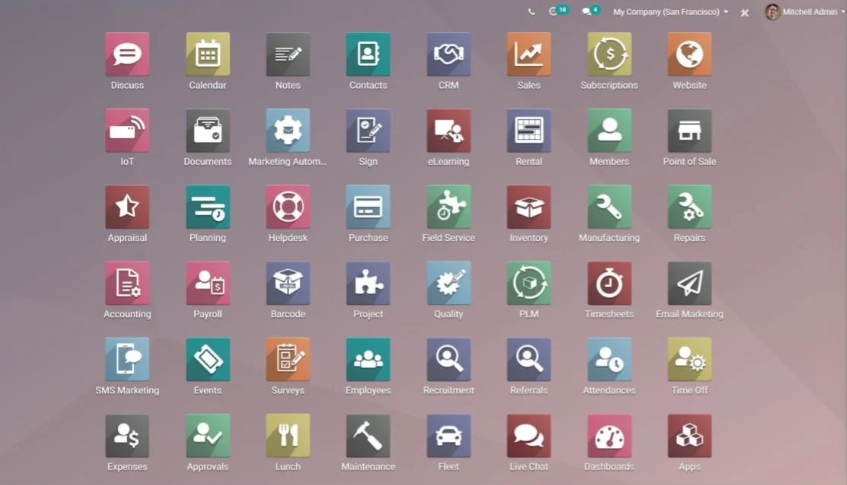
Organizations can enable applications from across the suite as their requirements expand. This can make Odoo attractive to businesses that want ERP alongside CRM, ecommerce, website management, HR, marketing, point of sale, and other applications in the same environment.
Microsoft Dynamics 365 Business Central vs. Odoo: Feature comparison
Business Central and Odoo overlap across many ERP requirements. Both can support accounting, purchasing, inventory, manufacturing, sales, and project processes. The more meaningful differences appear in how each platform approaches finance, surrounding applications, integrations, reporting, customization, deployment, and the broader technology environment.
Application breadth vs. ERP depth
One of the most important distinctions when comparing Microsoft Dynamics 365 Business Central and Odoo is the difference between application breadth and ERP depth. A platform can support a wide range of business functions without necessarily offering the same depth in the financial and operational processes that form the core of an ERP.
Application breadth describes how many business functions a platform can cover. This is one of Odoo’s clearest strengths. Its suite includes accounting, CRM, ecommerce, website management, point of sale, HR, marketing, projects, field service, help desk, manufacturing, inventory, and other applications within the same product family. For organizations looking to consolidate many business applications under one vendor, that breadth can be a significant advantage.
ERP depth describes how thoroughly a platform supports the financial and operational processes that organizations rely on as their system of record. This includes areas such as financial controls, costing, dimensional reporting, intercompany transactions, consolidation, inventory valuation, warehousing, manufacturing, service management, auditability, and the connections among those processes.
Both Business Central and Odoo provide meaningful core ERP functionality, so the difference should not be reduced to a simple checklist of which system has accounting, inventory, or manufacturing. The distinction becomes clearer when comparing how each platform handles specific ERP requirements, especially as process complexity increases. For example:
- Inventory costing. Business Central supports FIFO, LIFO, Average, Specific, and Standard costing methods. Odoo supports Standard Cost, Average Cost, and FIFO for financial inventory valuation. Business Central’s Specific costing method provides an additional option for organizations that need the actual acquisition cost of a serialized or lot-tracked item to follow that item through inventory and accounting. This can be important for businesses managing high-value equipment or other inventory where unit-level cost accuracy matters.
- Manufacturing cost accounting. Both platforms calculate manufacturing costs and connect production activity with inventory and accounting. Business Central provides a detailed standard-cost structure that can separately account for material, capacity, subcontracting, capacity overhead, and manufacturing overhead. It also supports single-level and rolled-up cost calculations and records variances between standard and actual production costs. Odoo also tracks expected and actual manufacturing-order costs, including components, work-center activity, and employee costs, but its costing model is structured differently and does not provide the same breadth of standard-cost components and variance accounting.
- Service management. Business Central Premium includes Service Management built around the specific equipment or item being serviced. Organizations can manage service items, service orders, contracts, warranties, repair history, parts consumption, technician or resource allocation, service pricing, invoicing, and structured fault and resolution reporting. Odoo offers native Field Service, Helpdesk, and Maintenance applications, but these applications address different aspects of customer service, on-site work, and equipment maintenance rather than mirroring Business Central’s equipment-, repair-, and contract-oriented Service Management model. This is a good example of why simply checking a box for “service functionality” can hide meaningful differences between the platforms.
The right comparison is therefore not which platform has more features, but which platform handles the processes that matter most to the business with the appropriate level of depth, control, integration, and maintainability. For organizations selecting a financial and operational system of record, those differences often matter more than the total number of applications available.
Business Central vs. Odoo customization and integrations
Both Business Central and Odoo can be customized and integrated with other systems, but they take different approaches. Business Central uses an extension-based model designed to add functionality without directly changing the core application.
Odoo takes a more open and flexible approach through Studio, modules, APIs, and custom development, which can give organizations more control over highly specialized requirements.
Business Central’s approach places greater emphasis on keeping customizations separate from the underlying ERP platform, which can be advantageous for code control, update stability, and long-term maintainability.
Neither approach is inherently better, but they carry different long-term maintenance profiles. For organizations with specialized workflows and capable development teams, Odoo’s open architecture provides considerable control over how the system is adapted. Business Central’s extension model appeals to organizations that want customizations to survive updates cleanly. It also suits those who value a large, well-governed marketplace of established add-on solutions.
When evaluating either platform, look beyond whether a customization or integration is technically possible. Consider who will develop and maintain it, how upgrades will affect it, and what testing it will require. Consider too whether supported functionality or an established application could meet the requirement instead. The most expensive customizations are usually the ones a business has to revisit at every upgrade.
Business Central vs. Odoo pricing
Business Central and Odoo use different licensing models. For that reason, software subscription price should be separated from total ERP cost. Data migration, implementation, integrations, custom development, reporting, training, support, hosting, and future system changes can outweigh differences in monthly user pricing. In our experience, buyers who compare only the per-user rate are often surprised by their true cost of ownership after go-live.
Business Central pricing
Microsoft publishes Business Central pricing for both the United States and Canada.
Business Central’s pricing is straightforward. The per-user subscription includes cloud hosting, so there is no separate infrastructure bill to budget for and no hosting environment to procure and maintain. The licensing model also lets organizations separate full ERP users from employees who only need limited access through Team Members licensing. The correct mix should be set during implementation planning — giving every employee the same license is rarely necessary. For a more detailed explanation, read Rand Group’s Business Central pricing and licensing guide.
Odoo pricing
Odoo uses a different pricing structure. Its commercial offerings include One App Free, Standard, and Custom plans. It also offers the separate open-source Community edition. Each paid plan carries a first-year promotional rate that steps up to a standard annual rate at renewal. Both are shown below.
Odoo’s low entry point makes it well suited to small companies with simpler requirements. The One App Free plan lets a small business run a single application at no subscription cost, with unlimited users, plus any dependent apps that application needs to function. It is a genuinely accessible starting point for a business that only needs one app.
What counts as an “application”?
In Odoo’s pricing, an application is one of its main business apps — Accounting, CRM, Sales, Inventory, Manufacturing, Purchase, Project, Website, ecommerce, Point of Sale, HR, and so on. The moment a business installs a second main application, it moves to the paid Standard plan. Installing Odoo Studio or adding multiple companies moves it to Custom. This matters because what a business thinks of as a single workflow often spans several Odoo apps. As a result, the free tier stretches less far than it first appears once requirements grow.
Standard can be attractive for organizations that need several Odoo applications but do not require custom modules or advanced deployment options. Custom becomes relevant when a company needs Odoo Studio, custom modules, external API access, multi-company capabilities, or deployment through Odoo.sh or an on-premises environment.
Understanding the deployment options.
Odoo runs in three ways, and they are frequently confused:
- Odoo Online is Odoo’s fully managed SaaS. Upgrades are handled automatically, but you cannot run custom code.
- Odoo.sh is Odoo’s managed cloud platform for teams that need custom modules. It runs on Google Cloud and requires an active Enterprise subscription. It is priced per “worker” for hosting on top of per-user licensing, with Git-based deployment and staging environments.
- Self-hosting / on-premises means running Odoo on infrastructure you control. You take on installation, security, backups, and upgrades yourself.
The deployment choice is especially important for organizations that expect to customize Odoo. Odoo Online is the simplest and most cost-effective option, but it does not support custom code. To use custom modules or more advanced custom development, organizations need Odoo.sh or self-hosting/on-premises, which adds hosting, development, testing, maintenance, upgrades, security, backups, and technical administration costs beyond the advertised per-user subscription price.
The Community edition deserves similar scrutiny. The software itself is open source, but the organization still needs to budget for hosting, implementation, development, maintenance, integrations, security, upgrades, and internal technical expertise. A low subscription price does not guarantee a low total cost of ownership.
For additional budgeting considerations, see Rand Group’s guide to ERP pricing, implementation, and hidden costs.
Business Central vs. Odoo release and update cycle
How a platform delivers updates affects long-term cost, risk, and how current your system stays. It is an area where the two platforms differ meaningfully.
Business Central follows a continuous cloud update model. Microsoft has two major release waves a year — Wave 1 around April and Wave 2 around October — plus monthly minor updates for fixes and smaller features. Updates are backward-compatible by design. Because the extension model keeps custom logic separate from the base application, most updates apply without reworking customizations. Microsoft also provides multi-month preview windows and sandbox environments, so teams can test each wave against their own processes before it reaches production.
Odoo releases one major version per year, typically in October or November. Each version is supported for roughly three years before it reaches end of life. Odoo Online additionally receives rolling interim (SaaS) versions every few months, but Odoo.sh and self-hosted deployments receive only the annual major releases. Moving between major versions is a defined upgrade project rather than a continuous roll-forward. Databases with custom modules often need those modules updated or refactored to match the new version first, and that effort grows the longer an organization defers upgrading.
The practical takeaway is simple. Business Central’s model is continuous and largely automatic, with customizations insulated from the core. Odoo’s is a periodic version-upgrade cycle whose effort scales with how much has been customized and how many versions have been skipped. Either can be managed well, but the upgrade cadence — and who owns that work — belongs in your total cost of ownership, not just the subscription price.

Build a stronger ERP selection process
Comparing ERP systems takes more than reviewing software demos and feature lists. Rand Group’s Top 10 ERP software selection checklist provides a practical framework for documenting requirements, aligning stakeholders, evaluating solutions, and reducing ERP selection risk.
Business Central vs. Odoo AI and automation
Both Microsoft and Odoo are adding AI to their business applications. Buyers should look beyond whether AI is available and evaluate what those capabilities can accomplish inside actual ERP processes.
The platforms also approach AI from different ecosystems. Business Central’s AI strategy sits within Microsoft’s larger Copilot, Power Platform, Azure, and Microsoft 365 environment. Odoo provides AI capabilities within its own application suite.
Business Central includes AI capabilities embedded directly into core ERP workflows. These include Copilot-assisted tools for tasks such as sales order creation, invoice processing, bank reconciliation, and suggestions for items or sales lines. The Sales Order and Payables Agents extend this further by automating parts of the quote-to-cash and procure-to-pay processes.
Odoo also incorporates AI across its applications, primarily through its Ask AI assistant and configurable AI agents. These tools support natural-language queries, content generation, document handling, and workflow automation across different modules. Odoo’s approach focuses on making AI broadly available within each application rather than tying it to specific end-to-end ERP processes.
Because both platforms offer AI capabilities, the more valuable comparison is how those tools can support your business. Instead of asking simply which ERP has AI, evaluate:
- Which repetitive business processes can AI reduce?
- Does the AI work directly with ERP records, with appropriate review and approval?
- What additional licenses or usage charges apply?
- How is access controlled and governed?
- How does the capability fit with your broader AI strategy?
The most useful test is to measure each platform’s AI against the processes you actually run, not the length of its feature list.
When to choose Business Central or Odoo
The right ERP depends on how well the platform supports your current business. It should also be able to accommodate change over the next several years.
Business Central may be a better fit when:
- You need genuine ERP depth — finance, accounting controls, costing, consolidation, dimensional reporting, inventory, warehousing, manufacturing, and service handled thoroughly and connected in one system.
- Platform maturity matters — you want an established product with a large partner network, a well-governed marketplace of add-on solutions, and broad localization coverage behind it.
- You need manufacturing or service management functionality, available with Business Central Premium and integrated with finance and inventory.
- Reporting and analytics are important, including deep native connections with Excel and Power BI.
- You want customizations to survive updates cleanly through an extension model, on a platform with a continuous, backward-compatible update cycle.
- Straightforward licensing with hosting included is a priority, and you expect the environment to expand through Dynamics 365, Power Platform, or Microsoft Marketplace.
Odoo may be a better fit when:
- You are a smaller company with simpler requirements looking for an accessible, low-entry-cost starting point.
- You want a broad suite of business applications — CRM, ecommerce, point of sale, marketing, HR, website management, and projects — alongside ERP in one environment.
- An open-source starting point is a priority.
- Website and ecommerce are central requirements you want handled natively.
- You have technical resources and value flexibility through custom development.
Both platforms can serve a growing business, but they serve it differently. Some organizations need a system of record they can scale with. For them, Business Central’s depth, maturity, and established ecosystem usually carry more weight than the breadth of any single feature list. Other organizations are smaller, or their priority is native reach across many business functions. For them, Odoo’s suite can be the more natural starting point.
Steps for comparing Business Central and Odoo
An ERP evaluation should test how each platform handles your business. These are the steps Rand Group’s consultants use when guiding clients through a structured selection.
1. Document your critical business processes
Identify the processes the ERP must improve. Examples include month-end close, financial reporting, purchasing approvals, inventory planning, production, project billing, and order processing. For each process, document the current problem and the result the organization wants to achieve.
2. Separate requirements from nice-to-have capabilities
Separate required functionality, important future functionality, and nice-to-have capabilities. Then weight each requirement based on business impact. An ERP that performs critical processes well is generally more valuable than one that provides more applications employees may never use.
3. Build realistic demonstration scenarios
Give each provider the same end-to-end scenarios instead of accepting a generic product tour. For example, a distributor could ask both providers to demonstrate purchasing, receiving, inventory allocation, fulfillment, invoicing, returns, and financial reporting. Using the same scenarios makes differences between the platforms easier to identify.
4. Compare integrations, localization, and your existing technology stack
List the key systems that need to connect with the ERP, such as Microsoft 365, CRM, ecommerce, payroll, banking, shipping, EDI, warehouse, and BI tools. For each integration, determine whether it is native, available via an app, or requires custom development, and who will be responsible for maintaining it over time.
For multi-country operations, also assess localization requirements. Both Business Central and Odoo offer country-specific functionality, but coverage varies, so confirm support for tax, reporting, e-invoicing, banking formats, and other regulatory needs in each region.
5. Calculate total cost over several years
Build a three- to five-year cost model. Include licenses, implementation, data migration, customization, integrations, reporting, hosting, training, support, upgrades, internal administration, and future enhancements. This makes it easier to compare the initial subscription price with ongoing operating costs.
6. Evaluate the implementation partner and wider ecosystem
Assess the partner’s experience across finance, operations, your industry, ERP architecture, integrations, data migration, reporting, change management, training, and long-term support. Also consider the wider ecosystem surrounding the ERP. Look at the availability of implementation specialists, third-party applications, localization expertise, upgrade support, and alternative providers if your requirements or support needs change in the future.
Ask how the partner gathers requirements, challenges unnecessary customization, manages testing, prepares users, and supports the business after go-live. Rand Group’s software selection services provide a structured process for comparing ERP platforms against business requirements rather than beginning with a predetermined software answer.

Need help choosing the right ERP?
ERP selection should start with your processes, users, technology strategy, and long-term goals, not a vendor feature list. Rand Group can help you define requirements, compare ERP solutions, understand total cost, and create a practical implementation path.
Find the right ERP solution with Rand Group
Rand Group is a Microsoft partner that has guided organizations across manufacturing, distribution, oil and gas, healthcare, and construction through ERP evaluations and implementations. Our ERP evaluation and software selection services help organizations document requirements and compare solutions. We also help teams understand how functionality, customization, integrations, implementation, and long-term ownership affect the decision.
For organizations that determine Microsoft Dynamics 365 Business Central is the right fit, Rand Group provides Business Central implementation, data migration, integration, reporting, customization, training, and ongoing support services.
Our 90% client retention rate reflects a focus on long-term partnerships and continued value well beyond go-live.
“There’s a deep level of knowledge at Rand Group. The team was attentive, well organized, and the entire process was clearly planned from the start.” — Sam Rentz, Corporate Controller, Dairy Products Inc.
The goal of an ERP project should not be to force the business into a particular product. The goal is to select a platform that can support current requirements and remain manageable as the organization changes. It should also provide a foundation the business can continue to build on.
Key takeaways
- Business Central is a mature, well-established finance and operations ERP with a deep core and a large surrounding ecosystem. Odoo pairs core ERP with a broader suite of native business applications.
- ERP depth and application breadth are different things. A longer application list is not the same as deeper core-ERP functionality, and for a system of record, depth usually matters most.
- Odoo's low entry cost suits smaller companies with simpler needs. Business Central's depth, maturity, and ecosystem suit organizations that need a platform to grow with.
- Subscription price alone does not determine ERP cost. Business Central's licensing is straightforward and includes hosting, while Odoo's promotional rates step up at renewal and Odoo.sh or self-hosting add hosting and upgrade responsibilities.
- Test real workflows before choosing. Financial depth, manufacturing, reporting, integrations, customization, the update cycle, and maintainability matter more than feature count.
Frequently asked questions
Is Business Central better than Odoo?
Neither is better for every organization, but they are strong at different things. Business Central is the more capable choice when core ERP depth and platform maturity are the priority. That means thorough finance, accounting controls, costing, consolidation, and operations, backed by an established product, a large partner ecosystem, and broad localization coverage. Odoo is attractive to smaller companies with simpler needs. It also appeals to organizations that want a broad suite of applications — including ecommerce, CRM, website management, HR, and point of sale — or that specifically value an open-source option.
What is the main difference between Business Central and Odoo?
It comes down to platform strategy and maturity. Business Central is a deep, established financial and operational ERP with a large surrounding ecosystem. Odoo combines a core ERP with a broader collection of native business applications and a newer, more open ecosystem. The right choice depends on whether your priority is ERP depth or application breadth.
Is Odoo cheaper than Business Central?
Odoo’s advertised per-user subscription rates can be lower than Business Central’s full-user licensing in some scenarios. However, monthly software pricing is only one part of ERP cost. Implementation, hosting, integrations, custom development, support, upgrades, and internal administration should also be included. Odoo’s promotional rates also step up at renewal, so the first-year price is not the long-term price. Read more about ERP implementation costs and hidden ERP expenses.
Which is better for manufacturing, Business Central or Odoo?
Both handle core manufacturing well, so the deciding factor is usually depth and integration rather than the feature checklist. Business Central Premium ties production tightly back to finance, inventory, purchasing, and warehousing, which matters most for manufacturers with demanding costing or reporting requirements. Odoo covers the same manufacturing fundamentals and adds connected quality and maintenance workflows within its suite. Test both against your real scenarios — planning, shortages, subcontracting, costing, traceability, and production exceptions — with particular attention to how tightly production ties back to your financial and inventory records.
Does Odoo integrate with Microsoft 365?
Odoo can connect with Microsoft services through integrations, APIs, connectors, and custom development. Business Central offers tighter native alignment because it is part of the Microsoft business application ecosystem. Compare more than whether an integration exists. Also consider how it is supported, upgraded, secured, and maintained over time.
Choosing between Business Central and Odoo
Do not decide on feature count or the lowest advertised subscription price. Compare the workflows employees perform every day, the systems the ERP must connect with, the amount of customization your organization can realistically maintain, the update cycle you will live with, and the total cost over the life of the system. For most businesses selecting a true system of record, that comparison points toward the more mature, more established platform — the one with the deeper ERP core and the stronger surrounding ecosystem.
If you need help evaluating Business Central, Odoo, or other ERP options, contact Rand Group to discuss your requirements and build a structured ERP selection process.