Dynamics 365
 Power Platform
 Dynamics
 Cloud & Productivity
Can I use AI to implement Dynamics 365 Business Central myself?

Artificial intelligence is changing how businesses approach ERP implementation. Tools like ChatGPT, Claude, and Microsoft Copilot can explain software functionality, guide configuration, and help troubleshoot problems. With so much information readily available, it raises an important question: Can you use AI to implement Microsoft Dynamics 365 Business Central without an implementation partner?
For some businesses, the answer may be yes. However, configuring software correctly is different from making the right implementation decisions. AI can provide detailed instructions and help you complete tasks faster. What it may lack is the business context and practical knowledge that experienced consultants build over years of implementations. Some of those lessons aren’t documented in publicly available resources, and even technically correct guidance can lead to costly mistakes when it’s applied to the wrong situation.
Finishing individual tasks faster also doesn’t guarantee a faster or less expensive implementation. The real question isn’t just whether AI can help you implement Business Central yourself. It’s whether the time you save outweighs the risk of decisions that need expensive corrections later.
At a glance
AI can help businesses implement Dynamics 365 Business Central by providing configuration guidance, preparing data, generating code, and troubleshooting errors. Organizations with straightforward requirements and experienced internal resources may be able to manage much of the process themselves. However, general-purpose AI may lack the undocumented best practices and business-specific knowledge that experienced consultants bring, and its convincing guidance can still lead to incorrect configurations or costly rework.
Research also shows that AI productivity gains vary and don’t always translate into faster overall project delivery. Combining specialized AI capabilities with experienced Business Central consultants can help organizations realize those efficiencies while reducing the risk of expensive implementation mistakes.
What can AI help you do during a Business Central implementation?
AI has made Business Central information more accessible than ever. Instead of searching through lengthy documentation or multiple support forums, users can ask questions in natural language and receive guidance tailored to the task they’re trying to complete. During a Business Central implementation, AI can assist with several activities:
These capabilities can reduce the manual effort involved in researching functionality, preparing documentation, and completing certain technical tasks.
However, not all AI tools work the same way. General-purpose AI assistants such as ChatGPT and Claude can explain Business Central functionality and generate recommendations based on the information provided. Microsoft Copilot offers AI capabilities within Business Central, while specialized AI tools and agents may support more targeted activities.
Their ability to access ERP data, interact with the system, or perform tasks depends on the specific tool, integration, permissions, and available functionality. Copilot within Business Central, for example, should not be confused with a tool capable of independently managing an entire ERP implementation.
For more information about the available capabilities, explore our guide to the best AI tools for Business Central, including Copilot and AI agents.
Why AI-generated instructions aren’t the same as implementation expertise
AI can explain how to configure Business Central, generate technical instructions, and recommend approaches based on the information available to it. However, knowing how to complete a task isn’t the same as knowing whether it’s the right approach for a particular business.
Experienced Business Central consultants bring knowledge developed through years of implementations across many industries. They’ve seen how configuration decisions affect operations after go-live, which approaches create unnecessary complexity, and what happens when critical requirements are overlooked. Much of this knowledge only emerges once teams start processing real transactions and exceptions surface in daily use.
Not all of these lessons are captured in Microsoft Learn, community forums, or other publicly available resources. As a result, general-purpose AI may not have access to them, particularly when they involve industry-specific practices, unusual business scenarios, or problems consultants have encountered and resolved over time. The difference becomes clearer when you look at three common implementation decisions.
Making configuration decisions that support the business
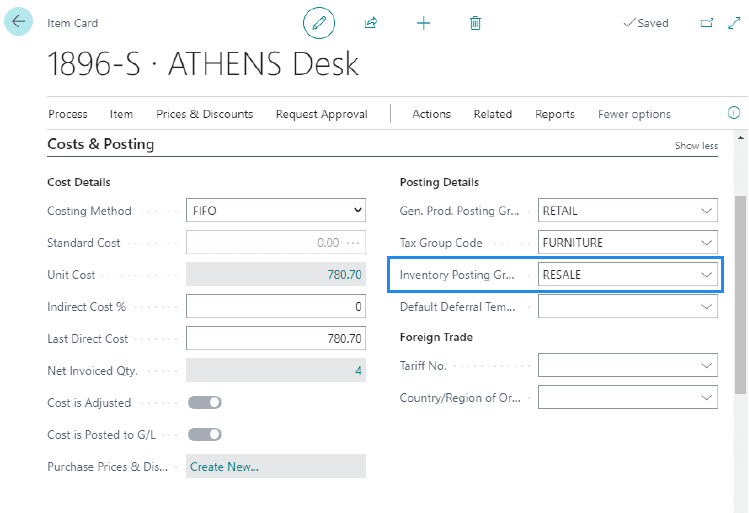
AI can explain how posting groups work, identify the relevant Business Central setup pages, and provide step-by-step configuration instructions. Determining the right structure, however, requires an understanding of the company’s accounting requirements, transaction flows, and reporting needs.
For example, a company selling multiple product categories across several business units may need to track revenue and costs separately for each one. An AI-recommended setup could allow transactions to post successfully while failing to capture the financial detail management needs, a gap that might not surface until the first month-end reports are produced.
An experienced consultant understands how posting groups, dimensions, and the chart of accounts should work together to support financial reporting. The goal isn’t just to get transactions posting. It’s to establish a structure that continues to meet the organization’s needs as the business evolves.
Understanding dependencies before migrating data
AI can assist with preparing migration files, mapping fields, identifying missing information, and importing inventory data into Business Central. However, successful migration requires more than loading records into the system. Inventory costing methods, opening balances, warehouse configurations, and general ledger reconciliation all need to be considered before migration begins.
For example, a company could use AI to prepare and import thousands of inventory records, only to discover during testing that its inventory valuation or opening financial position was set up incorrectly. Correcting the problem might mean adjusting configurations, reconciling financial balances, or repeating parts of the migration.
Experienced consultants understand these dependencies and can help identify potential problems before significant time is invested in importing data. Learn more about the considerations involved in Business Central data migration and reconciliation.
Knowing when not to customize
AI can help organizations understand Business Central functionality, evaluate extensions, and even generate code for custom features. However, one of the most valuable decisions an experienced consultant can make is recognizing when customization isn’t necessary.
For example, a company may want to replicate an existing purchasing approval process involving multiple departments and several approval levels. AI could help build a customization that reproduces the process exactly. An experienced consultant, on the other hand, might recognize that Business Central’s standard approval workflows can meet the requirements, possibly with some adjustments to how the organization operates.
This approach can reduce development effort, testing, ongoing maintenance, and the complexity of future upgrades. Often, the most valuable expertise lies in recognizing when a simpler approach will deliver a better outcome.
Across all three decisions, the pattern is the same. AI can accelerate implementation activities, but experience helps determine which activities are necessary, how to approach them, and what consequences to consider before making a decision.
What are the risks of implementing Business Central using AI alone?
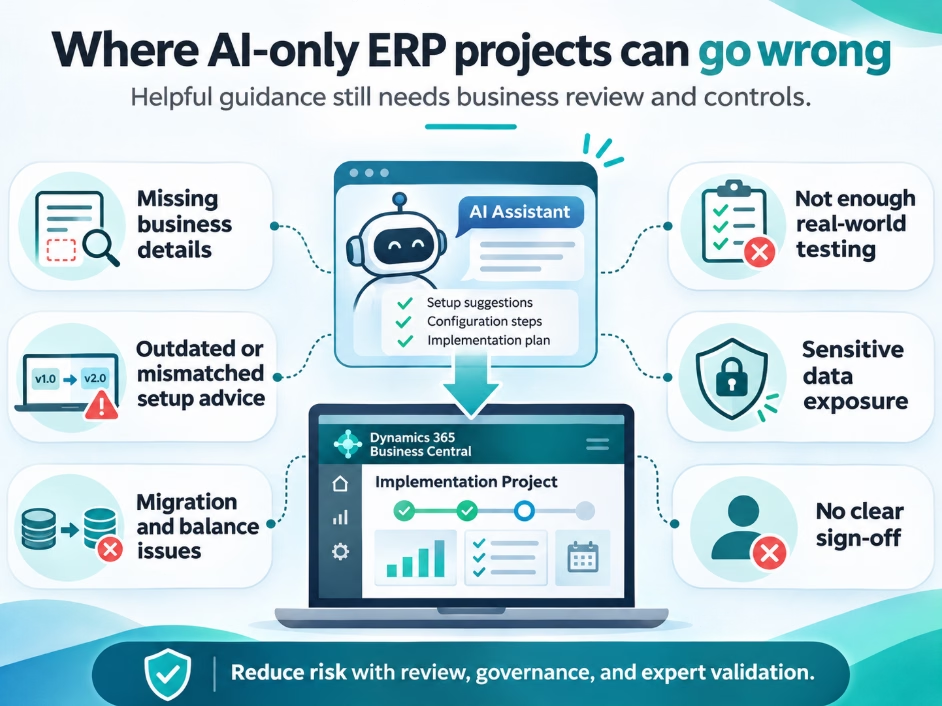
AI-generated recommendations can be useful, but following them without appropriate validation introduces risks. One of the biggest is that incorrect advice can sound just as convincing as correct advice. An AI assistant may provide detailed, technically plausible instructions without recognizing that a particular configuration is inappropriate for your business. In many cases, the instructions aren’t wrong at all. They’re technically valid but unsuitable for the organization’s requirements.
Potential challenges include:
- Outdated or unavailable guidance: Recommendations may reference functionality that has changed, requires additional licensing, or isn’t available in your environment.
- Missing context: AI can only work with what it’s told, so exceptions, reporting needs, and dependencies that haven’t been explained may be overlooked.
- Insufficient testing: A configuration that works in a simple test may not hold up under real transaction volumes, approvals, and exceptions.
- Security and data privacy: Uploading financial records, customer information, or other sensitive data into unapproved AI tools can create security and governance concerns.
- Limited accountability: Qualified people still need to review recommendations, approve configuration decisions, and confirm the system is ready for production.
These risks tend to compound because each implementation decision builds on the ones before it. A team that follows AI guidance on an early setup decision may go on to create item records, vendor setups, and migration files based on that structure. If testing later shows the original setup doesn’t fit the business, everything built on it may need to be revisited.
This is why experienced guidance early in the implementation can be more valuable than troubleshooting help after something goes wrong.
Customer example: When technical experience isn’t enough
The difference between technical knowledge and implementation experience isn’t unique to AI-assisted projects. Even businesses with substantial internal technical expertise can run into challenges when implementing an ERP system on their own.
The Amazing Chickpea, a food manufacturing company, is a good example. When the company selected Microsoft Dynamics 365 Business Central, founder Sunil Kumar initially attempted to implement the system himself. Despite his IT and ERP background, he encountered challenges configuring financial reporting, inventory management, and manufacturing processes.
After working with another provider that primarily offered documentation rather than practical solutions, The Amazing Chickpea turned to Rand Group (formerly WebSan Solutions) for hands-on implementation support. Our consultants helped the company address its configuration challenges and better align Business Central with its manufacturing and financial requirements.
AI wasn’t part of this project, but the experience is still relevant. Like AI-generated instructions, documentation can explain how Business Central works without resolving the decisions specific to a business. Knowing your way around technology doesn’t necessarily prepare you for the accounting, operational, and configuration decisions an ERP implementation involves. Watch The Amazing Chickpea share its Business Central implementation experience.
Can AI reduce the cost of a Business Central implementation?
AI can reduce the time needed for many implementation activities, including technical research, documentation, data preparation, testing, and software development. For organizations with experienced internal resources, it may also reduce their reliance on outside help for routine tasks. However, finishing individual tasks faster doesn’t automatically make the overall implementation faster or less expensive.
Research on AI-assisted software development shows why:
- Faster on a defined task: In a controlled experiment by researchers from Microsoft, GitHub, and MIT, developers using GitHub Copilot built an HTTP server in JavaScript 55.8% faster than developers working without it.
- Slower on complex, familiar work: A 2025 study by METR found that experienced developers working on their own projects took 19% longer with early-2025 AI tools, even though they believed AI was speeding them up. METR has since said that newer tools may change these results, although measuring their impact reliably has proven difficult.
- More activity, less finished output: A 2026 NBER working paper that tracked hundreds of thousands of GitHub developers found that AI coding tools sharply increased coding activity, but only a fraction of that increase turned into released software.
These studies measure software development, not ERP implementation. Still, they show why businesses should be cautious about expecting AI to cut project costs by a predictable percentage.
The total cost of an implementation includes more than consulting fees. Businesses also need to account for:
- Employee time spent on the project alongside their regular responsibilities
- Data migration, integrations, testing, and training
- Reviewing AI-generated recommendations and validating configurations
- Correcting errors and resolving issues that surface after go-live
For example, AI might help a developer build an integration between Business Central and an e-commerce platform much faster than usual. But if the integration doesn’t account for exceptions such as partial shipments, returns, or pricing changes, those gaps may only appear after go-live. Staff could then spend significant time correcting orders by hand while the integration is redesigned and retested, which can quickly outweigh the time saved during development.
In more serious cases, implementation mistakes can delay go-live, disrupt operations, and require expensive recovery efforts. Our article on how much it costs to recover a failed ERP implementation explores what’s involved in correcting an unsuccessful project.
Ultimately, the goal is to minimize the total effort and cost of delivering a reliable system that meets your organization’s needs, rather than completing each activity as quickly as possible. For a closer look at project expenses, read our guide to Dynamics 365 Business Central implementation costs.

Plan for the total cost of your implementation
Find out where AI can save time on your Business Central project and where experienced guidance will protect your investment.
When can you implement Business Central yourself, and when do you need an expert?
Not every Business Central implementation requires a large consulting engagement. Smaller organizations with straightforward requirements may be able to complete significant portions of an implementation using Microsoft documentation, AI tools, and experienced internal resources.
Self-implementation may be practical when an organization has:
- Straightforward financial and operational requirements
- Simple inventory processes or no inventory requirements
- No or few third-party integrations or customizations
- Internal employees with ERP implementation and accounting expertise
- Sufficient resources for data migration, testing, training, and go-live support
However, the complexity of the business matters more than the number of employees. A small manufacturer with detailed production, inventory costing, and traceability requirements may have more complicated implementation needs than a larger professional services organization with relatively straightforward financial processes.
Signs that you may need Business Central implementation expertise
Consider engaging an experienced consultant when:
- Multiple legal entities, currencies, or complex financial reporting requirements are involved
- Inventory costing, warehouse management, or manufacturing processes require specialized configuration
- Significant historical data, opening balances, or open transactions must be migrated
- Business Central must integrate with ecommerce, payroll, CRM, or other critical applications
- Existing business processes require substantial changes or custom functionality
- Internal teams lack the experience to validate configuration decisions or troubleshoot complex issues
Organizations don’t necessarily have to choose between complete self-implementation and a fully partner-led project. Different levels of support can address different requirements.
For example, Rand Group offers three delivery models for Dynamics 365 Business Central implementation: Rapid Activation for standardized deployments, Hybrid for organizations that want to share implementation work with our consultants, and Digital Transformation for complex, fully partner-led projects.

Get expert guidance for your Business Central implementation
Whether you’re considering implementing Business Central yourself or need support with a more complex project, Rand Group can help you navigate critical decisions, avoid costly mistakes, and choose the right implementation approach for your business.
How Rand Group combines specialized AI with Business Central implementation expertise
Rand Group is incorporating specialized AI capabilities into our Business Central implementation approach. This is different from asking a general-purpose AI assistant how to implement Business Central. Our approach brings together AI capabilities designed to support ERP implementation activities, established implementation methodologies, and practical knowledge gained from years of Business Central projects.
Our experienced consultants remain responsible for evaluating business requirements, guiding configuration decisions, and validating results. AI supports the work, while consultants use their accounting, industry, and technical experience to make the decisions that affect how your business operates.
This combination supports activities throughout the implementation lifecycle:
- Discovery and requirements: AI helps organize and document business requirements, while consultants identify the exceptions, dependencies, and reporting needs that shape the solution.
- Solution design: Consultants align business processes with system configuration, drawing on best practices from previous implementations.
- Data migration: AI supports data preparation and validation, while consultants confirm that costing methods, opening balances, and reconciliation are set up correctly.
- Testing and deployment readiness: AI helps prepare testing documentation, while consultants validate that the system is ready to support daily operations.
The goal is to improve efficiency while maintaining the quality and reliability of the implementation, so businesses can benefit from AI without relying on general-purpose tools for complex decisions.
Rand Group has helped businesses implement and optimize enterprise technology since 2003. As a Microsoft Dynamics 365 Business Central partner, we bring accounting, industry, functional, and technical expertise to every project. Our 90% client retention rate reflects our focus on building long-term customer relationships.
Key takeaways
- AI can make self-implementation more feasible. Teams with straightforward requirements and ERP experience can use it to research setup options, prepare data, and troubleshoot issues.
- Configuration decisions need business context. A setup can work technically and still fall short of your accounting, reporting, or operational needs.
- Measure savings across the whole project. Review, testing, and rework can offset the time AI saves on individual tasks.
- Use experienced guidance where decisions carry the most risk. Rand Group uses specialized AI to support implementation work while its Business Central consultants guide configuration decisions and validate results.
Frequently asked questions about implementing Business Central with AI
Can ChatGPT implement Microsoft Dynamics 365 Business Central?
ChatGPT can explain Business Central functionality, generate setup instructions, assist with troubleshooting, and support documentation or development tasks. However, it cannot be assumed to independently plan, configure, validate, and deploy a complete Business Central implementation. Its capabilities depend on the tools and integrations available, and its recommendations require appropriate review.
Can you implement Business Central without a consultant?
Yes. Organizations with straightforward requirements, experienced internal resources, and sufficient time for configuration, migration, testing, and training may be able to implement Business Central themselves. More complex requirements may benefit from targeted consulting or a partner-led implementation.
What are the biggest risks of implementing Business Central yourself?
Common risks include unsuitable financial configuration, inaccurate opening balances, incomplete data migration, integration issues, insufficient testing, and limited understanding of how configuration decisions affect other business processes. These risks are especially important when an organization lacks experienced internal ERP resources.
Can AI reduce Business Central implementation costs?
AI may reduce the time required for research, documentation, data preparation, and certain troubleshooting activities. However, overall implementation costs depend on project complexity, internal resources, integrations, testing, and the level of professional assistance required. AI-generated guidance should be validated before applying it to business-critical processes.
Can you implement Business Central yourself using AI?
AI tools keep getting more capable, and for organizations with straightforward requirements and experienced internal resources, they may make handling more of a Business Central implementation a realistic option.
Faster tasks don’t guarantee a successful implementation, though. Decisions about accounting structures, inventory costing, data migration, integrations, and business processes are connected, and their consequences often surface later in the project, when they’re harder and more expensive to fix. General-purpose AI can explain how to carry out these decisions, but it may not have the practical knowledge consultants have built through years of implementations. When a decision turns out to be wrong, the rework can quickly erase the time AI saved.
For many organizations, the best approach combines the two, with AI speeding up the work while experienced people make sure the decisions behind it are sound. Getting those decisions right the first time is often worth more than finishing the wrong tasks faster.
Rand Group brings together experienced Business Central consultants, established implementation methodologies, and specialized AI capabilities to help businesses make confident implementation decisions and avoid unnecessary complexity. Contact Rand Group to discuss the implementation approach that fits your organization.