Dynamics 365
 Power Platform
 Dynamics
 Cloud & Productivity
Business Central Expense Agent updates: What’s improved in 2026?

Microsoft introduced the Dynamics 365 Business Central Expense Agent in May 2026 to help organizations automate employee expense processing. Since its initial release, Microsoft has expanded its functionality with mobile expense capture, improved project allocation, travel management, and additional approval capabilities.
For organizations that previously evaluated the Expense Agent, these changes may address requirements that weren’t supported in the original version. This blog explores what’s new with the Business Central Expense Agent in 2026, how the improvements benefit employees and finance teams, and why businesses may want to reconsider the agent.
At a glance:
Since its initial release in May 2026, the Business Central Expense Agent has expanded beyond automated receipt processing and expense report preparation. Newer capabilities include a mobile app, project allocation directly through the web app, travel requests, interim approvals, and automatic expense report creation for approved trips. These improvements help organizations manage expenses more efficiently while maintaining financial oversight. Feature availability varies by Business Central version, configuration, and preview status.
What is the Dynamics 365 Business Central Expense Agent?
The Dynamics 365 Business Central Expense Agent is a Microsoft AI agent that helps automate employee expense management. It reduces manual data entry by extracting information from receipts, categorizing expenses, and preparing expense reports for review and approval. Introduced in May 2026 as part of Business Central’s expanded expense management functionality, the agent connects employee expense processing with the organization’s financial records and existing controls.
Its original capabilities include:
- Automated receipt processing: Extracts information such as merchant, date, amount, currency, and payment method.
- Expense categorization: Assigns expenses to configured categories and supports itemization.
- Expense report creation: Groups related expenses into reports that employees can review and submit.
- Expense policy validation: Checks configured expense rules and supports compliance review.
- Expense approvals: Routes submitted reports for review before posting.
- Financial integration: Records approved expenses in Business Central when authorized users post the reports.
These capabilities established the foundation for AI-assisted expense management. Subsequent updates have focused on improving how employees submit expenses, how organizations track spending, and how finance teams manage approvals.
What’s new with the Business Central Expense Agent?
Microsoft’s updates throughout 2026 address several practical challenges, including submitting expenses while traveling, allocating project costs, and managing approval requirements. Here are five notable improvements introduced after the agent’s initial release.
Capture and submit expenses with the mobile app
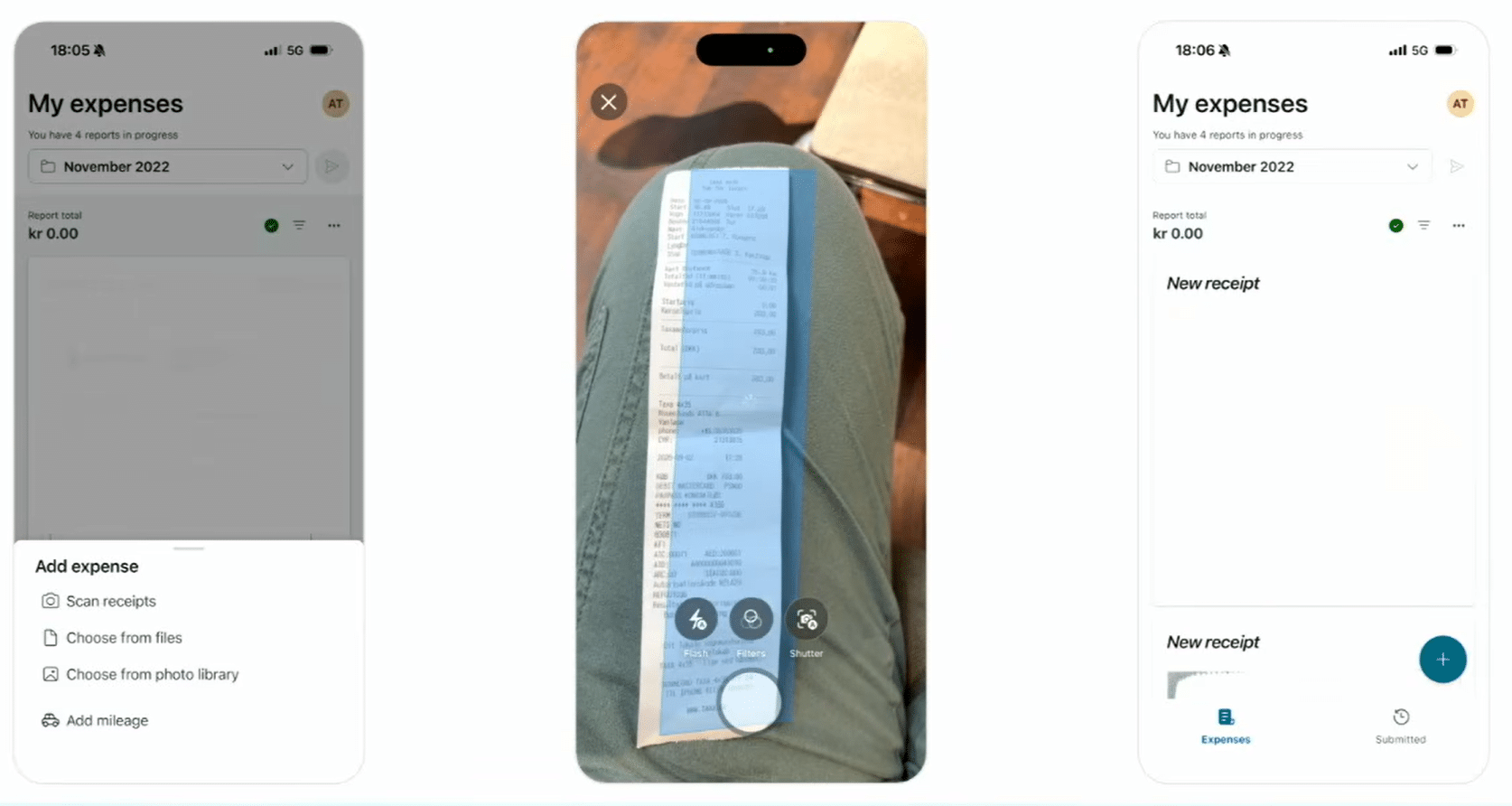
One of the most useful additions is the dedicated Expense Agent mobile app for iOS and Android, introduced in public preview in July 2026. Employees no longer need to wait until they’re at their desks to capture and organize business expenses. Instead, they can use their phones to submit receipts, review expense information, and prepare reports. The mobile app is available as a production-ready preview, subject to Microsoft’s supplemental preview terms.
The mobile experience supports:
- Receipt scanning: Capture receipts with a phone camera, including multipage documents.
- File uploads: Add existing receipt images and PDF documents.
- AI-assisted data entry: Review and correct expense details extracted from receipts.
- Offline receipt capture: Capture receipts without an internet connection and upload them when connectivity returns.
- Expense report submission: Organize expenses into reports and submit them for approval.
While employees can capture receipts offline, AI receipt processing and expense report submission require an internet connection. Receipts captured offline are queued and uploaded when connectivity is restored.
For example, a sales representative attending a customer meeting can photograph a restaurant receipt immediately rather than keeping a paper copy for later. Once the receipt is uploaded and processed, the employee can review the extracted information before submitting the expense. This helps reduce missing receipts, delayed submissions, and manual data entry for finance teams. Learn more about the Expense Agent mobile app for iOS and Android.
Assign expenses to projects directly from the web app
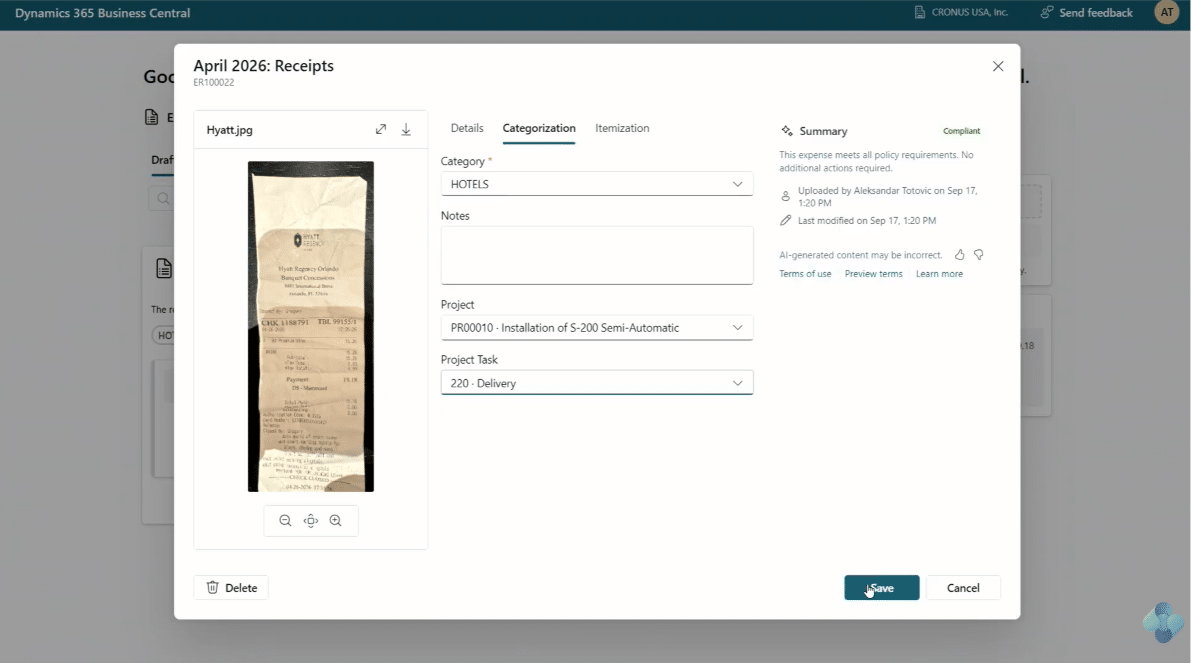
Microsoft introduced project expense allocation through the Expense Agent web app in July 2026, allowing employees to assign expenses to projects and project tasks before submitting them.
Previously, project and task information had to be added manually within Business Central before the expense report was posted. With the updated functionality, employees can select the appropriate project and task while categorizing expenses, provided an administrator has enabled the feature.
Administrators can also configure project visibility to:
- Show all available projects.
- Limit selection to projects assigned to the employee.
This improvement is particularly useful for project-based businesses, such as engineering firms, consulting companies, and professional services organizations.
For example, a consultant traveling to a customer site can assign transportation and meal expenses to the appropriate project when submitting them. Finance teams receive more complete expense information, reducing the need to correct project allocations later.
By capturing project information earlier, organizations can improve project cost tracking and reduce manual adjustments. This capability was introduced in public preview, and organizations should confirm its availability in their environment.
Manage travel requests and planned expenses
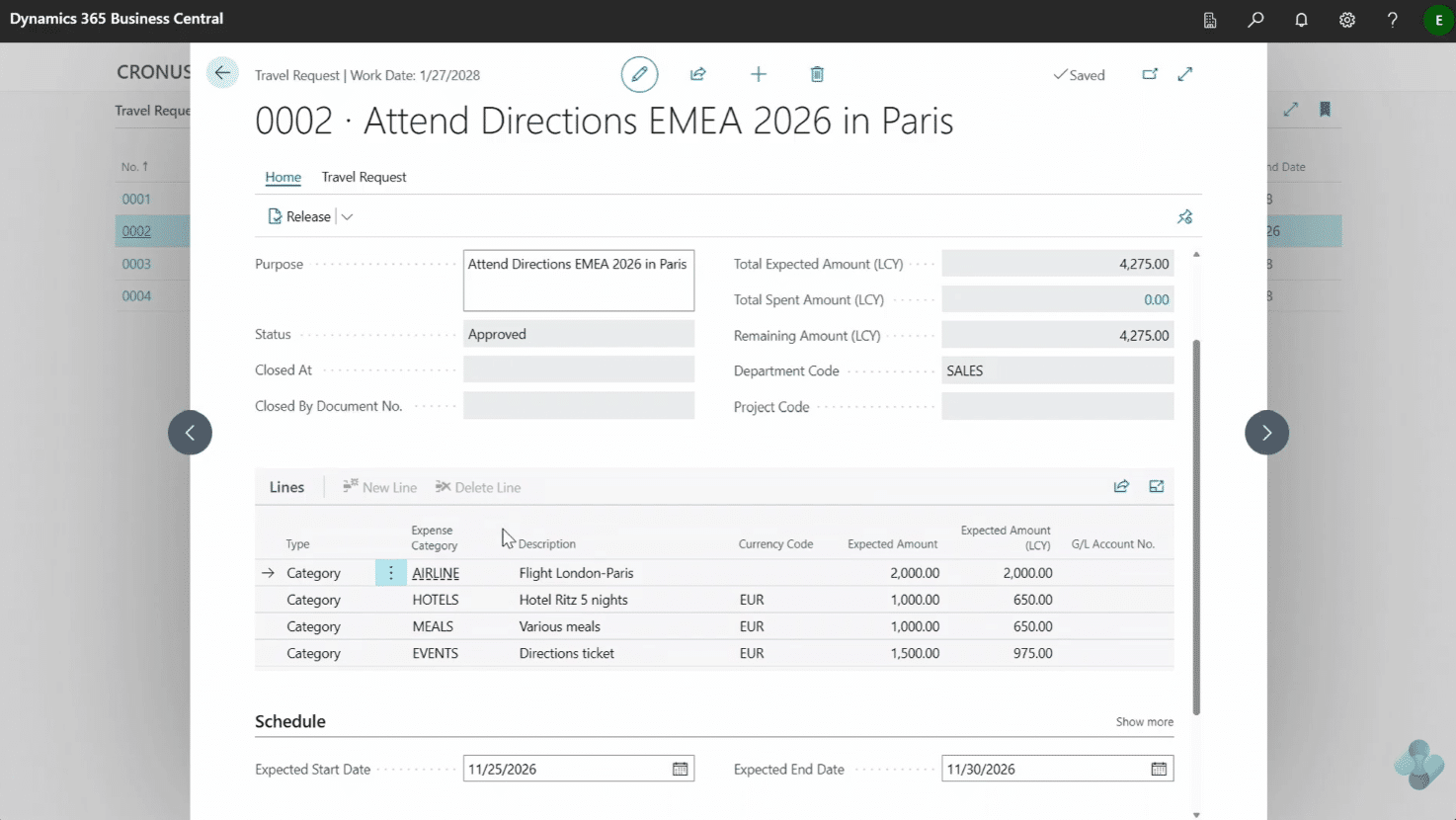
Business Central’s expense management functionality has also expanded to support travel requests, giving organizations a way to review planned business travel before employees incur expenses.
Travel requests can include information such as:
- Travel purpose and dates
- Employees participating in the trip
- Estimated travel costs
- Expected expenses and applicable per diem details
- Approval information
Once approved, a travel request can be linked to an expense report, helping finance teams compare planned spending with actual expenses.
For example, an employee attending a three-day conference can submit a travel request with estimated transportation, lodging, and meal costs. The organization can review the expected spending before the trip and track the resulting expenses afterward. This helps businesses manage travel budgets and identify spending that exceeds original estimates.
Travel request availability depends on the Business Central version and enabled capabilities. In Business Central version 29, travel requests are managed within Business Central. Microsoft’s newer Expense Agent documentation also describes travel requests through the web and mobile apps when the connected environment supports those capabilities.
Organizations should confirm which travel management features are available before incorporating them into their expense processes.
Add interim approvers to expense reports
Microsoft’s November 2026 Business Central 29.1 update introduced an additional approval capability for organizations that need more than one person to review employee expenses. With interim approvals, an expense report can undergo an initial review before reaching the final approver.
This is useful when an organization needs a project manager, department manager, or another designated employee to validate expenses before finance provides final approval.
For example, a consulting company may require a project manager to confirm that travel expenses are appropriate for a customer engagement before the report moves to its final approver.
The two-stage process helps organizations:
- Review expenses before final approval.
- Confirm that submitted information is complete.
- Support additional oversight for project-related or higher-value expenses.
- Maintain a clearer separation between preliminary review and final authorization.
Interim approvals are a public preview capability introduced in Business Central 29.1. The complete workflow currently requires Business Central. Users assign the interim approver and complete both approval stages within Business Central rather than the Expense Agent web or mobile apps. This provides additional flexibility for businesses whose expense approval requirements extend beyond a single reviewer.
Automatically create expense reports for individual trips
Another improvement included in Business Central 29.1 is the ability to automatically create expense reports for individual trips. Instead of manually setting up a separate report for each business trip, supported environments can create expense reports linked to approved travel requests. When a travel request is approved, Business Central can create a linked expense report. The employee can then review the report and add expenses incurred during the trip.
The Expense Agent can also use the approved travel dates when determining which receipts belong to the report. For example, a salesperson attending a conference may have expenses for flights, hotels, meals, and transportation. Rather than manually creating a report and organizing every receipt, the employee can review expenses associated with the approved trip.
This improvement can help organizations:
- Reduce manual expense report preparation.
- Keep expenses associated with individual trips.
- Improve the connection between planned and actual travel spending.
- Simplify expense report review.
Employees remain responsible for reviewing expenses and submitting reports for approval. Automatic report creation does not eliminate the need for financial oversight.
Automatic creation of trip-specific expense reports is listed as a public preview feature in Business Central 29.1. Availability depends on the connected environment and supported travel request functionality.
Expanded availability beyond the initial release
When Microsoft first introduced the Expense Agent in 2026, its public preview was limited to the United States. Microsoft has since expanded availability to additional markets, including Canada.
Microsoft’s current Expense Agent documentation describes availability across supported Business Central countries and regions, subject to Azure OpenAI geographic requirements and supported language capabilities.
For North American organizations, this expansion is particularly relevant to businesses operating in both the United States and Canada. Companies that couldn’t access the agent during its initial release may now have an opportunity to evaluate its capabilities.
How do the latest Expense Agent improvements benefit Business Central users?
The newer capabilities address challenges associated with manual expense management, particularly for organizations with frequent travel, project-based work, or multiple approval requirements.
The improvements offer five practical benefits:
- Less administrative work: Mobile receipt capture and automatic expense report creation reduce repetitive data entry and report preparation.
- More accurate project cost tracking: Employees can assign expenses to projects when submitting them, helping finance teams avoid later corrections.
- Better spending visibility: Travel requests and trip-specific expense reports help organizations compare expected costs with actual spending.
- More flexible approval processes: Interim approvals provide an additional review stage for organizations with more complex financial controls.
- More convenient expense submission: Mobile access allows employees to capture and manage expenses while traveling or working outside the office.
These improvements may be especially valuable for consulting firms, engineering companies, professional services organizations, and businesses with employees who regularly travel. For organizations exploring automation beyond expense management, learn more about AI agents in Dynamics 365 Business Central.
Why organizations should revisit the Business Central Expense Agent
An AI agent that didn’t meet an organization’s requirements when it first launched may offer a better fit after subsequent updates.
The Business Central Expense Agent illustrates this progression. Its original functionality focused on automating receipt processing and expense reports. Newer capabilities extend the experience to mobile employees, project-based expense tracking, travel planning, and additional approval requirements. Organizations that previously evaluated the agent should reconsider it if these capabilities were missing from their earlier assessment.
However, successful adoption still requires appropriate expense categories, approval policies, permissions, and financial controls. Organizations should also confirm feature availability and understand the costs associated with Copilot Credits. The goal is to reduce routine administrative work while maintaining oversight of employee spending.

Explore the Business Central Expense Agent
Find out whether Microsoft’s latest improvements meet your expense management requirements. Rand Group can help evaluate your existing processes and determine where AI automation makes sense.
Why work with Rand Group to adopt Business Central AI agents?
As Microsoft introduces new AI capabilities, organizations need to understand how these tools fit their business processes and financial requirements.
Rand Group is a Microsoft Solutions Partner with more than 20 years of experience helping organizations implement, optimize, and support business applications. Our team combines Business Central expertise with practical AI knowledge to help organizations identify opportunities for automation.
Through our Microsoft AI agents workshop, organizations can learn how AI agents work, explore relevant business scenarios, and identify processes that may benefit from automation. Rand Group also provides AI agent activation and development services to help businesses evaluate, configure, test, and deploy AI agents.
Whether you’re exploring the Expense Agent for the first time or revisiting it after the latest updates, Rand Group can help you determine how it fits your Business Central environment.
What our Business Central customers say about working with Rand Group
Organizations rely on Rand Group to help them implement, improve, and support Business Central as their needs evolve. Here’s what our customers say about their experience:
“Rand Group has been top-notch—professional, responsive, and very proactive. You can tell their internal processes are really sound, especially in how they manage and follow up on support requests. We come up with ideas, and they help us figure out what will actually work in the system, whether it’s configuration, reporting, or technical support.” – Derek Atwood, Subs for Pools
“Business Central has transformed how we operate. Our workflows are fully digital, data is integrated, and staff can now focus on sales and customer service instead of manual, repetitive tasks.” – Wesam Khoury, President, Avandium Trading Ltd.
Key takeaways
- The Business Central Expense Agent has expanded since its May 2026 release. New capabilities build on its original receipt processing and expense report functionality.
- Mobile access makes expense submission more convenient. Employees can capture receipts on their phones, including offline, with processing completed once connectivity returns.
- Project allocation and travel management improve expense visibility. These capabilities help organizations connect employee spending with project costs and planned travel.
- Newer approval and reporting capabilities reduce administrative work. Interim approvals support additional oversight, while trip-specific reports simplify expense organization.
- Organizations should reassess the agent based on their requirements. Features introduced after the initial release may now support business processes that previously required additional manual work.
- Availability varies by environment. Some capabilities remain in public preview and require supported Business Central versions and configuration.
Frequently asked questions about the Business Central Expense Agent
What is the Dynamics 365 Business Central Expense Agent?
The Business Central Expense Agent is a Microsoft AI agent that helps automate employee expense management. It extracts receipt information, categorizes expenses, prepares expense reports, and supports review and approval workflows. Financial posting and related records are handled within Business Central. Learn more about the Dynamics 365 Business Central Expense Agent.
What's new with the Business Central Expense Agent in 2026?
Since its initial release in May 2026, Microsoft has introduced mobile expense capture, project allocation through the web app, travel management capabilities, interim approvals, and automatic expense report creation for approved trips. Some features remain in public preview, and availability depends on the Business Central environment.
Can employees submit expenses using the Business Central Expense Agent mobile app?
Yes. The Expense Agent mobile app for iOS and Android allows employees to capture receipts, review extracted information, create expenses, and submit expense reports. It also supports offline receipt capture, with uploads and AI processing completed when an internet connection becomes available. The mobile experience remains a production-ready preview.
Can the Business Central Expense Agent assign expenses to projects?
Yes. Administrators can enable project fields in the Expense Agent web app, allowing employees to select projects and tasks when entering expenses. This helps organizations assign costs to the correct projects before approval and posting. Availability depends on whether the feature is enabled in the connected environment.
Can the Expense Agent support multiple approval stages?
Yes. Business Central 29.1 introduces support for interim approval before final approval of expense reports. This public preview capability provides an additional review stage for organizations with more complex approval requirements. The complete interim approval workflow currently takes place in Business Central.
Can Business Central automatically create expense reports for business trips?
Yes. Supported environments can create expense reports linked to approved travel requests. Business Central can use the trip dates to help associate receipts with the appropriate report. Employees must still review the expenses and submit the report for approval.
Does the Business Central Expense Agent require additional licensing?
Employees can submit expenses through supported web and email channels without individual Business Central licenses. However, users processing expenses within Business Central need appropriate licenses. AI processing uses Copilot Credits, with 50 credits consumed per receipt, regardless of the number of expense lines.
Business Central Expense Agent offers more ways to manage expenses
The Business Central Expense Agent has evolved beyond its original receipt processing capabilities. Mobile access, project allocation, travel management, and additional approval options give organizations more ways to simplify employee expense management while maintaining financial oversight. If you explored the agent when it first launched, these improvements may make it worth reconsidering. Contact Rand Group to explore how the latest Business Central AI capabilities can support your business.