 Dynamics 365
 Power Platform
 Dynamics
 Cloud & Productivity
Dynamics 365 Business Central for Engineering
Engineering firms need more than accounting software—they need visibility into projects, costs, supply chains, and execution. Dynamics 365 Business Central gives engineering-driven organizations a connected platform to manage projects, materials, finances, and operations in one system. With Rand Group as your partner, Business Central becomes a scalable foundation that supports precision, compliance, and growth.

Power your engineering firm’s growth with Business Central and Rand Group
Engineering firms that partner with Rand Group for Microsoft Dynamics 365 Business Central gain a competitive advantage through enhanced project visibility, streamlined resource management, and improved financial control. Our engineering-specific implementation approach ensures Business Central is configured to support your unique workflows—from complex project accounting and resource scheduling to compliance management and client billing.
With Rand Group’s deep expertise in both Microsoft technologies and the engineering services industry, you’ll benefit from a solution that not only meets your current operational needs but scales with your firm as you take on larger, more complex projects. Since 2003, we’ve helped engineering firms across disciplines modernize their operations, reduce administrative burden, and unlock the insights needed to drive sustainable growth and deliver exceptional client outcomes.

Real-time visibility across projects and finances
Business Central gives engineering teams immediate insight into project costs, budgets, timelines, and profitability. With financial and project data connected in real time, leaders can identify issues early and make informed decisions before margins are impacted.

Better control over materials and supply chain dependencies
Engineering projects often rely on long lead-time materials and complex procurement cycles. Business Central helps teams track inventory, manage vendors, and align purchasing with project schedules to avoid delays and cost overruns.

Scalable platform that grows with your firm
As engineering firms take on larger or more complex projects, Business Central scales with them. Its modular design supports multi-entity operations, advanced reporting, and integrations without forcing a complete system overhaul.
Business Central engineering capabilities
Project Management
Project costing
Project costing in Dynamics 365 Business Central allows engineering firms to track all costs associated with a project in one place, including labor, materials, subcontractors, and overhead. Costs are captured as work is performed, giving project managers real-time visibility into profitability and budget performance.
Budget vs. actual tracking
Business Central compares planned project budgets against actual costs as transactions occur. Engineering teams can quickly identify variances, understand where overruns are happening, and take corrective action before margins are impacted.
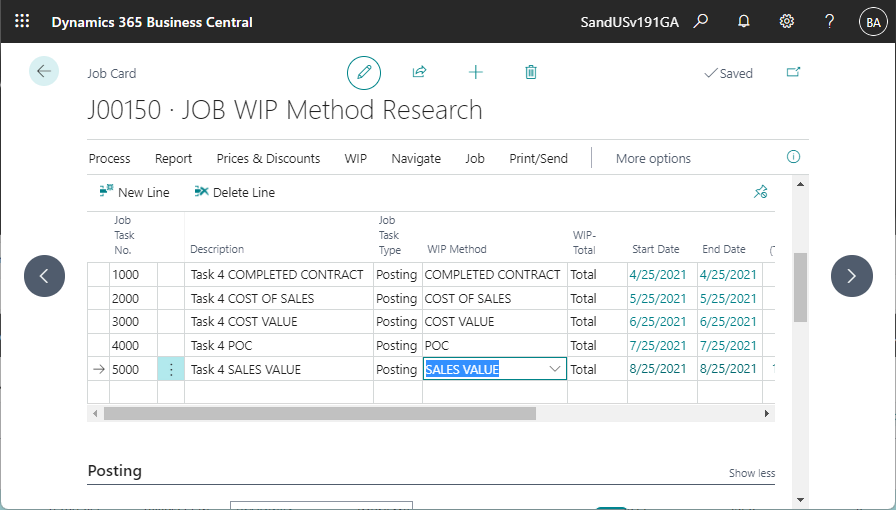
Work-in-progress (WIP) management
WIP functionality tracks revenue and costs for ongoing engineering projects that span long timelines. Business Central automatically calculates WIP values based on progress, ensuring accurate financial reporting and smoother month-end close.
Time and expense capture
Engineers and project staff can record time and expenses directly against jobs. These entries flow into project costing and billing, improving accuracy and reducing manual data entry.
Financial Management
General ledger, accounts receivable, and accounts payable
Business Central provides a centralized financial system that manages core accounting functions while tying financial activity directly to engineering projects. This ensures project costs, vendor invoices, and client billings are always reflected accurately in financial reports.
Revenue recognition
The system supports revenue recognition aligned to project progress and billing structures. Engineering firms can recognize revenue based on milestones, percentage of completion, or other project-driven methods.
Multi-currency and multi-entity support
For engineering firms operating across regions or entities, Business Central manages multiple currencies and legal entities within one environment. This allows for consolidated reporting while maintaining local compliance.
Financial reporting and audit trails
Every transaction in Business Central includes a detailed audit trail. Engineering firms gain transparency and traceability for compliance, audits, and internal reviews.

Supply Chain
Inventory and warehouse management
Business Central tracks materials and components used in engineering projects across locations. Inventory levels update in real time, helping teams avoid shortages or excess stock that can delay project timelines.
Purchase order automation
Purchase orders can be generated directly from demand related to projects. This ensures materials are ordered on time and tied back to the correct job for accurate cost tracking.
Vendor and landed cost tracking
Business Central captures additional costs such as freight, duties, and handling, assigning them to materials or projects. Engineering firms gain a true view of total project costs rather than relying on estimates.
Demand and supply planning
The system helps engineering teams align material requirements with project schedules. Planning tools provide visibility into future demand, reducing last-minute purchasing and supply chain disruptions.

Engineering
Engineering-To-Order (ETO)
Dynamics 365 Business Central supports engineering-to-order workflows by managing each project as a unique job with its own costs, materials, and timelines. Engineering teams can track custom designs, long lead-time components, and project-specific purchasing while maintaining real-time visibility into cost impact, margin, and delivery as requirements evolve.
Cost adjustments and reforecasting
When project requirements change, Business Central allows teams to update costs and forecasts quickly. This ensures engineering leaders always have an up-to-date view of expected margins.
Versioned budgets
Business Central supports multiple budget versions, making it easier to compare original estimates to revised plans. Engineering teams can clearly see how changes affect project outcomes.
Change order tracking
Change orders can be tracked within the system, linking scope changes to revised budgets and costs. This helps engineering firms control scope creep and justify cost impacts to clients.
Margin analysis
Built-in reporting highlights project-level margins in real time. This enables proactive decision-making instead of discovering issues after a project is complete.

Reporting
Power BI integration
Business Central connects directly with Power BI to provide interactive dashboards and visual analytics. Engineering leaders can monitor project performance, financial health, and resource utilization at a glance.
Project and financial dashboards
Custom dashboards surface key metrics such as project status, cost overruns, and billing progress. This keeps engineering and finance teams aligned without relying on spreadsheets.
KPI tracking
Business Central tracks operational and financial KPIs tied to engineering performance. These insights help firms improve efficiency, profitability, and delivery consistency over time.
AI-assisted analysis and natural language queries
Business Central includes AI-powered Copilot analysis assist, which lets users ask questions in plain language and get instant answers from ERP data — without building complex queries or reports manually. For example, users can type inquiries like “show me projects over budget by cost type” and receive structured results immediately.

Why engineering firms move to Business Central
%
Growth in operating margins
%
Inventory accuracy average
%
Increased order-to-shipment times
Business Central engineering licensing and Rapid Activation implementation plan
Rand Group offers flexible licensing and implementation options designed to match your engineering firm’s size, complexity, and growth trajectory. Our structured approach ensures you get the capabilities you need today while building a foundation that scales with your business.
Business Central Licenses
Premium license
$110
$149.20
/user/month
Dynamics 365 Business Central for engineering uses the Premium license to support manufacturing and service management capabilities. With secure cloud hosting, automatic updates, and flexible per-user licensing, it delivers a scalable ERP platform built for growing, project-driven engineering firms.
Implementation plan
Starting at
$80,000
$105,000
/16 weeks
Rand Group’s Rapid Activation implementation plan follows a structured, fixed-scope approach tailored to professional services environments. The plan covers core financials, project management setup, resource configuration, data migration, training, testing, and go-live support to ensure a stable and predictable rollout of Business Central for engineering firms.
Engineering tools
Starting at
$100
$100
/month
Our most comprehensive implementation plan combines Business Central’s project capabilities with Rand Group’s Supply Chain Accelerator apps designed specifically engineering firms. Our library of apps helps teams move faster, reduce errors, and deliver projects more effectively to meet client commitments.
What does the Business Central for engineering implementation plan include?
Rand Group offers a Rapid Activation Implementation plan designed for engineering companies. This plan includes the features and functions most often used by engineering firms. Additional functionality can be added on to the starter plan.
Core Financials
General Ledger
Supports a single company setup within Business Central. This provides a centralized view of financial transactions and balances.
Accounts Payable
Includes basic accounts payable functionality using checks. Electronic payment processing is not included in this plan.
Accounts Receivable
Supports simple accounts receivable entry and tracking. This allows teams to manage customer balances and payments efficiently.
Banking
Includes basic banking functionality with manual bank reconciliation. This supports accurate cash management without automated bank feeds.
Multi-Currency
Enables transactions in multiple currencies within Business Central. Exchange rates are managed directly in the system.
Financial Reporting
Includes standard, out-of-the-box financial reports provided by Business Central. These reports support basic financial visibility without customization.
Distribution
Inventory and Non-Stock Items
Supports inventory and non-stock items with FIFO costing. Lot tracking and serialization are included when applicable to your business.
Sales Quotes, Orders, and Invoices
Enables standard sales processing within Business Central. Teams can create quotes, convert them to orders, and generate invoices.
Purchase Orders and Receiving
Supports purchase order creation and goods receiving. This helps manage vendor purchases and inventory flow.
Warehousing
Includes basic warehouse functionality with pick, pack, and putaway processes. This supports more structured inventory handling.
Jobs & Manufacturing
Projects
Enables project and job tracking within Business Central. This allows teams to manage costs, timelines, and project structure in one system.
Timesheets with Approvals
Supports employee timesheets with built-in approval workflows. This helps ensure accurate time tracking and controlled project costing.
Work in Progress (WIP)
Includes work in progress tracking for active projects. This supports accurate financial reporting during project execution.
Revenue Recognition
Supports revenue recognition for project-based billing. This helps align revenue with project progress and accounting requirements.
Project Invoices
Enables invoicing directly from projects. This streamlines billing based on time, costs, or project milestones.
Production Orders
Supports production orders with manual or automated backflushing. This helps track material consumption and production output accurately.
Bills of Materials (BOMs)
Includes setup and use of bills of materials within Business Central. This defines required components for manufactured items.
Routings
Supports routings to define production steps and operations. This helps manage production flow and resource usage.
Other
Data Migration
Includes migration of customers, vendors, open AR, open AP, one year of general ledger history, chart of accounts, items, inventory quantities, price lists, open sales invoices and orders, open purchase orders, projects, tasks and employee resources.
Online/remote training
Includes live, remote training delivered by Rand Group consultants. Training focuses on production setup, processing, and reporting.
Business Central Insights Power BI Reports
Includes access to Business Central Insights Power BI reports. These dashboards provide visibility into manufacturing and financial performance.

Have more complex Business Central implementation requirements?
While Rapid Activation is a strong starting point for many engineering firms, it may not address every project-based or engineering-driven requirement. As engineering organizations take on greater complexity, longer project lifecycles, or more specialized workflows, Rand Group offers additional Business Central implementation options designed to support scalable growth and long-term operational improvement. Our team works with you to determine the right approach based on your current processes, project demands, and future objectives.
- Full digital transformation implementation: A comprehensive, end-to-end approach that redesigns business processes, systems, and reporting to fully align Business Central with your organization.
- Hybrid Business Central implementation: A flexible option that combines Rapid Activation with tailored configuration, bridging the gap between standardized plans and full digital transformation.
Custom apps for Business Central engineering
Our apps extend Dynamics 365 Business Central to support engineering and project-based operations that require accurate time tracking, cost control, and process oversight. Rand Group–built apps enhance core Business Central functionality to improve visibility, reduce manual effort, and support more predictable project execution.




Frequently Asked Questions (FAQs)
Is Dynamics 365 Business Central a good fit for engineering firms?
Yes. Dynamics 365 Business Central is well suited for engineering firms that operate in project-based, cost-driven environments. It combines financial management, project and job costing, supply chain, and reporting in a single system, giving engineering teams better visibility into project performance, margins, and resource usage without relying on disconnected tools.
Can Business Central handle project costing and WIP?
Business Central includes built-in job and project costing functionality that allows engineering firms to track labor, materials, subcontractors, and overhead at the project level. Work-in-progress (WIP) is calculated automatically based on project activity, helping finance teams accurately recognize costs and revenue while maintaining consistent and reliable financial reporting.
Does Business Central support multi-entity engineering firms?
Yes. Business Central supports multiple legal entities and companies within a single environment, making it a strong fit for engineering firms with multiple offices, subsidiaries, or regional operations. Firms can manage local financials independently while also producing consolidated reports for leadership and compliance purposes.
What does a typical Business Central implementation include for engineering organizations?
A standard implementation includes core financials, job and project costing, supply chain setup, reporting, and user security. For engineering firms, this also includes configuring project workflows, cost tracking, and billing structures that align with how engineering work is planned and delivered.
How does Rand Group handle data migration during implementation?
Rand Group takes a structured approach to data migration, focusing on accuracy and relevance. Historical financial data, open projects, and key master data are validated and migrated to ensure engineering teams have the information they need without carrying over unnecessary or outdated data.
How does Rand Group support user training and adoption?
Training is role-based and focused on real-world engineering scenarios. Engineers, project managers, finance teams, and operations staff receive targeted training so users understand not only how to use Business Central, but how it supports their day-to-day responsibilities.
Why partner with Rand Group?
Business Central tailored for engineering
Engineering firms have unique requirements around project costing, materials planning, and financial control. Rand Group configures Dynamics 365 Business Central to align with engineering workflows, ensuring the system supports how your teams plan, execute, and manage projects—not the other way around.
Proven results with Microsoft
As a long-standing Microsoft partner, Rand Group has delivered thousands of successful ERP implementations across project-based and operationally complex organizations. Our proven delivery methodology helps engineering firms reduce risk, accelerate adoption, and achieve measurable results faster.
Microsoft Partner of the Year recognition
Rand Group was named Microsoft Americas Channel Emerging Partner of the Year, recognizing our ability to deliver innovative, high-impact solutions built on Microsoft technology. This award reflects our commitment to quality, client success, and deep expertise within the Microsoft ecosystem.
Deep industry expertise in engineering
We understand the challenges engineering firms face, from long project lifecycles and scope changes to tight margins and supply chain dependencies. Our industry experience allows us to design Business Central solutions that support real-world engineering operations, not generic ERP use cases.